本文為您介紹通過Agent Identity擷取用於訪問其他服務的OAuth Access Token的認證流程和代碼配置方式。
工作流程
Agent Identity當前支援以使用者委託訪問的方式擷取資源的OAuth Access Token。
使用者委託訪問:Agent(已完成入站認證)向Agent Identity服務要求Access Token時,Agent Identity會向Agent返回OAuth授權URL。Agent將該URL呈現給使用者以獲得授權。授權完成後,Agent將代表使用者向配置的OAuth憑證供應商擷取Access Token,然後儲存並返回給Agent。
下面以使用者委託訪問(OAuth2.0 auth code grant流)情境為例,介紹Agent代表使用者擷取下遊服務(例如DingTalk)的OAuth access token並完成資源訪問的工作流程:
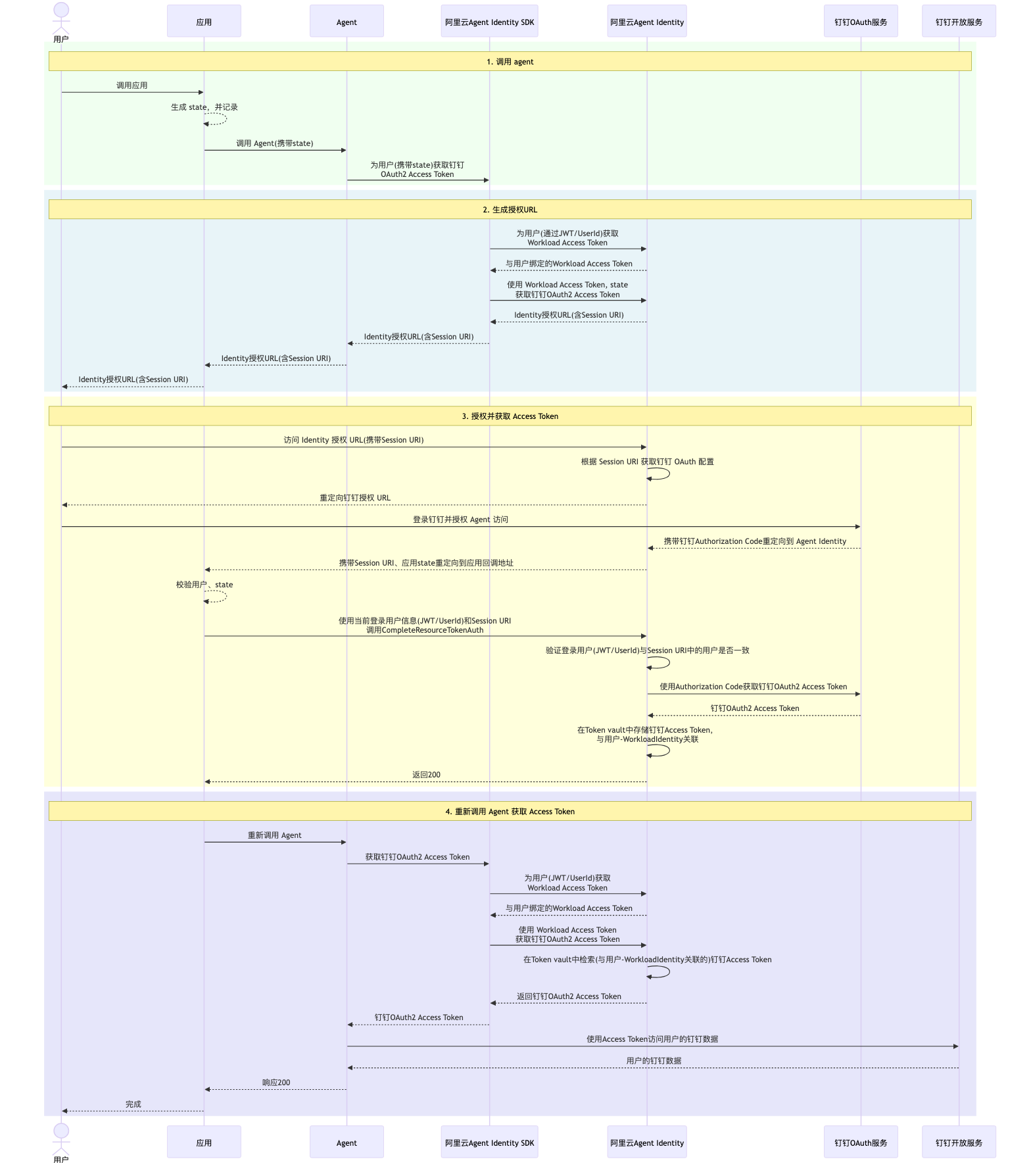
調用Agent。使用者登入應用並調用Agent。Agent分析使用者請求(例如:“幫我將以下內容寫入我的DingTalk文檔”),判定需要調用DingTalk開放服務。隨後,Agent通過Agent Identity SDK向阿里雲Agent Identity服務要求DingTalk憑證供應商的OAuth access token。
說明state是一個由應用產生的不透明狀態字串,用於防止CSRF攻擊。如果在請求OAuth Access Token時傳入state,則Agent Identity服務會在完成使用者授權後將state原樣返回到應用的回調地址。產生授權URL。Agent Identity SDK根據Agent傳入的使用者上下文,判定完成入站認證的具體方式。例如,若Agent傳入的使用者上下文包含使用者JWT令牌(ID Token),則調用
GetWorkloadAccessForJWT介面,通過使用者的JWT令牌換取Workload Access Token。隨後,Agent Identity SDK使用擷取的Workload Access Token向Agent Identity服務要求OAuth Access Token。Agent Identity服務產生DingTalk憑證供應商對應的OAuth授權URL,並最終返回給應用。說明Agent Identity服務會將
session_uri連同OAuth授權URL一起返回給Agent。Agent Identity使用session_uri將Agent完成入站認證時傳入的使用者資訊與當前會話綁定。換句話說,session_uri與初始調用Agent的使用者綁定。每一次產生的OAuth授權URL中所包含的
session_uri是唯一的,且整個OAuth授權URL只能被使用一次。授權並擷取Access Token。應用將OAuth授權URL呈現給使用者以完成授權。使用者完成DingTalk登入和授權後,應用或瀏覽器通過重新導向將OAuth授權碼提交給Agent Identity服務。Agent Identity服務收到授權碼後,將
session_uri和state返回到應用的回調地址。應用校正state和當前登入的使用者資訊,然後調用Agent Identity的CompleteResourceTokenAuth介面以繼續擷取Access Token的流程。具體請參見會話綁定。重新調用Agent擷取Access Token。應用成功調用
CompleteResourceTokenAuth介面後,Agent即可從Agent Identity服務擷取與初始要求者關聯的Access Token。訪問資源。Agent使用擷取的Access Token訪問資源。
會話綁定
當使用者擷取OAuth授權URL後,可能會將其發送給其他使用者並委託其完成認證。這會導致初始使用者獲得其他使用者的Access Token和資源存取權限。Agent Identity通過會話綁定功能,確保初始調用Agent並擷取OAuth授權URL的使用者,與完成OAuth授權的使用者是同一人。
具體的實現步驟如下:
應用需向Agent Identity服務註冊一個回調地址(在配置Workload Identity時設定)。
Agent Identity服務不會在收到OAuth授權碼後立即請求Access Token,而是會將
session_uri(與初始調用者綁定)和state(應用在對Agent發起調用時傳入)返回到應用的回調地址。應用需在監聽的回調地址處添加處理代碼,通過判斷
state和請求中包含的Cookie資訊,確認完成OAuth授權的使用者與初始調用者是同一人。確認後,調用Agent Identity服務的CompleteResourceTokenAuth介面,並傳入session_uri和目前使用者登入資訊(例如user_id或JWT令牌)以繼續OAuth Access Token的擷取。Agent Identity會比較傳入的使用者資訊(通過使用者ID或使用者令牌擷取)與
session_uri中的初始調用者資訊。如果兩者匹配,則繼續使用OAuth授權碼擷取Access Token,並嚮應用返回成功訊息。
回調地址處理的範例程式碼(Python)如下:
@app.get("/callback")
async def callback(session_uri: str, state: str, request: Request):
    """
    Callback interface - Handles authentication callback

    Args:

        session_uri (str): Session URI returned by Agent Identity callback, used for client confirmation when obtaining OAuth Token

        state (str): State parameter, which is the chat session ID passed through by the backend service to the Agent.
                     When the Agent Identity callbacks to the backend service, it's recommended to verify
                     the state against the caller's identity (usually stored in cookies) to ensure
                     the OAuth authorizer and initiator are the same user.
        request (Request): HTTP request object

    Returns:
        str: Success message

    Raises:
        HTTPException: When login session ID is missing or invalid
    """
    # Get login_session_id from cookies
    login_session_id = request.cookies.get("oauthSessionId")

    # Check if login_session_id exists
    if not login_session_id:
        raise HTTPException(status_code=400, detail="Missing login_session_id cookie")


    # Check if the state (i.e., the chat session ID passed in when initiating chat) exists
    # Need to verify that its corresponding login session ID matches the session ID in the current caller's cookie
    # Otherwise, the authorization link may have been forwarded to someone else, in which case confirmation should be denied
    if user_session_map.get(state) is None:
        raise HTTPException(status_code=400, detail="Invalid state")
    # Try to get initial user's session id by using state
    state_session_id = user_session_map[state]
    # Compare if current logged in user is the initial user who made agent call
    if state_session_id != login_session_id:
        raise HTTPException(status_code=400, detail="Invalid login_session_id")
    # Try to prase initial user token by using state session id
    user_identifier = UserTokenIdentifier(user_token=user_token_map[state_session_id])
    try:
        identity_client.complete_resource_token_auth(session_uri=session_uri, user_identifier=user_identifier)
    except Exception as e:
        logger.error(e)
        raise e

    return HTMLResponse(content="""
    <html>
    <head>
        <title>Success</title>
        <script>
            setTimeout(function() {
                window.close();
            }, 3000);
        </script>
    </head>
    <body>
        <h1>Success</h1>
        <p>This window will close automatically in 3 seconds.</p>
    </body>
    </html>
    """, status_code=200)
Token的儲存和重新整理
Agent Identity將擷取的OAuth Access Token和Refresh Token(如憑證供應商有返回)加密儲存到Token Vault中。當Agent再次請求Access Token時,Agent Identity會優先返回Token Vault中有效Access Token。如果Access Token已到期,則使用Refresh Token向憑證供應商請求新的Access Token並返回。在Refresh Token到期前,使用者無需再次進行OAuth認證和授權。
如果Refresh Token已到期或失效,Agent Identity將再次返回OAuth授權URL,以要求使用者重新完成認證和授權。
開發人員可以通過在向Agent Identity請求OAuth Access Token時傳入參數force_authentication=True,以要求Agent Identity忽略緩衝的Token並返回OAuth授權URL重新認證和授權。
擷取Refresh Token
Refresh Token並非在所有情況下均會返回。當使用OAuth2.0 auth code grant流時,常見廠商擷取Refresh Token的配置要求如下:
阿里雲:如應用類型為Native應用,預設返回Refresh Token。如應用類型為Web應用,需要在授權 URL 中包含
access_type=offline參數。飛書:應用中申請
offline_access許可權,並在授權URL的 scope 參數中包含offline_access。Google: 需要在授權 URL 中包含
access_type=offline參數。Microsoft Entra:在授權URL的 scope 參數中包含
offline_access。Okta:在授權URL的 scope 參數中包含
offline_access。
Refresh Token的閑置時間
Agent Identity遵循IdP的Refresh Token可用時間。但出於安全考慮,365天內未使用的Refresh Token將被清理。這意味著同一Agent使用者在一年後再次使用相關服務或工具時,需要重新授權。
使用方式
在Agent Identity中建立OAuth憑證供應商後,即可在Agent中使用Agent Identity SDK擷取OAuth Access Token。在需要使用Access Token調用其它服務的函數前,添加@requires_access_token註解,並傳入以下參數。Agent Identity SDK會為您自動擷取Workload Access Token並以此請求OAuth Access Token。
OAuth憑證供應商名稱:您在Agent Identity中配置的OAuth憑證供應商名稱,配置方法參見OAuth憑證供應商管理。
使用者上下文資訊(可選):包含使用Agent的使用者資訊如使用者ID、使用者令牌(ID Token)。Agent Identity SDK會使用使用者上下文資訊來決定如何擷取Workload Access Token。
以下為使用使用者委託訪問情境擷取OAuth Access Token的參考範例程式碼(Python):
from agent_identity_python_sdk.identity import requires_access_token

@requires_access_token(
    provider_name="your-oauth-credential-provider-name",
    scopes=["profile", "openid", "aliuid", "/acs/mcp-server"],
    auth_flow="USER_FEDERATION", # User delegated (3LO) auth flow
    on_auth_url=lambda x: print("Copy and paste this authorization url to your browser", x), # prints authorization URL to console
    # force_authentication=True,  # When forced authentication is enabled, a new authorization link will be returned every time
    callback_url="http://127.0.0.1:8080/callback",
    user_info_context=<your-user-identifier-context> # user context contains user token or user id
    # custom_parameters={"param1": "test-param", "param2": "test-param2"} # custom OAuth request params
)
async def access_aliyun_mcp(access_token: str):
    if not access_token:
        raise Exception("Access token is required")
    await call_mcp_server(access_token)