本文介紹如何配置ACK One GitOps多租戶許可權並進行許可權驗證。
索引
許可權模型
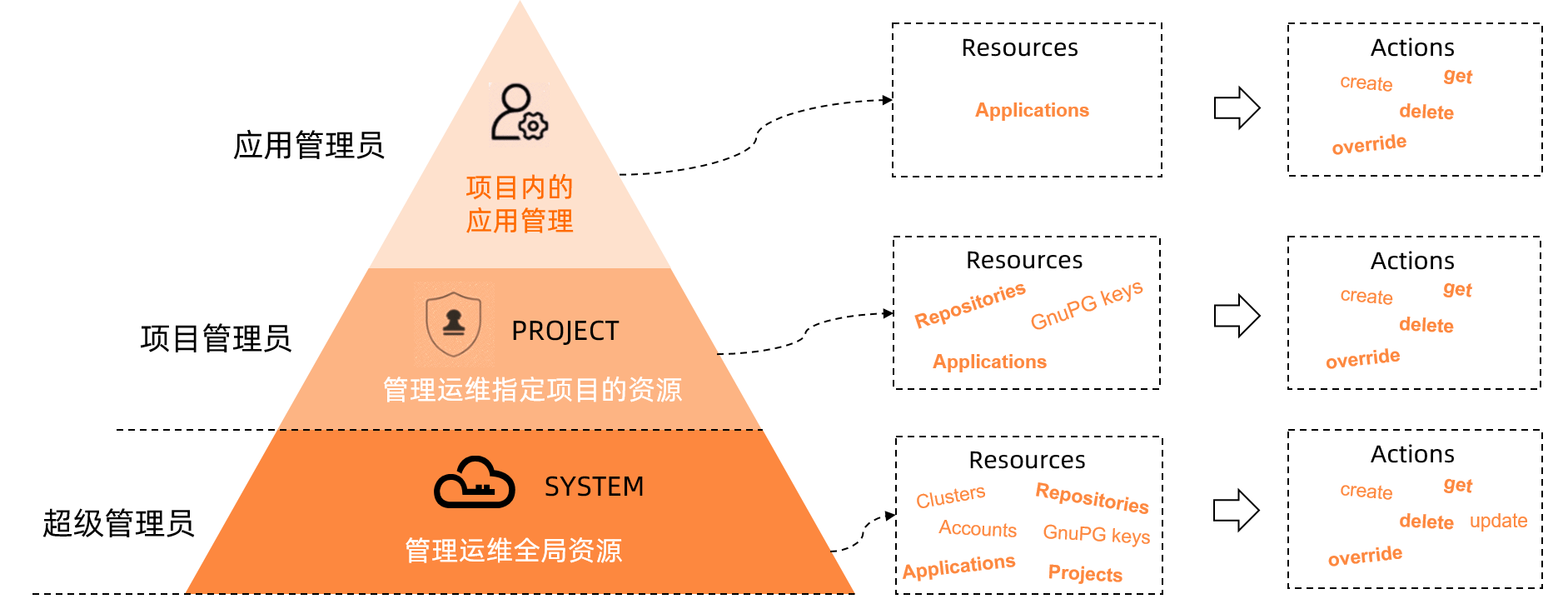
使用情境
使用者 | 角色 | 資源範圍 | 許可權 |
admin | 超級管理員 | 所有 |
|
team01-admin | 專案系統管理員 | Project team01 | 查詢、新增、修改或刪除Repositories等Project層級資源。 |
team02-admin | 專案系統管理員 | Project team02 | 查詢、新增、修改或刪除Repositories等Project層級資源。 |
team01-user01 | 應用管理員 | team01/production-app | 查詢、新增、修改或刪除team01/production-app應用。 |
team01-user02 | 應用管理員 | team01/staging-app | 查詢、新增、修改或刪除team01/staging-app應用。 |
配置ACK One GitOps多租戶許可權
執行以下命令,編輯ArgoCD
argocd-cm的ConfigMap檔案。kubectl edit cm argocd-cm -n argocd在
argocd-cm的ConfigMap檔案中,新增本機使用者。data: accounts.team01-admin: login accounts.team01-admin.enabled: "true" accounts.team01-user01: login accounts.team01-user01.enabled: "true" accounts.team01-user02: login accounts.team01-user02.enabled: "true" accounts.team02-admin: login accounts.team02-admin.enabled: "true"執行以下命令,編輯ArgoCD
argocd-rbac-cm的ConfigMap檔案。kubectl edit cm argocd-rbac-cm -n argocd在
argocd-rbac-cm的ConfigMap檔案中,新增如下內容為本機使用者設定RBAC規則。使用admin使用者登入ArgoCD系統,查看本機使用者並為其設定密碼。
執行以下命令,查看本機使用者。
export ARGOCD_OPTS='--port-forward-namespace argocd --port-forward'
argocd account list
預期輸出:
NAME           ENABLED  CAPABILITIES
admin          true     apiKey, login
team01-admin   true     login
team01-user01  true     login
team01-user02  true     login
team02-admin   true     login
執行以下命令,為本機使用者設定密碼。
argocd account update-password --account <username> --current-password <current password> --new-password <new password>
使用admin使用者登入ArgoCD系統,執行以下命令,添加全域Repositories。
argocd repo add https://code.aliyun.com/bigteam/echo-server01.git
argocd repo add https://code.aliyun.com/bigteam/echo-server02.git
argocd repo list
TYPE  NAME  REPO                                               INSECURE  OCI    LFS    CREDS  STATUS      MESSAGE  PROJECT
git         https://code.aliyun.com/bigteam/echo-server01.git  false     false  false  false  Successful
git         https://code.aliyun.com/bigteam/echo-server02.git  false     false  false  false  Successful
使用admin使用者登入ArgoCD系統,執行以下命令,建立和配置Project team01和Project team02。
類別
Git Repository
Cluster
允許Project team01使用的資源
https://code.aliyun.com/bigteam/echo-server01.githttps://47.111.XX.XX:6443允許Project team02使用的資源
https://code.aliyun.com/bigteam/echo-server02.githttps://47.97.XX.XX:6443argocd proj create team01 argocd proj add-source team01 https://code.aliyun.com/bigteam/echo-server01.git argocd proj add-destination team01 https://47.111.XX.XX:6443 "*" argocd proj create team02 argocd proj add-source team02 https://code.aliyun.com/bigteam/echo-server02.git argocd proj add-destination team02 https://47.97.XX.XX:6443 "*"使用team01-admin使用者和team02-admin使用者,分別在Project內建立Repositories。
使用team01-admin使用者操作
執行以下命令,使用team01-admin使用者登入。
argocd login
Username: team01-admin
Password:
'team01-admin:login' logged in successfully
Context 'port-forward' updated
執行以下命令,在Project team01內建立Repositories。
argocd repo add https://code.aliyun.com/team01/echo-server.git --project team01預期輸出:
Repository 'https://code.aliyun.com/team01/echo-server.git' added
使用team02-admin使用者操作
執行以下命令,使用team02-admin使用者登入。
argocd login
Username: team02-admin
Password:
'team01-admin:login' logged in successfully
Context 'port-forward' updated
執行以下命令,在Project team02內建立Repositories。
argocd repo add https://code.aliyun.com/team02/echo-server.git --project team02預期輸出:
Repository 'https://code.aliyun.com/team02/echo-server.git' added
驗證ACK One GitOps許可權模型
測試專案管理員的資源操作許可權
Projects資源操作
使用以下命令,測試team01-admin對Projects資源的操作許可權。
argocd account can-i create projects "*"
no
argocd account can-i update projects "team01"
no
argocd account can-i delete projects "team01"
no
argocd account can-i get projects "team01"
yes
argocd account can-i get projects "team02"
no
以上結果表明,專案系統管理員只能查看Project team01,無其他動作許可權。
Repositories資源操作
使用以下命令,測試team01-admin對Repositories資源的操作許可權。
argocd account can-i create repositories "*"
no
argocd account can-i update repositories "*"
no
argocd account can-i delete repositories "*"
no
argocd account can-i get repositories "*"
yes
argocd account can-i create repositories "team01/*"
yes
argocd account can-i update repositories "team01/*"
yes
argocd account can-i delete repositories "team01/*"
yes
argocd account can-i get repositories "team01/*"
yes
以上結果表明,專案系統管理員只能查看全域Repositories和Project team01的Repositories資源查詢、新增、修改或刪除的許可權。
Clusters資源操作
使用以下命令,測試team01-admin對Clusters資源的操作許可權。
argocd account can-i create clusters "*"
no
argocd account can-i update clusters "*"
no
argocd account can-i delete clusters "*"
no
argocd account can-i get clusters "*"
yes
argocd account can-i create clusters "team01/*"
no
argocd account can-i update clusters "team01/*"
no
argocd account can-i delete clusters "team01/*"
no
以上結果表明,專案系統管理員只能查看全域Clusters,無其他動作許可權。
Applications資源操作
使用以下命令,測試team01-admin對Applications資源的操作許可權。
argocd account can-i create applications "*"
no
argocd account can-i update applications "*"
no
argocd account can-i delete applications "*"
no
argocd account can-i get applications "*"
no
argocd account can-i create applications "team01/*"
yes
argocd account can-i update applications "team01/*"
yes
argocd account can-i delete applications "team01/*"
yes
argocd account can-i get applications "team01/*"
yes
以上結果表明,專案系統管理員只有team01專案下的查詢、新增、修改或刪除的許可權,無其他動作許可權。
Application建立操作
執行以下命令,查看專案系統管理員team01-admin擁有Project team01的資源許可權。
可引用的Repositories:
全域的
Repositories:https://code.aliyun.com/bigteam/echo-server01.git。專案內的
Scoped Repositories:https://code.aliyun.com/team01/echo-server.git。
可引用的Clusters:
https://47.111.XX.XX:6443。
argocd proj get team01
Name:                        team01
Description:
Destinations:                https://47.111.XX.XX:6443,*
Repositories:                https://code.aliyun.com/bigteam/echo-server01.git
Scoped Repositories:         https://code.aliyun.com/team01/echo-server.git
Allowed Cluster Resources:   <none>
Scoped Clusters:             <none>
Denied Namespaced Resources: <none>
Signature keys:              <none>
Orphaned Resources:          disabled
執行以下命令,在Project team01之外建立Application。
argocd app create team01-admin-echo-server --repo https://code.aliyun.com/bigteam/echo-server01.git --dest-namespace team01-admin-echo-server --dest-server https://47.111.XX.XX:6443預期輸出:
FATA[0001] rpc error: code = PermissionDenied desc = permission denied: applications, create, default/team01-admin-echo-server, sub: team01-admin, iat: 2022-10-20T03:20:47Z預期輸出表明,在Project team01之外,Application建立失敗。
執行以下命令,使用未被授權的Repositories和Cluster建立Application。
argocd app create team01-admin-echo-server --project team01 --repo https://code.aliyun.com/bigteam/echo-server02.git --path manifests/directory/production --dest-namespace team01-admin-echo-server --dest-server https://47.97.XX.XX:6443預期輸出:
FATA[0002] rpc error: code = InvalidArgument desc = application spec for team01-admin-echo-server is invalid: InvalidSpecError: application repo https://code.aliyun.com/bigteam/echo-server02.git is not permitted in project 'team01';InvalidSpecError: application destination {https://xx.xx.xx.xx:6443 team01-admin-echo-server} is not permitted in project 'team01預期輸出表明,使用未授權的Reporsitories和Cluster建立Application失敗。
執行以下命令,在Project team01內,使用允許的Repositories和Cluster建立Application。
argocd app create team01-admin-echo-server --project team01 --repo https://code.aliyun.com/bigteam/echo-server01.git --path  manifests/directory/production --dest-namespace team01-admin-echo-server --dest-server https://47.111.XX.XX:6443
application 'team01-admin-echo-server' created
預期輸出:
application 'team01-admin-echo-server' created預期輸出表明,在Project team01內部Application建立成功。