Gateway API是Kubernetes官方專案,是下一代Kubernetes路由和負載平衡API,支援通過Gateway API配置流量規則。本文介紹如何通過ALB使用Gateway API來暴露服務至叢集外部。
背景資訊
Gateway API是Kubernetes中用於對服務網路流量進行建模的一系列資源。目標是建立一套表現力強、易擴充、面向角色的服務網路模型。
ALB Ingress Controller在v2.17.0版本後提供了對Gateway API的支援,您可以安裝ALB Ingress Controller來通過ALB使用Gateway API暴露服務。
前提條件
-
已建立ACK託管叢集,且叢集版本在1.24及以上。
-
已在叢集中安裝ALB Ingress Controller,且版本在2.17及以上。
-
已在叢集中安裝Gateway API,且版本在1.1.0及以上。
-
叢集VPC下已建立兩個支援ALB產品的虛擬交換器。
環境確認
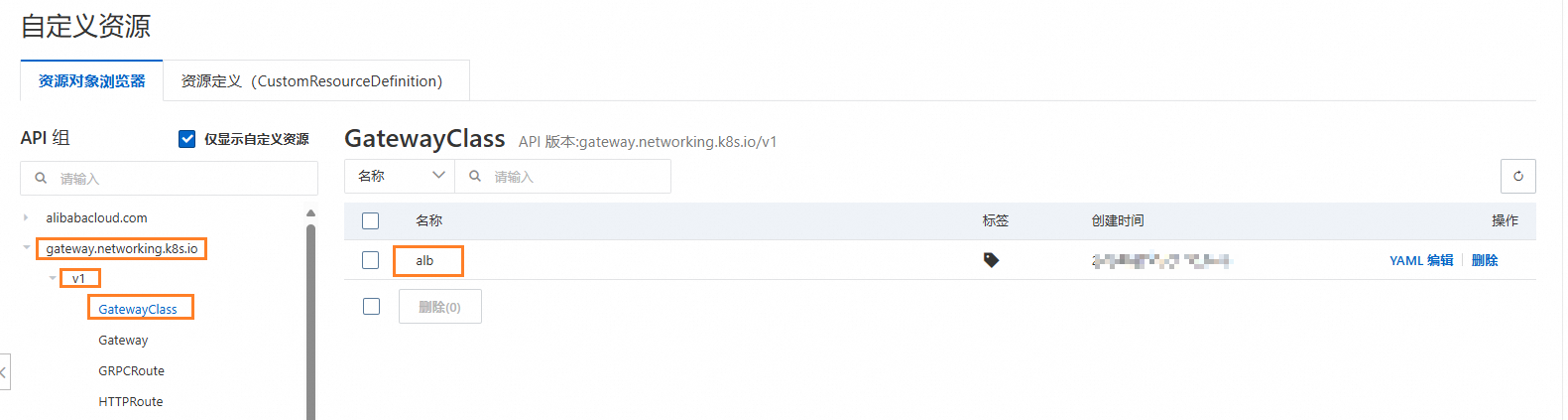
若您的叢集滿足前提條件,叢集中會自動建立出名為alb的GatewayClass資源。您可以通過以下方式進行確認。
控制台
-
登入Container Service管理主控台,在左側導覽列選擇叢集列表。
-
在叢集列表頁面,單擊目的地組群名稱,然後在左側導覽列,選擇。
-
單擊gateway.networking.k8s.io,查看v1下的GatewayClass。
kubectl
kubectl get gatewayclass預期輸出:
NAME   CONTROLLER                         ACCEPTED   AGE
alb    gateways.alibabacloud.com/alb/v1   True       1m
部署樣本應用
-
建立httpbin.yaml。
說明本文中應用的Service預設使用的是
ClusterIP,若您的叢集網路類型為Flannel,請修改Service的spec.type為NodePort。apiVersion: apps/v1 kind: Deployment metadata: name: go-httpbin namespace: default spec: replicas: 1 selector: matchLabels: app: go-httpbin template: metadata: labels: app: go-httpbin version: v1 spec: containers: - image: registry.cn-hangzhou.aliyuncs.com/mse/go-httpbin args: - "--port=8090" - "--version=v1" imagePullPolicy: Always name: go-httpbin ports: - containerPort: 8090 --- apiVersion: v1 kind: Service metadata: name: go-httpbin namespace: default spec: type: ClusterIP ports: - port: 80 targetPort: 8090 protocol: TCP selector: app: go-httpbin -
部署應用。
kubectl apply -f httpbin.yaml
部署Gateway和路由
此操作將在雲端建立一個 ALB 執行個體,併產生相應費用。通過 Gateway 建立的 ALB 執行個體不會隨叢集自動刪除。為避免產生預期外費用,請在刪除叢集前,先行刪除叢集內的 Gateway 資源。
-
建立gateway.yaml。
apiVersion: gateway.networking.k8s.io/v1 kind: Gateway metadata: name: alb namespace: default spec: gatewayClassName: alb listeners: - name: http protocol: HTTP port: 80 hostname: "*.ingress.top" allowedRoutes: namespaces: from: Same --- apiVersion: gateway.networking.k8s.io/v1beta1 kind: HTTPRoute metadata: name: demo-route spec: parentRefs: # 引用Gateway資源 - group: gateway.networking.k8s.io kind: Gateway name: alb hostnames: - demo.ingress.top # host設定為demo.domain.ingress.top rules: - matches: # 匹配規則為首碼匹配路徑 - path: type: PathPrefix value: / backendRefs: # 後端為類型為Service,名稱go-httpbin,連接埠80 - kind: Service name: go-httpbin port: 80 -
部署Gateway和路由規則。
kubectl apply -f gateway.yaml -
等待約2分鐘後,確認Gateway建立狀態。
kubectl get gateway alb預期輸出:
NAME   CLASS   ADDRESS                                                  PROGRAMMED   AGE
alb    alb     alb-0mwhq4ck6xxxxxxxxx.cn-hangzhou.alb.aliyuncsslb.com   True         2m12s
可以看到,Gateway建立成功。
-
確認路由建立狀態。
kubectl describe httproute demo-route|grep Status -A 20預期輸出:
Status: Parents: Conditions: Last Transition Time: 2025-05-23T08:21:25Z Message: Route is accepted. Observed Generation: 1 Reason: Accepted Status: True Type: Accepted Last Transition Time: 2025-05-23T08:21:25Z Message: Route is resolved. Observed Generation: 1 Reason: ResolvedRefs Status: True Type: ResolvedRefs Controller Name: gateways.alibabacloud.com/alb/v1 Parent Ref: Group: gateway.networking.k8s.io Kind: Gateway Name: alb -
測試訪問應用。
-
擷取Gateway地址。
export ALB_DOMAIN=$(kubectl get gateway alb -n default -o jsonpath='{.status.addresses[?(@.type=="Hostname")].value}') -
訪問應用。
curl -H "Host: demo.ingress.top" http://${ALB_DOMAIN}/version預期輸出:
version: v1
hostname: go-httpbin-547xxxxxf6-xxxxx
-
情境示範
情境一:使用filter修改要求標頭
通過HTTPRoute中的filter能力,可以在請求或者回複階段進行額外的處理。以下示範如何使用filter來為發送到後端的請求添加要求標頭。
-
建立httproute-filter.yaml。
apiVersion: gateway.networking.k8s.io/v1beta1
kind: HTTPRoute
metadata:
  name: demo-filter
spec:
  parentRefs: # 引用Gateway資源
    - group: gateway.networking.k8s.io
      kind: Gateway
      name: alb
  hostnames:
    - filter.ingress.top # host設定為filter.ingress.top
  rules:
    - matches: # 匹配規則為首碼匹配路徑
        - path:
            type: PathPrefix
            value: /
      filters:
        - type: RequestHeaderModifier # 添加要求標頭my-header: foo
          requestHeaderModifier:
            add:
              - name: my-header
                value: foo
      backendRefs: # 後端為類型為Service,名稱go-httpbin,連接埠80
        - kind: Service
          name: go-httpbin
          port: 80
此檔案將建立一個名為
demo-filter的HTTPRoute資源。部署後訪問應用go-httpbin時,佈建網域名為filter.ingress.top,請求將自動添加要求標頭my-header : foo。 -
部署路由規則。
kubectl apply -f httproute-filter.yaml -
訪問應用。
curl -H "Host: filter.ingress.top" http://${ALB_DOMAIN}/header預期輸出:
headers: {
    "Accept": [
      "*/*"
    ],
    "Connection": [
      "close"
    ],
    "Host": [
      "filter.ingress.top"
    ],
    "My-Header": [
      "foo"
    ],
    "Path": [
      "/header"
    ],
    "Protocol": [
      "HTTP/1.1"
    ],
    "Remoteip": [
      "118.xx.xx.91"
    ],
    "URL": [
      "/header"
    ],
    "User-Agent": [
      "curl/8.9.1"
    ]
  }
 query param:
, hostname: go-httpbin-547xxxxxf6-xxxxx
情境二:按照權重對流量進行切分
通過設定後端多個服務的權重,您可以對請求按照流量進行切分。
-
建立nginx.yaml。
上述檔案將部署兩個nginx應用。其中,
old-nginx服務會返回old字串,new-nginx服務會返回new字串。部署的資源將會放置在default命名空間下。 -
建立httproute-weight.yaml。
apiVersion: gateway.networking.k8s.io/v1beta1
kind: HTTPRoute
metadata:
  name: demo-weight
spec:
  parentRefs: # 引用Gateway資源
    - group: gateway.networking.k8s.io
      kind: Gateway
      name: alb
  hostnames:
    - weight.ingress.top # host設定為weight.ingress.top
  rules:
    - matches: # 匹配規則為首碼匹配路徑
        - path:
            type: PathPrefix
            value: /
      backendRefs:
        # 設定後端以及對應權重,權重不為百分比形式,無需等於100
        - kind: Service
          name: old-nginx
          port: 80
          weight: 100 # 設定old-nginx的權重為100
        - kind: Service
          name: new-nginx
          port: 80
          weight: 100 # 設定new-nginx的權重為100
此路由規則中設定了
old-nginx服務和new-nginx服務的權重相同,因此訪問應用時new-nginx和old-nginx兩個服務的流量應該是1:1。 -
部署應用和路由規則。
kubectl apply -f nginx.yaml kubectl apply -f httproute-weight.yaml -
訪問10次應用。
for i in {1..10}; do curl -H "Host: weight.ingress.top" http://${ALB_DOMAIN}/; done預期輸出:
old
new
new
old
new
old
old
new
new
old
可以看到,
new-nginx和old-nginx兩個服務的流量是1:1。
相關操作
為應用配置認證
您可以在Gateway資源上為應用配置TLS認證。
-
建立網域名稱為
ingress.tap的自我簽署憑證。openssl req -subj '/CN=ingress.top' -new -newkey rsa:2048 -sha256 \ -days 365 -nodes -x509 -keyout server.key -out server.crt \ -addext "subjectAltName = DNS:ingress.top" \ -addext "keyUsage = digitalSignature" \ -addext "extendedKeyUsage = serverAuth" 2> /dev/null; openssl x509 -in server.crt -subject -noout -
建立TLS Secret。
kubectl create secret tls ingress.top --key server.key --cert server.crt -
建立gateway-tls.yaml用於更新Gateway。
apiVersion: gateway.networking.k8s.io/v1 kind: Gateway metadata: name: alb namespace: default spec: gatewayClassName: alb listeners: - name: http protocol: HTTP port: 80 hostname: "*.ingress.top" allowedRoutes: namespaces: from: Same - name: https protocol: HTTPS port: 443 hostname: "*.ingress.top" allowedRoutes: namespaces: from: Same tls: # 配置TLS mode: Terminate certificateRefs: # 引用所建立的secret - kind: Secret name: ingress.top -
更新Gateway。
gateway.gateway.networking.k8s.io/alb configured -
等待Gateway的Programmed狀態為True後,驗證認證配置。
openssl s_client -servername ingress.top -connect ${ALB_DOMAIN}:443預期輸出:
CONNECTED(00000003)
depth=0 CN = ingress.top
verify error:num=18:self-signed certificate
verify return:1
depth=0 CN = ingress.top
verify return:1
---
Certificate chain
 0 s:CN = ingress.top
   i:CN = ingress.top
   a:PKEY: rsaEncryption, 2048 (bit); sigalg: RSA-SHA256
   v:NotBefore: Jun 24 10:49:39 2025 GMT; NotAfter: Jun 24 10:49:39 2026 GMT
---
Server certificate
-----BEGIN CERTIFICATE-----
...
...
...
-----END CERTIFICATE-----
subject=CN = ingress.top
issuer=CN = ingress.top
---
No client certificate CA names sent
Peer signing digest: SHA256
Peer signature type: RSA-PSS
Server Temp Key: X25519, 253 bits
---
SSL handshake has read 1506 bytes and written 410 bytes
Verification error: self-signed certificate
---
New, TLSv1.2, Cipher is ECDHE-RSA-AES128-GCM-SHA256
Server public key is 2048 bit
Secure Renegotiation IS supported
Compression: NONE
Expansion: NONE
No ALPN negotiated
SSL-Session:
    Protocol  : TLSv1.2
    Cipher    : ECDHE-RSA-AES128-GCM-SHA256
    Session-ID: xxxxxxxxxxxxxxxxxxxxxxxxx
    Session-ID-ctx:
    Master-Key: xxxxxxxxxxxxxxxxxxxxxxxxxxx
    PSK identity: None
    PSK identity hint: None
    SRP username: None
    TLS session ticket lifetime hint: 300 (seconds)
    TLS session ticket:
    ...
    ...
    ...

    Start Time: 1750820008
    Timeout   : 7200 (sec)
    Verify return code: 18 (self-signed certificate)
    Extended master secret: yes
---
出現類似以上輸出內容,表明認證已經生效。
說明您可以執行
curl -H "Host: demo.ingress.top" -k https://${ALB_DOMAIN}/version來訪問應用,預期輸出與測試訪問應用相同。