本文介紹如何使用kagent和ACK Gateway結合ACK MCP Server快速搭建一個Kubernetes營運智能體。
kagent介紹
kagent是一個開源的智能體編程架構,專為雲原生環境設計,將AI智能體的強大功能與工具鏈深度融合。它使智能體能夠通過自然語言互動執行複雜的多步驟任務,並將AI洞察轉化為具體操作。
kagent的核心優點:
-
進階推理能力:不同於傳統的聊天機器人,kagent利用先進的推理和迭代規劃能力來自主處理複雜的多步驟問題。
-
靈活的工具整合:支援對接MCP工具,智能體可以利用這些工具與各種系統和服務互動,擴充其功能。
-
可擴充架構:由Google ADK架構構建,提供廣泛的自訂選項,支援通過UI或聲明式方式運行智能體。
-
團隊協作模式:智能體可以組合成團隊,由規劃智能體制定計劃並將任務分配給團隊中的各個智能體。
-
通用任務處理能力:適用於各種情境的任務自動化,能夠處理複雜的問題診斷、資料分析和系統操作等典型情境。
準備工作
-
在ACK叢集中建立kagent命名空間。
-
使用ACK應用市場或者ACK叢集,在kagent命名空間中建立kagent-crds和kagent應用。
-
在ACK叢集中通過組件管理安裝Gateway API組件並且啟用實驗性通道功能。
-
在ACK叢集中通過組件管理安裝Gateway with Inference Extension組件。
-
開通阿里雲百鍊服務,並一、擷取API Key。
步驟一:部署ACK MCP Server
-
以下為當前ack-mcp-server所需唯讀許可權集。
{ "Version": "1", "Statement": [ { "Effect": "Allow", "Action": [ "cs:Check*", "cs:Describe*", "cs:Get*", "cs:List*", "cs:Query*", "cs:RunClusterCheck", "cs:RunClusterInspect" ], "Resource": "*" }, { "Effect": "Allow", "Action": "arms:GetPrometheusInstance", "Resource": "*" }, { "Effect": "Allow", "Action": [ "log:Describe*", "log:Get*", "log:List*" ], "Resource": "*" } ] } -
安裝ACK MCP Server。詳細操作步驟,請參見部署運行ack-mcp-server。
安裝完成後可通過
kubectl get --raw "/api/v1/namespaces/kube-system/services/ack-mcp-server/proxy/sse" --v=10命令確認是否安裝成功。 -
在叢集中聲明ACK MCP Server。
kubectl apply -f - <<EOF apiVersion: kagent.dev/v1alpha2 kind: RemoteMCPServer metadata: name: ack-mcp-tool-server namespace: kagent spec: description: Official ACK tool server protocol: SSE sseReadTimeout: 5m0s terminateOnClose: true timeout: 30s # ACK MCP Server預設安裝在kube-system下,如果切換了命名空間,也請更改此處的url。 url: http://ack-mcp-server.kube-system:8000/sse EOF -
查看RemoteMCPServer資源的狀態,擷取ACK MCP工具。
kubectl describe RemoteMCPServer ack-mcp-tool-server -n kagent預期輸出:
...
status:
  conditions:
  - lastTransitionTime: "2025-XX-XXT11:35:29Z"
    message: ""
    observedGeneration: 2
    reason: Reconciled
    status: "True"
    type: Accepted
  discoveredTools:
  - description: 擷取所有region下所有ACK叢集列表,預設返回最多10個叢集
    name: list_clusters
  - description: Execute kubectl command with intelligent context management. Supports
      cluster_id for automatic context switching and creation.
    name: ack_kubectl
  - description: 查詢一個ACK叢集的阿里雲Prometheus資料
    name: query_prometheus
  - description: 擷取Prometheus指標定義和最佳實務
    name: query_prometheus_metric_guidance
  - description: "對ACK叢集的Kubernetes資源進行診斷,當遇到問題難以定位時,使用該工具進行深度診斷。支援診斷的資源套件括:\n1. **node**:K8s
      節點\n2. **ingress**:Ingress\n3. **memory**:節點記憶體\n4. **pod**:Pod\n5. **service**:Service\n6.
      **network**:網路連通性\n                        "
    name: diagnose_resource
  - description: 即可產生並查詢一個ACK叢集最近的健康巡檢報告
    name: query_inspect_report
  - description: |-
      Query Kubernetes (k8s) audit logs.

          Function Description:
          - Supports multiple time formats (ISO 8601 and relative time).
          - Supports suffix wildcards for namespace, resource name, and user.
          - Supports multiple values for verbs and resource types.
          - Supports both full names and short names for resource types.
          - Allows specifying the cluster name to query audit logs from multiple clusters.
          - Provides detailed parameter validation and error messages.

          Usage Suggestions:
          - You can use the list_clusters() tool to view available clusters and their IDs.
          - By default, it queries the audit logs for the last 24 hours. The number of returned records is limited to 10 by default.
    name: query_audit_log
  - description: 擷取目前時間,返回 ISO 8601 格式和 Unix 時間戳記格式
    name: get_current_time
  - description: 查詢ACK叢集的控制面組件日誌。先查詢控制面日誌配置,驗證組件是否啟用,然後查詢對應的SLS日誌。
    name: query_controlplane_logs
  observedGeneration: 2
步驟二:部署網關並配置百鍊模型服務
-
建立網關。
kubectl apply -f- <<EOF apiVersion: gateway.networking.k8s.io/v1 kind: Gateway metadata: name: model-gateway namespace: kagent spec: gatewayClassName: ack-gateway infrastructure: parametersRef: group: gateway.envoyproxy.io kind: EnvoyProxy name: custom-proxy-config listeners: - name: http-bailian protocol: HTTP port: 8080 --- apiVersion: gateway.envoyproxy.io/v1alpha1 kind: EnvoyProxy metadata: name: custom-proxy-config namespace: kagent spec: provider: type: Kubernetes kubernetes: envoyService: type: ClusterIP EOF -
建立百鍊backend。
kubectl apply -f- <<EOF apiVersion: gateway.envoyproxy.io/v1alpha1 kind: Backend metadata: name: bailian namespace: kagent spec: endpoints: - fqdn: hostname: dashscope-intl.aliyuncs.com port: 443 --- apiVersion: gateway.networking.k8s.io/v1alpha3 kind: BackendTLSPolicy metadata: name: bailian-tls namespace: kagent spec: targetRefs: - group: gateway.envoyproxy.io kind: Backend name: bailian validation: hostname: dashscope-intl.aliyuncs.com wellKnownCACertificates: System EOF -
建立路由規則,將指定請求路由到百鍊backend。
kubectl apply -f- <<EOF
apiVersion: gateway.networking.k8s.io/v1
kind: HTTPRoute
metadata:
  name: bailian-route
  namespace: kagent
spec:
  parentRefs:
    - name: model-gateway
  rules:
    - backendRefs:
        - group: gateway.envoyproxy.io
          kind: Backend
          name: bailian
      filters:
        - type: URLRewrite
          urlRewrite:
            hostname: dashscope-intl.aliyuncs.com
            path:
              type: ReplacePrefixMatch
              replacePrefixMatch: /compatible-mode/v1
      matches:
        - path:
            type: PathPrefix
            value: /v1
      timeouts:
        backendRequest: 10m
        request: 10m
EOF
步驟三:使用ACK Gateway管理百鍊服務的API Key
訪問外部大模型服務時通常需要使用API Key來完成授權。ACK Gateway支援動態為請求注入API Key,可以統一管理所有模型服務的API Key,能夠有效降低維護的複雜度和叢集安全水位。
-
建立一個Secret,用於儲存百鍊服務的API Key。
export PROVIDER_API_KEY=${你的百鍊APIKey} kubectl create secret generic bailian-credential -n kagent --from-literal credential="Bearer $PROVIDER_API_KEY" -
建立HTTPRouteFilter資源引用這個Secret。
kubectl apply -f- <<EOF apiVersion: gateway.envoyproxy.io/v1alpha1 kind: HTTPRouteFilter metadata: name: credential-injection namespace: kagent spec: credentialInjection: overwrite: true credential: valueRef: name: bailian-credential EOF -
修改HTTPRoute資源,開啟API Key自動注入。
kubectl apply -f- <<EOF
apiVersion: gateway.networking.k8s.io/v1
kind: HTTPRoute
metadata:
  name: bailian-route
  namespace: kagent
spec:
  parentRefs:
    - name: model-gateway
  rules:
    - backendRefs:
        - group: gateway.envoyproxy.io
          kind: Backend
          name: bailian
      filters:
        - type: URLRewrite
          urlRewrite:
            hostname: dashscope-intl.aliyuncs.com
            path:
              type: ReplacePrefixMatch
              replacePrefixMatch: /compatible-mode/v1
        # 主要增加了這一部分
        - type: ExtensionRef
          extensionRef:
            group: gateway.envoyproxy.io
            kind: HTTPRouteFilter
            name: credential-injection
      timeouts:
        backendRequest: 10m
        request: 10m
      matches:
        - path:
            type: PathPrefix
            value: /v1
EOF
步驟四:配置百鍊的ModelConfig
-
擷取網關地址。
export GATEWAY_HOST=$(kubectl -n kagent get gateway/model-gateway -o jsonpath='{.status.addresses[0].value}') echo $GATEWAY_HOST -
建立如下ModelConfig。
kubectl apply -f - <<EOF
apiVersion: kagent.dev/v1alpha2
kind: ModelConfig
metadata:
  name: my-provider-config
  namespace: kagent
spec:
  model: qwen-plus
  openAI:
    baseUrl: http://$GATEWAY_HOST:8080/v1
  provider: OpenAI
EOF
步驟五:建立Agent
-
使用如下 YAML 定義agent。
kubectl apply -f - <<EOF apiVersion: kagent.dev/v1alpha2 kind: Agent metadata: name: my-ack-ops-agent namespace: kagent spec: declarative: deployment: env: - name: OPENAI_API_KEY value: placeholder replicas: 1 modelConfig: my-provider-config stream: true systemMessage: |- # 角色 你是一個專業的 ACK (Alibaba Cloud Container Service for Kubernetes) 智能助手。你的任務是準確理解使用者關於叢集的請求,並選擇最合適的工具來執行查詢、診斷或分析。 # 核心指令 (Core Instructions) 1. **確認目標,首要原則**: * 在執行任何操作前,必須先確認使用者要操作的 cluster_id。 * 如果使用者的提問中沒有提供,**必須**首先調用 list_clusters 工具,並詢問使用者希望在哪個叢集上操作。 2. **工具選擇策略 (按優先順序)**: * **複雜故障診斷**: 當遇到 Pod 異常、網路不通、節點 NotReady 等複雜問題時,**優先使用 diagnose_resource**。 * **效能指標查詢**: 當問題涉及“CPU/記憶體高低”、“快慢”、“用量多少”時,**優先使用 query_prometheus**。 * **安全與變更審計**: 當問題是關於“誰在什麼時間做了什麼”時,**優先使用 query_audit_log**。 * **叢集整體健康**: 當使用者想瞭解“叢集是否健康”或要“體檢報告”時,**使用 query_inspect_report**。 * **控制面問題**: 當懷疑是 API Server、Scheduler 等 Kubernetes 系統組件的問題時,**使用 query_controlplane_logs**。 * **通用查詢**: 對於其他所有標準的、明確的 Kubernetes 資源查詢(如 get pods, describe service, logs <pod>),**使用 ack_kubectl 作為預設工具**。 3. **安全紅線**: * 你的主要職責是查詢和診斷。任何通過 ack_kubectl 執行的、**可能修改叢集狀態**的操作(如 apply, delete,或建立診斷用的臨時 Pod),你**必須**先向使用者說明你將執行的命令及其目的,並在獲得**使用者明確授權**後才能執行。 4. **管理辦法**: * 如果使用者問題不清楚,先請求澄清再行動。 * 回答友好、熱情。 * 如果使用工具後仍無法找到答案,**絕不能編造**。誠實地回答:“抱歉,通過現有工具我暫時無法定位問題”,並可以提供你已有的發現。 # 回複格式 (Response Format) * **始終使用 Markdown 格式**。 * 回複需包含你的**操作總結**以及對結果的**分析和建議**。 --- ### 總結 *(用一句話總結你做了什麼,以及核心發現。)* tools: - mcpServer: apiGroup: kagent.dev kind: RemoteMCPServer name: ack-mcp-tool-server toolNames: - list_clusters - ack_kubectl - query_prometheus - query_prometheus_metric_guidance - diagnose_resource - query_inspect_report - query_audit_log - get_current_time - query_controlplane_logs type: McpServer description: 這個智能體可以和ACK MCP Tools進行互動,以擷取叢集的資訊並操作叢集。 type: Declarative EOF -
確認agent建立狀態。
kubectl get pod -n kagent預期輸出:
NAME                                              READY   STATUS    RESTARTS   AGE
my-ack-ops-agent-66b74675fc-rqwwx                 1/1     Running   0          2m6s
...
步驟六:通過UI使用Agent
kagent預設提供了Web UI可以直接與agent進行互動。
-
將kagent-ui服務通過連接埠轉寄至本地。
kubectl port-forward -n kagent service/kagent-ui 8082:8080 -
在瀏覽器中通過
localhost:8082訪問agent。-
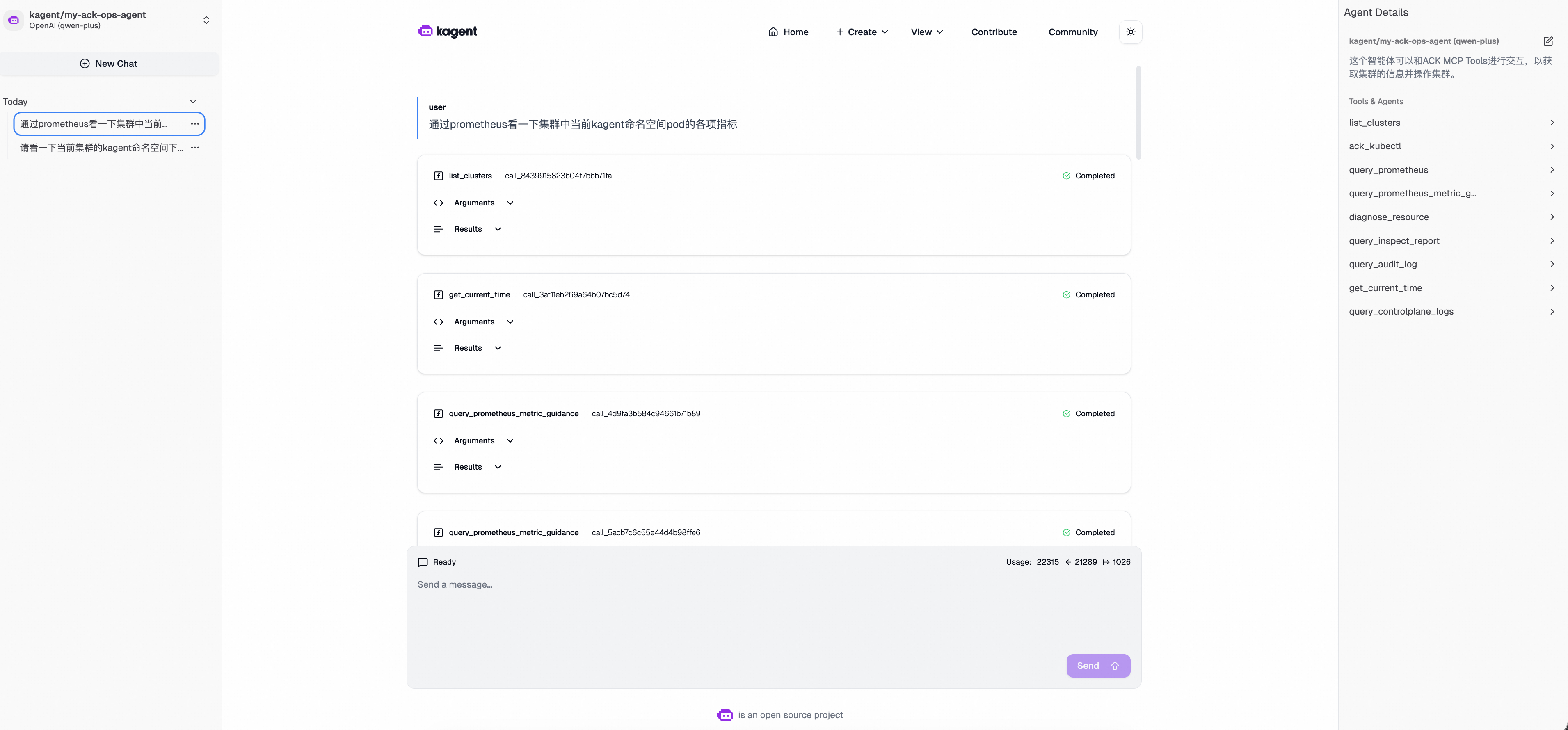
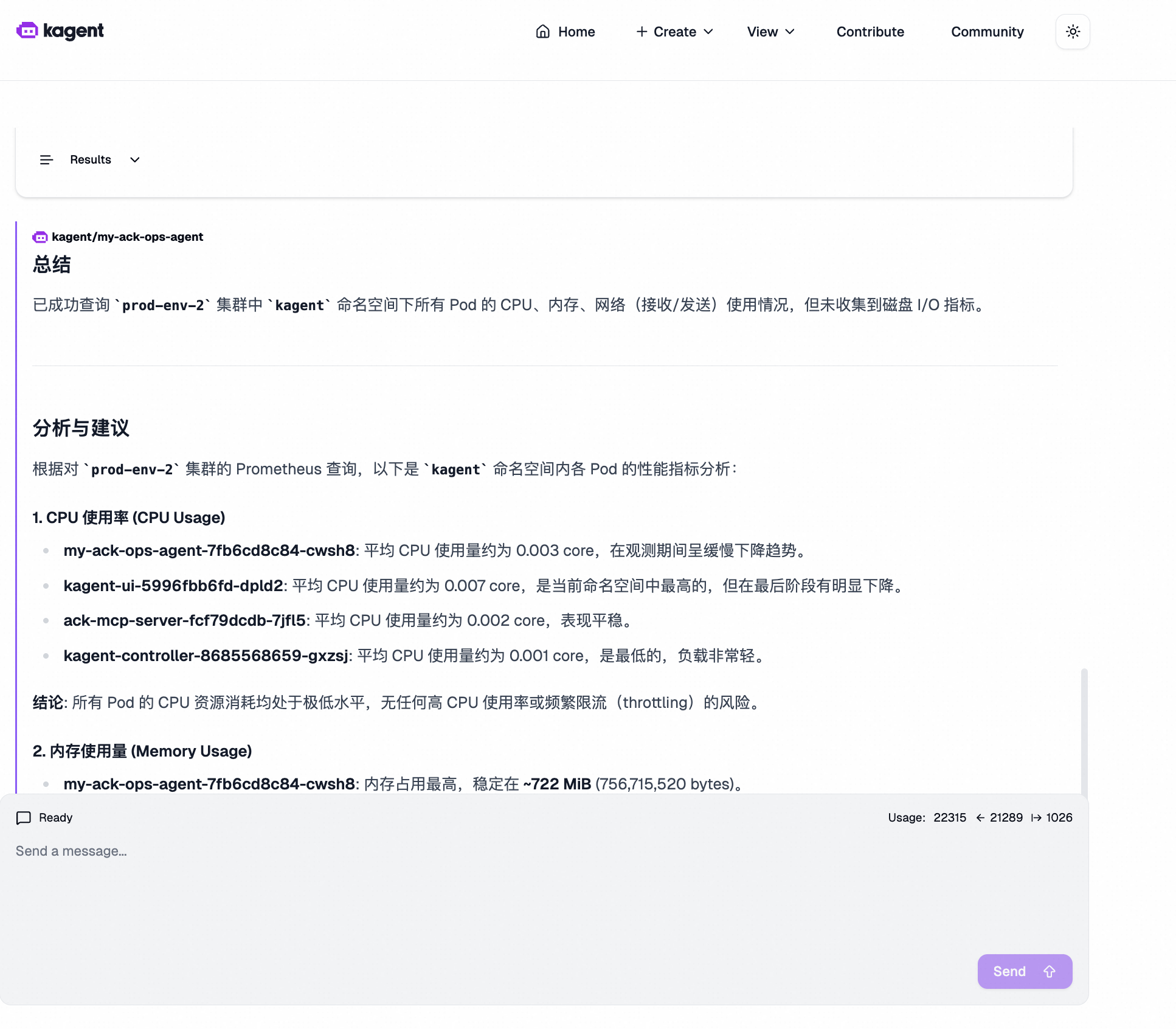
問答樣本:通過Prometheus查看叢集中當前kagent命名空間Pod的各項指標。
-