Routine O&M operations on ApsaraDB RDS for MySQL—such as minor version upgrades, parameter changes, and primary/secondary switchovers—temporarily interrupt backend connections between the database proxy and the database. Without persistent connections, your application sees these as connection errors, which causes service interruptions. You would also need to build reconnection logic into your application code.
Persistent connections prevent this. The database proxy keeps frontend connections (between your application and the proxy) alive while it re-establishes the backend connection to the new primary instance. Your application does not need to implement reconnection logic or handle connection errors during planned maintenance.
Starting January 9, 2024, enabling the database proxy feature on a qualifying RDS instance also enables persistent connections by default.
How it works
The database proxy sits between your application and the RDS instance. Connections on each side are managed independently:
-
Frontend connections: between your application and the database proxy
-
Backend connections: between the database proxy and the RDS instance
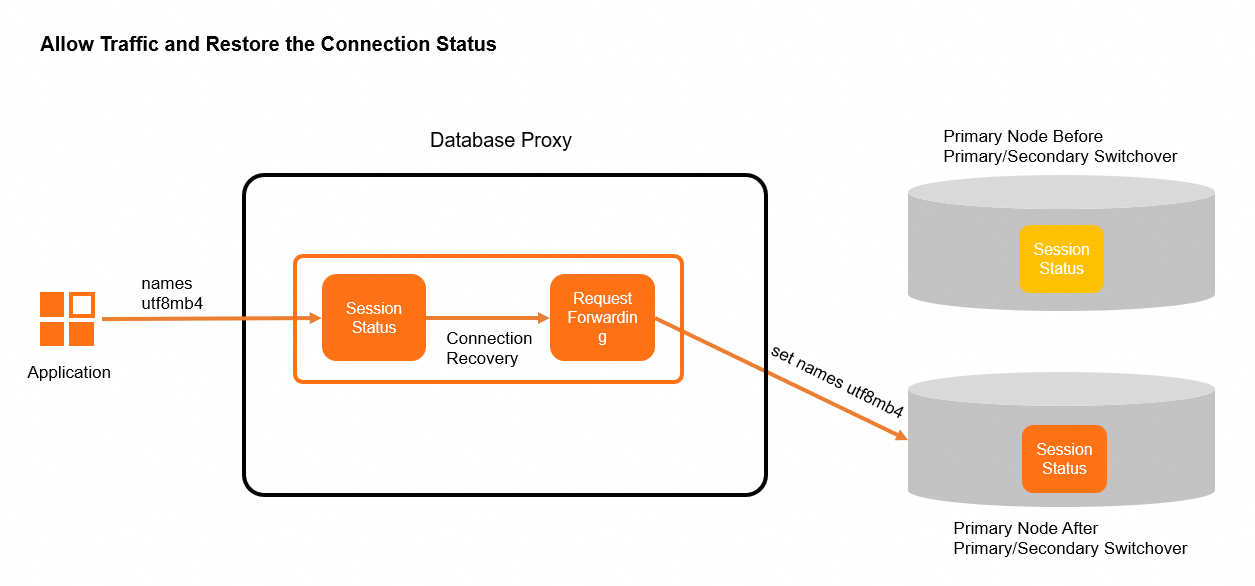
When a switchover interrupts a backend connection, the proxy restores it on the new primary instance by replaying the connection state—system variables, user variables, temporary tables, character set encoding, transaction state, and PREPARE statements. Your frontend connection remains unaffected throughout.
Proxy type comparison
The type of database proxy determines which events persistent connections cover.
| Proxy type | Persistent connections during switchovers | Persistent connections during failovers |
|---|---|---|
| General-purpose proxy | Supported | Not supported |
| Dedicated proxy | Supported | Supported |
Switchover
Switchovers are planned operations triggered by:
-
Primary/secondary switchovers
-
Minor engine version updates
-
Parameter changes that require a restart
-
Configuration changes to the primary RDS instance
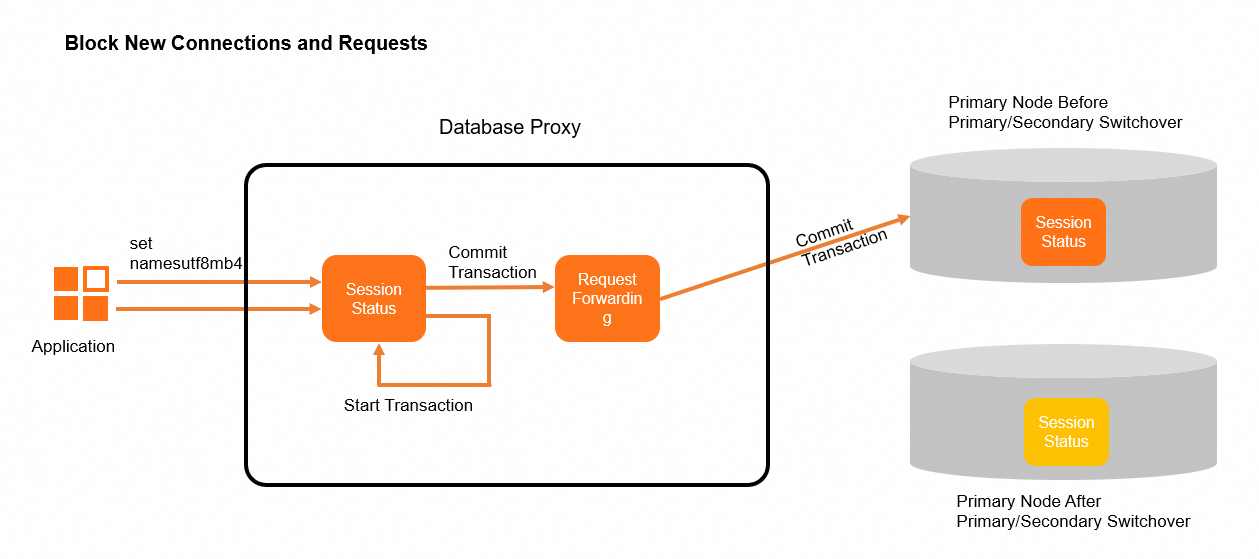
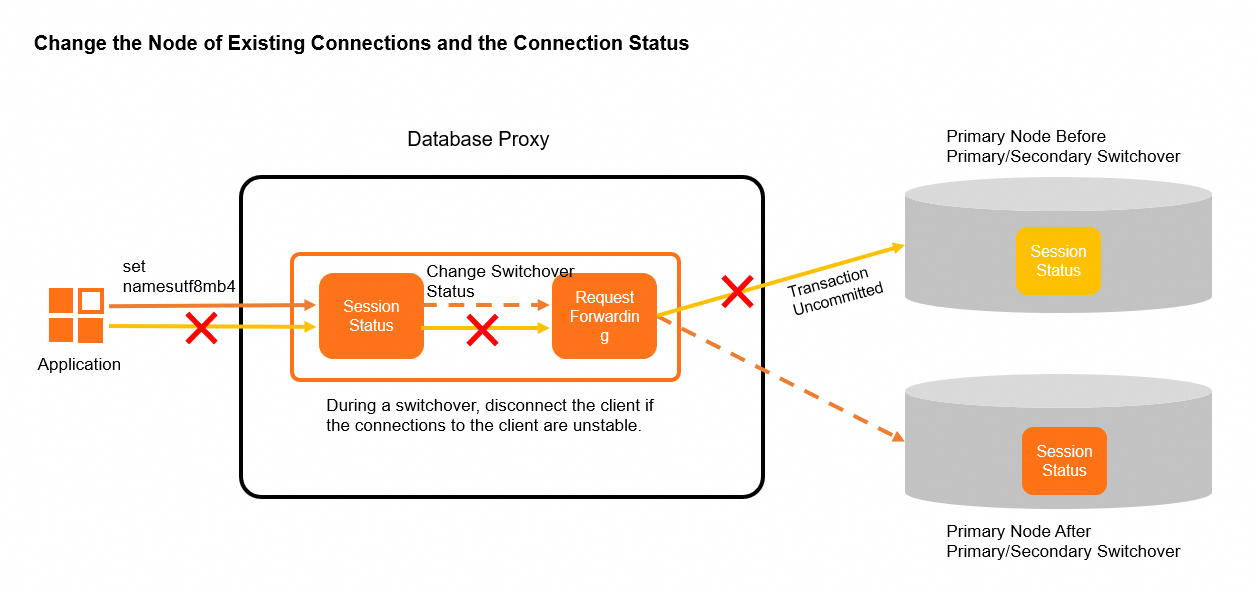
The proxy handles a switchover in three phases:
-
Block: The proxy stops accepting new requests. Sessions with active transactions are forwarded to the current primary instance. Sessions that start new transactions during this window have their requests held until the switchover completes. Sessions with active transactions that are still running after the block window ends are disconnected, and the RDS instance rolls back any uncommitted transactions.
-
Switch: The proxy updates the status of existing connections.
-
Non-persistent connections are terminated.
-
Persistent connections are moved from the current RDS instance to the new primary instance.
-
Connection pool connections to the original primary instance are released.
-
-
Restore: The proxy re-establishes persistent connections on the new primary instance.
Failover
A failover is an unplanned event triggered by a primary instance failure. The system automatically promotes a secondary instance as the new primary.
During a failover, the proxy caches SQL statements that are being executed or are to be forwarded, and forwards failed read requests to an available instance, then restores the connection.
Persistent connections do not cover write requests during a failover. The proxy cannot guarantee that write requests will be processed successfully when the primary instance fails.
Prerequisites
Before you begin, ensure that your RDS instance meets the requirements for the type of persistent connections you need.
For switchovers
-
Runs MySQL 5.6, 5.7, or 8.0
-
Uses RDS High-availability Edition or RDS Cluster Edition
-
Uses cloud disks or Premium Local SSDs
-
Uses general-purpose or dedicated database proxies
-
Has the database proxy feature enabled with proxy version 1.14.5_20231207 or later — see Enable the database proxy feature
For failovers
-
Runs MySQL 5.6, 5.7, or 8.0
-
Uses RDS High-availability Edition or RDS Cluster Edition
-
Uses cloud disks or Premium Local SSDs
-
Uses dedicated database proxies
-
Has the database proxy feature enabled with proxy version 2.9.1 or later — see Enable the database proxy feature
Enable persistent connections
-
Log on to the ApsaraDB RDS console. In the top navigation bar, select the region where your RDS instance resides, find the instance, and click the instance ID.
-
In the left-side navigation pane, click Database Proxy.
-
In the Basic Information section, click Enabled to the right of Persistent Connections.
If Persistent Connections does not appear, your RDS instance does not meet the prerequisites.
Use persistent connections
Before you begin, ensure that you have:
-
The database proxy feature enabled for your RDS instance
-
Persistent connections enabled for your RDS instance
To connect your application using the database proxy endpoint:
-
Log on to the ApsaraDB RDS console. In the top navigation bar, select the region where your RDS instance resides, find the instance, and click the instance ID.
-
In the left-side navigation pane, click Database Proxy.
-
Configure the connection settings for the database proxy endpoint. Set Read/Write Attributes to Read/Write (Read/Write Splitting). For details, see Configure the connection settings for a database proxy endpoint.
-
Apply for an internal or public endpoint for the database proxy endpoint. For details, see Manage database proxy endpoints.
-
Connect your application to the RDS instance using the endpoint and port of the database proxy.
When O&M operations trigger a switchover, the proxy keeps your frontend connections alive. Your application does not experience disconnection errors.
Disable persistent connections
-
Log on to the ApsaraDB RDS console. In the top navigation bar, select the region where your RDS instance resides, find the instance, and click the instance ID.
-
In the left-side navigation pane, click Database Proxy.
-
In the Basic Information section, click Disable to the right of Persistent Connections.
Limitations
Persistent connections are not maintained in the following scenarios during a switchover:
-
The MySQL server has not finished returning a result set. For example, a 100 MB result set has only returned 50 MB so far.
-
Uncommitted transactions exist.
-
The
CHANGE USERstatement was executed on the connection. -
The
LOAD DATAstatement was executed on the connection. -
Temporary tables exist.
-
The connection is used to subscribe to binary logs via a database proxy endpoint.
-
The
FOUND_ROWS(),ROW_COUNT(), orLAST_INSERT_ID()function is in use. These functions can still be called, but the results may be inaccurate after a reconnection. MySQL no longer recommendsSELECT FOUND_ROWS()— replace it withSELECT COUNT(*) FROM tb1. For more information, see FOUND_ROWS().
Usage notes
-
Thread ID changes: Running
SELECT CONNECTION_ID()may return a different thread ID after a reconnection. -
SHOW PROCESSLIST output: The IP addresses and port numbers shown in
SHOW PROCESSLISTor on the SQL Explorer page may differ from the actual client addresses after a reconnection. -
User-defined variables: User-defined variables set on a connection become invalid after the connection is kept alive through a reconnection.
Test results
The following test validates persistent connection behavior during switchovers.
Test environment
| Item | Value |
|---|---|
| RDS edition | MySQL 8.0, RDS High-availability Edition |
| Instance type | mysql.x2.xlarge.2c (dedicated, 8 CPU cores, 16 GB memory) |
| Test tool | Sysbench |
| Tables | 100 tables, 40,000 rows each |
| Concurrent threads | 128 |
Test command
sysbench --db-driver=mysql --mysql-host=127.X.X.1 --mysql-port=3306 --mysql-user=username --mysql-password='' --tables=100 --table-size=40000 --threads=128 --mysql-db=sbtest --report-interval=5 --time=600 oltp_read_write runKey parameters:
| Parameter | Description |
|---|---|
db-driver |
Database engine |
mysql-host |
Database proxy endpoint |
tables |
Number of tables |
table-size |
Rows per table |
threads |
Concurrent threads |
time |
Test duration, in seconds |
Results
All switchover scenarios achieved 100% connection retention.
| Switchover scenario | Connection retention |
|---|---|
| Minor engine version update | 100% |
| Primary/secondary switchover | 100% |
| Primary instance configuration change | 100% |
| Parameter change requiring restart | 100% |
API reference
| Operation | Description |
|---|---|
| ModifyDBProxy | Modifies the database proxy feature of an instance |
| DescribeDBProxy | Queries the details of the database proxy of an instance |