A aplicação de marcas d'água em vídeos insere informações de identificação no conteúdo, como logotipos de empresas, ícones de emissoras de TV, apelidos ou IDs de usuários. Esse recurso destaca sua marca, protege seus direitos autorais e aumenta o reconhecimento do produto. Este tópico fornece exemplos com o SDK para Java para adicionar, modifique, exclua e consultar marcas d'água de imagem ou texto.
Observações de uso
Todos os exemplos deste tópico utilizam um par de AccessKey para inicializar uma instância de cliente.
Para obter detalhes sobre os parâmetros de solicitação e resposta, acesse o Alibaba Cloud OpenAPI Explorer e abra a aba API Documentations.
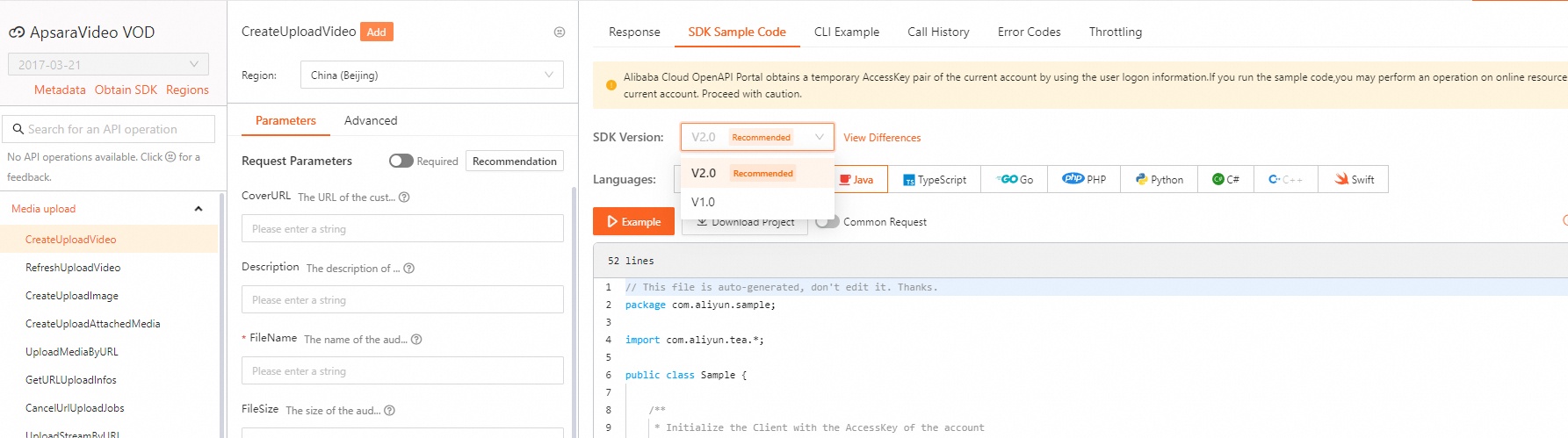
Para visualizar exemplos de SDK de outras operações de API, visite o Alibaba Cloud OpenAPI Explorer. Na aba Parameters, especifique os parâmetros e inicie a chamada. Em seguida, selecione a versão do SDK e a linguagem na aba SDK Sample Code para visualizar e baixe o código.
Os exemplos deste tópico usam o SDK V1.0. Para exemplos da V2.0, selecione a versão correta do SDK no OpenAPI Explorer.
Inicializar um cliente
Antes de usar o SDK, inicialize um cliente. Para mais informações, consulte Inicialização.
Adicionar uma marca d'água
Chame a operação AddWatermark para adicionar uma marca d'água. Para mais informações, veja o exemplo a seguir.
Portal do OpenAPI: ou AddWatermark.
Para mais detalhes sobre os parâmetros de obtenção de URL e credenciais de upload, consulte CreateUploadAttachedMedia.
Para saber mais sobre os parâmetros de upload de arquivos de marca d'água para o Object Storage Service (OSS), consulte Upload de objetos do OSS.
O código abaixo apresenta um exemplo:
import com.aliyuncs.auth.AlibabaCloudCredentials;
import com.aliyuncs.auth.EnvironmentVariableCredentialsProvider;
import com.aliyuncs.vod.model.v20170321.AddWatermarkRequest;
import com.aliyuncs.vod.model.v20170321.AddWatermarkResponse;

/**
 * Read the AccessKey information.
 */
public static DefaultAcsClient initVodClient() throws ClientException {
    // The region where ApsaraVideo VOD is activated.
    String regionId = "cn-shanghai";
    // The AccessKey pair of an Alibaba Cloud account has permissions on all API operations. We recommend that you use a Resource Access Management (RAM) user to call API operations or perform routine O&M.
    // Do not hard-code the AccessKey ID and AccessKey secret in your project code. Otherwise, the AccessKey pair may be leaked and the security of all the resources in your account may be compromised.
    // This example shows how to obtain the AccessKey pair from environment variables to authenticate API requests. Before you run the example, configure the ALIBABA_CLOUD_ACCESS_KEY_ID and ALIBABA_CLOUD_ACCESS_KEY_SECRET environment variables.
    DefaultProfile profile = DefaultProfile.getProfile(regionId, System.getenv("ALIBABA_CLOUD_ACCESS_KEY_ID"), System.getenv("ALIBABA_CLOUD_ACCESS_KEY_SECRET"));
    DefaultAcsClient client = new DefaultAcsClient(profile);
    return client;
    }

/**
 * The function to add watermark configuration information.
 */
public static AddWatermarkResponse addWatermark(DefaultAcsClient client) throws Exception {
    AddWatermarkRequest request = new AddWatermarkRequest();
    // The name of the watermark.
    request.setName("addwatermark");
    // The OSS URL of the watermark file. Example: http://example.oss-cn-shanghai.aliyuncs.com/watermark/test-****.png.
    String fileUrl = "<your watermarkFile URL>";
    // For an image watermark, you must specify the OSS URL of the image file. The watermark file must be in the same region as the video. For example, if the video is in the China (Shanghai) region, the watermark file must also be stored in the China (Shanghai) region.
    request.setFileUrl(fileUrl);
    // The watermark configuration data.
    JSONObject watermarkConfig = null;
    // The position configuration data for the image watermark.
    watermarkConfig = buildImageWatermarkConfig();

    // The position configuration data for the text watermark.
    //watermarkConfig = buildTextWatermarkConfig();
    request.setWatermarkConfig(watermarkConfig.toJSONString());

    // Text watermark: Text. Image watermark: Image.
    request.setType("Image");
    return client.getAcsResponse(request);
}

/**
 * The following code provides an example.
 * @param args
 * @throws ClientException
 */
public static void main(String[] args) throws ClientException {
    DefaultAcsClient client = initVodClient();
    AddWatermarkResponse response = new AddWatermarkResponse();
    try {
        // Add watermark information.
        response = addWatermark(client);
        // The watermark ID.
        System.out.println("WatermarkId = " + response.getWatermarkInfo().getWatermarkId());
        // The position and effect configuration data of the watermark.
        System.out.println("WatermarkConfig = " + response.getWatermarkInfo().getWatermarkConfig());
        // The FileUrl of the watermark file. This field is empty for text watermarks.
        System.out.println("FileUrl = " + response.getWatermarkInfo().getFileUrl());
    } catch (Exception e) {
        System.out.println("ErrorMessage = " + e.getLocalizedMessage());
    }
    System.out.println("RequestId = " + response.getRequestId());
}

/**
 * Build the configuration data for the image watermark. Modify the parameter values as needed.
 * @return
 */
public static JSONObject buildImageWatermarkConfig() {
    JSONObject watermarkConfig = new JSONObject();
    // The horizontal offset of the watermark.
    watermarkConfig.put("Dx", "8");
    // The vertical offset of the watermark.
    watermarkConfig.put("Dy", "8");
    // The width of the watermark.
    watermarkConfig.put("Width", "55");
    // The height of the watermark.
    watermarkConfig.put("Height", "55");
    // The relative position of the watermark. Valid values: TopLeft, TopRight, BottomLeft, and BottomRight.
    watermarkConfig.put("ReferPos", "BottomRight");
    // The timeline for displaying the watermark. You can specify the start time and end time.
    JSONObject timeline = new JSONObject();
    // The start time for displaying the watermark.
    timeline.put("Start", "2");
    // The end time for displaying the watermark.
    timeline.put("Duration", "ToEND");
    watermarkConfig.put("Timeline", timeline);
    return watermarkConfig;
}

/**
 * Build the configuration data for the text watermark. Modify the parameter values as needed.
 * @return
 */
public static JSONObject buildTextWatermarkConfig() {
    JSONObject watermarkConfig = new JSONObject();
    // The content of the text watermark.
    watermarkConfig.put("Content", "testwatermark");
    // The font name of the text watermark.
    watermarkConfig.put("FontName", "SimSun");
    // The font size of the text watermark.
    watermarkConfig.put("FontSize", 25);
    // The font color of the text watermark. You can also specify an RGB color value, such as #000000.
    watermarkConfig.put("FontColor", "Black");
    // The transparency of the text watermark.
    watermarkConfig.put("FontAlpha", "0.2");
    // The outline color of the text watermark. You can also specify an RGB color value, such as #ffffff.
    watermarkConfig.put("BorderColor", "White");
    // The outline width of the text watermark.
    watermarkConfig.put("BorderWidth", 1);
    // The offset of the text watermark from the top of the video.
    watermarkConfig.put("Top", 20);
    // The offset of the text watermark from the left of the video.
    watermarkConfig.put("Left", 15);
    return watermarkConfig;
}
Modificar uma marca d'água
Utilize a operação UpdateWatermark para alterar uma marca d'água existente. Consulte o exemplo abaixo para mais detalhes.
Portal do OpenAPI: | UpdateWatermark.
Confira o seguinte exemplo de código:
import com.aliyuncs.auth.AlibabaCloudCredentials;
import com.aliyuncs.auth.EnvironmentVariableCredentialsProvider;
import com.aliyuncs.vod.model.v20170321.UpdateWatermarkRequest;
import com.aliyuncs.vod.model.v20170321.UpdateWatermarkResponse;

/**
 * Read the AccessKey information.
 */
public static DefaultAcsClient initVodClient() throws ClientException {
    // The region where ApsaraVideo VOD is activated.
    String regionId = "cn-shanghai";
    // The AccessKey pair of an Alibaba Cloud account has permissions on all API operations. We recommend that you use a Resource Access Management (RAM) user to call API operations or perform routine O&M.
    // Do not hard-code the AccessKey ID and AccessKey secret in your project code. Otherwise, the AccessKey pair may be leaked and the security of all the resources in your account may be compromised.
    // This example shows how to obtain the AccessKey pair from environment variables to authenticate API requests. Before you run the example, configure the ALIBABA_CLOUD_ACCESS_KEY_ID and ALIBABA_CLOUD_ACCESS_KEY_SECRET environment variables.
    DefaultProfile profile = DefaultProfile.getProfile(regionId, System.getenv("ALIBABA_CLOUD_ACCESS_KEY_ID"), System.getenv("ALIBABA_CLOUD_ACCESS_KEY_SECRET"));
    DefaultAcsClient client = new DefaultAcsClient(profile);
    return client;
    }

/**
 * The function to modify watermark configuration information.
 * Note: You cannot modify the file URL of an image watermark. To use a different image, create a new watermark.
 */
public static UpdateWatermarkResponse updateWatermark(DefaultAcsClient client) throws Exception {
    UpdateWatermarkRequest request = new UpdateWatermarkRequest();
    request.setName("updatewatermark");
    // The ID of the watermark whose configuration information you want to update.
    request.setWatermarkId("421ddddd4f6e734a526fd2****");
    // The watermark configuration data.
    JSONObject watermarkConfig = null;
    // The position configuration data for the image watermark.
    //watermarkConfig = buildImageWatermarkConfig();
    // The position configuration data for the text watermark.
    watermarkConfig = buildTextWatermarkConfig();
    request.setWatermarkConfig(watermarkConfig.toJSONString());
    return client.getAcsResponse(request);
}

/**
 * The following code provides an example.
 */
public static void main(String[] args) {
    DefaultAcsClient client = initVodClient();
    UpdateWatermarkResponse response = new UpdateWatermarkResponse();
    try {
        response = updateWatermark(client);
        // The watermark ID.
        System.out.println("WatermarkId = " + response.getWatermarkInfo().getWatermarkId());
        // The position and effect configuration data of the watermark.
        System.out.println("WatermarkConfig = " + response.getWatermarkInfo().getWatermarkConfig());
        // The FileUrl of the watermark file. This field is empty for text watermarks.
        System.out.println("FileUrl = " + response.getWatermarkInfo().getFileUrl());
    } catch (Exception e) {
        System.out.println("ErrorMessage = " + e.getLocalizedMessage());
    }
    System.out.println("RequestId = " + response.getRequestId());
}

/**
 * Build the configuration data for the image watermark. Modify the parameter values as needed.
 * @return
 */
public static JSONObject buildImageWatermarkConfig() {
    JSONObject watermarkConfig = new JSONObject();
    // The horizontal offset of the watermark.
    watermarkConfig.put("Dx", "10");
    // The vertical offset of the watermark.
    watermarkConfig.put("Dy", "10");
    // The width of the watermark.
    watermarkConfig.put("Width", "66");
    // The height of the watermark.
    watermarkConfig.put("Height", "66");
    // The relative position of the watermark. Valid values: TopLeft, TopRight, BottomLeft, and BottomRight.
    watermarkConfig.put("ReferPos", "BottomLeft");
    // The timeline for displaying the watermark. You can specify the start time and end time.
    JSONObject timeline = new JSONObject();
    // The start time for displaying the watermark.
    timeline.put("Start", "2");
    // The end time for displaying the watermark.
    timeline.put("Duration", "ToEND");
    watermarkConfig.put("Timeline", timeline);
    return watermarkConfig;
}

/**
 * Build the configuration data for the text watermark. Modify the parameter values as needed.
 * @return
 */
public static JSONObject buildTextWatermarkConfig() {
    JSONObject watermarkConfig = new JSONObject();
    // The content of the text watermark.
    watermarkConfig.put("Content", "testwatermark");
    // The font name of the text watermark.
    watermarkConfig.put("FontName", "SimSun");
    // The font size of the text watermark.
    watermarkConfig.put("FontSize", 40);
    // The font color of the text watermark. You can also specify an RGB color value, such as #000000.
    watermarkConfig.put("FontColor", "Black");
    // The transparency of the text watermark.
    watermarkConfig.put("FontAlpha", "0.2");
    // The outline color of the text watermark. You can also specify an RGB color value, such as #ffffff.
    watermarkConfig.put("BorderColor", "White");
    // The outline width of the text watermark.
    watermarkConfig.put("BorderWidth", 2);
    // The offset of the text watermark from the top of the video.
    watermarkConfig.put("Top", 20);
    // The offset of the text watermark from the left of the video.
    watermarkConfig.put("Left", 15);
    return watermarkConfig;
}
Excluir uma marca d'água
Invoque a operação DeleteWatermark para remover uma marca d'água.
Portal do OpenAPI: / DeleteWatermark.
Consultar uma lista de marcas d'água
Execute a operação ListWatermark para listar as marcas d'água cadastradas.
Portal do OpenAPI: ListWatermark.
Consultar uma única marca d'água
Use a operação GetWatermark para obter os detalhes de uma marca d'água específica.
Portal do OpenAPI: GetWatermark.
Definir uma marca d'água padrão
Acione a operação SetDefaultWatermark para estabelecer uma marca d'água como padrão.
Portal do OpenAPI: SetDefaultWatermark.
Referências
Marcas d'água de imagem e texto para vídeos: Detalha o recurso de marcas d'água de imagem e texto do ApsaraVideo VOD, incluindo seu mecanismo de funcionamento, cenários de uso e exemplos.