Os modelos de snapshot definem o tamanho, a quantidade e o momento da captura dos snapshots de vídeo. Este tópico apresenta exemplos do SDK for Java para criar e gerenciar esses modelos.
Observações de uso
Todos os exemplos deste tópico usam um par de AccessKey para inicializar uma instância de cliente.
Para obter detalhes sobre os parâmetros de solicitação e resposta, acesse o Alibaba Cloud OpenAPI Explorer e abra a aba API Documentations.
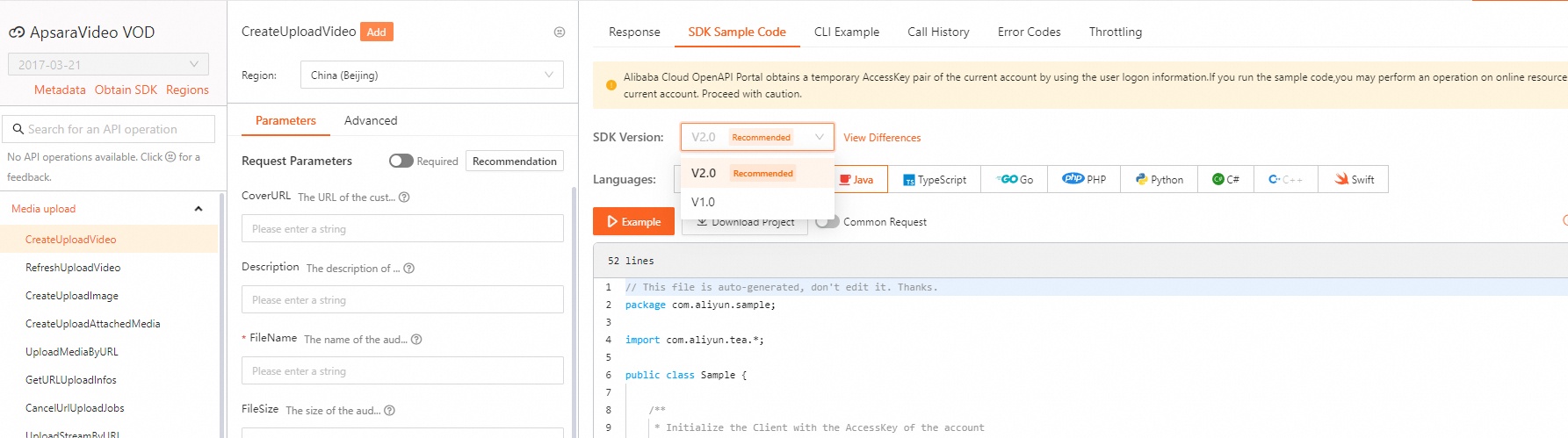
Para ver exemplos de SDK de outras operações de API, visite o Alibaba Cloud OpenAPI Explorer. Na aba Parameters, especifique os parâmetros e inicie a chamada. Depois, selecione a versão do SDK e a linguagem na aba SDK Sample Code para visualizar e baixar o código.
Os exemplos neste tópico usam o SDK V1.0. Para exemplos da V2.0, selecione a versão correta do SDK no OpenAPI Explorer.
Inicializar um cliente
Antes de usar o SDK, inicialize um cliente conforme descrito em Inicialização.
Criar um modelo de snapshot
Chame a operação AddVodTemplate para criar um modelo de snapshot.
Portal Alibaba Cloud OpenAPI: AddVodTemplate.
Código de exemplo:
import com.alibaba.fastjson.JSON;
import com.alibaba.fastjson.JSONObject;
import com.aliyuncs.auth.AlibabaCloudCredentials;
import com.aliyuncs.auth.EnvironmentVariableCredentialsProvider;
import com.aliyuncs.vod.model.v20170321.AddVodTemplateRequest;
import com.aliyuncs.vod.model.v20170321.AddVodTemplateResponse;

/**
 * Obtain the AccessKey information.
 */
public static DefaultAcsClient initVodClient() throws ClientException {
    // Specify the region in which ApsaraVideo VOD is activated.
    String regionId = "cn-shanghai";
    // The AccessKey pair of an Alibaba Cloud account has permissions on all API operations. We recommend that you use a RAM user to call API operations or perform routine O&M.
    // We recommend that you do not save your AccessKey pair (AccessKey ID and AccessKey secret) in your project code. Otherwise, the AccessKey pair may be leaked. As a result, the security of all resources in your account is compromised.
    // In this example, the system reads the AccessKey pair from environment variables to implement authentication for API access. Before you run the sample code, configure the environment variables ALIBABA_CLOUD_ACCESS_KEY_ID and ALIBABA_CLOUD_ACCESS_KEY_SECRET.
    DefaultProfile profile = DefaultProfile.getProfile(regionId, System.getenv("ALIBABA_CLOUD_ACCESS_KEY_ID"), System.getenv("ALIBABA_CLOUD_ACCESS_KEY_SECRET"));
    DefaultAcsClient client = new DefaultAcsClient(profile);
    return client;
    }

/**
 * Construct the snapshot template parameters and modify the corresponding parameter values as needed.
 * The following sample code describes the complete configuration of image sprites.
 * @return The snapshot template configurations.
 */
public static JSONObject buildSnapshotTemplateConfig() {
    JSONObject templateConfig = new JSONObject();
    JSONObject snapshotConfig = new JSONObject();
    snapshotConfig.put("Count", "50");
    snapshotConfig.put("Interval", "1");
    snapshotConfig.put("SpecifiedOffsetTime", "0");
    snapshotConfig.put("Width", "200");
    snapshotConfig.put("Height", "200");
    snapshotConfig.put("FrameType", "normal");
    // The configurations of normal snapshots. By default, the configurations are also used for image sprites.
    templateConfig.put("SnapshotConfig", snapshotConfig);

    // The configurations of image sprites. The configurations of normal snapshots are included.
    JSONObject spriteSnapshotConfig = new JSONObject();
    spriteSnapshotConfig.put("CellWidth", "120");
    spriteSnapshotConfig.put("CellHeight", "68");
    spriteSnapshotConfig.put("Columns", "3");
    spriteSnapshotConfig.put("Lines", "10");
    spriteSnapshotConfig.put("Padding", "20");
    spriteSnapshotConfig.put("Margin", "50");
    spriteSnapshotConfig.put("KeepCellPic", "keep");
    spriteSnapshotConfig.put("Color", "tomato");
    snapshotConfig.put("SpriteSnapshotConfig", spriteSnapshotConfig);

    // The snapshot type. Set the value to SpriteSnapshot for image sprites and to NormalSnapshot for normal snapshots.
    templateConfig.put("SnapshotType", "SpriteSnapshot");
    return templateConfig;
}

/**
 * Add a snapshot template function.
 */
public static AddVodTemplateResponse addSnapshotVodTemplate(DefaultAcsClient client) throws Exception {
    AddVodTemplateRequest request = new AddVodTemplateRequest();
    // The name of the template.
    request.setName("Test to add a snapshot template");
    // The template type. Set the value to Snapshot.
    request.setTemplateType("Snapshot");
    // The template configurations.
    JSONObject templateConfig = buildSnapshotTemplateConfig();
    request.setTemplateConfig(templateConfig.toJSONString());
    return client.getAcsResponse(request);
}

/**
 * Sample code
 * @param args
 * @throws ClientException
 */
public static void main(String[] args) {
    DefaultAcsClient client = initVodClient();
    AddVodTemplateResponse response = new AddVodTemplateResponse();
    try {
        // Create a snapshot template.
        response = addSnapshotVodTemplate(client);
        // The ID of the snapshot template.
        System.out.println("SnapshotVodTemplateId = " + response.getVodTemplateId());
    } catch (Exception e) {
        System.out.println("ErrorMessage = " + e.getLocalizedMessage());
    }
    System.out.println("RequestId = " + response.getRequestId());
}
Modificar um modelo de snapshot
Chame a operação UpdateVodTemplate para modificar um modelo de snapshot.
Portal Alibaba Cloud OpenAPI: UpdateVodTemplate.
Código de exemplo:
import com.alibaba.fastjson.JSON;
import com.alibaba.fastjson.JSONObject;
import com.aliyuncs.auth.AlibabaCloudCredentials;
import com.aliyuncs.auth.EnvironmentVariableCredentialsProvider;
import com.aliyuncs.vod.model.v20170321.UpdateVodTemplateRequest;
import com.aliyuncs.vod.model.v20170321.UpdateVodTemplateResponse;

/**
 * Obtain the AccessKey information.
 */
public static DefaultAcsClient initVodClient() throws ClientException {
    // Specify the region in which ApsaraVideo VOD is activated.
    String regionId = "cn-shanghai";
    // The AccessKey pair of an Alibaba Cloud account has permissions on all API operations. We recommend that you use a RAM user to call API operations or perform routine O&M.
    // We recommend that you do not save your AccessKey pair (AccessKey ID and AccessKey secret) in your project code. Otherwise, the AccessKey pair may be leaked. As a result, the security of all resources in your account is compromised.
    // In this example, the system reads the AccessKey pair from environment variables to implement authentication for API access. Before you run the sample code, configure the environment variables ALIBABA_CLOUD_ACCESS_KEY_ID and ALIBABA_CLOUD_ACCESS_KEY_SECRET.
    DefaultProfile profile = DefaultProfile.getProfile(regionId, System.getenv("ALIBABA_CLOUD_ACCESS_KEY_ID"), System.getenv("ALIBABA_CLOUD_ACCESS_KEY_SECRET"));
    DefaultAcsClient client = new DefaultAcsClient(profile);
    return client;
    }

/**
 * Construct the snapshot template parameters and modify the corresponding parameter values as needed.
 * The following sample code describes the complete configuration of normal snapshots.
 * @return The snapshot template configurations.
 */
public static JSONObject buildSnapshotTemplateConfig() {
    JSONObject templateConfig = new JSONObject();
    JSONObject snapshotConfig = new JSONObject();
    snapshotConfig.put("Count", "50");
    snapshotConfig.put("Interval", "1");
    snapshotConfig.put("SpecifiedOffsetTime", "0");
    snapshotConfig.put("Width", "200");
    snapshotConfig.put("Height", "200");
    snapshotConfig.put("FrameType", "normal");
    // The configurations of normal snapshots. By default, the configurations are also used for image sprites.
    templateConfig.put("SnapshotConfig", snapshotConfig);

    // The snapshot type. Set the value to SpriteSnapshot for image sprites and to NormalSnapshot for normal snapshots.
    templateConfig.put("SnapshotType", "NormalSnapshot");
    return templateConfig;
}

/**
 * Modify a snapshot template.
 */
public static UpdateVodTemplateResponse updateSnapshotVodTemplate(DefaultAcsClient client) throws Exception {
    UpdateVodTemplateRequest request = new UpdateVodTemplateRequest();
    // The ID of the template that you want to modify.
    request.setVodTemplateId("53azf9d796fad9d7b862b2e****");
    // The name of the template.
    request.setName("Test to modify a snapshot template");
    // The template configurations.
    JSONObject templateConfig = buildSnapshotTemplateConfig();
    request.setTemplateConfig(templateConfig.toJSONString());
    return client.getAcsResponse(request);
}

/**
 * Sample code
 * @param args
 * @throws ClientException
 */
public static void main(String[] args) {
    DefaultAcsClient client = initVodClient();
    UpdateVodTemplateResponse response = new UpdateVodTemplateResponse();
    try {
        // Modify a snapshot template.
        response = updateSnapshotVodTemplate(client);
        // The ID of the snapshot template.
        System.out.println("SnapshotVodTemplateId = " + response.getVodTemplateId());
    } catch (Exception e) {
        System.out.println("ErrorMessage = " + e.getLocalizedMessage());
    }
    System.out.println("RequestId = " + response.getRequestId());
}
Consultar um modelo de snapshot
-
Chame a operação GetVodTemplate para consultar um modelo de snapshot específico.
Portal Alibaba Cloud OpenAPI: GetVodTemplate.
-
Chame a operação ListVodTemplate para listar vários modelos de snapshot.
Portal Alibaba Cloud OpenAPI: ListVodTemplate.
Excluir um modelo de snapshot
Chame a operação DeleteVodTemplate para excluir um modelo de snapshot.
Portal Alibaba Cloud OpenAPI: DeleteVodTemplate.