O Object Storage Service (OSS) atribui um ID de solicitação exclusivo para cada solicitação recebida. Esse ID permite correlacionar informações de log. Se você encontrar um erro ao usar o OSS, forneça o ID da solicitação ao Suporte Técnico da Alibaba Cloud para obter assistência. Este tópico descreve várias maneiras de obter um ID de solicitação.
Obter um ID de solicitação com SDKs
Os exemplos de código a seguir mostram como obter um ID de solicitação com SDKs comuns.
import com.aliyun.oss.*;
import com.aliyun.oss.common.auth.*;
import com.aliyun.oss.common.comm.SignVersion;
import com.aliyun.oss.model.PutObjectRequest;
import com.aliyun.oss.model.PutObjectResult;
import java.io.File;

public class Demo {

    public static void main(String[] args) throws Exception {
        // In this example, the endpoint of the China (Hangzhou) region is used. Specify your actual endpoint.
        String endpoint = "https://oss-cn-hangzhou.aliyuncs.com";
        // Obtain access credentials from environment variables. Before you run the sample code, make sure that the OSS_ACCESS_KEY_ID and OSS_ACCESS_KEY_SECRET environment variables are configured.
        EnvironmentVariableCredentialsProvider credentialsProvider = CredentialsProviderFactory.newEnvironmentVariableCredentialsProvider();
        // Specify the name of the bucket. Example: examplebucket.
        String bucketName = "examplebucket";
        // Specify the key in PutObjectRequest, which is the complete object name. Do not include the bucket name, for example, exampledir/exampleobject.txt.
        String objectName = "exampledir/exampleobject.txt";
        // Specify the full path of the local file that you want to upload. Example: D:\\localpath\\examplefile.txt.
        // By default, if the path of the local file is not specified, the local file is uploaded from the path of the project to which the sample program belongs.
        String filePath= "D:\\localpath\\examplefile.txt";
        // Specify the region in which the bucket is located. For example, if the bucket is located in the China (Hangzhou) region, set the region to cn-hangzhou.
        String region = "cn-hangzhou";

        // Create an OSSClient instance.
        // Call the shutdown method to release associated resources when the OSSClient is no longer in use.
        ClientBuilderConfiguration clientBuilderConfiguration = new ClientBuilderConfiguration();
        clientBuilderConfiguration.setSignatureVersion(SignVersion.V4);
        OSS ossClient = OSSClientBuilder.create()
        .endpoint(endpoint)
        .credentialsProvider(credentialsProvider)
        .clientConfiguration(clientBuilderConfiguration)
        .region(region)
        .build();

        try {
            // Create a PutObjectRequest object.
            PutObjectRequest putObjectRequest = new PutObjectRequest(bucketName, objectName, new File(filePath));
            // The following sample code provides an example on how to specify the storage class and ACL of an object when you upload the object:
            // ObjectMetadata metadata = new ObjectMetadata();
            // metadata.setHeader(OSSHeaders.OSS_STORAGE_CLASS, StorageClass.Standard.toString());
            // metadata.setObjectAcl(CannedAccessControlList.Private);
            // putObjectRequest.setMetadata(metadata);

            // Upload the local file.
            PutObjectResult result = ossClient.putObject(putObjectRequest);
        } catch (OSSException oe) {
            System.out.println("Caught an OSSException, which means your request made it to OSS, "
                    + "but was rejected with an error response for some reason.");
            System.out.println("Error Message:" + oe.getErrorMessage());
            System.out.println("Error Code:" + oe.getErrorCode());
            System.out.println("Request ID:" + oe.getRequestId());
            System.out.println("Host ID:" + oe.getHostId());
        } catch (ClientException ce) {
            System.out.println("Caught an ClientException, which means the client encountered "
                    + "a serious internal problem while trying to communicate with OSS, "
                    + "such as not being able to access the network.");
            System.out.println("Error Message:" + ce.getMessage());
        } finally {
            if (ossClient != null) {
                ossClient.shutdown();
            }
        }
    }
}<?php
if (is_file(__DIR__ . '/../autoload.php')) {
require_once __DIR__ . '/../autoload.php';
}
if (is_file(__DIR__ . '/../vendor/autoload.php')) {
require_once __DIR__ . '/../vendor/autoload.php';
}
use OSS\OssClient;
use OSS\Core\OssException;
use OSS\Model\StyleConfig;
// Obtain access credentials from environment variables. Before you run this sample code, make sure that the OSS_ACCESS_KEY_ID and OSS_ACCESS_KEY_SECRET environment variables are set.
$accessKeyId = getenv("OSS_ACCESS_KEY_ID");
$accessKeySecret = getenv("OSS_ACCESS_KEY_SECRET");
// Set yourEndpoint to the endpoint of the region where your bucket is located. For example, if your bucket is in the China (Hangzhou) region, set the endpoint to https://oss-cn-hangzhou.aliyuncs.com.
$endpoint = "yourEndpoint";
// Specify the bucket name.
$bucket= "examplebucket";
try{
$ossClient = new OssClient($accessKeyId, $accessKeySecret, $endpoint);
$result = $ossClient->getObject($bucket, "demo.txt");
} catch(OssException $e) {
printf($e->getMessage() . "\n");
printf($e->getRequestId() . "\n");
}const OSS = require('ali-oss')
const path=require("path")
const client = new OSS({
// Set yourregion to the region where the bucket is located. For example, if the bucket is in the China (Hangzhou) region, set Region to oss-cn-hangzhou.
region: 'yourregion',
// Obtain access credentials from environment variables. Before you run this sample code, make sure that the OSS_ACCESS_KEY_ID and OSS_ACCESS_KEY_SECRET environment variables are set.
accessKeyId: process.env.OSS_ACCESS_KEY_ID,
accessKeySecret: process.env.OSS_ACCESS_KEY_SECRET,
authorizationV4: true,
// Specify the bucket name.
bucket: 'examplebucket',
});
// Custom request headers
const headers = {
// Specify the storage class of the object.
'x-oss-storage-class': 'Standard',
// Specify the access permissions of the object.
'x-oss-object-acl': 'private',
// When the file is accessed using its URL, specify that the file is downloaded as an attachment. The downloaded file is named example.txt.
'Content-Disposition': 'attachment; filename="example.txt"',
// Set tags for the object. You can set multiple tags at the same time.
'x-oss-tagging': 'Tag1=1&Tag2=2',
// Specify whether to overwrite an object that has the same name during a PutObject operation. This parameter is set to true to prevent the object from being overwritten.
'x-oss-forbid-overwrite': 'true',
};
async function put () {
try {
// Specify the full path of the OSS object and the full path of the local file. The full path of the OSS object cannot contain the bucket name.
// If you do not specify a local path in the full path of the local file, the file is uploaded from the local path of the project to which the sample program belongs.
const result = await client.put('exampleobject.txt', path.normalize('D:\\localpath\\examplefile.txt')
// Custom headers
,{headers}
);
console.log(result);
} catch (e) {
console.log(e);
}
}
put();# -*- coding: utf-8 -*-
import oss2
from oss2.credentials import EnvironmentVariableCredentialsProvider
# Obtain access credentials from the environment variables. Before you run the sample code, make sure that you have configured environment variables OSS_ACCESS_KEY_ID and OSS_ACCESS_KEY_SECRET.
auth = oss2.ProviderAuthV4(EnvironmentVariableCredentialsProvider())
# Specify the endpoint of the region in which the bucket is located. For example, if the bucket is located in the China (Hangzhou) region, set the endpoint to https://oss-cn-hangzhou.aliyuncs.com.
endpoint = "https://oss-cn-hangzhou.aliyuncs.com"
# Specify the ID of the region that maps to the endpoint. Example: cn-hangzhou. This parameter is required if you use the signature algorithm V4.
region = "cn-hangzhou"
# Specify the name of the bucket.
bucket = oss2.Bucket(auth, endpoint, "examplebucket", region=region)
try:
# Specify the name of the downloaded object. Example: exampleobject.txt.
stream = bucket.get_object('exampleobject.txt')
except oss2.exceptions.NoSuchKey as e:
print('status={0}, request_id={1}'.format(e.status, e.request_id)) package main
import (
"fmt"
"net/http"
"os"
"strings"
"github.com/aliyun/aliyun-oss-go-sdk/oss"
)
// The error handling function.
func HandleError(err error) {
fmt.Println("Error:", err)
os.Exit(-1)
}
func main() {
// Obtain access credentials from environment variables. Before you run this sample code, make sure that the OSS_ACCESS_KEY_ID and OSS_ACCESS_KEY_SECRET environment variables are set.
provider, err := oss.NewEnvironmentVariableCredentialsProvider()
if err != nil {
fmt.Println("Error:", err)
os.Exit(-1)
}
// Create an OSSClient instance.
// Set yourEndpoint to the endpoint of the region where your bucket is located. This example uses https://oss-cn-hangzhou.aliyuncs.com, which is the endpoint of the China (Hangzhou) region. Replace it with the actual endpoint.
// An AccessKey pair from an Alibaba Cloud account has permissions for all API operations. Using these credentials for OSS operations is a high-risk practice. We recommend that you use a RAM user for API calls or routine O&M. To create a RAM user, log on to the RAM console.
client, err := oss.New("https://oss-cn-hangzhou.aliyuncs.com", "", "", oss.SetCredentialsProvider(&provider))
if err != nil {
HandleError(err)
}
// Specify the bucket name. Example: examplebucket.
bucketName := "examplebucket"
// Specify the object name. Example: exampleobject.txt.
objectName := "exampleobject.txt"
bucket, err := client.Bucket(bucketName)
if err != nil {
HandleError(err)
}
var responseHeader http.Header
// Upload a string.
err = bucket.PutObject(objectName, strings.NewReader("Hello OSS"), oss.GetResponseHeader(&responseHeader))
if err != nil {
if _, ok := err.(oss.ServiceError); ok {
// err is an oss.ServiceError.
fmt.Println("Error Message:", err.(oss.ServiceError).Message)
fmt.Println("Error Code:", err.(oss.ServiceError).Code)
fmt.Println("Request ID:", err.(oss.ServiceError).RequestID)
fmt.Println("Host ID:", err.(oss.ServiceError).HostID)
} else {
// err is not an oss.ServiceError.
fmt.Println("Error:", err)
os.Exit(-1)
}
}
requestId := oss.GetRequestId(responseHeader)
fmt.Println("Request ID:", requestId)
}
Obter um ID de solicitação em um navegador
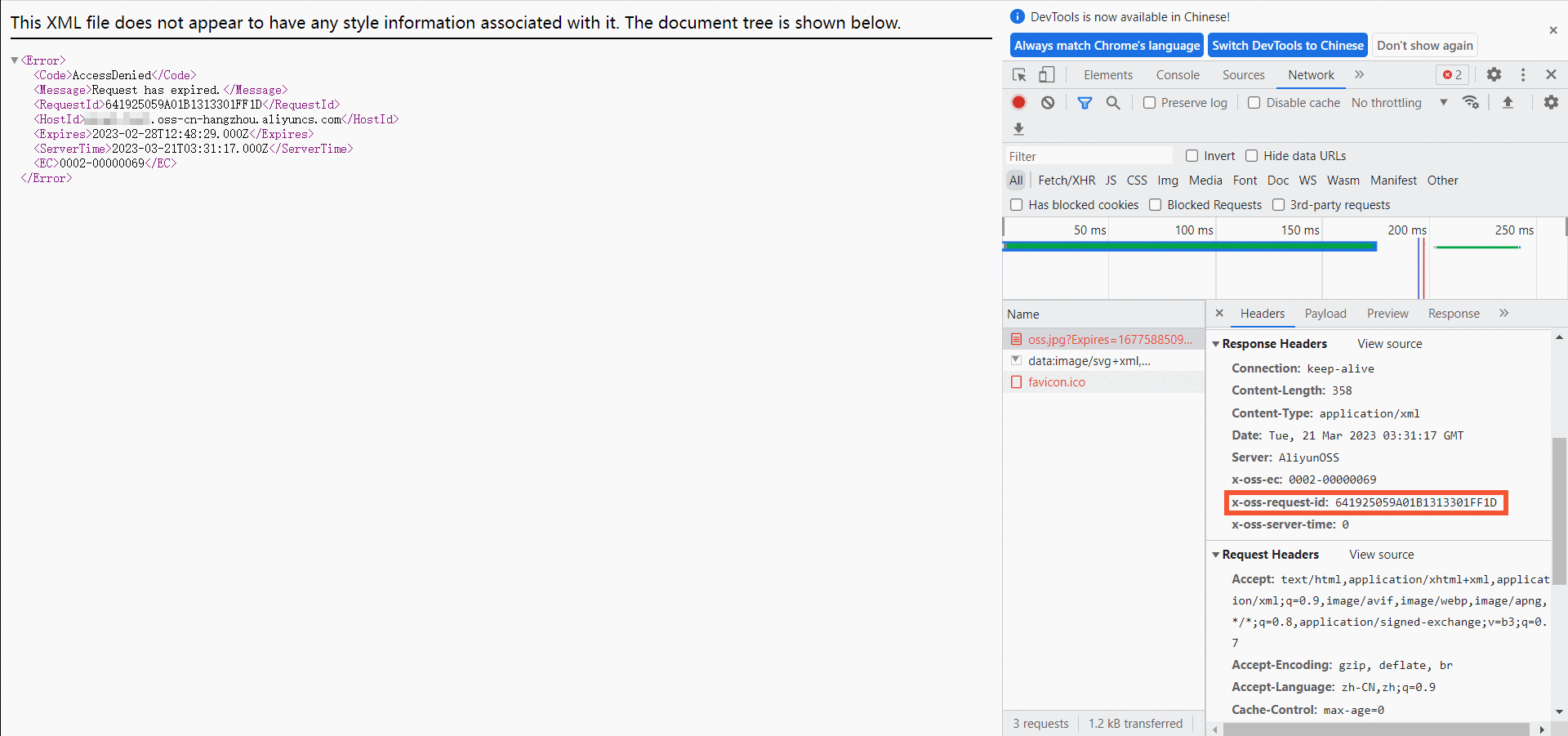
Siga estas etapas para obter um ID de solicitação ao acessar um objeto do OSS em um navegador.
Em um computador Windows, pressione
F12para abrir as ferramentas de desenvolvedor.Na página das ferramentas de desenvolvedor, clique na guia Network.
Na guia Name, selecione o objeto de destino.
Clique na guia Headers. Na seção Response Headers, obtenha o ID da solicitação em x-oss-request-id.
Obter um ID de solicitação em logs em tempo real
Você pode consultar logs em tempo real de buckets e objetos no console do OSS. Esses logs contêm o ID da solicitação.
Faça logon no console do OSS.
No painel de navegação, clique em Buckets. Em seguida, clique no nome do bucket de destino.
Escolha .
Pressione
Ctrl+Fe pesquise request_id.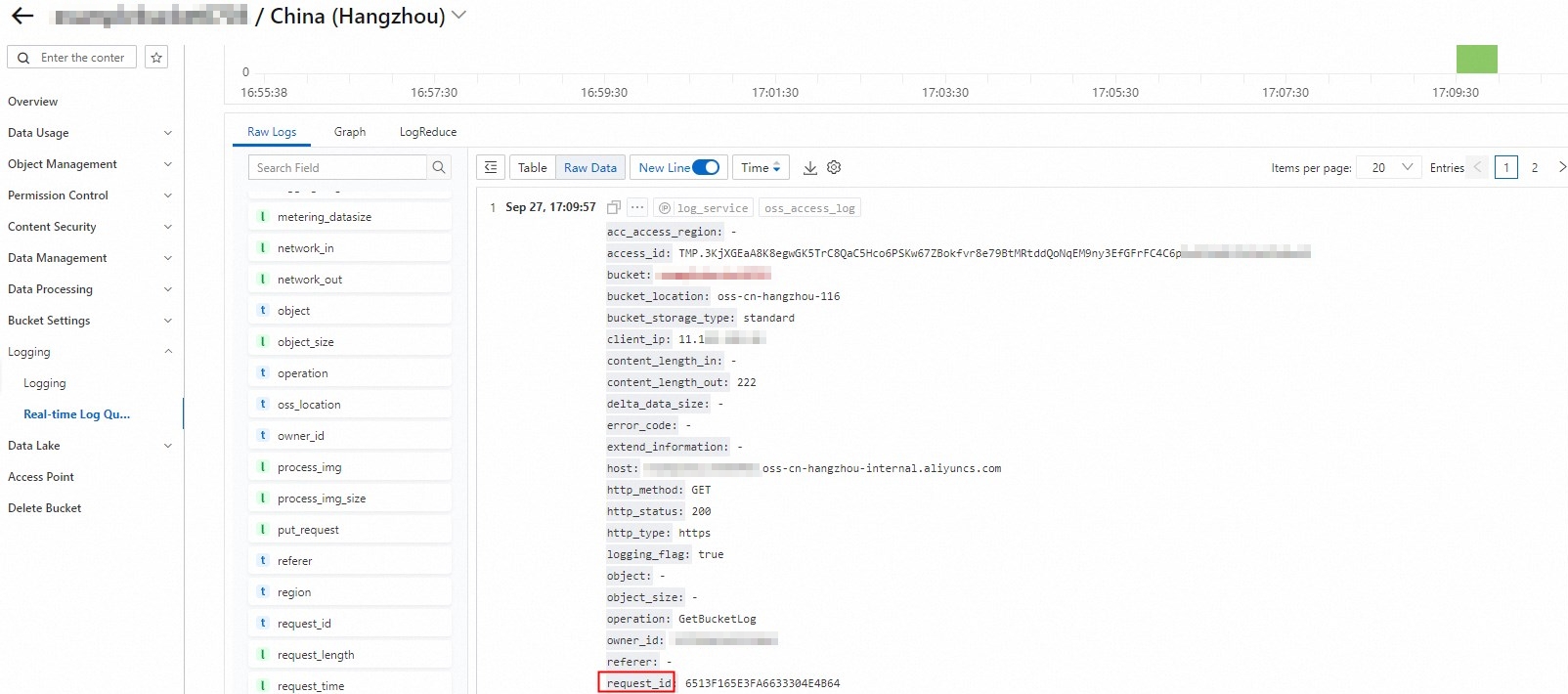
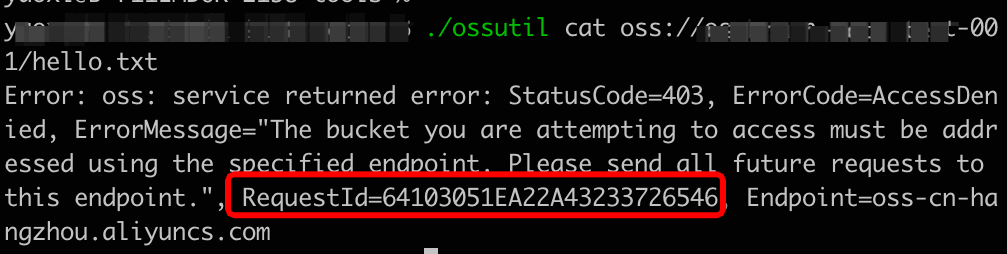
Obter um ID de solicitação com o ossutil
Ao executar um comando do ossutil, você pode obter o ID da solicitação na saída do comando.
Obter um ID de solicitação com a CLI
Siga estas etapas para obter um ID de solicitação com a interface de linha de comando (CLI) em um sistema Linux.
-
Obtenha a URL do objeto.
Faça logon no console do OSS.
No painel de navegação à esquerda, clique em Buckets. Na página Buckets, localize e clique no bucket desejado.
No painel de navegação à esquerda, escolha .
Clique em View Details na coluna Actions do objeto de destino. Em seguida, clique em Copy Object URL.
-
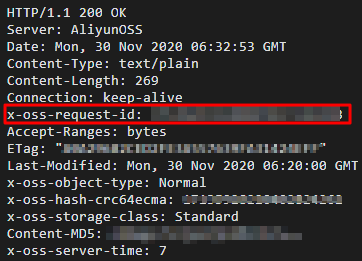
Execute o seguinte comando para obter o ID da solicitação no cabeçalho de resposta HTTP.
curl -voa "[$URL]"Substitua [$URL] pela URL do objeto que você copiou.
A figura a seguir mostra o resultado retornado.
Obter um ID de solicitação no console
Esta seção explica como obter o ID da solicitação para uma operação de upload com as ferramentas de desenvolvedor.
-
Abra as ferramentas de desenvolvedor.
Em um computador Windows, pressione
F12para abrir as ferramentas de desenvolvedor.Na página das ferramentas de desenvolvedor, clique na guia Network.
-
Faça upload de um objeto.
No console do OSS, clique em Buckets no painel de navegação. Em seguida, clique no nome do bucket de destino.
No painel de navegação, clique em Object Management.
Faça upload de um objeto. Para mais informações, consulte 上传文件.
-
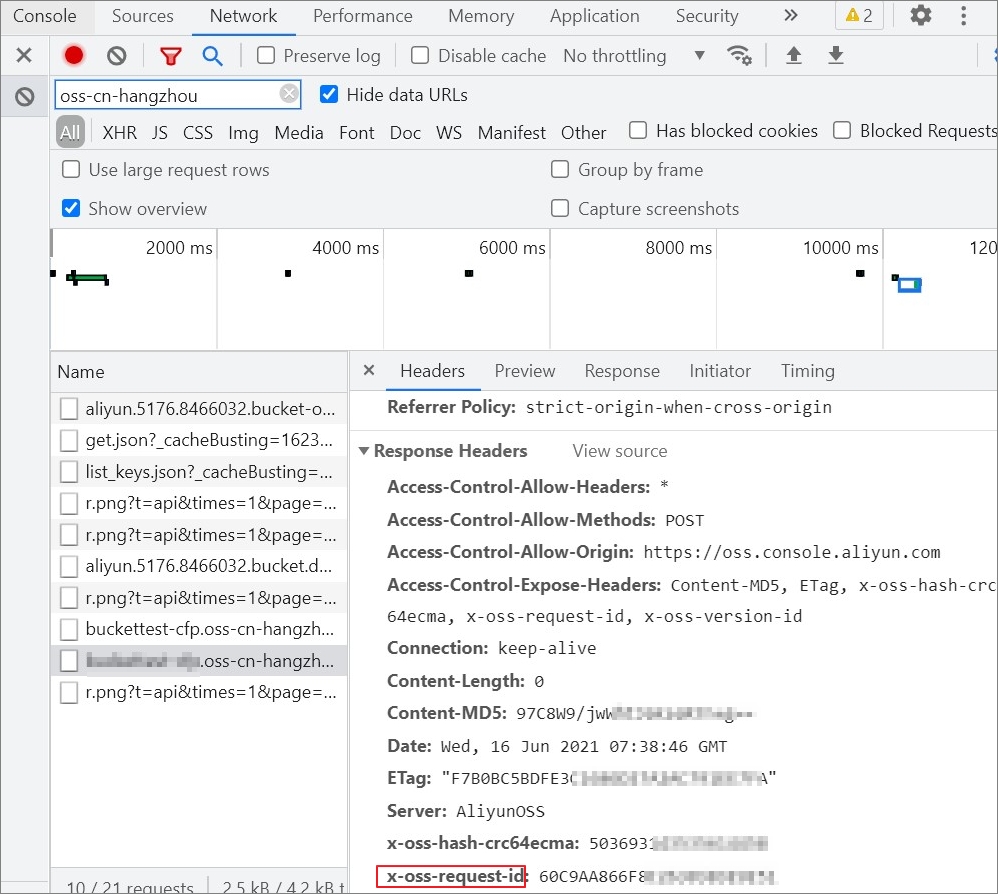
Obtenha o ID da solicitação nas ferramentas de desenvolvedor.
Na página das ferramentas de desenvolvedor, clique na guia Name e selecione o objeto de destino.
Clique na guia Headers. Na seção Response Headers, obtenha o ID da solicitação em x-oss-request-id.