A detecção facial, desenvolvida com o Intelligent Media Management (IMM), identifica rostos em imagens e extrai atributos como idade, gênero e expressões faciais. O recurso oferece suporte a múltiplos rostos por imagem.
Visão geral
A detecção facial utiliza IA de imagem para identificar rostos em uma imagem e retornar atributos de cada rosto detectado.
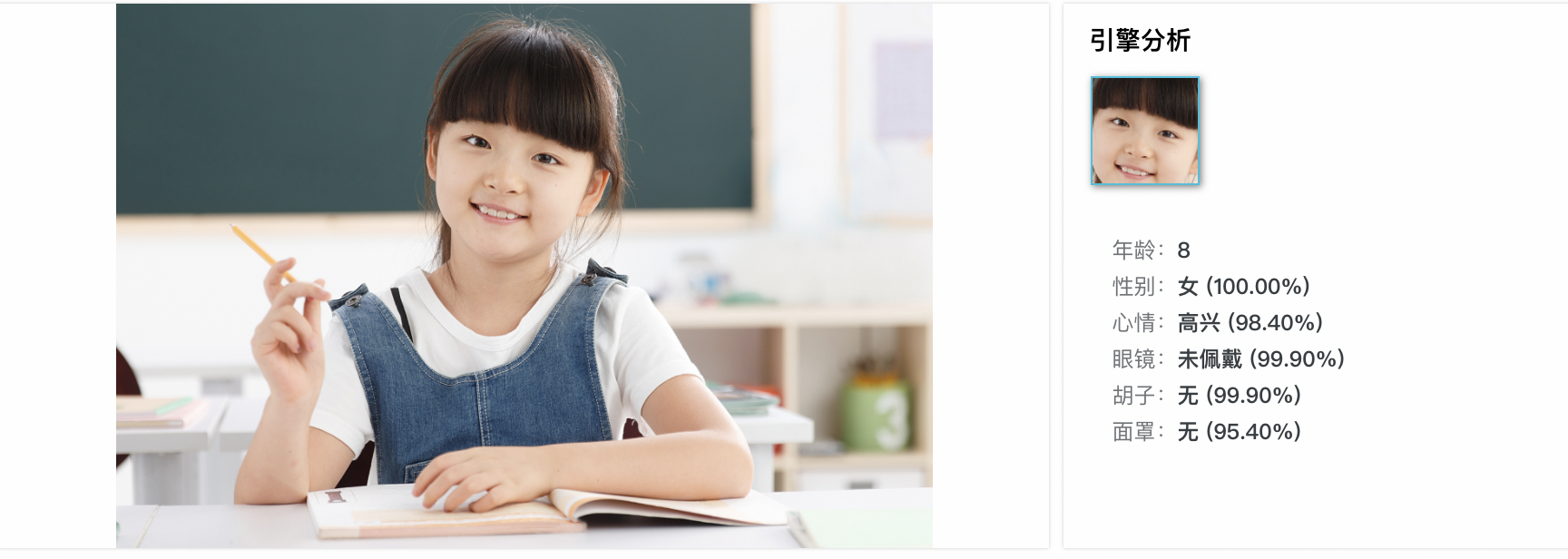
As informações faciais incluem ID do rosto, idade, gênero, humor, atratividade, qualidade do rosto e atributos faciais (posição, orientação da cabeça, óculos, barba e máscara).
Casos de uso
Reconhecimento facial: detecte e compare rostos com um banco de dados para autenticação e controle de acesso.
Autenticação facial: verifique a identidade do usuário em cenários como desbloqueio de telefone e validação de pagamentos.
-
Análise de expressão facial: analise expressões para análise de sentimentos, interação humano-computador e personagens virtuais.
NotaFundo desordenado: fundos complexos podem interferir na detecção de características faciais.
Oclusão facial: rostos sobrepostos em uma imagem podem reduzir a precisão da detecção.
Como usar
Pré-requisitos
Criar um bucket no OSS e fazer upload dos arquivos que você deseja processar para o bucket.
Crie e vincule um projeto do IMM. Vincule o projeto no console do OSS ou chame uma operação de API. O projeto do IMM deve estar na mesma região do bucket.
Detecção facial
Os exemplos a seguir mostram como detectar rostos usando SDKs do OSS. Para outras linguagens, adapte os parâmetros conforme necessário.
Java
É necessário o OSS SDK for Java 3.17.4 ou posterior.
import com.aliyun.oss.ClientBuilderConfiguration;
import com.aliyun.oss.OSS;
import com.aliyun.oss.OSSClientBuilder;
import com.aliyun.oss.common.auth.CredentialsProviderFactory;
import com.aliyun.oss.common.auth.EnvironmentVariableCredentialsProvider;
import com.aliyun.oss.common.comm.SignVersion;
import com.aliyun.oss.model.OSSObject;
import com.aliyun.oss.model.GetObjectRequest;
import com.aliyuncs.exceptions.ClientException;

import java.io.ByteArrayOutputStream;
import java.io.IOException;

public class Demo1 {
    public static void main(String[] args) throws ClientException, ClientException {
        // Specify the endpoint of the region in which the bucket is located.
        String endpoint = "https://oss-cn-hangzhou.aliyuncs.com";
        // Specify the ID of the Alibaba Cloud region in which the bucket is located. Example: cn-hangzhou.
        String region = "cn-hangzhou";
        // Obtain access credentials from environment variables. Before you run the sample code, make sure that the OSS_ACCESS_KEY_ID and OSS_ACCESS_KEY_SECRET environment variables are configured.
        EnvironmentVariableCredentialsProvider credentialsProvider = CredentialsProviderFactory.newEnvironmentVariableCredentialsProvider();
        // Specify the name of the bucket.
        String bucketName = "examplebucket";
        // If the image is stored in the root directory of the bucket, enter the image name. If the image is not stored in the root directory of the bucket, you must specify the full path of the image. Example: exampledir/example.jpg.
        String key = "example.jpg";

        // Create an OSSClient instance.
        // Call the shutdown method to release resources when the OSSClient is no longer in use.
        ClientBuilderConfiguration clientBuilderConfiguration = new ClientBuilderConfiguration();
        clientBuilderConfiguration.setSignatureVersion(SignVersion.V4);
        OSS ossClient = OSSClientBuilder.create()
                .endpoint(endpoint)
                .credentialsProvider(credentialsProvider)
                .clientConfiguration(clientBuilderConfiguration)
                .region(region)
                .build();

        try {
            // Create a processing instruction to use face detection.
            GetObjectRequest getObjectRequest = new GetObjectRequest(bucketName, key);
            getObjectRequest.setProcess("image/faces");

            // Use the getObject method and pass the processing instruction by using the process parameter.
            OSSObject ossObject = ossClient.getObject(getObjectRequest);

            // Read and display the query results.
            ByteArrayOutputStream baos = new ByteArrayOutputStream();
            byte[] buffer = new byte[1024];
            int bytesRead;
            while ((bytesRead = ossObject.getObjectContent().read(buffer)) != -1) {
                baos.write(buffer, 0, bytesRead);
            }
            String imageFaces = baos.toString("UTF-8");
            System.out.println("Image Faces:");
            System.out.println(imageFaces);
        } catch (IOException e) {
            System.out.println("Error: " + e.getMessage());
        } finally {
            // Shut down the OSSClient instance.
            ossClient.shutdown();
        }
    }
}
Python
É necessário o OSS SDK for Python 2.18.4 ou posterior.
# -*- coding: utf-8 -*-
import oss2
from oss2.credentials import EnvironmentVariableCredentialsProvider

# Obtain access credentials from environment variables. Before you run the sample code, make sure that the OSS_ACCESS_KEY_ID and OSS_ACCESS_KEY_SECRET environment variables are configured.
auth = oss2.ProviderAuthV4(EnvironmentVariableCredentialsProvider())

# Specify the endpoint of the region where the bucket is located.
endpoint = 'https://oss-cn-hangzhou.aliyuncs.com'
# Specify the ID of the Alibaba Cloud region in which the bucket is located.
region = 'cn-hangzhou'
bucket = oss2.Bucket(auth, endpoint, 'examplebucket', region=region)

# If the image is stored in the root directory, enter the image name. Otherwise, specify the full path.
key = 'example.jpg'

# Create a processing instruction to use face detection.
process = 'image/faces'

try:
    # Use the get_object method and pass the processing instruction by using the process parameter.
    result = bucket.get_object(key, process=process)

    # Read and display the query results.
    image_faces = result.read().decode('utf-8')
    print("Image Faces:")
    print(image_faces)
except oss2.exceptions.OssError as e:
    print("Error:", e)
Go
É necessário o OSS SDK for Go 3.0.2 ou posterior.
package main

import (
	"fmt"
	"io"
	"os"

	"github.com/aliyun/aliyun-oss-go-sdk/oss"
)

func main() {
	// Obtain the temporary access credentials from the environment variables. Before you run the sample code, make sure that the OSS_ACCESS_KEY_ID and OSS_ACCESS_KEY_SECRET environment variables are configured.
	provider, err := oss.NewEnvironmentVariableCredentialsProvider()
	if err != nil {
		fmt.Println("Error:", err)
		os.Exit(-1)
	}
	// Create an OSSClient instance.
	// Specify the endpoint of the region in which the bucket is located. For example, if the bucket is located in the China (Hangzhou) region, set the endpoint to https://oss-cn-hangzhou.aliyuncs.com. Specify your actual endpoint.
	// Specify the ID of the Alibaba Cloud region in which the bucket is located. Example: cn-hangzhou.
	client, err := oss.New("https://oss-cn-hangzhou.aliyuncs.com", "", "", oss.SetCredentialsProvider(&provider), oss.AuthVersion(oss.AuthV4), oss.Region("cn-hangzhou"))
	if err != nil {
		fmt.Println("Error:", err)
		os.Exit(-1)
	}
	// Specify the name of the bucket. Example: examplebucket.
	bucketName := "examplebucket"

	bucket, err := client.Bucket(bucketName)
	if err != nil {
		fmt.Println("Error:", err)
		os.Exit(-1)
	}
	// If the image is stored in the root directory of the bucket, enter the image name. If the image is not stored in the root directory of the bucket, you must specify the full path of the image. Example: exampledir/example.jpg.
	// Use the oss.Process method to create a processing instruction to use face detection.
	body, err := bucket.GetObject("example.jpg", oss.Process("image/faces"))
	if err != nil {
		fmt.Println("Error:", err)
		os.Exit(-1)
	}

	defer body.Close()

	data, err := io.ReadAll(body)
	if err != nil {
		fmt.Println("Error:", err)
		os.Exit(-1)
	}
	fmt.Println("data:", string(data))
}
PHP
É necessário o OSS SDK for PHP 2.7.0 ou posterior.
<?php
if (is_file(__DIR__ . '/../autoload.php')) {
    require_once __DIR__ . '/../autoload.php';
}
if (is_file(__DIR__ . '/../vendor/autoload.php')) {
    require_once __DIR__ . '/../vendor/autoload.php';
}
use OSS\Credentials\EnvironmentVariableCredentialsProvider;
use OSS\OssClient;

try {
    // Obtain access credentials from environment variables. Before you run the sample code, make sure that the OSS_ACCESS_KEY_ID and OSS_ACCESS_KEY_SECRET environment variables are configured.
    $provider = new EnvironmentVariableCredentialsProvider();
    // Specify the endpoint of the region in which the bucket is located. For example, if the bucket is located in the China (Hangzhou) region, set the endpoint to https://oss-cn-hangzhou.aliyuncs.com.
    $endpoint = 'https://oss-cn-hangzhou.aliyuncs.com';
    // Specify the name of the bucket. Example: examplebucket.
    $bucket = 'examplebucket';
    // If the image is stored in the root directory of the bucket, enter the image name. If the image is not stored in the root directory of the bucket, you must specify the full path of the image. Example: exampledir/example.jpg.
    $key = 'example.jpg';

    $config = array(
        "provider" => $provider,
        "endpoint" => $endpoint,
        "signatureVersion" => OssClient::OSS_SIGNATURE_VERSION_V4,
        // Specify the ID of the Alibaba Cloud region in which the bucket is located.
        "region" => "cn-hangzhou"
    );
    $ossClient = new OssClient($config);
  // Create a processing instruction to use face detection.
  $options[$ossClient::OSS_PROCESS] = "image/faces";
  $result = $ossClient->getObject($bucket,$key,$options);
  var_dump($result);
} catch (OssException $e) {
  printf($e->getMessage() . "\n");
  return;
}
Parâmetros
Ação: image/faces
Para obter detalhes sobre os campos de resposta, consulte a referência da API DetectImageFaces.
Operações de API relacionadas
Para chamar a API RESTful diretamente, inclua o cálculo de assinatura no seu código. Utilize o método (Recomendado) Incluir uma assinatura V4 para o cabeçalho Authorization.
Processe imagens adicionando o parâmetro x-oss-process à operação GetObject. GetObject.
Exemplo de solicitação
GET /example.jpg?x-oss-process=image/faces HTTP/1.1
Host: image-demo.oss-cn-hangzhou.aliyuncs.com
Date: Fri, 21 Jul 2023 08:57:30 GMT
Authorization: SignatureValue
Exemplo de resposta de sucesso
HTTP/1.1 200 OK
Server: AliyunOSS
Date: Fri, 21 Jul 2023 08:57:30 GMT
Content-Type: application/json;charset=utf-8
Content-Length: 161
Connection: keep-alive
x-oss-request-id: 628E2481184E20F26C000009
x-oss-transfer-acc-type: acc-none
x-oss-data-location: oss-cn-hangzhou-a
ETag: "D0F162350DA037F4DC2A142B2E116BD0"
Last-Modified: Wed, 25 May 2022 12:20:34 GMT
x-oss-object-type: Normal
x-oss-hash-crc64ecma: 2040549661341440100
x-oss-storage-class: Standard
x-oss-server-time: 12437

{
    "RequestId": "5F2389FE-A5E3-076F-B071-43A33DB0D716",
    "Figures": [{
        "Beard": "none",
        "MaskConfidence": 0.7509999871253967,
        "Gender": "male",
        "Boundary": {
            "Left": 280,
            "Top": 36,
            "Height": 87,
            "Width": 70
        },
        "BeardConfidence": 0.9980000257492065,
        "FigureId": "d39651db-9dc4-469f-8834-d2fcf30e179e",
        "Mouth": "open",
        "Emotion": "none",
        "Age": 12,
        "MouthConfidence": 0.5669999718666077,
        "FigureType": "face",
        "GenderConfidence": 0.9509999752044678,
        "HeadPose": {
            "Pitch": -12.309000015258789,
            "Roll": -11.362000465393066,
            "Yaw": 3.443000078201294
        },
        "Mask": "none",
        "EmotionConfidence": 0.9950000047683716,
        "HatConfidence": 0.9879999756813049,
        "GlassesConfidence": 1,
        "Sharpness": 0.8870000243186951,
        "FigureClusterId": "figure-cluster-id-unavailable",
        "FaceQuality": 0.8289999961853027,
        "Attractive": 0.12099999934434891,
        "AgeSD": 5,
        "Glasses": "none",
        "FigureConfidence": 0.9990000128746033,
        "Hat": "hat"
    }
    ]
}
Faturamento
A detecção facial gera cobranças tanto do OSS quanto do IMM:
-
OSS: Preços do OSS
API
Item faturável
Descrição
GetObject
Solicitações GET
Cobrança de taxas de solicitação com base no número de solicitações bem-sucedidas.
Tráfego de saída pela Internet
Ao chamar a operação GetObject usando um endpoint público, como oss-cn-hangzhou.aliyuncs.com, ou um endpoint de aceleração, como oss-accelerate.aliyuncs.com, há cobrança de taxas de tráfego de saída pela Internet com base no tamanho dos dados.
Recuperação de objetos IA
Se objetos de Acesso Infrequente (IA) forem recuperados, há cobrança de taxas de recuperação de dados IA com base no tamanho dos dados recuperados.
Aceleração de transferência
Caso a aceleração de transferência esteja ativada e um endpoint de aceleração seja usado para acessar seu bucket, há cobrança de taxas de aceleração de transferência com base no tamanho dos dados.
HeadObject
Solicitações GET
Cobrança de taxas de solicitação com base no número de solicitações bem-sucedidas.
-
Importante
A partir das 11:00 de 28 de julho de 2025 (UTC+8), o preço do serviço de detecção facial do IMM permanece inalterado, mas o nome do item faturável muda de ImageFace para ImageDetect. Para mais informações, consulte o Aviso de ajuste de faturamento do IMM.
API
Item faturável
Descrição
DetectImageFaces
ImageDetect
Cobrança de taxas de solicitação com base no número de solicitações bem-sucedidas.
Limites
Somente o processamento síncrono (x-oss-process) é suportado.