Todos os produtos
Search
Central de documentação

Object Storage Service:Tutorial: Busca semântica para IPCs

Última atualização: Jul 03, 2026

Use o recurso de indexação de dados do OSS para criar um sistema inteligente de busca semântica de vídeos de câmeras IP (IPC). Esse sistema permite buscar semanticamente nos vídeos coletados, sendo ideal para cenários como segurança inteligente.

Nota

Use a Calculadora de Preços com Reconhecimento de Conteúdo - Cenário IPC para estimar os custos potenciais dos recursos de IA com reconhecimento de conteúdo nesta solução. (Se você não estiver conectado à sua conta Alibaba Cloud, faça login e clique em novamente.)

Visão geral da solução

image

A criação do sistema inteligente de busca semântica envolve duas etapas:

  1. Crie um bucket e envie vídeos: Crie um bucket para armazenar os arquivos de vídeo brutos dos seus dispositivos IPC. Em seguida, envie os vídeos que deseja processar. Esses vídeos servem como dados de source para suas buscas.

  2. Ative o recurso AISearch: Ative o recurso AISearch no bucket para habilitar buscas inteligentes baseadas em descrições em linguagem natural.

Vantagens da solução

  • Busca semântica: Permite pesquisas precisas com descrições em linguagem natural e múltiplas condições, facilitando a localização rápida de quadros específicos em cenários complexos.

  • Busca multimodal: Oferece gerenciamento unificado e recursos de pesquisa para diversos tipos de dados, como vídeos, imagens e texto, reduzindo a complexidade técnica e os custos de operação e manutenção.

  • Dimensionamento horizontal: O OSS oferece capacidade e escalabilidade ilimitadas, permitindo lidar facilmente com o crescimento massivo de dados.

1. Crie um bucket e envie vídeos

  1. Faça login no console do OSS.

  2. Na página Buckets, clique em Create Bucket.

  3. Na página Create Bucket, insira um nome para o bucket. Use um nome relacionado ao negócio, como ipc-videos-oss-metaquery-demo. Mantenha as configurações padrão para os demais parâmetros.

  4. Clique em Create. Na página de sucesso, clique em Go to Bucket.

  5. Na página Objects, clique em Upload Object > Select Files. Selecione os arquivos de vídeo desejados, como videoA.mp4, videoB.mp4 e videoC.mp4. Mantenha as configurações padrão para os outros parâmetros e clique em Upload Object.

  6. (Opcional) Adicione tags aos arquivos de vídeo enviados. Na coluna Actions do arquivo alvo, escolha more > Tag. Na caixa de diálogo exibida, adicione pares chave-valor. Por exemplo, defina a chave como need-seek e o valor como true para usar como condição de filtro na criação do índice. Também é possível definir a chave como camera e o valor como camera-a para filtragem de consultas. Clique em OK. As tags permitem uma filtragem mais precisa durante a indexação e a busca.

2. Ative o recurso AISearch

Ative o recurso AISearch no bucket para permitir buscas precisas de vídeos com descrições em linguagem natural e múltiplas condições.

  1. No painel de navegação à esquerda, escolha Object Management > Data Indexing.

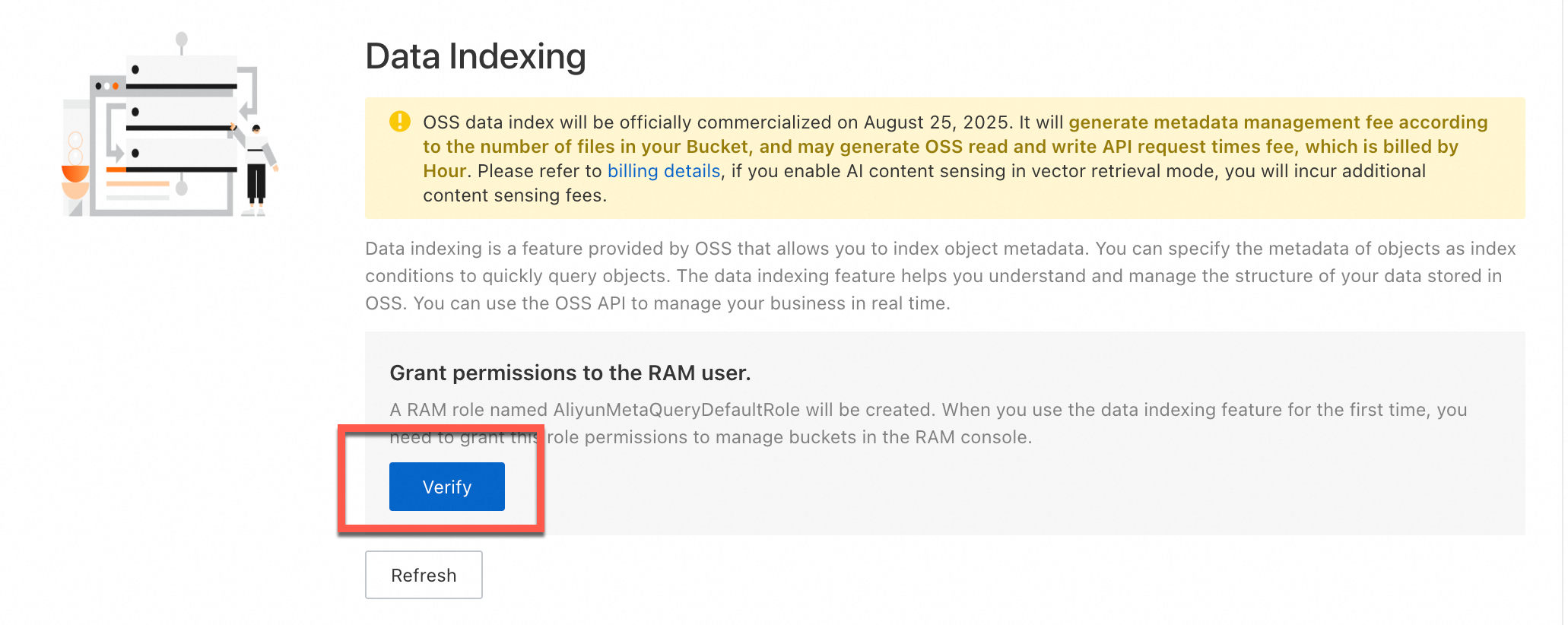
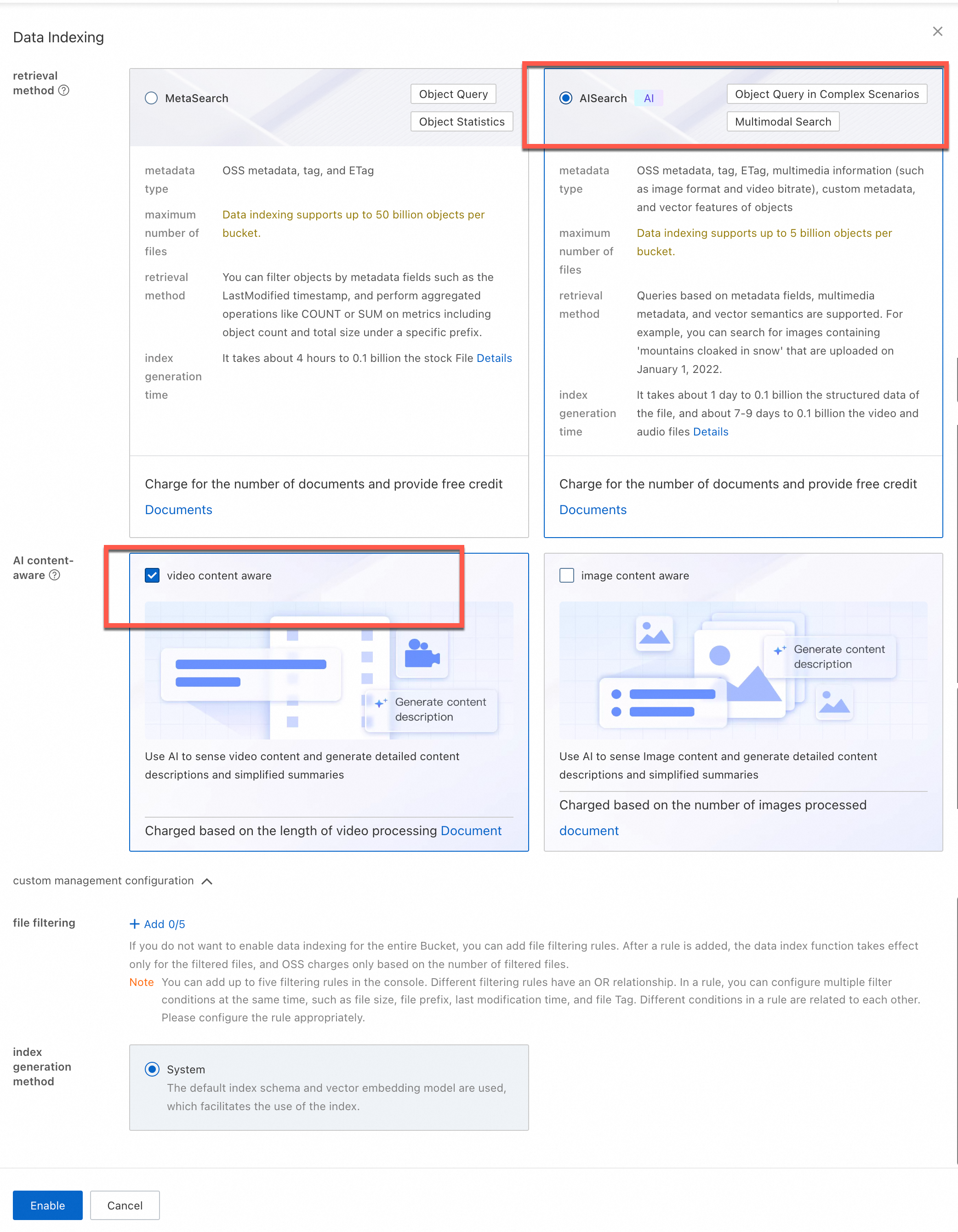
  2. Na página Data Indexing, caso esteja utilizando o recurso de indexação de dados pela primeira vez, siga as instruções na tela para conceder permissões à função AliyunMetaQueryDefaultRole, permitindo que o OSS gerencie dados no seu bucket. Após conceder as permissões, clique em Enable Data Index e selecione AISearch.

  3. (Opcional) AI Content Awareness: Selecione Image Content Awareness ou Video Content Awareness conforme necessário.

  4. (Opcional) Regras de filtragem de arquivos: Configure esta opção para analisar com IA apenas arquivos correspondentes a regras específicas. É possível definir até cinco regras de filtragem. A filtragem suporta prefixo, tamanho do arquivo, tag e LastModifiedTime. Por exemplo, adicione uma regra de filtragem por tag com a chave need-seek e o valor true. Após a configuração, o sistema indexará apenas os arquivos com essa tag.

    Nota

    Ao ativar a filtragem de arquivos, a cobrança pelos recursos de índice de dados (AISearch) e reconhecimento de conteúdo baseia-se exclusivamente na quantidade de arquivos filtrados.

  5. Clique em Enable.

Nota

A criação do índice de metadados leva algum tempo. A duração depende da quantidade de objetos no bucket. Se o processo demorar muito, atualize a página para verificar o status de ativação.

image

image

Verifique os resultados

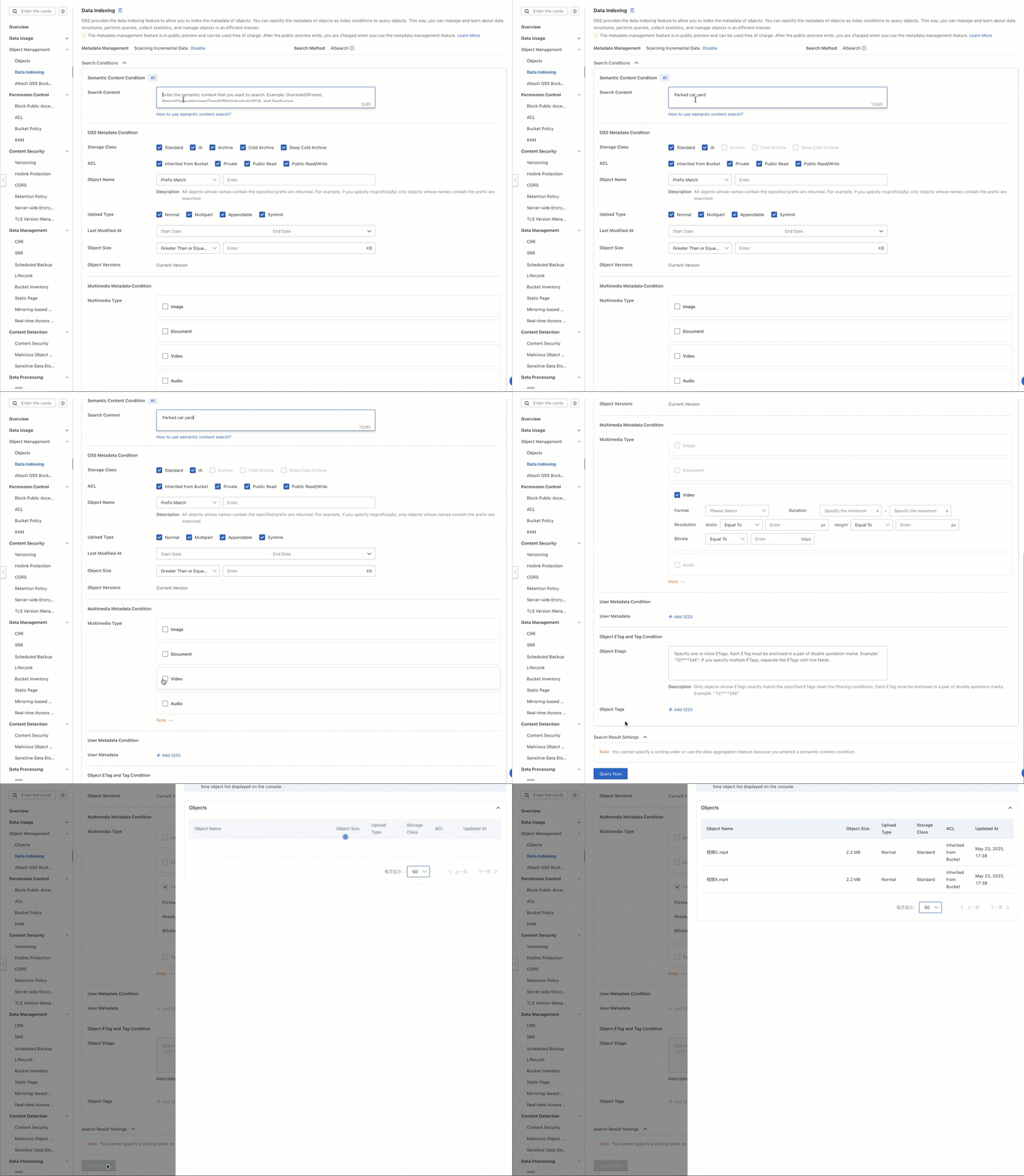
Insira uma frase descritiva, como a yard with a parked car, e o sistema retornará os vídeos relevantes correspondentes à descrição.

  1. Na página Buckets, clique em no nome do seu bucket.

  2. Na página Objects, verifique se os vídeos foram enviados.

  3. No painel de navegação à esquerda, escolha Object Management > Data Indexing.

  4. Na página Data Indexing, insira a yard with a parked car na caixa de pesquisa. Na seção Multimedia Type, marque a caixa de seleção video.

  5. (Opcional) Na seção Object Tagging, defina a chave como camera e o valor como camera-a. O sistema retornará apenas vídeos com a tag camera=camera-a, filtrando todos os demais.

  6. Clique em Query Now.

  7. Copie o caminho do arquivo nos resultados da consulta. Retorne à página Objects, cole o caminho na caixa de pesquisa e busque. Agora você poderá visualizar o vídeo correspondente à descrição.

2025-05-23_16-41-02 (1)

Entrada em produção

Ao integrar essa capacidade a um ambiente de produção, considere os seguintes aspectos:

Ingestão de dados de produção

Em cenários de negócios típicos, dispositivos de monitoramento, como IPCs, geram continuamente grandes volumes de dados de vídeo. Recomendamos integrar o SDK do OSS para enviar segmentos de vídeo gravados ao bucket especificado em tempo real. Isso garante a estabilidade e a pontualidade dos envios, melhorando a disponibilidade geral e a capacidade de processamento em tempo real do sistema.

O exemplo a seguir demonstra como usar o Upload Manager do SDK Python do OSS para enviar um arquivo de vídeo:

Exemplo de código

import argparse
import alibabacloud_oss_v2 as oss
from alibabacloud_oss_v2.models import ListObjectsRequest, PutObjectTaggingRequest, Tagging, TagSet, Tag, PutObjectRequest
import os

def upload_video(client, bucket, video_config):
    """Upload a video."""
    try:
        # Check if the file exists.
        if not os.path.exists(video_config['path']):
            print(f'File does not exist: {video_config["path"]}')
            return False

        # Create an uploader object.
        uploader = client.uploader()

        # Execute the upload request - pass the filepath parameter correctly.
        result = uploader.upload_file(
            filepath=video_config['path'],  # Add the filepath parameter.
            request=PutObjectRequest(
                bucket=bucket,
                key=video_config['key']
            )
        )

        print(f'Successfully uploaded {video_config["key"]}:')
        print(f'status code: {result.status_code},'
              f' request id: {result.request_id}')
        return True
    except Exception as e:
        print(f'Failed to upload {video_config["key"]}: {str(e)}')
        return False

def main():
    # OSS configuration.
    args = argparse.Namespace(
        region='cn-beijing',
        bucket='ipc-videos-oss-metaquery-demo',
        endpoint='https://oss-cn-beijing.aliyuncs.com'
    )

    # Configure the OSS client.
    credentials_provider = oss.credentials.EnvironmentVariableCredentialsProvider()
    cfg = oss.config.load_default()
    cfg.credentials_provider = credentials_provider
    cfg.region = args.region
    cfg.endpoint = args.endpoint
    client = oss.Client(cfg)

    # Video file configurations, including different tags.
    videos = [
        {
            'path': '<Your-Path>/videoa.mp4',
            'key': 'videoa.mp4'
        },
        {
            'path': '<Your-Path>/videob.mp4',
            'key': 'videob.mp4'
        },
        {
            'path': '<Your-Path>/videoc.mp4',
            'key': 'videoc.mp4'
        }
    ]

    # Upload all videos.
    for video in videos:
        print(f"\nStart uploading video: {video['key']}")
        upload_video(
            client=client,
            bucket=args.bucket,
            video_config=video
        )

if __name__ == "__main__":
    main()

Integração da capacidade de busca

Em ambientes de produção, recomenda-se integrar o recurso de busca ao seu serviço de backend. Use o SDK do OSS para realizar chamadas automatizadas, evitando operações manuais no console.

O exemplo de código abaixo mostra como construir uma solicitação XML compatível com a especificação OSS MetaQuery para recuperar resultados de busca:

Exemplo de código

# -*- coding: utf-8 -*-
import argparse
import alibabacloud_oss_v2 as oss
# Parse the XML response.
import xml.etree.ElementTree as ET
import json 
from datetime import datetime 

def get_search_conditions():
    """Get the user's multi-conditional input."""
    print("Enter a semantic description (example: a yard with a parked car)")
    query = input("> Semantic keywords: ").strip()
    while not query:
        print("Semantic keywords cannot be empty!")
        query = input("> Semantic keywords: ").strip()
    return query  

def build_metaquery_xml(query):
    """Build a MetaQuery XML that complies with the OSS specification."""
    xml_parts = [f'<Query>{query}</Query>']
    # Add the MediaTypes tag. Here, it is hard-coded as video.
    xml_parts.append('<MediaTypes><MediaType>video</MediaType></MediaTypes>')

    meta_query_xml = f'''<MetaQuery>
    {"".join(xml_parts)}
</MetaQuery>'''
    return meta_query_xml  # Encode into a UTF-8 byte stream.

def format_result(key, pre_url):
    """Format a single search result."""
    return f""" File path: {key}
 File URL: {pre_url}
-----------------------"""

def semantic_search():
    # Directly assign command-line arguments.
    args = argparse.Namespace(
        region = 'cn-beijing',  # Replace with your region.
        bucket = 'ipc-videos-oss-metaquery-demo',  # Replace with your bucket name.
        endpoint = 'https://oss-cn-beijing.aliyuncs.com',  # Replace with your endpoint. You can leave it empty or delete it if not needed.
    )

    # Initialize the OSS client.
    credentials = oss.credentials.EnvironmentVariableCredentialsProvider()
    cfg = oss.config.load_default()
    cfg.credentials_provider = credentials
    cfg.region = args.region
    if args.endpoint:
        cfg.endpoint = args.endpoint
    client = oss.Client(cfg)

    # Get user input.
    query = get_search_conditions()  # Get only the query.
    # Build the request.
    try:
        # Construct the request body (XML data).
        data_str = build_metaquery_xml(query)

        # Define the operation input.
        req = oss.OperationInput(
            op_name='DoMetaQuery',  # Custom action name.
            method='POST',            # HTTP method.
            parameters={              # Query parameters.
                'metaQuery': '',
                'mode': 'semantic',
                'comp': 'query',
            },
            headers=None,             # Custom request header (optional).
            body=data_str.encode("utf-8"),  # Request body (encoded as a UTF-8 byte stream).
            bucket=args.bucket,       # Destination bucket name.
        )

        # Call the generic interface to execute the operation.
        resp = client.invoke_operation(req)

    except oss.exceptions.ServiceError as e:
        print(f" Server-side error: {e.message}")
        return
    
    root = ET.fromstring(resp.http_response.content.decode('utf-8'))
     # Find all File elements.
    files = root.findall('.//File')
    
    print(f"\n Found {len(files)} matching results:")
    

    for i, file in enumerate(files, 1):
        print(f"\nFile {i}:")

        # Extract and print various properties.
        uri_element = file.find('URI')
        uri = uri_element.text if uri_element is not None else 'N/A'
        print(f"  URI: {uri}")

        key_element = file.find('Filename')
        key = key_element.text if key_element is not None else 'N/A'
        print(f"  File name: {key}")

        size_element = file.find('Size')
        size = size_element.text if size_element is not None else 'N/A'
        print(f"  Size: {size}")

        modified_time_element = file.find('FileModifiedTime')
        modified_time = modified_time_element.text if modified_time_element is not None else 'N/A'
        print(f"  Last modified: {modified_time}")

        content_type_element = file.find('ContentType')
        content_type = content_type_element.text if content_type_element is not None else 'N/A'
        print(f"  ContentType: {content_type}")

        media_type_element = file.find('MediaType')
        media_type = media_type_element.text if media_type_element is not None else 'N/A'
        print(f"  MediaType: {media_type}")

        # You can add extraction and printing for more properties as needed, such as ImageHeight, ImageWidth, OSSStorageClass, etc.
        # image_height_element = file.find('ImageHeight')
        # image_height = image_height_element.text if image_height_element is not None else 'N/A'
        # print(f"  ImageHeight: {image_height}")

        # Generate a signed URL (if needed).
        if key != 'N/A': # Generate a URL only if the file name exists.
             try:
                pre_url = client.presign(
                    oss.GetObjectRequest(
                        bucket=args.bucket,  # Specify the bucket name.
                        key=key,        # Specify the object key.
                    )
                )
                print(f"  File URL (signed URL): {pre_url.url}")
             except Exception as e:
                 print(f"  Failed to generate signed URL: {e}")

        print("-" * 20) # Separator.
        
if __name__ == "__main__":
    semantic_search()

Após executar o programa, insira uma frase descritiva (como a yard with a parked car) para consultar. O sistema retornará resultados de busca correspondentes à descrição a partir do índice de dados. Visualize os detalhes do vídeo pela URL.

Found 1 matching result:

File 1:
  URI: oss://ipc-videos-oss-metaquery-demo/videoA.mp4
  File name: videoA.mp4
  Size: 2311252
  Last modified: 2025-05-23T17:38:10+08:00
  ContentType: video/mp4
  MediaType: video
  File URL (signed URL): https://ipc-videos-oss-metaquery-demo.oss-cn-beijing.aliyuncs.com/%E8%A7%86%E9%A2%91A.mp4?x-oss-signature-version=OSS4-HMAC-SHA256&x-oss-date=20250523T094511Z&x-oss-expires=900&x-oss-credential=LTAI********************%2F20250523%2Fcn-beijing%2Foss%2Faliyun_v4_request&x-oss-signature=0bf38092c42a179ff0e8334c8bea3fd92f5a78599038e816e2ed3e02755542af
--------------------

Configure a filtragem por tags

Ao lidar com grandes volumes de dados de vídeo, gerenciar arquivos apenas por caminho costuma ser ineficiente para busca e categorização. Recomendamos usar o recurso de marcação de objetos do OSS. Adicione tags de chave-valor aos arquivos para filtrar e categorizar dados rapidamente conforme suas necessidades de negócio, como filtragem por ID da câmera ou região geográfica.

Suponha que você queira analisar os seguintes três arquivos de vídeo no sistema: videoA.mp4, videoB.mp4 e videoC.mp4.

videoA.mp4

videoB.mp4

videoC.mp4

example

example (1)

example

Vídeo do quintal, marcado como gravado pela camera-a

Vídeo de vendas, marcado como gravado pela camera-b

Vídeo do quintal, com conteúdo similar ao vídeo A, marcado como gravado pela camera-c

As tags podem ser definidas durante o envio dos arquivos ou gerenciadas dinamicamente após o upload, atendendo aos requisitos de diferentes cenários de negócios.

Defina tags durante o envio

É possível definir tags enquanto envia arquivos de vídeo, combinando as operações de upload e gerenciamento de tags. Isso aumenta a eficiência na gestão de dados.

O exemplo a seguir mostra como usar o Upload Manager do SDK Python do OSS para enviar um arquivo de vídeo e definir tags simultaneamente:

Exemplo de código

import argparse
import alibabacloud_oss_v2 as oss
from alibabacloud_oss_v2.models import PutObjectRequest
import os

def upload_video_with_tags(client, bucket, video_config):
    """Upload a video with tags."""
    try:
        # Check if the file exists.
        if not os.path.exists(video_config['path']):
            print(f'File does not exist: {video_config["path"]}')
            return False

        # Create an uploader object.
        uploader = client.uploader()

        # Use the tagging string directly (encoding is not required if both key and value are simple strings).
        tagging_str = f"camera={video_config['camera_tag']}"

        # Execute the upload request - include tags directly.
        result = uploader.upload_file(
            filepath=video_config['path'],
            request=PutObjectRequest(
                bucket=bucket,
                key=video_config['key'],
                tagging=tagging_str
            )
        )

        print(f'Successfully uploaded {video_config["key"]}:')
        print(f'status code: {result.status_code},'
              f' request id: {result.request_id}')
        print(f'Tags added: {tagging_str}')
        return True
    except Exception as e:
        print(f'Failed to upload {video_config["key"]}: {str(e)}')
        return False

def main():
    # OSS configuration.
    args = argparse.Namespace(
        region='cn-beijing',
        bucket='ipc-videos-oss-metaquery-demo',
        endpoint='https://oss-cn-beijing.aliyuncs.com'
    )

    # Configure the OSS client.
    credentials_provider = oss.credentials.EnvironmentVariableCredentialsProvider()
    cfg = oss.config.load_default()
    cfg.credentials_provider = credentials_provider
    cfg.region = args.region
    cfg.endpoint = args.endpoint
    client = oss.Client(cfg)

    # Video file configurations, including different tags.
    videos = [
        {
            'path': '<Your-Path>/videoa.mp4',
            'key': 'videoa.mp4',
            'camera_tag': 'camera-a'
        },
        {
            'path': '<Your-Path>/videob.mp4',
            'key': 'videob.mp4',
            'camera_tag': 'camera-b'
        },
        {
            'path': '<Your-Path>/videoc.mp4',
            'key': 'videoc.mp4',
            'camera_tag': 'camera-c'
        }
    ]

    # Upload all videos and add tags.
    for video in videos:
        print(f"\nStart uploading video: {video['key']}")
        upload_video_with_tags(
            client=client,
            bucket=args.bucket,
            video_config=video
        )

if __name__ == "__main__":
    main()
Gerencie tags após o envio

Caso o arquivo já tenha sido enviado, adicione ou modifique suas tags a qualquer momento. Isso garante a manutenção dinâmica e a precisão das tags de dados.

O exemplo abaixo demonstra como chamar a interface relevante para adicionar tags usando o SDK Python:

Exemplo de código

import argparse
import alibabacloud_oss_v2 as oss
from alibabacloud_oss_v2.models import GetObjectTaggingRequest, PutObjectTaggingRequest, Tagging, TagSet, Tag

def apply_tags_to_frame(client, bucket, frame_key, tags):
    """Add tags to a video."""
    try:
        # Build the tagging object.
        tagging = Tagging(
            version=1,
            tag_set=TagSet(tags=tags)
        )
        
        # Create a request to update tags.
        put_tag_request = PutObjectTaggingRequest(
            bucket=bucket,
            key=frame_key,
            tagging=tagging
        )
        
        # Update object tags.
        result = client.put_object_tagging(put_tag_request)
        
        # Convert tags to a string for printing.
        tags_str = '&'.join([f"{tag.key}={tag.value}" for tag in tags])
        print(f"Successfully added tags to {frame_key}: {tags_str}")
        return True
    except Exception as e:
        print(f"Failed to add tags: {str(e)}")
        return False

def frame_tags():
    # OSS configuration.
    args = argparse.Namespace(
        region='cn-beijing',   
        frame_bucket='ipc-videos-oss-metaquery-demo',     
        endpoint='https://oss-cn-beijing.aliyuncs.com'
    )
    
    # Configure the OSS client.
    credentials_provider = oss.credentials.EnvironmentVariableCredentialsProvider()
    cfg = oss.config.load_default()
    cfg.credentials_provider = credentials_provider
    cfg.region = args.region
    cfg.endpoint = args.endpoint
    client = oss.Client(cfg)

    # Configure your video names.
    videos = [
        'videoa.mp4',    
        'videob.mp4',
        'videoc.mp4'
    ]

    # Process each video.
    for video_filename in videos:
        print(f"\nStart processing tags for video {video_filename}") # Print the originally extracted file name.

        # Remove the file name extension, for example, 'videoa.mp4' -> 'videoa'.
        # The sample code extracts the last character of the video file name as the camera identifier. This is for reference only. You can add tags based on your actual business requirements.
        video_name_base = video_filename.split('.')[0] if '.' in video_filename else video_filename
        tags = [
            Tag(key='camera', value=f'camera-{video_name_base[-1].lower()}' if video_name_base else 'camera-unknown'),
            # Tag(key='category', value='video_monitoring')       # Add actual business category information.
        ]

        # Add tags to the video.
        apply_tags_to_frame(client, args.frame_bucket, video_filename, tags)

        print(f"Finished processing tags for video {video_filename}\n") # Print the originally extracted file name.

if __name__ == "__main__":
    frame_tags()
Combine filtragem por tags com busca

O exemplo a seguir ilustra como usar o SDK Python do OSS para iniciar uma solicitação de consulta que combina compreensão semântica com filtragem por tags:

Exemplo de código

# -*- coding: utf-8 -*-
import argparse
import alibabacloud_oss_v2 as oss
# Parse the XML response.
import xml.etree.ElementTree as ET
import json
from datetime import datetime
# --- New import ---
from alibabacloud_oss_v2.models import GetObjectTaggingRequest
# --- End of new import ---

def get_inputs():
    """Get the user's semantic query (required) and filter conditions (optional)."""
    # 1. Get the required semantic query.
    print(" Enter a semantic description (example: a yard with a parked car)")
    query = input("> Semantic keywords: ").strip()
    while not query:
        print(" Semantic keywords cannot be empty!")
        query = input("> Semantic keywords: ").strip()

    conditions = [] # Initialize the list of filter conditions.
    target_tag = None # --- Used to store the target tag ---

    # 2. Get the optional tag filter.
    print("\n (Optional) Enter a tag filter condition (will be used for client-side filtering, example: camera=camera-a, press Enter to skip)") 
    tag_input = input("> Tag (format key=value): ").strip()
    if tag_input:
        if '=' in tag_input:
            # conditions.append({
            #     'field': 'Tags',
            #     'value': tag_input,
            #     'op': 'eq'
            # })
            target_tag = tag_input
            print(f" Info: The tag '{target_tag}' will be used for client-side filtering after results are retrieved.")
        else:
             print(" Incorrect tag format. Ignored. Please use the 'key=value' format.")

    # --- Return target_tag ---
    return query, conditions, target_tag

def build_metaquery_xml(query, conditions):
    """Build a MetaQuery XML that complies with the OSS specification (includes semantic query and optional filters)."""
    # Always include the semantic query part.
    xml_parts = [f'<Query>{query}</Query>']
    
    # Add media type restriction.
    xml_parts.append('<MediaTypes><MediaType>video</MediaType></MediaTypes>')
    
    # Add optional filter conditions - in semantic mode, only some fields are supported (such as Filename here).
    for cond in conditions:
        # In semantic mode, skip building SimpleQuery for the Tags field (although we no longer add Tags to conditions, this is kept just in case).
        if cond['field'] == 'Tags':
            continue

        json_query = json.dumps({
            "Field": cond['field'],
            "Value": cond['value'],
            "Operation": cond['op']
        }, ensure_ascii=False)
        xml_parts.append(f'<SimpleQuery>{json_query}</SimpleQuery>')

    # Combine into a complete MetaQuery XML.
    meta_query_xml = f'''<MetaQuery>
    {"".join(xml_parts)}
</MetaQuery>'''
    return meta_query_xml

def format_result(key, pre_url):
    """Format a single search result."""
    return f""" File URL: {pre_url}
 File path: {key}
-----------------------"""

def perform_search():
    # Directly assign command-line arguments.
    args = argparse.Namespace(
        region='cn-beijing',  # Replace with your region.
        bucket='ipc-videos-oss-metaquery-demo',  # Replace with your bucket name.
        endpoint='https://oss-cn-beijing.aliyuncs.com',  # Replace with your endpoint.
    )

    # Initialize the OSS client.
    credentials = oss.credentials.EnvironmentVariableCredentialsProvider()
    cfg = oss.config.load_default()
    cfg.credentials_provider = credentials
    cfg.region = args.region
    if args.endpoint:
        cfg.endpoint = args.endpoint
    client = oss.Client(cfg)

    # Get user input (semantic query + optional conditions + target tag).
    query, conditions, target_tag = get_inputs()

    # Build the request.
    try:
        # Construct the request body (XML data).
        # --- Pass only conditions (without Tags) ---
        data_str = build_metaquery_xml(query, conditions)

        # Define the operation input.
        req = oss.OperationInput(
            op_name='DoMetaQuery',
            method='POST',
            parameters={
                'metaQuery': '',
                'mode': 'semantic', # <-- Re-add semantic mode.
                'comp': 'query',
            },
            headers=None,
            body=data_str.encode("utf-8"),
            bucket=args.bucket,
        )

        # Call the generic interface to execute the operation.
        print("\n Sending DoMetaQuery request...")
        resp = client.invoke_operation(req)
        print(f"\n Request successful, HTTP status code: {resp.http_response.status_code}")
    except oss.exceptions.ServiceError as e:
        print(f" Server-side error (ServiceError): {e.message}")
        print(f"   - HTTP Status Code: {e.status_code}")
        print(f"   - Error Code: {e.error_code}")
        print(f"   - Request ID: {e.request_id}")
        return
    except oss.exceptions.ClientError as e: # Add catch for client errors.
        print(f" Client or network error (ClientError): {e.message}")
        return
    except Exception as e: # Catch other possible exceptions.
        print(f" Unknown error: {e}")
        import traceback
        traceback.print_exc() # Print the full traceback.
        return

    # Parse and process the results...
    final_results_count = 0 # --- New: Counter to tally the final qualifying results ---
    try:
        root = ET.fromstring(resp.http_response.content.decode('utf-8'))
        # Find all File elements.
        files = root.findall('.//File')

        print(f"\n Retrieved {len(files)} initial matches from OSS. Starting client-side tag filtering...")

        if not files:
            # Check for NextContinuationToken, paging may be required.
            next_token_elem = root.find('.//NextContinuationToken')
            if next_token_elem is not None and next_token_elem.text:
                print(" Note: There may be more results. The current implementation does not handle paging.")
            print("\n No initial matches found.")
            return # Return early if no files are found.

        for i, file in enumerate(files, 1):
            # Get the file name.
            key_element = file.find('Filename')
            if key_element is None:
                print(f" Warning: The {i}-th initial result is missing the Filename field. Skipped.")
                continue
            key = key_element.text

            # --- Client-side tag filtering ---
            if target_tag:
                try:
                    tagging_req = GetObjectTaggingRequest(bucket=args.bucket, key=key)
                    tagging_resp = client.get_object_tagging(tagging_req)
                    # Check if the returned tag set contains the target tag.
                    tag_found = False
                    target_k, target_v = target_tag.split('=', 1)

                    if tagging_resp.tag_set and tagging_resp.tag_set.tags: # Use .tags
                        for tag in tagging_resp.tag_set.tags: # Use .tags

                            if tag.key == target_k and tag.value == target_v:
                                tag_found = True
                                break
                    if not tag_found:
                        continue # Tag does not match, skip this file.
                except oss.exceptions.ServiceError as tag_err:
                     if tag_err.status_code == 404 and tag_err.error_code == 'NoSuchTagSet':
                         continue
                     else:
                        print(f" Warning: Error getting tags for file '{key}': {tag_err.error_code} - {tag_err.message}. Skipped.")
                        continue
                except Exception as tag_e:
                    print(f" Warning: Unknown error occurred while getting or processing tags for file '{key}': {tag_e}. Skipped.")
                    # --- Add traceback for debugging ---
                    import traceback
                    traceback.print_exc()
                    # --- End of addition ---
                    continue
            # --- End of client-side tag filtering ---

            # --- If it passes the tag filter (or if no tag filter is set), process and print the result ---
            final_results_count += 1 # Increment the final result counter.
            print(f"\n[{final_results_count}] File '{key}' matches all conditions:") # Print the final result number.

            # Generate a signed URL.
            try:
                pre_url = client.presign(
                    oss.GetObjectRequest(
                        bucket=args.bucket,
                        key=key,
                    )
                )
                print(format_result(key, pre_url.url))
            except Exception as presign_e:
                print(f" Warning: Error generating signed URL for file '{key}': {presign_e}")
                print(format_result(key, "[Could not generate URL]"))
        # --- Print final statistics after the loop ---
        print(f"\n Client-side filtering complete. Found {final_results_count} final matching results.")

    except ET.ParseError as xml_e:
        print(f" Error: Failed to parse OSS response XML - {xml_e}")
    except Exception as parse_e:
        print(f" Error: An unexpected error occurred while processing results - {parse_e}")

if __name__ == "__main__":
    perform_search()

Após executar o programa, filtre os vídeos que contêm um quintal com um carro estacionado:

  1. No campo descritivo, insira a seguinte palavra-chave de busca: a yard with a parked car

  2. Defina a seguinte condição de filtro por tag: camera = camera-a

Neste exemplo, tanto o vídeo A quanto o vídeo C contêm uma cena correspondente à descrição a yard with a parked car. No entanto, como foi definido um filtro de tag para retornar apenas resultados de vídeos marcados com camera-a, o resultado final da busca inclui apenas o vídeo A.

Sending DoMetaQuery request...

Request successful, HTTP status code: 200

Retrieved 2 initial matches from OSS. Starting client-side tag filtering...

[1] File 'videoA.mp4' matches all conditions:
 File URL: https://ipc-videos-oss-metaquery-demo.oss-cn-beijing.aliyuncs.com/%E8%A7%86%E9%A2%91A.mp4?x-oss-signature-version=OSS4-HMAC-SHA256&x-oss-date=20250526T054908Z&x-oss-expires=900&x-oss-credential=LTAI********************%2Fcn-beijing%2Foss%2Faliyun_v4_request&x-oss-signature=01bbf29790763d8e0f177d4cb0469cb00ae1c69d565219edb3866f75110b37ab
 File path: videoA.mp4
-----------------------

 Client-side filtering complete. Found 1 final matching result.