Para buckets com milhões ou bilhões de objetos, listar objetos com a operação de API ListObjects é ineficiente e oneroso. O recurso de inventário de bucket gerencia objetos nessa escala ao escanear o bucket de forma assíncrona e periódica, gerando arquivos de inventário com os metadados de objetos que você especificar, como tamanho do objeto e classe de armazenamento.
Casos de uso
O Object Storage Service (OSS) oferece inventários completos e inventários incrementais. Configure um ou ambos os tipos de inventário e entregue os arquivos gerados a um bucket de destino especificado. Escolha o tipo de inventário com base na necessidade de rastrear alterações nos seus objetos:
Análise e estatísticas de dados pontuais — Para analisar apenas objetos históricos, configure uma regra de inventário completo para gerar uma única lista de metadados de objetos destinada à análise de dados offline.
Análise e estatísticas de dados contínuas — Para analisar objetos históricos e monitorar alterações subsequentes, combine inventários completos e incrementais para construir uma tabela de metadados unificada. Por exemplo, grave todos os metadados existentes e incrementais em sua própria tabela e use seu próprio cluster Spark para recuperar, consultar e analisar os metadados.
Como funciona
Após criar uma regra de inventário, o OSS executa automaticamente a tarefa de inventário de forma periódica. A tarefa é executada de maneira assíncrona e não afeta o acesso normal ao bucket.
-
Inventário completo — Um snapshot de todos os objetos existentes em um bucket em um momento específico. O OSS gera inventários completos periodicamente — diário, semanal ou mensal — com uma execução por ciclo. O fluxo de trabalho é o seguinte:
Obter permissões: o OSS assume uma função RAM pré-autorizada para escanear o bucket de source e gravar os relatórios de inventário no bucket de destino.
Escanear objetos: o OSS escaneia os objetos no bucket de source que correspondem aos critérios de filtro da regra de inventário, como prefixo do objeto, status de versão, hora de criação ou tamanho.
Gerar relatório de inventário: o OSS agrega os resultados do escaneamento em um relatório de inventário e o grava no bucket de destino. O relatório pode estar no formato CSV (comprimido com Gzip) ou no formato Parquet. O formato Parquet é compatível apenas na região UK (London).
-
Inventário incremental — Registra os metadados de objetos criados, atualizados ou excluídos em um período especificado. Os inventários incrementais capturam todos os eventos de alteração de objetos, incluindo criações, atualizações de metadados e exclusões, e geralmente são gerados a cada 10 minutos. O fluxo de trabalho é o seguinte:
Obter permissões: o OSS assume uma função RAM pré-autorizada para escanear os logs do bucket de source e gravar os relatórios de inventário no bucket de destino.
Escanear objetos: o OSS escaneia os registros nos logs incrementais que correspondem aos critérios de filtro da regra de inventário, como o prefixo do objeto.
Gerar relatório de inventário: o OSS usa particionamento no backend para agregar os resultados do escaneamento e grava o relatório de inventário no bucket de destino no formato CSV.
Pré-requisitos
Antes de configurar o inventário de um bucket, certifique-se de que os seguintes requisitos são atendidos:
O bucket de source possui o atributo regional. O recurso de inventário de bucket é compatível apenas com buckets que tenham atributo regional.
Para usar o recurso de inventário incremental, entre em contato com o suporte técnico para solicitar a habilitação.
Uma função RAM deve estar disponível para o service de inventário ler do bucket de source e gravar no bucket de destino. Use a função padrão
AliyunOSSRolecriada pelo console ou crie uma função dedicada com o menor privilégio possível. Para obter instruções, consulte Create and authorize a service role.Se a política do bucket de destino contiver instruções Deny que restrinjam o acesso a endereços IP ou VPCs específicos, permita gravações de inventário pela intranet clássica do OSS. Para obter instruções, consulte Allow inventory writes to a network-restricted destination bucket.
Para criptografar relatórios de inventário com KMS, use uma chave KMS gerenciada pelo OSS ou crie uma chave KMS na mesma região do bucket de destino.
Para exportar os campos Last Accessed Time e Last Accessed Timestamp, ative o Access Tracking no bucket de source.
Crie e autorize uma função de service
O service de inventário do OSS precisa assumir uma função RAM para obter permissões de leitura do bucket de source e de gravação no bucket de destino. Para garantir a segurança da conta, siga o princípio do menor privilégio e crie uma função de service dedicada para o recurso de inventário.
Ao configurar rapidamente um inventário pelo console, o sistema solicita a criação automática de uma função chamada AliyunOSSRole. Você pode usar essa função padrão sem criar uma função de service. No entanto, essa função concede permissões completas de gerenciamento a todos os buckets da sua conta Alibaba Cloud. Em ambientes de produção, não utilize AliyunOSSRole. Siga as etapas desta seção para criar manualmente uma função com menor privilégio.
(Opcional) Conceda a um usuário RAM as permissões para configurar inventários
Uma conta Alibaba Cloud possui todas as permissões por padrão. Se você usa uma conta Alibaba Cloud, ignore esta etapa. Esta etapa autoriza um usuário RAM, como um administrador de operações, a configurar regras de inventário. Ela não concede permissões ao próprio service de inventário. Como prática recomendada de segurança, o proprietário da conta Alibaba Cloud ou um administrador com permissões elevadas deve criar antecipadamente a função RAM necessária para o service de inventário. Isso permite que um usuário RAM comum configure o inventário usando essa função, sem precisar das permissões para criá-la.
Para conceder a um usuário RAM permissões para criar e gerenciar regras de inventário, grant the user uma política personalizada com as seguintes permissões. A permissão oss:ListBuckets na política a seguir é necessária apenas para operações no console. Essa permissão não é exigida ao usar ferramentas como SDKs ou ossutil.
{
    "Statement": [
        {
            "Effect": "Allow",
            "Action": [
                "oss:PutBucketInventory",
                "oss:GetBucketInventory",
                "oss:DeleteBucketInventory",
                "oss:ListBuckets",
                "ram:CreateRole",
                "ram:AttachPolicyToRole",
                "ram:GetRole",
                "ram:ListPoliciesForRole"
            ],
            "Resource": "*"
        }
    ],
    "Version": "1"
}Se o usuário RAM atual já tiver a política de sistema AliyunOSSFullAccess, é necessário conceder apenas as seguintes permissões para gerenciamento de funções:
{
    "Statement": [
        {
            "Effect": "Allow",
            "Action": [
                "ram:CreateRole",
                "ram:AttachPolicyToRole",
                "ram:GetRole",
                "ram:ListPoliciesForRole"
            ],
            "Resource": "*"
        }
    ],
    "Version": "1"
}
Crie a função de service
Crie uma função RAM. Acesse a página Create RAM Role. Em Select Trusted Entity, selecione Alibaba Cloud Service. Em Trusted Service, selecione Object Storage Service.
-
Conceda à função RAM as permissões para gravar no bucket de destino. Na página Create Policy, clique em na guia Script. Cole a política a seguir no editor de políticas e substitua
dest-bucketpelo nome do seu bucket de destino.{ "Version": "1", "Statement": [ { "Effect": "Allow", "Action": "oss:PutObject", "Resource": [ "acs:oss:::dest-bucket/*" ] } ] }
AliyunKMSCryptoUserAccesspermission or more granular KMS permissions. Vincule a política à função RAM. Na página Permissions, clique em Add Permissions. Em Principal, selecione a função RAM que você criou. Em Policy, selecione a política recém-criada e clique em OK.
Registre o ARN da função. Na página Roles, localize a função RAM criada. Acesse a página Basic Information e copie o ARN da função para uso ao criar a regra de inventário. O ARN está no formato
acs:ram::{source-account-id}:role/{role-name}.
Verifique se o service confiável da função RAM é Object Storage Service e se o recurso da política abrange o caminho do bucket de destino. Caso contrário, o service de inventário não conseguirá gravar os relatórios no bucket de destino.
Permita gravações de inventário em um bucket de destino com restrição de rede
Esta seção se aplica apenas quando a política do bucket de destino contém instruções Deny que restringem o acesso a endereços IP ou VPCs específicos. Se não existirem tais instruções Deny, ignore esta seção.
O bucket de destino deve permitir acesso pela intranet clássica do OSS para que o service de inventário possa gravar os arquivos de inventário exportados.
Caso seja necessário restringir o bucket de destino para aceitar acesso apenas de endereços IP ou VPCs específicos por razões de segurança, adicione a seguinte condição ao elemento Condition de cada instrução Deny na política do bucket de destino, permitindo assim que o service de inventário grave no bucket pela rede clássica.
"StringNotEquals": {
    "oss:ClassicIntranet": [
        "true"
    ]
}
Inventário completo
O inventário completo realiza varreduras periódicas e exporta uma lista completa de todos os objetos em um bucket ou sob um prefixo especificado. Observe os seguintes pontos:
Snapshot do relatório — O relatório de inventário fornece um snapshot dos objetos no momento em que a tarefa de varredura é iniciada. Alterações nos objetos, como adições ou exclusões ocorridas durante a varredura, podem não constar no relatório atual.
Agendamento do relatório — O primeiro relatório de inventário é gerado imediatamente após a configuração da regra. Caso você programe exportações mensais em um dia específico do mês, a tarefa de inventário será iniciada nesse dia. Os relatórios subsequentes são executados em lotes nas primeiras horas da manhã (UTC+8), diariamente, semanalmente ou mensalmente, conforme a configuração. A latência de exportação depende do número de objetos e da fila de tarefas.
Configurar uma regra de inventário
Console
Faça login no OSS console.
Acesse o bucket de origem para o qual deseja gerar um inventário. No painel de navegação à esquerda, escolha Data Management > Bucket Inventory.
Na página Bucket Inventory, clique em Create Inventory.
-
No painel Create Inventory, configure os seguintes parâmetros.
Parameter Description Status Selecione Start para ativar a tarefa de inventário. Rule Name O nome da tarefa de inventário. O nome pode conter apenas letras minúsculas, dígitos e hifens (-), não podendo começar nem terminar com um hífen (-). Inventory Report Destination O destino dos relatórios de inventário. O bucket de destino deve estar na mesma região e pertencer à mesma conta que o bucket de origem. Para salvar o relatório no caminho exampledir1/do bucket examplebucket, insiraexampledir1/. Se o caminho especificado não existir no bucket, o OSS o criará automaticamente. Caso esse campo seja deixado em branco, o relatório será salvo no diretório raiz. Se o service OSS-HDFS estiver ativado para um bucket, não defina o diretório do relatório de inventário como.dlsdata/, pois isso evita interferências no service e contaminação de dados.Inventory file scan scope O escopo dos objetos a serem varridos. Scan entire bucket: varre todos os objetos do bucket. Object Prefix: varre apenas os objetos que correspondem ao prefixo especificado, como exampledir1/. Encryption Method O método de criptografia do relatório de inventário. None: sem criptografia. AES256: criptografa o relatório usando AES256. KMS: criptografa o arquivo de inventário usando uma chave KMS. É possível usar uma chave KMS gerenciada pelo OSS ou create a KMS key na mesma região do bucket de destino no KMS console. O uso do recurso de chave KMS gera uma pequena taxa pelas chamadas à API de chave KMS. Para mais informações sobre preços, consulte . Frequency A frequência com que o OSS gera relatórios de inventário. As opções disponíveis são Weekly, Daily, Monthly e One-time Export. Para buckets com mais de 10 bilhões de objetos, selecione Weekly para reduzir custos e a sobrecarga de varredura. O agendamento Monthly não está disponível em todas as regiões. Para mais informações, consulte Quotas and limitations. {mode, select, NOT_SPECIFY {Unspecified Date} SPECIFY {Specified Date} other{--}} Quando o ciclo de exportação for definido como Monthly, é possível especificar o dia do mês em que a tarefa de inventário será iniciada. O valor deve ser um número inteiro de 1 a 31. Ao selecionar {mode, select, NOT_SPECIFY {Unspecified Date} SPECIFY {Specified Date} other{--}}, o OSS exporta o inventário em um intervalo fixo de 30 dias por padrão. A primeira varredura começa no dia em que a regra é configurada, e o inventário é exportado a cada 30 dias a partir dessa data. Se você especificar um dia de 1 a 28, a tarefa de inventário será iniciada nesse dia de cada mês. Se especificar um dia de 29 a 31, a tarefa será iniciada nesse dia, caso ele exista no mês corrente; se não existir, a tarefa começará no último dia do mês. Por exemplo, ao especificar o dia 31, a tarefa de inventário de abril será iniciada no dia 30. A data especificada indica o início da tarefa de inventário, não a entrega do relatório. A geração do relatório é uma tarefa assíncrona, e o tempo de conclusão depende do número de objetos no bucket. A entrega ocorre após a data especificada. Inventory format O formato do arquivo do relatório de inventário. As opções disponíveis são CSV e Parquet. O formato Parquet é suportado atualmente apenas na região UK (London). Optional Fields As informações dos objetos a incluir no relatório. System Metadata: object size, storage class, Last Modified Date, ETag, TransitionTime, multipart upload status, Encryption Status, Object ACL, Object Type, CRC64, Last Accessed Time e Last Accessed Timestamp. Os campos Last Accessed Time e Last Accessed Timestamp só podem ser exportados quando Access Tracking está ativado para o bucket. Se o Access Tracking estiver desativado, os valores desses dois campos deixam de ser significativos e geralmente aparecem como null. Custom Metadata: Number of Tags. Advanced Filtering Para filtrar os arquivos exportados com base em condições como tamanho do arquivo ou storage class, ative o switch Advanced Filtering. As opções de filtro são suportadas apenas nas regiões China (Qingdao), China (Hohhot) e Germany (Frankfurt). As opções de filtro disponíveis são as seguintes. Time Range: a data de início e a data de término da última modificação dos objetos a serem exportados. O horário é preciso ao segundo. Object Size Range: o tamanho mínimo e máximo dos objetos a serem exportados. Os tamanhos mínimo e máximo devem ser maiores que 0 B. O tamanho máximo não pode exceder 48,8 TB. Storage Class: as storage classes dos objetos a serem exportados. É possível exportar objetos das classes Standard, Infrequent Access, Archive, Cold Archive e Deep Cold Archive. Object Versions Se versioning estiver ativado para o bucket, selecione Current Version ou All Versions. Selecione I acknowledge and agree to grant the Alibaba Cloud OSS service permission to access resources in this bucket. e clique em OK. A nova regra de inventário aparece na página Bucket Inventory com o status Start. A geração do arquivo de inventário pode levar algum tempo caso o bucket contenha muitos objetos. Para saber como verificar se o arquivo está pronto, consulte How do I determine whether an inventory file has been generated?.
SDK
O código de exemplo a seguir demonstra como configurar uma regra de inventário usando OSS SDKs para diferentes linguagens.
import com.aliyun.oss.; import com.aliyun.oss.common.auth.; import com.aliyun.oss.common.comm.SignVersion; import com.aliyun.oss.model.*; import java.util.ArrayList; import java.util.List; public class Demo { public static void main(String[] args) throws Exception { // In this example, the endpoint of the China (Hangzhou) region is used. Specify your actual endpoint. String endpoint = "https://oss-cn-hangzhou.aliyuncs.com"; // Obtain access credentials from environment variables. Before you run the sample code, make sure that the OSS_ACCESS_KEY_ID and OSS_ACCESS_KEY_SECRET environment variables are configured. EnvironmentVariableCredentialsProvider credentialsProvider = CredentialsProviderFactory.newEnvironmentVariableCredentialsProvider(); // Specify the name of the bucket. Example: examplebucket. String bucketName = "examplebucket"; // Specify the name of the bucket in which you want to store the generated inventory lists. String destBucketName ="yourDestinationBucketName"; // Specify the account ID granted by the bucket owner. String accountId ="yourDestinationBucketAccountId"; // Specify the name of the RAM role that is granted the permissions to read all objects in the bucket for which you want to configure the inventory and the permissions to write data to the bucket in which you want to store the generated inventory lists. String roleArn ="yourDestinationBucketRoleArn"; // Specify the region in which the bucket is located. For example, if the bucket is located in the China (Hangzhou) region, set the region to cn-hangzhou. String region = "cn-hangzhou"; // Create an OSS Client instance. // Call the shutdown method to release associated resources when the OSS Client is no longer in use. ClientBuilderConfiguration clientBuilderConfiguration = new ClientBuilderConfiguration(); clientBuilderConfiguration.setSignatureVersion(SignVersion.V4); OSS ossClient = OSSClientBuilder.create() .endpoint(endpoint) .credentialsProvider(credentialsProvider) .clientConfiguration(clientBuilderConfiguration) .region(region) .build(); try { // Create an inventory. InventoryConfiguration inventoryConfiguration = new InventoryConfiguration(); // Specify the inventory name. String inventoryId = "testid"; inventoryConfiguration.setInventoryId(inventoryId); // Specify the object attributes that are included in inventory lists. List<String> fields = new ArrayList<String>(); fields.add(InventoryOptionalFields.Size); fields.add(InventoryOptionalFields.LastModifiedDate); fields.add(InventoryOptionalFields.IsMultipartUploaded); fields.add(InventoryOptionalFields.StorageClass); fields.add(InventoryOptionalFields.ETag); fields.add(InventoryOptionalFields.EncryptionStatus); inventoryConfiguration.setOptionalFields(fields); // Specify whether to generate inventory lists on a daily or weekly basis. The following code provides an example on how to generate the inventory lists on a weekly basis. Weekly indicates that the inventory lists are generated once a week and Daily indicates that the inventory lists are generated once a day. inventoryConfiguration.setSchedule(new InventorySchedule().withFrequency(InventoryFrequency.Weekly)); // Specify that the inventory lists include only the current version of objects. If you set the InventoryIncludedObjectVersions parameter to All, all versions of objects are included in the inventory lists. This configuration takes effect only when you enable versioning for the bucket. inventoryConfiguration.setIncludedObjectVersions(InventoryIncludedObjectVersions.Current); // Specify whether the inventory is enabled. Valid values: true and false. Set the value to true to enable the inventory. Set the value to false to disable the inventory. inventoryConfiguration.setEnabled(true); // Specify the rule used to filter the objects to include in the inventory lists. The following code provides an example on how to filter the objects by prefix. InventoryFilter inventoryFilter = new InventoryFilter().withPrefix("obj-prefix"); inventoryConfiguration.setInventoryFilter(inventoryFilter); // Specify the destination bucket in which you want to store the generated inventory lists. InventoryOSSBucketDestination ossInvDest = new InventoryOSSBucketDestination(); // Specify the prefix of the path in which you want to store the generated inventory lists. ossInvDest.setPrefix("destination-prefix"); // Specify the format of the inventory lists. ossInvDest.setFormat(InventoryFormat.CSV); // Specify the ID of the account to which the destination bucket belongs. ossInvDest.setAccountId(accountId); // Specify the role ARN of the destination bucket. ossInvDest.setRoleArn(roleArn); // Specify the name of the destination bucket. ossInvDest.setBucket(destBucketName); // The following code provides an example on how to encrypt the inventory lists by using customer master keys (CMKs) hosted in Key Management System (KMS). // InventoryEncryption inventoryEncryption = new InventoryEncryption(); // InventoryServerSideEncryptionKMS serverSideKmsEncryption = new InventoryServerSideEncryptionKMS().withKeyId("test-kms-id"); // inventoryEncryption.setServerSideKmsEncryption(serverSideKmsEncryption); // ossInvDest.setEncryption(inventoryEncryption); // The following code provides an example on how to encrypt the inventory lists on the OSS server. // InventoryEncryption inventoryEncryption = new InventoryEncryption(); // inventoryEncryption.setServerSideOssEncryption(new InventoryServerSideEncryptionOSS()); // ossInvDest.setEncryption(inventoryEncryption); // Specify the destination for the generated inventory lists. InventoryDestination destination = new InventoryDestination(); destination.setOssBucketDestination(ossInvDest); inventoryConfiguration.setDestination(destination); // Configure the inventory for the bucket. ossClient.setBucketInventoryConfiguration(bucketName, inventoryConfiguration); } catch (OSSException oe) { System.out.println("Caught an OSSException, which means your request made it to OSS, " + "but was rejected with an error response for some reason."); System.out.println("Error Message:" + oe.getErrorMessage()); System.out.println("Error Code:" + oe.getErrorCode()); System.out.println("Request ID:" + oe.getRequestId()); System.out.println("Host ID:" + oe.getHostId()); } catch (ClientException ce) { System.out.println("Caught an ClientException, which means the client encountered " + "a serious internal problem while trying to communicate with OSS, " + "such as not being able to access the network."); System.out.println("Error Message:" + ce.getMessage()); } finally { if (ossClient != null) { ossClient.shutdown(); } } } }
public class Demo {
public static void main(String[] args) throws Exception {
    // In this example, the endpoint of the China (Hangzhou) region is used. Specify your actual endpoint.
    String endpoint = </span>
const OSS = require('ali-oss');
const client = new OSS({
// The region where the bucket is located. Replace yourregion with the actual region. For example, if the bucket is in the China (Hangzhou) region, set this parameter to oss-cn-hangzhou.
region: 'yourregion',
// Obtain access credentials from environment variables. Before you run this sample code, make sure that you have configured the OSS_ACCESS_KEY_ID and OSS_ACCESS_KEY_SECRET environment variables.
accessKeyId: process.env.OSS_ACCESS_KEY_ID,
accessKeySecret: process.env.OSS_ACCESS_KEY_SECRET,
// The bucket name.
bucket: 'yourbucketname'
});
const inventory = {
// The ID of the inventory configuration.
id: 'default',
// Specifies whether to enable the inventory. Valid values: true and false.
isEnabled: true,
// (Optional) The inventory filter. Specify a prefix for the objects to be inventoried.
prefix: 'ttt',
OSSBucketDestination: {
// The format of the inventory report.
format: 'CSV',
// The account ID of the owner of the destination bucket.
accountId: '<Your AccountId>',
// The name of the role for the destination bucket.
rolename: 'AliyunOSSRole',
// The name of the destination bucket.
bucket: '<Your BucketName>',
// (Optional) A prefix for the path where the inventory report is stored.
prefix: '<Your Prefix>',
// If you want to use server-side encryption with OSS-managed keys to encrypt the inventory report, see the following code.
//encryption: {'SSE-OSS': ''},
// If you want to use server-side encryption with KMS keys (SSE-KMS) to encrypt the inventory report, see the following code.
//encryption: {
// 'SSE-KMS': {
// keyId: 'test-kms-id',
// },
//},
},
// The inventory generation schedule. Valid values: Daily and Weekly.
frequency: 'Daily',
// The object versions to include in the inventory. In this example, all versions of objects are included. If you set this parameter to Current, only the current version of objects is included.
includedObjectVersions: 'All',
optionalFields: {
// (Optional) The object attributes to include in the inventory report.
field: ["Size", "LastModifiedDate", "ETag", "StorageClass", "IsMultipartUploaded", "EncryptionStatus"]
},
}
async function putInventory(){
// The name of the bucket for which to add the inventory configuration.
const bucket = '<Your BucketName>';
try {
await client.putBucketInventory(bucket, inventory);
console.log('The inventory configuration was added.')
} catch(err) {
console.log('Failed to add the inventory configuration: ', err);
}
}
putInventory()import argparse import alibabacloud_oss_v2 as oss # Create a command line parameter parser and describe the purpose of the script. The example describes how to create an inventory for a bucket. parser = argparse.ArgumentParser(description="put bucket inventory sample") # Specify the command line parameters, including the required region, bucket name, endpoint, user ID, Alibaba Cloud Resource Name (ARN) of the RAM role, and inventory name. parser.add_argument('--region', help='The region in which the bucket is located.', required=True) parser.add_argument('--bucket', help='The name of the bucket.', required=True) parser.add_argument('--endpoint', help='The domain names that other services can use to access OSS') parser.add_argument('--user_id', help='User account ID.', required=True) parser.add_argument('--arn', help='The Alibaba Cloud Resource Name (ARN) of the role that has the permissions to read all objects from the source bucket and write objects to the destination bucket. Format: acs:ram::uid:role/rolename.', required=True) parser.add_argument('--inventory_id', help='The name of the inventory.', required=True) def main(): # Parse the command line parameters to obtain the values specified by the user. args = parser.parse_args() # Obtain access credentials from environment variables for authentication. credentials_provider = oss.credentials.EnvironmentVariableCredentialsProvider() # Use the default configurations of the SDK to create a configuration object and specify the credential provider. cfg = oss.config.load_default() cfg.credentials_provider = credentials_provider # Specify the region attribute of the configuration object based on the command line parameters specified by the user. cfg.region = args.region # If a custom endpoint is provided, modify the endpoint parameter in the configuration object. if args.endpoint is not None: cfg.endpoint = args.endpoint # Use the preceding configurations to initialize the OSSClient instance and allow the instance to interact with OSS. client = oss.Client(cfg) # Send a request to create an inventory for a bucket. result = client.put_bucket_inventory(oss.PutBucketInventoryRequest( bucket=args.bucket, # The name of the bucket. inventory_id=args.inventory_id, # The ID of the inventory. inventory_configuration=oss.InventoryConfiguration( included_object_versions='All', # Specify that inventory lists include all versions of objects. optional_fields=oss.OptionalFields( fields=[ # The optional fields, such as the size and last modified time of objects. oss.InventoryOptionalFieldType.SIZE, oss.InventoryOptionalFieldType.LAST_MODIFIED_DATE, ], ), id=args.inventory_id, # The ID of the inventory. is_enabled=True, # Specify whether to enable the inventory feature for the bucket. In this example, the inventory feature is enabled. destination=oss.InventoryDestination( oss_bucket_destination=oss.InventoryOSSBucketDestination( format=oss. InventoryFormatType.CSV, # Specify that the output format of the inventory lists is CSV. account_id=args.user_id, # The account ID of the user. role_arn=args.arn, # The ARN of the RAM role, which has the permissions to read the objects in the source bucket and write objects to the destination bucket. bucket=f'acs:oss:::{args.bucket}', # The name of the destination bucket. prefix='aaa', # Specify the prefix contained in the names of the objects that you want to include in inventory lists. ), ), schedule=oss.InventorySchedule( frequency=oss. InventoryFrequencyType.DAILY, # Specify whether to generate inventory lists on a daily or weekly basis. In this example, inventory lists are generated on a daily basis. ), filter=oss.InventoryFilter( lower_size_bound=1024, # Specify the minimum size of the object that you want to include in inventory lists. Unit: bytes. upper_size_bound=1048576, # Specify the maximum size of the object that you want to include in inventory lists. Unit: bytes. storage_class='ColdArchive', # # Specify the storage classes of objects that you want to include in inventory lists. prefix='aaa', # Specify the prefix that is used to filter inventories. last_modify_begin_time_stamp=1637883649, # Specify the beginning of the time range during which the object was last modified. last_modify_end_time_stamp=1638347592, # Specify the end of the time range during which the object was last modified. ), ), )) # Display the HTTP status code of the operation and request ID to check the request status. print(f'status code: {result.status_code},' f' request id: {result.request_id},' ) # Call the main function to start the processing logic when the script is directly run. if __name__ == "__main__": main() # Specify the entry points in the functions of the script. The control program flow starts here.
Crie um analisador de parâmetros de linha de comando e descreva o propósito do script. O exemplo descreve como criar um inventário para um bucket.
parser = argparse.ArgumentParser(description= using Aliyun.OSS; using Aliyun.OSS.Common; // Specify the endpoint of the region in which the bucket is located. For example, if the bucket is located in the China (Hangzhou) region, set the endpoint to https://oss-cn-hangzhou.aliyuncs.com. var endpoint = "yourEndpoint"; // Obtain access credentials from environment variables. Before you run the sample code, make sure that the OSS_ACCESS_KEY_ID and OSS_ACCESS_KEY_SECRET environment variables are configured. var accessKeyId = Environment.GetEnvironmentVariable("OSS_ACCESS_KEY_ID"); var accessKeySecret = Environment.GetEnvironmentVariable("OSS_ACCESS_KEY_SECRET"); // Specify the name of the bucket. var bucketName = "examplebucket"; // Specify the account ID granted by the bucket owner. var accountId ="yourDestinationBucketAccountId"; // Specify the name of the RAM role that is granted the permissions to read all objects in the bucket for which you want to configure the inventory and the permissions to write data to the bucket in which you want to store the generated inventory lists. var roleArn ="yourDestinationBucketRoleArn"; // Specify the name of the bucket in which you want to store the generated inventory lists. var destBucketName ="yourDestinationBucketName"; // Specify the region in which the bucket is located. For example, if the bucket is located in the China (Hangzhou) region, set the region to cn-hangzhou. const string region = "cn-hangzhou"; // Create a ClientConfiguration instance and modify the default parameters based on your requirements. var conf = new ClientConfiguration(); // Use the signature algorithm V4. conf.SignatureVersion = SignatureVersion.V4; // Create an OSSClient instance. var client = new OssClient(endpoint, accessKeyId, accessKeySecret, conf); client.SetRegion(region); try { // Create an inventory for the bucket. var config = new InventoryConfiguration(); // Specify the name of the inventory. config.Id = "report1"; // Specify whether to enable the inventory for the bucket. Valid values: true and false. If this parameter is set to true, the inventory is enabled. config.IsEnabled = true; // Specify the rule that is used to filter the objects included in inventory lists. The following code provides an example on how to filter the objects by prefix. config.Filter = new InventoryFilter("filterPrefix"); // Configure the bucket in which you want to store the generated inventory lists. config.Destination = new InventoryDestination(); config.Destination.OSSBucketDestination = new InventoryOSSBucketDestination(); // Specify the format of the inventory lists. config.Destination.OSSBucketDestination.Format = InventoryFormat.CSV; // Specify the ID of the account to which the destination bucket belongs. config.Destination.OSSBucketDestination.AccountId = accountId; // Specify the Alibaba Cloud Resource Name (ARN) of the RAM role that is used to access the destination bucket. config.Destination.OSSBucketDestination.RoleArn = roleArn; // Specify the name of the bucket in which you want to store the generated inventory lists. config.Destination.OSSBucketDestination.Bucket = destBucketName; // Specify the prefix of the path in which you want to store the generated inventory lists. config.Destination.OSSBucketDestination.Prefix = "prefix1"; // Specify whether to generate the inventory lists on a daily or weekly basis. The following code provides an example on how to generate the inventory lists on a weekly basis. A value of Weekly indicates that the inventory lists are generated on a weekly basis. A value of Daily indicates that the inventory lists are generated on a daily basis. config.Schedule = new InventorySchedule(InventoryFrequency.Daily); // Specify that the inventory lists include only the current versions of objects. If you set the InventoryIncludedObjectVersions parameter to All, all versions of objects are included in the inventory lists. This configuration takes effect only when versioning is enabled for the bucket. config.IncludedObjectVersions = InventoryIncludedObjectVersions.All; // Specify the object attributes that are included in the inventory lists. config.OptionalFields.Add(InventoryOptionalField.Size); config.OptionalFields.Add(InventoryOptionalField.LastModifiedDate); config.OptionalFields.Add(InventoryOptionalField.StorageClass); config.OptionalFields.Add(InventoryOptionalField.IsMultipartUploaded); config.OptionalFields.Add(InventoryOptionalField.EncryptionStatus); config.OptionalFields.Add(InventoryOptionalField.ETag); var req = new SetBucketInventoryConfigurationRequest(bucketName, config); client.SetBucketInventoryConfiguration(req); Console.WriteLine("Set bucket:{0} InventoryConfiguration succeeded", bucketName); } catch (OssException ex) { Console.WriteLine("Failed with error code: {0}; Error info: {1}. \nRequestID:{2}\tHostID:{3}", ex.ErrorCode, ex.Message, ex.RequestId, ex.HostId); }
// Specify the endpoint of the region in which the bucket is located. For example, if the bucket is located in the China (Hangzhou) region, set the endpoint to https://oss-cn-hangzhou.aliyuncs.com. var endpoint = #include <alibabacloud/oss/OssClient.h> using namespace AlibabaCloud::OSS; int main(void) { / Initialize information about the account that is used to access OSS. / / Specify the endpoint of the region in which the bucket is located. For example, if the bucket is located in the China (Hangzhou) region, set the endpoint to https://oss-cn-hangzhou.aliyuncs.com. / std::string Endpoint = "yourEndpoint"; / Specify the region in which the bucket is located. For example, if the bucket is located in the China (Hangzhou) region, set the region to cn-hangzhou. / std::string Region = "yourRegion"; / Specify the name of the bucket. Example: examplebucket. / std::string BucketName = "examplebucket"; / Initialize resources, such as network resources. / InitializeSdk(); ClientConfiguration conf; conf.signatureVersion = SignatureVersionType::V4; / Obtain access credentials from environment variables. Before you run the sample code, make sure that the OSS_ACCESS_KEY_ID and OSS_ACCESS_KEY_SECRET environment variables are configured. / auto credentialsProvider = std::make_shared<EnvironmentVariableCredentialsProvider>(); OssClient client(Endpoint, credentialsProvider, conf); client.SetRegion(Region); InventoryConfiguration inventoryConf; / Specify the name of the inventory. The name must be globally unique in the current bucket. / inventoryConf.setId("inventoryId"); / Specify whether to enable inventory for the bucket. Valid values: true and false. / inventoryConf.setIsEnabled(true); / (Optional) Specify the prefix in the names of the objects. After you specify the prefix, information about the objects whose names contain the prefix is included in the inventory lists. / inventoryConf.setFilter(InventoryFilter("objectPrefix")); InventoryOSSBucketDestination dest; / Specify the format of the exported inventory lists. / dest.setFormat(InventoryFormat::CSV); / Specify the ID of the Alibaba Cloud account to which the bucket owner grants the permissions to perform the operation. / dest.setAccountId("10988548"); / Specify the name of the RAM role to which the bucket owner grants permissions to perform the operation. / dest.setRoleArn("acs:ram::10988548:role/inventory-test"); / Specify the bucket in which you want to store the generated inventory lists. / dest.setBucket("yourDstBucketName"); / Specify the prefix of the path in which you want to store the generated inventory lists. / dest.setPrefix("yourPrefix"); / (Optional) Specify the method that is used to encrypt inventory lists. Valid values: SSEOSS and SSEKMS. / //dest.setEncryption(InventoryEncryption(InventorySSEOSS())); //dest.setEncryption(InventoryEncryption(InventorySSEKMS("yourKmskeyId"))); inventoryConf.setDestination(dest); / Specify the time interval at which inventory lists are exported. Valid values: Daily and Weekly. / inventoryConf.setSchedule(InventoryFrequency::Daily); / Specify whether to include all versions of objects or only the current versions of objects in the inventory lists. Valid values: All and Current. / inventoryConf.setIncludedObjectVersions(InventoryIncludedObjectVersions::All); / (Optional) Specify the fields that are included in inventory lists based on your requirements. / InventoryOptionalFields field { InventoryOptionalField::Size, InventoryOptionalField::LastModifiedDate, InventoryOptionalField::ETag, InventoryOptionalField::StorageClass, InventoryOptionalField::IsMultipartUploaded, InventoryOptionalField::EncryptionStatus }; inventoryConf.setOptionalFields(field); / Configure the inventory. / auto outcome = client.SetBucketInventoryConfiguration( SetBucketInventoryConfigurationRequest(BucketName, inventoryConf)); if (!outcome.isSuccess()) { / Handle exceptions. / std::cout << "Set Bucket Inventory fail" << ",code:" << outcome.error().Code() << ",message:" << outcome.error().Message() << ",requestId:" << outcome.error().RequestId() << std::endl; return -1; } / Release resources, such as network resources. / ShutdownSdk(); return 0; }
int main(void) { / Initialize information about the account that is used to access OSS. /
/* Specify the endpoint of the region in which the bucket is located. For example, if the bucket is located in the China (Hangzhou) region, set the endpoint to https://oss-cn-hangzhou.aliyuncs.com. */
std::string Endpoint = </span>
package main import ( "context" "flag" "log" "github.com/aliyun/alibabacloud-oss-go-sdk-v2/oss" "github.com/aliyun/alibabacloud-oss-go-sdk-v2/oss/credentials" ) // Define global variables. var ( region string // The region in which the bucket is located. bucketName string // The name of the bucket. ) // Specify the init function used to initialize command line parameters. func init() { flag.StringVar(®ion, "region", "", "The region in which the bucket is located.") flag.StringVar(&bucketName, "bucket", "", "The name of the bucket.") } func main() { // Parse command line parameters. flag.Parse() var ( accountId = "account id of the bucket" // Specify the ID of the Alibaba Cloud account to which the bucket owner grants permissions to perform the operation. Example: 109885487000**. inventoryId = "inventory id" // The name of the inventory. The name must be globally unique in the bucket. ) // Check whether the name of the bucket is specified. if len(bucketName) == 0 { flag.PrintDefaults() log.Fatalf("invalid parameters, bucket name required") } // Check whether the region is specified. if len(region) == 0 { flag.PrintDefaults() log.Fatalf("invalid parameters, region required") } // Load the default configurations and specify the credential provider and region. cfg := oss.LoadDefaultConfig(). WithCredentialsProvider(credentials.NewEnvironmentVariableCredentialsProvider()). WithRegion(region) // Create an OSS client. client := oss.NewClient(cfg) // Create a request to configure an inventory for the bucket. putRequest := &oss.PutBucketInventoryRequest{ Bucket: oss.Ptr(bucketName), // The name of the bucket. InventoryId: oss.Ptr(inventoryId), // The name of the inventory specified by the user. InventoryConfiguration: &oss.InventoryConfiguration{ Id: oss.Ptr(inventoryId), // The name of the inventory specified by the user. IsEnabled: oss.Ptr(true), // Enable the inventory. Filter: &oss.InventoryFilter{ Prefix: oss.Ptr("filterPrefix"), // Specify the rule that is used to filter the objects included in inventories. LastModifyBeginTimeStamp: oss.Ptr(int64(1637883649)), // The timestamp that specifies the start time of the last modification. LastModifyEndTimeStamp: oss.Ptr(int64(1638347592)), // The timestamp that specifies the end time of the last modification. LowerSizeBound: oss.Ptr(int64(1024)), // The lower size limit of files (unit: bytes). UpperSizeBound: oss.Ptr(int64(1048576)), // The upper size limit of files (unit: bytes). StorageClass: oss.Ptr("Standard,IA"), // The storage class. }, Destination: &oss.InventoryDestination{ OSSBucketDestination: &oss.InventoryOSSBucketDestination{ Format: oss.InventoryFormatCSV, // The format of the exported inventory lists. AccountId: oss.Ptr(accountId), // Specify the ID of the account that is granted permissions by the bucket owner to perform the operation. Example: 109885487000. RoleArn: oss.Ptr("acs:ram::" + accountId + ":role/AliyunOSSRole"), // Specify the name of the RAM role that is granted permissions by the bucket owner to perform the operation. Example: acs:ram::109885487000**:role/ram-test. Bucket: oss.Ptr("acs:oss:::" + bucketName), // Specify the name of the bucket in which you want to store the generated inventory lists. Prefix: oss.Ptr("export/"), // Specify the prefix of the path in which you want to store the generated inventory lists. }, }, Schedule: &oss.InventorySchedule{ Frequency: oss.InventoryFrequencyDaily, // The frequency at which the inventory list is exported (daily). }, IncludedObjectVersions: oss.Ptr("All"), // Specify whether to include all versions of objects or only the current versions of objects in the inventory list. }, } // Execute the request. putResult, err := client.PutBucketInventory(context.TODO(), putRequest) if err != nil { log.Fatalf("failed to put bucket inventory %v", err) } // Display the result. log.Printf("put bucket inventory result:%#v\n", putResult) }
import (
Após a execução do código de exemplo, verifique se a regra de inventário aparece na página Bucket Inventory do console ou chame a operação de API GetBucketInventory para consultar a regra.
ossutil
Crie um arquivo chamado inventory-configuration.xml com o seguinte conteúdo:
<?xml version="1.0" encoding="UTF-8"?>
<InventoryConfiguration>
  <Id>report1</Id>
    <IsEnabled>true</IsEnabled>
  <Destination>
    <OSSBucketDestination>
      <Format>CSV</Format>
      <AccountId>100000000000000</AccountId>
      <RoleArn>acs:ram::100000000000000:role/AliyunOSSRole</RoleArn>
      <Bucket>acs:oss:::destbucket</Bucket>
      <Prefix>prefix1/</Prefix>
      <Encryption>
        <SSE-KMS>
          <KeyId>keyId</KeyId>
        </SSE-KMS>
      </Encryption>
    </OSSBucketDestination>
  </Destination>
  <Schedule>
    <Frequency>Daily</Frequency>
  </Schedule>
    <IncludedObjectVersions>All</IncludedObjectVersions>
  <OptionalFields>
    <Field>Size</Field>
    <Field>LastModifiedDate</Field>
    <Field>ETag</Field>
    <Field>StorageClass</Field>
    <Field>IsMultipartUploaded</Field>
    <Field>EncryptionStatus</Field>
  </OptionalFields>
</InventoryConfiguration>
Execute o seguinte comando:
ossutil api put-bucket-inventory --bucket examplebucket --inventory-id report1 --inventory-configuration file://inventory-configuration.xmlApós a execução do comando, verifique se a regra de inventário aparece na página Bucket Inventory do console.
Para mais informações sobre o comando put-bucket-inventory, consulte put-bucket-inventory.
API
Chame a operação PutBucketInventory para configurar ou modificar uma regra de inventário. Esse método exige a construção manual da requisição HTTP e o cálculo da assinatura, sendo mais indicado para cenários altamente personalizados. Após o êxito da requisição, chame a operação GetBucketInventory para consultar a regra de inventário.
Arquivos de inventário completo
Após configurar uma tarefa de inventário, o OSS gera arquivos de inventário no intervalo especificado pela regra de inventário. A estrutura de diretórios dos arquivos de inventário é a seguinte:
<dest-bucket-name>/
└── <dest-prefix>/
    └── <source-bucket-name>/
        └── <inventory-id>/
            ├── YYYY-MM-DDTHH-MMZ/  (UTC time when the scan started)
            │   ├── manifest.json   (Metadata file for the inventory task)
            │   └── manifest.checksum (MD5 checksum of the manifest.json file)
            └── data/
└── <uuid>.csv.gz (Multiple GZIP-compressed inventory data files)|
Estrutura de diretórios |
Descrição |
|
dest-prefix |
Este diretório recebe o nome do prefixo do relatório de inventário que você especifica. Se nenhum prefixo for especificado, este diretório é omitido. |
|
source-bucket-name |
Este diretório recebe o nome do bucket de origem do relatório de inventário. |
|
inventory-id |
Este diretório recebe o nome da regra de inventário. |
|
YYYY-MM-DDTHH-MMZ |
O nome do diretório é um timestamp UTC que indica quando a varredura do bucket foi iniciada; por exemplo, 2025-05-17T16-00Z. Este diretório contém os arquivos manifest.json e manifest.checksum. |
|
data |
Este diretório contém os arquivos CSV de inventário compactados com GZIP, que listam os objetos do bucket de origem e os metadados de cada objeto. Se o bucket de origem contiver muitos objetos, o inventário é dividido automaticamente em vários arquivos CSV compactados para facilitar o download e o processamento. Os arquivos CSV compactados são nomeados sequencialmente, como uuid.csv.gz, uuid-1.csv.gz e uuid-2.csv.gz. Recupere a lista de arquivos CSV a partir do arquivo manifest.json, depois descompacte-os e leia-os para obter os dados completos do inventário. Um registro de objeto completo sempre está contido em um único arquivo de inventário. |
Arquivo manifest
O arquivo manifest é composto por manifest.json e manifest.checksum.
O arquivo manifest.json contém metadados sobre o inventário:
{
    "creationTimestamp": "1642994594",
    "destinationBucket": "dest-bucket-name",
    "fileFormat": "CSV",
    "fileSchema": "Bucket, Key, VersionId, IsLatest, IsDeleteMarker, Size, StorageClass, LastModifiedDate, ETag, IsMultipartUploaded, EncryptionStatus, ObjectAcl, TaggingCount, ObjectType, CRC64",
    "files": [{
            "MD5checksum": "F77449179760C3B13F1E76110F07****",
            "key": "dest-prefix/source-bucket-name/inventory-id/data/a1574226-b5e5-40ee-91df-356845777c04.csv.gz",
            "size": 2046}],
    "sourceBucket": "source-bucket-name",
    "version": "2019-09-01"
}
A tabela a seguir descreve cada campo:
|
Campo |
Descrição |
|
creationTimestamp |
O timestamp que indica quando a varredura do bucket de origem foi iniciada. |
|
destinationBucket |
O bucket de destino onde o arquivo de inventário é armazenado. |
|
fileFormat |
O formato do arquivo de inventário. |
|
fileSchema |
Lista os campos do arquivo de inventário, divididos em campos fixos e opcionais. A ordem dos campos fixos é constante. A ordem dos campos opcionais depende da disposição deles na configuração do inventário. Por exemplo, ao usar o console, a ordem é determinada pela sequência em que você seleciona os Optional Fields. Para evitar incompatibilidades entre colunas e campos, analise as colunas de dados no arquivo |
|
files |
Contém o MD5 checksum, a chave e o tamanho do arquivo de inventário. |
|
sourceBucket |
O bucket de origem que está sendo inventariado. |
|
version |
A versão do inventário. |
O arquivo manifest.checksum contém o hash MD5 do arquivo manifest.json, utilizado para verificar a integridade do arquivo manifest.json. Por exemplo, F77449179760C3B13F1E76110F07****.
Relatório de inventário completo
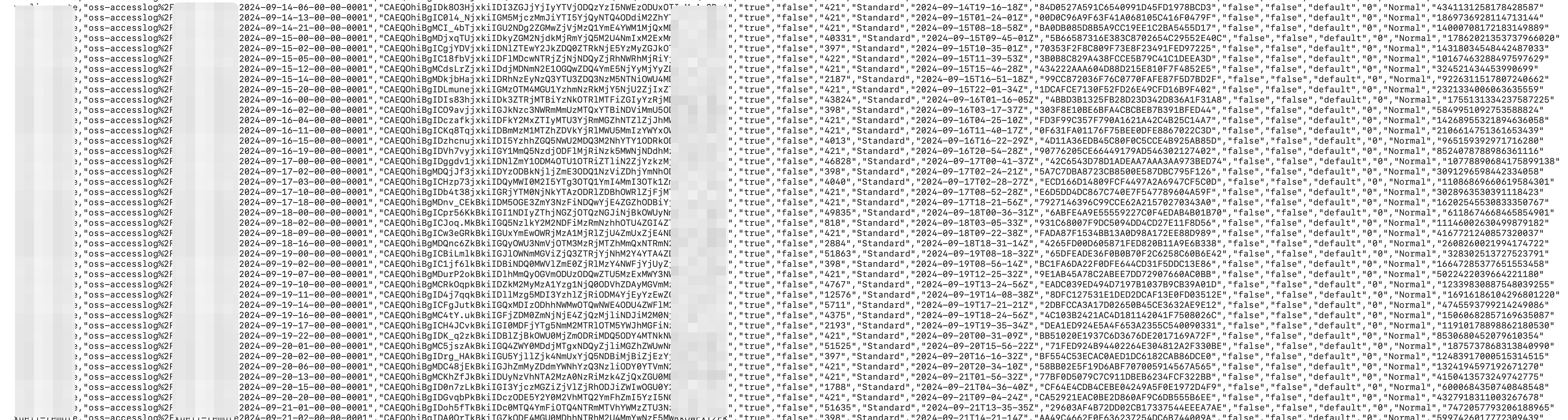
O relatório de inventário é armazenado no diretório data/ e contém informações sobre os objetos obtidas pelo recurso de inventário. Por exemplo:
|
Campo |
Descrição |
|
Bucket |
O nome do bucket de origem para o qual a tarefa de inventário é executada. |
|
Key |
O nome do objeto no bucket. O nome do objeto é codificado em URL. |
|
VersionId |
O ID de versão do objeto. Este campo aparece somente quando o inventário está configurado para incluir todas as versões. Se o versionamento não estiver ativo no bucket, este campo fica vazio. Se o versionamento estiver ativo, este campo contém o ID de versão do objeto. |
|
IsLatest |
Indica se o objeto é a versão mais recente. Este campo aparece somente quando o inventário está configurado para incluir todas as versões. Se o versionamento não estiver ativo no bucket, este campo é exibido como true. Se o versionamento estiver ativo e o objeto for a versão mais recente, este campo é true. Se o objeto for uma versão anterior, este campo é false. |
|
IsDeleteMarker |
Indica se a versão do objeto é um marcador de exclusão. Este campo aparece somente quando o inventário está configurado para incluir todas as versões. Se o versionamento não estiver ativo no bucket, este campo assume o valor false por padrão. Se o versionamento estiver ativo e o objeto for um marcador de exclusão, este campo é true. Caso contrário, este campo é false. |
|
Size |
O tamanho do objeto em bytes. |
|
StorageClass |
A classe de armazenamento do objeto. |
|
LastModifiedDate |
A data e hora da última modificação do objeto, em Tempo Universal Coordenado (UTC). |
|
TransitionTime |
O momento em que uma regra de ciclo de vida fez a transição do objeto para a classe de armazenamento Cold Archive ou Deep Cold Archive. |
|
ETag |
O ETag do objeto. Um ETag é gerado para cada objeto a fim de identificar seu conteúdo. Para objetos criados com a operação de API PutObject, o ETag é o hash MD5 do conteúdo. Para objetos criados por outros métodos, o ETag é um valor calculado exclusivo, não o hash MD5 do conteúdo. |
|
IsMultipartUploaded |
Indica se o objeto foi criado por meio de um multipart upload. Se sim, o valor deste campo é true. Caso contrário, o valor é false. |
|
EncryptionStatus |
Indica se o objeto está criptografado. Se estiver, o valor deste campo é true. Caso contrário, o valor é false. |
|
ObjectAcl |
A ACL do objeto. Para mais informações, consulte Object ACL. |
|
TaggingCount |
O número de tags associadas ao objeto. |
|
ObjectType |
O tipo do objeto. Para mais informações, consulte Object type. |
|
Crc64 |
O CRC-64 do objeto. |
|
LastAccessDate |
O último horário de acesso ao objeto, em Tempo Universal Coordenado (UTC). Este campo é exportado somente quando access tracking está ativo para o bucket. Se estiver desativado, este campo normalmente é |
|
LastAccessTimestamp |
O timestamp do último acesso ao objeto (Unix timestamp). Este campo é exportado somente quando access tracking está ativo para o bucket. Se estiver desativado, este campo normalmente é |
Inventário incremental
Um inventário incremental captura e registra todos os eventos de alteração de objetos — criações, atualizações de metadados e exclusões — ocorridos em uma janela de tempo de aproximadamente 10 minutos.
Configurar uma regra de inventário
Console
Faça login no OSS console.
Acesse o bucket de origem para o qual deseja gerar um inventário. No painel de navegação à esquerda, escolha Data Management > Bucket Inventory.
Na página Bucket Inventory, clique em Create Inventory.
-
No painel Create Inventory, configure os parâmetros de Basic Settings.
Parâmetro
Descrição
Status
O status da tarefa de inventário incremental. Selecione Start.
Rule Name
O nome da tarefa de inventário. O nome pode conter apenas letras minúsculas, dígitos e hífens (-), e não pode começar nem terminar com um hífen (-).
Inventory Report Destination
O caminho onde o relatório de inventário é armazenado. O bucket de origem e o bucket de destino devem pertencer à mesma conta e estar na mesma região. Para salvar o relatório no caminho
exampledir1do bucket examplebucket, insiraexampledir1/. Se o caminho especificado não existir no bucket, o OSS o cria automaticamente. O comprimento do prefixo do caminho de destino não pode exceder 128 caracteres. Se o campo for deixado em branco, o relatório é salvo no diretório raiz. Para evitar interrupções no service OSS-HDFS ou risco de corrupção de dados, não defina o diretório do relatório de inventário como.dlsdata/ao configurar uma regra de relatório de inventário para um bucket com o service OSS-HDFS ativado.Scan Scope
{status, select, BUCKET{Scan Entire Bucket} BUCKET_PATH{Match by Prefix} other{--}}: verifica todos os objetos no bucket. Object Prefix: verifica apenas os objetos que correspondem a um prefixo especificado, como exampledir1/.
-
Na seção Track and Generate Incremental Metadata Updates, ative Get Incremental Metadata Updates e selecione os Metadata Fields que deseja exportar.
Parâmetro
Descrição
Metadata Fields
As informações do objeto que você deseja exportar. Event Metadata: {type, select, SEQUENCE_NUMBER{Serial Number} RECORD_TYPE{Event Type} RECORD_TIMESTAMP{Timestamp} REQUESTER{User ID} REQUEST_ID{Request ID} SOURCE_IP{Source IP} other{type}}, {type, select, SEQUENCE_NUMBER{Serial Number} RECORD_TYPE{Event Type} RECORD_TIMESTAMP{Timestamp} REQUESTER{User ID} REQUEST_ID{Request ID} SOURCE_IP{Source IP} other{type}}, {type, select, SEQUENCE_NUMBER{Serial Number} RECORD_TYPE{Event Type} RECORD_TIMESTAMP{Timestamp} REQUESTER{User ID} REQUEST_ID{Request ID} SOURCE_IP{Source IP} other{type}}, {type, select, SEQUENCE_NUMBER{Serial Number} RECORD_TYPE{Event Type} RECORD_TIMESTAMP{Timestamp} REQUESTER{User ID} REQUEST_ID{Request ID} SOURCE_IP{Source IP} other{type}}, Request ID e {type, select, SEQUENCE_NUMBER{Serial Number} RECORD_TYPE{Event Type} RECORD_TIMESTAMP{Timestamp} REQUESTER{User ID} REQUEST_ID{Request ID} SOURCE_IP{Source IP} other{type}}. System Metadata: {type, select, SIZE{Object Size} STORAGE_CLASS{Storage Class} LAST_MODIFIED_DATE{Last Modified Date} ETAG{ETag} IS_MULTIPART_UPLOADED{Multipart Upload Status} ENCRYPTION_STATUS{Encryption Status} OBJECT_ACL{Object ACL} OBJECT_TYPE{File Type} CRC64{CRC64} USER_META_COUNT{User-Defined Metadata Count} TAGGING_COUNT{Tag Count} KMS_KEY_ARN{SSE-KMS Master Key} IS_SSE_KMS_ENABLED{SSE-KMS Encryption Status} other{type}}, {type, select, SIZE{Object Size} STORAGE_CLASS{Storage Class} LAST_MODIFIED_DATE{Last Modified Date} ETAG{ETag} IS_MULTIPART_UPLOADED{Multipart Upload Status} ENCRYPTION_STATUS{Encryption Status} OBJECT_ACL{Object ACL} OBJECT_TYPE{File Type} CRC64{CRC64} USER_META_COUNT{User-Defined Metadata Count} TAGGING_COUNT{Tag Count} KMS_KEY_ARN{SSE-KMS Master Key} IS_SSE_KMS_ENABLED{SSE-KMS Encryption Status} other{type}}, {type, select, SIZE{Object Size} STORAGE_CLASS{Storage Class} LAST_MODIFIED_DATE{Last Modified Date} ETAG{ETag} IS_MULTIPART_UPLOADED{Multipart Upload Status} ENCRYPTION_STATUS{Encryption Status} OBJECT_ACL{Object ACL} OBJECT_TYPE{File Type} CRC64{CRC64} USER_META_COUNT{User-Defined Metadata Count} TAGGING_COUNT{Tag Count} KMS_KEY_ARN{SSE-KMS Master Key} IS_SSE_KMS_ENABLED{SSE-KMS Encryption Status} other{type}}, ETag, {type, select, SIZE{Object Size} STORAGE_CLASS{Storage Class} LAST_MODIFIED_DATE{Last Modified Date} ETAG{ETag} IS_MULTIPART_UPLOADED{Multipart Upload Status} ENCRYPTION_STATUS{Encryption Status} OBJECT_ACL{Object ACL} OBJECT_TYPE{File Type} CRC64{CRC64} USER_META_COUNT{User-Defined Metadata Count} TAGGING_COUNT{Tag Count} KMS_KEY_ARN{SSE-KMS Master Key} IS_SSE_KMS_ENABLED{SSE-KMS Encryption Status} other{type}}, object type, object ACL, CRC64 e {type, select, SIZE{Object Size} STORAGE_CLASS{Storage Class} LAST_MODIFIED_DATE{Last Modified Date} ETAG{ETag} IS_MULTIPART_UPLOADED{Multipart Upload Status} ENCRYPTION_STATUS{Encryption Status} OBJECT_ACL{Object ACL} OBJECT_TYPE{File Type} CRC64{CRC64} USER_META_COUNT{User-Defined Metadata Count} TAGGING_COUNT{Tag Count} KMS_KEY_ARN{SSE-KMS Master Key} IS_SSE_KMS_ENABLED{SSE-KMS Encryption Status} other{type}}.
Selecione I acknowledge and agree to grant the Alibaba Cloud OSS service permission to access resources in this bucket. e clique em OK. A nova regra de inventário é exibida na página Bucket Inventory com o status Start.
Ossutil
Crie um arquivo chamado incremental-inventory.xml. A principal diferença em relação à configuração de inventário completo é a adição da seção <IncrementalInventory>.
<?xml version="1.0" encoding="UTF-8"?>
<InventoryConfiguration>
    <Id>report-1</Id>
    <IsEnabled>true</IsEnabled>
    <Filter>
      <Prefix>test</Prefix>
    </Filter>
    <Destination>
      <OSSBucketDestination>
        <Format>CSV</Format>
        <AccountId>12xxxxxx29</AccountId>
        <RoleArn>acs:ram::12xxxxxx29:role/AliyunOSSRole</RoleArn>
        <Bucket>acs:oss:::test-inc-bi-bj</Bucket>
        <Prefix>Report-1</Prefix>
      </OSSBucketDestination>
    </Destination>
    <Schedule>
      <Frequency>Weekly</Frequency>
    </Schedule>
    <IncludedObjectVersions>All</IncludedObjectVersions>
    <OptionalFields>
      <Field>Size</Field>
      <Field>LastModifiedDate</Field>
      <Field>ETag</Field>
      <Field>StorageClass</Field>
    </OptionalFields>
    <IncrementalInventory>
      <IsEnabled>true</IsEnabled>
      <Schedule>
        <Frequency>600</Frequency>
      </Schedule>
      <OptionalFields>
        <Field>SequenceNumber</Field>
        <Field>RecordType</Field>
        <Field>RecordTimestamp</Field>
        <Field>Requester</Field>
        <Field>RequestId</Field>
        <Field>SourceIp</Field>
        <Field>Size</Field>
        <Field>StorageClass</Field>
        <Field>LastModifiedDate</Field>
        <Field>ETag</Field>
        <Field>IsMultipartUploaded</Field>
        <Field>ObjectType</Field>
        <Field>ObjectAcl</Field>
        <Field>CRC64</Field>
        <Field>EncryptionStatus</Field>
      </OptionalFields>
    </IncrementalInventory>
  </InventoryConfiguration>
Na seção <IncrementalInventory>, o campo <Frequency> especifica o intervalo de exportação dos arquivos de inventário incremental. Neste exemplo, o valor 600 corresponde ao intervalo de aproximadamente 10 minutos em que os inventários incrementais são gerados.
Execute o seguinte comando:
ossutil api put-bucket-inventory --bucket examplebucket --inventory-id report-1 --inventory-configuration file://incremental-inventory.xmlApós a execução do comando, verifique se a regra de inventário aparece na página Bucket Inventory do console.
Para obter mais informações sobre o comando put-bucket-inventory, consulte put-bucket-inventory.
API
Para configurar ou modificar uma regra de inventário, chame a operação de API PutBucketInventory. Esse método é ideal para cenários altamente personalizados, mas exige que você construa e assine manualmente a requisição HTTP. Após o êxito da requisição, chame a operação GetBucketInventory para consultar a regra de inventário.
Arquivos de inventário incremental
Após configurar uma tarefa de inventário, o OSS gera os arquivos de inventário de acordo com o cronograma de exportação definido na regra. A estrutura de diretórios dos arquivos de inventário é a seguinte:
<dest-bucket-name>/
└── <dest-prefix>/
    └── <source-bucket-name>/
       └── <inventory-id>/
          └── incremental_inventory/
             └── YYYY-MM-DDTHH-MMSSZ/
                 ├── manifest.json
                 └── data/
                     ├── uuid1_0.csv
└── ......|
Componente do diretório |
Descrição |
|
dest-prefix |
O nome deste diretório corresponde ao prefixo especificado para o relatório de inventário. Se nenhum prefixo for especificado, o diretório é omitido. |
|
source-bucket-name |
O nome deste diretório corresponde ao bucket de origem para o qual a regra de inventário foi configurada. |
|
inventory-id |
O nome deste diretório corresponde ao nome da regra de inventário. |
|
incremental_inventory |
Prefixo fixo dos relatórios de inventário incremental, utilizado para diferenciá-los das exportações de inventário completo. |
|
YYYY-MM-DDTHH-MMSSZ |
O nome deste diretório usa um timestamp UTC que indica o início da varredura do bucket — por exemplo, 2020-05-17T16-0000Z. |
|
data |
Diretório que armazena os arquivos de inventário no formato CSV, listando os objetos e seus metadados modificados no bucket de origem durante a janela de tempo especificada. |
Arquivo manifest
{
    "startTimestamp": "1759320000",
    "endTimestamp": "1759320600",
    "destinationBucket": "destbucket",
    "fileFormat": "CSV",
    "fileSchema": "Bucket, Key, VersionId, IsDeleteMarker, SequenceNumber, RecordType, RecordTimestamp, Requester, RequestId, SourceIp, Size, StorageClass, LastModifiedDate, ETag, IsMultipartUploaded, ObjectType, ObjectAcl, CRC64, EncryptionStatus",
    "files": [{
            "MD5checksum": "60463A9A34019CF448A730EB2CB3****",
            "key": "dest-prefix/source-bucket-name/inventory-id/incremental_inventory/2025-09-28T07-4000Z/data/5b7c6cf0db490db906c60e87b917b148_5550506986a37a62abce56a83db6736d_0.csv",
            "size": 2046}],
    "sourceBucket": "srcbucket",
    "version": "2025-09-30"
}
A tabela a seguir descreve os campos.
|
Campo |
Descrição |
|
startTimestamp |
Timestamp que indica o início da janela do inventário incremental. |
|
endTimestamp |
Timestamp que indica o fim da janela do inventário incremental. |
|
destinationBucket |
O bucket de destino onde os arquivos de inventário são armazenados. |
|
fileFormat |
O formato dos arquivos de inventário. |
|
fileSchema |
Define os campos do arquivo de inventário, que podem ser fixos ou opcionais. A ordem dos campos fixos é constante, mas a ordem dos campos opcionais depende da sequência em que você seleciona os Metadata Fields durante a configuração. Para interpretar os dados corretamente, sempre utilize a ordem de campos definida em fileSchema. Quando você seleciona current version para a versão do objeto ao configurar uma regra de inventário, o |
|
files |
Contém o checksum MD5, a chave e o tamanho de cada arquivo de inventário. |
|
sourceBucket |
O bucket de origem cujo inventário está sendo gerado. |
|
version |
A versão do arquivo manifest. |
Campos do relatório de inventário incremental
|
Tipo de metadado |
Campo |
Descrição |
|
System Metadata |
Bucket |
O nome do bucket de origem. |
|
Event Metadata |
SequenceNumber |
Número de sequência único para cada registro. Para registros do mesmo objeto no mesmo bucket, ordenar por |
|
RecordType |
O tipo do evento. Valores válidos: CREATE, UPDATE_METADATA e DELETE. CREATE: todos os métodos de upload no prefixo selecionado, como |
|
|
RecordTimestamp |
O timestamp UTC do evento, com precisão de milissegundos. Exemplo: "2024-08-25 18:08:01.024". |
|
|
Requester |
O ID da conta Alibaba Cloud ou o Principal ID do solicitante. |
|
|
RequestId |
O identificador único da requisição. |
|
|
SourceIp |
O endereço IP de origem do solicitante. |
|
|
System Metadata |
Key |
O nome do objeto no bucket, codificado em URL. |
|
VersionId |
O ID de versão do objeto. Este campo só é incluído se a regra de inventário estiver configurada para exportar todas as versões. Se o versionamento não estiver ativo no bucket de origem, o campo fica vazio. Caso esteja ativo, o campo contém o VersionId do objeto. |
|
|
IsDeleteMarker |
Indica se a versão do objeto é um marcador de exclusão. Este campo só é incluído se a regra de inventário estiver configurada para exportar todas as versões. Se o versionamento não estiver ativo, o valor padrão é false. Com o versionamento ativo, o valor é true quando o objeto é um marcador de exclusão, e false caso contrário. |
|
|
Size |
O tamanho do objeto em bytes. |
|
|
StorageClass |
A classe de armazenamento do objeto. |
|
|
LastModifiedDate |
O horário UTC da última modificação do objeto. |
|
|
ETag |
Uma ETag é criada quando um objeto é gerado para identificar seu conteúdo. Para objetos criados pela operação PutObject, a ETag é o hash MD5 do conteúdo. Para objetos criados por outros meios, a ETag é um valor único gerado com base em uma regra de cálculo específica, mas não corresponde ao hash MD5 do conteúdo. |
|
|
IsMultipartUploaded |
Indica se o objeto foi criado por meio de upload multipart. Se sim, o valor é true; caso contrário, é false. |
|
|
EncryptionStatus |
Indica se o objeto está criptografado. Se estiver, o valor é true; caso contrário, é false. |
|
|
ObjectAcl |
A lista de controle de acesso (ACL) do objeto. Para mais informações, consulte Object ACL. |
|
|
ObjectType |
O tipo do objeto. Para mais informações, consulte Object Type. |
|
|
Crc64 |
O valor CRC-64 do objeto. |
Analisar relatórios de inventário
Uma tarefa de inventário é executada de forma assíncrona. Após a conclusão, o OSS gera os arquivos do relatório no caminho especificado do bucket de destino. Todos os arquivos de um relatório de inventário ficam em uma pasta nomeada com o horário de início da tarefa. Para confirmar que a tarefa foi concluída, verifique se o arquivo manifest.json foi gerado no local de destino.
Os arquivos principais dos relatórios de inventário completo e incremental são:
O arquivo
manifest.json.Os arquivos de dados no diretório
data/: arquivos.csv.gzcomprimidos com GZIP para inventários completos, e arquivos.csvsem compressão para inventários incrementais. Para analisar um relatório de inventário, siga estas etapas:
-
Leia o arquivo
manifest.jsonpara obter a ordem das colunas e as informações dos arquivos de dados. A ordem das colunas de um relatório de inventário é dinâmica e depende dos campos selecionados ao configurar a regra. Atenção especial a estes dois campos:fileSchema: string que define os nomes e a ordem exata das colunas no arquivo CSV.files: array que lista detalhes sobre todos os arquivos de dados gerados para este relatório, incluindokey(o caminho para o arquivo de dados),size(o tamanho do arquivo de dados) eMD5checksum(o checksum MD5 do arquivo de dados).
Recupere e descomprima os arquivos de dados. Obtenha a
keyde cada arquivo de dados no arrayfilesdomanifest.jsone use essa chave para baixar o arquivo correspondente. Se o arquivo for do tipo.csv.gz, descomprima-o para obter os dados no formato CSV.Interprete os dados na ordem correta. Use os nomes de colunas do campo
fileSchemacomo cabeçalhos das colunas CSV, preservando a ordem original. Leia o arquivo CSV linha por linha: cada linha representa um registro completo de um objeto, e cada coluna corresponde a um campo definido emfileSchema.
Exemplo de conteúdo CSV
Se o valor de fileSchema for "Bucket,Key,Size,StorageClass,LastModifiedDate", o conteúdo CSV descomprimido terá o seguinte formato:
source-bucket,"dir%2Fbody.xml","102400","Standard","2025-04-14T07-06-00Z"
source-bucket,"dest.png","312049","Standard","2025-04-14T07-05-59Z"
O campo key é codificado em URL. Decodifique-o conforme necessário.
Cotas e limitações
As seguintes cotas e limitações se aplicam aos inventários de bucket:
| Item | Limite |
| Regras de inventário por bucket | Até 1.000 regras via API ou SDK, ou 10 regras via console |
| Formato do relatório de inventário | CSV ou Parquet. O formato Parquet é compatível apenas na região UK (London). |
| Agendamento mensal | Não suportado nas seguintes regiões: China (Zhangjiakou), China (Zhongwei), US (Virginia), US (Silicon Valley), Mexico e France (Paris). |
| Advanced Filtering | Compatível apenas nas regiões China (Qingdao), China (Hohhot) e Germany (Frankfurt) |
| Filtro de tamanho de objeto | Os tamanhos mínimo e máximo devem ser maiores que 0 B, e o tamanho máximo não pode exceder 48,8 TB |
| Prefixo do caminho de destino para inventários incrementais | Até 128 caracteres |
Faturamento
O recurso de inventário de bucket é gratuito, mas as seguintes taxas se aplicam:
Taxas de requisições de API — Taxas de requisição
PuteGetsão cobradas ao configurar e recuperar regras de inventário. Taxas de requisição PUT são cobradas quando o OSS grava um relatório de inventário no bucket de destino. Taxas de requisição GET são cobradas ao baixar e ler um relatório de inventário.Taxas de armazenamento — Os relatórios de inventário gerados (arquivos
manifest, arquivoscsv.gze arquivoscsv) consomem espaço de armazenamento no bucket de destino e são cobrados com base nas taxas de armazenamento Standard.Taxas de tráfego de saída — Ao baixar e ler relatórios de inventário por meio de um endpoint de Internet, incidem taxas de tráfego de saída pela Internet. Para evitar custos desnecessários, exclua as regras de inventário não utilizadas e configure regras de ciclo de vida para excluir automaticamente os arquivos de relatório de inventário expirados.
Uso em produção
Boas práticas
Privilégio mínimo — Sempre utilize uma função RAM dedicada com as permissões mínimas necessárias. Nunca use
AliyunOSSRoleem ambiente de produção.Desempenho — Para buckets de origem com alto tráfego, armazene os relatórios de inventário em um bucket de destino separado e dedicado, evitando contenção de gravação que possa afetar o desempenho das aplicações em produção.
Otimização de custos — O inventário de bucket suporta exportações diárias, semanais e mensais. Para buckets com mais de 10 bilhões de objetos, adote a exportação semanal. Além disso, configure uma regra de ciclo de vida no bucket de destino para excluir automaticamente relatórios de inventário com mais de um número definido de dias (por exemplo, 30), reduzindo os custos de armazenamento.
| Quantidade de objetos | Recomendação de exportação |
| Menos de 10 bilhões de objetos | Configure exportações diárias ou semanais conforme necessário |
| De 10 bilhões a 50 bilhões de objetos | Exportação semanal |
| 50 bilhões de objetos ou mais | Exporte em lotes por prefixos correspondentes. |
Particionamento por prefixo — Para buckets extremamente grandes, como os que contêm centenas de bilhões de objetos, crie múltiplas regras de inventário com base nos prefixos de negócio. Essa abordagem gera relatórios particionados, mais fáceis de gerenciar e processar.
Prevenção de riscos
Auditoria de dados — Como objetos podem ser criados, excluídos ou sobrescritos durante a exportação de um arquivo de inventário, a lista final pode não incluir todos os objetos. Objetos com horário de última modificação anterior ao timestamp especificado no campo
creationTimestampdo arquivo manifest.json serão incluídos no inventário. Objetos com horário de última modificação posterior ao valor do campocreationTimestamppodem não estar incluídos. Antes de executar uma operação sobre um objeto listado no inventário, use a operação de API HeadObject para verificar as propriedades do objeto.Monitoramento e alertas — Monitore o uso de armazenamento do bucket de destino para evitar custos excessivos causados pelo acúmulo de arquivos de inventário. Além disso, monitore as chamadas de API, como
PutBucketInventory, para acompanhar as alterações de configuração.Gestão de mudanças — Qualquer alteração nas regras de inventário — como a modificação de um prefixo ou da frequência — pode impactar os fluxos de trabalho de análise de dados downstream. Essas mudanças devem passar por um processo formal de revisão e ser gerenciadas em controle de versão.