O modelo de imagem para vídeo Wan 2.7 usa entrada multimodal (texto, imagem, áudio e vídeo) para executar três tarefas principais: geração de vídeo a partir do primeiro quadro, geração de vídeo a partir do primeiro e último quadro e continuação de vídeo (continuação a partir de um segmento de vídeo inicial, com ou sem quadro final).
Configurações básicas: aceita durações de vídeo de 2 a 15 segundos, resolução configurável (720p ou 1080p), reescrita inteligente de prompt e marca d'água.
Recursos de áudio: permite dublagem automática ou upload de áudio personalizado, garantindo sincronização audiovisual.
Narrativa multi-cena: gera vídeos com múltiplas cenas, mantendo a consistência do sujeito entre elas.
Links rápidos: experimente online (Singapore | Virginia | China (Beijing)) | Referência da API
Início rápido
Prompt de entrada | Primeiro clipe de vídeo de entrada (2 s) | Imagem do último quadro de entrada | Vídeo de saída (12 s, 10 s de continuação) |
Um homem olha para uma caixa de madeira no chão. Ele se abaixa e abre a tampa com cuidado. Encara o conteúdo da caixa, com os lábios trêmulos e levemente entreabertos. Sua testa está franzida e seus olhos arregalados com uma expressão de horror. |
|

Antes de chamar a API, obtenha uma chave de API e configure-a como variável de ambiente. Para usar um SDK, instale o DashScope SDK.
Python SDK
Certifique-se de que seu DashScope Python SDK esteja na versão 1.25.16 ou posterior antes de executar o código a seguir.
Se você usar uma versão anterior, poderá ocorrer um erro como "url error, please check url!". Consulte Instalar o SDK para atualizar sua versão.
# -*- coding: utf-8 -*-
from http import HTTPStatus
from dashscope import VideoSynthesis
import dashscope
import os

# This URL is for the Singapore region. URLs vary by region. For more information, see https://www.alibabacloud.com/help/en/model-studio/image-to-video-general-api-reference
dashscope.base_http_api_url = 'https://{WorkspaceId}.ap-southeast-1.maas.aliyuncs.com/api/v1'

# If you have not configured an environment variable, replace the following line with your Model Studio API key: api_key="sk-xxx"
# API keys vary by region. To get an API key, see https://www.alibabacloud.com/help/en/model-studio/get-api-key
api_key = os.getenv("DASHSCOPE_API_KEY")

media = [
    {
        "type": "first_clip",
        "url": "https://help-static-aliyun-doc.aliyuncs.com/file-manage-files/zh-CN/20260414/cqcbkw/wan2.7-i2v-video-continuation.mp4"
    },
    {
        "type": "last_frame",
        "url": "https://help-static-aliyun-doc.aliyuncs.com/file-manage-files/zh-CN/20260414/mrwahg/wan2.7-i2v-video-continuation.webp"
    }
]

def sample_sync_call():
    print('----sync call, please wait a moment----')
    rsp = VideoSynthesis.call(
        api_key=api_key,
        model="wan2.7-i2v-2026-04-25",
        media=media,
        resolution="720P",
        duration=12,
        watermark=True,
        prompt="A man looks down at a wooden box on the ground. He bends over and carefully opens the lid. He stares at the contents of the box, his lips trembling and slightly parted. His brow is furrowed and his eyes are wide with a look of horror.",
    )
    if rsp.status_code == HTTPStatus.OK:
        print(rsp.output.video_url)
    else:
        print('Failed, status_code: %s, code: %s, message: %s' %
              (rsp.status_code, rsp.code, rsp.message))

if __name__ == '__main__':
    sample_sync_call()
Java SDK
Certifique-se de que seu DashScope Java SDK esteja na versão 2.22.14 ou posterior antes de executar o código a seguir.
Se você usar uma versão anterior, poderá ocorrer um erro como "url error, please check url!". Consulte Instalar o SDK para atualizar sua versão.
// Copyright (c) Alibaba, Inc. and its affiliates.

import com.alibaba.dashscope.aigc.videosynthesis.VideoSynthesis;
import com.alibaba.dashscope.aigc.videosynthesis.VideoSynthesisParam;
import com.alibaba.dashscope.aigc.videosynthesis.VideoSynthesisResult;
import com.alibaba.dashscope.exception.ApiException;
import com.alibaba.dashscope.exception.InputRequiredException;
import com.alibaba.dashscope.exception.NoApiKeyException;
import com.alibaba.dashscope.utils.Constants;
import com.alibaba.dashscope.utils.JsonUtils;

import java.util.ArrayList;
import java.util.List;

public class Image2Video {

    static {
        // Singapore region URL. Replace {WorkspaceId} with your actual workspace ID. The URL varies by region.
        Constants.baseHttpApiUrl = "https://{WorkspaceId}.ap-southeast-1.maas.aliyuncs.com/api/v1";
    }

    // If you have not configured an environment variable, replace the following line with your Model Studio API key: apiKey="sk-xxx"
    // API keys vary by region. To get an API key, see https://www.alibabacloud.com/help/en/model-studio/get-api-key
    static String apiKey = System.getenv("DASHSCOPE_API_KEY");

    public static void syncCall() {
        VideoSynthesis videoSynthesis = new VideoSynthesis();
        final String prompt = "A man looks down at a wooden box on the ground. He bends over and carefully opens the lid. He stares at the contents of the box, his lips trembling and slightly parted. His brow is furrowed and his eyes are wide with a look of horror.";
        List<VideoSynthesisParam.Media> media = new ArrayList<VideoSynthesisParam.Media>(){{
            add(VideoSynthesisParam.Media.builder()
                    .url("https://help-static-aliyun-doc.aliyuncs.com/file-manage-files/zh-CN/20260414/cqcbkw/wan2.7-i2v-video-continuation.mp4")
                    .type("first_clip")
                    .build());
            add(VideoSynthesisParam.Media.builder()
                    .url("https://help-static-aliyun-doc.aliyuncs.com/file-manage-files/zh-CN/20260414/mrwahg/wan2.7-i2v-video-continuation.webp")
                    .type("last_frame")
                    .build());
        }};
        VideoSynthesisParam param =
                VideoSynthesisParam.builder()
                        .apiKey(apiKey)
                        .model("wan2.7-i2v-2026-04-25")
                        .prompt(prompt)
                        .media(media)
                        .watermark(true)
                        .duration(12)
                        .resolution("720P")
                        .build();
        VideoSynthesisResult result = null;
        try {
            System.out.println("---sync call, please wait a moment----");
            result = videoSynthesis.call(param);
        } catch (ApiException | NoApiKeyException e){
            throw new RuntimeException(e.getMessage());
        } catch (InputRequiredException e) {
            throw new RuntimeException(e);
        }
        System.out.println(JsonUtils.toJson(result));
    }

    public static void main(String[] args) {
        syncCall();
    }
}
Curl
Etapa 1: Crie uma tarefa e obtenha o ID da tarefa
curl --location 'https://{WorkspaceId}.ap-southeast-1.maas.aliyuncs.com/api/v1/services/aigc/video-generation/video-synthesis' \
    -H 'X-DashScope-Async: enable' \
    -H "Authorization: Bearer $DASHSCOPE_API_KEY" \
    -H 'Content-Type: application/json' \
    -d '{
    "model": "wan2.7-i2v-2026-04-25",
    "input": {
        "prompt": "A man looks down at a wooden box on the ground. He bends over and carefully opens the lid. He stares at the contents of the box, his lips trembling and slightly parted. His brow is furrowed and his eyes are wide with a look of horror.",
        "media": [
            {
                "type": "first_clip",
                "url": "https://help-static-aliyun-doc.aliyuncs.com/file-manage-files/zh-CN/20260414/cqcbkw/wan2.7-i2v-video-continuation.mp4"
            },
            {
                "type": "last_frame",
                "url": "https://help-static-aliyun-doc.aliyuncs.com/file-manage-files/zh-CN/20260414/mrwahg/wan2.7-i2v-video-continuation.webp"

            }
        ]
    },
    "parameters": {
        "resolution": "720P",
        "duration": 12,
        "prompt_extend": true,
        "watermark": true
    }
}'
Etapa 2: Recuperar o resultado usando o ID da tarefa
Substitua {task_id} pelo valor task_id retornado pela chamada de API anterior. O task_id é válido para consultas por 24 horas.
curl -X GET https://{WorkspaceId}.ap-southeast-1.maas.aliyuncs.com/api/v1/tasks/{task_id} \
--header "Authorization: Bearer $DASHSCOPE_API_KEY"
Saída de exemplo
A video_url é válida por 24 horas. Baixe o vídeo imediatamente.
{
    "request_id": "c1209113-8437-424f-a386-xxxxxx",
    "output": {
        "task_id": "966cebcd-dedc-4962-af88-xxxxxx",
        "task_status": "SUCCEEDED",
        "video_url": "https://dashscope-result-sh.oss-accelerate.aliyuncs.com/xxx.mp4?Expires=xxx",
         ...
    },
    ...
}
Notas de uso
-
Os modelos suportados variam por região. Os recursos são isolados entre regiões. Para ver os modelos suportados em cada região, consulte o console do Model Studio.
Ao chamar a API, certifique-se de que seu modelo, URL do endpoint e chave de API pertençam à mesma região. Chamadas entre regiões falham.
O código de exemplo neste tópico refere-se à região Singapore.
Capacidades principais
Geração de vídeo a partir do primeiro quadro
Modelos suportados: modelos da série wan2.7.
Configurações de parâmetros: O campo type no array media aceita as duas combinações a seguir. Consulte Ativos de entrada para detalhes sobre combinações de ativos de mídia.
Primeiro quadro: defina
typecomofirst_frame. O modelo adiciona áudio ao vídeo automaticamente.Primeiro quadro + áudio: defina
typecomofirst_frameedriving_audio. O modelo usa o áudio para orientar a geração de vídeo em recursos como sincronia labial e tempo de ação.
Prompt | Imagem do primeiro quadro | Vídeo de saída |
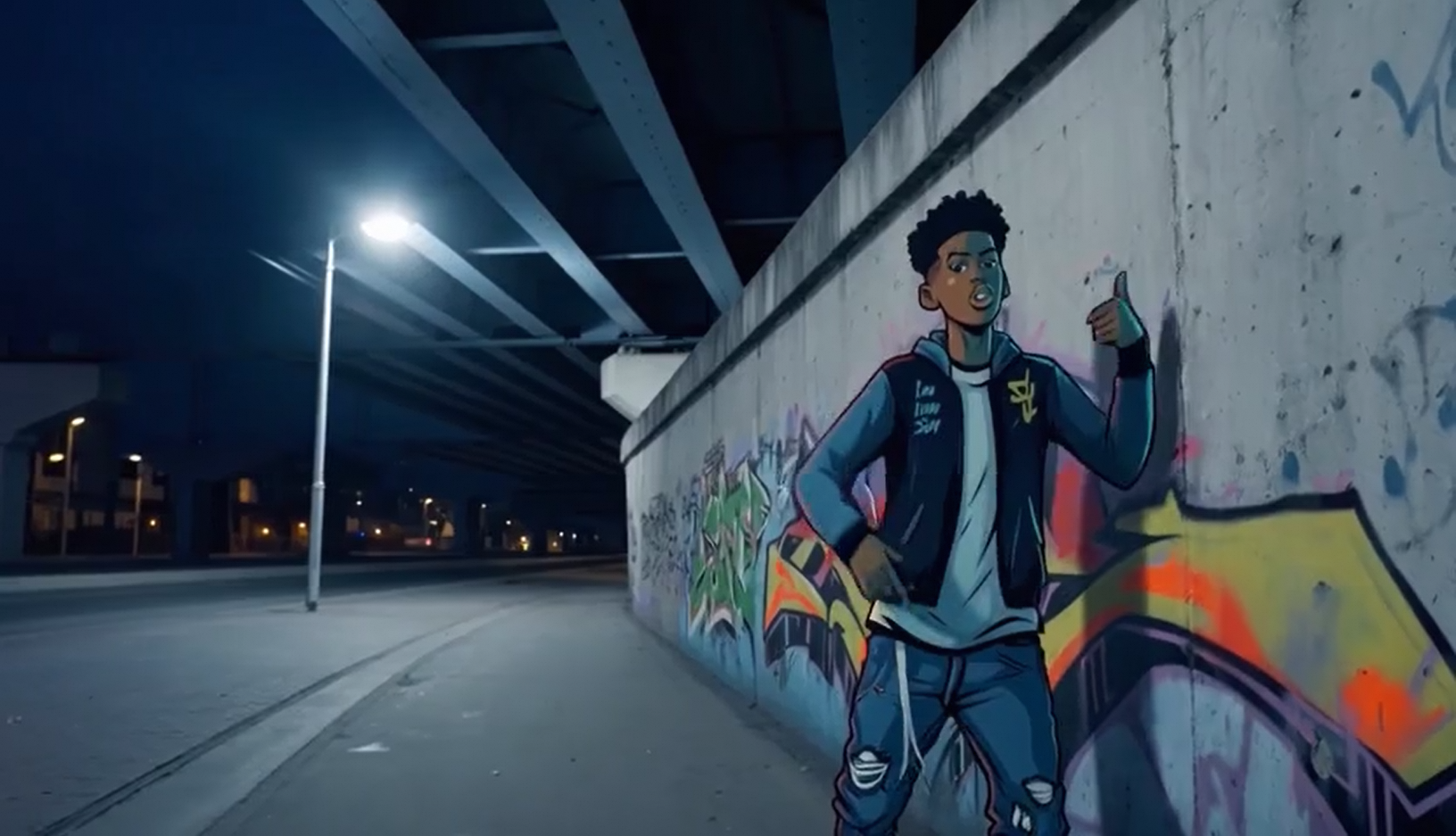
Uma cena de arte de fantasia urbana. Um personagem dinâmico de grafite. Um menino feito de tinta spray ganha vida em uma parede de concreto. Ele canta rap em inglês em alta velocidade enquanto faz uma pose clássica e enérgica de rapper. A cena se passa à noite sob uma ponte ferroviária urbana. A luz vem de um único poste de rua, criando uma atmosfera cinematográfica cheia de alta energia e detalhes incríveis. O áudio do vídeo consiste inteiramente no rap, sem outros diálogos ou ruídos. |
Áudio de entrada: |
Python SDK
Certifique-se de que a versão do seu DashScope Python SDK seja 1.25.16 ou posterior. Para atualizar, consulte Instalar o SDK .
# -*- coding: utf-8 -*-
from http import HTTPStatus
from dashscope import VideoSynthesis
import dashscope
import os

# This is the URL for the Singapore region. URLs vary by region. For a list of URLs, see https://www.alibabacloud.com/help/en/model-studio/image-to-video-general-api-reference.
dashscope.base_http_api_url = 'https://{WorkspaceId}.ap-southeast-1.maas.aliyuncs.com/api/v1'

# If you have not configured an environment variable, replace the following line with your Model Studio API key: api_key="sk-xxx"
# API keys vary by region. To obtain an API key, see https://www.alibabacloud.com/help/en/model-studio/get-api-key.
api_key = os.getenv("DASHSCOPE_API_KEY")

media = [
    {
        "type": "first_frame",
        "url": "https://help-static-aliyun-doc.aliyuncs.com/file-manage-files/zh-CN/20250925/wpimhv/rap.png"
    },
    {
        "type": "driving_audio",
        "url": "https://help-static-aliyun-doc.aliyuncs.com/file-manage-files/zh-CN/20250925/ozwpvi/rap.mp3"
    }
]

def sample_sync_call():
    print('----sync call, please wait a moment----')
    rsp = VideoSynthesis.call(
        api_key=api_key,
        model="wan2.7-i2v-2026-04-25",
        media=media,
        resolution="720P",
        duration=10,
        watermark=True,
        prompt="An urban fantasy art scene. A dynamic graffiti art character. A boy made of spray paint comes to life from a concrete wall. He raps an English song at high speed while striking a classic, energetic rapper pose. The scene is set at night under an urban railway bridge. The light comes from a single street lamp, creating a cinematic atmosphere full of high energy and amazing detail. The audio of the video consists entirely of the rap, with no other dialogue or noise.",
    )
    if rsp.status_code == HTTPStatus.OK:
        print(rsp.output.video_url)
    else:
        print('Failed, status_code: %s, code: %s, message: %s' %
              (rsp.status_code, rsp.code, rsp.message))

if __name__ == '__main__':
    sample_sync_call()
Java SDK
Certifique-se de que a versão do seu DashScope Java SDK seja 2.22.14 ou posterior. Para atualizar, consulte Instalar o SDK .
// Copyright (c) Alibaba, Inc. and its affiliates.

import com.alibaba.dashscope.aigc.videosynthesis.VideoSynthesis;
import com.alibaba.dashscope.aigc.videosynthesis.VideoSynthesisParam;
import com.alibaba.dashscope.aigc.videosynthesis.VideoSynthesisResult;
import com.alibaba.dashscope.exception.ApiException;
import com.alibaba.dashscope.exception.InputRequiredException;
import com.alibaba.dashscope.exception.NoApiKeyException;
import com.alibaba.dashscope.utils.Constants;
import com.alibaba.dashscope.utils.JsonUtils;

import java.util.ArrayList;
import java.util.List;

public class Image2Video {

    static {
        // This is the endpoint for the Singapore region. For the China (Beijing) region, use https://{WorkspaceId}.cn-beijing.maas.aliyuncs.com/api/v1
        Constants.baseHttpApiUrl = "https://{WorkspaceId}.ap-southeast-1.maas.aliyuncs.com/api/v1";
    }

    // If you have not configured an environment variable, replace the following line with your Model Studio API key: apiKey="sk-xxx"
    // API keys vary by region. To obtain an API key, see https://www.alibabacloud.com/help/en/model-studio/get-api-key.
    static String apiKey = System.getenv("DASHSCOPE_API_KEY");

    public static void syncCall() {
        VideoSynthesis videoSynthesis = new VideoSynthesis();
        final String prompt = "An urban fantasy art scene. A dynamic graffiti art character. A boy made of spray paint comes to life from a concrete wall. He raps an English song at high speed while striking a classic, energetic rapper pose. The scene is set at night under an urban railway bridge. The light comes from a single street lamp, creating a cinematic atmosphere full of high energy and amazing detail. The audio of the video consists entirely of the rap, with no other dialogue or noise.";
        List<VideoSynthesisParam.Media> media = new ArrayList<VideoSynthesisParam.Media>(){{
            add(VideoSynthesisParam.Media.builder()
                    .url("https://help-static-aliyun-doc.aliyuncs.com/file-manage-files/zh-CN/20250925/wpimhv/rap.png")
                    .type("first_frame")
                    .build());
            add(VideoSynthesisParam.Media.builder()
                    .url("https://help-static-aliyun-doc.aliyuncs.com/file-manage-files/zh-CN/20250925/ozwpvi/rap.mp3")
                    .type("driving_audio")
                    .build());
        }};
        VideoSynthesisParam param =
                VideoSynthesisParam.builder()
                        .apiKey(apiKey)
                        .model("wan2.7-i2v-2026-04-25")
                        .prompt(prompt)
                        .media(media)
                        .watermark(true)
                        .duration(10)
                        .resolution("720P")
                        .build();
        VideoSynthesisResult result = null;
        try {
            System.out.println("---sync call, please wait a moment----");
            result = videoSynthesis.call(param);
        } catch (ApiException | NoApiKeyException e){
            throw new RuntimeException(e.getMessage());
        } catch (InputRequiredException e) {
            throw new RuntimeException(e);
        }
        System.out.println(JsonUtils.toJson(result));
    }

    public static void main(String[] args) {
        syncCall();
    }
}
Curl
Etapa 1: Crie uma tarefa e obtenha o ID da tarefa
curl --location 'https://{WorkspaceId}.ap-southeast-1.maas.aliyuncs.com/api/v1/services/aigc/video-generation/video-synthesis' \
    -H 'X-DashScope-Async: enable' \
    -H "Authorization: Bearer $DASHSCOPE_API_KEY" \
    -H 'Content-Type: application/json' \
    -d '{
    "model": "wan2.7-i2v-2026-04-25",
    "input": {
        "prompt": "An urban fantasy art scene. A dynamic graffiti art character. A boy made of spray paint comes to life from a concrete wall. He raps an English song at high speed while striking a classic, energetic rapper pose. The scene is set at night under an urban railway bridge. The light comes from a single street lamp, creating a cinematic atmosphere full of high energy and amazing detail. The audio of the video consists entirely of the rap, with no other dialogue or noise.",
        "media": [
            {
                "type": "first_frame",
                "url": "https://help-static-aliyun-doc.aliyuncs.com/file-manage-files/zh-CN/20250925/wpimhv/rap.png"
            },
            {
                "type": "driving_audio",
                "url": "https://help-static-aliyun-doc.aliyuncs.com/file-manage-files/zh-CN/20250925/ozwpvi/rap.mp3"

            }
        ]
    },
    "parameters": {
        "resolution": "720P",
        "duration": 10,
        "prompt_extend": true,
        "watermark": true
    }
}'
Etapa 2: Recuperar o resultado usando o ID da tarefa
Substitua {task_id} pelo valor task_id retornado pela chamada de API anterior. O task_id é válido para consultas por 24 horas.
curl -X GET https://{WorkspaceId}.ap-southeast-1.maas.aliyuncs.com/api/v1/tasks/{task_id} \
--header "Authorization: Bearer $DASHSCOPE_API_KEY"
Saída de exemplo
A video_url é válida por 24 horas. Baixe o vídeo imediatamente.
{
    "request_id": "c1209113-8437-424f-a386-xxxxxx",
    "output": {
        "task_id": "966cebcd-dedc-4962-af88-xxxxxx",
        "task_status": "SUCCEEDED",
        "video_url": "https://dashscope-result-sh.oss-accelerate.aliyuncs.com/xxx.mp4?Expires=xxx",
         ...
    },
    ...
}
Geração de vídeo a partir do primeiro e último quadro
Modelos suportados: modelos da série wan2.7.
Configurações de parâmetros: O campo type no array media aceita as duas combinações a seguir. Consulte Ativos de entrada para detalhes sobre combinações de ativos de mídia.
Primeiro quadro + último quadro: defina
typecomofirst_frameelast_frame. O modelo adiciona áudio ao vídeo automaticamente.Primeiro quadro + último quadro + áudio: defina
typecomofirst_frame,last_frameedriving_audio. O modelo usa o áudio para orientar a geração de vídeo.
Prompt | Imagem do primeiro quadro | Imagem do último quadro | Vídeo de saída |
No início da manhã, ao nascer do sol, uma pequena abóbora com gotas de orvalho repousa em uma plantação. De repente, a abóbora se racha com um "CRACK". Uma luz dourada emana da fissura enquanto a abóbora se parte, liberando uma nuvem de névoa branca. Um pequeno coelho aparece no centro da abóbora aberta. |
|
|


Python SDK
Certifique-se de que a versão do seu DashScope Python SDK seja 1.25.16 ou posterior. Para atualizar, consulte Instalar o SDK .
# -*- coding: utf-8 -*-
from http import HTTPStatus
from dashscope import VideoSynthesis
import dashscope
import os

# This is the URL for the Singapore region. URLs vary by region. For a list of URLs, see https://www.alibabacloud.com/help/en/model-studio/image-to-video-general-api-reference.
dashscope.base_http_api_url = 'https://{WorkspaceId}.ap-southeast-1.maas.aliyuncs.com/api/v1'

# If you have not configured an environment variable, replace the following line with your Model Studio API key: api_key="sk-xxx"
# API keys vary by region. To obtain an API key, see https://www.alibabacloud.com/help/en/model-studio/get-api-key.
api_key = os.getenv("DASHSCOPE_API_KEY")

media = [
    {
        "type": "first_frame",
        "url": "https://help-static-aliyun-doc.aliyuncs.com/file-manage-files/zh-CN/20260414/welyei/wan2.7-i2v-first-frame.webp"
    },
    {
        "type": "last_frame",
        "url": "https://help-static-aliyun-doc.aliyuncs.com/file-manage-files/zh-CN/20260414/zongha/wan2.7-i2v-last-frame.webp"
    }
]

def sample_sync_call():
    print('----sync call, please wait a moment----')
    rsp = VideoSynthesis.call(
        api_key=api_key,
        model="wan2.7-i2v-2026-04-25",
        media=media,
        resolution="720P",
        duration=15,
        watermark=True,
        prompt="In the early morning as the sun rises, a small pumpkin with dewdrops sits in a pumpkin patch. Suddenly, the pumpkin cracks open with a \"CRACK\". A golden light emanates from the fissure as the pumpkin splits apart, releasing a puff of white mist. A small rabbit appears in the center of the opened pumpkin.",
    )
    if rsp.status_code == HTTPStatus.OK:
        print(rsp.output.video_url)
    else:
        print('Failed, status_code: %s, code: %s, message: %s' %
              (rsp.status_code, rsp.code, rsp.message))

if __name__ == '__main__':
    sample_sync_call()
Java SDK
Certifique-se de que a versão do seu DashScope Java SDK seja 2.22.14 ou posterior. Para atualizar, consulte Instalar o SDK .
// Copyright (c) Alibaba, Inc. and its affiliates.

import com.alibaba.dashscope.aigc.videosynthesis.VideoSynthesis;
import com.alibaba.dashscope.aigc.videosynthesis.VideoSynthesisParam;
import com.alibaba.dashscope.aigc.videosynthesis.VideoSynthesisResult;
import com.alibaba.dashscope.exception.ApiException;
import com.alibaba.dashscope.exception.InputRequiredException;
import com.alibaba.dashscope.exception.NoApiKeyException;
import com.alibaba.dashscope.utils.Constants;
import com.alibaba.dashscope.utils.JsonUtils;

import java.util.ArrayList;
import java.util.List;

public class Image2Video {

    static {
        // This is the endpoint for the Singapore region. For the China (Beijing) region, use https://{WorkspaceId}.cn-beijing.maas.aliyuncs.com/api/v1
        Constants.baseHttpApiUrl = "https://{WorkspaceId}.ap-southeast-1.maas.aliyuncs.com/api/v1";
    }

    // If you have not configured an environment variable, replace the following line with your Model Studio API key: apiKey="sk-xxx"
    // API keys vary by region. To obtain an API key, see https://www.alibabacloud.com/help/en/model-studio/get-api-key.
    static String apiKey = System.getenv("DASHSCOPE_API_KEY");

    public static void syncCall() {
        VideoSynthesis videoSynthesis = new VideoSynthesis();
        final String prompt = "In the early morning as the sun rises, a small pumpkin with dewdrops sits in a pumpkin patch. Suddenly, the pumpkin cracks open with a \"CRACK\". A golden light emanates from the fissure as the pumpkin splits apart, releasing a puff of white mist. A small rabbit appears in the center of the opened pumpkin.";
        List<VideoSynthesisParam.Media> media = new ArrayList<VideoSynthesisParam.Media>(){{
            add(VideoSynthesisParam.Media.builder()
                    .url("https://help-static-aliyun-doc.aliyuncs.com/file-manage-files/zh-CN/20260414/welyei/wan2.7-i2v-first-frame.webp")
                    .type("first_frame")
                    .build());
            add(VideoSynthesisParam.Media.builder()
                    .url("https://help-static-aliyun-doc.aliyuncs.com/file-manage-files/zh-CN/20260414/zongha/wan2.7-i2v-last-frame.webp")
                    .type("last_frame")
                    .build());
        }};
        VideoSynthesisParam param =
                VideoSynthesisParam.builder()
                        .apiKey(apiKey)
                        .model("wan2.7-i2v-2026-04-25")
                        .prompt(prompt)
                        .media(media)
                        .watermark(true)
                        .duration(15)
                        .resolution("720P")
                        .build();
        VideoSynthesisResult result = null;
        try {
            System.out.println("---sync call, please wait a moment----");
            result = videoSynthesis.call(param);
        } catch (ApiException | NoApiKeyException e){
            throw new RuntimeException(e.getMessage());
        } catch (InputRequiredException e) {
            throw new RuntimeException(e);
        }
        System.out.println(JsonUtils.toJson(result));
    }

    public static void main(String[] args) {
        syncCall();
    }
}
Curl
Etapa 1: Crie uma tarefa e obtenha o ID da tarefa
curl --location 'https://{WorkspaceId}.ap-southeast-1.maas.aliyuncs.com/api/v1/services/aigc/video-generation/video-synthesis' \
    -H 'X-DashScope-Async: enable' \
    -H "Authorization: Bearer $DASHSCOPE_API_KEY" \
    -H 'Content-Type: application/json' \
    -d '{
    "model": "wan2.7-i2v-2026-04-25",
    "input": {
        "prompt": "In the early morning as the sun rises, a small pumpkin with dewdrops sits in a pumpkin patch. Suddenly, the pumpkin cracks open with a \"CRACK\". A golden light emanates from the fissure as the pumpkin splits apart, releasing a puff of white mist. A small rabbit appears in the center of the opened pumpkin.",
        "media": [
            {
                "type": "first_frame",
                "url": "https://help-static-aliyun-doc.aliyuncs.com/file-manage-files/zh-CN/20260414/welyei/wan2.7-i2v-first-frame.webp"
            },
            {
                "type": "last_frame",
                "url": "https://help-static-aliyun-doc.aliyuncs.com/file-manage-files/zh-CN/20260414/zongha/wan2.7-i2v-last-frame.webp"
            }
        ]
    },
    "parameters": {
        "resolution": "720P",
        "duration": 15,
        "prompt_extend": false,
        "watermark": true
    }
}'
Etapa 2: Recuperar o resultado usando o ID da tarefa
Substitua {task_id} pelo valor task_id retornado pela chamada de API anterior. O task_id é válido para consultas por 24 horas.
curl -X GET https://{WorkspaceId}.ap-southeast-1.maas.aliyuncs.com/api/v1/tasks/{task_id} \
--header "Authorization: Bearer $DASHSCOPE_API_KEY"
Continuação de vídeo
Modelos suportados: modelos da série wan2.7.
Este recurso continua o conteúdo de um clipe de vídeo de entrada. A saída inclui o clipe original, e sua duração conta para o tempo total de geração. Por exemplo, se você inserir um vídeo de 2 segundos e definir a duração total de saída para 12 segundos, o vídeo final terá 12 segundos (o clipe original de 2 segundos mais uma continuação de 10 segundos).
Configurações de parâmetros: O campo type no array media aceita as duas combinações a seguir. Consulte Ativos de entrada para detalhes sobre combinações de ativos de mídia.
Primeiro clipe de vídeo: defina
typecomofirst_clippara continuar o vídeo.Primeiro clipe de vídeo + continuação do último quadro: defina
typecomofirst_clipelast_frame. Isso continua o primeiro clipe de vídeo e garante que seu quadro final corresponda ao último quadro fornecido.
First clip continuation
Prompt | Primeiro clipe de vídeo | Vídeo de saída |
O padeiro traz o pão glaceado, coloca o pincel de lado, e a câmera o segue até o forno nos fundos para assá-lo. O padeiro fecha a porta do forno, fica ao lado observando o pão, sente o aroma e diz: "tão bom". |
First clip and last frame
Prompt | Primeiro clipe de vídeo | Imagem do último quadro | Vídeo de saída |
O homem olha para a caixa de madeira no chão. Ele se abaixa, abre a tampa com cuidado e encara o conteúdo. Seus lábios tremem e se entreabrem levemente, sua testa franze e seus olhos se arregalam com uma expressão de horror. |
|
Python SDK
Certifique-se de que a versão do seu DashScope Python SDK seja 1.25.16 ou posterior. Para atualizar, consulte Instalar o SDK .
# -*- coding: utf-8 -*-
from http import HTTPStatus
from dashscope import VideoSynthesis
import dashscope
import os

# This is the URL for the Singapore region. URLs vary by region. For a list of URLs, see https://www.alibabacloud.com/help/en/model-studio/image-to-video-general-api-reference.
dashscope.base_http_api_url = 'https://{WorkspaceId}.ap-southeast-1.maas.aliyuncs.com/api/v1'

# If you have not configured an environment variable, replace the following line with your Model Studio API key: api_key="sk-xxx"
# API keys vary by region. To obtain an API key, see https://www.alibabacloud.com/help/en/model-studio/get-api-key.
api_key = os.getenv("DASHSCOPE_API_KEY")

media = [
    {
        "type": "first_clip",
        "url": "https://help-static-aliyun-doc.aliyuncs.com/file-manage-files/zh-CN/20260414/rptnhd/wan2.7-i2v-video-continuation-2.mp4"
    }
]

def sample_sync_call():
    print('----sync call, please wait a moment----')
    rsp = VideoSynthesis.call(
        api_key=api_key,
        model="wan2.7-i2v-2026-04-25",
        media=media,
        resolution="720P",
        duration=12,
        watermark=True,
        prompt="The baker brings over the glazed bread, sets the brush aside, and the camera follows him to the oven at the back to bake it. The baker closes the oven door, stands beside it watching the bread, smells the aroma, and says, \"so good\".",
    )
    if rsp.status_code == HTTPStatus.OK:
        print(rsp.output.video_url)
    else:
        print('Failed, status_code: %s, code: %s, message: %s' %
              (rsp.status_code, rsp.code, rsp.message))

if __name__ == '__main__':
    sample_sync_call()
Java SDK
Certifique-se de que a versão do seu DashScope Java SDK seja 2.22.14 ou posterior. Para atualizar, consulte Instalar o SDK .
// Copyright (c) Alibaba, Inc. and its affiliates.

import com.alibaba.dashscope.aigc.videosynthesis.VideoSynthesis;
import com.alibaba.dashscope.aigc.videosynthesis.VideoSynthesisParam;
import com.alibaba.dashscope.aigc.videosynthesis.VideoSynthesisResult;
import com.alibaba.dashscope.exception.ApiException;
import com.alibaba.dashscope.exception.InputRequiredException;
import com.alibaba.dashscope.exception.NoApiKeyException;
import com.alibaba.dashscope.utils.Constants;
import com.alibaba.dashscope.utils.JsonUtils;

import java.util.ArrayList;
import java.util.List;

public class Image2Video {

    static {
        Constants.baseHttpApiUrl = "https://{WorkspaceId}.ap-southeast-1.maas.aliyuncs.com/api/v1";
    }

    static String apiKey = System.getenv("DASHSCOPE_API_KEY");

    public static void syncCall() {
        VideoSynthesis videoSynthesis = new VideoSynthesis();
        final String prompt = "The baker brings over the glazed bread, sets the brush aside, and the camera follows him to the oven at the back to bake it. The baker closes the oven door, stands beside it watching the bread, smells the aroma, and says, \"so good\".";
        List<VideoSynthesisParam.Media> media = new ArrayList<VideoSynthesisParam.Media>(){{
            add(VideoSynthesisParam.Media.builder()
                    .url("https://help-static-aliyun-doc.aliyuncs.com/file-manage-files/zh-CN/20260414/rptnhd/wan2.7-i2v-video-continuation-2.mp4")
                    .type("first_clip")
                    .build());
        }};
        VideoSynthesisParam param =
                VideoSynthesisParam.builder()
                        .apiKey(apiKey)
                        .model("wan2.7-i2v-2026-04-25")
                        .prompt(prompt)
                        .media(media)
                        .watermark(true)
                        .duration(12)
                        .resolution("720P")
                        .build();
        VideoSynthesisResult result = null;
        try {
            System.out.println("---sync call, please wait a moment----");
            result = videoSynthesis.call(param);
        } catch (ApiException | NoApiKeyException e){
            throw new RuntimeException(e.getMessage());
        } catch (InputRequiredException e) {
            throw new RuntimeException(e);
        }
        System.out.println(JsonUtils.toJson(result));
    }

    public static void main(String[] args) {
        syncCall();
    }
}
Curl
Etapa 1: Crie uma tarefa e obtenha o ID da tarefa
curl --location 'https://{WorkspaceId}.ap-southeast-1.maas.aliyuncs.com/api/v1/services/aigc/video-generation/video-synthesis' \
    -H 'X-DashScope-Async: enable' \
    -H "Authorization: Bearer $DASHSCOPE_API_KEY" \
    -H 'Content-Type: application/json' \
    -d '{
    "model": "wan2.7-i2v-2026-04-25",
    "input": {
        "prompt": "The baker brings over the glazed bread, sets the brush aside, and the camera follows him to the oven at the back to bake it. The baker closes the oven door, stands beside it watching the bread, smells the aroma, and says, \"so good\".",
        "media": [
            {
                "type": "first_clip",
                "url": "https://help-static-aliyun-doc.aliyuncs.com/file-manage-files/zh-CN/20260414/rptnhd/wan2.7-i2v-video-continuation-2.mp4"
            }
        ]
    },
    "parameters": {
        "resolution": "720P",
        "duration": 12,
        "prompt_extend": false,
        "watermark": true
    }
}'
Etapa 2: Recuperar o resultado usando o ID da tarefa
Substitua {task_id} pelo valor task_id retornado pela chamada de API anterior. O task_id é válido para consultas por 24 horas.
curl -X GET https://{WorkspaceId}.ap-southeast-1.maas.aliyuncs.com/api/v1/tasks/{task_id} \
--header "Authorization: Bearer $DASHSCOPE_API_KEY"
Mídia de entrada
Forneça os ativos de mídia no array media, onde cada elemento deve especificar um type e uma url, e cada type pode aparecer no máximo uma vez no array media.
Apenas as combinações específicas de mídia listadas abaixo são suportadas. Qualquer outra combinação retorna um erro.
First frame
// Combination 1: First frame, with automatic dubbing
{
  "media": [
    { "type": "first_frame", "url": "https://example.com/image.jpg" }
  ]
}

// Combination 2: First frame + driving audio, with custom audio
{
  "media": [
    { "type": "first_frame", "url": "https://example.com/image.jpg" },
    { "type": "driving_audio", "url": "https://example.com/audio.mp3" }
  ]
}
First and last frame
// Combination 1: First frame + last frame, with automatic dubbing
{
  "media": [
    { "type": "first_frame", "url": "https://example.com/image1.jpg" },
    { "type": "last_frame", "url": "https://example.com/image2.jpg" }
  ]
}

// Combination 2: First frame + last frame + driving audio, with custom audio
{
  "media": [
    { "type": "first_frame", "url": "https://example.com/image1.jpg" },
    { "type": "last_frame", "url": "https://example.com/image2.jpg" },
    { "type": "driving_audio", "url": "https://example.com/audio.mp3" }
  ]
}
Video continuation
// Combination 1: First video clip
{
  "media": [
    { "type": "first_clip", "url": "https://example.com/video.mp4" }
  ]
}

// Combination 2: First video clip + last frame
{
  "media": [
    { "type": "first_clip", "url": "https://example.com/video.mp4" },
    { "type": "last_frame", "url": "https://example.com/last_image.jpg" }
  ]
}
Imagens de entrada
Número de imagens: envie no máximo uma imagem para o primeiro quadro (
type=first_frame) e uma para o último quadro (type=last_frame).-
Métodos de entrada:
URL pública: aceita protocolos HTTP e HTTPS. Exemplo: https://xxxx/xxx.png.
-
String codificada em base64: uma string no formato
data:{MIME_type};base64,{base64_data}, onde:{base64_data}: a string codificada em Base64 para a imagem.
-
{MIME_type}: o tipo MIME da imagem, que deve corresponder ao formato do arquivo.
Formato
Tipo MIME
JPEG
image/jpeg
JPG
image/jpeg
PNG
image/png
BMP
image/bmp
WEBP
image/webp
Áudio de entrada
Número de arquivos de áudio: forneça no máximo um arquivo de áudio (
type=driving_audio).-
Métodos de entrada:
URL pública: aceita protocolos HTTP e HTTPS. Exemplo: https://xxxx/xxx.mp3.
Vídeo de entrada
Número de vídeos: insira no máximo 1 primeiro clipe de vídeo (
type=first_clip).-
Métodos de entrada:
URL pública: aceita protocolos HTTP e HTTPS. Exemplo: https://xxxx/xxx.mp4.
Vídeo de saída
Número de vídeos: 1.
Especificações do vídeo de saída: as especificações suportadas variam por modelo. Para detalhes, consulte Disponibilidade.
Expiração da URL do vídeo de saída: 24 horas.
-
Dimensões do vídeo de saída: o modelo determina as dimensões com base no primeiro quadro ou primeiro clipe de vídeo de entrada e na configuração de
resolution.O modelo preserva a proporção original da mídia de entrada. Ele escala a contagem total de pixels para se aproximar do alvo definido pelo parâmetro
resolutione ajusta a largura e a altura para serem múltiplos de 16.
Faturamento e limite de taxa
Consulte Preços do modelo para detalhes sobre a cota gratuita e preços.
Consulte Wan para detalhes sobre o limite de taxa.
-
Detalhes de faturamento:
As entradas são gratuitas. As saídas são cobradas com base na duração em segundos de cada vídeo gerado com sucesso.
Chamadas com falha ou erros de processamento não incorrem em taxas nem consomem a cota gratuita para novos usuários.
O recurso de imagem para vídeo também aceita Planos de Economia.
Referência da API
FAQ
P: Quais são as novidades no wan2.7-i2v?
R: O wan2.7-i2v introduz as seguintes novas capacidades em comparação com o wan2.6-i2v e modelos anteriores:
Suporta três tarefas principais: geração de vídeo a partir do primeiro quadro, geração de vídeo a partir do primeiro e último quadro e continuação de vídeo. Modelos anteriores suportavam apenas a geração de vídeo a partir do primeiro quadro.
Permite passar mídia multimodal, como imagens, áudio e vídeos, usando o array unificado
media. Modelos anteriores aceitavam apenas imagens com o parâmetroimg_url.
P: Como criar um vídeo multi-cena?
R: Especifique a estrutura das cenas no prompt. Use os seguintes métodos:
Especificação direta: inclua "gerar um vídeo multi-cena" no
prompt.Storyboard ou timestamps: descreva cada cena com um intervalo de tempo. Por exemplo, "Primeira cena: plano geral, um menino canta rap e dança" ou "Primeira cena [1-5s]: plano geral, um menino canta rap e dança. Segunda cena [6-10s]: a câmera corta para a plateia aplaudindo."
Se você não especificar explicitamente a estrutura das cenas, o modelo a inferirá a partir do
prompt.
P: Por que não consigo definir a proporção do vídeo?
R: A API atualmente não suporta a definição direta da proporção. Em vez disso, defina a resolução usando o parâmetro resolution.
O parâmetro resolution controla a contagem total de pixels do vídeo, não uma proporção fixa. O modelo preserva a proporção original aproximada do primeiro quadro ou primeiro clipe de vídeo de entrada e ajusta a largura e a altura para serem múltiplos inteiros de 16 para codificação de vídeo.