Todos os produtos
Search
Central de documentação

Alibaba Cloud Model Studio:Edição de imagens - Wan2.5 a 2.7

Última atualização: Jul 14, 2026

Edite imagens com instruções de texto usando os modelos Wan. Oferece suporte a entrada e saída de múltiplas imagens, fusão de imagens, preservação de sujeito e detecção de objetos.

Primeiros passos

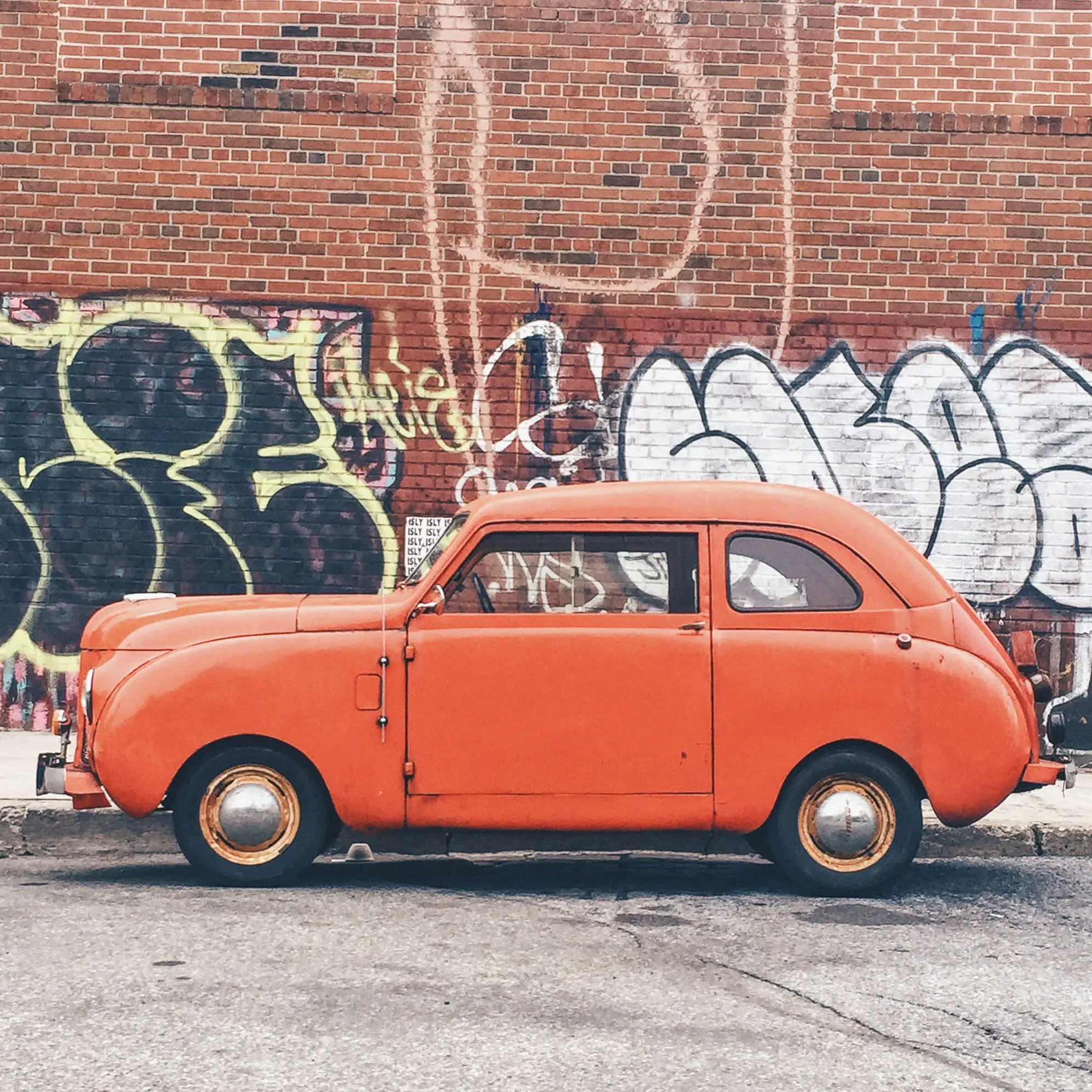
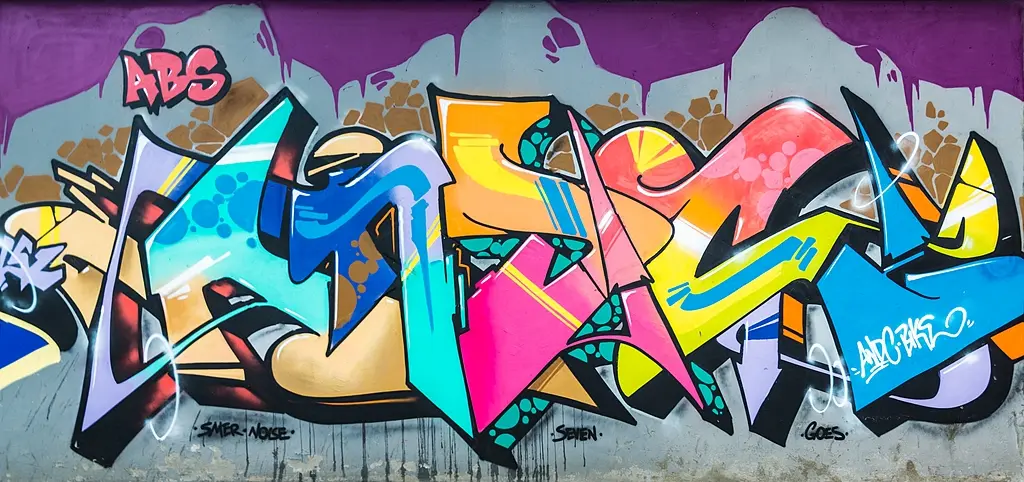
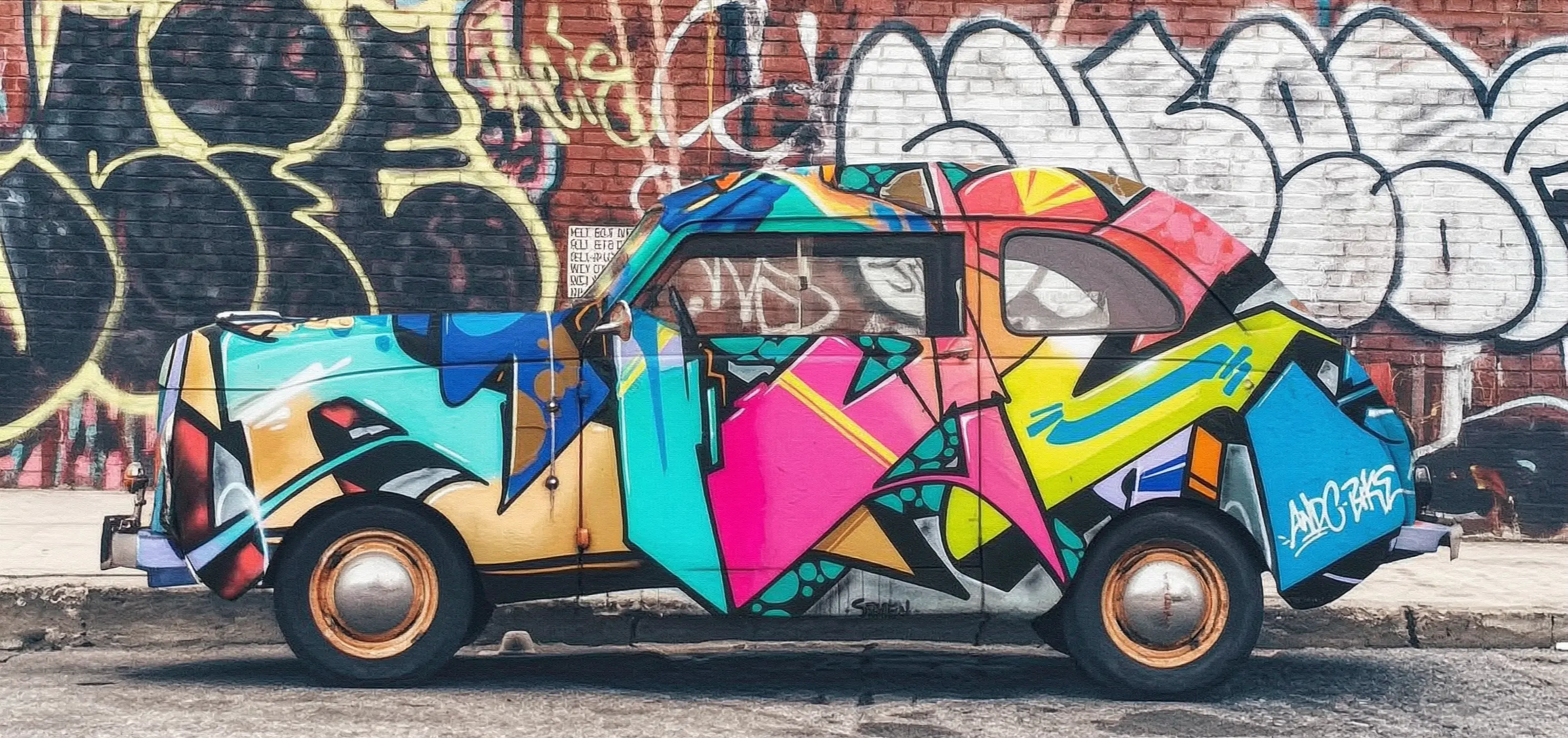
Gere uma imagem editada a partir de duas imagens de entrada e um prompt de texto com wan2.7-image-pro.

Prompt: Aplique o grafite da imagem 2 sobre o carro da imagem 1

Imagem de entrada 1

Imagem de entrada 2

Imagem de saída (wan2.7-image-pro)

umbrella

input2

1774509357_902b1408-2026-03-30-16-12-31

Antes de fazer uma chamada, obtenha uma chave de API e exporte a chave de API como uma variável de ambiente. Para realizar chamadas usando o SDK, instale o DashScope SDK.

Chamada síncrona

Importante

Certifique-se de que a versão do DashScope Python SDK seja 1.25.15 ou posterior, e a versão do DashScope Java SDK seja 2.22.13 ou posterior.

Python

Exemplo de solicitação
import os
import base64
import mimetypes
import urllib.request
import dashscope
from dashscope.aigc.image_generation import ImageGeneration
from dashscope.api_entities.dashscope_response import Message

# The following base_url is for the Singapore region. Replace {WorkspaceId} with your Bailian workspace ID. The base_url varies by region.
dashscope.base_http_api_url = "https://{WorkspaceId}.ap-southeast-1.maas.aliyuncs.com/api/v1"

# If you have not configured environment variables, replace the following line with your Model Studio API key: api_key="sk-xxx"
# The API key varies by region. To obtain an API key, visit: https://www.alibabacloud.com/help/en/model-studio/get-api-key
api_key = os.getenv("DASHSCOPE_API_KEY")

# --- Base64 encoding function ---
# The Base64 encoding format is data:{MIME_type};base64,{base64_data}
def encode_file(file_path):
    mime_type, _ = mimetypes.guess_type(file_path)
    if not mime_type or not mime_type.startswith("image/"):
        raise ValueError("Unsupported or unrecognized image format")
    with open(file_path, "rb") as image_file:
        encoded_string = base64.b64encode(image_file.read()).decode("utf-8")
    return f"data:{mime_type};base64,{encoded_string}"

"""
Image input methods:
The following are three methods for image input. You need to choose only one.
1. Use a public URL: This method is suitable for publicly accessible images.
2. Use a local file: This method is suitable for local development and testing.
3. Use Base64 encoding: This method is suitable for private images or scenarios that require encrypted transmission.
"""
# [Method 1] Use a public image URL
image_1 = "https://help-static-aliyun-doc.aliyuncs.com/file-manage-files/zh-CN/20251229/pjeqdf/car.webp"
image_2 = "https://help-static-aliyun-doc.aliyuncs.com/file-manage-files/zh-CN/20251229/xsunlm/paint.webp"

# [Method 2] Use a local file (supports absolute and relative paths)
# image_1 = "file:///path/to/your/car.png"
# image_2 = "file:///path/to/your/paint.png"

# [Method 3] Use a Base64-encoded image
# image_1 = encode_file("/path/to/your/car.png")
# image_2 = encode_file("/path/to/your/paint.png")

message = Message(
    role="user",
    content=[
        {"text": "Spray the graffiti from image 2 onto the car in image 1"},
        {"image": image_1},
        {"image": image_2},
    ],
)
print("----sync call, please wait a moment----")
rsp = ImageGeneration.call(
    model="wan2.7-image-pro",
    api_key=api_key,
    messages=[message],
    watermark=False,
    n=1,
    size="2K",  # wan2.7-image-pro supports 4K resolution only for text-to-image generation. Image editing and multi-image generation support up to 2K resolution.
)

# Extract the result image URL and save the image to a local file.
if rsp.status_code == 200:
    for i, choice in enumerate(rsp.output.choices):
        for j, content in enumerate(choice["message"]["content"]):
            if content.get("type") == "image":
                image_url = content["image"]
                file_name = f"output_{i}_{j}.png"
                # The result URL is valid for 24 hours. Please download it promptly.
                urllib.request.urlretrieve(image_url, file_name)
                print(f"Image saved to {file_name}")
else:
    print(f"Failed: status_code={rsp.status_code}, message={rsp.message}")
Exemplo de resposta
A URL é válida por 24 horas. Baixe a imagem prontamente.
{
    "status_code": 200,
    "request_id": "81d868c6-6ce1-92d8-a90d-d2ee71xxxxxx",
    "code": "",
    "message": "",
    "output": {
        "text": null,
        "finish_reason": null,
        "choices": [
            {
                "finish_reason": "stop",
                "message": {
                    "role": "assistant",
                    "content": [
                        {
                            "image": "https://dashscope-result-bj.oss-cn-beijing.aliyuncs.com/xxxxxx.png?Expires=xxxxxx",
                            "type": "image"
                        }
                    ]
                }
            }
        ],
        "audio": null,
        "finished": true
    },
    "usage": {
        "input_tokens": 18790,
        "output_tokens": 2,
        "characters": 0,
        "image_count": 1,
        "size": "2985*1405",
        "total_tokens": 18792
    }
}

Java

Exemplo de solicitação
import com.alibaba.dashscope.aigc.imagegeneration.*;
import com.alibaba.dashscope.exception.ApiException;
import com.alibaba.dashscope.exception.NoApiKeyException;
import com.alibaba.dashscope.exception.UploadFileException;
import com.alibaba.dashscope.utils.Constants;
import com.alibaba.dashscope.utils.JsonUtils;

import java.io.IOException;
import java.io.InputStream;
import java.net.URL;
import java.nio.file.Files;
import java.nio.file.Paths;
import java.nio.file.StandardCopyOption;
import java.util.Arrays;
import java.util.Base64;
import java.util.Collections;
import java.util.List;
import java.util.Map;

/**
 * wan2.7-image-pro Image Editing - Synchronous Call Example
 */
public class Main {

    static {
        // The following URL is for the Singapore region. Replace {WorkspaceId} with your Bailian workspace ID. The base_url varies by region.
        Constants.baseHttpApiUrl = "https://{WorkspaceId}.ap-southeast-1.maas.aliyuncs.com/api/v1";
    }

    // If you have not configured an environment variable, replace the following line with your Model Studio API key: apiKey="sk-xxx"
    // The API key varies by region. To obtain an API key, visit https://www.alibabacloud.com/help/en/model-studio/get-api-key
    static String apiKey = System.getenv("DASHSCOPE_API_KEY");

    // --- Base64 encoding function ---
    // Base64 encoding format: data:{MIME_type};base64,{base64_data}
    public static String encodeFile(String filePath) throws IOException {
        byte[] fileContent = Files.readAllBytes(Paths.get(filePath));
        String base64String = Base64.getEncoder().encodeToString(fileContent);
        String mimeType = Files.probeContentType(Paths.get(filePath));
        return "data:" + mimeType + ";base64," + base64String;
    }

    public static void basicCall() throws ApiException, NoApiKeyException, UploadFileException, IOException {
        /*
         * Description of image input methods:
         * Three image input methods are provided below. Select one.
         * 1. Use a public URL: Suitable for publicly accessible images.
         * 2. Use a local file: Suitable for local development and testing.
         * 3. Use Base64 encoding: Suitable for private images or scenarios that require encrypted transmission.
         */
        // Method 1: Use a public image URL.
        String image1 = "https://help-static-aliyun-doc.aliyuncs.com/file-manage-files/zh-CN/20251229/pjeqdf/car.webp";
        String image2 = "https://help-static-aliyun-doc.aliyuncs.com/file-manage-files/zh-CN/20251229/xsunlm/paint.webp";

        // Method 2: Use a local file. Both absolute and relative paths are supported.
        // Format: file:// + file path
        // String image1 = "file:///path/to/your/car.png";
        // String image2 = "file:///path/to/your/paint.png";

        // Method 3: Use a Base64-encoded image.
        // String image1 = encodeFile("/path/to/your/car.png");
        // String image2 = encodeFile("/path/to/your/paint.png");

        // Build a multi-image input message.
        ImageGenerationMessage message = ImageGenerationMessage.builder()
                .role("user")
                .content(Arrays.asList(
                        // Multi-image input is supported. You can provide multiple reference images.
                        Collections.singletonMap("text", "Spray the graffiti from image 2 onto the car in image 1"),
                        Collections.singletonMap("image", image1),
                        Collections.singletonMap("image", image2)
                )).build();

        ImageGenerationParam param = ImageGenerationParam.builder()
                .apiKey(apiKey)
                .model("wan2.7-image-pro")
                .messages(Collections.singletonList(message))
                .n(1)
                .size("2K") // For wan2.7-image-pro, only the text-to-image generation scenario supports 4K resolution. Image editing and collage generation support a maximum resolution of 2K.
                .build();

        ImageGeneration imageGeneration = new ImageGeneration();
        ImageGenerationResult result = null;
        try {
            System.out.println("---sync call for image editing, please wait a moment----");
            result = imageGeneration.call(param);
        } catch (ApiException | NoApiKeyException | UploadFileException e) {
            throw new RuntimeException(e.getMessage());
        }
        // Extract the result image URL and save it to a local file.
        for (int i = 0; i < result.getOutput().getChoices().size(); i++) {
            List<Map<String, Object>> contents = result.getOutput().getChoices().get(i)
                    .getMessage().getContent();
            for (int j = 0; j < contents.size(); j++) {
                if ("image".equals(contents.get(j).get("type"))) {
                    String imageUrl = (String) contents.get(j).get("image");
                    String fileName = "output_" + i + "_" + j + ".png";
                    // The result URL is valid for 24 hours. Download the image in a timely manner.
                    try (InputStream in = new URL(imageUrl).openStream()) {
                        Files.copy(in, Paths.get(fileName), StandardCopyOption.REPLACE_EXISTING);
                    }
                    System.out.println("Image saved to " + fileName);
                }
            }
        }
    }

    public static void main(String[] args) throws ApiException, NoApiKeyException, UploadFileException, IOException {
        basicCall();
    }
}
Exemplo de resposta
A URL é válida por 24 horas. Salve-a prontamente.
{
    "requestId": "1bf6173a-e8de-9f75-94d3-5e618f875xxx",
    "usage": {
        "input_tokens": 18790,
        "output_tokens": 2,
        "total_tokens": 18792,
        "image_count": 1,
        "size": "2985*1405"
    },
    "output": {
        "choices": [
            {
                "finish_reason": "stop",
                "message": {
                    "role": "assistant",
                    "content": [
                        {
                            "image": "https://dashscope-result-bj.oss-cn-beijing.aliyuncs.com/xxxxxx.png?Expires=xxxxxx",
                            "type": "image"
                        }
                    ]
                }
            }
        ],
        "finished": true
    },
    "status_code": 200,
    "code": "",
    "message": ""
}

curl

Exemplo de solicitação
curl --location 'https://{WorkspaceId}.ap-southeast-1.maas.aliyuncs.com/api/v1/services/aigc/multimodal-generation/generation' \
    --header 'Content-Type: application/json' \
    --header "Authorization: Bearer $DASHSCOPE_API_KEY" \
    --data '{
        "model": "wan2.7-image-pro",
        "input": {
            "messages": [
                {
                    "role": "user",
                    "content": [
                        {"image": "https://help-static-aliyun-doc.aliyuncs.com/file-manage-files/zh-CN/20251229/pjeqdf/car.webp"},
                        {"image": "https://help-static-aliyun-doc.aliyuncs.com/file-manage-files/zh-CN/20251229/xsunlm/paint.webp"},
                        {"text": "Spray-paint the graffiti from image 2 onto the car in image 1"}
                    ]
                }
            ]
        },
        "parameters": {
            "size": "2K",
            "n": 1,
            "watermark": false
        }
    }'
    
Exemplo de resposta
{
    "output": {
        "choices": [
            {
                "finish_reason": "stop",
                "message": {
                    "content": [
                        {
                            "image": "https://dashscope-xxx.oss-xxx.aliyuncs.com/xxx.png?Expires=xxx",
                            "type": "image"
                        }
                    ],
                    "role": "assistant"
                }
            }
        ],
        "finished": true
    },
    "usage": {
        "image_count": 1,
        "input_tokens": 10867,
        "output_tokens": 2,
        "size": "1488*704",
        "total_tokens": 10869
    },
    "request_id": "71dfc3c6-f796-9972-97e4-bc4efc4faxxx"
}

Chamada assíncrona

Importante

Certifique-se de que a versão do DashScope Python SDK seja 1.25.15 ou posterior, e a versão do DashScope Java SDK seja 2.22.13 ou posterior.

Python

Exemplo de solicitação
import os
import base64
import mimetypes
import urllib.request
import dashscope
from dashscope.aigc.image_generation import ImageGeneration
from dashscope.api_entities.dashscope_response import Message
from http import HTTPStatus

# The following base_url is for the Singapore region. Replace {WorkspaceId} with your Bailian workspace ID. The base_url varies by region.
dashscope.base_http_api_url = "https://{WorkspaceId}.ap-southeast-1.maas.aliyuncs.com/api/v1"

# If you have not configured environment variables, replace the following line with your Model Studio API key: api_key="sk-xxx"
# The API key varies by region. To obtain an API key, visit https://www.alibabacloud.com/help/en/model-studio/get-api-key
api_key = os.getenv("DASHSCOPE_API_KEY")

# --- Base64 encoding function ---
# The Base64 encoding format is data:{MIME_type};base64,{base64_data}
def encode_file(file_path):
    mime_type, _ = mimetypes.guess_type(file_path)
    if not mime_type or not mime_type.startswith("image/"):
        raise ValueError("Unsupported or unrecognized image format.")
    with open(file_path, "rb") as image_file:
        encoded_string = base64.b64encode(image_file.read()).decode("utf-8")
    return f"data:{mime_type};base64,{encoded_string}"

"""
Image input methods:
Three image input methods are provided below. Choose one.
1. Use a public URL - suitable for publicly accessible images.
2. Use a local file - suitable for local development and testing.
3. Use Base64 encoding - suitable for private images or scenarios that require encrypted transmission.
"""
# [Method 1] Use a public image URL
image_1 = "https://help-static-aliyun-doc.aliyuncs.com/file-manage-files/zh-CN/20251229/pjeqdf/car.webp"
image_2 = "https://help-static-aliyun-doc.aliyuncs.com/file-manage-files/zh-CN/20251229/xsunlm/paint.webp"

# [Method 2] Use a local file (supports absolute and relative paths)
# image_1 = "file:///path/to/your/car.png"
# image_2 = "file:///path/to/your/paint.png"

# [Method 3] Use a Base64-encoded image
# image_1 = encode_file("/path/to/your/car.png")
# image_2 = encode_file("/path/to/your/paint.png")

# Create an asynchronous task.
def create_async_task():
    print("Creating async task...")
    message = Message(
        role="user",
        content=[
            {"text": "Spray the graffiti from image 2 onto the car in image 1."},
            {"image": image_1},
            {"image": image_2},
        ],
    )
    response = ImageGeneration.async_call(
        model="wan2.7-image-pro",
        api_key=api_key,
        messages=[message],
        watermark=False,
        n=1,
        size="2K",  # wan2.7-image-pro supports 4K resolution only for text-to-image generation scenarios. Image editing and collage generation support a maximum resolution of 2K.
    )

    if response.status_code == 200:
        print("Task created successfully:", response)
        return response
    else:
        raise Exception(f"Failed to create task: {response.code} - {response.message}")

# Wait for the task to complete.
def wait_for_completion(task_response):
    print("Waiting for task completion...")
    status = ImageGeneration.wait(task=task_response, api_key=api_key)

    if status.output.task_status == "SUCCEEDED":
        print("Task succeeded!")
        # Extract the result image URL and save the image to a local file.
        for i, choice in enumerate(status.output.choices):
            for j, content in enumerate(choice["message"]["content"]):
                if content.get("type") == "image":
                    image_url = content["image"]
                    file_name = f"output_{i}_{j}.png"
                    # The result URL is valid for 24 hours. Download the image in a timely manner.
                    urllib.request.urlretrieve(image_url, file_name)
                    print(f"Image saved to {file_name}")
    else:
        raise Exception(f"Task failed with status: {status.output.task_status}")

# Obtain information about the asynchronous task.
def fetch_task_status(task):
    print("Fetching task status...")
    status = ImageGeneration.fetch(task=task, api_key=api_key)

    if status.status_code == HTTPStatus.OK:
        print("Task status:", status.output.task_status)
        print("Response details:", status)
    else:
        print(f"Failed to fetch status: {status.code} - {status.message}")

# Cancel the asynchronous task.
def cancel_task(task):
    print("Canceling task...")
    response = ImageGeneration.cancel(task=task, api_key=api_key)

    if response.status_code == HTTPStatus.OK:
        print("Task canceled successfully:", response.output.task_status)
    else:
        print(f"Failed to cancel task: {response.code} - {response.message}")

# Main execution flow.
if __name__ == "__main__":
    task = create_async_task()
    wait_for_completion(task)
Exemplo de resposta
  1. Exemplo de resposta para criação de tarefa

    {
        "status_code": 200,
        "request_id": "4fb3050f-de57-4a24-84ff-e37ee5xxxxxx",
        "code": "",
        "message": "",
        "output": {
            "text": null,
            "finish_reason": null,
            "choices": null,
            "audio": null,
            "task_id": "127ec645-118f-4884-955d-0eba8dxxxxxx",
            "task_status": "PENDING"
        },
        "usage": {
            "input_tokens": 0,
            "output_tokens": 0,
            "characters": 0
        }
    }
  2. Exemplo de resposta para consulta de resultado de tarefa

    A URL é válida por 24 horas. Baixe a imagem prontamente.
    {
        "status_code": 200,
        "request_id": "3b99aae5-d26f-9059-8dd0-ee9ca4804xxx",
        "code": null,
        "message": "",
        "output": {
            "text": null,
            "finish_reason": null,
            "choices": [
                {
                    "finish_reason": "stop",
                    "message": {
                        "role": "assistant",
                        "content": [
                            {
                                "image": "https://dashscope-result-bj.oss-cn-beijing.aliyuncs.com/xxxxxx.png?Expires=xxxxxx",
                                "type": "image"
                            }
                        ]
                    }
                }
            ],
            "audio": null,
            "task_id": "127ec645-118f-4884-955d-0eba8dxxxxxx",
            "task_status": "SUCCEEDED",
            "submit_time": "2026-03-31 22:58:47.646",
            "scheduled_time": "2026-03-31 22:58:47.683",
            "end_time": "2026-03-31 22:58:59.642",
            "finished": true
        },
        "usage": {
            "input_tokens": 18711,
            "output_tokens": 2,
            "characters": 0,
            "size": "2985*1405",
            "total_tokens": 18713,
            "image_count": 1
        }
    }

Java

Exemplo de solicitação
import com.alibaba.dashscope.aigc.imagegeneration.*;
import com.alibaba.dashscope.exception.ApiException;
import com.alibaba.dashscope.exception.NoApiKeyException;
import com.alibaba.dashscope.exception.UploadFileException;
import com.alibaba.dashscope.utils.Constants;
import com.alibaba.dashscope.utils.JsonUtils;

import java.io.IOException;
import java.io.InputStream;
import java.net.URL;
import java.nio.file.Files;
import java.nio.file.Paths;
import java.nio.file.StandardCopyOption;
import java.util.Arrays;
import java.util.Base64;
import java.util.Collections;
import java.util.List;
import java.util.Map;

/**
 * wan2.7-image-pro Image Editing - Asynchronous Invocation Example
 */
public class Main {

    static {
        // The following URL is for the Singapore region. Replace {WorkspaceId} with your Bailian workspace ID. The base_url varies by region.
        Constants.baseHttpApiUrl = "https://{WorkspaceId}.ap-southeast-1.maas.aliyuncs.com/api/v1";
    }

    // If you have not configured an environment variable, replace the following line with your Model Studio API key: apiKey="sk-xxx"
    // The API key varies by region. To obtain an API key, visit: https://www.alibabacloud.com/help/en/model-studio/get-api-key
    static String apiKey = System.getenv("DASHSCOPE_API_KEY");

    // --- Base64 encoding function ---
    // The Base64 encoding format is data:{MIME_type};base64,{base64_data}
    public static String encodeFile(String filePath) throws IOException {
        byte[] fileContent = Files.readAllBytes(Paths.get(filePath));
        String base64String = Base64.getEncoder().encodeToString(fileContent);
        String mimeType = Files.probeContentType(Paths.get(filePath));
        return "data:" + mimeType + ";base64," + base64String;
    }

    public static void asyncCall() throws ApiException, NoApiKeyException, UploadFileException, IOException {
        /*
         * Description of image input methods:
         * The following three image input methods are provided. You can choose one of them.
         * 1. Use a public URL - Suitable for publicly accessible images.
         * 2. Use a local file - Suitable for local development and testing.
         * 3. Use Base64 encoding - Suitable for scenarios that involve private images or require encrypted transmission.
         */
        // [Method 1] Use a public image URL
        String image1 = "https://help-static-aliyun-doc.aliyuncs.com/file-manage-files/zh-CN/20251229/pjeqdf/car.webp";
        String image2 = "https://help-static-aliyun-doc.aliyuncs.com/file-manage-files/zh-CN/20251229/xsunlm/paint.webp";

        // [Method 2] Use a local file (supports absolute and relative paths)
        // Required format: file:// + file path
        // String image1 = "file:///path/to/your/car.png";
        // String image2 = "file:///path/to/your/paint.png";

        // [Method 3] Use a Base64-encoded image
        // String image1 = encodeFile("/path/to/your/car.png");
        // String image2 = encodeFile("/path/to/your/paint.png");

        // Build a multi-image input message
        ImageGenerationMessage message = ImageGenerationMessage.builder()
                .role("user")
                .content(Arrays.asList(
                        // Supports multi-image input. You can provide multiple reference images.
                        Collections.singletonMap("text", "Spray-paint the graffiti from image 2 onto the car in image 1"),
                        Collections.singletonMap("image", image1),
                        Collections.singletonMap("image", image2)
                )).build();

        ImageGenerationParam param = ImageGenerationParam.builder()
                .apiKey(apiKey)
                .model("wan2.7-image-pro")
                .n(1)
                .size("2K") // The wan2.7-image-pro model supports 4K resolution only for text-to-image generation. For image editing and composite image generation, the maximum supported resolution is 2K.
                .messages(Arrays.asList(message))
                .build();

        ImageGeneration imageGeneration = new ImageGeneration();
        ImageGenerationResult result = null;
        try {
            System.out.println("---async call for image editing, creating task----");
            result = imageGeneration.asyncCall(param);
        } catch (ApiException | NoApiKeyException | UploadFileException e) {
            throw new RuntimeException(e.getMessage());
        }
        System.out.println("Task creation result:");
        System.out.println(JsonUtils.toJson(result));

        String taskId = result.getOutput().getTaskId();
        // Wait for the task to complete
        waitTask(taskId);
    }

    public static void waitTask(String taskId) throws ApiException, NoApiKeyException, IOException {
        ImageGeneration imageGeneration = new ImageGeneration();
        System.out.println("\n---waiting for task completion----");
        ImageGenerationResult result = imageGeneration.wait(taskId, apiKey);
        // Fetch the resulting image URL and save it to a local file
        for (int i = 0; i < result.getOutput().getChoices().size(); i++) {
            List<Map<String, Object>> contents = result.getOutput().getChoices().get(i)
                    .getMessage().getContent();
            for (int j = 0; j < contents.size(); j++) {
                if ("image".equals(contents.get(j).get("type"))) {
                    String imageUrl = (String) contents.get(j).get("image");
                    String fileName = "output_" + i + "_" + j + ".png";
                    // The result URL is valid for 24 hours. Download the image in a timely manner.
                    try (InputStream in = new URL(imageUrl).openStream()) {
                        Files.copy(in, Paths.get(fileName), StandardCopyOption.REPLACE_EXISTING);
                    }
                    System.out.println("Image saved to " + fileName);
                }
            }
        }
    }

    public static void main(String[] args) throws ApiException, NoApiKeyException, UploadFileException, IOException {
        asyncCall();
    }
}
Exemplo de resposta
  1. Exemplo de resposta ao criar uma tarefa

    {
        "requestId": "ccf4b2f4-bf30-9e13-9461-3a28c6a7bxxx",
        "output": {
            "task_id": "8811b4a4-00ac-4aa2-a2fd-017d3b90cxxx",
            "task_status": "PENDING"
        },
        "status_code": 200,
        "code": "",
        "message": ""
    }
  2. Exemplo de resposta ao consultar o resultado de uma tarefa

    A URL tem validade de 24 horas. Salve-a prontamente.
    {
        "requestId": "60a08540-f1c1-9e76-8cd3-d5949db8cxxx",
        "usage": {
            "input_tokens": 18711,
            "output_tokens": 2,
            "total_tokens": 18713,
            "image_count": 1,
            "size": "2985*1405"
        },
        "output": {
            "choices": [
                {
                    "finish_reason": "stop",
                    "message": {
                        "role": "assistant",
                        "content": [
                            {
                                "image": "https://dashscope-result-bj.oss-cn-beijing.aliyuncs.com/xxxxxx.png?Expires=xxxxxx",
                                "type": "image"
                            }
                        ]
                    }
                }
            ],
            "task_id": "8811b4a4-00ac-4aa2-a2fd-017d3b90cxxx",
            "task_status": "SUCCEEDED",
            "finished": true,
            "submit_time": "2026-03-31 19:57:58.840",
            "scheduled_time": "2026-03-31 19:57:58.877",
            "end_time": "2026-03-31 19:58:11.563"
        },
        "status_code": 200,
        "code": "",
        "message": ""
    }

curl

Etapa 1: Criar uma tarefa para obter o ID da tarefa

curl --location 'https://{WorkspaceId}.ap-southeast-1.maas.aliyuncs.com/api/v1/services/aigc/image-generation/generation' \
    --header 'Content-Type: application/json' \
    --header "Authorization: Bearer $DASHSCOPE_API_KEY" \
    --header "X-DashScope-Async: enable" \
    --data '{
        "model": "wan2.7-image-pro",
        "input": {
            "messages": [
                {
                    "role": "user",
                    "content": [
                        {"image": "https://help-static-aliyun-doc.aliyuncs.com/file-manage-files/zh-CN/20251229/pjeqdf/car.webp"},
                        {"image": "https://help-static-aliyun-doc.aliyuncs.com/file-manage-files/zh-CN/20251229/xsunlm/paint.webp"},
                        {"text": "Spray-paint the graffiti from image 2 onto the car in image 1"}
                    ]
                }
            ]
        },
        "parameters": {
            "size": "2K",
            "n": 1,
            "watermark": false
        }
    }'
    

Exemplo de resposta

{
    "output": {
        "task_status": "PENDING",
        "task_id": "0385dc79-5ff8-4d82-bcb6-xxxxxx"
    },
    "request_id": "4909100c-7b5a-9f92-bfe5-xxxxxx"
}

Etapa 2: Consultar o resultado pelo ID da tarefa

Use o task_id obtido na etapa anterior para consultar o status da tarefa via API até que o task_status seja SUCCEEDED ou FAILED.

Substitua {task_id} pelo valor de task_id retornado pela chamada de API anterior. O task_id permanece válido para consultas por 24 horas.

curl -X GET https://{WorkspaceId}.ap-southeast-1.maas.aliyuncs.com/api/v1/tasks/{task_id} \
--header "Authorization: Bearer $DASHSCOPE_API_KEY"

Exemplo de resposta

A URL da imagem tem validade de 24 horas. Baixe a imagem prontamente.
{
    "request_id": "810fa5f5-334c-91f3-aaa4-ed89cf0caxxx",
    "output": {
        "task_id": "a81ee7cb-014c-473d-b842-76e98311cxxx",
        "task_status": "SUCCEEDED",
        "submit_time": "2026-03-26 17:16:01.663",
        "scheduled_time": "2026-03-26 17:16:01.716",
        "end_time": "2026-03-26 17:16:22.961",
        "finished": true,
        "choices": [
            {
                "finish_reason": "stop",
                "message": {
                    "role": "assistant",
                    "content": [
                        {
                            "image": "https://dashscope-xxx.oss-xxx.aliyuncs.com/xxx.png?Expires=xxx",
                            "type": "image"
                        }
                    ]
                }
            }
        ]
    },
    "usage": {
        "size": "2976*1408",
        "total_tokens": 11017,
        "image_count": 1,
        "output_tokens": 2,
        "input_tokens": 11015
    }
}

O modelo wan2.5-i2i-preview utiliza endpoints e parâmetros de API diferentes.

Clique para ver exemplos de chamada para wan2.5-i2i-preview

Chamada síncrona

Importante

Certifique-se de que a versão do DashScope Python SDK seja pelo menos 1.25.2 e a versão do DashScope Java SDK seja pelo menos 2.22.2.

Versões desatualizadas do SDK podem gerar erros do tipo "url error, please check url!". Instale ou atualize o SDK.

Python

Este exemplo oferece suporte a três métodos de entrada de imagem: URL pública, codificação Base64 e caminho de arquivo local.

Exemplo de solicitação
import base64
import mimetypes
from http import HTTPStatus
from urllib.parse import urlparse, unquote
from pathlib import PurePosixPath

import dashscope
import requests
from dashscope import ImageSynthesis
import os

# The following URL is for the Singapore region. Replace {WorkspaceId} with your actual workspace ID. URLs differ by region.
dashscope.base_http_api_url = 'https://{WorkspaceId}.ap-southeast-1.maas.aliyuncs.com/api/v1'

# If you have not configured an environment variable, replace the next line with: api_key="sk-xxx"
# API keys differ between Singapore and Beijing. Get an API key: https://www.alibabacloud.com/help/zh/model-studio/get-api-key
api_key = os.getenv("DASHSCOPE_API_KEY")

# --- Input image: Base64 encoding ---
# Base64 format: data:{MIME_type};base64,{base64_data}
def encode_file(file_path):
    mime_type, _ = mimetypes.guess_type(file_path)
    if not mime_type or not mime_type.startswith("image/"):
        raise ValueError("Unsupported or unrecognized image format")
    with open(file_path, "rb") as image_file:
        encoded_string = base64.b64encode(image_file.read()).decode('utf-8')
    return f"data:{mime_type};base64,{encoded_string}"

"""
Image input methods:
Choose one of the following:

1. Public URL — best for publicly accessible images
2. Local file — best for local development and testing
3. Base64 encoding — best for private images or secure transmission
"""

# [Method 1] Public image URL
image_url_1 = "https://img.alicdn.com/imgextra/i3/O1CN0157XGE51l6iL9441yX_!!6000000004770-49-tps-1104-1472.webp"
image_url_2 = "https://img.alicdn.com/imgextra/i3/O1CN01SfG4J41UYn9WNt4X1_!!6000000002530-49-tps-1696-960.webp"

# [Method 2] Local file (supports absolute and relative paths)
# Format: file:// + file path
# Example (absolute path):
# image_url_1 = "file://" + "/path/to/your/image_1.png"     # Linux/macOS
# image_url_2 = "file://" + "C:/path/to/your/image_2.png"  # Windows
# Example (relative path):
# image_url_1 = "file://" + "./image_1.png"                 # Adjust to your path
# image_url_2 = "file://" + "./image_2.png"                # Adjust to your path

# [Method 3] Base64-encoded image
# image_url_1 = encode_file("./image_1.png")               # Adjust to your path
# image_url_2 = encode_file("./image_2.png")              # Adjust to your path

print('----sync call, please wait a moment----')
rsp = ImageSynthesis.call(api_key=api_key,
                          model="wan2.5-i2i-preview",
                          prompt="Place the alarm clock from image 1 beside the vase on the dining table in image 2.",
                          images=[image_url_1, image_url_2],
                          negative_prompt="",
                          n=1,
                          # size="1280*1280",
                          prompt_extend=True,
                          watermark=False,
                          seed=12345)
print('response: %s' % rsp)
if rsp.status_code == HTTPStatus.OK:
    # Save images to current directory
    for result in rsp.output.results:
        file_name = PurePosixPath(unquote(urlparse(result.url).path)).parts[-1]
        with open('./%s' % file_name, 'wb+') as f:
            f.write(requests.get(result.url).content)
else:
    print('sync_call Failed, status_code: %s, code: %s, message: %s' %
          (rsp.status_code, rsp.code, rsp.message))
Exemplo de resposta
A URL da imagem tem validade de 24 horas. Baixe a imagem prontamente.
{
    "status_code": 200,
    "request_id": "8ad45834-4321-44ed-adf5-xxxxxx",
    "code": null,
    "message": "",
    "output": {
        "task_id": "3aff9ebd-35fc-4339-98a3-xxxxxx",
        "task_status": "SUCCEEDED",
        "results": [
            {
                "url": "https://dashscope-result-sh.oss-cn-shanghai.aliyuncs.com/xxx.png?Expires=xxx",
                "orig_prompt": "Place the alarm clock from image 1 beside the vase on the dining table in image 2.",
                "actual_prompt": "Place the blue alarm clock from image 1 to the right of the vase on the dining table in image 2, near the edge of the tablecloth. Keep the clock facing the camera and parallel to the tabletop, with natural shadow projection."
            }
        ],
        "submit_time": "2025-10-23 16:18:16.009",
        "scheduled_time": "2025-10-23 16:18:16.040",
        "end_time": "2025-10-23 16:19:09.591",
        "task_metrics": {
            "TOTAL": 1,
            "FAILED": 0,
            "SUCCEEDED": 1
        }
    },
    "usage": {
        "image_count": 1
    }
}

Java

Este exemplo oferece suporte a três métodos de entrada de imagem: URL pública, codificação Base64 e caminho de arquivo local.

Exemplo de solicitação
// Copyright (c) Alibaba, Inc. and its affiliates.

import com.alibaba.dashscope.aigc.imagesynthesis.ImageSynthesis;
import com.alibaba.dashscope.aigc.imagesynthesis.ImageSynthesisParam;
import com.alibaba.dashscope.aigc.imagesynthesis.ImageSynthesisResult;
import com.alibaba.dashscope.exception.ApiException;
import com.alibaba.dashscope.exception.NoApiKeyException;
import com.alibaba.dashscope.utils.Constants;
import com.alibaba.dashscope.utils.JsonUtils;

import java.io.IOException;
import java.nio.file.Files;
import java.nio.file.Path;
import java.nio.file.Paths;
import java.util.*;

public class Image2Image {

    static {
        // The following URL is for the Singapore region. Replace {WorkspaceId} with your actual workspace ID. URLs differ by region.
        Constants.baseHttpApiUrl = "https://{WorkspaceId}.ap-southeast-1.maas.aliyuncs.com/api/v1";
    }

    // If you have not configured an environment variable, replace the next line with: apiKey="sk-xxx"
    // API keys differ between Singapore and Beijing. Get an API key: https://www.alibabacloud.com/help/zh/model-studio/get-api-key
    static String apiKey = System.getenv("DASHSCOPE_API_KEY");

    /**
     * Image input methods: choose one
     *
     * 1. Public URL — best for publicly accessible images
     * 2. Local file — best for local development and testing
     * 3. Base64 encoding — best for private images or secure transmission
     */

    // [Method 1] Public URL
    static String imageUrl_1 = "https://img.alicdn.com/imgextra/i3/O1CN0157XGE51l6iL9441yX_!!6000000004770-49-tps-1104-1472.webp";
    static String imageUrl_2 = "https://img.alicdn.com/imgextra/i3/O1CN01SfG4J41UYn9WNt4X1_!!6000000002530-49-tps-1696-960.webp";

    // [Method 2] Local file path (file://+absolute path or file:///+absolute path)
    // static String imageUrl_1 = "file://" + "/your/path/to/image_1.png";    // Linux/macOS
    // static String imageUrl_2 = "file:///" + "C:/your/path/to/image_2.png";  // Windows

    // [Method 3] Base64 encoding
    // static String imageUrl_1 = encodeFile("/your/path/to/image_1.png");
    // static String imageUrl_2 = encodeFile("/your/path/to/image_2.png");

    // List of images to edit
    static List<String> imageUrls = new ArrayList<>();
    static {
        imageUrls.add(imageUrl_1);
        imageUrls.add(imageUrl_2);
    }

    public static void syncCall() {
        // Set parameters
        Map<String, Object> parameters = new HashMap<>();
        parameters.put("prompt_extend", true);
        parameters.put("watermark", false);
        parameters.put("seed", 12345);

        ImageSynthesisParam param =
                ImageSynthesisParam.builder()
                        .apiKey(apiKey)
                        .model("wan2.5-i2i-preview")
                        .prompt("Place the alarm clock from image 1 beside the vase on the dining table in image 2.")
                        .images(imageUrls)
                        .n(1)
                         //.size("1280*1280")
                        .negativePrompt("")
                        .parameters(parameters)
                        .build();

        ImageSynthesis imageSynthesis = new ImageSynthesis();
        ImageSynthesisResult result = null;
        try {
            System.out.println("---sync call, please wait a moment----");
            result = imageSynthesis.call(param);
        } catch (ApiException | NoApiKeyException e){
            throw new RuntimeException(e.getMessage());
        }
        System.out.println(JsonUtils.toJson(result));
    }

    /**
     * Encode a file as a Base64 string
     * @param filePath File path
     * @return Base64 string in format data:{MIME_type};base64,{base64_data}
     */
    public static String encodeFile(String filePath) {
        Path path = Paths.get(filePath);
        if (!Files.exists(path)) {
            throw new IllegalArgumentException("File not found: " + filePath);
        }
        // Detect MIME type
        String mimeType = null;
        try {
            mimeType = Files.probeContentType(path);
        } catch (IOException e) {
            throw new IllegalArgumentException("Cannot detect file type: " + filePath);
        }
        if (mimeType == null || !mimeType.startsWith("image/")) {
            throw new IllegalArgumentException("Unsupported or unrecognized image format");
        }
        // Read file and encode
        byte[] fileBytes = null;
        try{
            fileBytes = Files.readAllBytes(path);
        } catch (IOException e) {
            throw new IllegalArgumentException("Cannot read file: " + filePath);
        }

        String encodedString = Base64.getEncoder().encodeToString(fileBytes);
        return "data:" + mimeType + ";base64," + encodedString;
    }

    public static void main(String[] args) {
        syncCall();
    }
}
Exemplo de resposta
A URL da imagem tem validade de 24 horas. Baixe a imagem prontamente.
{
    "request_id": "d362685b-757f-4eac-bab5-xxxxxx",
    "output": {
        "task_id": "bfa7fc39-3d87-4fa7-b1e6-xxxxxx",
        "task_status": "SUCCEEDED",
        "results": [
            {
                "orig_prompt": "Place the alarm clock from image 1 beside the vase on the dining table in image 2.",
                "actual_prompt": "Place the blue alarm clock from image 1 to the right of the vase on the dining table in image 2, near the edge of the tablecloth. Keep the clock facing the camera and parallel to the vase.",
                "url": "https://dashscope-result-sh.oss-cn-shanghai.aliyuncs.com/xxx.png?Expires=xxx"
            }
        ],
        "task_metrics": {
            "TOTAL": 1,
            "SUCCEEDED": 1,
            "FAILED": 0
        }
    },
    "usage": {
        "image_count": 1
    }
}

Chamada assíncrona

Importante

Certifique-se de que a versão do DashScope Python SDK seja pelo menos 1.25.2 e a versão do DashScope Java SDK seja pelo menos 2.22.2.

Versões desatualizadas do SDK podem gerar erros do tipo "url error, please check url!". Instale ou atualize o SDK.

Python

Este exemplo utiliza uma URL pública para fornecer a imagem.

Exemplo de solicitação
import os
from http import HTTPStatus
from urllib.parse import urlparse, unquote
from pathlib import PurePosixPath
import dashscope
import requests
from dashscope import ImageSynthesis

# The following URL is for the Singapore region. Replace {WorkspaceId} with your actual workspace ID. URLs differ by region.
dashscope.base_http_api_url = 'https://{WorkspaceId}.ap-southeast-1.maas.aliyuncs.com/api/v1'

# If you have not configured an environment variable, replace the next line with: api_key="sk-xxx"
# API keys differ between Singapore and Beijing. Get an API key: https://www.alibabacloud.com/help/zh/model-studio/get-api-key
api_key = os.getenv("DASHSCOPE_API_KEY")

# Public image URLs
image_url_1 = "https://img.alicdn.com/imgextra/i3/O1CN0157XGE51l6iL9441yX_!!6000000004770-49-tps-1104-1472.webp"
image_url_2 = "https://img.alicdn.com/imgextra/i3/O1CN01SfG4J41UYn9WNt4X1_!!6000000002530-49-tps-1696-960.webp"

def async_call():
    print('----create task----')
    task_info = create_async_task()
    print('----wait task----')
    wait_async_task(task_info)

# Create an asynchronous task
def create_async_task():
    rsp = ImageSynthesis.async_call(api_key=api_key,
                                    model="wan2.5-i2i-preview",
                                    prompt="Place the alarm clock from image 1 beside the vase on the dining table in image 2.",
                                    images=[image_url_1, image_url_2],
                                    negative_prompt="",
                                    n=1,
                                    # size="1280*1280",
                                    prompt_extend=True,
                                    watermark=False,
                                    seed=12345)
    print(rsp)
    if rsp.status_code == HTTPStatus.OK:
        print(rsp.output)
    else:
        print('Failed, status_code: %s, code: %s, message: %s' %
              (rsp.status_code, rsp.code, rsp.message))
    return rsp

# Wait for the asynchronous task to finish
def wait_async_task(task):
    rsp = ImageSynthesis.wait(task=task, api_key=api_key)
    print(rsp)
    if rsp.status_code == HTTPStatus.OK:
        print(rsp.output)
        # Save file to current directory
        for result in rsp.output.results:
            file_name = PurePosixPath(unquote(urlparse(result.url).path)).parts[-1]
            with open('./%s' % file_name, 'wb+') as f:
                f.write(requests.get(result.url).content)
    else:
        print('Failed, status_code: %s, code: %s, message: %s' %
              (rsp.status_code, rsp.code, rsp.message))

# Fetch asynchronous task status
def fetch_task_status(task):
    status = ImageSynthesis.fetch(task=task, api_key=api_key)
    print(status)
    if status.status_code == HTTPStatus.OK:
        print(status.output.task_status)
    else:
        print('Failed, status_code: %s, code: %s, message: %s' %
              (status.status_code, status.code, status.message))

# Cancel an asynchronous task. Only PENDING tasks can be canceled.
def cancel_task(task):
    rsp = ImageSynthesis.cancel(task=task, api_key=api_key)
    print(rsp)
    if rsp.status_code == HTTPStatus.OK:
        print(rsp.output.task_status)
    else:
        print('Failed, status_code: %s, code: %s, message: %s' %
              (rsp.status_code, rsp.code, rsp.message))

if __name__ == '__main__':
    async_call()
Exemplo de resposta
  1. Resposta ao criar uma tarefa

    {
    	"status_code": 200,
    	"request_id": "31b04171-011c-96bd-ac00-f0383b669cc7",
    	"code": "",
    	"message": "",
    	"output": {
    		"task_id": "4f90cf14-a34e-4eae-xxxxxxxx",
    		"task_status": "PENDING",
    		"results": []
    	},
    	"usage": null
    }
  2. Resposta ao consultar resultados da tarefa

    As URLs das imagens expiram após 24 horas. Baixe as imagens prontamente.
    {
        "status_code": 200,
        "request_id": "8ad45834-4321-44ed-adf5-xxxxxx",
        "code": null,
        "message": "",
        "output": {
            "task_id": "3aff9ebd-35fc-4339-98a3-xxxxxx",
            "task_status": "SUCCEEDED",
            "results": [
                {
                    "url": "https://dashscope-result-sh.oss-cn-shanghai.aliyuncs.com/xxx.png?Expires=xxx",
                    "orig_prompt": "Place the alarm clock from image 1 beside the vase on the dining table in image 2.",
                    "actual_prompt": "Place the blue alarm clock from image 1 to the right of the vase on the dining table in image 2, near the edge of the tablecloth. Keep the clock facing the camera and parallel to the tabletop, with natural shadow projection."
                }
            ],
            "submit_time": "2025-10-23 16:18:16.009",
            "scheduled_time": "2025-10-23 16:18:16.040",
            "end_time": "2025-10-23 16:19:09.591",
            "task_metrics": {
                "TOTAL": 1,
                "FAILED": 0,
                "SUCCEEDED": 1
            }
        },
        "usage": {
            "image_count": 1
        }
    }
    

Java

Este exemplo usa uma URL pública para passar a imagem por padrão.

Exemplo de solicitação
// Copyright (c) Alibaba, Inc. and its affiliates.

import com.alibaba.dashscope.aigc.imagesynthesis.ImageSynthesis;
import com.alibaba.dashscope.aigc.imagesynthesis.ImageSynthesisListResult;
import com.alibaba.dashscope.aigc.imagesynthesis.ImageSynthesisParam;
import com.alibaba.dashscope.aigc.imagesynthesis.ImageSynthesisResult;
import com.alibaba.dashscope.exception.ApiException;
import com.alibaba.dashscope.exception.NoApiKeyException;
import com.alibaba.dashscope.task.AsyncTaskListParam;
import com.alibaba.dashscope.utils.Constants;
import com.alibaba.dashscope.utils.JsonUtils;

import java.util.ArrayList;
import java.util.HashMap;
import java.util.List;
import java.util.Map;

public class Image2Image {

    static {
        // The following URL is for the Singapore region. Replace {WorkspaceId} with your actual workspace ID. URLs differ by region.
        Constants.baseHttpApiUrl = "https://{WorkspaceId}.ap-southeast-1.maas.aliyuncs.com/api/v1";
    }

    // If you have not configured an environment variable, replace the next line with: apiKey="sk-xxx"
    // API keys differ between Singapore and Beijing. Get an API key: https://www.alibabacloud.com/help/zh/model-studio/get-api-key
    static String apiKey = System.getenv("DASHSCOPE_API_KEY");

    // Public URLs
    static String imageUrl_1 = "https://img.alicdn.com/imgextra/i3/O1CN0157XGE51l6iL9441yX_!!6000000004770-49-tps-1104-1472.webp";
    static String imageUrl_2 = "https://img.alicdn.com/imgextra/i3/O1CN01SfG4J41UYn9WNt4X1_!!6000000002530-49-tps-1696-960.webp";

    // List of images to edit
    static List<String> imageUrls = new ArrayList<>();
    static {
        imageUrls.add(imageUrl_1);
        imageUrls.add(imageUrl_2);
    }

    public static void asyncCall() {
        // Set parameters
        Map<String, Object> parameters = new HashMap<>();
        parameters.put("prompt_extend", true);
        parameters.put("watermark", false);
        parameters.put("seed", 12345);

        ImageSynthesisParam param =
                ImageSynthesisParam.builder()
                        .apiKey(apiKey)
                        .model("wan2.5-i2i-preview")
                        .prompt("Place the alarm clock from image 1 beside the vase on the dining table in image 2.")
                        .images(imageUrls)
                        .n(1)
                        //.size("1280*1280")
                        .negativePrompt("")
                        .parameters(parameters)
                        .build();
        ImageSynthesis imageSynthesis = new ImageSynthesis();
        ImageSynthesisResult result = null;
        try {
            System.out.println("---async call, please wait a moment----");
            result = imageSynthesis.asyncCall(param);
        } catch (ApiException | NoApiKeyException e){
            throw new RuntimeException(e.getMessage());
        }

        System.out.println(JsonUtils.toJson(result));

        String taskId = result.getOutput().getTaskId();

        System.out.println("taskId=" + taskId);

        try {
            result = imageSynthesis.wait(taskId, apiKey);
        } catch (ApiException | NoApiKeyException e){
            throw new RuntimeException(e.getMessage());
        }
        System.out.println(JsonUtils.toJson(result));
        System.out.println(JsonUtils.toJson(result.getOutput()));
    }

    public static void listTask() throws ApiException, NoApiKeyException {
        ImageSynthesis is = new ImageSynthesis();
        AsyncTaskListParam param = AsyncTaskListParam.builder().build();
        param.setApiKey(apiKey);
        ImageSynthesisListResult result = is.list(param);
        System.out.println(result);
    }

    public void fetchTask(String taskId) throws ApiException, NoApiKeyException {
        ImageSynthesis is = new ImageSynthesis();
        // If DASHSCOPE_API_KEY is set as an environment variable, apiKey can be empty.
        ImageSynthesisResult result = is.fetch(taskId, apiKey);
        System.out.println(result.getOutput());
        System.out.println(result.getUsage());
    }

    public static void main(String[] args) {
        asyncCall();
    }
}
Exemplo de resposta
  1. Resposta ao criar uma tarefa

    {
    	"request_id": "5dbf9dc5-4f4c-9605-85ea-542f97709ba8",
    	"output": {
    		"task_id": "7277e20e-aa01-4709-xxxxxxxx",
    		"task_status": "PENDING"
    	}
    }
  2. Resposta ao consultar resultados da tarefa

    As URLs das imagens expiram após 24 horas. Baixe as imagens prontamente.
    {
        "request_id": "d362685b-757f-4eac-bab5-xxxxxx",
        "output": {
            "task_id": "bfa7fc39-3d87-4fa7-b1e6-xxxxxx",
            "task_status": "SUCCEEDED",
            "results": [
                {
                    "orig_prompt": "Place the alarm clock from image 1 beside the vase on the dining table in image 2.",
                    "actual_prompt": "Place the blue alarm clock from image 1 to the right of the vase on the dining table in image 2, near the edge of the tablecloth. Keep the clock facing the camera and parallel to the vase.",
                    "url": "https://dashscope-result-sh.oss-cn-shanghai.aliyuncs.com/xxx.png?Expires=xxx"
                }
            ],
            "task_metrics": {
                "TOTAL": 1,
                "SUCCEEDED": 1,
                "FAILED": 0
            }
        },
        "usage": {
            "image_count": 1
        }
    }

curl

Este é um processo de duas etapas: crie uma tarefa e depois recupere o resultado.

Nota
  • Para chamadas assíncronas, defina o parâmetro de cabeçalho X-DashScope-Async como enable.

  • O task_id de uma tarefa assíncrona é válido por 24 horas. Após a expiração, o status da tarefa torna-se UNKNOWN.

Etapa 1: Enviar uma solicitação para criar uma tarefa

Esta solicitação retorna um ID de tarefa (task_id).

Exemplo de solicitação
 curl --location 'https://{WorkspaceId}.ap-southeast-1.maas.aliyuncs.com/api/v1/services/aigc/image2image/image-synthesis' \
    -H 'X-DashScope-Async: enable' \
    -H "Authorization: Bearer $DASHSCOPE_API_KEY" \
    -H 'Content-Type: application/json' \
    -d '{
    "model": "wan2.5-i2i-preview",
    "input": {
        "prompt": "Place the alarm clock from image 1 beside the vase on the dining table in image 2.",
        "images": [
            "https://img.alicdn.com/imgextra/i3/O1CN0157XGE51l6iL9441yX_!!6000000004770-49-tps-1104-1472.webp",
            "https://img.alicdn.com/imgextra/i3/O1CN01SfG4J41UYn9WNt4X1_!!6000000002530-49-tps-1696-960.webp"
        ]
    },
    "parameters": {
        "n": 1
    }
}'

Exemplo de resposta

{
    "output": {
        "task_status": "PENDING",
        "task_id": "0385dc79-5ff8-4d82-bcb6-xxxxxx"
    },
    "request_id": "4909100c-7b5a-9f92-bfe5-xxxxxx"
}

Etapa 2: Consultar o resultado pelo ID da tarefa

Use o task_id obtido na etapa anterior para sondar o status da tarefa por meio da API até que o task_status seja SUCCEEDED ou FAILED.

Exemplo de solicitação

Substitua {task_id} pelo valor de task_id retornado pela chamada de API anterior. O task_id permanece válido para consultas durante 24 horas.

curl -X GET https://{WorkspaceId}.ap-southeast-1.maas.aliyuncs.com/api/v1/tasks/{task_id} \
--header "Authorization: Bearer $DASHSCOPE_API_KEY"

Exemplo de resposta

A URL da imagem é válida por 24 horas. Baixe a imagem prontamente.
{
    "request_id": "d1f2a1be-9c58-48af-b43f-xxxxxx",
    "output": {
        "task_id": "7f4836cd-1c47-41b3-b3a4-xxxxxx",
        "task_status": "SUCCEEDED",
        "submit_time": "2025-09-23 22:14:10.800",
        "scheduled_time": "2025-09-23 22:14:10.825",
        "end_time": "2025-09-23 22:15:23.456",
        "results": [
            {
                "orig_prompt": "Place the alarm clock from image 1 next to the vase on the dining table in image 2",
                "url": "https://dashscope-result-sh.oss-cn-shanghai.aliyuncs.com/xxx.png?Expires=xxx"
            }
        ],
        "task_metrics": {
            "TOTAL": 1,
            "FAILED": 0,
            "SUCCEEDED": 1
        }
    },
    "usage": {
        "image_count": 1
    }
}

Seleção de modelo

  • wan2.7-image-pro e wan2.7-image (recomendado): Ideais para edição precisa ou geração de múltiplas imagens coerentes.

    • Edição local precisa: Selecione uma área específica para mover, substituir ou adicionar elementos. Recomendado para retoques em e-commerce e ajustes de design.

    • Geração de múltiplos painéis: Gere várias imagens com estilo consistente em uma única chamada. Mais indicado para storyboards de quadrinhos e séries de produtos.

  • wan2.6-image: Edição estilizada com mistura de texto e imagens ou múltiplas referências. Gera texto nas imagens e aceita até quatro imagens de referência.

  • wan2.5-i2i-preview: Adequado para edição simples de imagens e fusão de múltiplas imagens.

Para as especificações de entrada e saída de cada modelo, consulte Especificações de imagem de entrada e Resolução da imagem de saída.

Galeria de demonstração

Conjunto imagem para imagem

Imagem de entrada

Imagem de saída

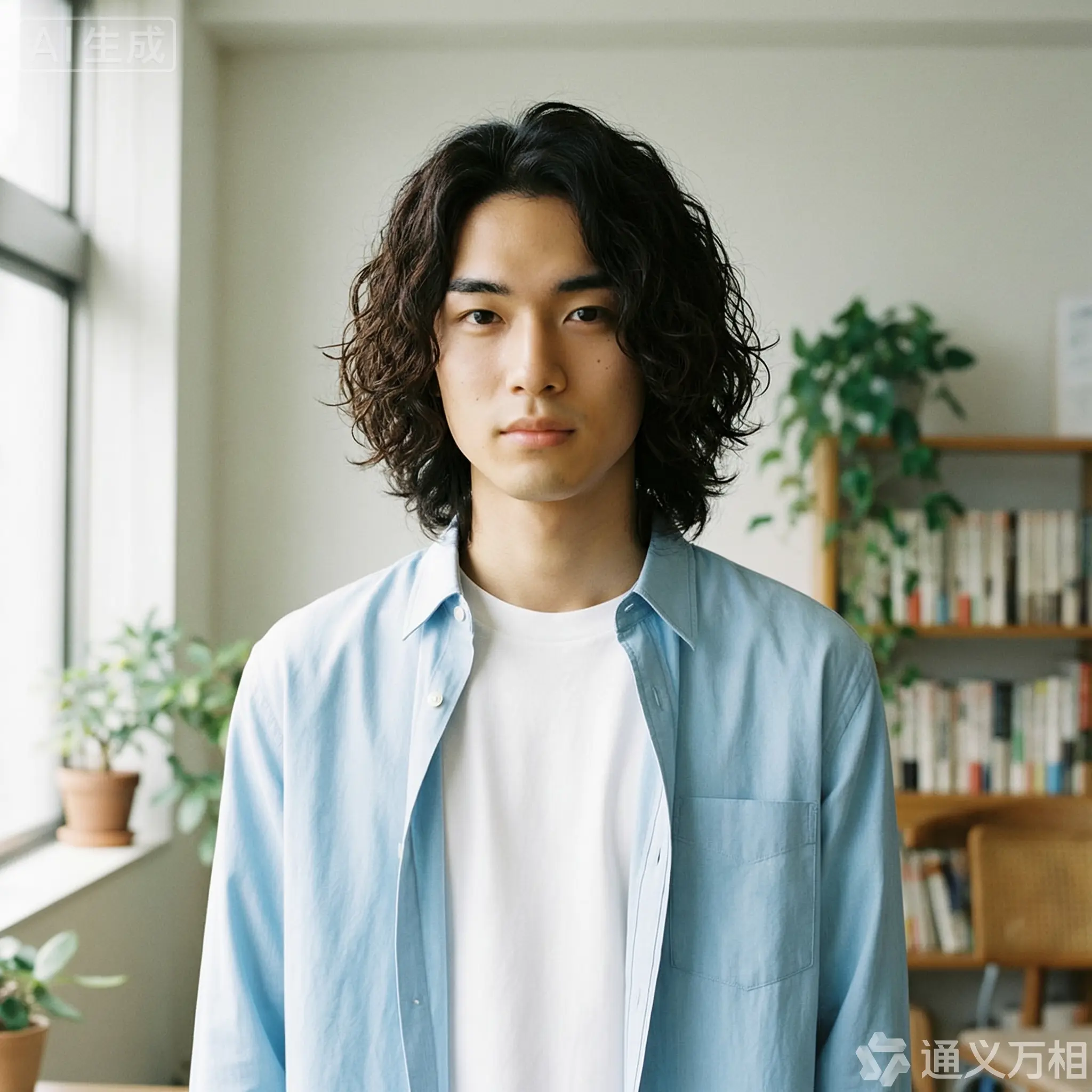
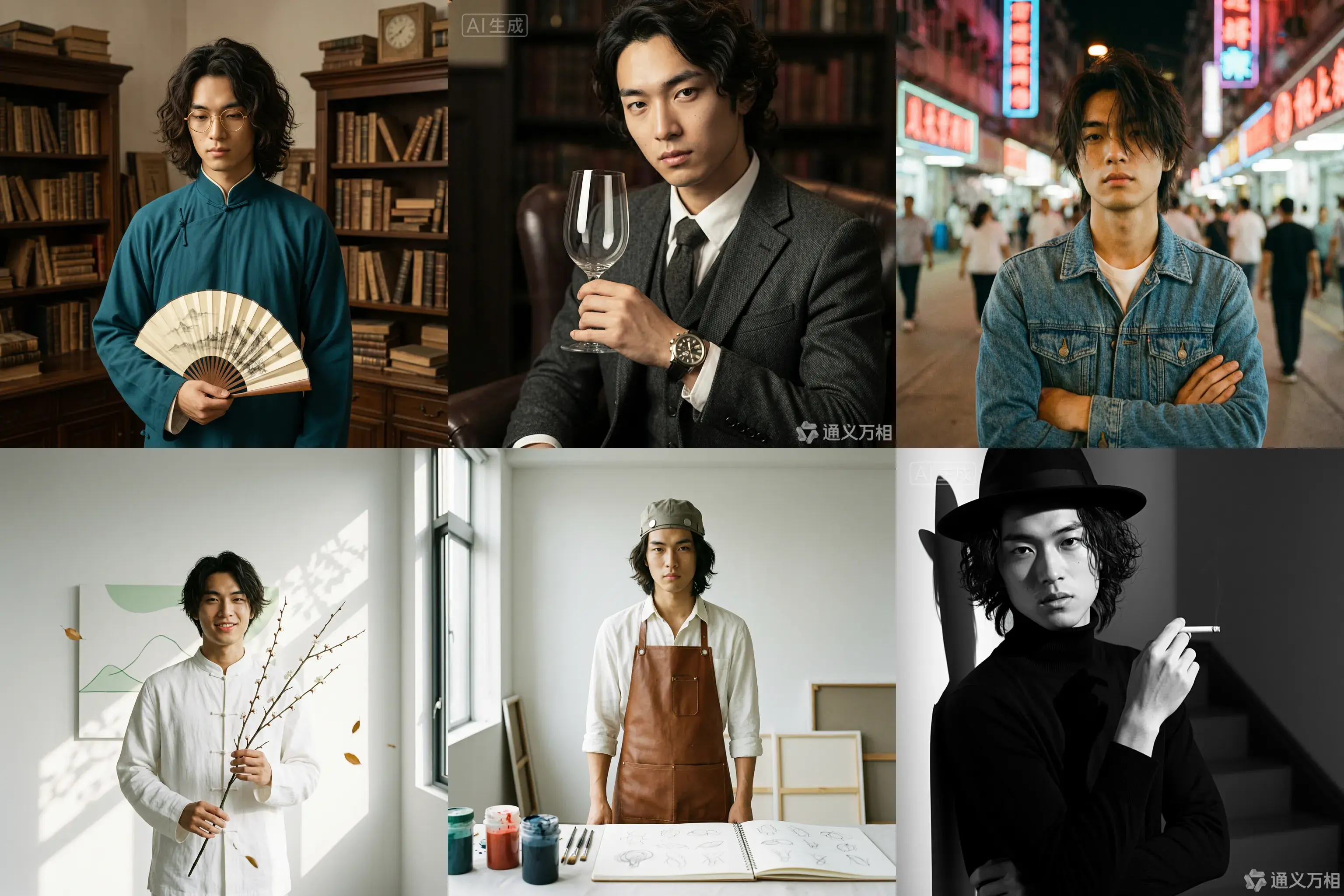
East Asian male portrait, 20 years old, curly medium-length hair, artistic temperament

output

wan_image_reqid_57d7a71c-1932-4de8-8c32-be0f3fd5696f_n1-2026-03-31-19-32-44

output

Clique para visualizar os prompts

Caso 1: Ensaio fotográfico

Base character setting: A 20-year-old East Asian male with curly, medium-length hair, an artistic temperament, defined features, and delicate eyes. He is wearing a simple white T-shirt or a light blue shirt, exuding a youthful and natural vibe.
1. Republic Era Scholar Style
Prompt:
[Base facial description] The character's appearance is based on reference image 1, wearing a dark cyan long gown and round, gold-rimmed glasses, holding a folding fan. The background is an old Shanghai study with wooden bookshelves, a warm yellow tone, a retro film texture, soft side lighting, and dust dancing in the light beams, creating a cultural and serene atmosphere. Hasselblad medium format, 85mm lens, high resolution, cinematic color grading, Wong Kar-wai style.
Props: Folding fan / Thread-bound book / Round-frame glasses
Color tone: Warm yellow / Dark cyan / Sepia
2. British Gentleman Style
Prompt:
[Base facial description] The character's appearance is based on reference image 1, wearing a dark gray tweed three-piece suit and a vintage mechanical watch, holding a glass of red wine and looking at it. The background is a classic library or private club with dark leather sofas, Rembrandt lighting, and a dark, elegant, and noble atmosphere. He has a cool gaze, with rich details and clear textures, exuding a British aristocratic temperament. 8k resolution, fashion magazine-style shot.
Props: Wine glass / Pipe / Mechanical watch
Color tone: Dark gray / Burgundy / Dark gold
3. 90s HK Retro Style
Prompt:
[Base facial description] The character's appearance is based on reference image 1, wearing a washed denim jacket or a floral shirt, with slightly messy hair and arms crossed. The background is a street with neon signs at night, with blurry light spots, high grain, and rich colors, featuring a red and blue color clash. Wong Kar-wai style, emotional, with a dreamy gaze, direct flash effect, and a nostalgic atmosphere. [Full-body shot].
Color tone: Neon red / Dark blue / Film green
4. New Chinese Zen Style
Prompt:
[Base facial description] The character's appearance is based on reference image 1, with a slight smile showing teeth, wearing a modified white Chinese stand-up collar shirt, holding a branch of plum blossoms. The background is a minimalist blank wall or a bamboo forest, with sunlight casting mottled shadows on the wall. The color tone is cool and serene, embodying Eastern aesthetics. The skin is translucent, with high grain and a matte finish. The composition is simple, with rich layers of light and shadow. High-end photography, Zen atmosphere.
Props: Plum blossom branch
Color tone: White / Dark green / Light gray
5. Vintage Artist Style
Prompt:
[Base facial description] The character's appearance is based on reference image 1, wearing a white shirt stained with paint and a brown leather apron, holding a paintbrush or a palette. The background is a clean studio with bright light and colorful light and shadow. He has a focused expression, looking at the paint in his hand, not at the camera. His hair is slightly messy, with an artistic flair, an impressionist color tone, and a strong texture.
Props: Paintbrush / Palette / Sketchbook
Color tone: Warm light / Colorful paint / Brown
6. Classic Noir B&W Style
Prompt:
[Base facial description] The character's appearance is based on reference image 1, wearing a black turtleneck sweater, holding a cigarette, and wearing a black fedora. The background is a staircase or hallway with intersecting shadows. High-contrast black and white photography, hard lighting, strong shadows, a sense of mystery, and a hard-boiled detective style. The facial contours are sharp, with extremely clear skin texture. A classic movie still, timeless feel, side-profile close-up, artistic photography.
Props: Cane / Fedora / Sunglasses
Color tone: Black and white / High contrast

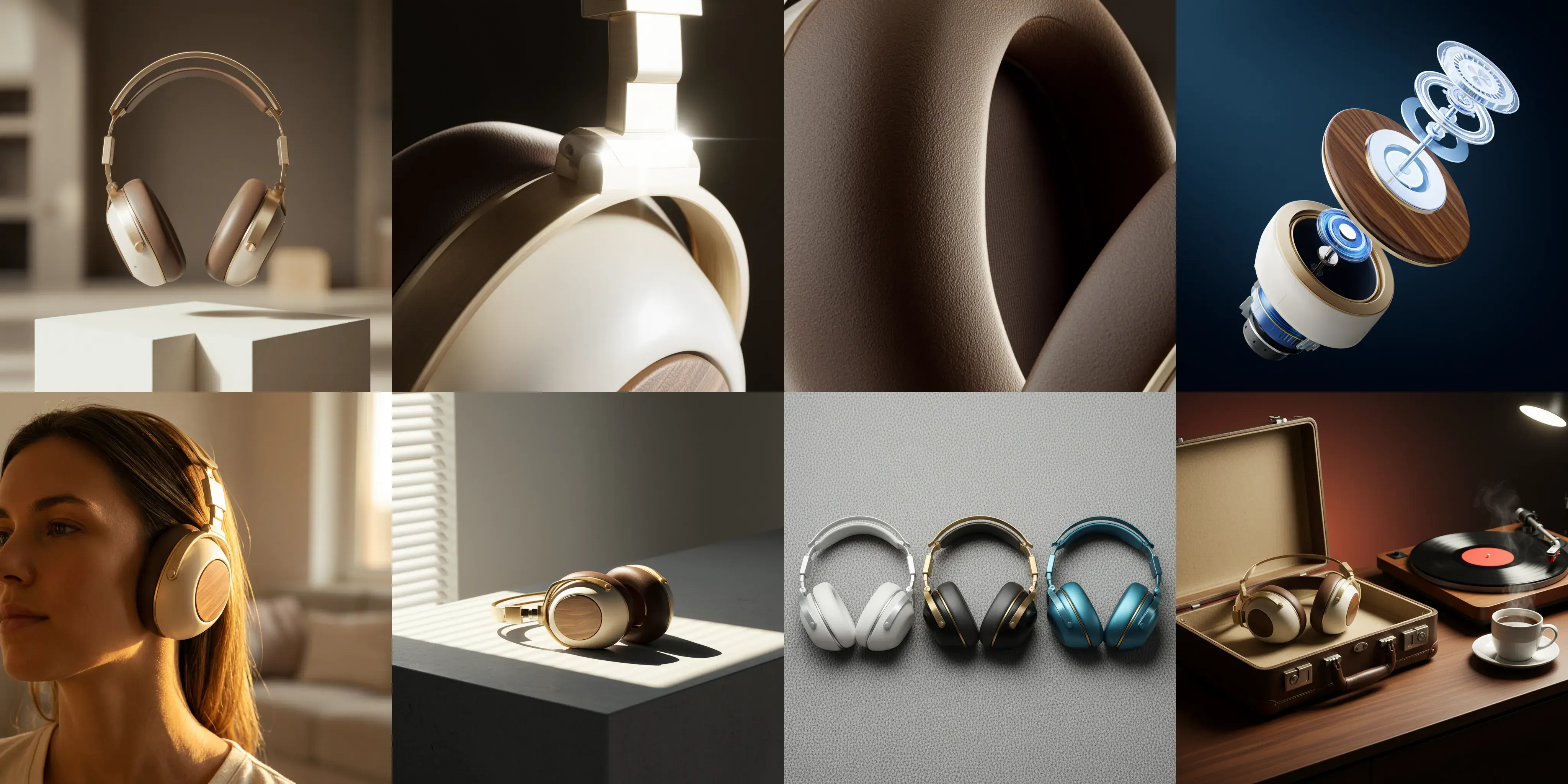
Caso 2: Design visual

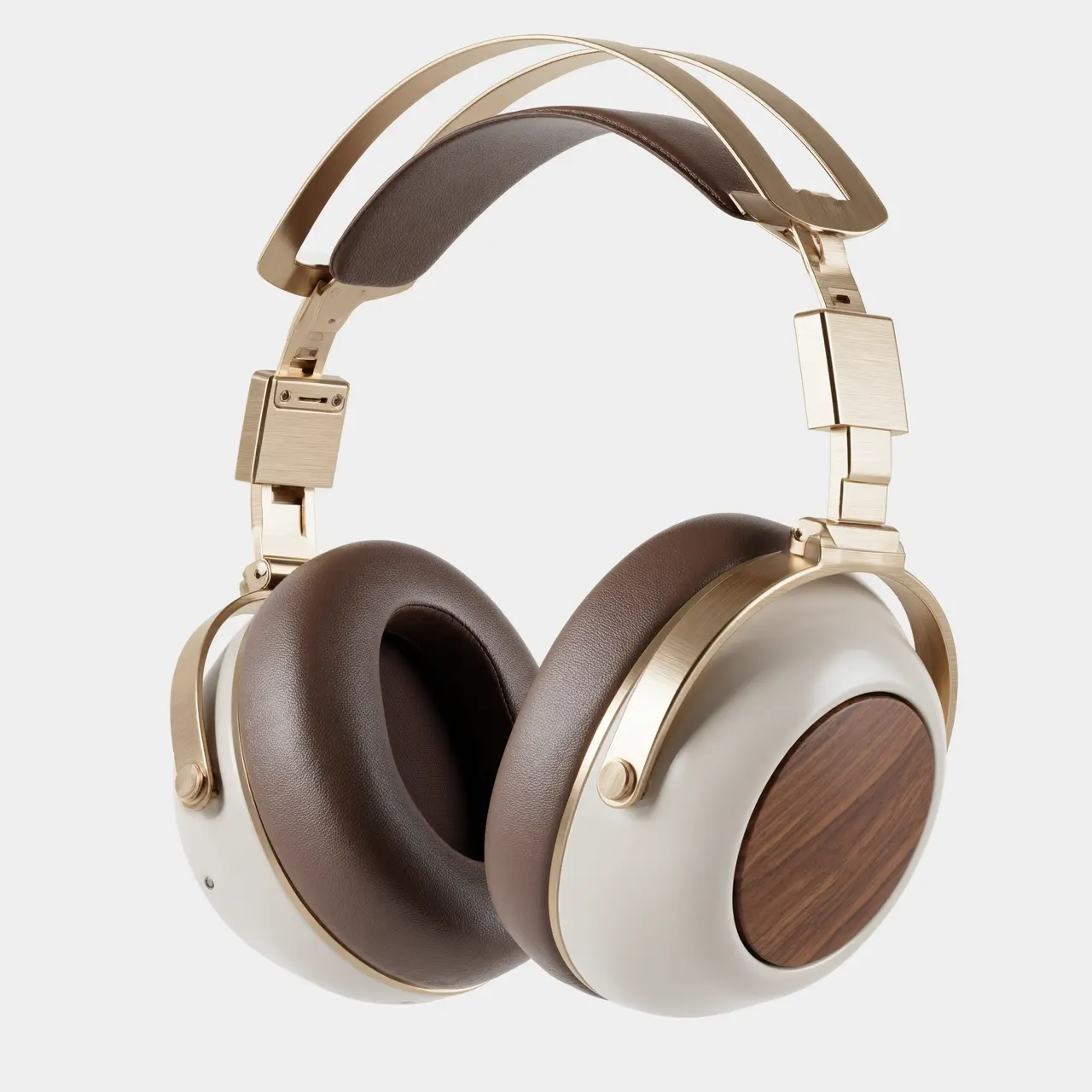
Image 1: A commercial-grade product photography main visual cover image, front-view panoramic composition. A pair of retro-futuristic wireless over-ear headphones floats above a geometric plaster form, showcasing perfect symmetrical aesthetics. The materials are champagne gold metal and a cream-white shell. The background is a deeply blurred warm indoor light and shadow, with soft light outlining the product's silhouette. The white space in the image creates a strong sense of breathability, suggesting a quiet auditory experience. 8k ultra-high resolution, minimalist and premium feel.
Image 2: A 100mm macro shot of the product's material details, focusing closely on the connection of the headphone's telescopic arm. It clearly shows the texture of the champagne gold brushed aluminum alloy and the CNC precision-cut chamfers. A sharp backlight creates a starburst highlight on the metal edge. The background is dark to emphasize the industrial precision of the metal. The image quality is extremely sharp with no noise.
Image 3: An extreme close-up macro shot of the material, focusing on the surface of the mocha-colored protein leather earcups. Side lighting reveals the fine pore texture of the leather, the soft wrinkles from pressing, and the ventilation hole details, conveying ultimate skin-friendly comfort and resilience. The light and shadow are rich in layers, and the color tone is warm and moist. Ultra-high-definition macro photography.
Image 4: An artistic exploded view of the product, showing the internal sound units, noise-canceling chips, battery modules, and external walnut wood decorative panels and metal frame of the retro-futuristic headphones in a suspended, disassembled state. The background is a deep tech blue, and the internal components have a semi-transparent holographic technological texture, emphasizing the combination of internal precision craftsmanship and modern technology. High-tech commercial poster style.
Image 5: A 35mm humanistic shot of the wearing scenario, with a close-up on the model's jawline and neck, showing the perfect fit of the champagne gold headphones. Natural warm sunset light from the side-rear creates a rim light, with the edges of the hair glowing gold. The model's skin tone has a healthy and natural texture, creating a relaxed, immersive music-listening lifestyle feel. The background is a blurry home environment.
Image 6: A still life photograph paying homage to architectural light and shadow. The headphones are placed on a minimalist gray concrete table. Afternoon sunlight streams through blinds, casting striped hard shadows that cut across the matte cream-white body and champagne gold frame, creating a strong geometric composition of light and dark. This highlights the three-dimensional shape of the body and the contrast of materials. A clash of cool and warm color tones, minimalist composition.
Image 7: A top-down flat-lay composition showing the color options. Three headphones from the series in different color schemes—silver-white, black-gold, and blue-copper—are arranged side by side. The background is a highly textured gray wool felt cloth. Soft top lighting emphasizes the diversity of the CMF design and the delicate touch of the materials. The image is clean and orderly, in a design magazine style.
Image 8: A brand lifestyle family portrait still life photograph. The retro-futuristic headphones are placed next to their matching exquisite leather case. On the table are a vinyl record player, a spinning vinyl record, and a cup of steaming coffee. The background is rendered with warm ambient lighting, dominated by a deep walnut wood tone, conveying a brand philosophy that combines a slow-paced lifestyle with high-fidelity sound quality. Cinematic narrative lighting.

Edição interativa

Imagem de entrada

Imagem de saída

image (20)-2026-03-31-19-17-37

image (21)-2026-03-31-19-17-37

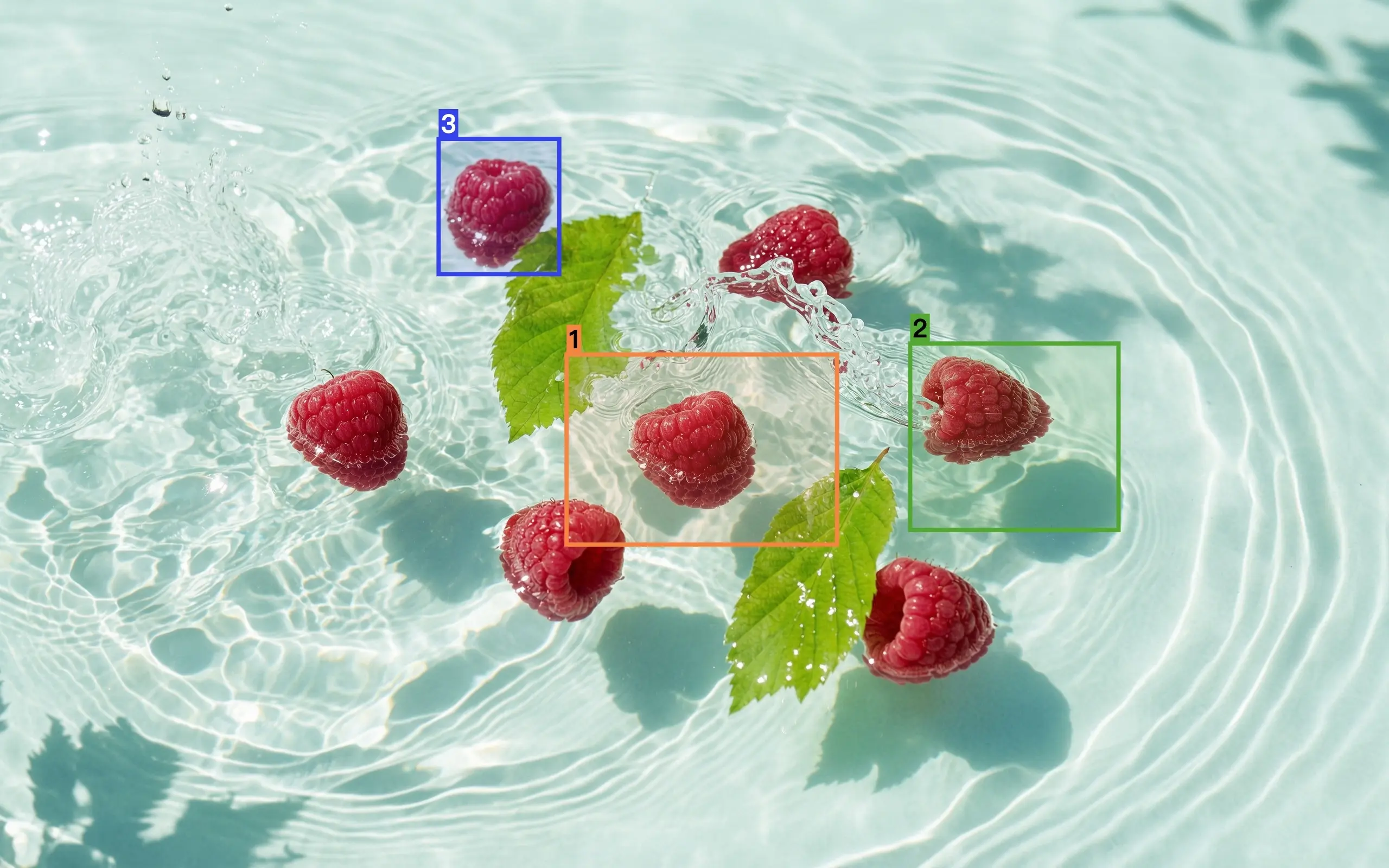
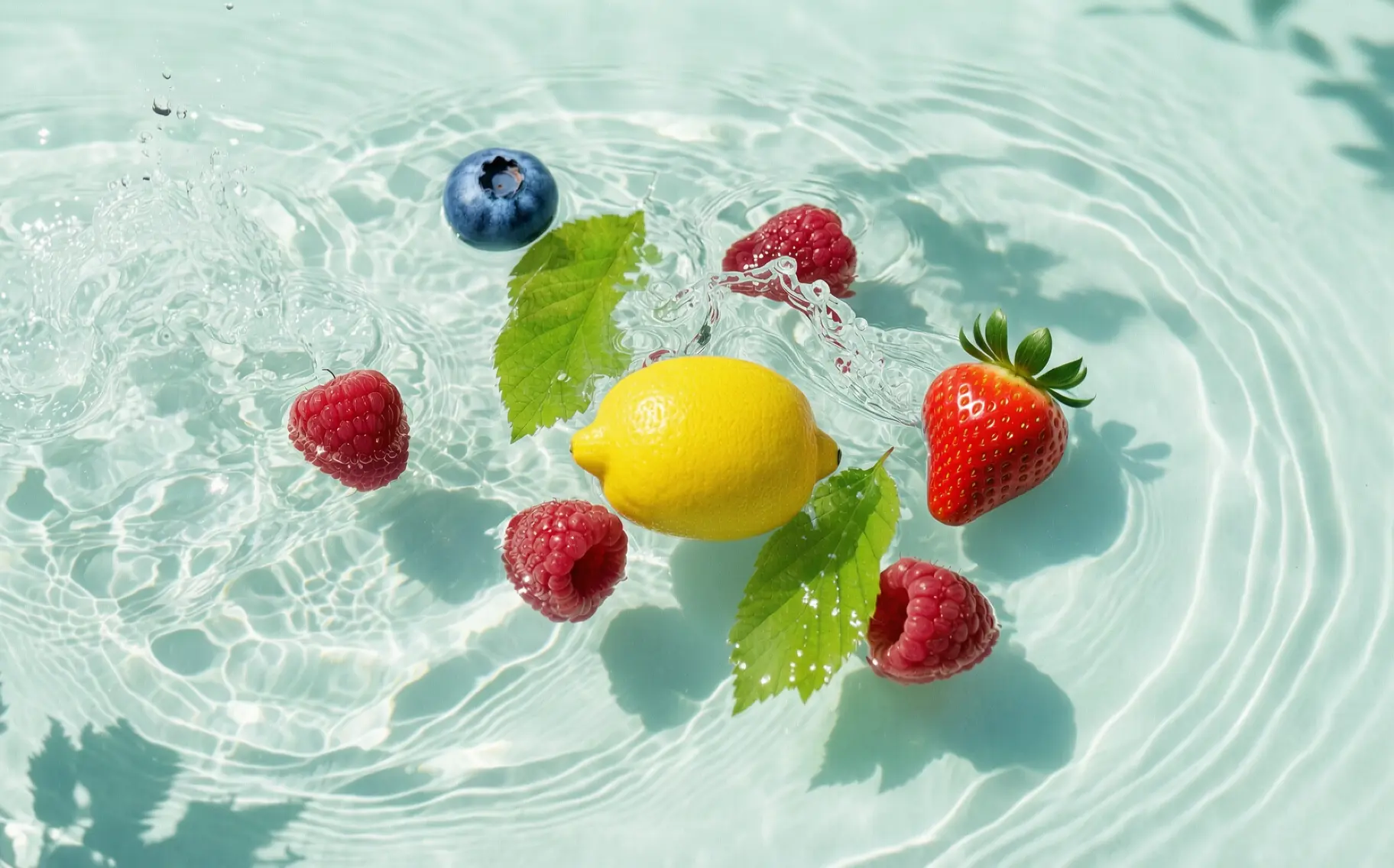
Edite com base na imagem 1. Substitua a framboesa selecionada na caixa 1 por um limão, a framboesa na caixa 2 por um morango e a framboesa na caixa 3 por um mirtilo. O resultado deve integrar-se harmoniosamente à imagem original, sem as caixas de referência e números, mantendo o restante do conteúdo inalterado.

5eecdaf48460cde5f7fd58249809b192a118accde85283f275b8339e1c4c24831b75b38faadcd24bec177c308ebd5304463ca8e345548eb5f551b6ba01cd2c8d2d9b5606fa569ff7ba4077816ac9b801464f65aedbcf494f4fb4c8ed7016461c-combine

5eecdaf48460cde5f7fd58249809b192a118accde85283f275b8339e1c4c24831b75b38faadcd24bec177c308ebd530460436714d0283cee289325430893028097a53a8e5d630fb1c2d4c85d8cbb68a4387575c4b03700344fb4c8ed7016461c-2026-03-31-19-13-38

Coloque o padrão selecionado da imagem 1 na área selecionada da imagem 2.

Fusão de múltiplas imagens

Imagem de entrada

Imagem de saída

5eecdaf48460cde5544f9fac410016bc2fe4c1b4d23666c075b8339e1c4c24831b75b38faadcd24bec177c308ebd5304e9d05d028a65a9ac270ee730e44b8c75c6634a9b9a7a70240d438b02b2f2153dc68966b442378d1d4fb4c8ed7016461c-combine

5eecdaf48460cde5544f9fac410016bc2fe4c1b4d23666c075b8339e1c4c24831b75b38faadcd24bec177c308ebd53044b9a1d72dee2f8507ee704b9cef3832907ff1182f52507c9bc4737520762d46a722e658f57cda6524fb4c8ed7016461c-2025-12-29-19-11-31

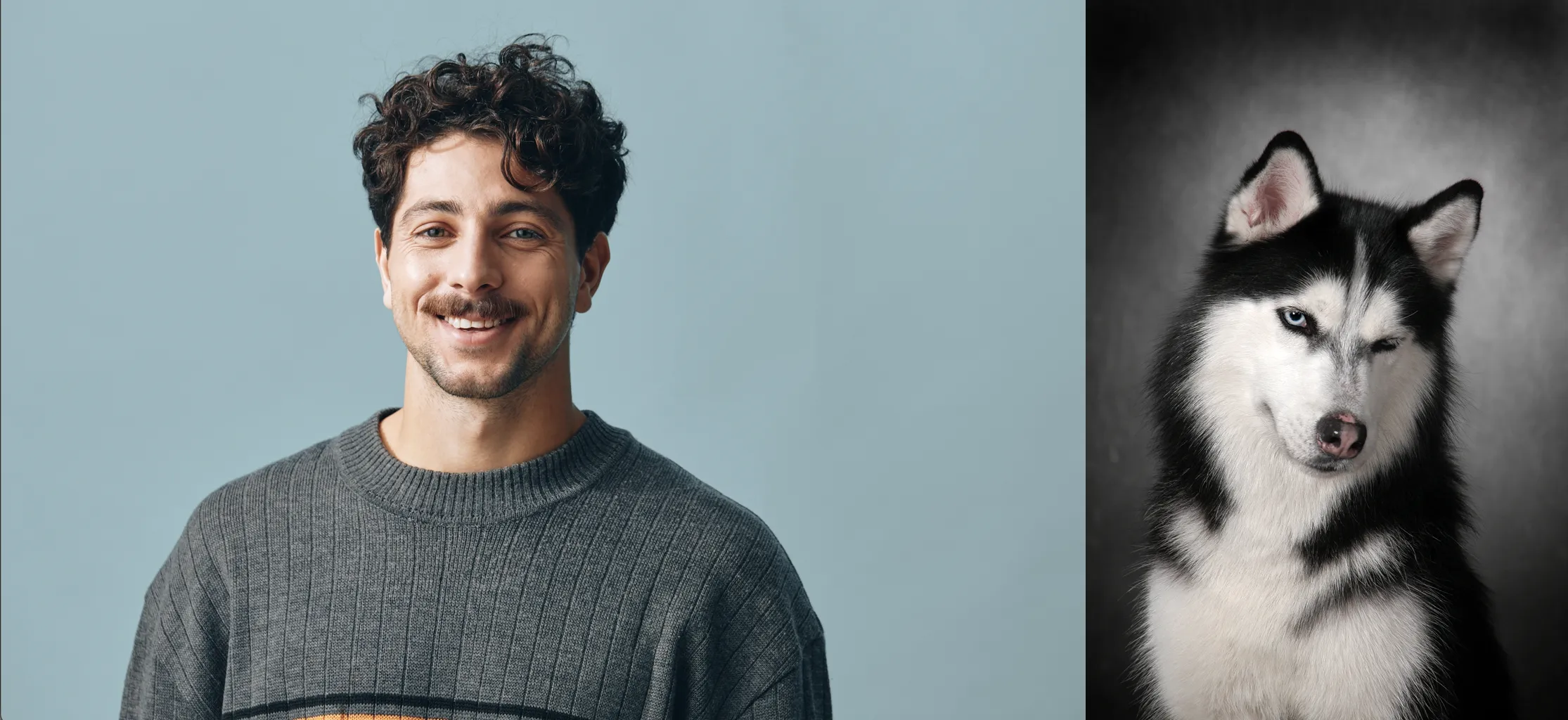
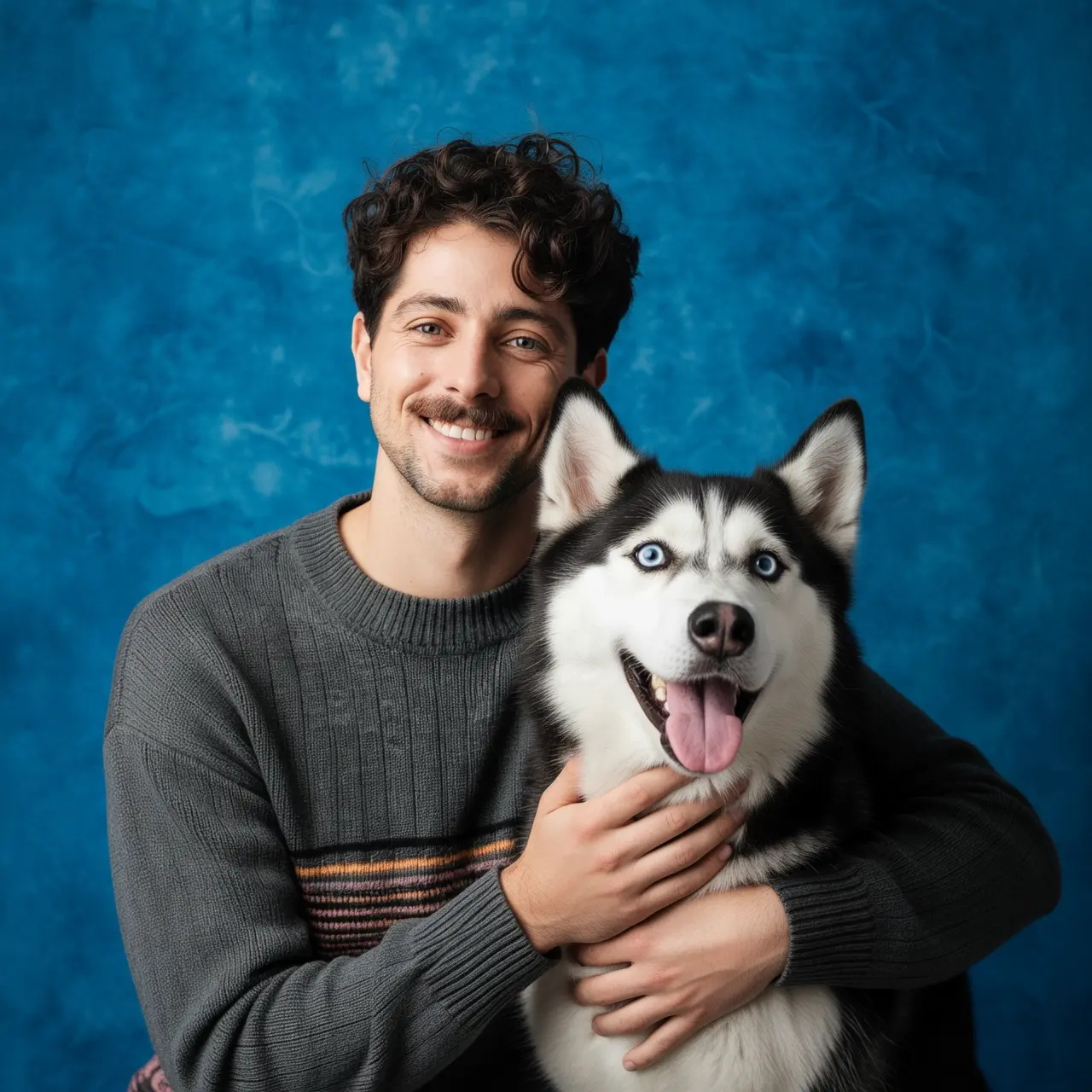
Faça um retrato do menino da imagem 1 e do cachorro da imagem 2. O menino está abraçando o cachorro, e ambos estão muito felizes. Iluminação suave de estúdio, fundo texturizado azul.

5eecdaf48460cde5544f9fac410016bc2fe4c1b4d23666c075b8339e1c4c24831b75b38faadcd24bec177c308ebd5304f060ec7a363e318af9bfaaa5e07be972cfc1ea4e21b47637fcdb2dfc53130c40a8efed5defc408a04fb4c8ed7016461c-combine

5eecdaf48460cde5544f9fac410016bc2fe4c1b4d23666c075b8339e1c4c24831b75b38faadcd24bec177c308ebd5304922cbdef3e3c42f83239de6d0f35a8b76f0e38934cc5170f7a908ec12140fb0af6590c72bcf1ba6f4fb4c8ed7016461c-2025-12-29-19-15-53

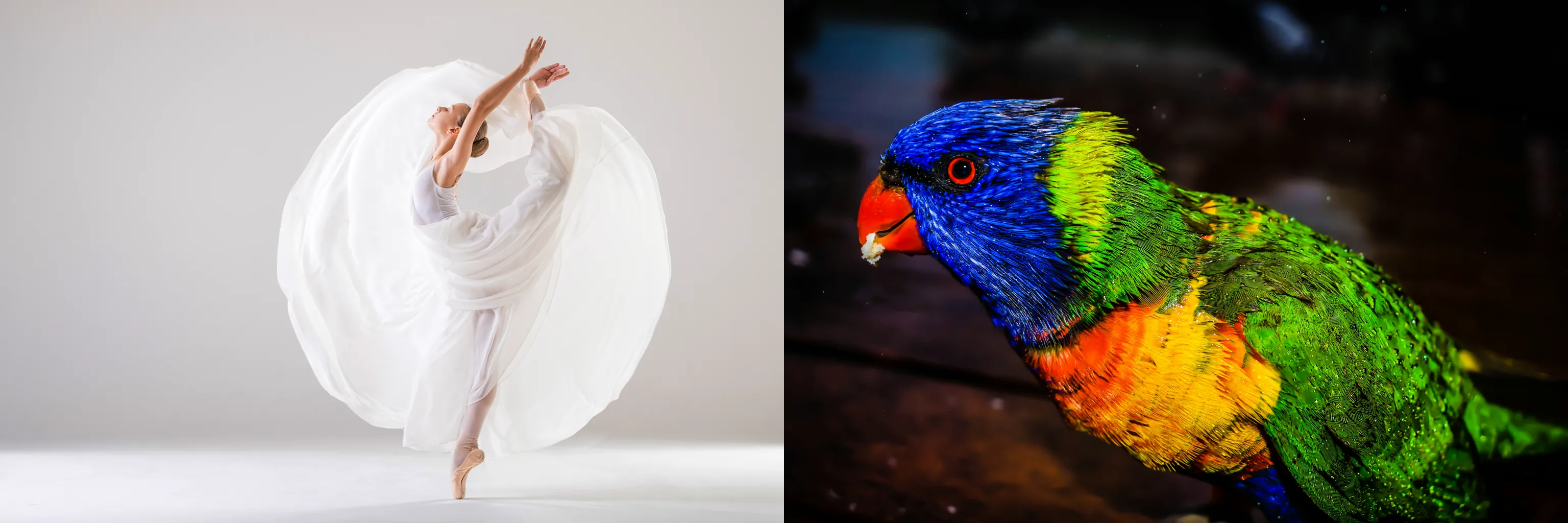
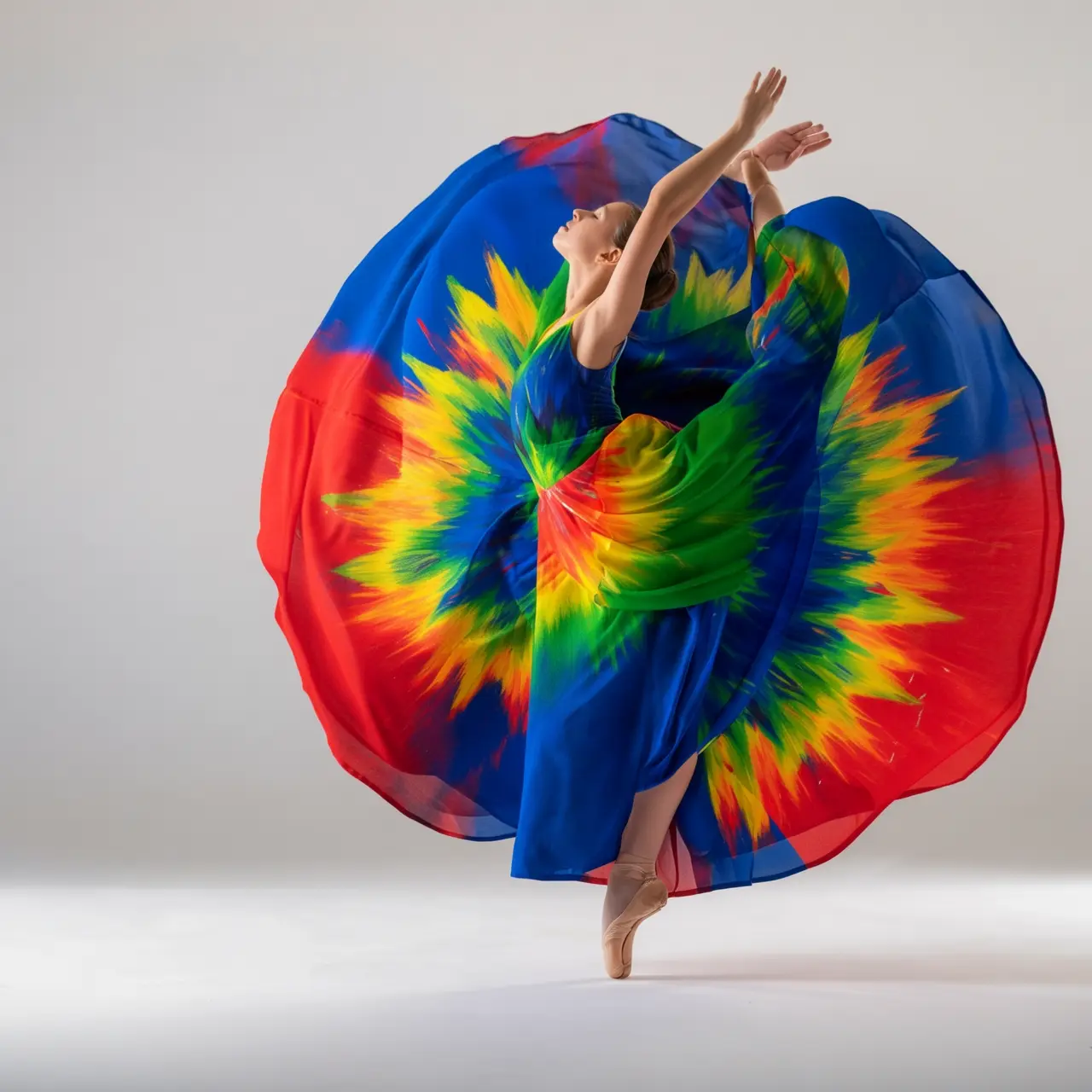
Recoloque o vestido da imagem 1 usando as cores do pássaro na imagem 2. Torne-o artístico, mas mantenha o estilo do vestido e da modelo inalterados.

Preservação de características do sujeito

Imagem de entrada

Imagem de saída

5eecdaf48460cde5544f9fac410016bc2fe4c1b4d23666c075b8339e1c4c24831b75b38faadcd24bec177c308ebd5304448a972b9f2ee7a7aadcc61495f4975a049f009e7721cbc833dc3a8005b1b026a54eaaec109d73484fb4c8ed7016461c-2025-12-29-20-00-21

5eecdaf48460cde5544f9fac410016bc2fe4c1b4d23666c075b8339e1c4c24831b75b38faadcd24bec177c308ebd5304cc1b4a509823c5fb5e60999898811f8b51d7419220a118c9ff82110bc9525725a9ad7338f75985794fb4c8ed7016461c-2025-12-29-20-00-21

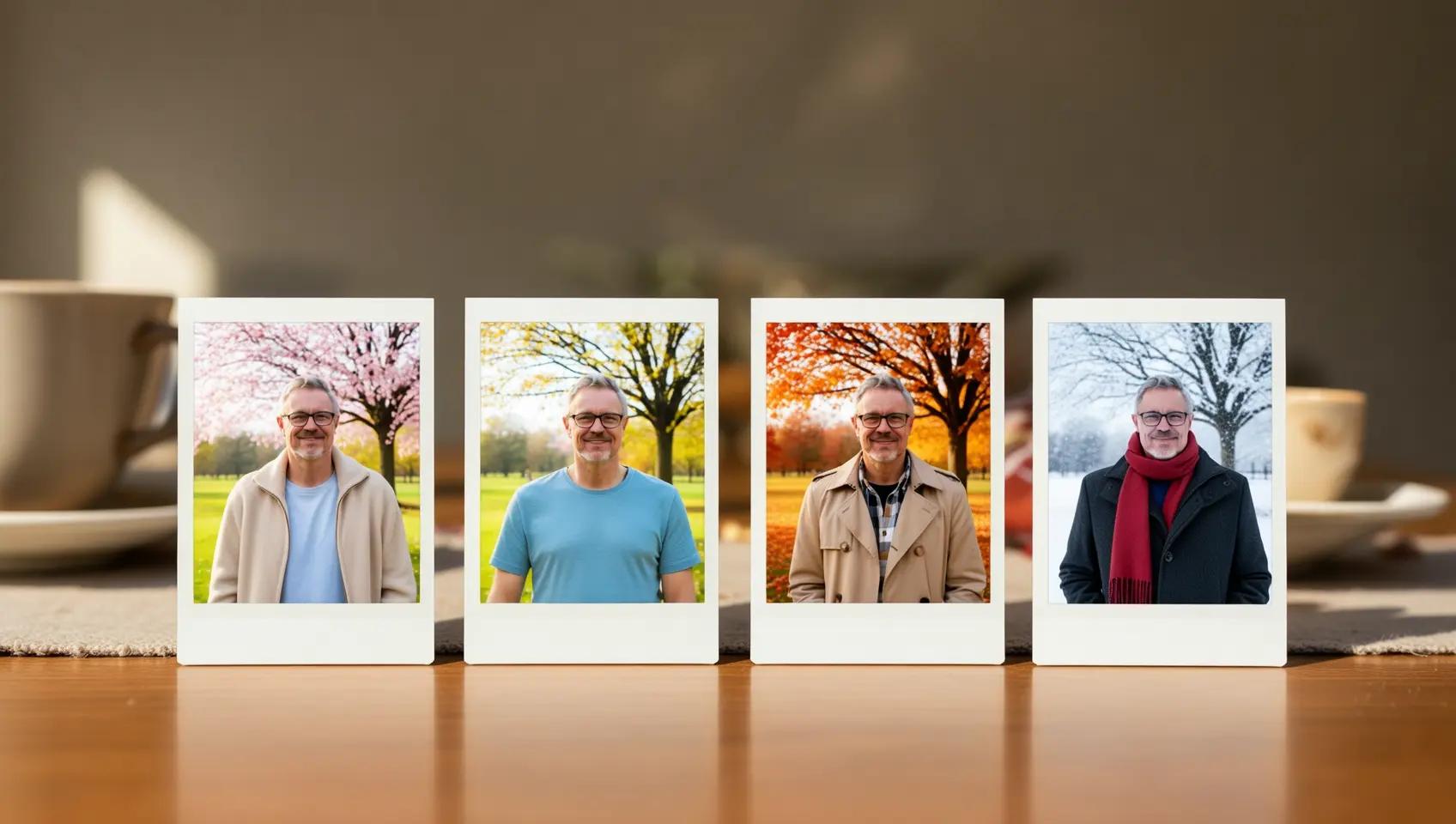
Gere um conjunto de quatro fotos estilo Polaroid com o tema "Mudanças Sazonais". Cada foto é tirada no mesmo local, sob uma árvore em um parque, mas mostra cenas de primavera, verão, outono e inverno, respectivamente. As roupas da pessoa também devem combinar com a estação: uma jaqueta leve na primavera, uma camisa de manga curta no verão, um sobretudo no outono, e um cachecol com casaco grosso no inverno. Coloque este conjunto de fotos sobre uma mesa de jantar.

Detecção e segmentação

Imagem de entrada

Imagem de saída

5eecdaf48460cde5544f9fac410016bc2fe4c1b4d23666c075b8339e1c4c24831b75b38faadcd24bec177c308ebd5304b025e74206dc2cec5c2e587c3fe6fb135293836c9479220355470da15476dc934b26018061e9db0b4fb4c8ed7016461c-2025-12-29-19-54-33

5eecdaf48460cde5544f9fac410016bc2fe4c1b4d23666c075b8339e1c4c24831b75b38faadcd24bec177c308ebd530451385eb561b49b0fe1f2169526b6a7e15bd78940def3c640c801511c349f6df35dceb72f4d3755f94fb4c8ed7016461c-2025-12-29-19-54-33

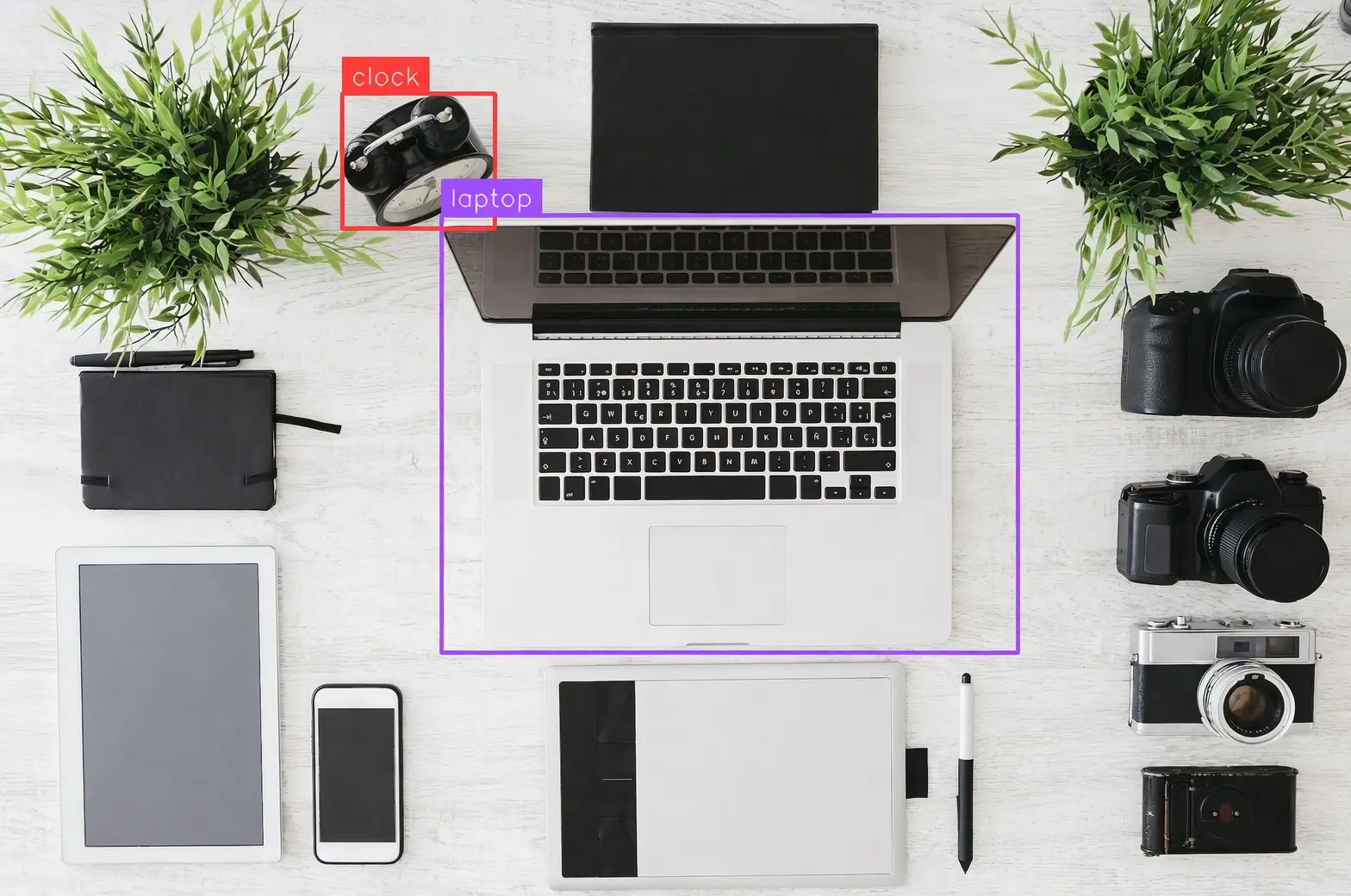
Detecte o laptop e o despertador na imagem, desenhe caixas delimitadoras e rotule-os como "laptop" e "clock".

5eecdaf48460cde5544f9fac410016bc2fe4c1b4d23666c075b8339e1c4c24831b75b38faadcd24bec177c308ebd530440256f9add4113787af5d4f3a55469b38ef2422f018076640eb7cb552584c02ee729fcb23fec3bca4fb4c8ed7016461c-2025-12-29-19-54-33

5eecdaf48460cde5544f9fac410016bc2fe4c1b4d23666c075b8339e1c4c24831b75b38faadcd24bec177c308ebd5304f0612d67f5c810ebef958385624ebd17323047aa5d00465d0e35257de5a2ea49d4b375d2e57693fa4fb4c8ed7016461c-2025-12-29-19-54-32

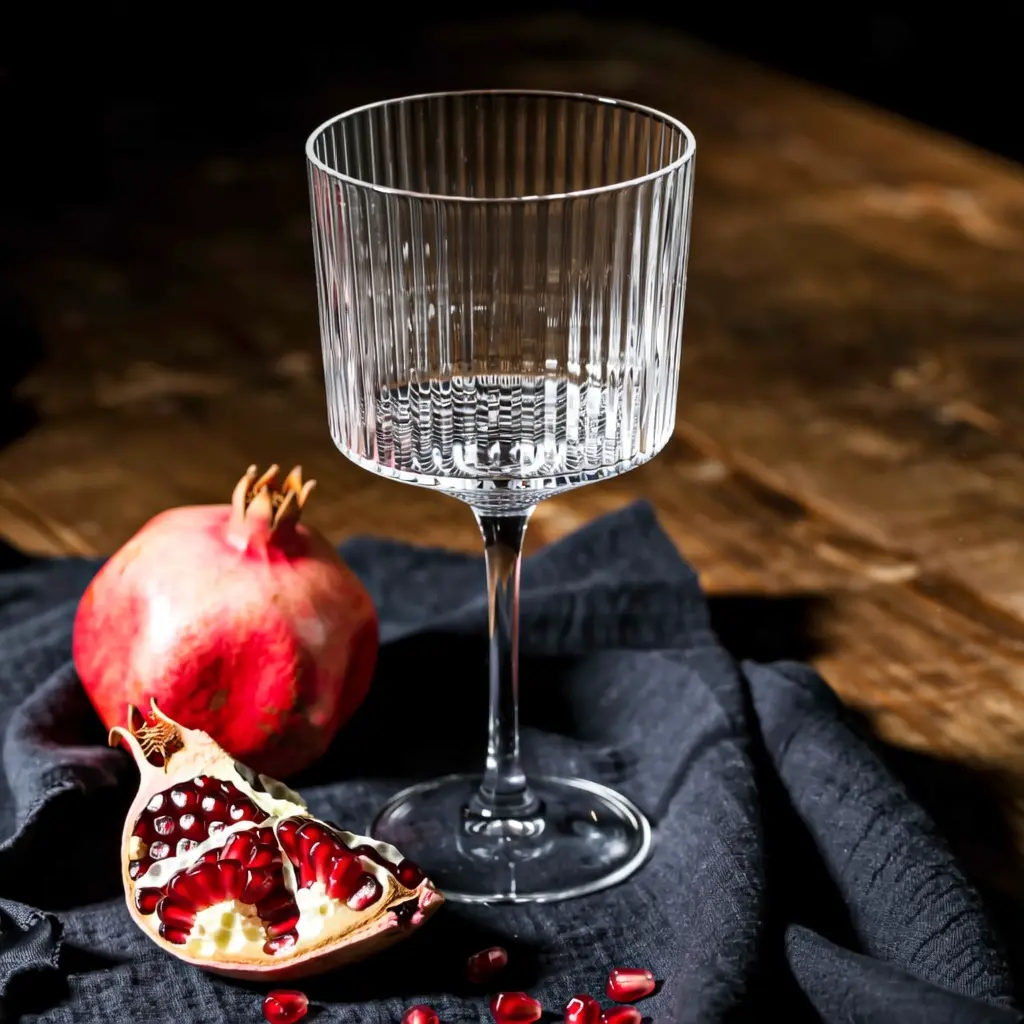
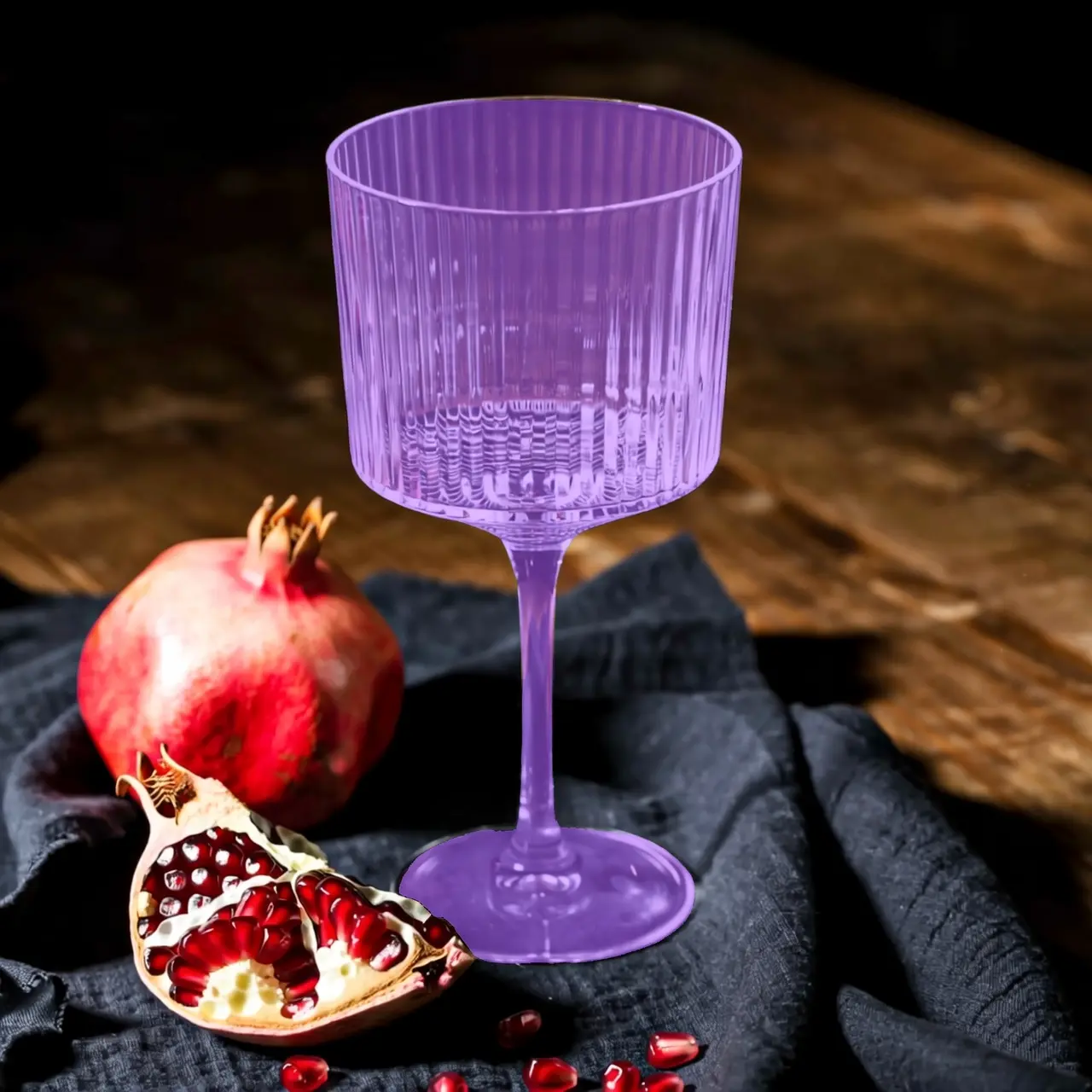
Segmente o copo de vidro na imagem.

Extração de elementos

Imagem de entrada

Imagem de saída

5eecdaf48460cde5544f9fac410016bc2fe4c1b4d23666c075b8339e1c4c24831b75b38faadcd24bec177c308ebd53046b83761f1ab18c40e144f5db2b388e5f865ba9a5961d98b2710ce177c6a0f4baff63fe52259c44364fb4c8ed7016461c-2025-12-29-19-48-27

5eecdaf48460cde5544f9fac410016bc2fe4c1b4d23666c075b8339e1c4c24831b75b38faadcd24bec177c308ebd53048e2a0d1d2805d92ba8d45a3bd1368528dd76f517b21ad1f545eb4097610838497cbdb5196da94ff54fb4c8ed7016461c-2025-12-29-19-48-27

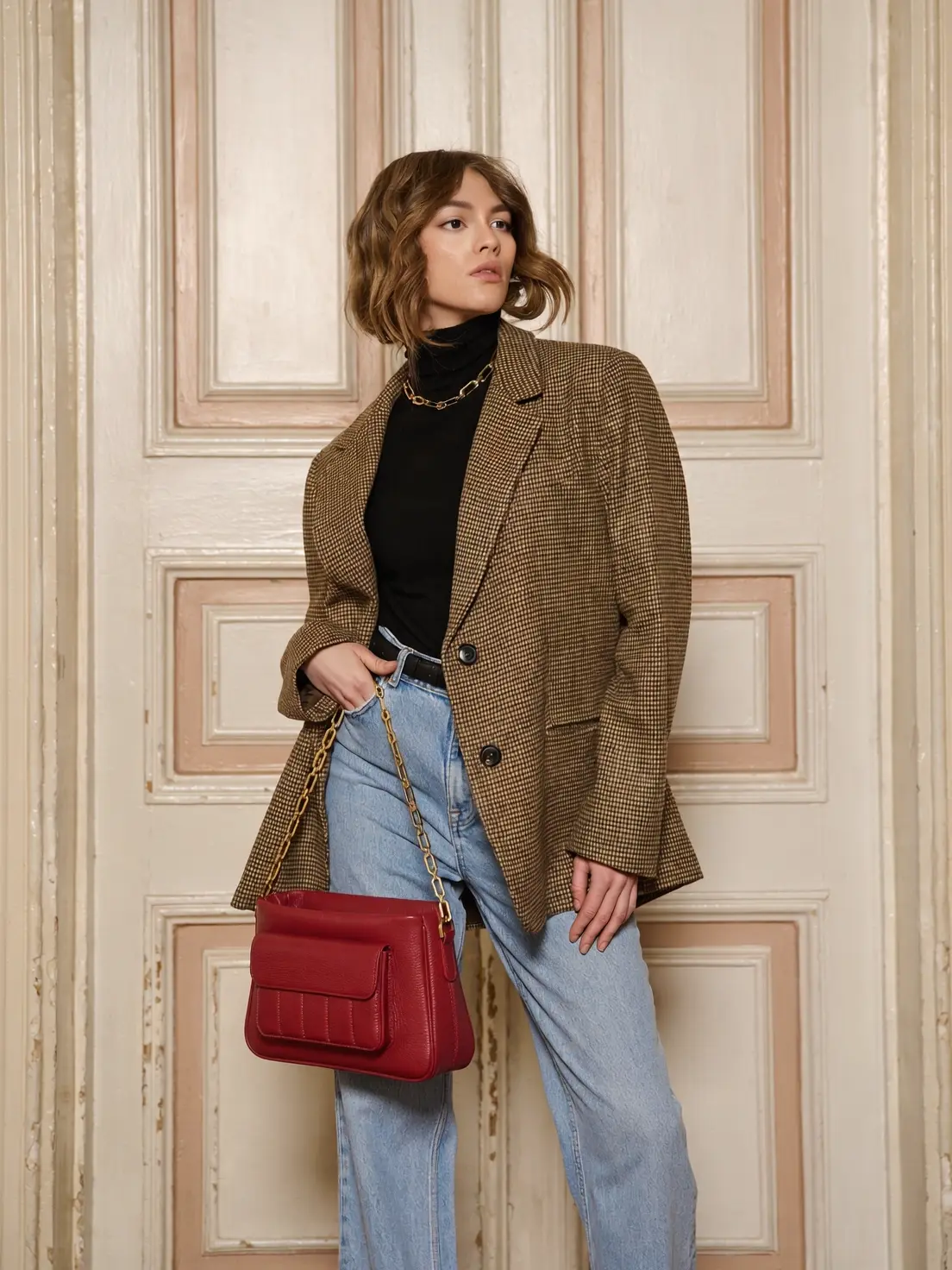
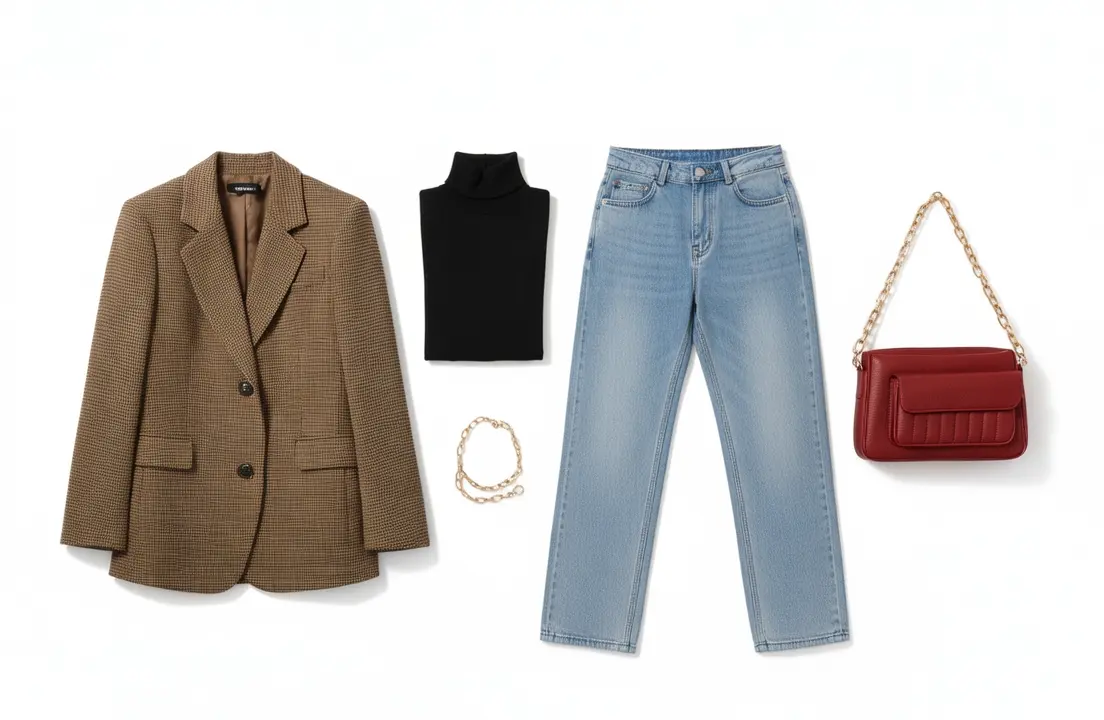
Extraia as peças de roupa da foto enviada e organize-as em uma exibição flat-lay sobre um fundo branco puro. Mantenha detalhes realistas e texturas de material. Estilo de e-commerce de moda, adequado para vitrine de roupas.

Instruções

  1. Leia o inglês para entender O QUE precisa ser comunicado

  2. Escreva o português brasileiro DO ZERO — esqueça a estrutura da frase em inglês

  3. Preserve toda a formatação markdown, blocos de código, links e imagens exatamente como estão

  4. Tags xref (<a data-tag="xref" ...>text</a>) — preserve a tag INTEIRA com todos os atributos na ordem e caixa originais, APENAS traduza o texto visível entre > e

  5. Aplique todas as regras específicas de idioma rigorosamente

  6. Aplique as regras de stopwords com tolerância zero

  7. Use o modo imperativo em passos numerados e listas de procedimentos

  8. Garanta consistência terminológica — mesmo termo = mesma tradução em todo o documento

  9. Varie os inícios de frase em listas/tabelas — nenhum iniciador repetido mais de 3 vezes

  10. Retorne APENAS o documento markdown em português brasileiro, sem explicações

    Edição de texto

    Imagem de entrada

    Imagem de saída
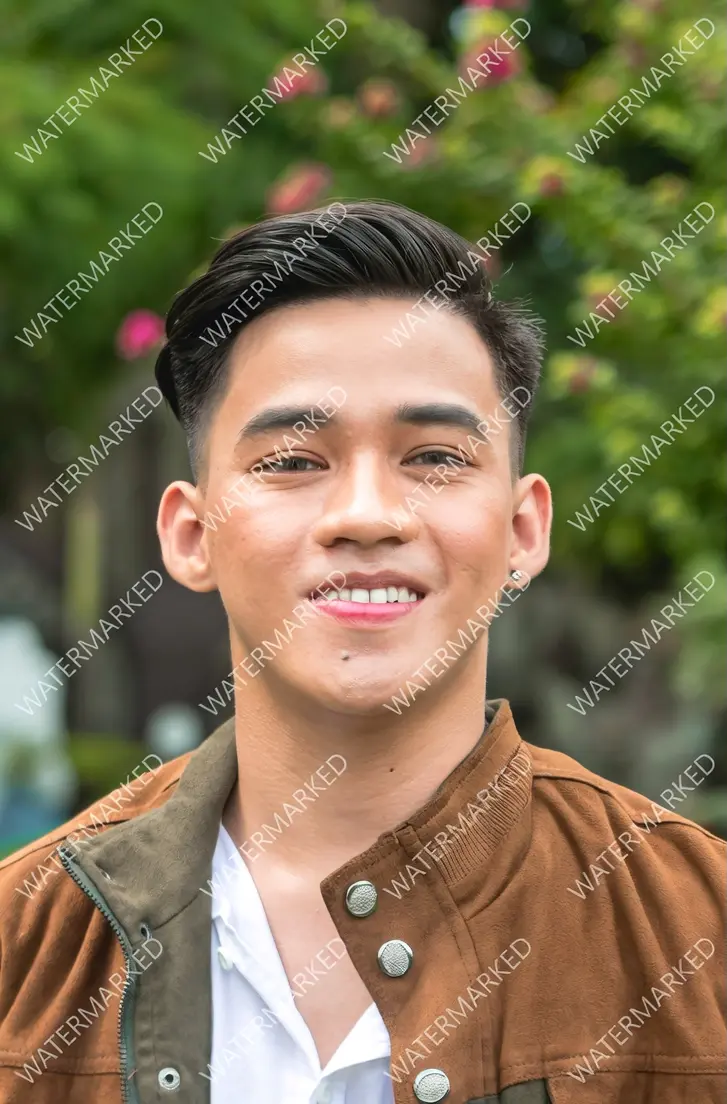
    5eecdaf48460cde5544f9fac410016bc2fe4c1b4d23666c075b8339e1c4c24831b75b38faadcd24bec177c308ebd530490f493eca22f34f0197173ddfdef17a04b34cb94813178b9d4eee36d246d3530a3e2fc6258cca0694fb4c8ed7016461c-2025-12-29-19-28-35

    5eecdaf48460cde5544f9fac410016bc2fe4c1b4d23666c075b8339e1c4c24831b75b38faadcd24bec177c308ebd5304fe77776567f4ef79cb621289a6fdaa981f3364fe4c7c56265403b5d9d5ac43eaf5931f62db14952f4fb4c8ed7016461c-2025-12-29-19-28-35

    Remove todas as marcas d'água da imagem.
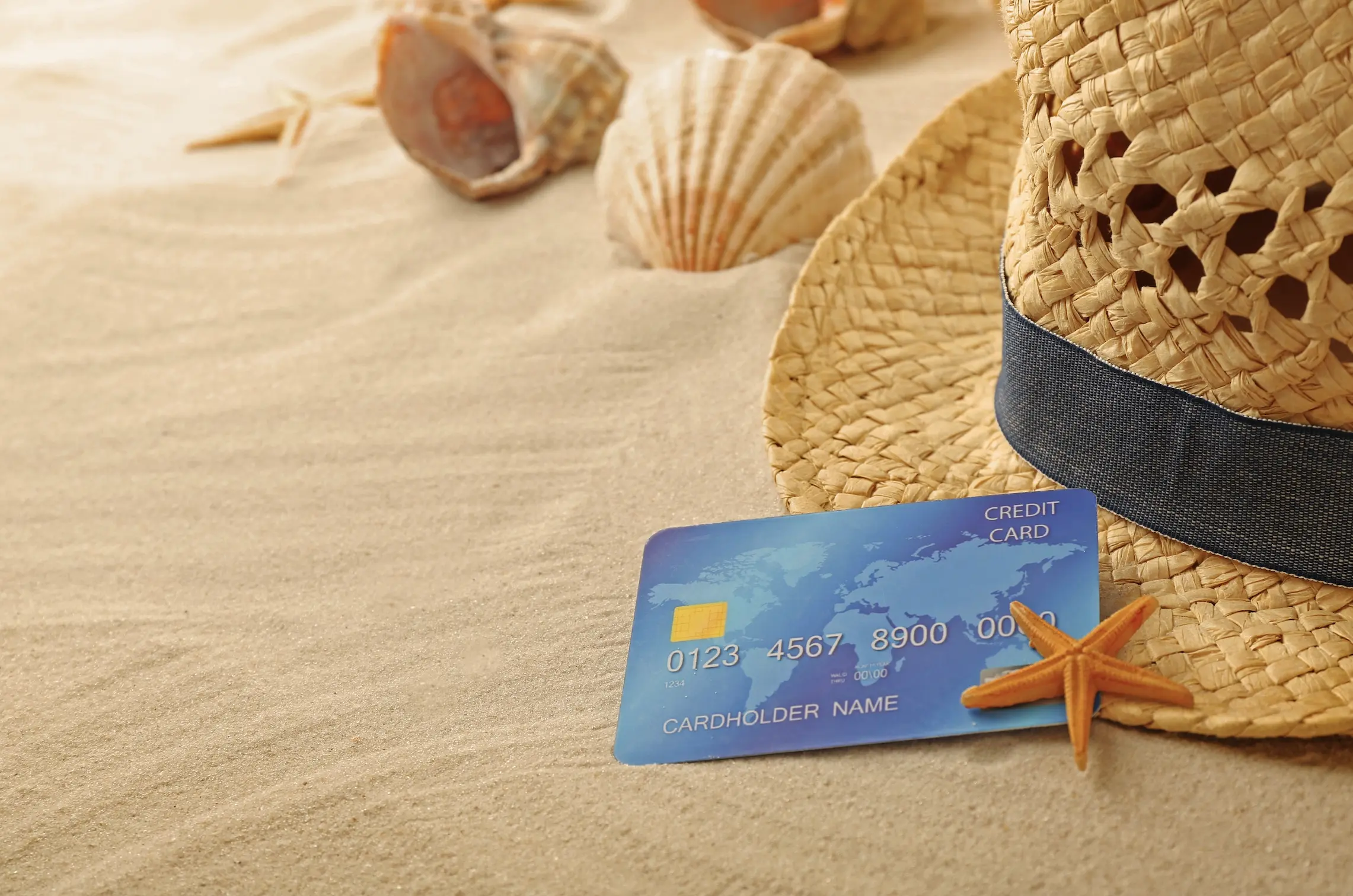
    5eecdaf48460cde5544f9fac410016bc2fe4c1b4d23666c075b8339e1c4c24831b75b38faadcd24bec177c308ebd530476e971380812b1b9dbeac68272a27057175499fe84f0781c7b6fa6535f438c67f3556acc8c7324394fb4c8ed7016461c-2025-12-29-19-28-35

    5eecdaf48460cde5544f9fac410016bc2fe4c1b4d23666c075b8339e1c4c24831b75b38faadcd24bec177c308ebd53047be52c6f41edecdefa77f0d93335d1492f1821b47dff7a1b08f60e99bdafcc84c31e3658fc593c904fb4c8ed7016461c-2025-12-29-19-28-35

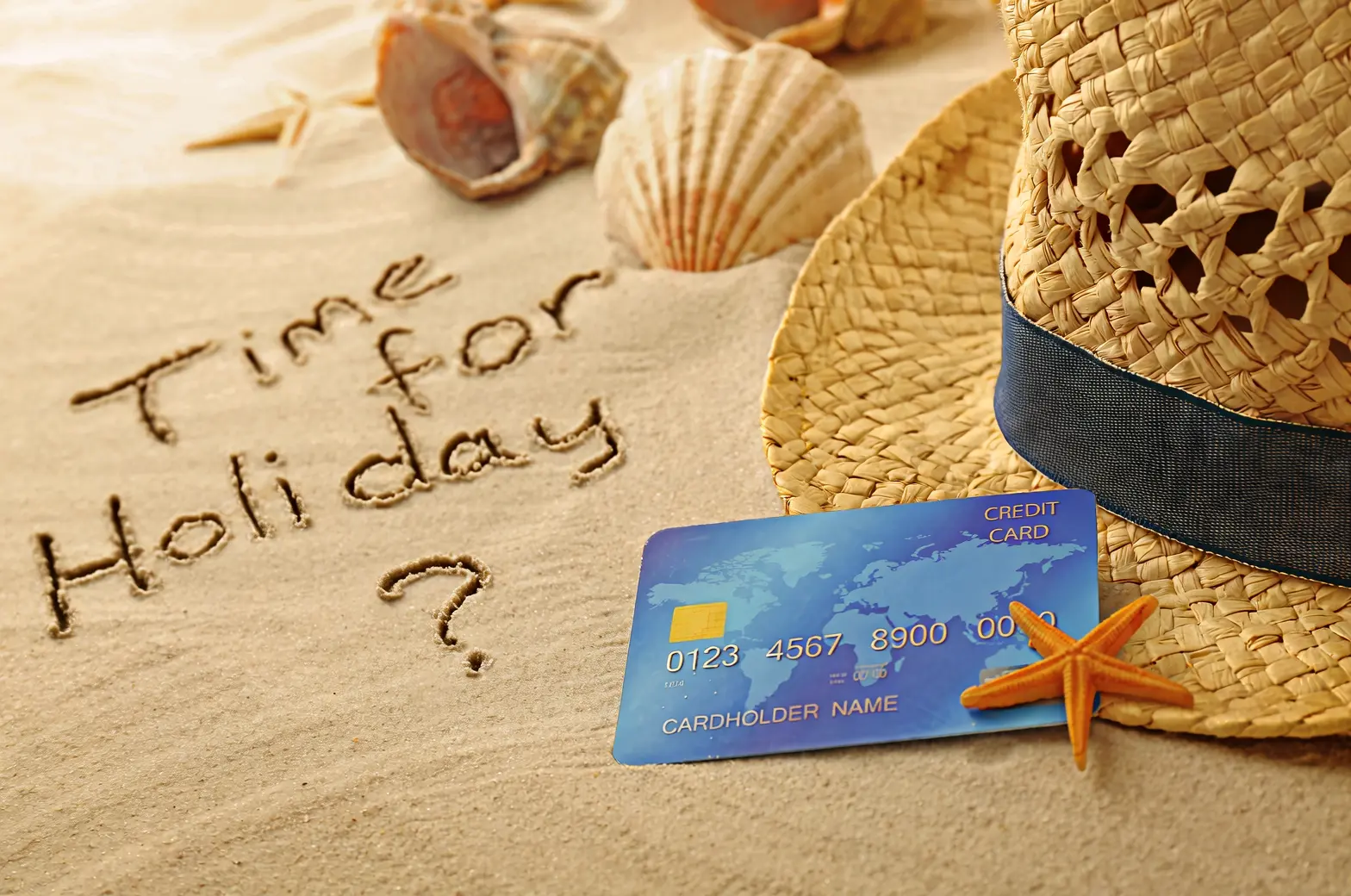
    Escreva casualmente "Time for Holiday?" na areia com a mão.

    5eecdaf48460cde5544f9fac410016bc2fe4c1b4d23666c075b8339e1c4c24831b75b38faadcd24bec177c308ebd5304fdb284f8d5c8ead814d11890da1a49411a6d9d41ad1bb2a4bf0b93d0bee5d792e8f5b419a3da9d534fb4c8ed7016461c-2025-12-29-19-28-34

    5eecdaf48460cde5544f9fac410016bc2fe4c1b4d23666c075b8339e1c4c24831b75b38faadcd24bec177c308ebd5304df1c8787530497f4cc3bee0b84d3ba51d0353fceb8d0518ded6a25e8c0ddfec714f719154ac1c9354fb4c8ed7016461c-2025-12-29-19-28-34

    Altere 18 para 29 e JUNE para SEPTEMBER.

    Edição de câmera e perspectiva

    Imagem de entrada

    Imagem de saída
    image (2)-2025-12-29-19-42-44

    image (3)-2025-12-29-19-42-44

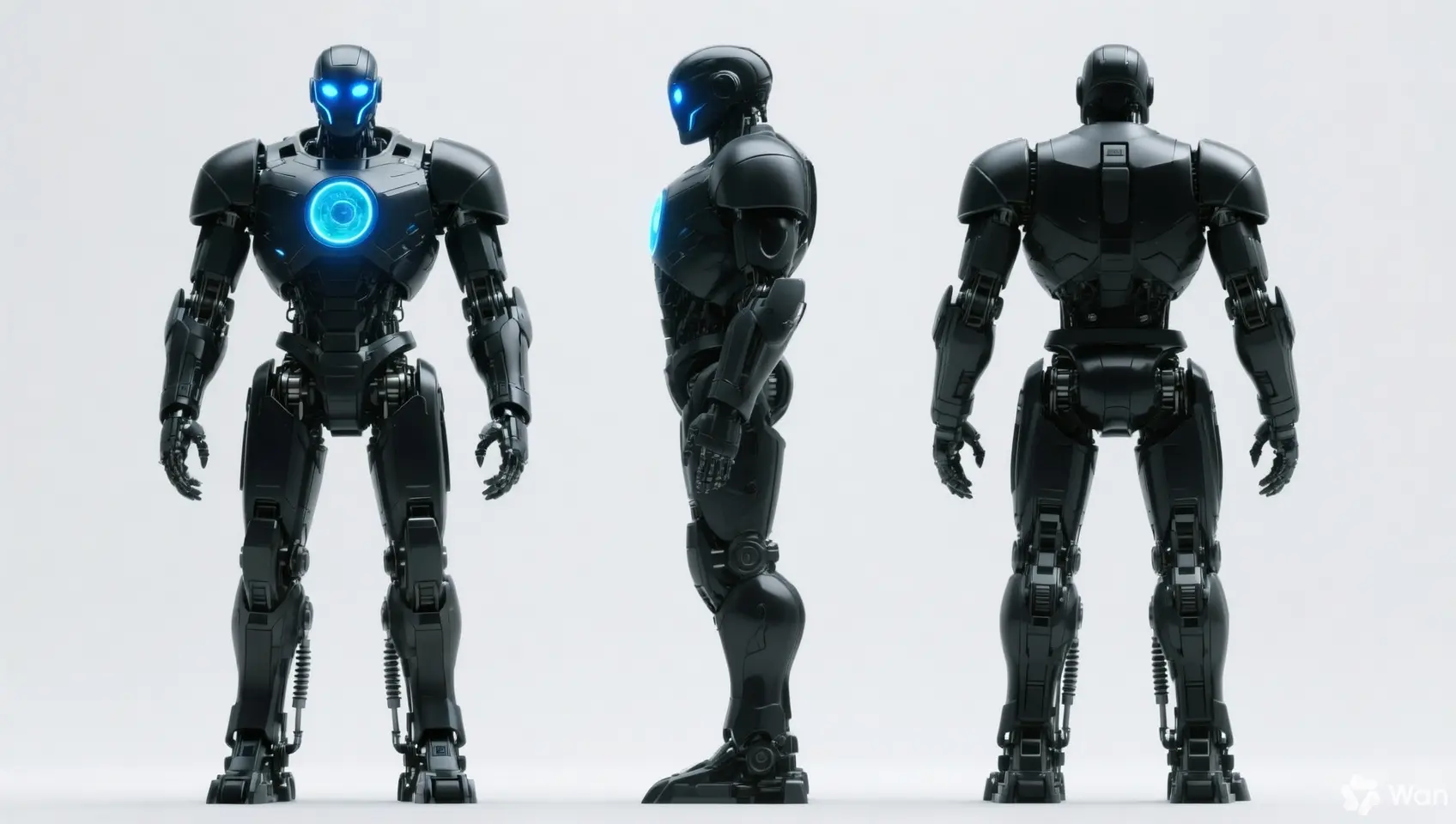
    Mantenha as características da pessoa inalteradas e gere vistas frontal, lateral e traseira.
    5eecdaf48460cde5544f9fac410016bc2fe4c1b4d23666c075b8339e1c4c24831b75b38faadcd24bec177c308ebd5304a53988b2efdd2fb6b95cb3b1b02701e6ff2c4902170b1ee230a9b4e3726a891c93646d68b821de294fb4c8ed7016461c-2025-12-29-19-42-43

    5eecdaf48460cde5544f9fac410016bc2fe4c1b4d23666c075b8339e1c4c24831b75b38faadcd24bec177c308ebd530428783dee341e41eb06234dfb75bd149d774f4850000123559a98bcd7ece97dc4a6c3cefa983ae8ac4fb4c8ed7016461c-2025-12-29-19-42-43

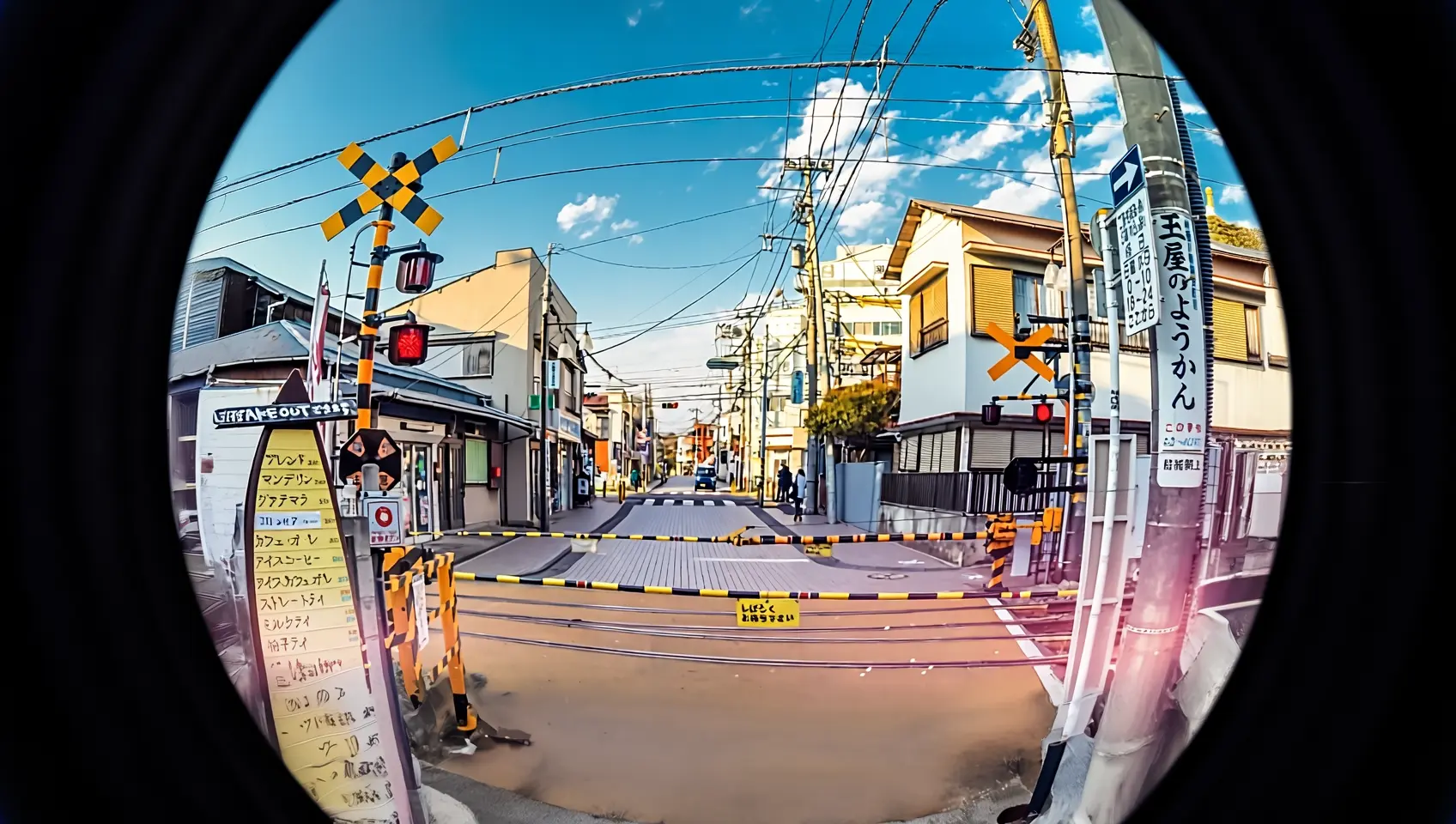
    Refotografe esta cena com uma lente olho de peixe.

Especificações de entrada

Especificações da imagem de entrada

Especificação

wan2.7-image-pro, wan2.7-image

wan2.6-image

wan2.5-i2i-preview

Quantidade de imagens de entrada

0 a 9 (0 corresponde ao modo texto para imagem)

Edição de imagem: 1 a 4 / Texto e imagem mistos: 0 a 1

1 a 3

Formato da imagem

JPEG, JPG, PNG (canal alfa não suportado), BMP, WEBP

JPEG, JPG, PNG (canal alfa não suportado), BMP, WEBP

JPEG, JPG, PNG (canal alfa não suportado), BMP, WEBP

Intervalo de largura e altura da imagem

[240, 8000] pixels

[240, 8000] pixels

[384, 5000] pixels

Tamanho do arquivo

≤ 20 MB

≤ 10 MB

≤ 10 MB

Proporção

[1:8, 8:1]

Ilimitada

[1:4, 4:1]

Ordem de entrada das imagens

Os números das imagens nos prompts correspondem à posição no array: a primeira imagem é "image 1", a segunda é "image 2". Também é possível usar marcadores como "[image 1]" e "[image 2]".

{
    "content": [
        {"text": "Editing instruction, for example: Place the alarm clock from image 1 next to the vase on the dining table in image 2"},
        {"image": "https://example.com/image1.png"},
        {"image": "https://example.com/image2.png"}
    ]
}

Imagem de entrada

Imagem de saída

image (19)-转换自-png

Image 1

image (20)-转换自-png

Image 2

04e0fc39-7ad6-41e0-9df9-1f69ac3ce825-转换自-png

Prompt: Move image 1 onto image 2

36ed450d-bd54-4169-b13f-3d0f26d9d360-转换自-png

Prompt: Move image 2 onto image 1

Métodos de entrada de imagem

Forneça as imagens utilizando qualquer um dos métodos abaixo:

Método 1: URL pública

  • Informe uma URL de imagem HTTP ou HTTPS publicamente acessível.

  • Exemplo de valor: https://xxxx/img.png.

  • Recomendado quando as imagens estão hospedadas no OSS ou em um service público de hospedagem de imagens.

Método 2: Codificação Base64

Converta o arquivo de imagem para uma string codificada em Base64 e formate-a como: data:{MIME_type};base64,{base64_data}.

  • Exemplo de valor: data:image/png;base64,iVBORw0KGgoAAAANSUhEUgAABDg...... (Este é um trecho devido a limitações de tamanho). Ao fazer a chamada, passe a string completa.

  • {base64_data}: A string codificada em Base64 do arquivo de imagem.

  • {MIME_type}: O tipo de mídia da imagem, que deve corresponder ao formato do arquivo.

    Formato da imagem

    Tipo MIME

    JPEG

    image/jpeg

    JPG

    image/jpeg

    PNG

    image/png

    BMP

    image/bmp

    WEBP

    image/webp

  • Indicado para transmissão de imagens locais, privadas ou criptografadas.

Exemplo de código: Codificação Base64 para uma imagem

import os
import base64
import mimetypes

# The format is data:{mime_type};base64,{base64_data}
def encode_file(file_path):
    mime_type, _ = mimetypes.guess_type(file_path)
    with open(file_path, "rb") as image_file:
        encoded_string = base64.b64encode(image_file.read()).decode('utf-8')
    return f"data:{mime_type};base64,{encoded_string}"
        
        
# Call the encoding function. Replace "/path/to/your/image.png" with the path to your local image file, otherwise the code will not run.
image = encode_file("/path/to/your/image.png")

Método 3: Caminho de arquivo local (apenas SDK)

  • Python SDK: Suporta caminhos absolutos e relativos. As regras de caminho de arquivo são as seguintes:

    Sistema

    Caminho do arquivo de entrada

    Exemplo (caminho absoluto)

    Exemplo (caminho relativo)

    Linux ou macOS

    file://{caminho absoluto ou relativo do arquivo}

    file:///home/images/test.png

    file://./images/test.png

    Windows

    file://D:/images/test.png

    file://./images/test.png

  • Java SDK: Suporta apenas o caminho absoluto. As regras de caminho de arquivo são as seguintes:

    Sistema

    Caminho do arquivo de entrada

    Exemplo (caminho absoluto)

    Linux ou macOS

    file://{caminho absoluto do arquivo}

    file:///home/images/test.png

    Windows

    file:///{caminho absoluto do arquivo}

    file:///D:/images/test.png

  • Ideal para testes rápidos durante o desenvolvimento local.

Recursos principais

1. Seguimento de instruções (prompts)

Parâmetros: messages.content.text ou input.prompt (obrigatório), negative_prompt (opcional).

  • text ou prompt (Prompt positivo): Descreva o conteúdo, sujeitos, cenas, estilos, iluminação e composição desejados para a imagem de saída.

  • negative_prompt (Prompt negativo): Especifique conteúdos indesejados, como "blurry" ou "extra fingers".

Parâmetro

wan2.7-image-pro, wan2.7-image

wan2.6-image

wan2.5-i2i-preview

text

Obrigatório, até 5.000 caracteres

Obrigatório, até 2.000 caracteres

Não suportado

prompt

Não suportado

Não suportado

Obrigatório, até 2.000 caracteres

negative_prompt

Não suportado

Suportado, até 500 caracteres

Suportado, até 500 caracteres

2. Ativar reescrita inteligente de prompts

Parâmetro: parameters.prompt_extend (bool, padrão true).

Expande prompts curtos para melhorar a qualidade da imagem, aumentando o tempo de resposta.

Melhores práticas:

  • Ative: Quando os prompts forem concisos ou genéricos.

  • Desative: Para controle fino de detalhes, descrições detalhadas ou cenários sensíveis à latência. Defina prompt_extend como false.

Parâmetro

wan2.7-image-pro, wan2.7-image

wan2.6-image

wan2.5-i2i-preview

prompt_extend

Não suportado

Suportado (apenas modo de edição de imagem)

Suportado

3. Definir a resolução da imagem de saída

Parâmetro: parameters.size (string), no formato "largura*altura".

Parâmetro

wan2.7-image-pro, wan2.7-image

wan2.6-image

wan2.5-i2i-preview

size

Método 1: Especificar a resolução da imagem de saída (recomendado)

No modo de edição (com pelo menos uma imagem fornecida), os níveis opcionais de resolução de saída são: 1K, 2K (padrão).

  • 1K: O total de pixels de saída aproxima-se de 1024*1024, mantendo a proporção da última imagem de entrada.

  • 2K: O total de pixels de saída aproxima-se de 2048*2048, mantendo a proporção da última imagem de entrada.

Método 2: Especificar os valores de largura e altura em pixels da imagem gerada

  • O total de pixels varia entre 768768 e 20482048, com proporção no intervalo de [1:8, 8:1].

Apenas o wan2.7-image-pro em cenários de texto para imagem suporta resolução 4K.

Método 1: Referenciar a proporção da imagem de entrada (recomendado)

No modo de edição (enable_interleave=false), os níveis opcionais de resolução de saída são: 1K (padrão), 2K.

  • 1K: O total de pixels de saída aproxima-se de 1280*1280, mantendo a proporção da última imagem de entrada.

  • 2K: O total de pixels de saída aproxima-se de 2048*2048, mantendo a proporção da última imagem de entrada.

Método 2: Especificar os valores de largura e altura em pixels da imagem gerada

  • O total de pixels varia entre 768768 e 20482048, com proporção no intervalo de [1:4, 4:1].

Os valores reais de pixels da imagem de saída serão o múltiplo de 16 mais próximo do valor especificado.

Suporta apenas a especificação dos valores de largura e altura em pixels da imagem gerada

  • O total de pixels varia entre 768768 e 12801280, com proporção no intervalo de [1:4, 4:1].

  • Se size não for especificado, o sistema gerará por padrão uma imagem com contagem total de pixels de 1280*1280, mantendo a proporção da última imagem de entrada.

4. Edição precisa interativa

Utilize parameters.bbox_list para selecionar regiões específicas para edição. Suportado apenas por wan2.7-image-pro e wan2.7-image.

  • Tamanho da lista: Deve corresponder ao número de imagens de entrada. Use uma lista vazia [] para imagens que não exigem edição.

  • Formato das coordenadas: [x1, y1, x2, y2] (x superior esquerdo, y superior esquerdo, x inferior direito, y inferior direito). As coordenadas são valores absolutos em pixels com origem (0, 0) no canto superior esquerdo, eixo x para a direita e eixo y para baixo.

  • Limite de quantidade: Máximo de 2 caixas delimitadoras por imagem.

Exemplo: 3 imagens de entrada, onde a imagem 1 possui duas caixas delimitadoras e a imagem 2 não possui nenhuma

[
  [[0, 0, 12, 12], [25, 25, 100, 100]],  # Image 1 (2 boxes)
  [],                                    # Image 2 (no box)
  [[10, 10, 50, 50]]                    # Image 3 (1 box)
]

Clique para ver exemplos de chamada

curl --location 'https://{WorkspaceId}.ap-southeast-1.maas.aliyuncs.com/api/v1/services/aigc/multimodal-generation/generation' \
    --header 'Content-Type: application/json' \
    --header "Authorization: Bearer $DASHSCOPE_API_KEY" \
    --data '{
        "model": "wan2.7-image-pro",
        "input": {
            "messages": [
                {
                    "role": "user",
                    "content": [
                        {"image": "https://img.alicdn.com/imgextra/i3/O1CN0157XGE51l6iL9441yX_!!6000000004770-49-tps-1104-1472.webp"},
                        {"image": "https://img.alicdn.com/imgextra/i3/O1CN01SfG4J41UYn9WNt4X1_!!6000000002530-49-tps-1696-960.webp"},
                        {"text": "Place the alarm clock from image 1 into the bounding box of image 2, and blend the scene and lighting naturally."}
                    ]
                }
            ]
        },
        "parameters": {
            "bbox_list": [[],[[989, 515, 1138, 681]]],
            "size": "2K",
            "n": 1,
            "watermark": false
        }
    }'
    

Como determinar as coordenadas da região de edição

Método 1: Desenhar caixas delimitadoras com OpenCV

Desenhe caixas delimitadoras arrastando o mouse sobre a imagem para uma seleção precisa e intuitiva:

# Install dependencies: pip install opencv-python
import cv2
import urllib.request

# Download a sample image (replace with your own image URL or local path)
image_url = "https://img.alicdn.com/imgextra/i3/O1CN01SfG4J41UYn9WNt4X1_!!6000000002530-49-tps-1696-960.webp"
urllib.request.urlretrieve(image_url, "example.webp")

# Read the image and open an interactive window
img = cv2.imread("example.webp")
# Drag the mouse in the pop-up window to draw a box. Press Enter to confirm, press Esc to cancel
x, y, w, h = cv2.selectROI("Draw bounding box (Enter=confirm, Esc=cancel)", img)
cv2.destroyAllWindows()

# Convert the (x, y, w, h) returned by OpenCV to the [x1, y1, x2, y2] format required by bbox_list
# Coordinate system: origin at the top-left corner, x-axis points right, y-axis points down, unit is pixels
bbox = [x, y, x + w, y + h]
print(f"Bounding box coordinates: {bbox}")  # Pass these coordinates to parameters.bbox_list

Método 2: Modelo de compreensão visual

Use o qwen3.6-plus para identificar automaticamente as coordenadas da região alvo descrevendo o alvo em linguagem natural:

# Install dependencies: pip install dashscope pillow
import os
import json
from dashscope import MultiModalConversation
import dashscope
from PIL import Image
import urllib.request

dashscope.base_http_api_url = "https://{WorkspaceId}.cn-beijing.maas.aliyuncs.com/api/v1"

def get_bbox_list(image, prompt):
    """
    Identify target regions in an image using qwen3.6-plus and return absolute pixel coordinates.

    Args:
        image: Image URL or local path (local path format: "file:///absolute/path.png")
        prompt: Natural language description, e.g., "coffee cup", "all fruits on the plate", "the fruit in the center of the plate"

    Returns:
        [[x1, y1, x2, y2], ...] Absolute pixel coordinates that can be passed directly to bbox_list
    """
    # Concatenate user description with return format instructions
    full_prompt = (
        prompt + "\n"
        "Based on the description above, return the coordinates of the corresponding region.\n"
        "Return a maximum of 2 regions, prioritizing the most matching target.\n"
        "Strictly follow the JSON 2D list format: [[x1, y1, x2, y2], ...]\n"
        "Each set of coordinates: [top-left x, top-left y, bottom-right x, bottom-right y]\n"
        "Use absolute pixel coordinates of the original image, with (0,0) at the top-left corner, x-axis pointing right, y-axis pointing down.\n"
        "If there is only one region, you must still use a 2D list: [[x1, y1, x2, y2]]\n"
        "Only return the JSON list, do not return any other content."
    )

    messages = [
        {'role': 'user',
         'content': [
             {'image': image},
             {'text': full_prompt}
         ]}
    ]

    response = MultiModalConversation.call(
        api_key=os.getenv('DASHSCOPE_API_KEY'),
        model='qwen3.6-plus',
        messages=messages,
    )

    text = response.output.choices[0].message.content[0]["text"]
    text = text.replace("```json", "").replace("```", "").strip()
    coords = json.loads(text)

    # Handle the case where the model returns a 1D list [x1,y1,x2,y2]
    if coords and not isinstance(coords[0], list):
        coords = [coords]

    # Get image dimensions for coordinate conversion
    if image.startswith("file://"):
        local_path = image[len("file://"):]
        img = Image.open(local_path)
    else:
        tmp_path = "temp_bbox_image"
        urllib.request.urlretrieve(image, tmp_path)
        img = Image.open(tmp_path)
    width, height = img.size

    # Convert model's normalized coordinates [0, 999] to absolute pixel coordinates
    bbox_list = []
    for box in coords:
        bbox_list.append([
            int(box[0] / 1000 * width),
            int(box[1] / 1000 * height),
            int(box[2] / 1000 * width),
            int(box[3] / 1000 * height)
        ])

    return bbox_list

# === Usage examples ===
image_url = "https://img.alicdn.com/imgextra/i3/O1CN01ewUWhg1eS3VqJ3wap_!!6000000003869-49-tps-2048-2048.webp"

# Select target by name
bbox = get_bbox_list(image_url, "coffee cup")           # [[x1, y1, x2, y2]]

# Select target by position description
bbox = get_bbox_list(image_url, "the fruit in the center of the plate")  # [[x1, y1, x2, y2]]

# Describe a region
bbox = get_bbox_list(image_url, "lavender potted plant")

# Results can be used as elements in the bbox_list array
# Note: A maximum of 2 bounding boxes per image
# Install dependencies: pip install dashscope pillow
import os
import json
from dashscope import MultiModalConversation
import dashscope
from PIL import Image
import urllib.request

# The following URL is for the Singapore region. Replace WorkspaceId with your actual workspace ID. URLs differ by region.
dashscope.base_http_api_url = "https://{WorkspaceId}.ap-southeast-1.maas.aliyuncs.com/api/v1"

def get_bbox_list(image, prompt):
    """
    Identify target regions in an image using qwen3.6-plus and return absolute pixel coordinates.

    Args:
        image: Image URL or local path (local path format: "file:///absolute/path.png")
        prompt: Natural language description, e.g., "coffee cup", "all fruits on the plate", "the fruit in the center of the plate"

    Returns:
        [[x1, y1, x2, y2], ...] Absolute pixel coordinates that can be passed directly to bbox_list
    """
    # Concatenate user description with return format instructions
    full_prompt = (
        prompt + "\n"
        "Based on the description above, return the coordinates of the corresponding region.\n"
        "Return a maximum of 2 regions, prioritizing the most matching target.\n"
        "Strictly follow the JSON 2D list format: [[x1, y1, x2, y2], ...]\n"
        "Each set of coordinates: [top-left x, top-left y, bottom-right x, bottom-right y]\n"
        "Use absolute pixel coordinates of the original image, with (0,0) at the top-left corner, x-axis pointing right, y-axis pointing down.\n"
        "If there is only one region, you must still use a 2D list: [[x1, y1, x2, y2]]\n"
        "Only return the JSON list, do not return any other content."
    )

    messages = [
        {'role': 'user',
         'content': [
             {'image': image},
             {'text': full_prompt}
         ]}
    ]

    response = MultiModalConversation.call(
        api_key=os.getenv('DASHSCOPE_API_KEY'),
        model='qwen3.6-plus',
        messages=messages,
    )

    text = response.output.choices[0].message.content[0]["text"]
    text = text.replace("```json", "").replace("```", "").strip()
    coords = json.loads(text)

    # Handle the case where the model returns a 1D list [x1,y1,x2,y2]
    if coords and not isinstance(coords[0], list):
        coords = [coords]

    # Get image dimensions for coordinate conversion
    if image.startswith("file://"):
        local_path = image[len("file://"):]
        img = Image.open(local_path)
    else:
        tmp_path = "temp_bbox_image"
        urllib.request.urlretrieve(image, tmp_path)
        img = Image.open(tmp_path)
    width, height = img.size

    # Convert model's normalized coordinates [0, 999] to absolute pixel coordinates
    bbox_list = []
    for box in coords:
        bbox_list.append([
            int(box[0] / 1000 * width),
            int(box[1] / 1000 * height),
            int(box[2] / 1000 * width),
            int(box[3] / 1000 * height)
        ])

    return bbox_list

# === Usage examples ===
image_url = "https://img.alicdn.com/imgextra/i3/O1CN01ewUWhg1eS3VqJ3wap_!!6000000003869-49-tps-2048-2048.webp"

# Select target by name
bbox = get_bbox_list(image_url, "coffee cup")           # [[x1, y1, x2, y2]]

# Select target by position description
bbox = get_bbox_list(image_url, "the fruit in the center of the plate")  # [[x1, y1, x2, y2]]

# Describe a region
bbox = get_bbox_list(image_url, "lavender potted plant")

# Results can be used as elements in the bbox_list array
# Note: A maximum of 2 bounding boxes per image

Faturamento e limites de taxa

  • Cota gratuita e preços: Lista de modelos e preços.

  • Para limites de taxa, consulte Wanxiang.

  • Faturamento:

    • As cobranças ocorrem por imagem gerada com sucesso. A cobrança acontece apenas quando a API retorna um task_status igual a SUCCEEDED.

    • Chamadas de modelo falhas ou erros de processamento não geram taxas nem consomem a cota gratuita.

Referência da API

Cada modelo utiliza um endpoint e uma estrutura de solicitação diferentes:

Modelo

Endpoint (Exemplo para a região Singapore)

wan2.7-image, wan2.7-image-pro, wan2.6-image

API síncrona: POST https://{WorkspaceId}.ap-southeast-1.maas.aliyuncs.com/api/v1/services/aigc/multimodal-generation/generation

API assíncrona: POST https://{WorkspaceId}.ap-southeast-1.maas.aliyuncs.com/api/v1/services/aigc/image-generation/generation

Substitua WorkspaceId pelo seu ID do Workspace real.

wan2.5-i2i-preview

API assíncrona: POST https://{WorkspaceId}.ap-southeast-1.maas.aliyuncs.com/api/v1/services/aigc/image2image/image-synthesis

Substitua WorkspaceId pelo seu ID do Workspace real.

  • wan2.7 / wan2.6: Utilize o formato messages. No array messages[].content, passe a imagem no parâmetro image e o prompt no parâmetro text.

  • wan2.5: Passe a imagem no array input.images e o prompt no parâmetro input.prompt.

wan2.7-image-pro, wan2.7-image, wan2.6-image

wan2.5-i2i-preview

"input": {
    "messages": [
        {
            "role": "user",
            "content": [
                {"image": "https://help-static-aliyun-doc.aliyuncs.com/file-manage-files/zh-CN/20251229/pjeqdf/car.webp"},
                {"image": "https://help-static-aliyun-doc.aliyuncs.com/file-manage-files/zh-CN/20251229/xsunlm/paint.webp"},
                {"text": "Spray the graffiti from image 2 onto the car in image 1"}
            ]
        }
    ]
}
"input": {
    "prompt": "Place the alarm clock from image 1 next to the vase on the dining table in image 2",
    "images": [
        "https://img.alicdn.com/imgextra/i3/O1CN0157XGE51l6iL9441yX_!!6000000004770-49-tps-1104-1472.webp",
        "https://img.alicdn.com/imgextra/i3/O1CN01SfG4J41UYn9WNt4X1_!!6000000002530-49-tps-1696-960.webp"
    ]
}

Para parâmetros de entrada e saída, consulte Wan2.7 - geração e edição de imagens, Wan2.6 - geração e edição de imagens, Wanxiang – Edição Geral de Imagens 2.5