O Qwen-Image Edit aceita entrada e saída de múltiplas imagens. Edite textos em imagens, adicione, remova ou mova objetos, altere poses, transfira estilos e aprimore detalhes usando prompts em linguagem natural.
Visão geral do modelo
Imagem de entrada 1 | Imagem de entrada 2 | Imagem de entrada 3 | Imagens de saída (múltiplas) | |
|---|---|---|---|---|
|
|
|
|
|

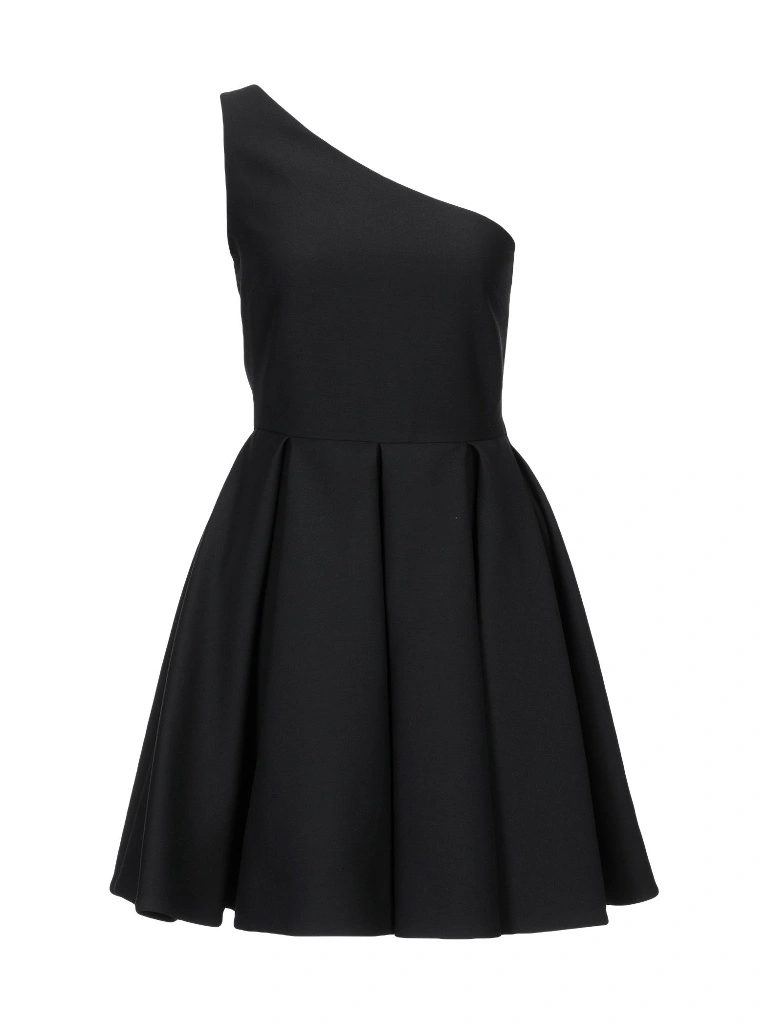
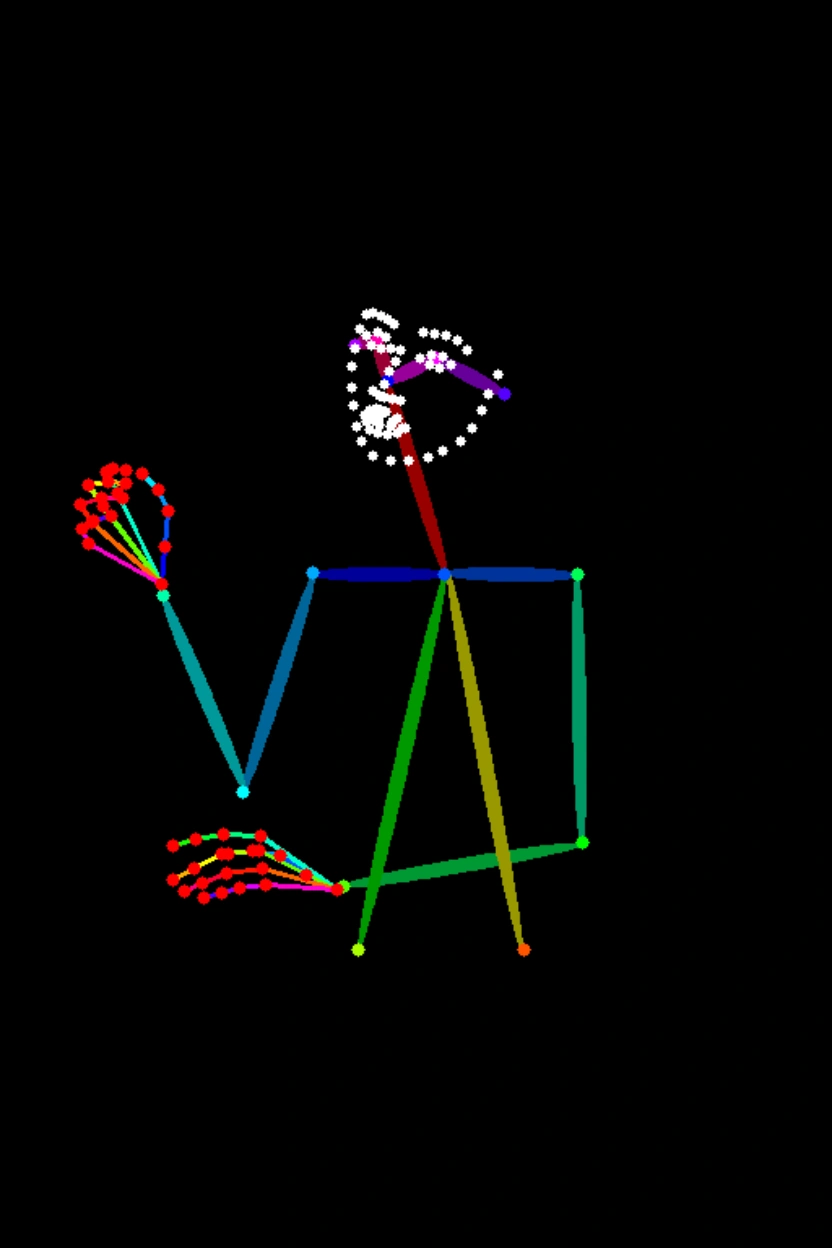


Prompt: A garota da Imagem 1 está vestindo o vestido preto da Imagem 2 e sentada na pose da Imagem 3.
| Nome do modelo | Descrição do modelo | Especificações da imagem de saída |
|---|---|---|
qwen-image-2.0-pro
| A série Pro dos modelos de geração e edição de imagens Qwen oferece capacidades aprimoradas em renderização de texto, texturas realistas e aderência semântica.
| Resolução da imagem:
Formato da imagem: png Número de imagens: 1–6 |
qwen-image-2.0-pro-2026-06-22 | ||
qwen-image-2.0-pro-2026-04-22 | ||
qwen-image-2.0-pro-2026-03-03 | ||
qwen-image-2.0
| Esta é a versão acelerada do modelo de geração e edição de imagens Qwen, equilibrando desempenho e velocidade de resposta.
| |
qwen-image-2.0-2026-03-03 |
ObservaçãoAntes de chamar a API, verifique a Lista de Modelos para saber quais modelos são suportados em cada região.
Pré-requisitos
Antes de fazer uma chamada, obtenha uma chave de API e exporte a chave de API como uma variável de ambiente.
Para chamar a API usando o SDK, instale o DashScope SDK. O SDK está disponível para Python e Java.
ImportanteAs regiões China (Beijing) e Singapore possuem chaves de API e endpoints de solicitação separados. Eles não podem ser usados indistintamente. Chamadas entre regiões resultam em falhas de autenticação ou erros de service.
Chamada HTTP
Região Singapore:POST https://{WorkspaceId}.ap-southeast-1.maas.aliyuncs.com/api/v1/services/aigc/multimodal-generation/generation
Região Beijing:POST https://{WorkspaceId}.cn-beijing.maas.aliyuncs.com/api/v1/services/aigc/multimodal-generation/generation
Ao fazer a chamada, substitua {WorkspaceId} pelo seu ID do workspace real.
Parâmetros da solicitação | Edição de imagem únicaEste exemplo usa o modelo Fusão de múltiplas imagensEste exemplo usa o modelo |
Cabeçalhos da solicitação | |
Content-Type O tipo de conteúdo da solicitação. Deve ser | |
Authorization Autentica a solicitação com uma chave de API do Model Studio. Exemplo: Bearer sk-xxxx. | |
Corpo da solicitação | |
model O nome do modelo. Exemplo: qwen-image-2.0-pro. | |
input O objeto de entrada, contendo o seguinte campo: | |
parameters Parâmetros adicionais para controlar a geração de imagens. |
Parâmetros da resposta | Tarefa bem-sucedidaOs dados da tarefa (status da tarefa e URLs das imagens) são retidos por apenas 24 horas e depois removidos automaticamente. Salve as imagens geradas prontamente. Erro na tarefaSe a tarefa falhar por qualquer motivo, informações relevantes serão retornadas. Identifique a causa do erro usando os campos code e message. Para mais informações, consulte Códigos de erro. |
output Os resultados da geração do modelo. | |
usage Uso de recursos para esta chamada. Retornado apenas em caso de sucesso. | |
request_id Identificador único da solicitação para rastreamento e solução de problemas. | |
code Código de erro. Retornado apenas para solicitações com falha. Consulte Códigos de erro. | |
message Mensagem de erro detalhada. Retornada apenas para solicitações com falha. Consulte Códigos de erro. |
Chamada via DashScope SDK
Os nomes dos parâmetros do SDK são majoritariamente consistentes com a API HTTP. A estrutura dos parâmetros é encapsulada com base nos recursos da linguagem. Para uma lista completa de parâmetros, consulte a Referência da API Qwen.
Chamada via Python SDK
Observação
- Recomendamos instalar a versão mais recente do DashScope Python SDK para evitar possíveis erros de execução. Para mais informações, consulte Instalar ou atualizar o SDK.
- Interfaces assíncronas não são suportadas.
Exemplos de solicitação
import json
import os
import dashscope
from dashscope import MultiModalConversation

# The following is the URL for the Singapore region. Replace {WorkspaceId} with your Bailian workspace ID. URLs vary by region.
dashscope.base_http_api_url = 'https://{WorkspaceId}.ap-southeast-1.maas.aliyuncs.com/api/v1'

# The model supports one to three input images.
messages = [
    {
        "role": "user",
        "content": [
            {"image": "https://help-static-aliyun-doc.aliyuncs.com/file-manage-files/zh-CN/20250925/thtclx/input1.png"},
            {"image": "https://help-static-aliyun-doc.aliyuncs.com/file-manage-files/zh-CN/20250925/iclsnx/input2.png"},
            {"image": "https://help-static-aliyun-doc.aliyuncs.com/file-manage-files/zh-CN/20250925/gborgw/input3.png"},
            {"text": "The girl from Image 1 is wearing the black dress from Image 2 and sitting in the pose from Image 3."}
        ]
    }
]

# The API keys for the Singapore and Beijing regions are different. To get an API key, see https://www.alibabacloud.com/help/en/model-studio/get-api-key.
# If you have not configured the environment variable, replace the next line with: api_key="sk-xxx"
api_key = os.getenv("DASHSCOPE_API_KEY")

# The qwen-image-2.0 series supports one to six output images. This example generates two.
response = MultiModalConversation.call(
    api_key=api_key,
    model="qwen-image-2.0-pro",
    messages=messages,
    stream=False,
    n=2,
    watermark=False,
    negative_prompt=" ",
    prompt_extend=True,
    size="1024*1536",
)

if response.status_code == 200:
    # To view the full response, uncomment the next line.
    # print(json.dumps(response, ensure_ascii=False))
    for i, content in enumerate(response.output.choices[0].message.content):
        print(f"URL of output image {i+1}: {content['image']}")
else:
    print(f"HTTP status code: {response.status_code}")
    print(f"Error code: {response.code}")
    print(f"Error message: {response.message}")
    print("For more information, see https://www.alibabacloud.com/help/en/model-studio/error-code")
import json
import os
import dashscope
from dashscope import MultiModalConversation
import base64
import mimetypes

# The following is the URL for the Singapore region. Replace {WorkspaceId} with your Bailian workspace ID. URLs vary by region.
dashscope.base_http_api_url = 'https://{WorkspaceId}.ap-southeast-1.maas.aliyuncs.com/api/v1'

# --- For Base64 encoding ---
# Format: data:{mime_type};base64,{base64_data}
def encode_file(file_path):
    mime_type, _ = mimetypes.guess_type(file_path)
    if not mime_type or not mime_type.startswith("image/"):
        raise ValueError("Unsupported or unrecognized image format")

    try:
        with open(file_path, "rb") as image_file:
            encoded_string = base64.b64encode(
                image_file.read()).decode('utf-8')
        return f"data:{mime_type};base64,{encoded_string}"
    except IOError as e:
        raise IOError(f"Error reading file: {file_path}, Error: {str(e)}")

# Get the Base64 encoding of the image.
# Call the encoding function. Replace "/path/to/your/image.png" with the path to your local image file. Otherwise, the code will not run.
image = encode_file("/path/to/your/image.png")

messages = [
    {
        "role": "user",
        "content": [
            {"image": image},
            {"text": "Generate an image that matches the depth map, following this description: A red, dilapidated bicycle is parked on a muddy path, with a dense primeval forest in the background."}
        ]
    }
]

# The API keys for the Singapore and Beijing regions are different. To get an API key, see https://www.alibabacloud.com/help/en/model-studio/get-api-key.
# If you have not configured the environment variable, replace the next line with: api_key="sk-xxx"
api_key = os.getenv("DASHSCOPE_API_KEY")

# The qwen-image-2.0 series supports one to six output images. This example generates two.
response = MultiModalConversation.call(
    api_key=api_key,
    model="qwen-image-2.0-pro",
    messages=messages,
    stream=False,
    n=2,
    watermark=False,
    negative_prompt=" ",
    prompt_extend=True,
    size="1536*1024",
)

if response.status_code == 200:
    # To view the full response, uncomment the next line.
    # print(json.dumps(response, ensure_ascii=False))
    for i, content in enumerate(response.output.choices[0].message.content):
        print(f"URL of output image {i+1}: {content['image']}")
else:
    print(f"HTTP status code: {response.status_code}")
    print(f"Error code: {response.code}")
    print(f"Error message: {response.message}")
    print("For more information, see https://www.alibabacloud.com/help/en/model-studio/error-code")
# You need to install requests to download the image: pip install requests
import requests

def download_image(image_url, save_path='output.png'):
    try:
        response = requests.get(image_url, stream=True, timeout=300)  # Set a timeout.
        response.raise_for_status()  # Raise an exception if the HTTP status code is not 200.
        with open(save_path, 'wb') as f:
            for chunk in response.iter_content(chunk_size=8192):
                f.write(chunk)
        print(f"Image successfully downloaded to: {save_path}")

    except requests.exceptions.RequestException as e:
        print(f"Image download failed: {e}")

image_url = "https://dashscope-result-sz.oss-cn-shenzhen.aliyuncs.com/xxx.png?Expires=xxx"
download_image(image_url, save_path='output.png')
Exemplo de resposta
A URL da imagem é válida por 24 horas. Baixe a imagem prontamente.
Os campos
input_tokens,output_tokensecharacterssão compatíveis. Seus valores estão atualmente fixados em 0.
{
    "status_code": 200,
    "request_id": "fa41f9f9-3cb6-434d-a95d-4ae6b9xxxxxx",
    "code": "",
    "message": "",
    "output": {
        "text": null,
        "finish_reason": null,
        "choices": [
            {
                "finish_reason": "stop",
                "message": {
                    "role": "assistant",
                    "content": [
                        {
                            "image": "https://dashscope-result-hz.oss-cn-hangzhou.aliyuncs.com/xxx.png?Expires=xxx"
                        },
                        {
                            "image": "https://dashscope-result-hz.oss-cn-hangzhou.aliyuncs.com/xxx.png?Expires=xxx"
                        }
                    ]
                }
            }
        ],
        "audio": null
    },
    "usage": {
        "input_tokens": 0,
        "output_tokens": 0,
        "characters": 0,
        "height": 1536,
        "image_count": 2,
        "width": 1024
    }
}
Chamada via Java SDK
ObservaçãoInstale o DashScope Java SDK mais recente para evitar erros de execução. Consulte Instalar ou atualizar o SDK.
Exemplos de solicitação
import com.alibaba.dashscope.aigc.multimodalconversation.MultiModalConversation;
import com.alibaba.dashscope.aigc.multimodalconversation.MultiModalConversationParam;
import com.alibaba.dashscope.aigc.multimodalconversation.MultiModalConversationResult;
import com.alibaba.dashscope.common.MultiModalMessage;
import com.alibaba.dashscope.common.Role;
import com.alibaba.dashscope.exception.ApiException;
import com.alibaba.dashscope.exception.NoApiKeyException;
import com.alibaba.dashscope.exception.UploadFileException;
import com.alibaba.dashscope.utils.JsonUtils;
import com.alibaba.dashscope.utils.Constants;

import java.io.IOException;
import java.util.Arrays;
import java.util.Collections;
import java.util.HashMap;
import java.util.Map;
import java.util.List;

public class QwenImageEdit {

    static {
        // The following is the URL for the Singapore region. Replace {WorkspaceId} with your Bailian workspace ID. URLs vary by region.
        Constants.baseHttpApiUrl = "https://{WorkspaceId}.ap-southeast-1.maas.aliyuncs.com/api/v1";
    }

    // The API keys for the Singapore and Beijing regions are different. To obtain an API key, see https://www.alibabacloud.com/help/en/model-studio/get-api-key.
    // If you have not configured the environment variable, replace the following line with your DashScope API key: apiKey="sk-xxx".
    static String apiKey = System.getenv("DASHSCOPE_API_KEY");

    public static void call() throws ApiException, NoApiKeyException, UploadFileException, IOException {

        MultiModalConversation conv = new MultiModalConversation();

        // The model supports one to three input images.
        MultiModalMessage userMessage = MultiModalMessage.builder().role(Role.USER.getValue())
                .content(Arrays.asList(
                        Collections.singletonMap("image", "https://help-static-aliyun-doc.aliyuncs.com/file-manage-files/zh-CN/20250925/thtclx/input1.png"),
                        Collections.singletonMap("image", "https://help-static-aliyun-doc.aliyuncs.com/file-manage-files/zh-CN/20250925/iclsnx/input2.png"),
                        Collections.singletonMap("image", "https://help-static-aliyun-doc.aliyuncs.com/file-manage-files/zh-CN/20250925/gborgw/input3.png"),
                        Collections.singletonMap("text", "The girl from Image 1 is wearing the black dress from Image 2 and sitting in the pose from Image 3.")
                )).build();
        // The qwen-image-2.0 series models support one to six output images. This example generates two images.
        Map<String, Object> parameters = new HashMap<>();
        parameters.put("watermark", false);
        parameters.put("negative_prompt", " ");
        parameters.put("n", 2);
        parameters.put("prompt_extend", true);
        parameters.put("size", "1024*1536");

        MultiModalConversationParam param = MultiModalConversationParam.builder()
                .apiKey(apiKey)
                .model("qwen-image-2.0-pro")
                .messages(Collections.singletonList(userMessage))
                .parameters(parameters)
                .build();

        MultiModalConversationResult result = conv.call(param);
        // To view the complete response, uncomment the following line.
        // System.out.println(JsonUtils.toJson(result));
        List<Map<String, Object>> contentList = result.getOutput().getChoices().get(0).getMessage().getContent();
        int imageIndex = 1;
        for (Map<String, Object> content : contentList) {
            if (content.containsKey("image")) {
                System.out.println("URL of output image " + imageIndex + ": " + content.get("image"));
                imageIndex++;
            }
        }
    }

    public static void main(String[] args) {
        try {
            call();
        } catch (ApiException | NoApiKeyException | UploadFileException | IOException e) {
            System.out.println(e.getMessage());
        }
    }
}
import com.alibaba.dashscope.aigc.multimodalconversation.MultiModalConversation;
import com.alibaba.dashscope.aigc.multimodalconversation.MultiModalConversationParam;
import com.alibaba.dashscope.aigc.multimodalconversation.MultiModalConversationResult;
import com.alibaba.dashscope.common.MultiModalMessage;
import com.alibaba.dashscope.common.Role;
import com.alibaba.dashscope.exception.ApiException;
import com.alibaba.dashscope.exception.NoApiKeyException;
import com.alibaba.dashscope.exception.UploadFileException;
import com.alibaba.dashscope.utils.JsonUtils;
import com.alibaba.dashscope.utils.Constants;

import java.io.IOException;
import java.nio.file.Files;
import java.nio.file.Path;
import java.nio.file.Paths;
import java.util.Arrays;
import java.util.Base64;
import java.util.Collections;
import java.util.HashMap;
import java.util.Map;
import java.util.List;

public class QwenImageEdit {

    static {
        // The following is the URL for the Singapore region. Replace {WorkspaceId} with your Bailian workspace ID. URLs vary by region.
        Constants.baseHttpApiUrl = "https://{WorkspaceId}.ap-southeast-1.maas.aliyuncs.com/api/v1";
    }

    // The API keys for the Singapore and Beijing regions are different. To obtain an API key, see https://www.alibabacloud.com/help/en/model-studio/get-api-key.
    // If you have not configured the environment variable, replace the following line with your DashScope API key: apiKey="sk-xxx".
    static String apiKey = System.getenv("DASHSCOPE_API_KEY");

    public static void call() throws ApiException, NoApiKeyException, UploadFileException, IOException {

        // Replace "/path/to/your/image.png" with the path to your local image file. Otherwise, the code cannot run.
        String image = encodeFile("/path/to/your/image.png");

        MultiModalConversation conv = new MultiModalConversation();

        MultiModalMessage userMessage = MultiModalMessage.builder().role(Role.USER.getValue())
                .content(Arrays.asList(
                        Collections.singletonMap("image", image),
                        Collections.singletonMap("text", "Generate an image that matches the depth map, following this description: A dilapidated red bicycle is parked on a muddy path, with a dense primeval forest in the background.")
                )).build();
        // The qwen-image-2.0 series models support one to six output images. This example generates two images.
        Map<String, Object> parameters = new HashMap<>();
        parameters.put("watermark", false);
        parameters.put("negative_prompt", " ");
        parameters.put("n", 2);
        parameters.put("prompt_extend", true);
        parameters.put("size", "1536*1024");

        MultiModalConversationParam param = MultiModalConversationParam.builder()
                .apiKey(apiKey)
                .model("qwen-image-2.0-pro")
                .messages(Collections.singletonList(userMessage))
                .parameters(parameters)
                .build();

        MultiModalConversationResult result = conv.call(param);
        // To view the complete response, uncomment the following line.
        // System.out.println(JsonUtils.toJson(result));
        List<Map<String, Object>> contentList = result.getOutput().getChoices().get(0).getMessage().getContent();
        int imageIndex = 1;
        for (Map<String, Object> content : contentList) {
            if (content.containsKey("image")) {
                System.out.println("URL of output image " + imageIndex + ": " + content.get("image"));
                imageIndex++;
            }
        }
    }

    /**
     * Encodes a file into a Base64 string.
     * @param filePath The path to the file.
     * @return A Base64 string in the format: data:{mime_type};base64,{base64_data}.
     */
    public static String encodeFile(String filePath) {
        Path path = Paths.get(filePath);
        if (!Files.exists(path)) {
            throw new IllegalArgumentException("File does not exist: " + filePath);
        }
        // Detect the MIME type.
        String mimeType = null;
        try {
            mimeType = Files.probeContentType(path);
        } catch (IOException e) {
            throw new IllegalArgumentException("Cannot detect file type: " + filePath);
        }
        if (mimeType == null || !mimeType.startsWith("image/")) {
            throw new IllegalArgumentException("Unsupported or unrecognized image format.");
        }
        // Read the file content and encode it.
        byte[] fileBytes = null;
        try{
            fileBytes = Files.readAllBytes(path);
        } catch (IOException e) {
            throw new IllegalArgumentException("Cannot read file content: " + filePath);
        }

        String encodedString = Base64.getEncoder().encodeToString(fileBytes);
        return "data:" + mimeType + ";base64," + encodedString;
    }

    public static void main(String[] args) {
        try {
            call();
        } catch (ApiException | NoApiKeyException | UploadFileException | IOException e) {
            System.out.println(e.getMessage());
        }
    }
}
import java.io.FileOutputStream;
import java.io.InputStream;
import java.net.HttpURLConnection;
import java.net.URL;

public class ImageDownloader {
    public static void downloadImage(String imageUrl, String savePath) {
        try {
            URL url = new URL(imageUrl);
            HttpURLConnection connection = (HttpURLConnection) url.openConnection();
            connection.setConnectTimeout(5000);
            connection.setReadTimeout(300000);
            connection.setRequestMethod("GET");
            InputStream inputStream = connection.getInputStream();
            FileOutputStream outputStream = new FileOutputStream(savePath);
            byte[] buffer = new byte[8192];
            int bytesRead;
            while ((bytesRead = inputStream.read(buffer)) != -1) {
                outputStream.write(buffer, 0, bytesRead);
            }
            inputStream.close();
            outputStream.close();

            System.out.println("Image downloaded successfully to: " + savePath);
        } catch (Exception e) {
            System.err.println("Image download failed: " + e.getMessage());
        }
    }

    public static void main(String[] args) {
        String imageUrl = "http://dashscope-result-bj.oss-cn-beijing.aliyuncs.com/xxx?Expires=xxx";
        String savePath = "output.png";
        downloadImage(imageUrl, savePath);
    }
}
Exemplos de resposta
A URL da imagem é válida por 24 horas. Baixe a imagem prontamente.
{
    "requestId": "46281da9-9e02-941c-ac78-be88b8xxxxxx",
    "usage": {
        "image_count": 2,
        "width": 1024,
        "height": 1536
    },
    "output": {
        "choices": [
            {
                "finish_reason": "stop",
                "message": {
                    "role": "assistant",
                    "content": [
                        {
                            "image": "https://dashscope-result-sz.oss-cn-shenzhen.aliyuncs.com/xxx.png?Expires=xxx"
                        },
                        {
                            "image": "https://dashscope-result-sz.oss-cn-shenzhen.aliyuncs.com/xxx.png?Expires=xxx"
                        }
                    ]
                }
            }
        ]
    }
}
Códigos de erro
Se a chamada do modelo falhar e retornar uma mensagem de erro, consulte Códigos de erro para resolução.
Faturamento e limitação de taxa
- Para cotas gratuitas e taxas de faturamento do modelo, consulte a Lista de Modelos.
- Consulte Qwen-Image para detalhes sobre limitação de taxa do modelo.
- Faturamento: A cobrança é feita por imagem gerada com sucesso. Chamadas com falha não incorrem em cobranças e não consomem sua cota gratuita de novo usuário.
FAQ
P: Quais idiomas o modelo de Edição de Imagem Qwen suporta?
R: O modelo atualmente suporta chinês simplificado e inglês. Você pode tentar outros idiomas, mas o desempenho não é garantido.
P: Como visualizo as métricas de invocação do modelo?
R: Uma hora após a conclusão de uma invocação do modelo, acesse a página Monitoramento (Singapore) ou Monitoramento (China (Beijing)) para visualizar métricas como contagem de invocações e taxa de sucesso. Para mais informações, consulte Faturamento e gestão de custos.
P: Como obtenho a lista de permissões de nomes de domínio para armazenamento de imagens?
R: As imagens geradas pelos modelos são armazenadas no OSS. A API retorna uma URL pública temporária. Para configurar uma lista de permissões de firewall para esta URL de download, observe o seguinte: O armazenamento subjacente pode mudar dinamicamente. Este tópico não fornece uma lista fixa de permissões de nomes de domínio do OSS para evitar problemas de acesso causados por informações desatualizadas. Se você tiver requisitos de controle de segurança, entre em contato com seu gerente de conta para obter a lista mais recente de nomes de domínio do OSS.