Adicione o plugin de Localização a um projeto iOS existente via CocoaPods para acessar as APIs de serviços baseados em localização (LBS) e obter dados de localização do dispositivo.
Pré-requisitos
Antes de começar, verifique se você tem:
Um projeto iOS já integrado ao mPaaS. Para instruções de configuração, consulte Integração usando CocoaPods em um projeto existente.
Adicionar o SDK
Use o plugin cocoapods-mPaaS para adicionar o SDK do componente de Localização ao seu projeto.
No Podfile, adicione a dependência do componente de Localização:
mPaaS_pod "mPaaS_LBS".
Execute
pod installna linha de comando. Após a conclusão da instalação, abra o arquivo.xcworkspacegerado no Xcode. Não abra diretamente o arquivo.xcodeproj.-
Ative os alertas de localização no projeto Xcode. Acesse a aba Signing & Capabilities do target ou adicione as strings de descrição de uso necessárias diretamente ao
Info.plist:Para localização em primeiro plano: adicione
NSLocationWhenInUseUsageDescriptioncom uma mensagem que explique por que o aplicativo precisa de acesso à localização.Para localização em segundo plano: adicione também
NSLocationAlwaysAndWhenInUseUsageDescription.
Se o projeto já incluir essas chaves no
Info.plistdevido a um framework de localização existente (como Amap), ignore esta etapa.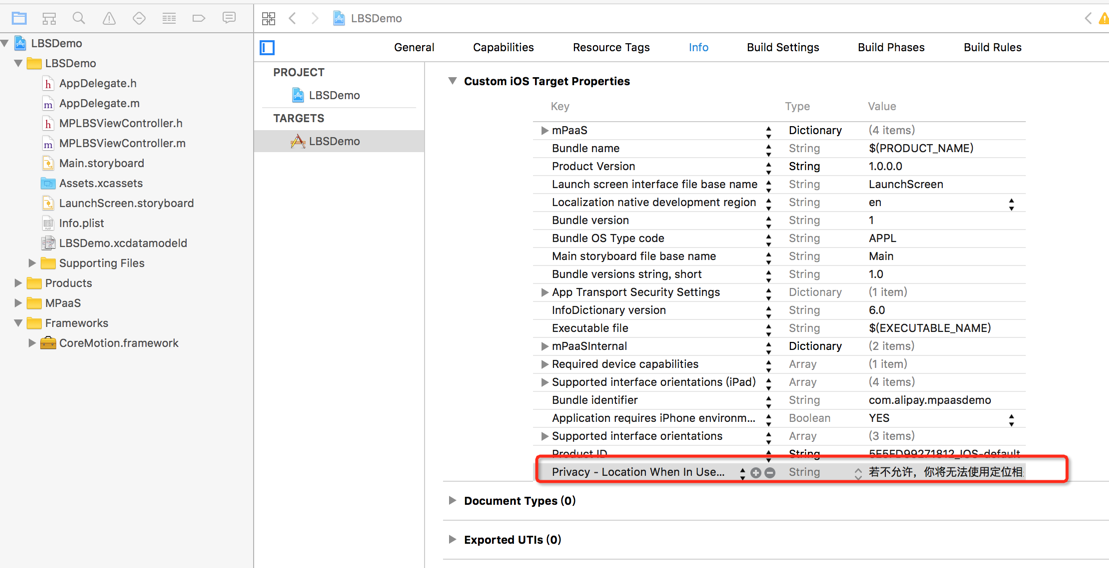
Usar o SDK
Os exemplos a seguir baseiam-se na demonstração de Localização oficial e aplicam-se à baseline 10.1.32 ou posterior. O módulo APMobileLBS retorna a latitude e a longitude atuais do dispositivo.
O SDK de Localização não oferece suporte a geocodificação reversa. Para obter resultados de geocodificação reversa, chame diretamente a API do Amap.
Referência da API
Configure parâmetros com MPLBSConfiguration
/**
 Configuration for the location service.
 */
@interface MPLBSConfiguration : NSObject

/** The desired accuracy for a single location request, in meters. Pass an acceptable positive number based on your scenario, such as 500 for a 500 m range. */
@property (nonatomic, assign) CLLocationAccuracy desiredAccuracy;

/** The acceptable cache duration for a single location request. This value specifies how long a cached location is valid, measured back from the current time. Set the cache time to 30s or longer. */
@property (nonatomic, assign) APCoreLocationCacheAvaliable cacheTimeInterval;

/** The timeout period for a single location request or reverse geocoding query, in seconds. The default and minimum value is 2s. */
@property (nonatomic, assign) NSTimeInterval timeOut;

/** The information level for the reverse geocoding query. The default is APCoreLocationReGeoLevelDistrict. */
@property (nonatomic, assign) LBSLocationReGeoLevel reGeoLevel;

/** The location information for the reverse geocoding query. Specify the latitude and longitude coordinates in this parameter. */
@property (nonatomic, strong) CLLocation *reGeoLocation;

/** Specifies whether the location information for the reverse geocoding query uses the Amap coordinate system. The default is YES. This parameter takes effect only when the reGeoLocation parameter is used. */
@property (nonatomic, assign) BOOL reGeoCoordinateConverted;

/** Specifies whether to enable the check-in feature. The default is NO. Enable it as needed. */
@property (nonatomic, assign) BOOL needCheckIn;

/**
 *  Specifies whether high-accuracy location is required. iOS versions earlier than 14 do not differentiate accuracy. For iOS 14 and later, the default is NO (low accuracy). Specify whether your service requires high-accuracy location.
 */
@property (nonatomic,assign) BOOL highAccuracyRequired;

@end
Iniciar uma solicitação de localização com MPLBSLocationManager
/**
 The callback block for the location result.

 @param success Specifies whether the operation was successful.
 @param locationInfo The location information.
 @param error The error message if the location request failed.
 */
typedef void(^MPLBSLocationCompletionBlock)(BOOL success,
                                            MPLBSLocationInfo *locationInfo,
                                            NSError *error);

/**
 The location service.
 */
@interface MPLBSLocationManager : NSObject

/**
 Initializes the instance.

 @param configuration The parameter settings.
 @return An instance.
 */
- (instancetype)initWithConfiguration:(MPLBSConfiguration *)configuration;

/**
 Initiates a single location request.

 @param needReGeocode Specifies whether reverse geocoding information is needed. Because the location service does not support reverse geocoding, pass NO for this parameter.
 @param block The callback block for when the location request is complete.
 */
- (void)requestLocationNeedReGeocode:(BOOL)needReGeocode
                   completionHandler:(MPLBSLocationCompletionBlock)block;
Descrição de MPLBSLocationInfo no callback
/**
 Reverse geocoding information.
 */
@interface MPLBSReGeocodeInfo : NSObject

@property (nonatomic, strong) NSString* country;        // Country
@property (nonatomic, strong) NSString* countryCode;    // Country code
@property (nonatomic, strong) NSString* provience;      // Province
@property (nonatomic, strong) NSString* city;           // City
@property (nonatomic, strong) NSString* district;       // District
@property (nonatomic, strong) NSString* street;         // Street
@property (nonatomic, strong) NSString* streetCode;     // Street code
@property (nonatomic, strong) NSString* cityCode;       // City code
@property (nonatomic, strong) NSString* adCode;         // Administrative region code
@property (nonatomic, strong) NSArray* poiList;         // POI list

@end

/**
 The data structure for location information in the location result.
 */
@interface MPLBSLocationInfo : NSObject

@property (nonatomic, strong) CLLocation* location;         // Location information
@property (nonatomic, strong) MPLBSReGeocodeInfo* rgcInfo;  // Reverse geocoding information

@end
Exemplo de código
O exemplo abaixo obtém a localização do dispositivo e exibe o resultado, incluindo coordenadas, precisão e status da localização precisa.
- (void)getLocation {
    MPLBSConfiguration *configuration = [[MPLBSConfiguration alloc] init];
    configuration.desiredAccuracy = kCLLocationAccuracyBest;

    self.locationManager = [[MPLBSLocationManager alloc] initWithConfiguration:configuration];
    [self.locationManager requestLocationNeedReGeocode:NO completionHandler:^(BOOL success, MPLBSLocationInfo * _Nonnull locationInfo, NSError * _Nonnull error) {
        NSString *message;
        if (success) {
            message = [NSString stringWithFormat:@"Location successful. Longitude: %.5f, Latitude: %.5f, Accuracy: %.3f, High accuracy: %d", locationInfo.location.coordinate.longitude, locationInfo.location.coordinate.latitude, locationInfo.location.horizontalAccuracy, !locationInfo.location.ap_lbs_is_high_accuracy_close];
        } else {
            message = [NSString stringWithFormat:@"%@", error];
        }
        dispatch_async(dispatch_get_main_queue(), ^{
            AUNoticeDialog *alert = [[AUNoticeDialog alloc] initWithTitle:@"Location Result" message:message delegate:nil cancelButtonTitle:@"OK" otherButtonTitles:nil];
            [alert show];
        });
    }];
}
Adaptação para iOS 14
O iOS 14 introduziu a Localização Precisa como permissão por aplicativo. Os usuários podem ativar ou desativar essa opção ao conceder acesso à localização e alterá-la posteriormente nos Ajustes. O SDK lida com ambos os cenários por meio do parâmetro highAccuracyRequired e do campo ap_lbs_is_high_accuracy_close.
Adaptação de parâmetro de entrada
Defina highAccuracyRequired em MPLBSConfiguration para declarar se o recurso exige localização precisa. Se você definir highAccuracyRequired = YES e o usuário não tiver concedido permissão de alta precisão, o callback retornará um erro em vez do resultado de localização.
/**
 Configuration for the location service.
 */
@interface MPLBSConfiguration : NSObject

/**
 *  Specifies whether high-accuracy location is required. iOS versions earlier than 14 do not differentiate accuracy. For iOS 14 and later, the default is NO (low accuracy). Specify whether your service requires high-accuracy location.
 */
@property (nonatomic,assign) BOOL highAccuracyRequired;

@end
// If highAccuracyRequired is set to YES and high-accuracy location permission is not granted, an error is returned in the callback.
Errorcode: APCoreLocationErrorCodeHighAccuracyAuthorizationAdaptação de callback
Quando highAccuracyRequired = NO (ou o parâmetro é omitido), o callback é bem-sucedido independentemente da configuração de precisão do usuário. O objeto CLLocation retornado inclui o campo ap_lbs_is_high_accuracy_close, que o aplicativo pode ler para determinar se a localização precisa estava disponível.
// Response parameter modification
@interface CLLocation (APMobileLBS)
/*
 *  Specifies whether precise location is disabled. The default is NO.
 */
@property(nonatomic,assign)BOOL ap_lbs_is_high_accuracy_close;
@end
Exemplo de código
- (void)getLocationWithHighAccuracy {
    MPLBSConfiguration *configuration = [[MPLBSConfiguration alloc] init];
    configuration.desiredAccuracy = kCLLocationAccuracyBest;
    configuration.highAccuracyRequired = YES;

    self.locationManager = [[MPLBSLocationManager alloc] initWithConfiguration:configuration];
    [self.locationManager requestLocationNeedReGeocode:NO completionHandler:^(BOOL success, MPLBSLocationInfo * _Nonnull locationInfo, NSError * _Nonnull error) {
        NSString *message;
        if (success) {
            message = [NSString stringWithFormat:@"Location successful. Longitude: %.5f, Latitude: %.5f, Accuracy: %.3f, High accuracy: %d", locationInfo.location.coordinate.longitude, locationInfo.location.coordinate.latitude, locationInfo.location.horizontalAccuracy, !locationInfo.location.ap_lbs_is_high_accuracy_close];
        } else {
            message = [NSString stringWithFormat:@"%@", error];
        }
        dispatch_async(dispatch_get_main_queue(), ^{
            AUNoticeDialog *alert = [[AUNoticeDialog alloc] initWithTitle:@"Location Result" message:message delegate:nil cancelButtonTitle:@"OK" otherButtonTitles:nil];
            [alert show];
        });
    }];
}