No mPaaS, recomendamos adicionar controle de acesso a todas as JavaScript APIs (JSAPIs). Configure um plug-in para implementar esse controle.
-
Personalize as permissões para controlar o plug-in.
Crie um plug-in personalizado para escutar eventos de chamada de JSAPI e interceptá-los.
Após interceptar um evento, o plug-in obtém a URL da página atual. Verifique se a string corresponde às informações de host e scheme.
@interface MPPlugin4WebView : NBPluginBase @end @implementation MPPlugin4WebView - (void)pluginDidLoad { self.scope = kPSDScope_Scene; // -- Intercept the information about the JSAPI that is being called. [self.target addEventListener:kEvent_Invocation_Event_Start withListener:self useCapture:NO]; [self.target addEventListener:kEvent_Invocation_Invoke withListener:self useCapture:NO]; [super pluginDidLoad]; } - (void)handleEvent:(PSDEvent *)event { [super handleEvent:event]; if([kEvent_Invocation_Event_Start isEqualToString:event.eventType] || [kEvent_Invocation_Invoke isEqualToString:event.eventType]){ PSDInvocationEvent *invocationEvent = (PSDInvocationEvent *)event; NSString *apiName = invocationEvent.invocationName; NSDictionary *data = invocationEvent.invocationData; // Obtain the URL of the current page and check whether the string matches the scheme and host information. NSURL *url = event.context.currentViewController.url; if (![url.host isEqualToString:@"xxx"] || ![url.scheme isEqualToString:@"xxx"]) { [event preventDefault]; [event stopPropagation]; return; } } } - (int)priority { return PSDPluginPriority_High+1; }ImportanteAs URLs exigem correspondência exata. No mínimo, as informações de scheme e host na classe URI devem corresponder. Não use correspondência por expressão regular ou utilize-a com cautela. Evite funções imprecisas, como contains, startsWith, endsWith e indexOf.
-
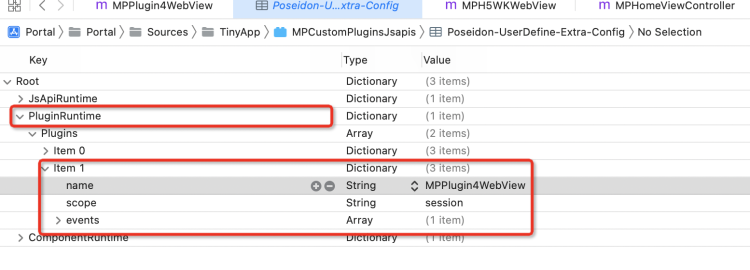
Registre o plug-in.
Especifique o caminho do plug-in personalizado durante a inicialização do HTML5 Container no mPaaS.
-
Abra o arquivo plist no bundle do plug-in personalizado e registre o plug-in criado na etapa anterior. Para mais informações, consulte Registrar um plug-in.