Utilize o Milvus 2.5 para executar buscas de texto completo, correspondência de palavras-chave e busca híbrida com BM25. Combine vetores densos e esparsos com Reciprocal Rank Fusion (RRF) para aumentar a precisão da recuperação em aplicações de RAG.
Informações básicas
O Milvus 2.5 introduz a busca nativa de texto completo ao integrar a biblioteca do mecanismo de busca Tantivy com um algoritmo Sparse-BM25 interno. Esse recurso complementa a busca semântica existente com uma recuperação baseada em palavras-chave.
Tokenizador integrado: O Milvus converte diretamente a entrada de texto em vetores esparsos e filtra automaticamente as stop words, eliminando a necessidade de pré-processamento externo.
Estatísticas BM25 em tempo real: Os valores de frequência de termo (TF) e frequência inversa de documento (IDF) são atualizados dinamicamente durante a inserção de dados, mantendo os resultados da busca sempre atuais.
Busca híbrida aprimorada: A recuperação de vetores esparsos baseada em ANN oferece respostas na casa dos milissegundos mesmo na escala de centenas de milhões e suporta consultas híbridas com vetores densos.
Pré-requisitos
Uma instância do Milvus com Kernel Version 2.5 ou posterior deve estar criada. Crie uma instância do Milvus.
O service precisa estar ativado e uma chave de API deve ser obtida.
Limites
Aplica-se a instâncias do Milvus com Kernel Version 2.5 ou superior.
-
Requer
pymilvus2.5 ou versão mais recente.Verifique a versão instalada:
pip3 show pymilvusAtualize se necessário:
pip3 install --upgrade pymilvus
Procedimento
Etapa 1: Instale bibliotecas de dependência
pip3 install pymilvus langchain dashscopeEtapa 2: Preparar dados
Este exemplo divide a documentação oficial do Milvus em chunks usando LangChain, gera embeddings com o modelo text-embedding-v2 e insere os resultados no Milvus.
from langchain_community.document_loaders import WebBaseLoader
from langchain.text_splitter import RecursiveCharacterTextSplitter
from langchain_community.embeddings import DashScopeEmbeddings
from pymilvus import MilvusClient, DataType, Function, FunctionType

dashscope_api_key = "<YOUR_DASHSCOPE_API_KEY>"
milvus_url = "<YOUR_MMILVUS_URL>"
user_name = "root"
password = "<YOUR_PASSWORD>"
collection_name = "milvus_overview"
dense_dim = 1536

loader = WebBaseLoader([
    'https://raw.githubusercontent.com/milvus-io/milvus-docs/refs/heads/v2.5.x/site/en/about/overview.md'
])

docs = loader.load()

text_splitter = RecursiveCharacterTextSplitter(chunk_size=1024, chunk_overlap=256)

# Use LangChain to chunk the input document by chunk_size
all_splits = text_splitter.split_documents(docs)

embeddings = DashScopeEmbeddings(
    model="text-embedding-v2", dashscope_api_key=dashscope_api_key
)

text_contents = [doc.page_content for doc in all_splits]

vectors = embeddings.embed_documents(text_contents)

client = MilvusClient(
    uri=f"http://{milvus_url}:19530",
    token=f"{user_name}:{password}",
)

schema = MilvusClient.create_schema(
    enable_dynamic_field=True,
)

analyzer_params = {
    "type": "english"
}

# Add fields to schema
schema.add_field(field_name="id", datatype=DataType.INT64, is_primary=True, auto_id=True)
schema.add_field(field_name="text", datatype=DataType.VARCHAR, max_length=65535, enable_analyzer=True, analyzer_params=analyzer_params, enable_match=True)
schema.add_field(field_name="sparse_bm25", datatype=DataType.SPARSE_FLOAT_VECTOR)
schema.add_field(field_name="dense", datatype=DataType.FLOAT_VECTOR, dim=dense_dim)

bm25_function = Function(
   name="bm25",
   function_type=FunctionType.BM25,
   input_field_names=["text"],
   output_field_names="sparse_bm25",
)
schema.add_function(bm25_function)

index_params = client.prepare_index_params()

# Add indexes
index_params.add_index(
    field_name="dense",
    index_name="dense_index",
    index_type="IVF_FLAT",
    metric_type="IP",
    params={"nlist": 128},
)

index_params.add_index(
    field_name="sparse_bm25",
    index_name="sparse_bm25_index",
    index_type="SPARSE_WAND",
    metric_type="BM25"
)

# Create collection
client.create_collection(
    collection_name=collection_name,
    schema=schema,
    index_params=index_params
)

data = [
    {"dense": vectors[idx], "text": doc}
    for idx, doc in enumerate(text_contents)
]

# Insert data
res = client.insert(
    collection_name=collection_name,
    data=data
)

print(f"Generated {len(vectors)} vectors, dimension: {len(vectors[0])}")
Substitua os parâmetros abaixo pelos seus valores reais.
Parâmetro | Descrição |
| Chave de API do Alibaba Cloud Model Studio. |
| O Internal IP Address ou Public IP Address da instância do Milvus, disponível na página Details.
|
| Nome de usuário e senha definidos durante a criação da instância do Milvus. |
| |
| Nome da coleção. Este exemplo utiliza milvus_overview. |
| Dimensão do vetor denso. Defina como 1536 para corresponder à saída do modelo text-embedding-v2. |
O objeto bm25_function instrui o Milvus a converter automaticamente a coluna de texto em vetores esparsos.
Para documentos em chinês, especifique um analisador do tipo chinese.
A configuração do analisador é permanente por coleção. Para alterá-la, crie uma nova coleção.
# Define tokenizer parameters
analyzer_params = {
    "type": "chinese"  # Specify the tokenizer type as chinese
}

# Add a text field to the schema and enable the tokenizer
schema.add_field(
    field_name="text",                      # Field name
    datatype=DataType.VARCHAR,              # Data type: string (VARCHAR)
    max_length=65535,                       # Maximum length: 65535 characters
    enable_analyzer=True,                   # Enable the tokenizer
    analyzer_params=analyzer_params         # Tokenizer parameters
)
Etapa 3: Execute busca de texto completo
O exemplo a seguir realiza uma busca de texto completo utilizando o campo de vetor esparso BM25.
from pymilvus import MilvusClient
# Create a Milvus client.
client = MilvusClient(
uri="http://c-xxxx.milvus.aliyuncs.com:19530", # The public network address of the Milvus instance.
token="<yourUsername>:<yourPassword>", # The username and password to log on to the Milvus instance.
db_name="default" # The name of the database to connect to. This example uses the default database.
)
search_params = {
'params': {'drop_ratio_search': 0.2},
}
full_text_search_res = client.search(
collection_name='milvus_overview',
data=['what makes milvus so fast?'],
anns_field='sparse_bm25',
limit=3,
search_params=search_params,
output_fields=["text"],
)
for hits in full_text_search_res:
for hit in hits:
print(hit)
print("\n")
"""
{'id': 456165042536597485, 'distance': 6.128782272338867, 'entity': {'text': '## What Makes Milvus so Fast?\n\nMilvus was designed from day one to be a highly efficient vector database system. In most cases, Milvus outperforms other vector databases by 2-5x (see the VectorDBBench results). This high performance is the result of several key design decisions:\n\n**Hardware-aware Optimization**: To accommodate Milvus in various hardware environments, we have optimized its performance specifically for many hardware architectures and platforms, including AVX512, SIMD, GPUs, and NVMe SSD.\n\n**Advanced Search Algorithms**: Milvus supports a wide range of in-memory and on-disk indexing/search algorithms, including IVF, HNSW, DiskANN, and more, all of which have been deeply optimized. Compared to popular implementations like FAISS and HNSWLib, Milvus delivers 30%-70% better performance.'}}
{'id': 456165042536597487, 'distance': 4.760214805603027, 'entity': {'text': "## What Makes Milvus so Scalable\n\nIn 2022, Milvus supported billion-scale vectors, and in 2023, it scaled up to tens of billions with consistent stability, powering large-scale scenarios for over 300 major enterprises, including Salesforce, PayPal, Shopee, Airbnb, eBay, NVIDIA, IBM, AT&T, LINE, ROBLOX, Inflection, etc.\n\nMilvus's cloud-native and highly decoupled system architecture ensures that the system can continuously expand as data grows:\n\n"}}
"""Etapa 4: Correspondência de palavras-chave
A correspondência de palavras-chave restringe o escopo da busca filtrando termos exatos antes da busca vetorial. Defina enable_analyzer e enable_match como True na definição do schema.
Ativar enable_match cria um índice invertido, o que consome armazenamento adicional.
Exemplo 1: Correspondência de palavras-chave combinada com busca vetorial
A expressão de filtro limita os resultados a documentos que contenham 'query' e 'node' e, em seguida, executa a busca por similaridade vetorial nesse subconjunto filtrado.
filter = "TEXT_MATCH(text, 'query') and TEXT_MATCH(text, 'node')"

text_match_res = client.search(
    collection_name="milvus_overview",
    anns_field="dense",
    data=query_embeddings,
    filter=filter,
    search_params={"params": {"nprobe": 10}},
    limit=2,
    output_fields=["text"]
)
Exemplo 2: Consulta com filtro escalar
Utilize TEXT_MATCH em query() para filtragem escalar. Este exemplo recupera documentos que contêm 'scalable' ou 'fast'.
filter = "TEXT_MATCH(text, 'scalable fast')"

text_match_res = client.query(
    collection_name="milvus_overview",
    filter=filter,
    output_fields=["text"]
)
Etapa 5: Busca híbrida e RAG
Combine a busca por vetores densos com a busca de texto completo BM25 e una os resultados usando Reciprocal Rank Fusion (RRF) para melhorar tanto o recall quanto a precisão.
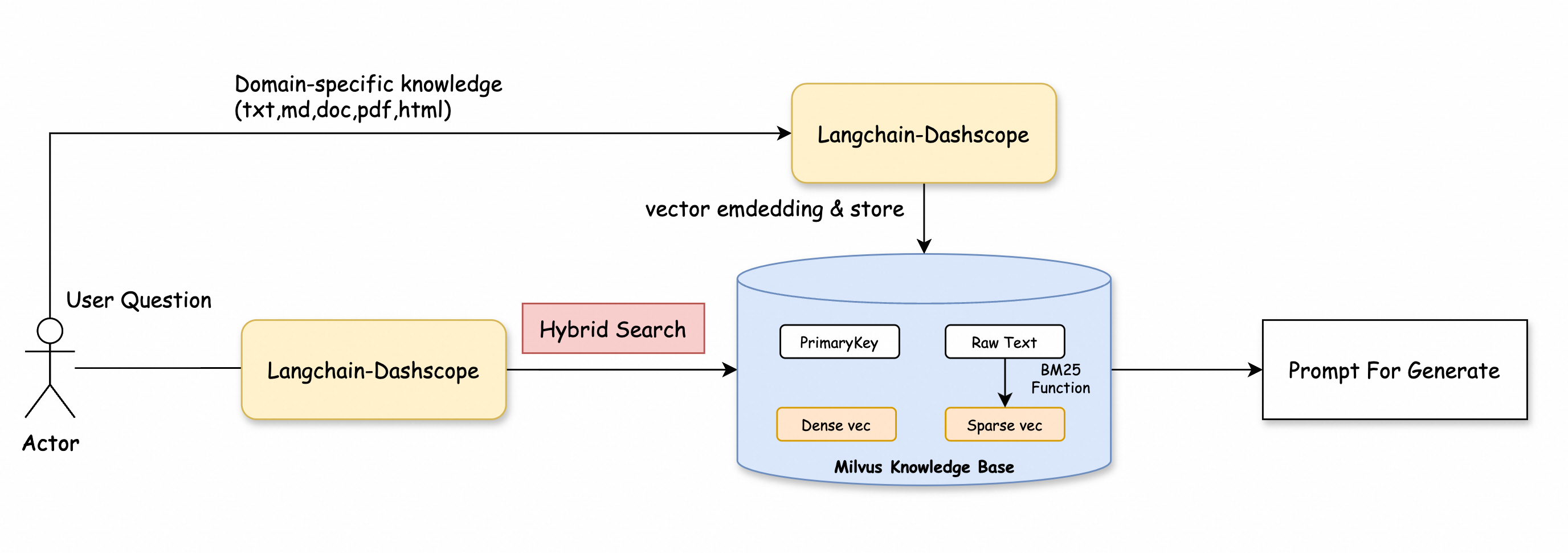
Exemplo:
from pymilvus import MilvusClient
from pymilvus import AnnSearchRequest, RRFRanker
from langchain_community.embeddings import DashScopeEmbeddings
from dashscope import Generation

# Create a Milvus client.
client = MilvusClient(
    uri="http://c-xxxx.milvus.aliyuncs.com:19530",  # The public network address of the Milvus instance.
    token="<yourUsername>:<yourPassword>",  # The username and password to log on to the Milvus instance.
    db_name="default"  # The name of the database to connect to. This example uses the default database.
)

collection_name = "milvus_overview"

# Replace with your DashScope API key
dashscope_api_key = "<YOUR_DASHSCOPE_API_KEY>"

# Initialize the embedding model
embeddings = DashScopeEmbeddings(
    model="text-embedding-v2",  # Use the text-embedding-v2 model.
    dashscope_api_key=dashscope_api_key
)

# Define the query
query = "Why does Milvus run so scalable?"

# Embed the query and generate the corresponding vector representation
query_embeddings = embeddings.embed_documents([query])

# Set the top K result count
top_k = 5  # Get the top 5 docs related to the query

# Define the parameters for the dense vector search
search_params_dense = {
    "metric_type": "IP",
    "params": {"nprobe": 2}
}

# Create a dense vector search request
request_dense = AnnSearchRequest([query_embeddings[0]], "dense", search_params_dense, limit=top_k)

# Define the parameters for the BM25 text search
search_params_bm25 = {
    "metric_type": "BM25"
}

# Create a BM25 text search request
request_bm25 = AnnSearchRequest([query], "sparse_bm25", search_params_bm25, limit=top_k)

# Combine the two requests
reqs = [request_dense, request_bm25]

# Initialize the RRF ranking algorithm
ranker = RRFRanker(100)

# Perform the hybrid search
hybrid_search_res = client.hybrid_search(
    collection_name=collection_name,
    reqs=reqs,
    ranker=ranker,
    limit=top_k,
    output_fields=["text"]
)

# Extract the context from hybrid search results
context = []
print("Top K Results:")
for hits in hybrid_search_res:  # Use the correct variable here
    for hit in hits:
        context.append(hit['entity']['text'])  # Extract text content to the context list
        print(hit['entity']['text'])  # Output each retrieved document

# Define a function to get an answer based on the query and context
def getAnswer(query, context):
    prompt = f'''Please answer my question based on the content within:
    {context}
    My question is: {query}.
    '''
    # Call the generation module to get an answer
    rsp = Generation.call(model='qwen-turbo', prompt=prompt)
    return rsp.output.text

# Get the answer
answer = getAnswer(query, context)

print(answer)

# Expected output excerpt
"""
Milvus is highly scalable due to its cloud-native and highly decoupled system architecture. This architecture allows the system to continuously expand as data grows. Additionally, Milvus supports three deployment modes that cover a wide...
"""