Parar ou desinstalar o Cloud Assistant Agent desativa o logon remoto, a execução de comandos do OOS e os Diagnostics.
Parar o Cloud Assistant Agent
Se você estiver conectado via Session Manager ou Workbench, parar o agente encerrará sua sessão. Conecte-se primeiro por outro método, como Workbench terminal connection, third-party client tool (SSH) ou VNC.
Linux
Connect to a Linux instance by using a username and password.
-
Pare o processo daemon.
O processo daemon monitora o Cloud Assistant Agent e o reinicia automaticamente. Pare o daemon primeiro. Versões mais recentes do Cloud Assistant não instalam o componente daemon. Se o caminho abaixo não existir na instância, pule esta etapa.
if [ -e /usr/local/share/assist-daemon/assist_daemon ]; then sudo /usr/local/share/assist-daemon/assist_daemon --stop fi -
Identifique o sistema init.
O comando para parar varia conforme o sistema init. Identifique qual deles sua instância utiliza.
systemd: Alibaba Cloud Linux, CentOS 7+, Red Hat Enterprise Linux (RHEL) 7+, Fedora 15+, Ubuntu 15.04+, Debian 8+, entre outros.Upstart: Ubuntu 6.10-14.10, RHEL 6, CentOS 6, entre outros.SysVinit: RHEL 5, CentOS 5, Debian 6, entre outros.
-
Pare o Cloud Assistant Agent.
systemd
sudo systemctl stop aliyun.service

# Verify that the service has stopped. The service is stopped if the output contains "inactive (dead)".
sudo systemctl status aliyun.service
Upstart
sudo /sbin/initctl stop aliyun-service

# Verify that the service has stopped. The service is stopped if the output is empty.
ps aux | grep -v grep | grep "aliyun-service"
SysVinit
sudo /etc/init.d/aliyun-service stop

# Verify that the service has stopped. The service is stopped if the output is empty.
ps aux | grep -v grep | grep "aliyun-service"
Windows
Método 1: Usar o console de Serviços do Windows
Clique no ícone Iniciar e selecione Windows Administrative Tools > Computer Management.
No painel à esquerda, acesse Computer Management (Local) > Services and Applications > Services.
-
Localize Aliyun Assist Service e clique em Stop the service.
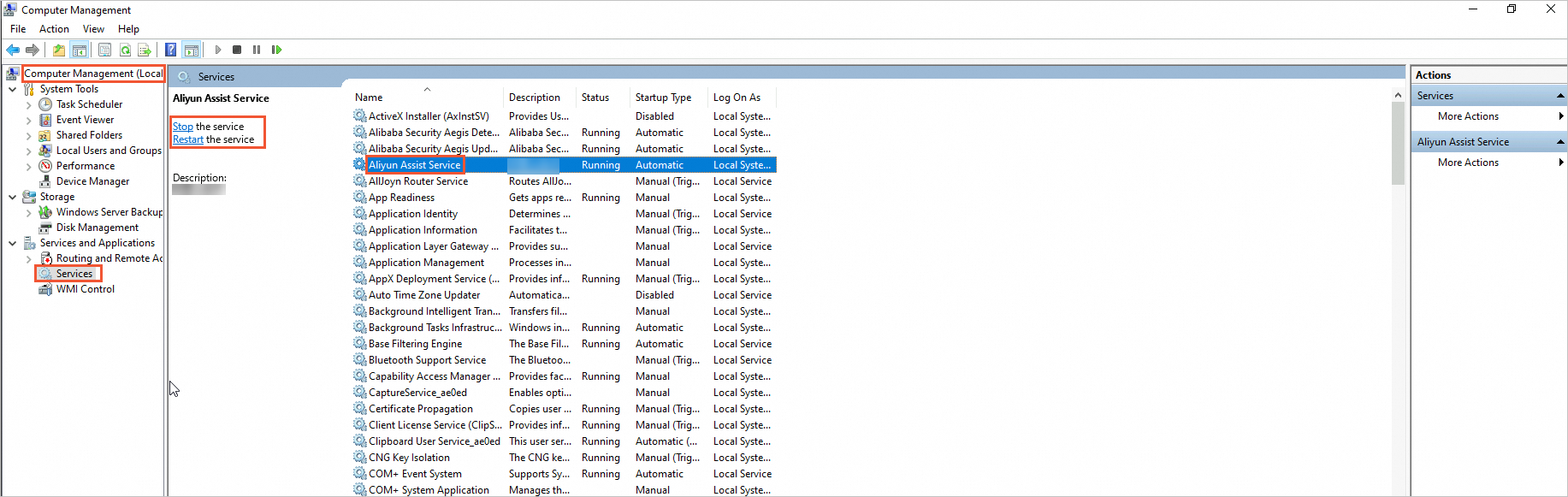
Método 2: Usar o Windows PowerShell
Clique no ícone Iniciar, localize Windows PowerShell, clique com o botão direito nele e selecione Run as administrator.
-
Pare o Cloud Assistant Agent.
Stop-Service -Name "AliyunService" -
Verifique se o agente foi parado.
O agente estará parado se
StatusforStopped.Get-Service -Name "AliyunService"
Desinstalar o Cloud Assistant Agent
Se você estiver conectado via Session Manager ou Workbench, parar o agente encerrará sua sessão. Conecte-se primeiro por outro método, como Workbench terminal connection, SSH ou VNC.
Linux
-
Exclua o processo daemon.
Versões mais recentes do Cloud Assistant não instalam o componente daemon. Se o caminho /usr/local/share/assist-daemon não existir na instância, pule esta etapa. O arquivo assist_daemon, incluído em pacotes de instalação mais antigos, reside no diretório de versão dentro de /usr/local/share/aliyun-assist e é removido na etapa "Limpar arquivos residuais e configurações de serviço".
if [ -e /usr/local/share/assist-daemon/assist_daemon ]; then sudo /usr/local/share/assist-daemon/assist_daemon --delete fi -
Desinstale o pacote.
RPM: Para Alibaba Cloud Linux, CentOS, RHEL, Fedora, Rocky Linux, openSUSE, entre outros.-
DEB: Para Debian, Ubuntu, entre outros.RPM
sudo rpm -qa | grep aliyun_assist | xargs sudo rpm -eDEB
sudo apt-get purge -y aliyun-assist
-
Limpe arquivos residuais e configurações de serviço.
sudo rm -rf /usr/local/share/aliyun-assist sudo rm -rf /usr/local/share/assist-daemon sudo rm -f /etc/systemd/system/aliyun.service sudo rm -f /etc/init.d/aliyun-service -
Verifique se o agente foi desinstalado.
A desinstalação será confirmada se a saída estiver vazia.
ps aux | grep -v grep | grep "aliyun-service"
Windows
Método 1: Usar a interface da área de trabalho do Windows
-
No File Explorer, acesse a aba View, selecione Hidden items e exclua o diretório C:\ProgramData\aliyun\assist.

Método 2: Usar o Windows PowerShell
Clique no ícone Iniciar, localize Windows PowerShell, clique com o botão direito nele e selecione Run as administrator.
-
Pare o Cloud Assistant Agent.
Stop-Service -Name "AliyunService" -Force -
Exclua o diretório de instalação e o registro.
# Delete the installation directory Remove-Item -Path "C:\ProgramData\aliyun\assist" -Recurse -Force # Delete the registry entry Remove-Item -Path "HKLM:\SYSTEM\CurrentControlSet\Services\AliyunService" -Recurse -Force -
Verifique se o agente foi desinstalado.
A desinstalação será confirmada se a saída estiver vazia ou exibir
Cannot find any service with service name 'AliyunService'.Get-Service -Name "AliyunService"
FAQ
Como reiniciar o Cloud Assistant Agent após pará-lo?
Linux
Connect to a Linux instance by using a username and password.
-
Inicie o processo daemon.
Versões mais recentes do Cloud Assistant não instalam o componente daemon. Se o caminho abaixo não existir na instância, pule esta etapa.
if [ -e /usr/local/share/assist-daemon/assist_daemon ]; then sudo /usr/local/share/assist-daemon/assist_daemon --start fi -
Inicie o Cloud Assistant Agent.
systemd
sudo systemctl start aliyun.service

# Verify that the service has started. The service is running if the output contains "active (running)".
sudo systemctl status aliyun.service
Upstart
sudo /sbin/initctl start aliyun-service

# Verify that the service has started. The service is running if the output is not empty.
ps aux | grep -v grep | grep "aliyun-service"
SysVinit
sudo /etc/init.d/aliyun-service start

# Verify that the service has started. The service is running if the output is not empty.
ps aux | grep -v grep | grep "aliyun-service"
Windows
Método 1: Usar a interface de Serviços do Windows
Clique no Start icon e selecione Windows Administrative Tools > Computer Management.
No painel à esquerda, acesse Computer Management (Local) > Services and Applications > Services.
Localize Aliyun Assist Service e clique em Start the service.
Método 2: Usar o Windows PowerShell
Clique no Start icon, localize Windows PowerShell, clique com o botão direito nele e selecione Run as administrator.
-
Inicie o Cloud Assistant Agent.
Start-Service -Name "AliyunService" -
Verifique se o agente foi iniciado.
O agente estará em execução se
StatusforRunning.Get-Service -Name "AliyunService"