O Istio é uma malha de serviços open source que oferece recursos de gerenciamento de tráfego, observabilidade, segurança e políticas. Quando integrado ao Kubernetes, o Istio ajuda a gerenciar e controlar aplicativos em contêineres, melhorando o desempenho, a segurança e a confiabilidade. Este tópico utiliza o aplicativo de exemplo Bookinfo para demonstrar como usar o Istio em um cluster Kubernetes auto-gerenciado conectado ao Elastic Container Instance por meio de um VNode.
Informações básicas
O Istio é uma plataforma de malha de serviços open source que gerencia o tráfego entre microsserviços, além de lidar com comunicações de rede e riscos de segurança. Integrado ao Kubernetes, o Istio fornece gerenciamento de tráfego padronizado e seguro, simplificando a implantação e as operações e manutenção (O&M).
O Bookinfo simula uma única entrada de catálogo de uma livraria online, exibindo descrições de livros, detalhes como ISBN e número de páginas, além de avaliações de leitores. Trata-se de um aplicativo heterogêneo composto por quatro microsserviços escritos em linguagens diferentes, o que o torna ideal para demonstrar os recursos do Istio. A arquitetura de ponta a ponta do Bookinfo:
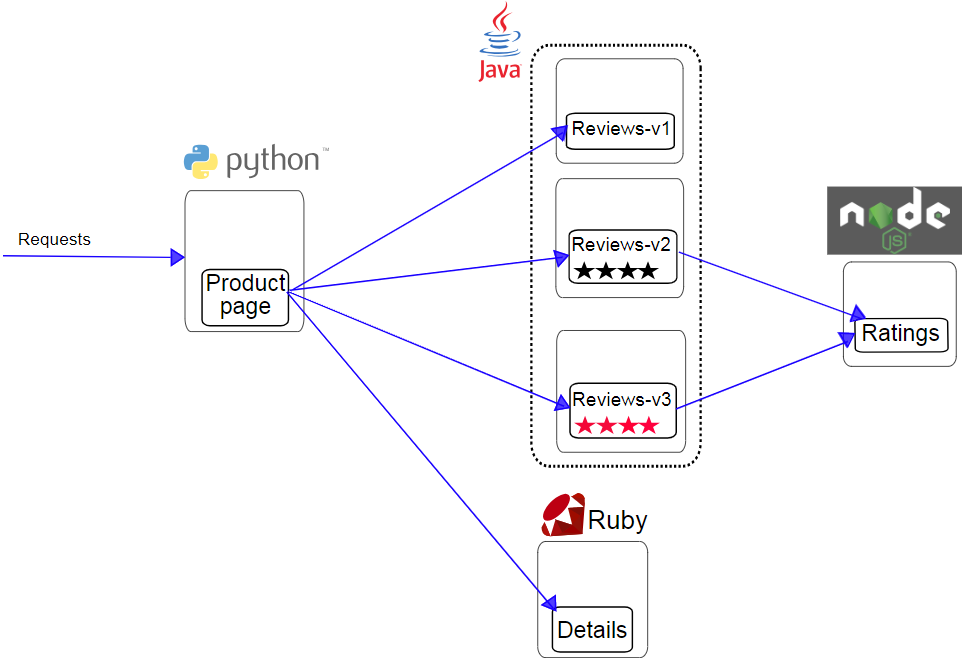
Productpage: microsserviço Python que chama os microsserviços Details e Reviews para gerar uma página. Ele fornece os recursos de logon e logoff.
Details: microsserviço Ruby que contém informações sobre o livro.
-
Reviews: microsserviço Java que contém avaliações do livro. Possui as três versões a seguir:
Versão 1: não chama o microsserviço Ratings.
Versão 2: chama o microsserviço Ratings e avalia o livro usando de uma a cinco estrelas pretas.
Versão 3: chama o microsserviço Ratings e avalia o livro usando de uma a cinco estrelas vermelhas.
Ratings: microsserviço Node.js que fornece classificações com base nas avaliações do livro.
Para obter mais informações, visite Istio.
Pré-requisitos
Este tópico aplica-se a clusters Kubernetes auto-gerenciados. Certifique-se de que seu cluster atenda às seguintes condições:
Um VNode está implantado no cluster Kubernetes auto-gerenciado.
Se o cluster Kubernetes auto-gerenciado estiver implantado em um data center, esse data center deve estar conectado à Alibaba Cloud.
Caso o cluster Kubernetes auto-gerenciado esteja implantado em uma instância do Elastic Compute Service (ECS) e o plug-in de rede seja o Flannel, verifique se o gerenciador de controle de nuvem do Kubernetes (CCM) está implantado no cluster. Isso garante a interconexão do Elastic Container Instance com os pods nos nós reais. Para mais detalhes, consulte Implantar o CCM.
Preparações
Instale o Istio. Para mais informações, consulte Guia de Introdução.
-
Crie um namespace e configure rótulos para ele.
kubectl create namespace istio-test
kubectl label namespace istio-test istio-injection=enabled
Procedimento
Implantar o aplicativo Bookinfo
-
Crie um arquivo chamado bookinfo.yaml e copie o modelo a seguir para ele:
Expandir o arquivo bookinfo.yaml
# Copyright Istio Authors
#
#   Licensed under the Apache License, Version 2.0 (the "License");
#   you may not use this file except in compliance with the License.
#   You may obtain a copy of the License at
#
#       http://www.apache.org/licenses/LICENSE-2.0
#
#   Unless required by applicable law or agreed to in writing, software
#   distributed under the License is distributed on an "AS IS" BASIS,
#   WITHOUT WARRANTIES OR CONDITIONS OF ANY KIND, either express or implied.
#   See the License for the specific language governing permissions and
#   limitations under the License.
##################################################################################################
# This file defines the services, service accounts, and deployments for the Bookinfo sample.
#
# To apply all 4 Bookinfo services, their corresponding service accounts, and deployments:
#
#   kubectl apply -f samples/bookinfo/platform/kube/bookinfo.yaml
#
# Alternatively, you can deploy any resource separately:
#
#   kubectl apply -f samples/bookinfo/platform/kube/bookinfo.yaml -l service=reviews # reviews Service
#   kubectl apply -f samples/bookinfo/platform/kube/bookinfo.yaml -l account=reviews # reviews ServiceAccount
#   kubectl apply -f samples/bookinfo/platform/kube/bookinfo.yaml -l app=reviews,version=v3 # reviews-v3 Deployment
##################################################################################################
##################################################################################################
# Details service
##################################################################################################
apiVersion: v1
kind: Service
metadata:
  name: details
  labels:
    app: details
    service: details
spec:
  ports:
  - port: 9080
    name: http
  selector:
    app: details
---
apiVersion: v1
kind: ServiceAccount
metadata:
  name: bookinfo-details
  labels:
    account: details
---
apiVersion: apps/v1
kind: Deployment
metadata:
  name: details-v1
  labels:
    app: details
    version: v1
spec:
  replicas: 1
  selector:
    matchLabels:
      app: details
      version: v1
  template:
    metadata:
      labels:
        app: details
        version: v1
    spec:
      nodeSelector:     # Configure a specific nodeSelector
        k8s.aliyun.com/vnode: "true"
      tolerations:      # Configure specific tolerations
      - key: k8s.aliyun.com/vnode
        operator: "Equal"
        value: "true"
        effect: "NoSchedule"
      serviceAccountName: bookinfo-details
      containers:
      - name: details
        image: docker.io/istio/examples-bookinfo-details-v1:1.16.4
        imagePullPolicy: IfNotPresent
        ports:
        - containerPort: 9080
        securityContext:
          runAsUser: 1000
---
##################################################################################################
# Ratings service
##################################################################################################
apiVersion: v1
kind: Service
metadata:
  name: ratings
  labels:
    app: ratings
    service: ratings
spec:
  ports:
  - port: 9080
    name: http
  selector:
    app: ratings
---
apiVersion: v1
kind: ServiceAccount
metadata:
  name: bookinfo-ratings
  labels:
    account: ratings
---
apiVersion: apps/v1
kind: Deployment
metadata:
  name: ratings-v1
  labels:
    app: ratings
    version: v1
spec:
  replicas: 1
  selector:
    matchLabels:
      app: ratings
      version: v1
  template:
    metadata:
      labels:
        app: ratings
        version: v1
    spec:
      nodeSelector:     # Configure a specific nodeSelector
        k8s.aliyun.com/vnode: "true"
      tolerations:      # Configure specific tolerations
      - key: k8s.aliyun.com/vnode
        operator: "Equal"
        value: "true"
        effect: "NoSchedule"
      serviceAccountName: bookinfo-ratings
      containers:
      - name: ratings
        image: docker.io/istio/examples-bookinfo-ratings-v1:1.16.4
        imagePullPolicy: IfNotPresent
        ports:
        - containerPort: 9080
        securityContext:
          runAsUser: 1000
---
##################################################################################################
# Reviews service
##################################################################################################
apiVersion: v1
kind: Service
metadata:
  name: reviews
  labels:
    app: reviews
    service: reviews
spec:
  ports:
  - port: 9080
    name: http
  selector:
    app: reviews
---
apiVersion: v1
kind: ServiceAccount
metadata:
  name: bookinfo-reviews
  labels:
    account: reviews
---
apiVersion: apps/v1
kind: Deployment
metadata:
  name: reviews-v1
  labels:
    app: reviews
    version: v1
spec:
  replicas: 1
  selector:
    matchLabels:
      app: reviews
      version: v1
  template:
    metadata:
      labels:
        app: reviews
        version: v1
    spec:
      nodeSelector:     # Configure a specific nodeSelector
        k8s.aliyun.com/vnode: "true"
      tolerations:      # Configure specific tolerations
      - key: k8s.aliyun.com/vnode
        operator: "Equal"
        value: "true"
        effect: "NoSchedule"
      serviceAccountName: bookinfo-reviews
      containers:
      - name: reviews
        image: docker.io/istio/examples-bookinfo-reviews-v1:1.16.4
        imagePullPolicy: IfNotPresent
        env:
        - name: LOG_DIR
          value: "/tmp/logs"
        ports:
        - containerPort: 9080
        volumeMounts:
        - name: tmp
          mountPath: /tmp
        - name: wlp-output
          mountPath: /opt/ibm/wlp/output
        securityContext:
          runAsUser: 1000
      volumes:
      - name: wlp-output
        emptyDir: {}
      - name: tmp
        emptyDir: {}
---
apiVersion: apps/v1
kind: Deployment
metadata:
  name: reviews-v2
  labels:
    app: reviews
    version: v2
spec:
  replicas: 1
  selector:
    matchLabels:
      app: reviews
      version: v2
  template:
    metadata:
      labels:
        app: reviews
        version: v2
    spec:
      nodeSelector:     # Configure a specific nodeSelector
        k8s.aliyun.com/vnode: "true"
      tolerations:      # Configure specific tolerations
      - key: k8s.aliyun.com/vnode
        operator: "Equal"
        value: "true"
        effect: "NoSchedule"
      serviceAccountName: bookinfo-reviews
      containers:
      - name: reviews
        image: docker.io/istio/examples-bookinfo-reviews-v2:1.16.4
        imagePullPolicy: IfNotPresent
        env:
        - name: LOG_DIR
          value: "/tmp/logs"
        ports:
        - containerPort: 9080
        volumeMounts:
        - name: tmp
          mountPath: /tmp
        - name: wlp-output
          mountPath: /opt/ibm/wlp/output
        securityContext:
          runAsUser: 1000
      volumes:
      - name: wlp-output
        emptyDir: {}
      - name: tmp
        emptyDir: {}
---
apiVersion: apps/v1
kind: Deployment
metadata:
  name: reviews-v3
  labels:
    app: reviews
    version: v3
spec:
  replicas: 1
  selector:
    matchLabels:
      app: reviews
      version: v3
  template:
    metadata:
      labels:
        app: reviews
        version: v3
    spec:
      nodeSelector:     # Configure a specific nodeSelector
        k8s.aliyun.com/vnode: "true"
      tolerations:      # Configure specific tolerations
      - key: k8s.aliyun.com/vnode
        operator: "Equal"
        value: "true"
        effect: "NoSchedule"
      serviceAccountName: bookinfo-reviews
      containers:
      - name: reviews
        image: docker.io/istio/examples-bookinfo-reviews-v3:1.16.4
        imagePullPolicy: IfNotPresent
        env:
        - name: LOG_DIR
          value: "/tmp/logs"
        ports:
        - containerPort: 9080
        volumeMounts:
        - name: tmp
          mountPath: /tmp
        - name: wlp-output
          mountPath: /opt/ibm/wlp/output
        securityContext:
          runAsUser: 1000
      volumes:
      - name: wlp-output
        emptyDir: {}
      - name: tmp
        emptyDir: {}
---
##################################################################################################
# Productpage services
##################################################################################################
apiVersion: v1
kind: Service
metadata:
  name: productpage
  labels:
    app: productpage
    service: productpage
spec:
  ports:
  - port: 9080
    name: http
  selector:
    app: productpage
---
apiVersion: v1
kind: ServiceAccount
metadata:
  name: bookinfo-productpage
  labels:
    account: productpage
---
apiVersion: apps/v1
kind: Deployment
metadata:
  name: productpage-v1
  labels:
    app: productpage
    version: v1
spec:
  replicas: 1
  selector:
    matchLabels:
      app: productpage
      version: v1
  template:
    metadata:
      labels:
        app: productpage
        version: v1
    spec:
      nodeSelector:     # Configure a specific nodeSelector
        k8s.aliyun.com/vnode: "true"
      tolerations:      # Configure specific tolerations
      - key: k8s.aliyun.com/vnode
        operator: "Equal"
        value: "true"
        effect: "NoSchedule"
      serviceAccountName: bookinfo-productpage
      containers:
      - name: productpage
        image: docker.io/istio/examples-bookinfo-productpage-v1:1.16.4
        imagePullPolicy: IfNotPresent
        ports:
        - containerPort: 9080
        volumeMounts:
        - name: tmp
          mountPath: /tmp
        securityContext:
          runAsUser: 1000
      volumes:
      - name: tmp
        emptyDir: {}
---
-
Implante o aplicativo Bookinfo.
kubectl -n istio-test apply -f bookinfo.yaml
Saída esperada:
xxx# kubectl -n istio-test apply -f bookinfo.yaml
service/details created
serviceaccount/bookinfo-details created
deployment.apps/details-v1 created
service/ratings created
serviceaccount/bookinfo-ratings created
deployment.apps/ratings-v1 created
service/reviews created
serviceaccount/bookinfo-reviews created
deployment.apps/reviews-v1 created
deployment.apps/reviews-v2 created
deployment.apps/reviews-v3 created
service/productpage created
serviceaccount/bookinfo-productpage created
deployment.apps/productpage-v1 created
-
Visualize o status do Bookinfo.
kubectl -n istio-test get pods -o wide
Saída esperada:
[xxx@xxx ~]# kubectl -n istio-test get pods -o wide
NAME                                   READY   STATUS    RESTARTS   AGE     IP          NODE                          NOMINATED NODE   READINESS GATES
details-v1-5f957dd5ff-kdvpc            2/2     Running   0          14m     192.168.xxx cn-qingdao.vnd-m5echu4xxx     <none>           <none>
productpage-v1-85976f8df7-ht5dg        2/2     Running   0          72s     192.168.xxx cn-qingdao.vnd-m5echu4xxx     <none>           <none>
ratings-v1-69fb6864cf-9l7fp            2/2     Running   0          23m     192.168.xxx cn-qingdao.vnd-m5echu4xxx     <none>           <none>
reviews-v1-77f77b5-sssgw               2/2     Running   0          7m13s   192.168.xxx cn-qingdao.vnd-m5echu4xxx     <none>           <none>
reviews-v2-5b9b5676c-bcjx9             2/2     Running   0          23m     192.168.xxx cn-qingdao.vnd-m5echu4xxx     <none>           <none>
reviews-v3-6ff46dbb9c-kf2gl            2/2     Running   0          13m     192.168.xxx cn-qingdao.vnd-m5echu4xxx     <none>           <none>
-
Verifique os microsserviços do Bookinfo.
kubectl -n istio-test get services
Saída esperada:
NAME          TYPE        CLUSTER-IP    EXTERNAL-IP   PORT(S)    AGE
details       ClusterIP   10.96.1.xxx   <none>        9080/TCP   25m
productpage   ClusterIP   10.96.2.xxx   <none>        9080/TCP   25m
ratings       ClusterIP   10.96.1.xxx   <none>        9080/TCP   25m
reviews       ClusterIP   10.96.1.xxx   <none>        9080/TCP   25m
Implantar um gateway do Istio
-
Crie um arquivo chamado bookinfo-gateway.yaml e copie o modelo a seguir para ele:
Expandir o arquivo bookinfo-gateway.yaml
apiVersion: networking.istio.io/v1alpha3
kind: Gateway
metadata:
  name: bookinfo-gateway
spec:
  selector:
    istio: ingressgateway # use istio default controller
  servers:
  - port:
      number: 80
      name: http
      protocol: HTTP
    hosts:
    - "*"
---
apiVersion: networking.istio.io/v1alpha3
kind: VirtualService
metadata:
  name: bookinfo
spec:
  hosts:
  - "*"
  gateways:
  - bookinfo-gateway
  http:
  - match:
    - uri:
        exact: /productpage
    - uri:
        prefix: /static
    - uri:
        exact: /login
    - uri:
        exact: /logout
    - uri:
        prefix: /api/v1/products
    route:
    - destination:
        host: productpage
        port:
          number: 9080
-
Implante um gateway do Istio.
kubectl -n istio-test apply -f bookinfo-gateway.yaml
Saída esperada:
[root@xxx ~]# kubectl -n istio-test apply -f bookinfo-gateway.yaml
gateway.networking.istio.io/bookinfo-gateway created
virtualservice.networking.istio.io/bookinfo created
-
Visualize o gateway do Istio.
kubectl -n istio-test get gateway
Saída esperada:
NAME                AGE
bookinfo-gateway    88s
Verificar os microsserviços do Bookinfo
-
Obtenha o endereço do host do gateway do Istio.
Selecione um Istio Ingress Service com base no tipo de cluster. Neste tópico, o LoadBalancer foi selecionado como Istio Ingress Service.
kubectl -n istio-system get service istio-ingressgateway
Saída esperada:
[xxx@xxx ~]# kubectl -n istio-system get service istio-ingressgateway
NAME                   TYPE           CLUSTER-IP   EXTERNAL-IP   PORT(S)                                                                      AGE
istio-ingressgateway   LoadBalancer   10.96.xxx    <pending>     15021:31682/TCP,80:32247/TCP,443:31049/TCP,31400:30519/TCP,15443:31511/TCP   43m
O parâmetro istio-ingressgateway na mensagem retornada indica o endereço do host (no formato IP:Port) do Istio Ingress Gateway. Neste tópico, o endereço do host é 10.96.XX.XX:80.
-
Crie um pod de teste para verificar os microsserviços do Bookinfo.
-
Crie um arquivo chamado test-pod.yaml e copie o modelo a seguir para ele:
Expandir o arquivo test-pod.yaml
apiVersion: v1
kind: Pod
metadata:
  name: centos
spec:
  nodeSelector:
    k8s.aliyun.com/vnode: "true"
  tolerations:
  - key: k8s.aliyun.com/vnode
    operator: "Equal"
    value: "true"
    effect: "NoSchedule"
  containers:
  - name: eip
    image: registry-vpc.cn-shanghai.aliyuncs.com/eci_open/centos:7
    command:
    - bash
    - -c
    - sleep inf
-
Implante o pod.
kubectl apply -f test-pod.yaml
-
Faça logon no pod de teste e execute os comandos a seguir para validar os microsserviços do Bookinfo.
kubectl exec -it centos -- bash
curl -s http://10.96.XX.XX:80/productpage | grep -o "<title>.*</title>"
Substitua 10.96.xxx:80 pelo endereço interno do seu gateway de entrada. Se o comando retornar <title>Simple BookStore App</title>, o aplicativo Bookinfo estará acessível pelo gateway de entrada do Istio.