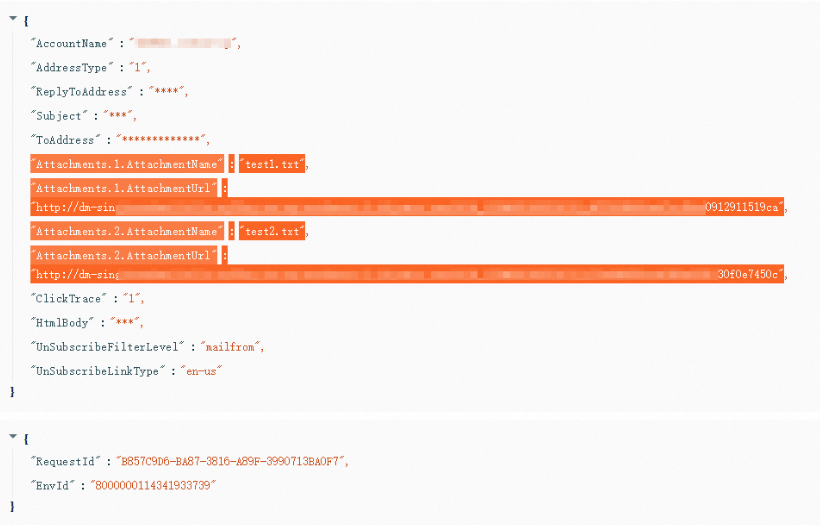
O tamanho total de um e-mail com anexos não pode exceder 15 MB. Cada mensagem aceita no máximo 100 anexos.
Esse limite de 15 MB refere-se ao tamanho total do e-mail enviado, incluindo cabeçalho, corpo e anexos. Como a codificação Base64 aumenta o tamanho dos arquivos, o e-mail final pode ficar mais de 1,5 vez maior que os anexos originais. Por isso, mantenha o tamanho total dos arquivos de anexo originais em até 8 MB. Para enviar arquivos maiores, adicione hiperlinks no corpo do e-mail.
# -*- coding: utf-8 -*-
import sys
from typing import List
from typing import BinaryIO
from alibabacloud_dm20151123.client import Client as Dm20151123Client
from alibabacloud_tea_openapi import models as open_api_models
from alibabacloud_dm20151123 import models as dm_20151123_models
from alibabacloud_tea_util import models as util_models
from alibabacloud_dm20151123 import models as main_models

attachments = []

class Sample:
    def __init__(self) -> None:
        pass

    @staticmethod
    def create_client() -> Dm20151123Client:
        """
        Initializes the account client using credentials.
        @return: Client
        @throws Exception
        """
        # For production code, we recommend using a more secure method that does not require an AccessKey pair. For more information about how to configure credentials, see https://www.alibabacloud.com/help/en/sdk/developer-reference/v2-manage-python-access-credentials.
        config = open_api_models.Config(
            access_key_id='xxxxxx',
            access_key_secret='xxxxxx'
        )
        # For more information about endpoints, see https://api.alibabacloud.com/product/Dm
        config.endpoint = f'dm.ap-southeast-1.aliyuncs.com'
        config.region_id = f'ap-southeast-1'
        return Dm20151123Client(config)

    @staticmethod
    def main(
            args: List[str],
    ) -> None:
        client = Sample.create_client()
        single_sendmail_request = dm_20151123_models.SingleSendMailAdvanceRequest(
            account_name='sender@example.com',
            address_type='1',
            reply_to_address='true',
            to_address='recipient@example.com',
            subject='Subject',
            html_body='Email Body',
            attachments=getAttachments()
        )
        try:
            # When you copy the code to run, print the API return value.
            response = client.single_send_mail_advance(single_sendmail_request, util_models.RuntimeOptions())
            print(response)
        except Exception as error:
            # This is for demonstration purposes only. Handle exceptions with care. Do not ignore exceptions in your project.
            # Error message
            print(error.data)
            # # Diagnosis address
            # print(error.data.get("Recommend"))
            # UtilClient.assert_as_string(error.message)

def getAttachments() -> List[main_models.SingleSendMailAdvanceRequestAttachments]:
    attach = main_models.SingleSendMailAdvanceRequestAttachments("test1.txt", getFile(r"C:\Users\Downloads\111.txt"))
    attach1 = main_models.SingleSendMailAdvanceRequestAttachments("test2.txt", getFile(r"C:\Users\Downloads\222.txt"))
    attachments.append(attach)
    attachments.append(attach1)
    return attachments

def getFile(v_file) -> BinaryIO:
    f = open(v_file, 'rb')
    return f

if __name__ == '__main__':
    Sample.main(sys.argv[1:])
package org.example;
import com.aliyun.dm20151123.models.SingleSendMailAdvanceRequest;
import com.aliyun.dm20151123.models.SingleSendMailResponse;
import com.aliyun.tea.TeaException;
import com.google.gson.Gson;
import java.io.File;
import java.io.FileInputStream;
import java.util.ArrayList;
import java.util.List;
public class Sample {
/**
* description<?php
// This file is auto-generated, don't edit it. Thanks.
namespace AlibabaCloud\SDK\Sample;
use AlibabaCloud\SDK\Dm\V20151123\Dm;
// use AlibabaCloud\Credentials\Credential;
use \Exception;
use AlibabaCloud\Tea\Exception\TeaError;
use AlibabaCloud\Tea\Utils\Utils;
use Darabonba\OpenApi\Models\Config;
use AlibabaCloud\SDK\Dm\V20151123\Models\SingleSendMailAdvanceRequest;
use AlibabaCloud\SDK\Dm\V20151123\Models\SingleSendMailAdvanceRequest\attachments;
use GuzzleHttp\Psr7\Stream;
use AlibabaCloud\Tea\Utils\Utils\RuntimeOptions;
require_once __DIR__ . '\\..\\..\\vendor\\autoload.php';
class Sample {
/**
* Initializes the account client using credentials.
* @return Dm Client
*/
public static function createClient(){
// For production code, we recommend using a more secure method that does not require an AccessKey pair. For more information about how to configure credentials, see https://www.alibabacloud.com/help/en/sdk/developer-reference/v2-manage-php-access-credentials.
$config = new Config([
"accessKeyId" => "xxxxxx",
"accessKeySecret" => "xxxxxxx"
]);
// For more information about endpoints, see https://api.alibabacloud.com/product/Dm
$config->endpoint = "dm.ap-southeast-1.aliyuncs.com";
$config->regionId = "ap-southeast-1";
return new Dm($config);
}
// public static function createClient(){
// // For production code, we recommend using a more secure method that does not require an AccessKey pair. For more information about how to configure credentials, see https://www.alibabacloud.com/help/document_detail/311677.html.
// $credential = new Credential();
// $config = new Config([
// "credential" => $credential
// ]);
// // For more information about endpoints, see https://api.aliyun.com/product/Dm
// $config->endpoint = "dm.aliyuncs.com";
// $config->regionId = "cn-hangzhou";
// return new Dm($config);
// }
/**
* Gets the file stream.
* @param string $filePath The file path.
* @return Stream
*/
public static function getFile($filePath) {
$fileResource = fopen($filePath, 'rb');
$fileSize = filesize($filePath); // Get the file size.
var_dump("File size:");
var_dump($fileSize);
return new Stream($fileResource);
}
/**
* Gets the attachment list.
* @return array
*/
public static function getAttachments() {
$attachments = [];
// Create the first attachment.
$attachment1 = new attachments();
$attachment1->attachmentName = "test1.txt";
$attachment1->attachmentUrlObject = self::getFile("C:\\Users\\Downloads\\111.txt");
$attachments[] = $attachment1;
// Create the second attachment.
$attachment2 = new attachments();
$attachment2->attachmentName = "test2.txt";
$attachment2->attachmentUrlObject = self::getFile("C:\\Users\\Downloads\\222.txt");
$attachments[] = $attachment2;
// Print $attachments;
var_dump($attachments);
return $attachments;
}
/**
* @param string[] $args
* @return void
*/
public static function main($args){
$client = self::createClient();
// Create the email request.
$singleSendMailRequest = new SingleSendMailAdvanceRequest([
"accountName" => "sender@example.com",
"addressType" => 1,
"replyToAddress" => true,
"subject" => "Subject",
"toAddress" => "recipient@example.com",
"attachments" => self::getAttachments(),
"htmlBody" => "<h1>Body</h1>",
"textBody" => "Body"
]);
// // Create runtime options.
// $runtime = new RuntimeOptions([
// "ca" => "C:\\Users\\cacert.pem" // Specify the local CA certification path.
// ]);
$runtime = new RuntimeOptions();
try {
// Send the email.
$client->singleSendMailAdvance($singleSendMailRequest, $runtime);
var_dump("Sent successfully");
}
catch (Exception $error) {
if (!($error instanceof TeaError)) {
$error = new TeaError([], $error->getMessage(), $error->getCode(), $error);
}
// This is for demonstration purposes only. Handle exceptions with care. Do not ignore exceptions in your project.
// Error message
var_dump($error->message);
// Diagnosis address
var_dump($error->data["Recommend"]);
Utils::assertAsString($error->message);
}
}
}
$path = __DIR__ . \DIRECTORY_SEPARATOR . '..' . \DIRECTORY_SEPARATOR . 'vendor' . \DIRECTORY_SEPARATOR . 'autoload.php';
if (file_exists($path)) {
require_once $path;
}
Sample::main(array_slice($argv, 1));package main
import (
"fmt"
"os"
openapiutil "github.com/alibabacloud-go/darabonba-openapi/v2/utils"
dm "github.com/alibabacloud-go/dm-20151123/v2/client"
"github.com/alibabacloud-go/tea/dara"
"github.com/aliyun/credentials-go/credentials"
)
// Description:
//
// Initializes the account client using credentials.
//
// @return Client
//
// @throws Exception
func CreateClient() (_result *dm.Client, _err error) {
config := new(credentials.Config).
SetType("access_key").
SetAccessKeyId("xxxxxx").
SetAccessKeySecret("xxxxxx")
akCredential, err := credentials.NewCredential(config)
if err != nil {
return _result, err
}
openapiConfig := &openapiutil.Config{
Credential: akCredential,
}
// For more information about endpoints, see https://api.alibabacloud.com/product/Dm
openapiConfig.Endpoint = dara.String("dm.ap-southeast-1.aliyuncs.com")
_result, _err = dm.NewClient(openapiConfig)
return _result, _err
}
func main() {
err := _main(dara.StringSlice(os.Args[1:]))
if err != nil {
panic(err)
}
}
func _main(args []*string) (_err error) {
client, _err := CreateClient()
if _err != nil {
return _err
}
// Create attachments.
attachments, _err := getAttachments()
if _err != nil {
return _err
}
// Use SingleSendMailAdvanceRequest instead of SingleSendMailRequest.
singleSendMailRequest := &dm.SingleSendMailAdvanceRequest{
AccountName: dara.String("sender@example.com"),
AddressType: dara.Int32(1),
ReplyToAddress: dara.Bool(true),
ToAddress: dara.String("recipient@example.com"),
Subject: dara.String("Subject"),
HtmlBody: dara.String("Email Body"),
Attachments: attachments,
}
runtime := &dara.RuntimeOptions{}
// Use the SingleSendMailAdvance method instead of SingleSendMailWithOptions.
resp, _err := client.SingleSendMailAdvance(singleSendMailRequest, runtime)
if _err != nil {
fmt.Printf("[ERROR] %s\n", _err.Error())
return _err
}
fmt.Printf("[LOG] %s\n", dara.Stringify(resp))
return _err
}
// getAttachments gets the attachment list.
func getAttachments() ([]*dm.SingleSendMailAdvanceRequestAttachments, error) {
// Note: You must change the file path to your actual file path.
attach1, err := createAttachmentFromFile("test1.txt", `C:\Users\Downloads\111.txt`)
if err != nil {
return nil, fmt.Errorf("Failed to create attachment test1.txt: %v", err)
}
attach2, err := createAttachmentFromFile("test2.txt", `C:\Users\Downloads\222.txt`)
if err != nil {
return nil, fmt.Errorf("Failed to create attachment test2.txt: %v", err)
}
return []*dm.SingleSendMailAdvanceRequestAttachments{attach1, attach2}, nil
}
// createAttachmentFromFile creates an attachment from a file.
func createAttachmentFromFile(name, filePath string) (*dm.SingleSendMailAdvanceRequestAttachments, error) {
// Open the file.
file, err := os.Open(filePath)
if err != nil {
return nil, fmt.Errorf("Cannot open file %s: %v", filePath, err)
}
// Get file information.
fileInfo, err := file.Stat()
if err != nil {
file.Close()
return nil, fmt.Errorf("Cannot get file information %s: %v", filePath, err)
}
// Check the file size.
// if fileInfo.Size() > 15*1024*1024 {
// file.Close()
// return nil, fmt.Errorf("File %s exceeds the size limit", filePath)
// }
// Create an attachment object and use the file as an io.Reader.
attachment := &dm.SingleSendMailAdvanceRequestAttachments{
AttachmentName: dara.String(name),
AttachmentUrlObject: file, // Use the file directly as an io.Reader.
}
fmt.Printf("Attachment %s created. Size: %d bytes\n", name, fileInfo.Size())
// Note: In a real application, you may need to keep the file open until the sending is complete
// or read the file content into memory to avoid file handle issues.
return attachment, nil
}
Acesse o OpenAPI Explorer para baixar o pacote mais recente do kit de desenvolvimento de software (SDK) com os métodos para manipulação de anexos.
Se você utilizar uma instância ECS em uma VPC e precisar de conexão via rede interna, defina o parâmetro config.setEndpointType("internal");.
Descrição da chamada de API
O exemplo a seguir utiliza Python:
A lógica básica consiste em ler o fluxo binário dos arquivos, encapsular vários anexos em uma lista e passar essa lista para o campo de anexos. Em seguida, chame a operação single_send_mail_advance para enviar o e-mail. Observe que este método difere da operação singleSendMailWithOptions.
SingleSendMailAdvanceRequestAttachments
Esta classe define um anexo de e-mail, incluindo nome do arquivo e conteúdo (fluxo binário).
SingleSendMailAdvanceRequest
Esta classe encapsula todos os parâmetros necessários para enviar um e-mail, como remetente, destinatário, assunto, corpo e anexos.
single_send_mail_advanceenvia um único e-mail.
Chame este método a partir de uma instância Dm20151123Client para enviar um e-mail com anexos.
Resultado
Use o Centro de Solução de Problemas para consultar o ID da solicitação e verifique se os parâmetros foram transmitidos corretamente.