Este tópico explica como o CDN acelera recursos em uma instância do ECS e descreve o procedimento de implementação.
Benefícios
Usar uma instância do ECS como servidor de origem do CDN combina computação IaaS escalável com distribuição acelerada de recursos estáticos, oferecendo os seguintes benefícios:
Todas as solicitações de recursos do site feitas pelos usuários são roteadas pelo CDN, reduzindo a carga no servidor de origem.
O tráfego do CDN é cobrado a uma tarifa inferior à da transferência de dados de saída gerada pelo acesso direto a uma instância do ECS.
Os clientes recuperam recursos do nó CDN mais próximo, reduzindo a latência de rede e melhorando a entrega de recursos estáticos.
Como funciona
Quando uma instância do ECS é usada como servidor de origem, o CDN armazena em cache seus recursos estáticos — como scripts, imagens e arquivos de áudio/vídeo — em nós de aceleração distribuídos globalmente. Os usuários recuperam esses recursos do nó CDN mais próximo. O CDN encaminha solicitações de conteúdo dinâmico, como aplicações web e bancos de dados, para a instância do ECS.
Para acelerar recursos dinâmicos na sua instância do ECS, use o Alibaba Cloud ESA. Para mais informações, consulte What is ESA?.
A figura a seguir ilustra a arquitetura técnica.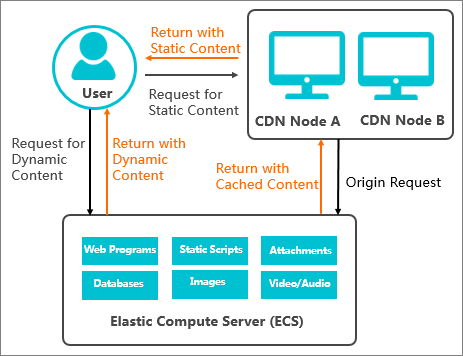
Caso de uso
Este tópico usa um site de exemplo, image.example.com, para demonstrar como acelerar recursos de imagem hospedados em uma instância do ECS.
Parâmetro | Descrição | Exemplo |
Nome de domínio do site | O nome de domínio a ser acelerado. | image.example.com |
Tipo de negócio | Esse tipo depende do conteúdo do seu site. Por exemplo, se o site for composto principalmente de imagens, o tipo de negócio é Image and Small File. | Image and Small File |
Área de aceleração | As regiões geográficas dos visitantes do seu site. | Chinese mainland only |
Nome de domínio de origem | É possível usar um nome de domínio de origem ou um endereço IP.
| ecs.example.com Nota Este exemplo usa um nome de domínio de origem. |
Outros serviços | Outros requisitos de negócio. |
|
Procedimento de configuração
Com base no caso de uso, este tópico descreve o procedimento para acelerar recursos em uma instância do ECS com o Alibaba Cloud CDN.
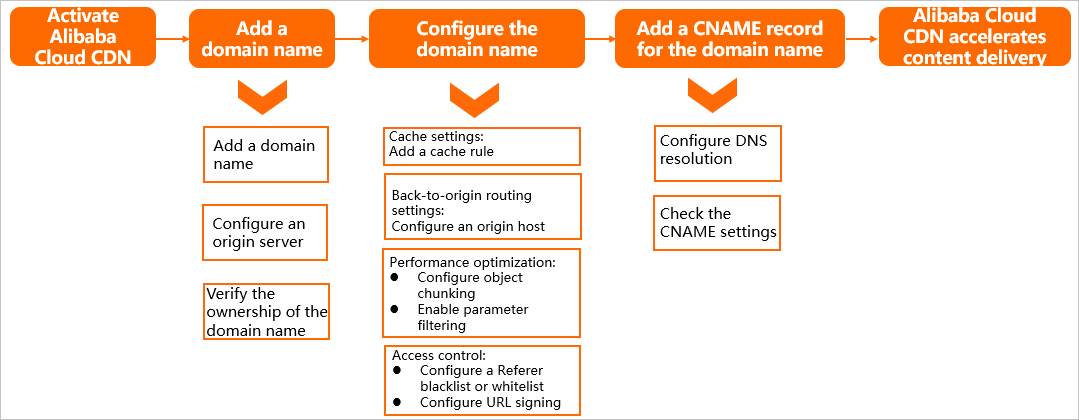
Implantação manual
Pré-requisitos
Você concluiu o Account Registration e a Real-Name Verification da Alibaba Cloud.
Você ativou Alibaba Cloud CDN.
Você criou uma instância do ECS. Para mais informações, consulte Create an instance.
Você tem um nome de domínio a ser acelerado.
Etapa 1: Adicionar um nome de domínio acelerado
Faça login no Alibaba Cloud CDN console.
-
No painel de navegação à esquerda, escolha Domain Names. Na página Domain Names, clique em Add Domain Name e configure os parâmetros descritos na tabela a seguir com base no caso de uso.
NotaAo adicionar um nome de domínio ao Alibaba Cloud CDN console pela primeira vez, é necessário verifique a propriedade do domínio raiz. Para mais informações, consulte Verify the ownership of a domain name. Ignore esta etapa se a propriedade do domínio raiz já tiver sido verificada.
Para mais informações sobre os parâmetros, consulte Configure basic and business information.
Domain Name to Accelerate:
image.example.comBusiness Type: Image and Small File
Region: Chinese Mainland Only
-
Clique em Add Origin Server e configure o servidor de origem.
Em Origin Info, selecione Site Domain ou IP e insira o nome de domínio de origem ou o endereço ip público da instância do ECS. Neste exemplo, o nome de domínio de origem é
ecs.example.com. Os demais parâmetros podem manter seus valores padrão.NotaPara mais informações sobre os parâmetros, consulte Configure an origin server.
Após configurar o servidor de origem, clique em Next.
-
Aguarde a revisão manual.
Após a aprovação do nome de domínio, o status muda para Enabled. Nesse momento, o nome de domínio é adicionado ao CDN.
Quando o status do nome de domínio for Enabled, o CNAME do nome de domínio acelerado será exibido. Neste exemplo, o CNAME é
image.example.com.w.kunlunsl.com.
Etapa 2: Configurar o nome de domínio
Para melhorar o desempenho da aceleração e a segurança de acesso, configure os seguintes recursos de acordo com os requisitos do seu negócio.
No Alibaba Cloud CDN console, acesse a página Domain Names. Localize o nome de domínio que deseja gerencie e clique em Manage na coluna Actions.
-
Configure os recursos da tabela a seguir com base nas necessidades do seu negócio.
Caso de uso
Descrição
Configuração
Melhorar a taxa de acertos do cache
Defina um tempo de expiração de cache adequado para melhorar a taxa de acertos:
Para arquivos estáticos com atualização pouco frequente, como imagens e pacotes de instalação de aplicações, recomenda-se defina o tempo de expiração em um mês ou mais.
Para arquivos estáticos com atualização frequente, como arquivos JavaScript e CSS, defina o tempo de expiração de acordo com os requisitos do seu negócio.
Para arquivos dinâmicos, como PHP, JSP e ASP, recomenda-se defina o tempo de expiração em 0s para desativar o cache.
Especificar o site para solicitações de origin fetch dos nós CDN
Se o servidor de origem hospeda múltiplos sites e o site que o CDN precisa acessar difere do nome de domínio acelerado, configure o host de origem. O Alibaba Cloud CDN usa as informações do host para recuperar recursos do site correto durante o origin fetch.
Aumentar a eficiência de download de arquivos da origem
Com o range origin fetch ativado, os nós CDN podem solicitar arquivos grandes ao servidor de origem ECS em partes. A instância responde apenas com o intervalo de conteúdo solicitado.
NotaEste recurso é adequado para distribuição de arquivos grandes, como áudio e vídeo. Não é necessário configurá-lo para aceleração de imagens e arquivos pequenos.
Melhorar a taxa de acertos do cache
Aumentar a eficiência de distribuição de arquivos
Com a filtragem de parâmetros ativada, os nós CDN removem os parâmetros que seguem o
?em uma URL ao gerar a chave de hash do cache. Isso permite que solicitações do mesmo arquivo de recurso com parâmetros diferentes acessem o mesmo arquivo em cache, melhorando a taxa de acertos e reduzindo o tráfego para o servidor de origem.Restringir usuários com acesso aos recursos do CDN e evitar hotlinking
Ao configurar uma lista de permissões ou de bloqueios de Referer, o acesso é controlado com base no cabeçalho Referer da solicitação. O CDN permite ou nega a solicitação de acordo com as regras definidas. Se permitida, o CDN serve o recurso. Se negada, retorna o código de status 403.
Evitar hotlinking e consumo não autorizado de tráfego
A assinatura de URL exige coordenação com o servidor de origem. O servidor deve gerar URLs assinadas conforme o algoritmo de autenticação definido na configuração de assinatura de URL do CDN. Após a ativação, o CDN atende apenas solicitações de clientes com URLs assinadas válidas, impedindo acessos não autorizados.
Configuração do Nginx para conteúdo estático e dinâmico
Se o servidor de origem usar Nginx, melhore o desempenho da aceleração separando conteúdo estático e dinâmico e aplicando políticas de cache do CDN diferentes para cada tipo.
Configuração de cache para recursos estáticos
Para caminhos de recursos estáticos, como /css, /js e /images:
Tempo de expiração do cache: Recomenda-se defina o tempo de expiração em 30 dias (2.592.000 segundos). Recursos estáticos como CSS, JS e imagens são atualizados com pouca frequência. Um tempo de cache mais longo pode melhorar significativamente a taxa de acertos do cache.
Ignore Parameters: Recomenda-se ative este recurso para evitar a geração de múltiplas cópias em cache quando as URLs contêm parâmetros de consulta diferentes.
Range origin fetch: Recomenda-se ative este recurso. Para arquivos JS/CSS grandes, os nós CDN podem recuperar o conteúdo em partes com base no intervalo especificado, reduzindo o tráfego de origin fetch e o tempo de resposta.
Configuração de cache para recursos dinâmicos
Para caminhos de solicitações dinâmicas, como /api ou arquivos .php:
Tempo de expiração do cache: Recomenda-se defina o tempo de expiração em 0 segundos (sem cache) para garantir que cada solicitação recupere os dados mais recentes do servidor de origem.
Configuração do host de origem
Host de origem: Defina como o nome de domínio configurado no servidor Nginx, como o nome de domínio
ecs.example.comvinculado à instância do ECS, e não o nome de domínio acelerado.Motivo: o Nginx usa a diretiva
server_namepara diferenciar hosts virtuais. Se o host de origem enviado pelo CDN não corresponder a umserver_nameconfigurado, o Nginx pode rotear a solicitação para um site padrão ou retornar um erro, impedindo que o CDN recupere os recursos corretos.
Etapa 3: Configurar um registro CNAME
Adicione um registro CNAME no seu provedor de DNS para apontar o nome de domínio acelerado para o endereço CNAME fornecido pelo CDN. Isso roteia as solicitações dos usuários pela rede CDN para aceleração.
As etapas a seguir mostram como adicionar um registro CNAME quando o provedor de DNS é o Alibaba Cloud DNS.
Para mais informações, consulte Configure a CNAME record.
Faça login no Alibaba Cloud DNS console com a conta proprietária do domínio e acesse a página Public DNS.
Na página Authoritative Domains, localize o domínio raiz (example.com) do nome de domínio acelerado e clique em DNS Settings na coluna Actions.
-
Clique em Add Record para adicionar um registro CNAME.
Type: CNAME
Host Record:
imageRecord Value: insira o CNAME obtido na página Domain Names, que neste exemplo é
image.example.com.w.kunlunsl.com.Mantenha os valores padrão para os demais parâmetros.
-
Verifique o registro CNAME.
-
Método 1: Verifique o status no Alibaba Cloud CDN console
Acesse a página Domain Names no Alibaba Cloud CDN console.
-
Localize o nome de domínio desejado e verifique a coluna CNAME Status. O status exibirá Configured assim que o registro CNAME estiver em vigor.
NotaUm novo registro CNAME no Alibaba Cloud DNS entra em vigor imediatamente. Um registro atualizado entra em vigor após a expiração do TTL (o padrão é 10 minutos). Durante esse período de propagação, o status pode aparecer como Pending Configuration.
-
Método 2: Use o comando nslookup
Abra a interface de linha de comando no seu computador.
-
Execute nslookup -type=CNAME nome de domínio aceleradonome de domínio do service. Se o registro CNAME retornado corresponder ao valor CNAME do nome de domínio aceleradonome de domínio do service no console CDNDCDN, a aceleração CDNDCDN está ativa. Por exemplo:
nslookup -type=CNAME image.example.comLast login: xxx xxx ~ % nslookup -type=CNAME image.example.com Server: Address: xxx Non-authoritative answer: image.example.com canonical name = image.example.com.w.kunlunsl.com. Authoritative answers can be found from:
-