Após instrumentar sua aplicação com o SkyWalking Rust Agent e relatar dados de rastreamento para o Managed Service for OpenTelemetry, o Managed Service for OpenTelemetry inicia o monitoramento. Visualize métricas essenciais, como topologia da aplicação, traces, transações lentas ou com falha e análise de SQL.
Pré-requisitos
-
Protobuf instalado.
macOS
brew install protobufDebian
sudo apt install protobuf-compiler -
Faça login no console do ARMS. No painel de navegação à esquerda, clique em Integration Center.
Na página Integration Center, clique no cartão SkyWalking na seção Server-side Applications.
-
No painel SkyWalking, clique na aba Start Integration e selecione a região para relatório de dados.
NotaOs recursos são inicializados automaticamente ao acessar uma região pela primeira vez.
-
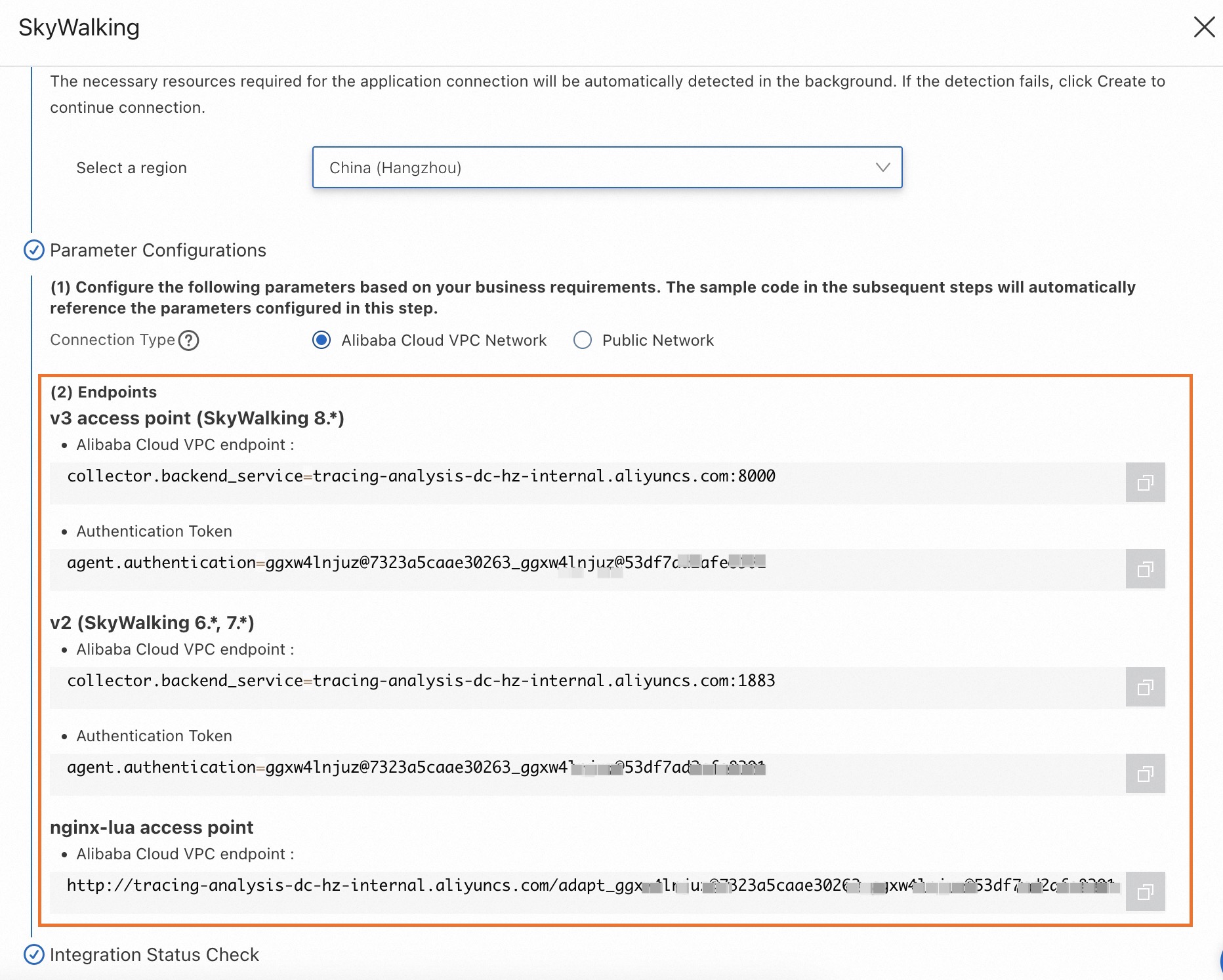
Configure o parâmetro Connection Type e copie um endpoint.
Se o service estiver implantado na Alibaba Cloud e residir na região selecionada, defina este parâmetro como Alibaba Cloud VPC Network. Caso contrário, defina-o como Public Network.
Contexto
O SkyWalking é uma ferramenta popular de código aberto para Monitoramento de Desempenho de Aplicações (APM), voltada para microsserviços e aplicações cloud-native ou containerizadas (como docker, Kubernetes e Mesos). Essencialmente, funciona como um sistema de rastreamento distribuído.
O crate skywalking-rust é a biblioteca oficial do SkyWalking Rust Agent. Integre-o para monitorar aplicações Rust. Atualmente, o skywalking-rust oferece instrumentação automática limitada e exige instrumentação manual.
Demonstração
Repositório de demonstração: Demonstração do SkyWalking
Esta demonstração fornece um servidor HTTP simples baseado no framework hyper para Rust. Ela utiliza instrumentação manual com skywalking-rust para relatar dados ao console do Managed Service for OpenTelemetry.
Instrumentar manualmente uma aplicação Rust
-
Adicione a dependência do SkyWalking ao projeto Rust.
NotaEste tópico usa o SkyWalking 0.8.0 como exemplo.
cargo.toml
# Add the following line under [dependencies]
skywalking = { version = "0.8.0", features = ["vendored"] }
cargo add
cargo add skywalking --features vendored -
Importe os módulos do SkyWalking no código-fonte.
# Import modules in the source code that requires instrumentation. use skywalking::{reporter::grpc::GrpcReporter, trace::tracer::Tracer}; -
Execute a instrumentação manual.
// Use entry span, local span, and exit span to manually instrument a trace. // These three span types enable complete end-to-end tracing. // // entry span: Used on the server side to extract the tracing context from an incoming HTTP request. // local span: Used for instrumenting operations within the same process. // exit span: Used on the client side to inject the tracing context into an outgoing HTTP request. // // For cross-process traces, refer to the following example: // // client.rs: let mut ctx = tracer.create_trace_context(); { // do something... let span = ctx.create_exit_span("operation1", "remote_peer"); } // server.rs: let mut ctx = tracer.create_trace_context(); { let span = ctx.create_entry_span("operation1"); // do something... } -
Configure o endpoint e o token.
Obtenha o endereço do endpoint e o token de autenticação na seção Pré-requisitos.
// Replace  with the endpoint address,  with the authentication token,
// and  with your application name.
let endpoint = "<endpoint>";
let token = "<token>";
let service_name = "<service_name>";
let instance_name = "<instance_name>";

let reporter = GrpcReporter::connect(endpoint).await?;
let reporter = reporter.with_authentication(token);
let tracer = Tracer::new(service_name, instance_name, reporter.clone());
Reinicie a aplicação.
Perguntas frequentes
A compilação do projeto Rust falha com o seguinte erro:
   Compiling tokio-io v0.1.13
   Compiling hyper v0.14.27
error: failed to run custom build command for `skywalking v0.8.0`
Caused by:
  process didn't exit successfully: `/Users/whlongxi/work/test/skywalking-test-demo/skywalking-rust-demo/target/debug/build/skywalking-12f2124cc5c4c6c4/build-script-build` (exit status:
101)
  --- stdout
  cargo:rerun-if-changed=./skywalking-data-collect-protocol/language-agent/Meter.proto
  cargo:rerun-if-changed=./skywalking-data-collect-protocol/language-agent/Tracing.proto
  cargo:rerun-if-changed=./skywalking-data-collect-protocol/logging/Logging.proto
  cargo:rerun-if-changed=./skywalking-data-collect-protocol/management/Management.proto
  cargo:rerun-if-changed=./skywalking-data-collect-protocol
  --- stderr
  thread 'main' panicked at 'Could not find `protoc` installation and this build crate cannot proceed without
      this knowledge. If `protoc` is installed and this crate had trouble finding
      it, you can set the `PROTOC` environment variable with the specific path to your
      installed `protoc` binary.You could try running `brew install protobuf` or downloading it from https://github.com/protocolbuffers/protobuf/releases
Esse erro indica a ausência do compilador protoc. Para corrigir, instale o protobuf conforme descrito na seção Pré-requisitos.