The rise of ChatGPT has highlighted the potential of large language models (LLMs) and generative AI in various fields, such as content creation, image generation, code optimization, and information retrieval. LLMs have become powerful tools for both individuals and enterprises, driving a new ecosystem of super applications. This topic describes how to build a custom enterprise chatbot by using a PolarDB for PostgreSQL vector database and an LLM.
Background information
More enterprises and individuals are using LLMs and generative AI to build AI-powered products focused on their specific domains. However, general-purpose LLMs often lack the deep, up-to-date knowledge required for specific industries because their training data is broad and not specialized. In the information age, enterprise knowledge bases (such as internal documents, images, and audio/video files) are frequently updated and often proprietary or confidential. To build an effective AI product for a specific domain, enterprises must continuously train the LLM on their own knowledge bases.
Two common methods are:
-
Fine-tuning: This method adjusts the weights of a pre-trained model by using a new dataset. It is suitable for adapting a model to specific tasks or styles but can be expensive and time-consuming.
-
Prompt-tuning: This method adjusts the model's output by modifying the input prompt rather than the model's weights. Compared to fine-tuning, prompt-tuning is less computationally expensive, requires fewer resources and less training time, and is more flexible.
In summary, fine-tuning is often too costly and its low update frequency makes it unsuitable for many enterprises. Prompt-tuning offers a more practical approach by building enterprise knowledge assets in a vector database. This method uses prompt engineering to extract features from enterprise knowledge base documents and real-time information, convert them into vector embeddings, and store them. Combining an LLM with a vector database allows chatbots to provide more professional and timely answers, making this an ideal solution for small and medium-sized enterprises to build custom chatbots.
In machine learning, AI techniques process large amounts of unstructured data by extracting its features and converting them into feature vectors. These vectors can then be analyzed and retrieved. A vector database is designed to store, analyze, and retrieve these feature vectors.
Building a chatbot with PolarDB for PostgreSQL offers several advantages:
With the pgvector extension in PolarDB for PostgreSQL, you can convert real-time content or specialized knowledge into vector embeddings. Storing these embeddings in PolarDB for PostgreSQL enables efficient vector retrieval, which improves the accuracy of answers based on your private data.
-
As a next-generation relational cloud-native database, PolarDB for PostgreSQL combines the cost-effectiveness of a distributed design with the usability of a centralized one. It separates compute nodes from storage nodes to provide instant scalability and simplified operations. It is a leading product in the cloud-native distributed database market.
The pgvector extension is widely used in the developer community and in open source databases based on PostgreSQL. Tools like the ChatGPT Retrieval Plugin also support PostgreSQL, demonstrating that PolarDB for PostgreSQL has a strong ecosystem and a broad user base for vector retrieval, providing users with a rich set of tools and resources.
The large language models (LLMs) mentioned in this topic are provided by third parties (third-party models). Alibaba Cloud cannot guarantee the compliance or accuracy of third-party models and assumes no liability for them or for your use of them. Before you access or use any third-party models, you must evaluate the associated risks. We also remind you that third-party models are subject to agreements such as open source licenses. You must read and strictly comply with these agreements.
Prerequisites
-
You have a PolarDB for PostgreSQL cluster that meets the following requirement:
PostgreSQL 14 with revision version 14.7.9.0 or later
NoteTo upgrade the revision version, see Manage the revision version.
The chatbot in this topic uses the open source pgvector extension for PolarDB for PostgreSQL. Make sure you understand its usage and key concepts.
-
This topic uses OpenAI services. Ensure you have an OpenAI
Secret API Keyand network access to its services. The code examples in this topic are deployed on an ECS instance in the Singapore region. -
The code examples use Python. Make sure you have a Python development environment. This topic uses Python
3.11.4and PyCharm2023.1.2.
Key concepts
Embedding
An embedding is a low-dimensional representation of high-dimensional data. In machine learning and natural language processing (NLP), embeddings are used to represent discrete symbols or objects as points in a continuous vector space.
In NLP, word embedding is a common technique that maps words to real-numbered vectors. This allows computers to better understand and process text by representing semantic and syntactic relationships between words in the vector space.
OpenAI provides an embedding API.
How it works
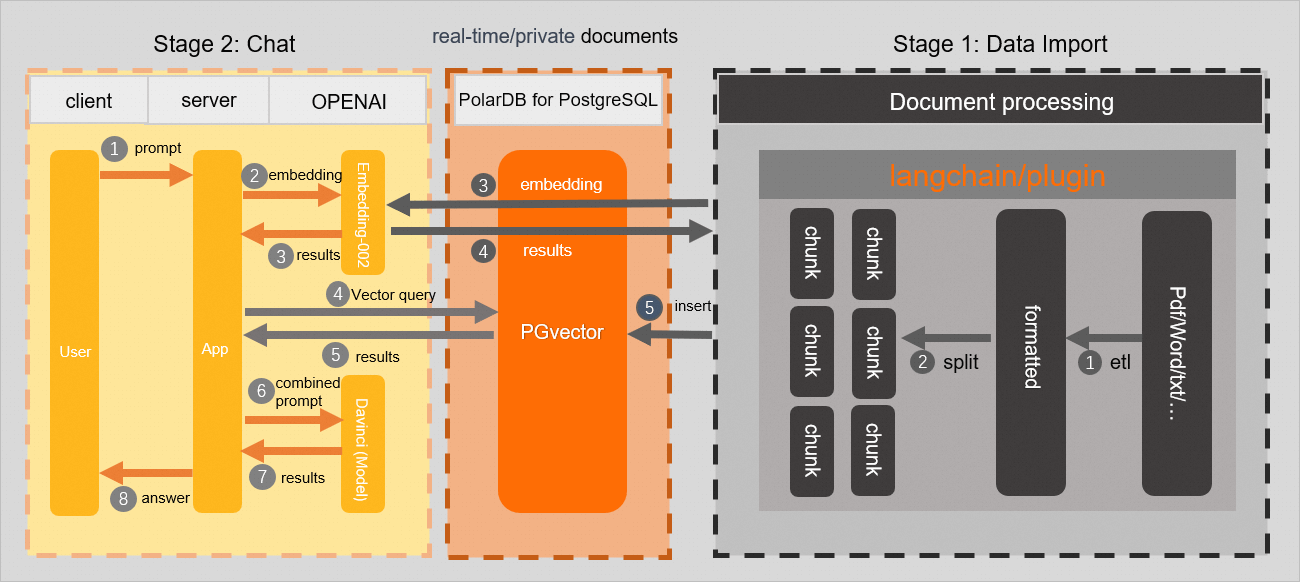
Building the custom chatbot involves two phases:
Phase 1: Data preparation
-
Extract and chunk knowledge base information: Split the text from your knowledge base into smaller chunks. This can include breaking long documents into paragraphs or sentences and extracting keywords or entities. This helps organize and manage your knowledge base content.
-
Generate embeddings by using an LLM API: Convert the text chunks into embeddings by using an LLM API, such as OpenAI's. These embeddings capture the semantic and contextual information of the text, which is essential for searching and matching.
-
Store embedding information: Store the generated text embeddings, text chunks, and related metadata in your PolarDB for PostgreSQL database.
Phase 2: Q&A
-
The user asks a question.
-
Create an embedding for the question by using the OpenAI embedding API.
-
Use pgvector to search the PolarDB for PostgreSQL database for document chunks with a similarity score above a specified threshold.
The following diagram shows the workflow.
Procedure
Phase 1: Data preparation
This topic uses the text content from the Product updates for PolarDB for PostgreSQL in 2023 document as an example. The content is chunked and stored in a PolarDB for PostgreSQL database. You must prepare your own domain-specific knowledge base.
The key to the data preparation phase is to convert your specialized knowledge into text embeddings and store them effectively. By using the powerful semantic understanding of an LLM, you can get high-quality answers and suggestions related to your specific domain. Open source frameworks like LangChain and OpenAI's ChatGPT Retrieval Plugin can help you upload and parse knowledge base files in formats like URL, Markdown, PDF, and Word. Both LangChain and the ChatGPT Retrieval Plugin support PostgreSQL with the pgvector extension as a backend vector database. This simplifies integration with your PolarDB for PostgreSQL cluster. With this integration, you can easily complete the data preparation for your knowledge base and use pgvector's indexing and similarity search features for efficient text matching and querying.
-
Create a test database. In this example, the database is named
testdb.CREATE DATABASE testdb; -
Connect to the test database and create the pgvector extension.
CREATE EXTENSION IF NOT EXISTS vector; -
Create a test table to store the knowledge base content. In this example, the table is named
polardb_pg_help_docs.CREATE TABLE polardb_pg_help_docs ( id bigserial PRIMARY KEY, title text, -- Document title description text, -- Description doc_chunk text, -- Document chunk token_size int, -- Token count of the chunk embedding vector(1536)); -- Text embedding -
Create an index on the
embeddingcolumn to optimize and accelerate queries.CREATE INDEX ON polardb_pg_help_docs USING ivfflat (embedding vector_cosine_ops) WITH (lists = 100); -
In PyCharm, create a project, open the terminal, and run the following command to install the required libraries.
pip install openai psycopg2 tiktoken requests beautifulsoup4 numpyNoteIf you encounter issues installing
psycopg2, try compiling it from the source code. -
Create a
.pyfile to chunk the knowledge base document and store it in the database. In this example, the file is namedknowledge_chunk_storage.py. The following is the sample code:NoteThe custom chunking method in the following sample code splits the knowledge base content by a fixed number of characters. You can use more advanced methods provided by frameworks like LangChain or OpenAI's open source ChatGPT Retrieval Plugin. The quality of the documents in your knowledge base and the chunking results significantly impact the final output.
import openai import psycopg2 import tiktoken import requests from bs4 import BeautifulSoup EMBEDDING_MODEL = "text-embedding-ada-002" tokenizer = tiktoken.get_encoding("cl100k_base") # Connect to the PolarDB for PostgreSQL database conn = psycopg2.connect(database="<your_database_name>", host="<your_polardb_cluster_endpoint>", user="<your_username>", password="<your_password>", port="<your_database_port>") conn.autocommit = True # OpenAI API Key openai.api_key = '<your_secret_api_key>' # Custom chunking method (example only) def get_text_chunks(text, max_chunk_size): chunks_ = [] soup_ = BeautifulSoup(text, 'html.parser') content = ''.join(soup_.strings).strip() length = len(content) start = 0 while start < length: end = start + max_chunk_size if end >= length: end = length chunk_ = content[start:end] chunks_.append(chunk_) start = end return chunks_ # Specify the webpage to chunk url = 'https://www.alibabacloud.com/help/document_detail/602217.html?spm=a2c4g.468881.0.0.5a2c72c2cnmjaL' response = requests.get(url) if response.status_code == 200: # Get the webpage content web_html_data = response.text soup = BeautifulSoup(web_html_data, 'html.parser') # Get the title (H1 tag) title = soup.find('h1').text.strip() # Get the description (content of the p tag with class='shortdesc') description = soup.find('p', class_='shortdesc').text.strip() # Chunk and store chunks = get_text_chunks(web_html_data, 500) for chunk in chunks: doc_item = { 'title': title, 'description': description, 'doc_chunk': chunk, 'token_size': len(tokenizer.encode(chunk)) } query_embedding_response = openai.Embedding.create( model=EMBEDDING_MODEL, input=chunk, ) doc_item['embedding'] = query_embedding_response['data'][0]['embedding'] cur = conn.cursor() insert_query = ''' INSERT INTO polardb_pg_help_docs (title, description, doc_chunk, token_size, embedding) VALUES (%s, %s, %s, %s, %s); ''' cur.execute(insert_query, ( doc_item['title'], doc_item['description'], doc_item['doc_chunk'], doc_item['token_size'], doc_item['embedding'])) conn.commit() else: print('Failed to fetch web page') -
Run the Python script.
-
Log on to the database and run the following command to verify that the knowledge base document has been chunked and stored as vector data.
SELECT * FROM polardb_pg_help_docs;After you run the command, the query returns data from the
polardb_pg_help_docstable. The table contains columns such asid,title,description,doc_chunk,token_size, andembedding(a 1536-dimensional vector), confirming that the knowledge base document has been successfully chunked and stored in vector format.
Phase 2: Q&A
-
In your Python project, create a
.pyfile to query for similar content from the database and generate an answer. In this example, the file is namedchatbot.py.# Connect to the PolarDB for PostgreSQL database conn = psycopg2.connect(database="<your_database_name>", host="<your_polardb_cluster_endpoint>", user="<your_username>", password="<your_password>", port="<your_database_port>") conn.autocommit = True def answer(prompt_doc, prompt): improved_prompt = f""" Answer the following question based on the provided documents and steps: (1) First, analyze the content of the documents to check if it is relevant to the question. (2) Second, use only the content from the documents to reply. Be as detailed as possible and use Markdown format for the output. (3) Finally, if the question is not related to PolarDB for PostgreSQL, reply with "I don't know much about topics other than PolarDB for PostgreSQL." Documents: \"\"\" {prompt_doc} \"\"\" Question: {prompt} """ response = openai.Completion.create( model=GPT_COMPLETIONS_MODEL, prompt=improved_prompt, temperature=0.2, max_tokens=MAX_TOKENS ) print(f"{response['choices'][0]['text']}\n") similarity_threshold = 0.78 max_matched_doc_counts = 8 # Use pgvector to filter for document chunks with a similarity score above the threshold. similarity_search_sql = f''' SELECT doc_chunk, token_size, 1 - (embedding <=> '{prompt_embedding}') AS similarity FROM polardb_pg_help_docs WHERE 1 - (embedding <=> '{prompt_embedding}') > {similarity_threshold} ORDER BY id LIMIT {max_matched_doc_counts}; ''' cur = conn.cursor(cursor_factory=DictCursor) cur.execute(similarity_search_sql) matched_docs = cur.fetchall() total_tokens = 0 prompt_doc = '' print('Answer: \n') for matched_doc in matched_docs: if total_tokens + matched_doc['token_size'] <= 1000: prompt_doc += f"\n---\n{matched_doc['doc_chunk']}" total_tokens += matched_doc['token_size'] continue answer(prompt_doc,prompt) total_tokens = 0 prompt_doc = '' answer(prompt_doc,prompt) -
Running the Python script produces an answer similar to the following:
NoteYou can optimize the chunking method and the question prompt to get more accurate and complete answers. This is just an example.
[postgres@783ce3dda0bc /home/postgres/polardb_pg/123]
$python chatbot.py
Answer:
Answer: The new features of PolarDB for PostgreSQL 14 include:
1.  Added the PASE extension for high-dimensional vector retrieval.
2.  Added ST_AsMVT3D and ST_AsMVTGeom3D functions to support 3D vector tiles for Geometry3D data.
3.  Added the ST_AsTableFormat function to output the return type when a trajectory calls ST_AsTable.
4.  Added support for importing glTF and glb files from OSS as SFMesh objects.
5.  Provided a one-stop HTAP service that allows quick data migration from the OLTP engine to the built-in OLAP storage and engine by using simple SQL.
6.  Supports the roaringbitmap extension for bitmap calculations.
7.  Supports ePQ Hint Injection to inject PX hints into specified SQL statements.
8.  Enhanced the ST_MosaicFrom function to support parallel operations and mosaicking of images with different resolutions or projections.
9.  Fixed an issue where ST_Intersection incorrectly judged the intersection of overlapping segments of two trajectories.
10. Supports logical replication for Data Definition Language (DDL) commands.
11. Supports the pldebugger extension for debugging stored procedures.
12. Supports the Global CatCache feature.
13. Supports the polar_sql_mapping extension.
14. Fixed a crash issue in ST_makeTrajectory when creating a trajectory with only two points by using start and end times.
  Answer: The new features of PolarDB for PostgreSQL 14 include:
- The oss_fdw extension supports TRUNCATE.
- Supports recovery bulk extend.
- Released documentation for the spatiotemporal database (Ganos v5.3).
- Supports outputting the angle of each turn in a trajectory as an array (ST_Angle).
- Supports outputting the radius of curvature of each turn in a trajectory as an array (ST_CurvatureRadius).
- Upgraded PostGIS extension compatibility to 3.3.2.
- Fixed a crash issue in the trajectory ST_AsTable function when the x, y, and t dimensions were NULL.
- Released documentation for revision version 14.6.4.0.
- Supports GLOBAL INDEX.
- Supports specifying Storage parameters when creating a table.
- One-stop HTAP service.
- Performance comparison with similar PostgreSQL cloud-native databases.
Summary
Without a vector database, OpenAI's answer to the question "What are the new features of the 2023 release of PolarDB for PostgreSQL 14?" is often irrelevant to Alibaba Cloud. For example:
ChatGPT states that its knowledge cutoff is September 2021 and it cannot provide the requested information. It suggests checking the official PostgreSQL website, mailing lists, and release announcements.
After connecting to the custom knowledge base stored in the PolarDB for PostgreSQL database, the same question "What are the new features of the 2023 release of PolarDB for PostgreSQL 14?" yields a specific answer about Alibaba Cloud's PolarDB for PostgreSQL.
After connecting to the knowledge base, the Q&A application returns a list of new features for PolarDB for PostgreSQL 14. These include the addition of the PASE extension for high-dimensional vector retrieval, new functions like ST_AsMVT3D and ST_AsMVTGeom3D for 3D vector tiles, the ST_AsTableFormat function for trajectories, support for importing glTF and glb files from OSS as SFMesh objects, a one-stop HTAP service, and support for the roaringbitmap extension and ePQ Hint Injection.
This demonstrates that PolarDB for PostgreSQL is fully capable of building a domain-specific knowledge base for LLM-based applications.
References
For more information, see the GitHub repository: https://github.com/openai/openai-cookbook/tree/main/examples/vector_databases/PolarDB.