MiniApp コンテナ UI カスタマイズ
1 背景情報 & 目的
MiniApp コンテナでは、ユーザー端末の権限付与画面などのデフォルト UI が実装されていますが、一部のクライアントでは、これらのデフォルト UI の一部またはすべてをカスタマイズする必要があります。
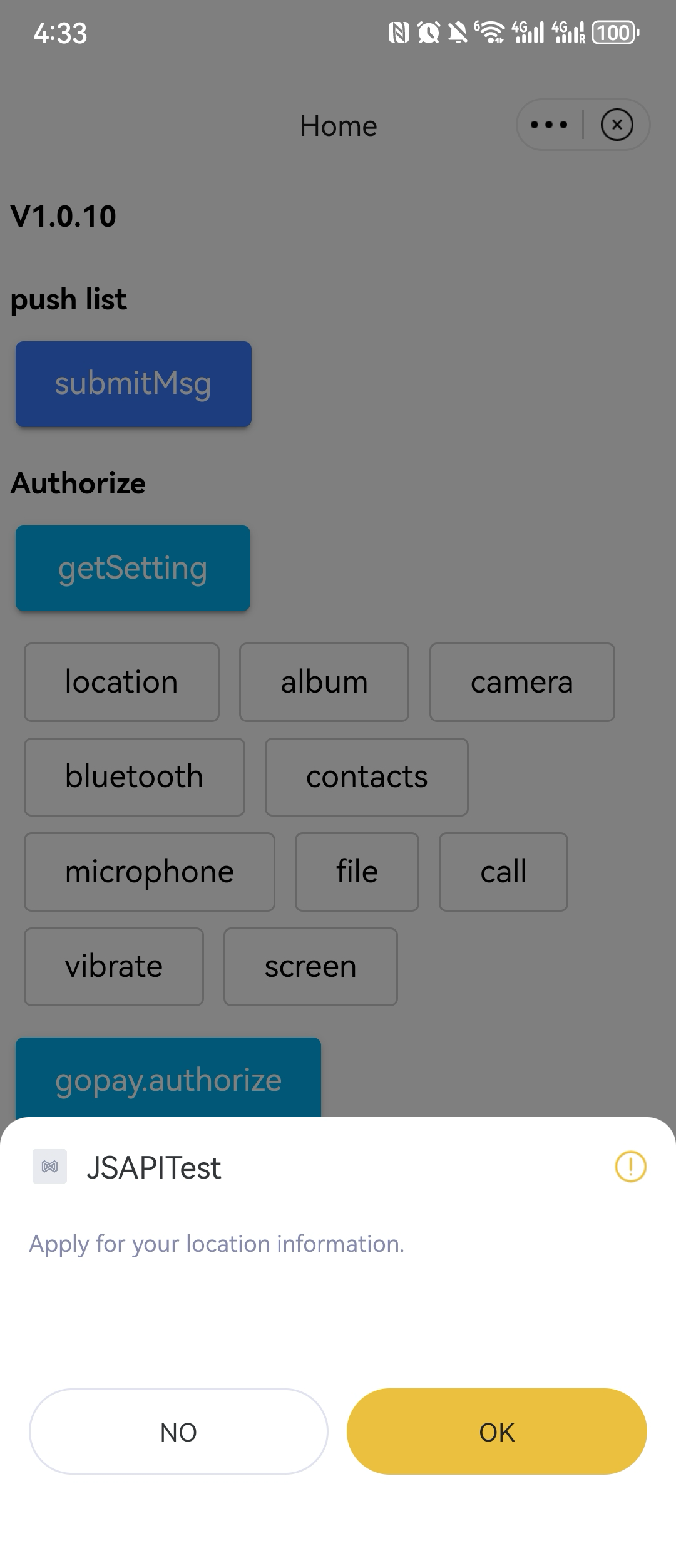
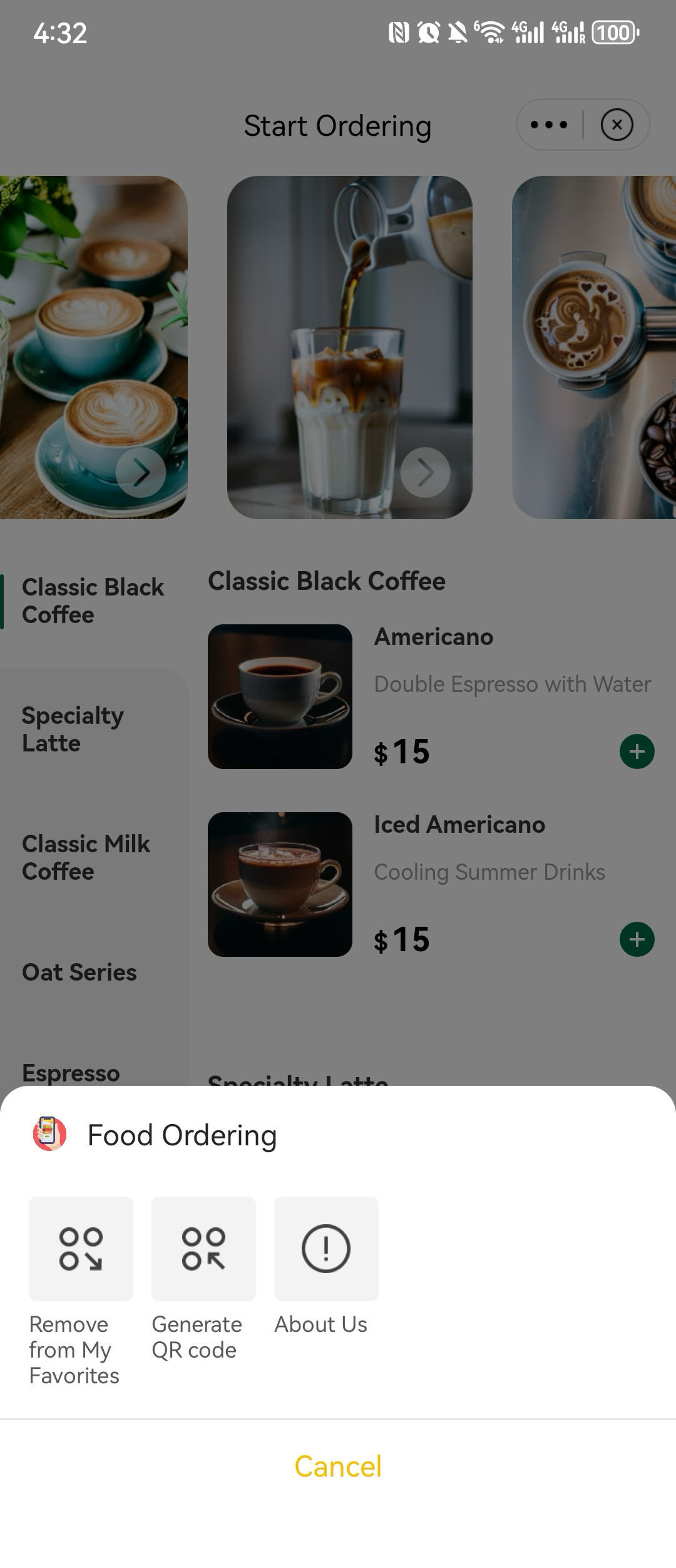
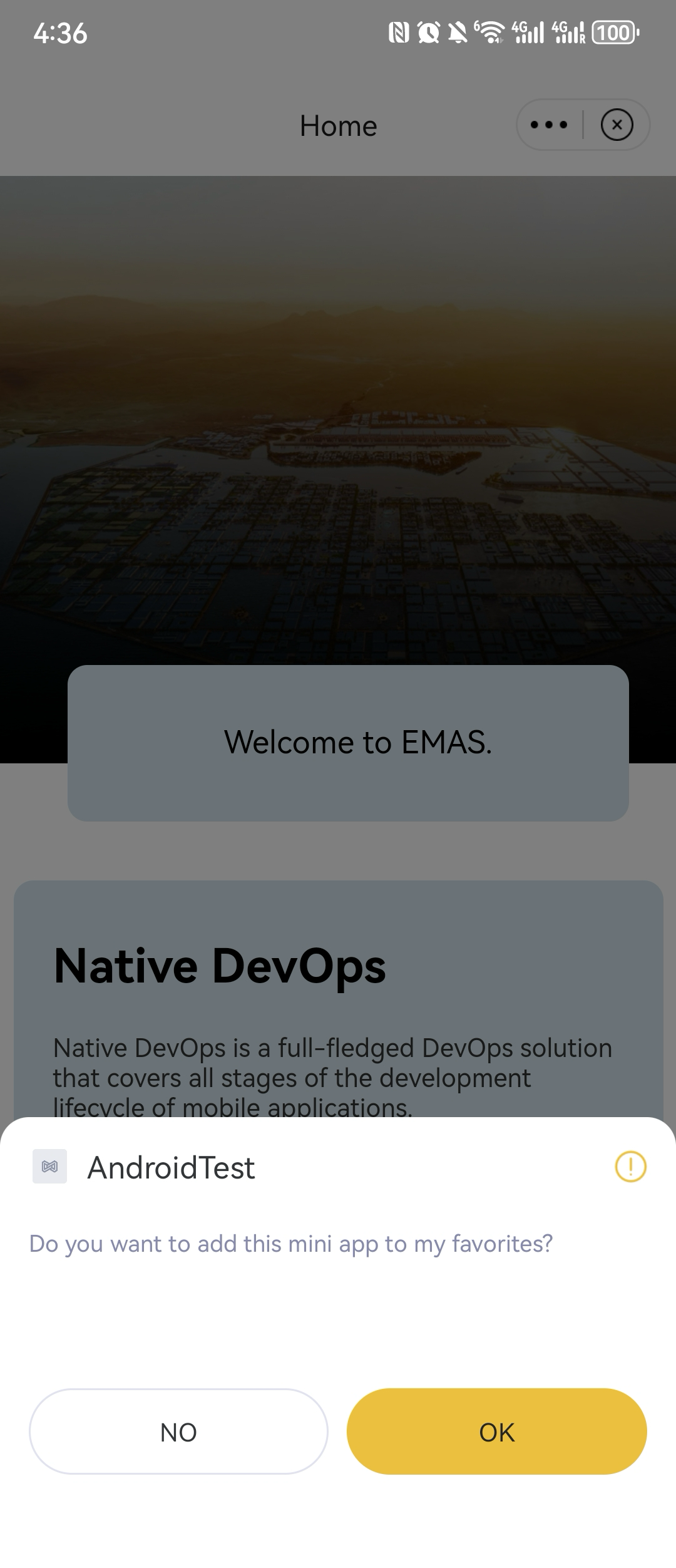
クライアントによるデフォルト UI の一部またはすべてのカスタマイズをサポートします。UI のカスタマイズには、以下のソリューションが利用可能です。
2 全体アーキテクチャと処理順序
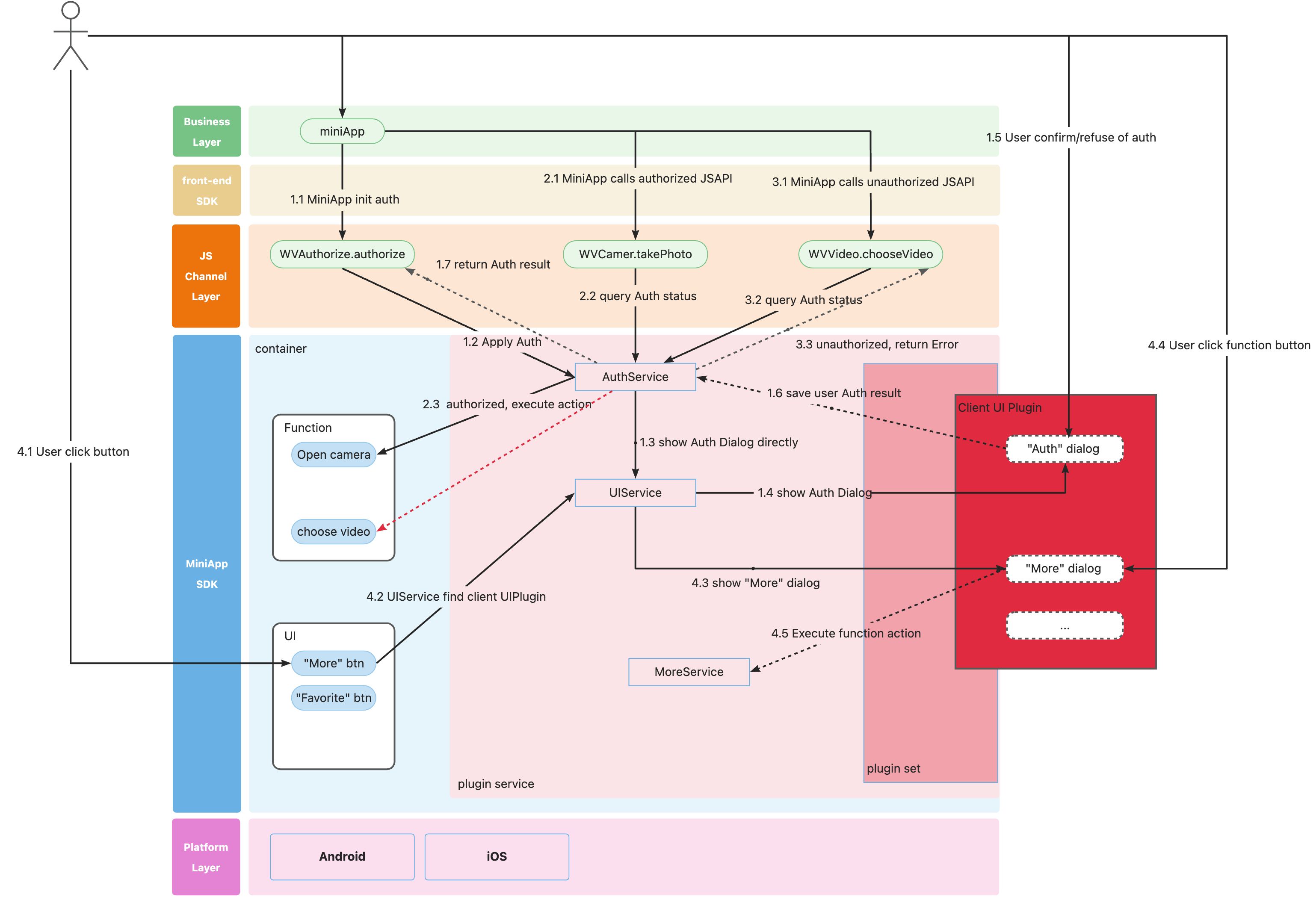
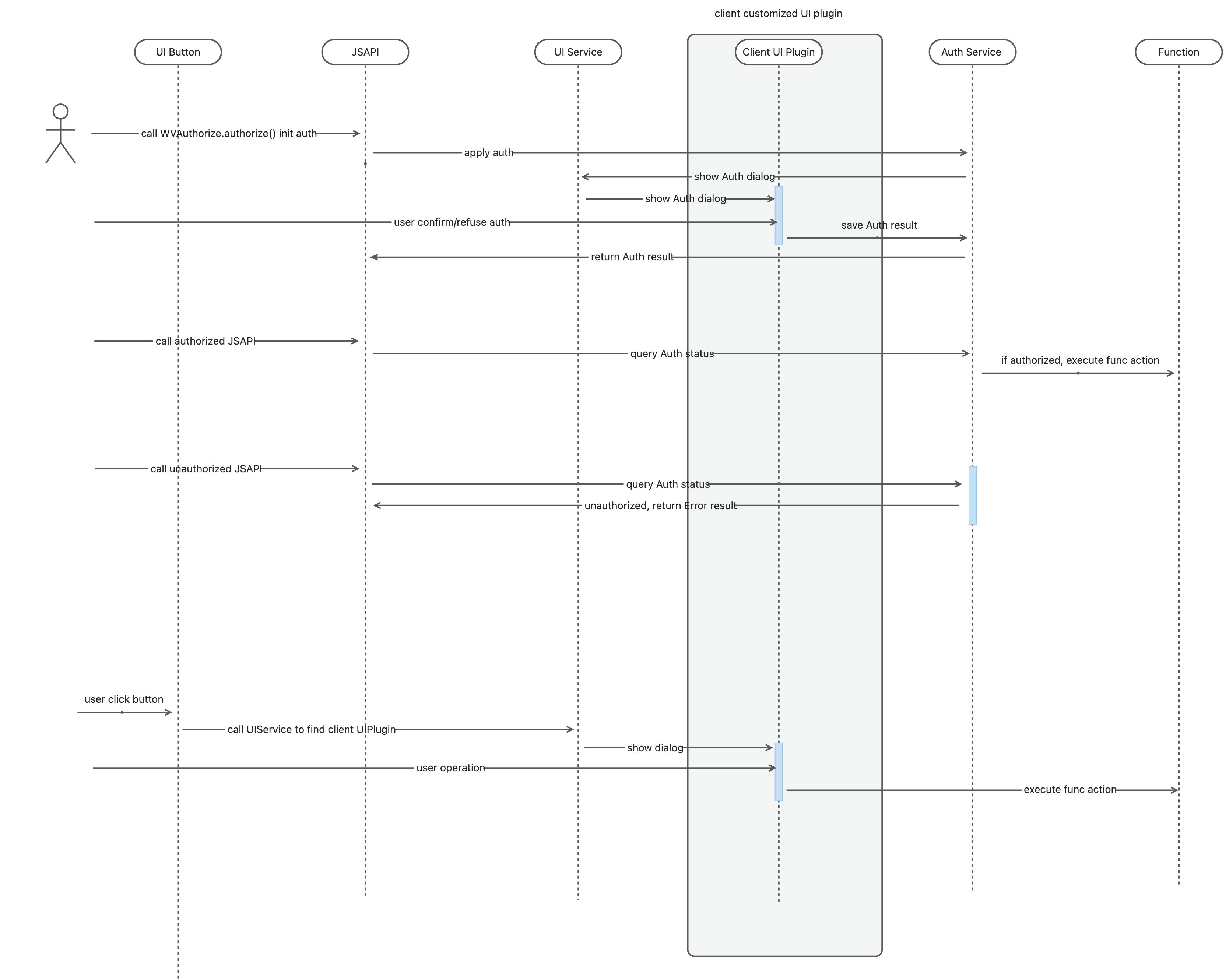
3 開発手順
3.1 ネイティブ シナリオ
3.1.1 関連パッケージのインポート
// build.gradle 内

implementation "com.aliyun.emas.suite.foundation:mini-app-adapter:1.8.14"
implementation "com.aliyun.emas.suite.foundation:windvane-mini-app:1.8.14"

implementation "com.aliyun.emas.suite.foundation:mini-app-plugin-base:1.8.14"
// Podfile 内
pod 'EMASMiniAppAdapter', '1.1.4'
pod 'EMASWindVaneMiniApp', '1.2.5'
// Bluetooth 機能を利用する場合は、WindVaneBluetooth を追加してください
pod 'WindVaneBluetooth', '1.0.2'
3.1.2 SDK 内の UI インターフェイス
3.1.2.1 Android 向け
public interface UIExtension {


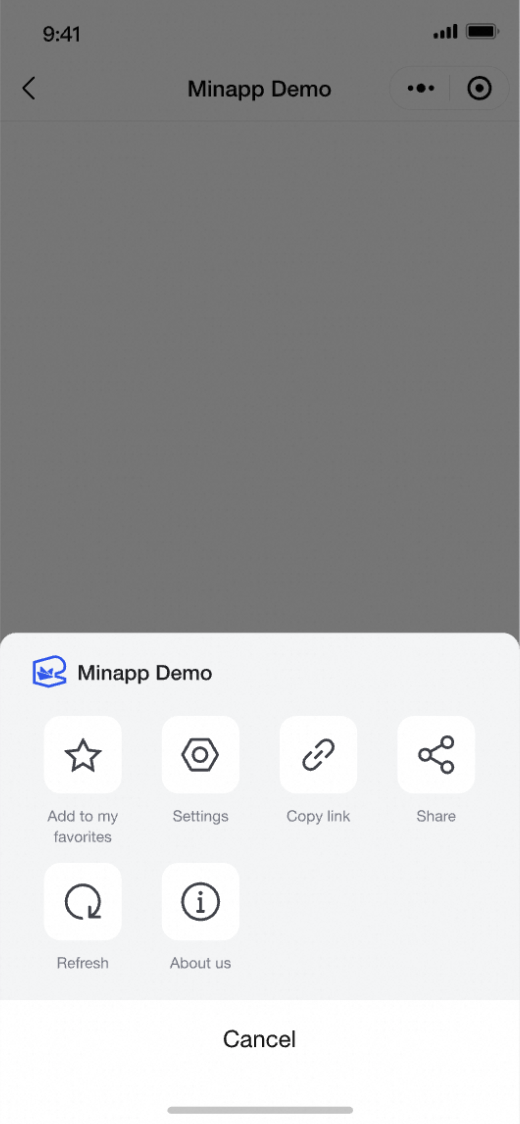
    // 「図 1」の例示スタイルを参照して、「その他」ダイアログを作成するために使用します
    public default Fragment createMoreDialogFragment(UIComponentParam uiComponentParam) {
        return  NoExistFragment.newInstance();
    }

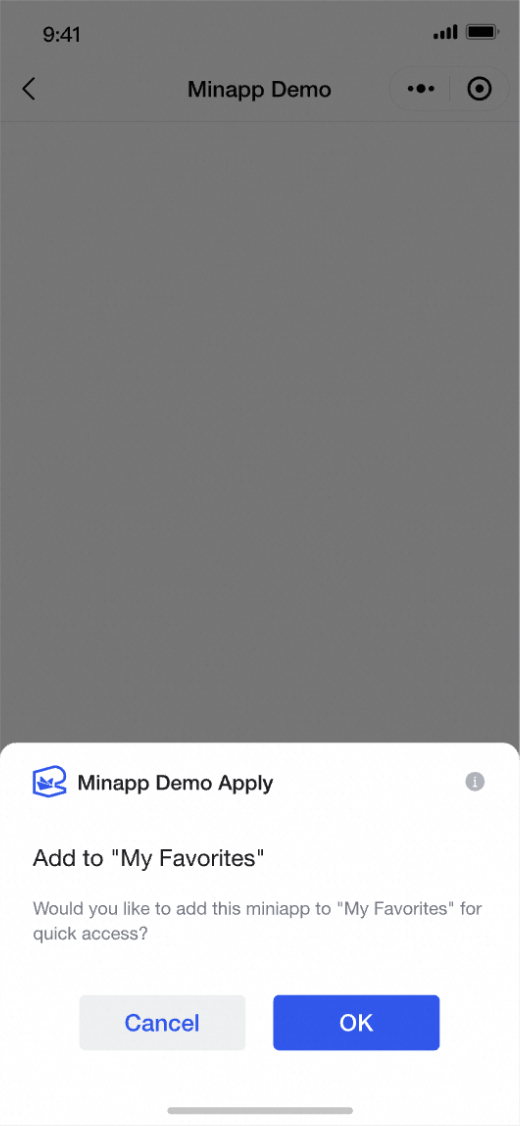
    // 「図 2」の例示スタイルを参照して、「お気に入り」ダイアログを作成するために使用します
    public default Fragment createFavoriteDialogFragment(UIComponentParam uiComponentParam) {
        return NoExistFragment.newInstance();
    }

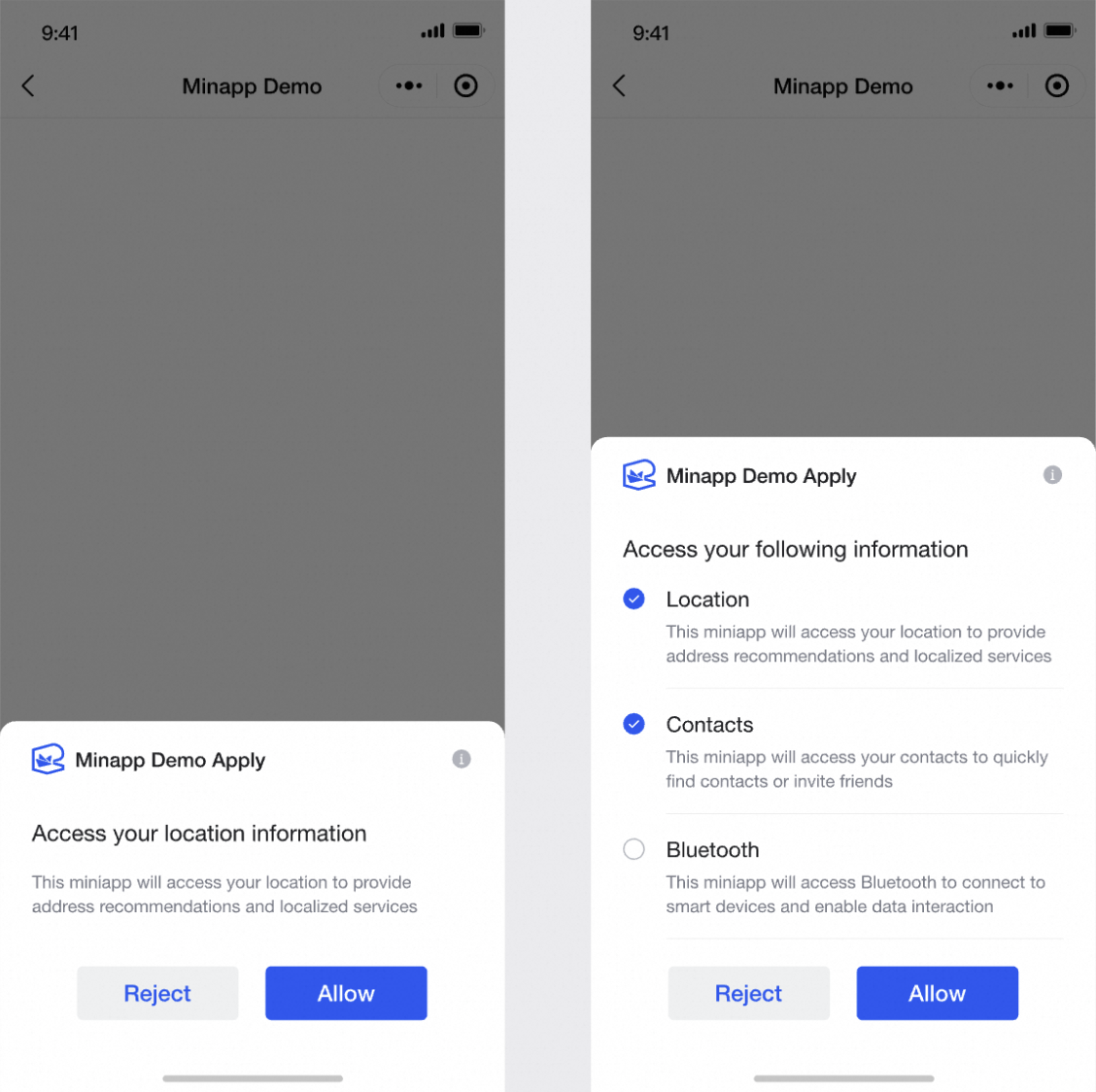
    // 「図 3」の例示スタイルを参照して、「権限付与」ダイアログを作成するために使用します
    public default Fragment createUserDeviceInfoAuthDialogFragment(UIComponentParam uiComponentParam) {
        return NoExistFragment.newInstance();
    }

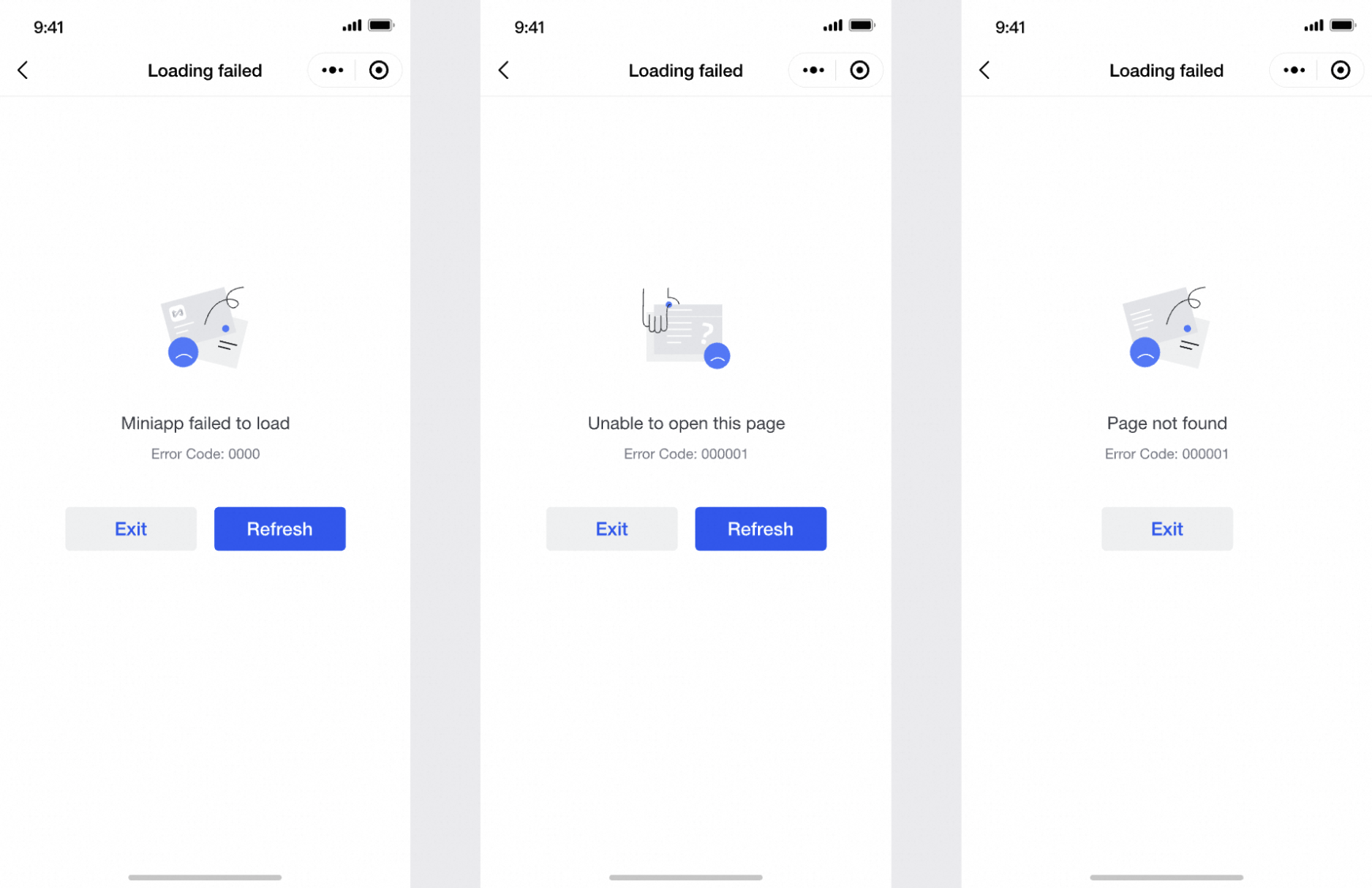
    // 「図 5」の例示スタイルを参照して、「エラー」サブページを作成するために使用します
    public default Fragment createErrorPageFragment(UIComponentParam uiComponentParam) {
        return NoExistFragment.newInstance();
    }

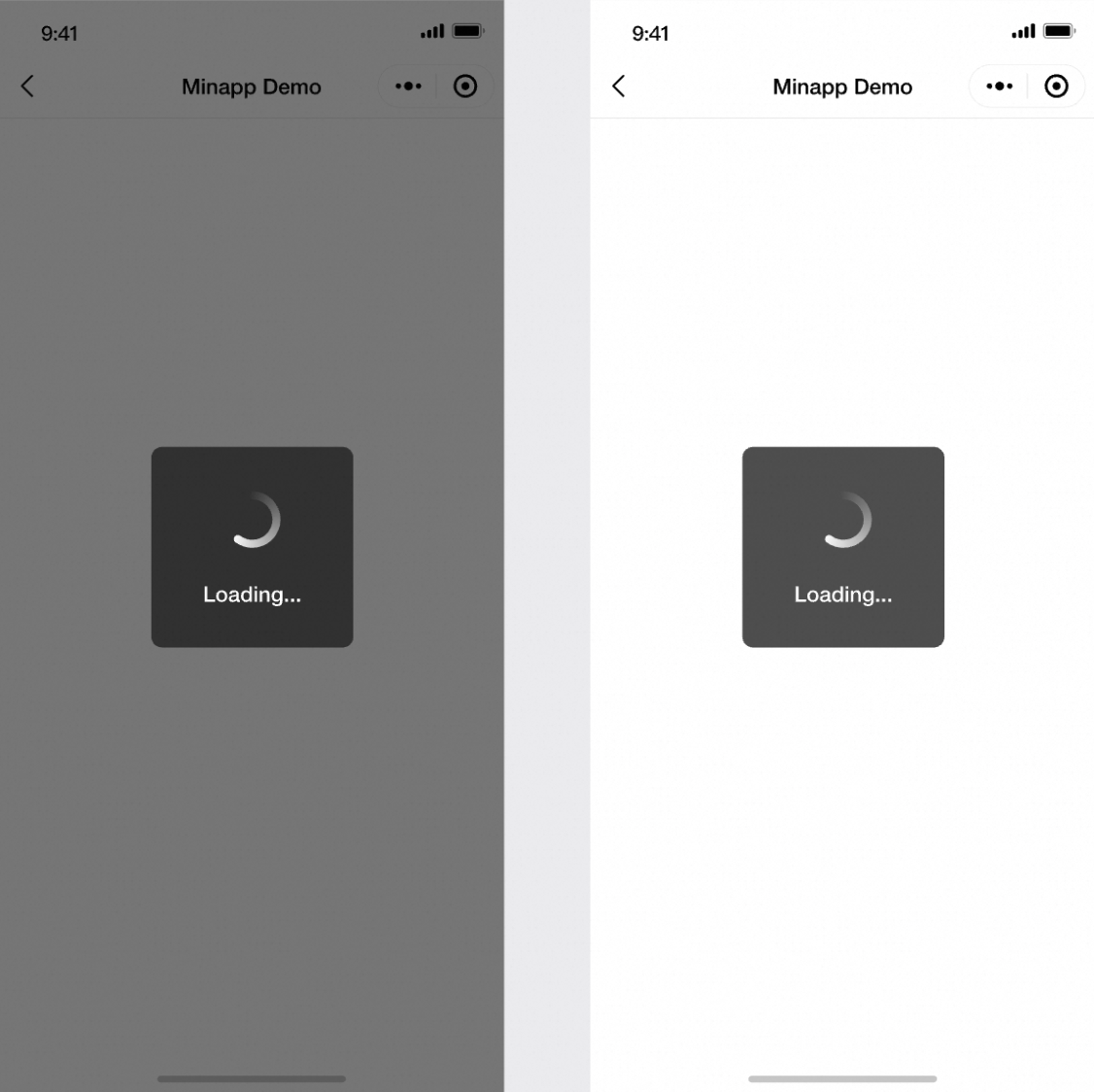
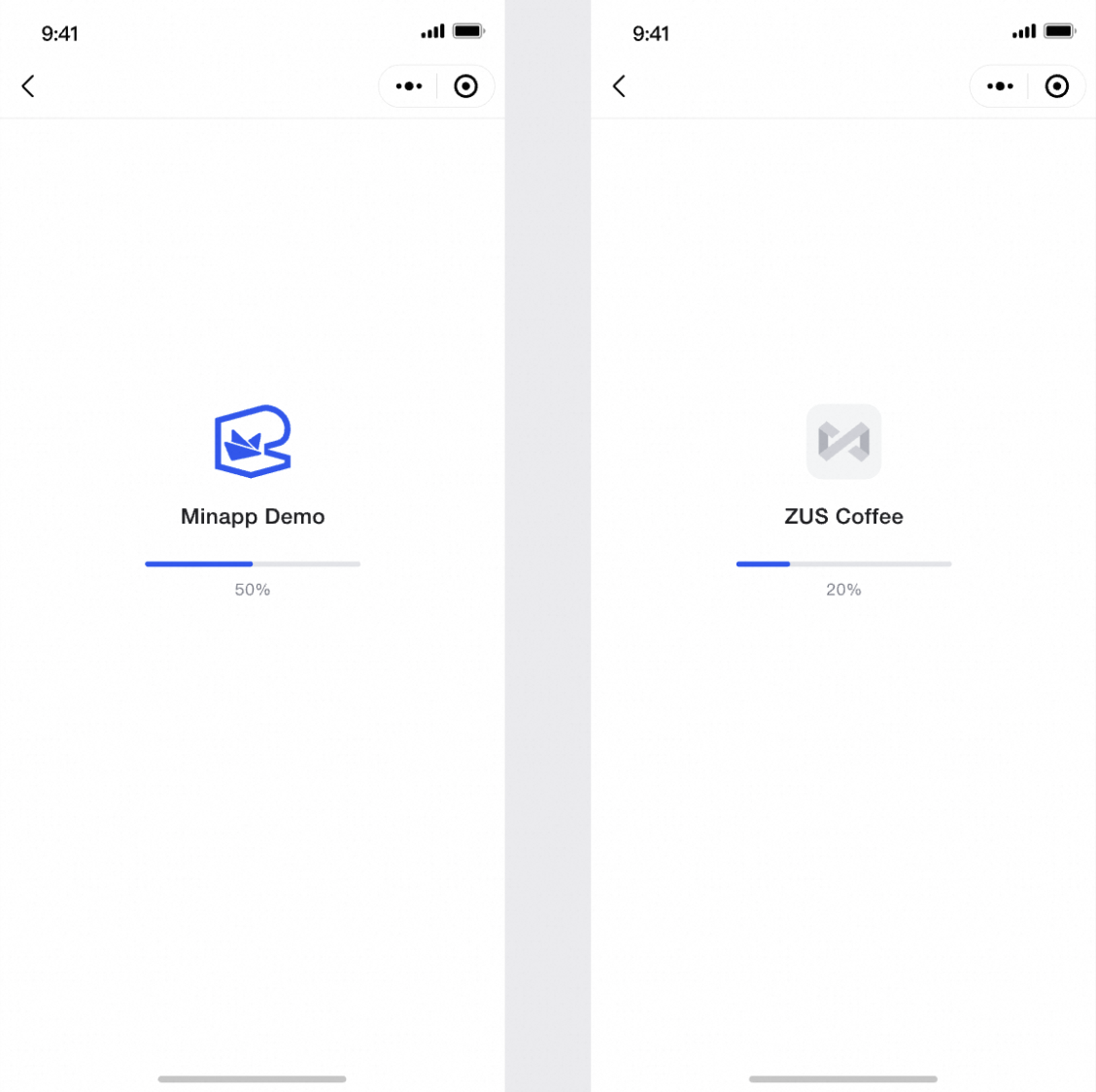
    // 「図 6」の例示スタイルを参照して、「スプラッシュ」サブページを作成するために使用します
    public default Fragment createSplashPageFragment(UIComponentParam uiComponentParam) {
        return NoExistFragment.newInstance();
    }

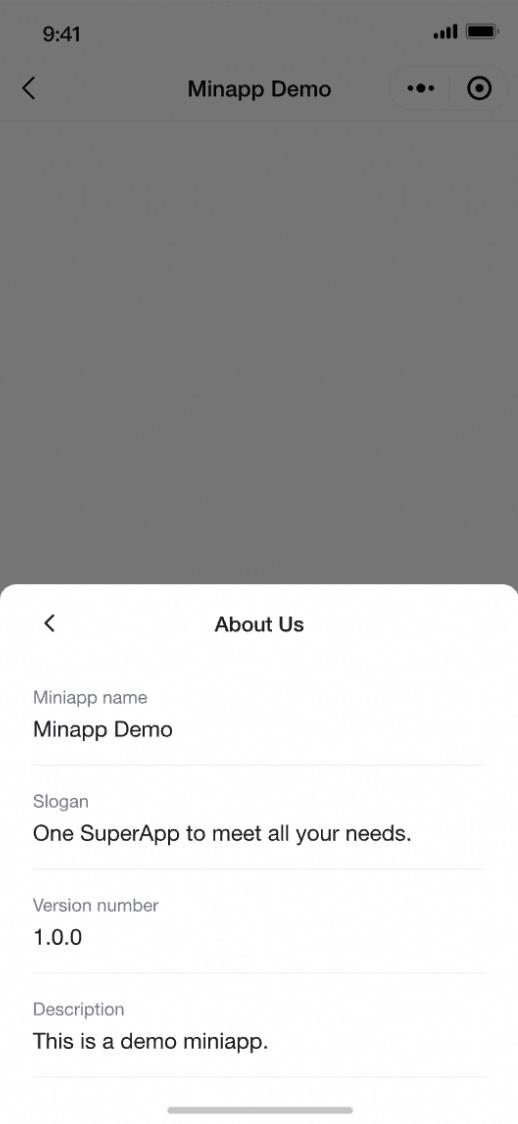
    // 「図 8」の例示スタイルを参照して、「当社について」ダイアログを作成するために使用します
    public default Fragment createAboutUsDialogFragment(UIComponentParam uiComponentParam) {
        return NoExistFragment.newInstance();
    }
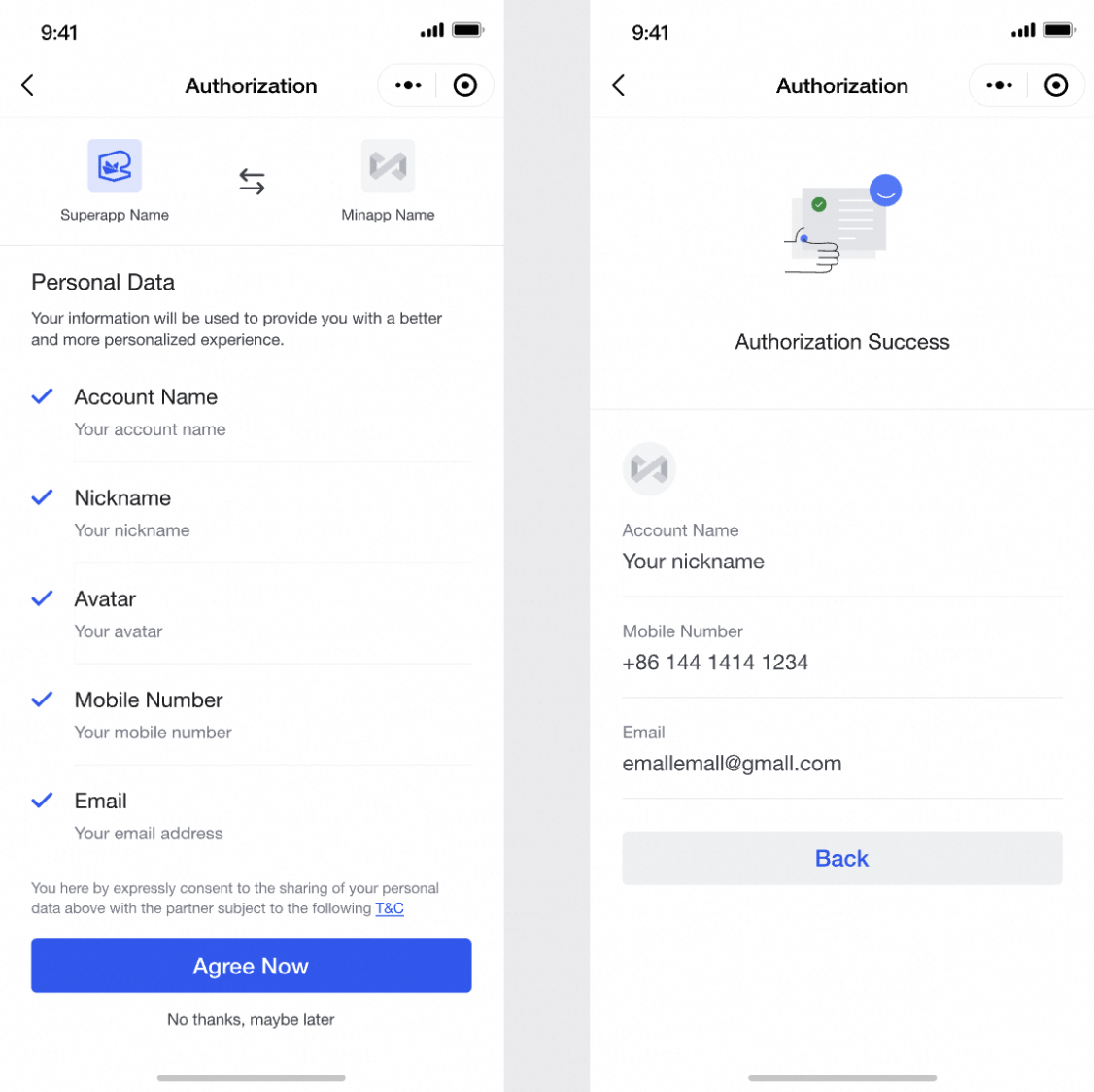
        // 「図 7」の例示スタイルを参照して、「ユーザー情報権限付与」サブページを作成するために使用します
    public default Fragment createUserInfoAuthPageFragment(UIComponentParam uiComponentParam) {
        return NoExistFragment.newInstance();
    }

}
public class UIComponentParam {
private UIResultCallBack uiResultCallBack;
private Context context;
private HashMap<String, Object> params;
/**
* uiResultCallBack:返却されるデータ
* data:送信されるデータ
* **/
public UIComponentParam(UIResultCallBack uiResultCallBack, HashMap<String, Object> data, Context context) {
this.uiResultCallBack = uiResultCallBack;
this.params = data;
this.context = context;
}
public UIResultCallBack getUiResultCallBack() {
return uiResultCallBack;
}
public HashMap<String, Object> getParams() {
return params;
}
public Context getContext() {
return context;
}
}public interface UIResultCallBack{
void onComplete(String data);
}
public class UIResultDataUtil {
private static JSONObject buildResultData(Object data, String msg, String code) {
JSONObject returnData = new JSONObject();
try {
returnData.put("data", data != null ? data : EMPTY_DATA);
returnData.put("msg", msg != null ? msg : EMPTY_DATA);
returnData.put("code", code);
} catch (JSONException e) {
throw new IllegalArgumentException("JSON の構築に失敗しました", e);
}
return returnData;
}
public static String getResultData(JSONObject jsonObject, String msg, String code) {
return buildResultData(jsonObject, msg, code).toString();
}
public static String getResultData(String data, String msg, String code) {
return buildResultData(data, msg, code).toString();
}
public static String getResultData(String msg, String code) {
return buildResultData(null, msg, code).toString();
}
public static String getResultData(String code) {
return buildResultData(null, null, code).toString();
}
}
public class UIResultCodeConstants {
public static final String CANCEL = "CANCEL";
public static final String CONFIRM = "CONFIRM";
public static final String ERROR = "ERROR";
public static final String RESTART_MINIAPP = "RESTART_MINIAPP";
public static final String EXIT_MINIAPP = "EXIT_MINIAPP";
public static final String OPEN_ABOUT="OPEN_ABOUT";
public static final String OPEN_SETTING="OPEN_SETTING";
}権限付与データ形式における定数の使用方法
CANCEL:ユーザーがページ上のキャンセルボタンをクリックした場合、
codeにこの定数を設定します。SDK はポップアップウィンドウを閉じます。CONFIRM:ユーザーがページ上の確認ボタンをクリックした場合、
codeにこの定数を設定し、dataに該当情報を返します。SDK はポップアップウィンドウを閉じます。ERROR:コンポーネント処理が失敗した場合、
codeにこの定数を設定し、msgにエラーメッセージを提供します。SDK はポップアップウィンドウを閉じ、エラーメッセージを JavaScript に渡してミニアプリに返却します。RESTART_MINIAPP:ユーザーがミニアプリページ上の更新/再起動ボタンをクリックした場合、
codeにこの定数を設定します。SDK はミニアプリを再オープンして再読み込みします。EXIT_MINIAPP:ユーザーがミニアプリページ上の終了ボタンをクリックした場合、
codeにこの定数を設定します。SDK は現在のミニアプリを閉じます。
onComplete および UIResultCodeConstants の定数の使用方法:
a. ErrorPageFragment 内:
ユーザーがミニアプリページ上の終了ボタンをクリックした場合、code に EXIT_MINIAPP を設定します。
uiComponentParam.getUiResultCallBack().onComplete(UIResultDataUtil.getResultData(UIResultCodeConstants.EXIT_MINIAPP));ユーザーがミニアプリページ上の更新/再起動ボタンをクリックした場合、code に RESTART_MINIAPP を設定します。
uiComponentParam.getUiResultCallBack().onComplete(UIResultDataUtil.getResultData(UIResultCodeConstants.RESTART_MINIAPP));b. UserDeviceInfoAuthDialogFragment 内:
uiComponentParam.params の内容は以下の通りです:
authorize:ミニアプリが wv.authorize を呼び出した際に渡されるパラメーターです。wv.authorize メソッドのパラメーターに「scope」と「scopes」の両方が含まれる場合、優先的に「scopes」が使用されます。それ以外の場合は「scope」パラメーターが使用されます。また、SDK はミニアプリの既存の権限付与状況を照会し、要求された scope(複数可)に対する権限付与状況を設定します。
appId:ミニアプリ ID
userId:ユーザー ID
miniAppInfo:ミニアプリのメタ情報。
/*これは、UIComponentParam の param 内のキー 'authorize' で取得される構造に対応します。
{
    "authorize": {"location": true/false, "camera": true/false},
    "appId": appId,
    "userId": userInfo.userId,
    "miniAppInfo": miniAppInfo
}
これは、UIComponentParam の param 内のキー 'miniAppInfo' に従って取得される構造に対応します。
miniAppInfo:
{
    "miniAppId": appId,
    "miniAppName": appName,
    "miniAppIcon": iconUrl,
    "miniAppVersion": version,
    "miniAppSlogan": slogan,
    "miniAppDescription": description
}
*/

    HashMap<String, Object> params = uiComponentParam.getParam();
    String authorizeData = (String) params.get("authorize");
    String appId = (String) params.get(MiniAppInfoConstants.MINI_APP_ID);
    String userId = (String) params.get(MiniAppInfoConstants.USER_ID);
    String miniAppInfo = (String) params.get("miniAppInfo");
     if (miniAppInfo != null) {
            try {
                JSONObject jsonObject = new JSONObject(miniAppInfo);
                String miniAppIcon = jsonObject.optString("miniAppIcon");
                String miniAppName = jsonObject.optString("miniAppName");
            } catch (JSONException e) {
                throw new RuntimeException(e);
            }
        }
ユーザーが権限付与をキャンセルした場合、onComplete に設定するデータは以下の通りです:
uiComponentParam.getUiResultCallBack().onComplete(UIResultDataUtil.getResultData( UIResultCodeConstants.CANCEL));ユーザーが権限付与を拒否した場合、onComplete に設定するデータは以下の通りです:
uiComponentParam.getUiResultCallBack().onComplete(UIResultDataUtil.getResultData( "ユーザーが権限付与リクエストを拒否しました", UIResultCodeConstants.ERROR));ユーザーが権限付与を承認した場合、権限付与結果は wv.authorize コールバック(入力 scopes の true/false をマーキング)に返却されます。onComplete に設定するデータは以下の通りです:
/*
finalJsObj:情報フォーマットは以下の通りです(JsonObject):
{"location": true,"camera": false}
*例:JSONObject finalJsObj=new JSONObject
*finalJsObj.put("file","true/false")
*/


uiComponentParam.getUiResultCallBack().onComplete(UIResultDataUtil.getResultData(finalJsObj, "", UIResultCodeConstants.CONFIRM));
c. UserMoreDialogFragment 内
uiComponentParam.params の内容は以下の通りです:
miniAppInfo:ミニアプリのメタ情報。
appId:ミニアプリ ID
userId:ユーザー ID
miniAppUrl:ミニアプリの現在のページ URL
/*これは、UIComponentParam の param で取得される構造に対応しています。

{
    "miniAppUrl":"現在のページ URL"
    "appId": appId,
    "userId": userInfo.userId,
    "miniAppInfo": miniAppInfo
}

これは、UIComponentParam の param 内のキー 'miniAppInfo' に従って取得される構造に対応しています。

miniAppInfo:
{
    "miniAppId": appId,
    "miniAppName": appName,
    "miniAppIcon": iconUrl,
    "miniAppVersion": version,
    "miniAppSlogan": slogan,
    "miniAppDescription": description
}
*/

    HashMap<String, Object> params = uiComponentParam.getParam();
    String authorizeData = (String) params.get("miniAppUrl");
    String appId = (String) params.get(MiniAppInfoConstants.MINI_APP_ID);
    String userId = (String) params.get(MiniAppInfoConstants.USER_ID);
    String miniAppInfo = (String) params.get("miniAppInfo");
     if (miniAppInfo != null) {
            try {
                JSONObject jsonObject = new JSONObject(miniAppInfo);
                String miniAppIcon = jsonObject.optString("miniAppIcon");
                String miniAppName = jsonObject.optString("miniAppName");
            } catch (JSONException e) {
                throw new RuntimeException(e);
            }
        }
「お気に入りに追加/削除」ボタン:「ミニアプリのお気に入り」機能が必要な場合は、IMiniAppFavoriteService インターフェイスを実装してください。
サンプルコードは以下の通りです。
public class MiniAppFavoriteServiceImpl implements IMiniAppFavoriteService {
    public static List<MiniAppInfo> mFavorites = new ArrayList<>();

    static {
        getFav();
    }

    @Override
    public void addToFavorites(String subAppCode, ServiceCallback callback) {
        if (!isFavorite(subAppCode)) {
            if (mFavorites.size() >= 7) {
                if (callback != null) {
                    Result result = new Result();
                    result.success = false;
                    result.msg = "最大 7 個のミニアプリまでお気に入りに登録できます";
                    callback.onFinish(result);

                    return;
                }
            }

            List<MiniAppInfo> miniApps = MiniAppInfoManager.getInstance().getCache();
            if (miniApps == null || miniApps.isEmpty()) {
                if (FlavorUtil.isVSCodeIDE()) {
                    Result result = new Result();
                    result.success = false;

                    callback.onFinish(result);
                    return;
                }
                if (callback != null) {
                    Result result = new Result();
                    result.success = false;
                    result.msg = "ミニアプリの登録に失敗しました";
                    callback.onFinish(result);

                    return;
                }
            }

            for (MiniAppInfo data : miniApps) {
                if (TextUtils.equals(subAppCode, data.getAppId())) {
                    mFavorites.add(data);
                    saveFav();
                    break;
                }
            }
        }


        if (callback != null) {
            callback.onFinish(new Result());
        }
    }

    @Override
    public void removeFromFavorites(String subAppCode, ServiceCallback callback) {
        if (isFavorite(subAppCode)) {
            for (int i = 0; i != mFavorites.size(); ++i) {
                if (TextUtils.equals(subAppCode, mFavorites.get(i).getAppId())) {
                    mFavorites.remove(i);
                    saveFav();
                    break;
                }
            }
        }

        if (callback != null) {
            callback.onFinish(new Result());
        }
    }

    @Override
    public boolean isFavorite(String subAppCode) {
        for (MiniAppInfo data : mFavorites) {
            if (TextUtils.equals(subAppCode, data.getAppId())) {
                return true;
            }
        }
        return false;
    }

    private void saveFav() {
        JSONArray jsonArray = new JSONArray();
        for (MiniAppInfo data : mFavorites) {
            JSONObject jsonObject = new JSONObject();
            try {
                jsonObject.put("appId", data.getAppId());
                jsonObject.put("name", data.getAppName());
                jsonObject.put("icon", data.getAppIcon());
                jsonArray.put(jsonObject);
            } catch (JSONException e) {

            }
        }
        Context context = MainModuleService.context;
        if (context != null) {
            SharedPreferences sp = context.getSharedPreferences("mini_app", 0);
            SharedPreferences.Editor editor = sp.edit();
            editor.putString("mini_app_fav", jsonArray.toString());
            editor.commit();
        }
    }

    private static void getFav() {
        Context context = MainModuleService.context;
        if (context != null) {
            String fav = sp.getString("mini_app_fav", null);
            if (!TextUtils.isEmpty(fav)) {
                try {
                    JSONArray jsonArray = new JSONArray(fav);
                    for (int i = 0; i != jsonArray.length(); ++i) {
                        JSONObject json = jsonArray.getJSONObject(i);
                        MiniAppInfo miniAppData = new MiniAppInfo();
                        miniAppData.setAppId(json.getString("appId"));
                        miniAppData.setAppName(json.getString("name"));
                        miniAppData.setAppIcon(json.getString("icon"));

                        mFavorites.add(miniAppData);
                    }
                } catch (JSONException e) {
                    e.printStackTrace();
                }
            }
        }
    }
UserMoreDialog の「設定」ボタンは、「ユーザー端末情報範囲」の管理に使用され、ユーザーが「承認/取り消し」を行えます。
ユーザーが「設定」ボタンをクリックすると、範囲管理ページ (UserInfoAuthPageFragment) が開きます。
注:カスタム範囲を使用する場合は、ページをカスタマイズする必要があります。3.1.3.1.6(AuthorizeSettingsFragment)を参照してください。
UserInfoAuthPageFragment:
UserInfoAuthPageFragment ページを開くための開始パラメーターは以下の通りです:
uiComponentParam.params
miniAppInfo:ミニアプリのメタ情報。
appId:ミニアプリ ID
userId:ユーザー ID
「コピー」ボタンは、現在のページの URL をコピーするために使用されます。
「共有」ボタン:「共有」機能が必要な場合は、IMiniAppMoreService インターフェイスを実装してください。サンプルコードは以下の通りです。
public class MyShare implements IMiniAppMoreService {
   /**
     * @param miniAppInfo
     *             miniAppInfoMap.put("miniAppId","miniAppId");
     *             miniAppInfoMap.put("miniAppName", "miniAppName");
     *             miniAppInfoMap.put("miniAppIcon", "miniAppIcon");
     *             miniAppInfoMap.put("miniAppSlogan", "miniAppSlogan");
     *             miniAppInfoMap.put("miniAppDescription", "miniAppDescription");
     *             miniAppInfoMap.put("miniAppVersion", "miniAppVersion");
     */

    @Override
    public String share(HashMap<String, String> miniAppInfo) {
        return "emassuperapp://miniapp/startapp?appId=ミニアプリ ID";
    }
}

// 「共有」機能を登録します
ServiceManager.getInstance().registerService(IMiniAppMoreService.class.getName(), MyShare.class);
「更新」ボタンは、ミニアプリを再起動するために使用されます。
カスタム「その他」ページで「当社について」および「範囲設定」ページを開く場合のサンプルコードは以下の通りです。
     holder.itemView.setOnClickListener(new View.OnClickListener() {
                @Override
                public void onClick(View view) {
                 int id= v.getId();
                    if(id==about_us){
                        if (uiResultCallBack != null) {
    uiComponentParam.getUiResultCallBack().onComplete(UIResultDataUtil.getResultData(UIResultCodeConstants.OPEN_ABOUT));
}
                    }else if(id==auth_setting){
                     if (uiResultCallBack != null) {
    uiComponentParam.getUiResultCallBack().onComplete(UIResultDataUtil.getResultData(UIResultCodeConstants.OPEN_SETTING));
}
                    }

                }
d. user AboutUsDialogFragment 内
サンプルコードについては、3.1.3.1.8 を参照してください。
uiComponentParam.params の内容は以下の通りです:
miniAppInfo:ミニアプリのメタ情報。
e. user FavoriteDialogFragment 内
サンプルコードについては、3.1.3.1.7 を参照してください。
uiComponentParam.params の内容は以下の通りです:
miniAppInfo:ミニアプリのメタ情報。
appId:ミニアプリ ID
userId:ユーザー ID
3.1.2.2 iOS 向け
@protocol EMASIUIExtension <NSObject>

@optional

// 「図 1」の例示スタイルを参照して、「その他」ダイアログを作成するために使用します
- (nullable UIViewController *)createMoreDialogViewController:(EMASUIComponentParam *)uiComponentParam;

// 「図 2」の例示スタイルを参照して、「お気に入り」ダイアログを作成するために使用します
- (nullable UIViewController *)createFavoriteDialogViewController:(EMASUIComponentParam *)uiComponentParam;

// 「図 3」の例示スタイルを参照して、「権限付与」ダイアログを作成するために使用します
- (nullable UIViewController *)createUserDeviceInfoAuthDialogViewController:(EMASUIComponentParam *)uiComponentParam;

// 「図 5」の例示スタイルを参照して、「エラー」サブページを作成するために使用します
- (nullable UIViewController *)createErrorPageViewController:(EMASUIComponentParam *)uiComponentParam;

// 「図 6」の例示スタイルを参照して、「スプラッシュ」サブページを作成するために使用します
- (nullable UIViewController *)createSplashPageViewController:(EMASUIComponentParam *)uiComponentParam;

// 「図 8」の例示スタイルを参照して、「当社について」ダイアログを作成するために使用します
- (nullable UIViewController *)createAboutUsDialogViewController:(EMASUIComponentParam *)uiComponentParam;

- (nullable UIViewController *)createSettingsDialogViewController:(EMASUIComponentParam *)uiComponentParam;


@end
@interface EMASUIComponentParam : NSObject
@property (nonatomic, strong) NSDictionary * params;
@property (nonatomic, copy) void(^completionBlock)(NSDictionary *resultDict);
@end
FOUNDATION_EXPORT NSString * _Nonnull const EMAS_CANCEL;

FOUNDATION_EXPORT NSString * _Nonnull const EMAS_CONFIRM;

FOUNDATION_EXPORT NSString * _Nonnull const EMAS_RESTART_MINIAPP;

FOUNDATION_EXPORT NSString * _Nonnull const EMAS_EXIT_MINIAPP;

FOUNDATION_EXPORT NSString * _Nonnull const EMAS_ERROR;

FOUNDATION_EXPORT NSString * _Nonnull const EMAS_OPEN_ABOUT;

FOUNDATION_EXPORT NSString * _Nonnull const EMAS_OPEN_SETTING;
権限付与データ形式における定数の使用方法
EMAS_CANCEL:ユーザーがページ上のキャンセルボタンをクリックした場合、
codeにこの定数を設定します。SDK はポップアップウィンドウを閉じます。EMAS_CONFIRM:ユーザーがページ上の確認ボタンをクリックした場合、
codeにこの定数を設定し、dataに該当情報を返します。SDK はポップアップウィンドウを閉じます。EMAS_ERROR:コンポーネント処理が失敗した場合、
codeにこの定数を設定し、msgにエラーメッセージを提供します。SDK はポップアップウィンドウを閉じ、エラーメッセージを JavaScript に渡してミニアプリに返却します。EMAS_RESTART_MINIAPP:ユーザーがミニアプリページ上の更新/再起動ボタンをクリックした場合、
codeにこの定数を設定します。SDK はミニアプリを再オープンして再読み込みします。EMAS_EXIT_MINIAPP:ユーザーがミニアプリページ上の終了ボタンをクリックした場合、
codeにこの定数を設定します。SDK は現在のミニアプリを閉じます。
completionBlock および定数の使用方法:
a. ErrorPageViewController 内:
ユーザーがミニアプリページ上の終了ボタンをクリックした場合、code に EMAS_EXIT_MINIAPP を設定します。
uiComponentParam.completionBlock(["code": EMAS_EXIT_MINIAPP])ユーザーがミニアプリページ上の更新/再起動ボタンをクリックした場合、code に EMAS_RESTART_MINIAPP を設定します。
uiComponentParam.completionBlock(["code": EMAS_RESTART_MINIAPP])b. UserDeviceInfoAuthDialogViewController 内:
uiComponentParam.params の内容は以下の通りです:
authorize:ミニアプリが wv.authorize を呼び出した際に渡されるパラメーターです。wv.authorize メソッドのパラメーターに「scope」と「scopes」の両方が含まれる場合、優先的に「scopes」が使用されます。それ以外の場合は「scope」パラメーターが使用されます。また、SDK はミニアプリの既存の権限付与状況を照会し、要求された scope(複数可)に対する権限付与状況を設定します。
appId:ミニアプリ ID
userId:ユーザー ID
miniAppInfo:ミニアプリのメタ情報
/*
[
    "authorize": ["location": true/false, "camera": true/false],
    "appId": appId,
    "userId": userInfo.userId,
    "miniAppInfo": miniAppInfo
]

miniAppInfo:
[
    "miniAppId": appId,
    "miniAppName": appName,
    "miniAppIcon": iconUrl,
    "miniAppVersion": version,
    "miniAppSlogan": slogan,
    "miniAppDescription": description
]
*/
ユーザーが権限付与をキャンセルした場合、completionBlock に設定するデータは以下の通りです:
uiComponentParam.completionBlock(["code": EMAS_CANCEL])ユーザーが権限付与を拒否した場合、completionBlock に設定するデータは以下の通りです:
uiComponentParam.completionBlock(["code": EMAS_CANCEL, "msg":"ユーザーが権限付与をキャンセルしました"])ユーザーが権限付与を承認した場合、権限付与結果は wv.authorize コールバック(入力 scopes の true/false をマーキング)に返却されます。completionBlock に設定するデータは以下の通りです:
/*
authDic:情報フォーマットは以下の通りです:
["location": true,"camera": false]
*/
uiComponentParam.completionBlock(["code": EMAS_CONFIRM, "msg":"", "data":authDic])
c. UserMoreDialogFragment 内
uiComponentParam.params の内容は以下の通りです:
miniAppId:ミニアプリ ID
userId:ユーザー ID
miniAppUrl:ミニアプリの現在のページ URL
miniAppName:アプリ名
miniAppIcon:アイコン URL
miniAppSlogan:スローガン
miniAppDescription:説明
miniAppVersion:バージョン
/*
これは、UIComponentParam の param で取得される構造に対応しています。
{
    "miniAppId": appId,
    "miniAppName": appName,
    "miniAppIcon": iconUrl,
    "miniAppVersion": version,
    "miniAppSlogan": slogan,
    "miniAppDescription": description,
    "miniAppUrl": "現在のページ URL",
    "userId": userId
}
*/「お気に入りに追加/削除」ボタン:「ミニアプリのお気に入り」機能が必要な場合は、EMASMiniAppFavoriteService を実装してください。
ユーザー コレクション機能がさらに
#import "EMASMiniAppFavoriteServiceImpl.h"

@implementation EMASMiniAppFavoriteServiceImpl


/**
 * お気に入りに追加
 * @param subAppCode ミニアプリ ID
 * @return int 0 の場合:成功 | 0 以外:エラーコード
 */
- (void)addToFavorites:(NSString*)subAppCode completion:(nonnull EMASFavoriteCompletionBlock)completionBlock{

    [[NSUserDefaults standardUserDefaults] setObject:@(YES) forKey:subAppCode];
    [[NSUserDefaults standardUserDefaults] synchronize];


    if (completionBlock) {
        completionBlock(@{});
    }

}

/**
 * お気に入りから削除
 * @param subAppCode ミニアプリ ID
 * @return int 0 の場合:成功 | 0 以外:エラーコード
 */
- (void)removeFromFavorites:(NSString*)subAppCode completion:(nonnull EMASFavoriteCompletionBlock)completionBlock{

    [[NSUserDefaults standardUserDefaults] removeObjectForKey:subAppCode];
    [[NSUserDefaults standardUserDefaults] synchronize];

    if (completionBlock) {
        completionBlock(@{});
    }

}

/**
 * お気に入りかどうかを確認
 * @param subAppCode ミニアプリ ID
 * @return int 0 の場合:成功 | 0 以外:エラーコード
 */
- (BOOL)isFavorite:(NSString*)subAppCode {

    BOOL isFavorite = [[NSUserDefaults standardUserDefaults] objectForKey:subAppCode];

    return isFavorite;
}

@end
UserMoreDialog の「設定」ボタンは、「ユーザー端末情報範囲」の管理に使用され、ユーザーが「承認/取り消し」を行えます。
ユーザーが「設定」ボタンをクリックすると、範囲管理ページ (SettingViewController) が開きます。
注:カスタム範囲を使用する場合は、ページをカスタマイズする必要があります。3.1.3.2.6(CPSettingPage)を参照してください。
SettingViewController ページを開くための開始パラメーターは以下の通りです:
uiComponentParam.params の内容は以下の通りです:
miniAppId:ミニアプリ ID
userId:ユーザー ID
miniAppUrl:ミニアプリの現在のページ URL
miniAppName:アプリ名
miniAppIcon:アイコン URL
miniAppSlogan:スローガン
miniAppDescription:説明
miniAppVersion:バージョン
「コピー」ボタンは、現在のページの URL をコピーするために使用されます。
「共有」ボタン:「共有」機能が必要な場合は、EMASMiniAppMoreService プロトコルを実装してください。サンプルコードは以下の通りです。
import Foundation

@objc(EMASMiniAppMoreServiceImpl)
class EMASMiniAppMoreServiceImpl: NSObject, EMASMiniAppMoreService {
    /*
    *@param miniAppInfo
    {
    "miniAppId": appId,
    "miniAppName": appName,
    "miniAppIcon": iconUrl,
    "miniAppVersion": version,
    "miniAppSlogan": slogan,
    "miniAppDescription": description,
    "userId": userId
}
    */
    @objc func share(_ miniAppInfo: [AnyHashable : Any]!) -> String! {
        let appid: String = miniAppInfo["miniAppId"] as? String ?? ""
        return String(format: "%@%@", "superapp://miniapp/startapp?appId=", appid)
    }
}
「更新」ボタンは、ミニアプリを再起動するために使用されます。
別のウィンドウで現在のミニアプリが実行されている場合、EMASMiniAppMoreService プロトコルを実装してください。
import Foundation
import EMASMiniApp
import EMASServiceManager

@objc(EMASMiniAppMoreServiceImpl)
class EMASMiniAppMoreServiceImpl: NSObject, EMASMiniAppMoreService {

    @objc func restartMiniApp(_ miniAppId: String!, openConfiguration: EMASMiniAppOpenConfiguration!) {
        DispatchQueue.main.asyncAfter(deadline: .now() + 1.0) {
            if let miniAppService = EMASServiceManager.sharedInstance().service(forProtocol: "EMASMiniAppService") as? EMASMiniAppService {
                //TODO:ウィンドウの表示切り替えを行い、openMiniApp メソッドを呼び出します。例:
                let appDelegate = UIApplication.shared.delegate as? AppDelegate
                appDelegate?.window?.isHidden = true;
                appDelegate?.windvaneWindow?.isHidden = false
                appDelegate?.windvaneWindow?.makeKeyAndVisible()
                miniAppService.openMiniApp(miniAppId, openConfiguration: openConfiguration) { code, resultDic in

                                                                                            }
            }
        }

    }
}
カスタム「その他」ページで「当社について」および「範囲設定」ページを開く場合のサンプルコードは以下の通りです。
- (void)collectionView:(UICollectionView *)collectionView didSelectItemAtIndexPath:(NSIndexPath *)indexPath {

    NSString *appId = self.miniAppInfo[@"miniAppId"] ?: @"";
    NSString * code = @"";
    switch (item.key) {
            //お気に入りに追加
        case MenuItemKeyAddToFav:
            {
                code = EMAS_CANCEL;
                id<EMASMiniAppFavoriteService> favService = [[EMASServiceManager sharedInstance] serviceForProtocol:@"EMASMiniAppFavoriteService"];

                if (favService){
                    BOOL isFavorite = [favService isFavorite:appId];
                    __weak typeof(self) weakSelf = self;
                    if (!isFavorite) {

                        [favService addToFavorites:appId completion:^(NSDictionary * _Nonnull result) {
                            [CPCommonTool showToast:kLocalStringWithValue(@"miniapp_more_favorite_success", @"お気に入りに追加しました")];//miniapp_more_favorite_success
                        }];
                    }else{
                        if(favService){
                            [favService removeFromFavorites:appId completion:^(NSDictionary * _Nonnull result) {
                                [CPCommonTool showToast:kLocalStringWithValue(@"miniapp_more_remove_favorite_success", @"お気に入りから削除しました")];
                            }];
                        }
                    }
                };
                if (self.completionBlock && code && code .length != 0) {
                    self.completionBlock(@{@"code":code});
                }
            }
            break;
            //設定
        case MenuItemKeySettings:
            {
                //設定ページへ遷移
                code = EMAS_OPEN_SETTING;
                if (self.completionBlock && code && code .length != 0) {
                    self.completionBlock(@{@"code":code});
                }

            }
            break;

            //リンクのコピー
        case MenuItemKeyCopyLink:
            {

                NSString *urlStr =  self.miniAppInfo[@"miniAppUrl"];
                if (urlStr && ![urlStr isEqualToString:@""]) {
                    UIPasteboard * pasteboard = [UIPasteboard generalPasteboard];
                    pasteboard.string = urlStr;
                    [CPCommonTool showToast:kLocalStringWithValue(@"miniapp_more_copy_success", @"コピーしました")];
                }

            }
            break;

            //共有
        case MenuItemKeyShare:
            {
                __weak typeof(self) weakself = self;
                UIViewController* vc = self.presentingViewController;
                NSString* url = self.miniAppInfo[@"miniAppUrl"];
                [self dismissViewControllerWithCompletion:^{
                    __strong typeof(weakself) strongSelf = weakself;
                    strongSelf.completionBlock(@{@"code":EMAS_CANCEL});
                    dispatch_after(dispatch_time(DISPATCH_TIME_NOW, (int64_t)(0.1 * NSEC_PER_SEC)), dispatch_get_main_queue(), ^{
                        [strongSelf showShareWithString:url showIn:vc];
                    });
                }];
            }
            break;


            //当社について
        case MenuItemKeyAboutUs:
            {
                code = EMAS_OPEN_ABOUT;
                if (self.completionBlock && code && code .length != 0) {
                    self.completionBlock(@{@"code":code});
                }
            }
            break;

            //更新
        case MenuItemKeyRefresh:
            {
                code = EMAS_RESTART_MINIAPP;
                if (self.completionBlock && code && code .length != 0) {
                    self.completionBlock(@{@"code":code});
                }

            }

        default:
            break;
    }
}
d. user AboutUsDialogFragment 内
uiComponentParam.params の内容は以下の通りです:
miniAppId:ミニアプリ ID
userId:ユーザー ID
miniAppUrl:ミニアプリの現在のページ URL
miniAppName:アプリ名
miniAppIcon:アイコン URL
miniAppSlogan:スローガン
miniAppDescription:説明
miniAppVersion:バージョン。
e. user FavoriteDialogFragment 内
uiComponentParam.params の内容は以下の通りです:
miniAppId:ミニアプリ ID
userId:ユーザー ID
miniAppUrl:ミニアプリの現在のページ URL
miniAppName:アプリ名
miniAppIcon:アイコン URL
miniAppSlogan:スローガン
miniAppDescription:説明
miniAppVersion:バージョン
3.1.3 プラグイン経由でのインターフェイス実装
3.1.3.1 Android 実装
1. クライアントカスタム UIPlugin の作成
public class CustomUIPlugin extends BasePlugin implements UIExtension {


    public CustomUIPlugin(Context context) {
        super(context);
    }
       @Override
    public Fragment createSplashPageFragment(UIComponentParam uiComponentParam) {
        return SplashPageFragment.newInstance();
    }
    @Override
    public Fragment createUserDeviceInfoAuthDialogFragment(UIComponentParam uiComponentParam) {

        /* ここにパッケージ化したデータを記述します
            HashMap<String, Object> hashMap = new HashMap();
            hashMap.put("authorize", new JSONObject(authorize).toString());
            hashMap.put("miniAppInfo", getMiniAppInfo().toString());
            hashMap.put(MiniAppInfoConstants.MINI_APP_ID, appId);
            hashMap.put(MiniAppInfoConstants.USER_ID, userInfo.getUserId()); */
        HashMap<String, Object> params = uiComponentParam.getParams();
        //ここでは、ポップアップウィンドウが必要かどうかを判断するための権限付与ロジックを実装できます。ポップアップウィンドウが不要な場合は、null を返すことができます。
     if (uiComponentParam == null) {
            return null;
        }
        if (uiComponentParam.getParams() == null) return null;
        HashMap<String, Object> params = uiComponentParam.getParams();
//        boolean permissionValid = MiniAppAuthorizations.isPermissionValid(innerScope);
        String authorizeData = (String) params.get("authorize");
        String appId = (String) params.get(MiniAppInfoConstants.MINI_APP_ID);
        String userId = (String) params.get(MiniAppInfoConstants.USER_ID);
        JSONObject jsObj = null;
        boolean permissionValid = true;
        List<String> authorize = new ArrayList<>();
        JSONObject returnData = new JSONObject();
        JSONObject authorizedData = new JSONObject();
        String authorizeValid = "";
        List<String> authorizedValid = new ArrayList<>();
        try {
            jsObj = new JSONObject(authorizeData);
            if (jsObj != null) {
                Iterator<String> keys = jsObj.keys();
                for (Iterator<String> it = keys; it.hasNext(); ) {
                    String key = it.next();
                    Boolean value = (Boolean) jsObj.get(key);
                    permissionValid = MiniAppAuthorizations.isPermissionValid(key);
                    if (permissionValid) {
                        if (!value) {
                            authorize.add(key);
                        } else {
                            authorizedData.put(key, true);
                        }
                    } else {
                        authorizedValid.add(key);
                        authorizeValid += "'" + key + "',";
                    }

                }


            }
        } catch (JSONException e) {
            throw new RuntimeException(e);
        }

        if (authorize.size() == 0 && authorizedData.length() == 0) {

            if (uiComponentParam.getUiResultCallBack() != null) {
                uiComponentParam.getUiResultCallBack().onComplete(UIResultDataUtil.getResultData(null, "エラー:不明な権限 " + authorizeValid.substring(0, authorizeValid.length() - 1) + " ", UIResultCallBackConstants.CANCEL_BTN));
            }
            return null;
        } else if (authorize.size() == 0 && authorizedData.length() != 0) {


            if (uiComponentParam.getUiResultCallBack() != null) {
                uiComponentParam.getUiResultCallBack().onComplete(UIResultDataUtil.getResultData(authorizedData, "", UIResultCallBackConstants.SURE_BTN));

            }

            return null;
        }


        params.put("authorize", authorize);
        JSONObject finalJsObj = jsObj;
        String finalAuthorizeValid = authorizeValid;
          return  return AuthorizeFragment.newInstance(params, new OnDialogButtonClickListener() {
            @Override
            public void onPositiveClick(String data) {
                //このデータは、ユーザーが権限付与を選択したデータになります。もちろん、OK ボタンをクリックした際のロジック処理を保存したり、処理のためにデータを返却したりすることもできます。
                IAuthService authService = PluginEnv.getInstance().getPluginContext().getContainer().getAuthService();
                JSONArray restoredList = null;
                if (!TextUtils.isEmpty(data)) {
                    try {
                        restoredList = new JSONArray(data);
                        JSONObject jsonObject = new JSONObject();
                        if (restoredList != null && restoredList.length() > 0) {
                            for (int i = 0; i < restoredList.length(); i++) {

                                String innerScope = restoredList.getString(i);
//
                                if (authService == null) {

                                } else {
                                    authService.saveAuth(uiComponentParam.getContext(), innerScope, userId, appId);
                                    finalJsObj.put(innerScope, true);
                                }

                            }
                            if (authorizedValid.size() != 0) {
                                for (String authorize : authorizedValid) {
                                    finalJsObj.remove(authorize);
                                }

                            }
                        }
                        //finalJsObj:権限付与が正常に完了したことを確認するために必要なデータです。
                        //  フォーマット:new JSONObject、finalJsObj.put("file", true);        {"file":true,"location":true}
                        if (uiComponentParam.getUiResultCallBack() != null) {
                            uiComponentParam.getUiResultCallBack().onComplete(UIResultDataUtil.getResultData(finalJsObj, "", UIResultCallBackConstants.SURE_BTN));

//
                        }

                    } catch (JSONException e) {
                        throw new RuntimeException(e);
                    }
                }
            }

            @Override
            public void onNegativeClick(String data) {
                if (uiComponentParam.getUiResultCallBack() != null) {
                    uiComponentParam.getUiResultCallBack().onComplete(UIResultDataUtil.getResultData(null, "ユーザーが権限付与リクエストを拒否しました", UIResultCallBackConstants.CANCEL_BTN));
                }
            }
        }, uiComponentParam.getContext());
        }
     HashMap<String, Object> params = uiComponentParam.getParams();
        String authorizeData = (String) params.get("authorize");
        String appId = (String) params.get(MiniAppInfoConstants.MINI_APP_ID);
        String userId = (String) params.get(MiniAppInfoConstants.USER_ID);
        JSONObject jsObj = null;
        boolean permissionValid = true;
        List<String> authorize = new ArrayList<>();
        JSONObject authorizedData = new JSONObject();
        String authorizeValid = "";
        List<String> authorizedValid = new ArrayList<>();
        try {
            jsObj = new JSONObject(authorizeData);
            if (jsObj != null) {
                Iterator<String> keys = jsObj.keys();
                for (Iterator<String> it = keys; it.hasNext(); ) {
                    String key = it.next();
                    Boolean value = (Boolean) jsObj.get(key);
                    permissionValid = MiniAppAuthorizations.isPermissionValid(key);
                    if (permissionValid) {
                        if (!value) {
                            authorize.add(key);
                        } else {
                            authorizedData.put(key, true);
                        }
                    } else {
                        authorizedValid.add(key);
                        authorizeValid += "'" + key + "',";
                    }

                }

            }
        } catch (JSONException e) {
            throw new RuntimeException(e);
        }

        if (authorize.size() == 0 && authorizedData.length() == 0) {
            if (uiComponentParam.getUiResultCallBack() != null) {
                uiComponentParam.getUiResultCallBack().onComplete(UIResultDataUtil.getResultData("エラー:不明な権限 " + authorizeValid.substring(0, authorizeValid.length() - 1) + " ", UIResultCodeConstants.ERROR));
            }
            return null;
        } else if (authorize.size() == 0 && authorizedData.length() != 0) {

            if (uiComponentParam.getUiResultCallBack() != null) {
                uiComponentParam.getUiResultCallBack().onComplete(UIResultDataUtil.getResultData(authorizedData, "", UIResultCodeConstants.CONFIRM));
            }
            return null;
        }
        params.put("authorize", authorize);
        JSONObject finalJsObj = jsObj;
        return AuthorizeFragment.newInstance(params, new OnDialogButtonClickListener() {
            @Override
            public void onPositiveClick(String data) {
                IAuthService authService = PluginEnv.getInstance().getPluginContext().getContainer().getAuthService();
                JSONArray restoredList = null;
                if (!TextUtils.isEmpty(data)) {
                    try {
                        restoredList = new JSONArray(data);
                        if (restoredList != null && restoredList.length() > 0) {
                            for (int i = 0; i < restoredList.length(); i++) {
                                String innerScope = restoredList.getString(i);
                                if (authService != null) {
                                    authService.saveAuth(uiComponentParam.getContext(), innerScope, userId, appId);
                                    finalJsObj.put(innerScope, true);
                                }
                            }
                            if (authorizedValid.size() != 0) {
                                for (String authorize : authorizedValid) {
                                    finalJsObj.remove(authorize);
                                }

                            }
                        }

                        if (uiComponentParam.getUiResultCallBack() != null) {
                            uiComponentParam.getUiResultCallBack().onComplete(UIResultDataUtil.getResultData(finalJsObj, "", UIResultCodeConstants.CONFIRM));
                        }
                    } catch (JSONException e) {
                        throw new RuntimeException(e);
                    }
                }
            }

            @Override
            public void onNegativeClick(String data) {
                if (uiComponentParam.getUiResultCallBack() != null) {
                    uiComponentParam.getUiResultCallBack().onComplete(UIResultDataUtil.getResultData("ユーザーが権限付与リクエストを拒否しました", UIResultCodeConstants.ERROR));
                }
            }
        }, uiComponentParam.getContext());
    }
       @Override
    public Fragment createErrorPageFragment(UIComponentParam uiComponentParam) {
        /*  ここにパッケージ化したデータを記述します
        *   HashMap<String, Object> map = new HashMap<>();
         *   map.put("errorCode", 1);
        */
        return ErrorFragment.newInstance(uiComponentParam);
    }

    ...
}
2. UserDeviceInfoAuthDialogFragment の実装
package com.alibaba.plugin.ui.fragment;

import android.os.Bundle;

import androidx.annotation.NonNull;
import androidx.annotation.Nullable;
import androidx.fragment.app.Fragment;
import androidx.fragment.app.FragmentManager;
import androidx.fragment.app.FragmentTransaction;

import android.view.LayoutInflater;
import android.view.View;
import android.view.ViewGroup;
import android.widget.TextView;

import com.alibaba.emas.android.windvane.mini.app.pluginsdk.ui.base.AbstractDialogFragment;
import com.alibaba.plugin.ui.R;
//ネイティブ Android 開発者の場合、ポップアップウィンドウを使用するには DialogFragment を継承します。
//Flutter 開発者の場合、Fragment を継承します。

public class AuthorizeFragment extends Fragment  {
  private FragmentAuthorizeBinding binding;
    private TextView mCloseBtn;
    private String miniAppInfo = null;
   private List<String> itemList = new ArrayList<>();
    private OnDialogButtonClickListener listener;
    public AuthorizeFragment() {
        // 必須の空のパブリックコンストラクター
    }
//ここに渡された miniinfo 情報があります。
  //  キーに基づいて解析できます。
//           JSONObject miniInfoJson = new JSONObject();
            // MiniAppInfo appInfo = updateData.miniAppInfo;
            // miniInfoJson.put("miniAppName", appInfo.getAppName());
            // miniInfoJson.put("miniAppId", updateData.appId);
            // miniInfoJson.put("miniAppSlogan", appInfo.getAppSlogan());
            // miniInfoJson.put("miniAppDescription", appInfo.getAppDesc());
            // miniInfoJson.put("miniAppIcon", appInfo.getAppIcon());
            // miniInfoJson.put("miniAppVersion", updateData.version);
            // miniInfoJson.toString()
  public static AuthorizeFragment newInstance(HashMap<String, Object> data, OnDialogButtonClickListener buttonClickListener, Context context) {
        AuthorizeFragment fragment = new AuthorizeFragment();
        fragment.itemList = (List<String>) data.get("authorize");
        fragment.miniAppInfo = (String) data.get("miniAppInfo");
        fragment.listener = buttonClickListener;
        fragment.context = context;
        return fragment;
    }

    @Override
    public void onCreate(Bundle savedInstanceState) {
        super.onCreate(savedInstanceState);

    }

    @Override
    public View onCreateView(LayoutInflater inflater, ViewGroup container,
                             Bundle savedInstanceState) {
        // このフラグメントのレイアウトをインフレートします
                binding = FragmentAuthorizeBinding.inflate(inflater, container, false);

        return binding.getRoot();
    }


    @Override
    public void onViewCreated(@NonNull View view, @Nullable Bundle savedInstanceState) {
        super.onViewCreated(view, savedInstanceState);
        //ここでは、ロジック操作を実行し、データを返却できます
             if (miniAppInfo != null) {
            try {
                JSONObject jsonObject = new JSONObject(miniAppInfo);
                String miniAppIcon = jsonObject.optString("miniAppIcon");
                String miniAppName = jsonObject.optString("miniAppName");
                Picasso.get().load(miniAppIcon).placeholder(R.drawable.splash_logo).error(R.drawable.splash_logo).into(binding.headerIcon);
                binding.headerTitle.setText(miniAppName + " " + getString(R.string.mini_app_authorize_apply));
            } catch (JSONException e) {
                throw new RuntimeException(e);
            }
        }
        binding.cancelButton.setOnClickListener(v -> {
            listener.onNegativeClick(null);
            dismiss();
        });
        binding.confirmButton.setOnClickListener(v -> {
            if (itemList.size() == 1) {
                listener.onPositiveClick(itemList.toString());
            } else {
                List<String> checkedAuthorized = new ArrayList<>();
                for (int i = 0; i < binding.recyclerView.getChildCount(); i++) {
                    View child = binding.recyclerView.getChildAt(i);
                    CheckBox checkBox = child.findViewById(R.id.checkBox);
                    if (checkBox.isChecked()) {
                        int position = binding.recyclerView.getChildAdapterPosition(child);
                        String selectedItem = itemList.get(position);
                        checkedAuthorized.add(selectedItem);
                    }
                }
                if (checkedAuthorized.size() != 0) {
                    listener.onPositiveClick(checkedAuthorized.toString());
                } else {
                    listener.onNegativeClick(null);
                }
            }
            dismiss();
        });
    }


}
3. ErrorPageFragment の実装
public class ErrorFragment extends Fragment {

    private FragmentErrorBinding binding;
    private static int errorCode = 0;
    private static UIResultCallBack uiResultCallBack;

    public static ErrorFragment newInstance(UIComponentParam uiComponentParam) {
        if (uiComponentParam != null && uiComponentParam.getParams() != null) {
            HashMap<String, Object> data = uiComponentParam.getParams();
            errorCode = (int) data.get("errorCode");
            uiResultCallBack = uiComponentParam.getUiResultCallBack();
        }
        return new ErrorFragment();
    }

    @Override
    public View onCreateView(@NonNull LayoutInflater inflater, ViewGroup container,
                             Bundle savedInstanceState) {
        binding = FragmentErrorBinding.inflate(inflater, container, false);
        return binding.getRoot();
    }

    @Override
    public void onViewCreated(@NonNull View view, @Nullable Bundle savedInstanceState) {
        super.onViewCreated(view, savedInstanceState);
        setText(binding.tvErrorMessage, ErrorConstants.getErrorMessage(getContext(), errorCode));
        setText(binding.tvErrorCode, getString(R.string.mini_app_error_code) + ":00000" + ErrorConstants.getErrorCode(errorCode));
        setLocalImage(binding.ivMiniAppLogo, ErrorConstants.getErrorIcon(errorCode));
        setViewsClickListener(new View.OnClickListener() {
            @Override
            public void onClick(View view) {
                int id = view.getId();
                if (id == R.id.btn_exit) {
                uiResultCallBack.onComplete(UIResultDataUtil.getResultData(UIResultCodeConstants.EXIT_MINIAPP));
                } else if (id == R.id.btn_close) {
             uiResultCallBack.onComplete(UIResultDataUtil.getResultData(UIResultCodeConstants.EXIT_MINIAPP));

                } else if (id == R.id.btn_refresh) {
                    if (errorCode != MiniAppConstants.ERROR_PAGE_NOT_EXITS) {
                        if (uiResultCallBack != null) {
                            uiResultCallBack.onComplete(UIResultDataUtil.getResultData(UIResultCodeConstants.RESTART_MINIAPP));
                        }
                    }

                }
            }
        }, binding.btnExit, binding.btnClose, binding.btnRefresh);
    }

    @Override
    public void onCreate(@Nullable Bundle savedInstanceState) {
        super.onCreate(savedInstanceState);

    }

    @Override
    protected void renderState(MiniAppState state) {
    }

    @Override
    public void onDestroyView() {
        super.onDestroyView();
        binding = null;
    }
4. SplashPageFragment の実装
//アプリケーションが起動時にスプラッシュ画面をカスタマイズしたい場合は、以下を参照してください
public class SplashPageFragment extends Fragment implements ISplashExtension {
    private FragmentLoadingBinding binding;

    public static SplashPageFragment newInstance() {
        return new SplashPageFragment();
    }

    @Override
    public View onCreateView(@NonNull LayoutInflater inflater, ViewGroup container,
                             Bundle savedInstanceState) {
        binding = FragmentLoadingBinding.inflate(inflater, container, false);
        return binding.getRoot();
    }

    @Override
    public void onViewCreated(@NonNull View view, @Nullable Bundle savedInstanceState) {
        super.onViewCreated(view, savedInstanceState);
               setImage(binding.ivLoadingIcon, appUrl);
               setText(binding.tvLoadingName, appName);
    }


    @Override
    public void onDestroyView() {
        super.onDestroyView();
        binding = null;
    }

    @Override
    public void setProgress(int progress) {
        //ここでは、ミニアプリのダウンロード進捗を返却できます
        binding.progressBar.setProgress(progress);
        binding.statusText.setText(progress+"%" );
    }

    @Override
    public void setMiniAppInfo(HashMap<String, Object> params) {
     //必要に応じて、ミニアプリ情報を表示するためのインターフェイスを更新できます
        String miniAppInfo = (String) params.get("miniAppInfo");

        try {
            JSONObject jsonObject = new JSONObject(miniAppInfo);
            String miniAppName = jsonObject.optString("miniAppName");
            String miniAppIcon = jsonObject.optString("miniAppIcon");
            if (TextUtils.isEmpty(appName)) {
                setText(binding.tvLoadingName, miniAppName);
            }
            if (TextUtils.isEmpty(appUrl)) {
                setImage(binding.ivLoadingIcon, miniAppIcon);
            }
        } catch (JSONException e) {
            throw new RuntimeException(e);
        }


    }
}
5. MoreFragment の実装
import android.annotation.SuppressLint;
import android.app.Dialog;
import android.content.ClipData;
import android.content.ClipboardManager;
import android.content.Context;
import android.content.Intent;
import android.os.Bundle;
import android.text.TextUtils;
import android.view.Gravity;
import android.view.LayoutInflater;
import android.view.View;
import android.view.ViewGroup;
import android.view.Window;
import android.view.WindowManager;
import android.widget.Toast;

import androidx.annotation.NonNull;
import androidx.annotation.Nullable;
import androidx.fragment.app.DialogFragment;
import androidx.fragment.app.Fragment;
import androidx.recyclerview.widget.GridLayoutManager;
import androidx.recyclerview.widget.RecyclerView;

import com.alibaba.emas.android.mini.app.common.log.MiniAppLog;
import com.alibaba.emas.android.windvane.mini.app.plugin.ui.R;
import com.alibaba.emas.android.windvane.mini.app.plugin.ui.data.MoreMenuItem;
import com.alibaba.emas.android.windvane.mini.app.plugin.ui.databinding.FragmentMoreBinding;
import com.alibaba.emas.android.windvane.mini.app.plugin.ui.databinding.MoreItemGridBinding;
import com.alibaba.emas.android.windvane.mini.app.pluginsdk.environment.PluginEnv;
import com.alibaba.emas.android.windvane.mini.app.pluginsdk.service.IMiniAppMoreService;
import com.alibaba.emas.android.windvane.mini.app.pluginsdk.service.IMoreService;
import com.alibaba.emas.android.windvane.mini.app.pluginsdk.ui.misc.UIComponentParam;
import com.alibaba.emas.android.windvane.mini.app.pluginsdk.ui.misc.UIResultCodeConstants;
import com.alibaba.emas.android.windvane.mini.app.pluginsdk.ui.misc.UIResultDataUtil;
import com.alibaba.emas.android.windvane.mini.app.pluginsdk.ui.protocol.UIResultCallBack;
import com.alibaba.module.android.core.servicebus.service.ServiceManager;
import com.alibaba.module.android.mini.app.api.IMiniAppFavoriteService;
import com.alibaba.module.android.mini.app.api.IToastService;
import com.squareup.picasso.Picasso;

import org.json.JSONException;
import org.json.JSONObject;

import java.util.ArrayList;
import java.util.HashMap;
import java.util.List;

public class MoreFragment extends BaseDialogFragment {
    private static final String TAG = "MoreFragment";
    private FragmentMoreBinding binding;
    private UIComponentParam uiComponentParam;
    private JSONObject miniAppInfo = null;
    private UIResultCallBack uiResultCallBack = null;
    private String currentUrl = null;
    private List<MoreMenuItem> moreMenuItems = new ArrayList<>();

    public static MoreFragment newInstance(UIComponentParam uiComponentParam) {
        MoreFragment fragment = new MoreFragment();
        fragment.uiComponentParam = uiComponentParam;
        return fragment;
    }

    @NonNull
    @Override
    public Dialog onCreateDialog(@Nullable Bundle savedInstanceState) {
        Dialog dialog = new Dialog(requireContext(), R.style.BottomDialogTheme);
        binding = FragmentMoreBinding.inflate(getLayoutInflater());
        View contentView = binding.getRoot();
        dialog.setContentView(contentView);
        Window window = dialog.getWindow();
        if (window != null) {
            window.setLayout(ViewGroup.LayoutParams.MATCH_PARENT, ViewGroup.LayoutParams.WRAP_CONTENT);
            window.setGravity(Gravity.BOTTOM);
            window.getAttributes().windowAnimations = R.style.mini_app_bottom_dialog_anim;
        }
        dialog.setCanceledOnTouchOutside(false);
        dialog.setCancelable(false);
        return dialog;
    }

    @Override
    public void onCreate(@Nullable Bundle savedInstanceState) {
        super.onCreate(savedInstanceState);
        dealData();
    }

    private void dealData() {
        if (uiComponentParam != null) {
            HashMap<String, Object> params = uiComponentParam.getParams();
            if (params != null) {
                try {
                    miniAppInfo = TextUtils.isEmpty((String) params.get("miniAppInfo")) ? null : new JSONObject((String) params.get("miniAppInfo"));
                    currentUrl = (String) params.get("miniAppUrl");
                } catch (JSONException e) {
                    MiniAppLog.d(TAG, "JSONException in dealData ");
                }
            }
            uiResultCallBack = uiComponentParam.getUiResultCallBack();
        }
    }

    @Nullable
    @Override
    public View onCreateView(@NonNull LayoutInflater inflater, @Nullable ViewGroup container, @Nullable Bundle savedInstanceState) {
        binding = FragmentMoreBinding.inflate(inflater, container, false);
        return binding.getRoot();
    }

    @Override
    public void onViewCreated(@NonNull View view, @Nullable Bundle savedInstanceState) {
        super.onViewCreated(view, savedInstanceState);
        setView();
        setData();
        GridLayoutManager layoutManager = new GridLayoutManager(getContext(), 4);
        binding.rlMore.setLayoutManager(layoutManager);
        GridAdapter gridAdapter = new GridAdapter(moreMenuItems);
        binding.rlMore.setAdapter(gridAdapter);
    }

    private void setView() {
        if (miniAppInfo != null) {
            binding.headerTitle.setText(miniAppInfo.optString("miniAppName"));
            setImage(binding.headerIcon, miniAppInfo.optString("miniAppIcon"));
        }
        binding.btnMoreCancel.setOnClickListener(view -> {
            if (uiResultCallBack != null) {
                uiResultCallBack.onComplete(UIResultDataUtil.getResultData(UIResultCodeConstants.CANCEL));
            } else {
                dismiss();
            }
        });
    }

    private void handleCallBackResultData(String resultData) {
        if (uiResultCallBack != null) {
            uiResultCallBack.onComplete(UIResultDataUtil.getResultData(resultData));
        } else {
            dismiss();
        }
    }

    private void favorite(boolean isFavorite, IMoreService moreService) {
        final IToastService toastService = ServiceManager.getInstance().getService(IToastService.class.getName());

        if (isFavorite) {
            moreService.removeFromFavorites(miniAppInfo.optString("miniAppId"), getActivity());
            if (toastService == null) {
                getActivity().runOnUiThread(() -> {
                    Toast.makeText(getActivity(), getString(R.string.mini_app_favorite_remove_success), Toast.LENGTH_SHORT).show();
                });
            }
        } else {
            moreService.addToFavorites(miniAppInfo.optString("miniAppId"), getActivity());
            if (toastService == null) {
                getActivity().runOnUiThread(() -> {
                    Toast.makeText(getActivity(), getString(R.string.mini_app_favorite_success), Toast.LENGTH_SHORT).show();
                });
            }
        }
        handleCallBackResultData(UIResultCodeConstants.CANCEL);
    }

    private void copy() {
        ClipboardManager clipboardManager = (ClipboardManager) getContext()
                .getSystemService(Context.CLIPBOARD_SERVICE);
        ClipData clipData = ClipData.newPlainText(currentUrl, currentUrl);
        clipboardManager.setPrimaryClip(clipData);
        getActivity().runOnUiThread(() -> {
            if (getActivity() != null && !getActivity().isFinishing()) {
                Toast toast = Toast.makeText(getActivity(), getString(R.string.mini_app_copy), Toast.LENGTH_SHORT);
                toast.setGravity(Gravity.BOTTOM, 0, 0);
                toast.show();
            }
        });
        handleCallBackResultData(UIResultCodeConstants.CANCEL);

    }

    private void share(String share) {
        Intent shareIntent = new Intent(Intent.ACTION_SEND);
        shareIntent.setType("text/plain");
        shareIntent.putExtra(Intent.EXTRA_TEXT, share);
        shareIntent.putExtra(Intent.EXTRA_SUBJECT, "");
        startActivity(Intent.createChooser(shareIntent, ""));
        handleCallBackResultData(UIResultCodeConstants.CANCEL);
    }

    private void setData() {
        moreMenuItems.clear();
        IMoreService moreService = PluginEnv.getInstance().getPluginContext().getContainer().getMoreService();
        IMiniAppFavoriteService miniAppFavoriteService = ServiceManager.getInstance().getService(IMiniAppFavoriteService.class.getName());
        if (moreService != null && miniAppFavoriteService != null) {
            boolean isFavorite = moreService.isFavorite(miniAppInfo.optString("miniAppId"));
            String title = isFavorite ? getString(R.string.mini_app_more_remove_favorite)
                    : getString(R.string.mini_app_more_favorite);
            int icon = isFavorite ? R.drawable.mini_app_remove_favorite
                    : R.drawable.mini_app_add_favorite;
            moreMenuItems.add(new MoreMenuItem(title, icon, () -> {
                favorite(isFavorite, moreService);
            }));
        }
        if (!TextUtils.isEmpty(currentUrl)) {
            moreMenuItems.add(new MoreMenuItem(getString(R.string.mini_app_more_settings),
                    R.drawable.mini_app_setting,
                    () -> handleCallBackResultData(UIResultCodeConstants.OPEN_SETTING)));
        }
        if (!TextUtils.isEmpty(currentUrl)) {
            moreMenuItems.add(new MoreMenuItem(getString(R.string.mini_app_more_copy),
                    R.drawable.mini_app_copy,
                    () -> {
                        copy();
                    }));
        }
        IMiniAppMoreService service = ServiceManager.getInstance().getService(IMiniAppMoreService.class.getName());
        HashMap<String, String> miniAppInfoMap = new HashMap<>();
        if (miniAppInfo != null) {
            miniAppInfoMap.put("miniAppId", miniAppInfo.optString("miniAppId"));
            miniAppInfoMap.put("miniAppName", miniAppInfo.optString("miniAppName"));
            miniAppInfoMap.put("miniAppIcon", miniAppInfo.optString("miniAppIcon"));
            miniAppInfoMap.put("miniAppSlogan", miniAppInfo.optString("miniAppSlogan"));
            miniAppInfoMap.put("miniAppDescription", miniAppInfo.optString("miniAppDescription"));
            miniAppInfoMap.put("miniAppVersion", miniAppInfo.optString("miniAppVersion"));
        }

        if (service != null) {
            String share = service.share(miniAppInfoMap);
            moreMenuItems.add(new MoreMenuItem(getString(R.string.mini_app_more_Share),
                    R.drawable.mini_app_share, () -> {
                share(share);
            }));
        }
        moreMenuItems.add(new MoreMenuItem(getString(R.string.mini_app_more_refresh),
                R.drawable.mini_app_refresh,
                () -> handleCallBackResultData(UIResultCodeConstants.RESTART_MINIAPP)));

        moreMenuItems.add(new MoreMenuItem(getString(R.string.mini_app_more_about_us),
                R.drawable.mini_app_more_about_us,
                () -> handleCallBackResultData(UIResultCodeConstants.OPEN_ABOUT)));
    }

    @Override
    public void onStart() {
        super.onStart();
        Dialog dialog = getDialog();
        if (dialog != null && dialog.getWindow() != null) {
            Window window = dialog.getWindow();
            window.setGravity(Gravity.BOTTOM);
            window.getAttributes().windowAnimations = R.style.mini_app_bottom_dialog_anim;
        }
    }

    @Override
    public void onResume() {
        super.onResume();
    }


    @Override
    public void onDestroyView() {
        super.onDestroyView();
        binding = null;
    }

    class GridAdapter extends RecyclerView.Adapter<GridAdapter.ViewHolder> {
        private List<MoreMenuItem> itemList;

        public GridAdapter(List<MoreMenuItem> itemList) {
            this.itemList = itemList;
        }

        @NonNull
        @Override
        public ViewHolder onCreateViewHolder(@NonNull ViewGroup parent, int viewType) {
            MoreItemGridBinding moreItemGridBinding = MoreItemGridBinding.inflate(LayoutInflater.from(parent.getContext()), parent, false);
            return new ViewHolder(moreItemGridBinding);
        }

        @Override
        public void onBindViewHolder(@NonNull ViewHolder holder, @SuppressLint("RecyclerView") int position) {
            MoreMenuItem item = itemList.get(position);
            holder.itemGridBinding.tvMoreName.setText(item.title);
//            Picasso.get().load(item.iconResId).placeholder(R.drawable.mini_app_default_logo).error(R.drawable.mini_app_default_logo).into(holder.itemGridBinding.tvMoreIcon);
            setImage(holder.itemGridBinding.tvMoreIcon, item.iconResId);
            holder.itemView.setOnClickListener(new View.OnClickListener() {
                @Override
                public void onClick(View view) {
                    item.action.run();
                }
            });
        }

        @Override
        public int getItemCount() {
            return itemList.size();
        }

        public class ViewHolder extends RecyclerView.ViewHolder {
            MoreItemGridBinding itemGridBinding;

            public ViewHolder(@NonNull MoreItemGridBinding binding) {
                super(binding.getRoot());
                this.itemGridBinding = binding;
            }
        }
    }

}
6. UserInfoPageFragment の実装
import android.content.Context;
import android.graphics.Color;
import android.os.Bundle;
import android.text.TextUtils;
import android.util.Log;
import android.view.LayoutInflater;
import android.view.View;
import android.view.ViewGroup;

import androidx.annotation.NonNull;
import androidx.annotation.Nullable;
import androidx.fragment.app.Fragment;
import androidx.recyclerview.widget.LinearLayoutManager;
import androidx.recyclerview.widget.RecyclerView;

import com.alibaba.emas.android.mini.app.common.log.MiniAppLog;
import com.alibaba.emas.android.windvane.mini.app.plugin.ui.R;
import com.alibaba.emas.android.windvane.mini.app.plugin.ui.databinding.FragmentAuthorizeSettingItemBinding;
import com.alibaba.emas.android.windvane.mini.app.plugin.ui.databinding.FragmentAuthorizeSettingsBinding;
import com.alibaba.emas.android.windvane.mini.app.plugin.ui.util.AuthorizeMessageUtil;
import com.alibaba.emas.android.windvane.mini.app.plugin.ui.util.DividerItemDecoration;
import com.alibaba.emas.android.windvane.mini.app.pluginsdk.environment.PluginEnv;
import com.alibaba.emas.android.windvane.mini.app.pluginsdk.service.IAuthService;
import com.alibaba.emas.android.windvane.mini.app.pluginsdk.ui.misc.UIComponentParam;
import com.alibaba.emas.android.windvane.mini.app.pluginsdk.ui.misc.UIResultCodeConstants;
import com.alibaba.emas.android.windvane.mini.app.pluginsdk.ui.misc.UIResultDataUtil;
import com.alibaba.emas.android.windvane.mini.app.pluginsdk.ui.protocol.UIResultCallBack;
import com.alibaba.module.android.mini.app.api.MiniAppInfoConstants;

import org.json.JSONException;
import org.json.JSONObject;

import java.util.HashMap;
import java.util.List;

public class AuthorizeSettingsFragment extends Fragment {
    private static final String TAG = "AuthorizeSettingsFragment";
    private FragmentAuthorizeSettingsBinding binding;
    private ItemAdapter itemAdapter;
    private String authorizeData = null;
    private UIComponentParam uiComponentParam = null;
    private Context context = null;
    private String userId = null;
    private String appId = null;
    private List<String> authorizeTotalData = null;
    private String miniAppName = "MiniApp Demo";

    public static AuthorizeSettingsFragment newInstance(UIComponentParam uiComponentParam) {
        AuthorizeSettingsFragment fragment = new AuthorizeSettingsFragment();
        fragment.uiComponentParam = uiComponentParam;
        return fragment;
    }


    @Override
    public void onCreate(@Nullable Bundle savedInstanceState) {
        super.onCreate(savedInstanceState);
        if (uiComponentParam != null) {
            HashMap<String, Object> params = uiComponentParam.getParams();
            userId = (String) params.get(MiniAppInfoConstants.USER_ID);
            appId = (String) params.get(MiniAppInfoConstants.MINI_APP_ID);
            context = uiComponentParam.getContext();
            miniAppName = (String) params.get(MiniAppInfoConstants.MINI_APP_NAME);
            IAuthService authService = PluginEnv.getInstance().getContainerContext().getAuthService();
            authorizeData = authService.queryAuthInfo(context, userId, appId);
        }
    }

    @Nullable
    @Override
    public View onCreateView(@NonNull LayoutInflater inflater, @Nullable ViewGroup container, @Nullable Bundle savedInstanceState) {
        binding = FragmentAuthorizeSettingsBinding.inflate(inflater, container, false);
        return binding.getRoot();
    }


    @Override
    public void onViewCreated(@NonNull View view, @Nullable Bundle savedInstanceState) {
        super.onViewCreated(view, savedInstanceState);
        binding.tvAuthorizeSetting.setText(getString(R.string.mini_app_more_authorize_setting_des) + miniAppName + getString(R.string.mini_app_more_authorize_setting_des_end));
        setupRecyclerView();
        binding.flMiniAppNavigationBarBack.setOnClickListener(view1 -> {
            UIResultCallBack uiResultCallBack = uiComponentParam.getUiResultCallBack();
            if (uiResultCallBack != null) {
                uiResultCallBack.onComplete(UIResultDataUtil.getResultData(UIResultCodeConstants.CANCEL));
            }
        });
    }

    private void setupRecyclerView() {
        authorizeTotalData = AuthorizeMessageUtil.getAuthorizeData();
        itemAdapter = new AuthorizeSettingsFragment.ItemAdapter(authorizeTotalData);
        binding.rlAuthorizeSetting.setLayoutManager(new LinearLayoutManager(getContext()));
        binding.rlAuthorizeSetting.addItemDecoration(new DividerItemDecoration(2, Color.parseColor("#EEEEEE")));
        binding.rlAuthorizeSetting.setAdapter(itemAdapter);
    }

    @Override
    public void onStart() {
        super.onStart();

    }

    @Override
    public void onResume() {
        super.onResume();
    }


    @Override
    public void onDestroyView() {
        super.onDestroyView();
        binding = null;
    }

    private class ItemAdapter extends RecyclerView.Adapter<AuthorizeSettingsFragment.ItemAdapter.ViewHolder> {
        private List<String> items;

        public ItemAdapter(List<String> items) {
            this.items = items;
        }

        @NonNull
        @Override
        public AuthorizeSettingsFragment.ItemAdapter.ViewHolder onCreateViewHolder(@NonNull ViewGroup parent, int viewType) {
            FragmentAuthorizeSettingItemBinding itemBinding = FragmentAuthorizeSettingItemBinding.inflate(LayoutInflater.from(parent.getContext()), parent, false);
            return new AuthorizeSettingsFragment.ItemAdapter.ViewHolder(itemBinding);
        }

        @Override
        public void onBindViewHolder(@NonNull AuthorizeSettingsFragment.ItemAdapter.ViewHolder holder, int position) {
            String authorize = items.get(position);
            holder.binding.tvAuthorizeName.setText(AuthorizeMessageUtil.getAuthorizeName(authorize, getContext()));
            try {
                JSONObject jsonAuthorize = new JSONObject(authorizeData);
                holder.binding.cbAuthorize.setChecked(jsonAuthorize.optBoolean(authorize, false));
            } catch (JSONException e) {
                MiniAppLog.d(TAG,"json pares error ");
            }
            holder.binding.cbAuthorize.setOnCheckedChangeListener((compoundButton, isChecked) -> {
                IAuthService authService = PluginEnv.getInstance().getContainerContext().getAuthService();
                if (isChecked) {
                    if (authorize != null) {
                        boolean b = authService.saveAuth(context, authorizeTotalData.get(position), userId, appId);
                        if (!b) {
                            holder.binding.cbAuthorize.setChecked(false);
                        }

                    }
                } else {
                    if (authorize != null) {
                        boolean b = authService.revokeAuth(context, authorizeTotalData.get(position), userId, appId);
                        if (!b) {
                            holder.binding.cbAuthorize.setChecked(true);
                        }
                    }
                }

            });


        }

        @Override
        public int getItemCount() {
            return items.size();
        }

        class ViewHolder extends RecyclerView.ViewHolder {
            FragmentAuthorizeSettingItemBinding binding;

            public ViewHolder(FragmentAuthorizeSettingItemBinding binding) {
                super(binding.getRoot());
                this.binding = binding;
            }
        }
    }
}
7. FavoriteFragment の実装
import android.app.Dialog;
import android.os.Bundle;
import android.text.TextUtils;
import android.view.Gravity;
import android.view.LayoutInflater;
import android.view.View;
import android.view.ViewGroup;
import android.view.Window;

import androidx.annotation.NonNull;
import androidx.annotation.Nullable;
import androidx.fragment.app.DialogFragment;

import com.alibaba.emas.android.windvane.mini.app.plugin.ui.R;
import com.alibaba.emas.android.windvane.mini.app.plugin.ui.databinding.FragmentAboutUsBinding;
import com.alibaba.emas.android.windvane.mini.app.plugin.ui.databinding.FragmentAddFavoriteBinding;
import com.alibaba.emas.android.windvane.mini.app.pluginsdk.environment.PluginEnv;
import com.alibaba.emas.android.windvane.mini.app.pluginsdk.service.IMoreService;
import com.alibaba.emas.android.windvane.mini.app.pluginsdk.ui.misc.UIComponentParam;
import com.alibaba.emas.android.windvane.mini.app.pluginsdk.ui.misc.UIResultCodeConstants;
import com.alibaba.emas.android.windvane.mini.app.pluginsdk.ui.misc.UIResultDataUtil;
import com.alibaba.emas.android.windvane.mini.app.pluginsdk.ui.protocol.UIResultCallBack;
import com.squareup.picasso.Picasso;

import org.json.JSONException;
import org.json.JSONObject;

import java.util.HashMap;

public class AddFavoriteFragment extends BaseDialogFragment {
    private FragmentAddFavoriteBinding binding;
    private JSONObject miniAppInfo = null;
    private UIComponentParam uiComponentParam = null;

    public static AddFavoriteFragment newInstance(UIComponentParam uiComponentParam) {
        AddFavoriteFragment fragment = new AddFavoriteFragment();
        fragment.uiComponentParam = uiComponentParam;
        return fragment;
    }

    @NonNull
    @Override
    public Dialog onCreateDialog(@Nullable Bundle savedInstanceState) {
        Dialog dialog = new Dialog(requireContext(), R.style.BottomDialogTheme);
        binding = FragmentAddFavoriteBinding.inflate(getLayoutInflater());
        View contentView = binding.getRoot();
        dialog.setContentView(contentView);
        Window window = dialog.getWindow();
        if (window != null) {
            window.setLayout(ViewGroup.LayoutParams.MATCH_PARENT, ViewGroup.LayoutParams.WRAP_CONTENT);
            window.setGravity(Gravity.BOTTOM);
            window.getAttributes().windowAnimations = R.style.mini_app_bottom_dialog_anim;
        }
        dialog.setCanceledOnTouchOutside(false);
        dialog.setCancelable(false);
        return dialog;
    }

    @Override
    public void onCreate(@Nullable Bundle savedInstanceState) {
        super.onCreate(savedInstanceState);
        HashMap<String, Object> params = uiComponentParam.getParams();
        String miniInfo = (String) params.get("miniAppInfo");
        if (!TextUtils.isEmpty(miniInfo)) {
            try {
                miniAppInfo = new JSONObject(miniInfo);
            } catch (JSONException e) {
                throw new RuntimeException(e);
            }
        }
    }

    @Nullable
    @Override
    public View onCreateView(@NonNull LayoutInflater inflater, @Nullable ViewGroup container, @Nullable Bundle savedInstanceState) {
        binding = FragmentAddFavoriteBinding.inflate(inflater, container, false);
        return binding.getRoot();
    }

    @Override
    public void onViewCreated(@NonNull View view, @Nullable Bundle savedInstanceState) {
        super.onViewCreated(view, savedInstanceState);
        View parent = (View) view.getParent();
        ViewGroup.LayoutParams params = parent.getLayoutParams();
        params.height = (int) (getResources().getDisplayMetrics().heightPixels * 0.32);
        parent.setLayoutParams(params);
        if (miniAppInfo != null) {
            String miniAppIcon = miniAppInfo.optString("miniAppIcon");
            String miniAppName = miniAppInfo.optString("miniAppName");
            setImage(binding.headerIcon, miniAppIcon);
            binding.headerTitle.setText(miniAppName + " " + getString(R.string.mini_app_authorize_new_apply));
        }
        binding.ivAboutUs.setOnClickListener(new View.OnClickListener() {
            @Override
            public void onClick(View view) {
                if (uiComponentParam != null) {
                    UIResultCallBack uiResultCallBack = uiComponentParam.getUiResultCallBack();
                    if (uiResultCallBack != null) {
                        uiResultCallBack.onComplete(UIResultDataUtil.getResultData(UIResultCodeConstants.OPEN_ABOUT));
                    }
                }
            }
        });
        binding.confirmButton.setOnClickListener(new View.OnClickListener() {
            @Override
            public void onClick(View view) {
                IMoreService moreService = PluginEnv.getInstance().getPluginContext().getContainer().getMoreService();
                if (moreService != null) {
                    if (!moreService.isFavorite(miniAppInfo.optString("miniAppId"))) {
                        moreService.addToFavorites(miniAppInfo.optString("miniAppId"), getActivity());
                    }
                }
                dismiss();
                UIResultCallBack uiResultCallBack = uiComponentParam.getUiResultCallBack();
                if (uiResultCallBack != null) {
                    uiResultCallBack.onComplete(UIResultDataUtil.getResultData(UIResultCodeConstants.EXIT_MINIAPP));
                }

            }
        });
        binding.cancelButton.setOnClickListener(new View.OnClickListener() {
            @Override
            public void onClick(View view) {
                dismiss();
                UIResultCallBack uiResultCallBack = uiComponentParam.getUiResultCallBack();
                if (uiResultCallBack != null) {
                    uiResultCallBack.onComplete(UIResultDataUtil.getResultData(UIResultCodeConstants.EXIT_MINIAPP));
                }

            }
        });
    }

    @Override
    public void onStart() {
        super.onStart();

    }

    @Override
    public void onResume() {
        super.onResume();
    }


    @Override
    public void onDestroyView() {
        super.onDestroyView();
        binding = null;
    }
}
8. AboutUsFragment の実装
import android.app.Dialog;
import android.os.Bundle;
import android.text.TextUtils;
import android.view.Gravity;
import android.view.LayoutInflater;
import android.view.View;
import android.view.ViewGroup;
import android.view.Window;

import androidx.annotation.NonNull;
import androidx.annotation.Nullable;
import androidx.fragment.app.DialogFragment;

import com.alibaba.emas.android.mini.app.common.log.MiniAppLog;
import com.alibaba.emas.android.windvane.mini.app.plugin.ui.R;
import com.alibaba.emas.android.windvane.mini.app.plugin.ui.databinding.FragmentAboutUsBinding;
import com.alibaba.emas.android.windvane.mini.app.plugin.ui.databinding.FragmentAuthorizeBinding;
import com.alibaba.emas.android.windvane.mini.app.pluginsdk.ui.misc/UIComponentParam;
import com.alibaba.emas.android.windvane.mini.app.pluginsdk.ui.misc/UIResultCodeConstants;
import com.alibaba.emas.android.windvane.mini.app.pluginsdk.ui/misc/UIResultDataUtil;
import com.alibaba.emas.android.windvane.mini.app.pluginsdk/ui/protocol/UIResultCallBack;

import org.json.JSONException;
import org.json.JSONObject;

import java.util.HashMap;

public class AboutUsFragment extends DialogFragment {

    private FragmentAboutUsBinding binding;
    private JSONObject miniAppInfo = null;
    private UIComponentParam uiComponentParam = null;
    private UIResultCallBack uiResultCallBack = null;
    private static final String TAG = "AboutUsFragment";

    public static AboutUsFragment newInstance(UIComponentParam uiComponentParam) {
        AboutUsFragment fragment = new AboutUsFragment();
        fragment.uiComponentParam = uiComponentParam;
        return fragment;
    }


    @Override
    public void onCreate(@Nullable Bundle savedInstanceState) {
        super.onCreate(savedInstanceState);
        getData();
    }

    private void getData() {
        if (uiComponentParam != null) {
            HashMap<String, Object> params = uiComponentParam.getParams();
            uiResultCallBack = uiComponentParam.getUiResultCallBack();
            if (params != null) {
                String miniAppInfo = (String) params.get("miniAppInfo");
                if (!TextUtils.isEmpty(miniAppInfo)) {
                    try {
                        this.miniAppInfo = new JSONObject(miniAppInfo);
                    } catch (JSONException e) {
                        MiniAppLog.d(TAG, "miniAppInfo is null");
                    }
                }
            }
        }
    }

    @NonNull
    @Override
    public Dialog onCreateDialog(@Nullable Bundle savedInstanceState) {
        Dialog dialog = new Dialog(requireContext(), R.style.BottomDialogTheme);
        binding = FragmentAboutUsBinding.inflate(getLayoutInflater());
        View contentView = binding.getRoot();
        dialog.setContentView(contentView);
        Window window = dialog.getWindow();
        if (window != null) {
            window.setLayout(ViewGroup.LayoutParams.MATCH_PARENT, ViewGroup.LayoutParams.WRAP_CONTENT);
            window.setGravity(Gravity.BOTTOM);
            window.getAttributes().windowAnimations = R.style.mini_app_bottom_dialog_anim;
        }
        dialog.setCanceledOnTouchOutside(false);
        dialog.setCancelable(false);
        return dialog;
    }

    @Nullable
    @Override
    public View onCreateView(@NonNull LayoutInflater inflater, @Nullable ViewGroup container, @Nullable Bundle savedInstanceState) {
        binding = FragmentAboutUsBinding.inflate(inflater, container, false);
        return binding.getRoot();
    }

    @Override
    public void onViewCreated(@NonNull View view, @Nullable Bundle savedInstanceState) {
        super.onViewCreated(view, savedInstanceState);
        if (miniAppInfo != null) {
            binding.tvNameDes.setText(miniAppInfo.optString("miniAppName"));
            binding.tvSloganDes.setText(miniAppInfo.optString("miniAppSlogan"));
            binding.tvVersionDes.setText(miniAppInfo.optString("miniAppVersion"));
            binding.tvDescription.setText(miniAppInfo.optString("miniAppDescription"));
        }
        binding.ivBack.setOnClickListener(new View.OnClickListener() {
            @Override
            public void onClick(View view) {
                if (uiResultCallBack != null) {
                    uiResultCallBack.onComplete(UIResultDataUtil.getResultData(UIResultCodeConstants.CANCEL));
                }
            }
        });
    }

    @Override
    public void onDestroyView() {
        super.onDestroyView();
        binding = null;
    }

}
3.1.3.2 iOS 実装
1. クライアントカスタム UIPlugin の作成
#import "EMASClientCustomUIPlugin.h"
#import <EMASMiniAppService/EMASIUIExtension.h>
#import <EMASMiniAppService/EMASUIComponentParam.h>
#import <EMASMiniAppService/EMASResultCodeConstants.h>
#import "EMASAuthUIViewController.h"
#import "CPErrorPage.h"
#import "CPLoadPage.h"
#import "CPMenuController.h"
#import "CPAboutUsViewController.h"
#import "CPComfirmViewController.h"
#import "CPSettingPage.h"

@interface EMASClientCustomUIPlugin()<EMASIUIExtension>

@end

@implementation EMASClientCustomUIPlugin

- (UIViewController *)createUserDeviceInfoAuthDialogViewController:(EMASUIComponentParam *)uiComponentParam {

    NSDictionary *authParams = uiComponentParam.params;

    NSDictionary *authDic = authParams[@"authorize"];
    //すでに権限付与済みの scope
    NSMutableDictionary *authedScopeDic = [[NSMutableDictionary alloc] init];
    //権限付与が必要な scopes(未知の scope をフィルター)
    NSMutableArray * filterArray = [[NSMutableArray alloc] init];
    for (NSString *key in authDic.allKeys) {
        if ([[authDic objectForKey:key] boolValue]) {
            [authedScopeDic setObject:[authDic objectForKey:key] forKey:key];
        }else {
            [filterArray addObject:key];
        }
    }

    NSDictionary *filterDic = @{@"authorize": filterArray, @"appId": authParams[@"appId"], @"userId": authParams[@"userId"], @"miniAppInfo": authParams[@"miniAppInfo"], @"authed": authedScopeDic};

    EMASAuthUIViewController *vc = [[EMASAuthUIViewController alloc] init];
    [vc setMiniAppAuth:filterDic];
    vc.completionBlock = uiComponentParam.completionBlock;
    return vc;
}

- (UIViewController *)createErrorPageViewController:(EMASUIComponentParam *)uiComponentParam {
    CPErrorPage* page = [CPErrorPage new];
    [page miniAppErrorInfo:uiComponentParam.params];
    [page setComplete:^(int index) {
        if (index == 0) {
            if (uiComponentParam.completionBlock) {
                uiComponentParam.completionBlock(@{@"code": EMAS_EXIT_MINIAPP});
            }
        }else if(index == 1){
            if (uiComponentParam.completionBlock) {
                uiComponentParam.completionBlock(@{@"code": EMAS_RESTART_MINIAPP});
            }
        }
    }];
    return page;
}

- (UIViewController *)createSplashPageViewController:(EMASUIComponentParam *)uiComponentParam {
    CPLoadPage* page =  [CPLoadPage new];
    [page miniAppInfo:uiComponentParam.params];
    return page;
}

-(UIViewController*)createMoreDialogViewController:(EMASUIComponentParam *)uiComponentParam{

    CPMenuController* moreVC = [CPMenuController new];
    [moreVC miniAppInfo:uiComponentParam.params];
    moreVC.completionBlock = uiComponentParam.completionBlock;
    return moreVC;
}

- (UIViewController *)createAboutUsDialogViewController:(EMASUIComponentParam *)uiComponentParam {
    CPAboutUsViewController *aboutUsVC = [[CPAboutUsViewController alloc] init];
    [aboutUsVC miniAppInfo:uiComponentParam.params];
    aboutUsVC.completionBlock = uiComponentParam.completionBlock;
    return aboutUsVC;
}

- (UIViewController *)createFavoriteDialogViewController:(EMASUIComponentParam *)uiComponentParam {
    CPComfirmViewController *favoriteVC = [[CPComfirmViewController alloc] init];
    CPCfmViewConfig *config = [[CPCfmViewConfig alloc] init];
    config.miniAppInfo = uiComponentParam.params;
    favoriteVC.completionBlock = uiComponentParam.completionBlock;
    favoriteVC.config = config;
    return favoriteVC;
}

- (UIViewController *)createSettingsDialogViewController:(EMASUIComponentParam *)uiComponentParam {
    CPSettingPage* settingsVC = [CPSettingPage new];
    [settingsVC miniAppInfo:uiComponentParam.params];
    settingsVC.completionBlock = uiComponentParam.completionBlock;
    return settingsVC;
}

@end
2. UserDeviceInfoAuthDialogViewController の実装
#import "EMASAuthUIViewController.h"
#import "EMASAuthUITopInfoView.h"
#import "UIColor+SAHexString.h"
#import "EMASDefaultAuthTabCell.h"
#import "EMASAuthInfoTabCell.h"
#import "EMASAuthorizeInfoModel.h"
#import "UIColor+SAHexString.h"
#import "EMASUIUtils.h"
#import <EMASMiniAppService/EMASPluginEnv.h>
#import <EMASMiniAppService/EMASIAuthService.h>
#import <EMASMiniAppService/EMASUIComponentParam.h>
#import <EMASMiniAppService/EMASResultCodeConstants.h>

static NSString * const defaultIdentifier = @"defalultIdentifier";
static NSString * const authIdentifier = @"authIdentifier";

@interface EMASAuthUIViewController ()<UITableViewDelegate, UITableViewDataSource>

@property (nonatomic, strong) UIView *containerView;
@property (nonatomic, strong) EMASAuthUITopInfoView *topView;
@property (nonatomic, strong) UILabel *authTipLabel;
@property (nonatomic, strong) UIButton *cancelBtn;
@property (nonatomic, strong) UIButton *sureBtn;
@property (nonatomic, strong) UITableView *authTabView;

@property (nonatomic, strong) NSMutableArray *filterScopes;

@property (nonatomic, strong) NSMutableArray *scopeAuthArray;

@property (nonatomic, assign) BOOL isMultiple;

@property (nonatomic, strong) NSDictionary *scopeDic;
@property (nonatomic, strong) NSDictionary *scopeTipDic;
@property (nonatomic, strong) NSDictionary *permissionDic;
//ミニアプリ情報
@property (nonatomic, strong) NSDictionary *miniAppInfo;
//ミニアプリ appid
@property (nonatomic, strong) NSString *appId;
//ユーザー ID
@property (nonatomic, strong)NSString *userId;

//tableView の高さレイアウトを更新
@property (nonatomic, strong)NSLayoutConstraint *authTabHeightConstraint;
@property (nonatomic, strong)NSLayoutConstraint *cancelBottomConstraint;

@property (nonatomic, strong) NSDictionary *unknownAuthDic;
@property (nonatomic, strong) NSDictionary *authedDic;

@end

@implementation EMASAuthUIViewController

- (void)viewDidLoad {
    [super viewDidLoad];
    // その他の初期設定をここに記述します。
    self.view.backgroundColor = [UIColor colorWithWhite:0.0 alpha:0.5];
    [self initDefaultAuthInfo];
    [self initSubViewUI];
    self.containerView.layer.cornerRadius = 12.0;
    self.containerView.layer.masksToBounds = YES;
    [self.topView setMiniAppInfo:self.miniAppInfo];
    [self updateSubViewLayout];
    [self getScopeAuthInfo];
    [self updateAuthTipInfo];
    [self.authTabView reloadData];

}

- (void)initSubViewUI {
    self.containerView.translatesAutoresizingMaskIntoConstraints = NO;
    [self.view addSubview:self.containerView];
    self.topView.translatesAutoresizingMaskIntoConstraints = NO;
    [self.containerView addSubview:self.topView];
    self.authTipLabel.translatesAutoresizingMaskIntoConstraints = NO;
    [self.containerView addSubview:self.authTipLabel];
    self.authTabView.translatesAutoresizingMaskIntoConstraints = NO;
    [self.containerView addSubview:self.authTabView];
    self.authTabView.delegate = self;
    self.authTabView.dataSource = self;
    self.authTabView.rowHeight = UITableViewAutomaticDimension;
    self.authTabView.estimatedRowHeight = 70;
    self.authTabView.estimatedSectionHeaderHeight = 0;
    self.authTabView.estimatedSectionFooterHeight = 0;
    if (@available(iOS 11.0, *)) {
        self.authTabView.contentInsetAdjustmentBehavior = UIScrollViewContentInsetAdjustmentNever;
    }
    self.authTabView.scrollEnabled = NO;
    self.cancelBtn.translatesAutoresizingMaskIntoConstraints = NO;
    [self.containerView addSubview:self.cancelBtn];
    self.sureBtn.translatesAutoresizingMaskIntoConstraints = NO;
    [self.containerView addSubview:self.sureBtn];
    [self.cancelBtn addTarget:self action:@selector(clickToCancelAuth:) forControlEvents:UIControlEventTouchUpInside];
    [self.sureBtn addTarget:self action:@selector(clickToAllowAuth:) forControlEvents:UIControlEventTouchUpInside];
    [self addSubViewLayout];
    [self setDefaultStyle];
}

- (void)clickToCancelAuth:(UIButton *)btn {

    if (self.completionBlock) {
        NSDictionary *dic = @{
            @"code": EMAS_CANCEL,
            @"msg": @"ユーザーが権限付与をキャンセルしました"
        };
        self.completionBlock(dic);
    }

}

- (void)clickToAllowAuth:(UIButton *)btn {

    NSMutableArray *array = [[NSMutableArray alloc] init];
    for (EMASAuthorizeInfoModel *model in self.scopeAuthArray) {
        if (model.isSelect) {
            [array addObject:model.scope];
        }
    }
    //権限付与が必要な値が一時的にない場合
    if (array.count == 0) {
        //文案情報と表示--ロジック処理
        return;
    }
    id<EMASIAuthService> authService = EMASPluginEnv.shareInstance.getContainerContext.getAuthService;
    if (authService && [authService respondsToSelector:@selector(saveAuthList:userId:miniAppId:)]) {
        BOOL isSuccess = [authService saveAuthList:array userId:self.userId miniAppId:self.appId];

        NSMutableDictionary *scopDic = [[NSMutableDictionary alloc] init];
        for (EMASAuthorizeInfoModel *model in self.scopeAuthArray) {
            BOOL isAuth = isSuccess ? model.isSelect : isSuccess;
            [scopDic setObject:@(isAuth) forKey:model.scope];
        }

        if (self.authedDic && self.authedDic.allKeys.count != 0) {
            [scopDic addEntriesFromDictionary:self.authedDic];
        }

        if (self.unknownAuthDic && self.unknownAuthDic.allKeys.count != 0) {
            [scopDic addEntriesFromDictionary:self.unknownAuthDic];
        }
        if (self.completionBlock) {
            NSDictionary *dic = @{
                @"code": EMAS_CONFIRM,
                @"msg": @"",
                @"data": scopDic
            };
            self.completionBlock(dic);
        }

    }

}

- (void)addSubViewLayout {

    // テーブルの高さをデフォルトで 60 に設定
    self.authTabHeightConstraint = [self.authTabView.heightAnchor constraintEqualToConstant:60];

    [NSLayoutConstraint activateConstraints:@[
        [self.containerView.leadingAnchor constraintEqualToAnchor:self.view.leadingAnchor constant:0],
        [self.containerView.trailingAnchor constraintEqualToAnchor:self.view.trailingAnchor constant:0],
        [self.containerView.bottomAnchor constraintEqualToAnchor:self.view.bottomAnchor constant:0],

        [self.topView.leadingAnchor constraintEqualToAnchor:self.containerView.leadingAnchor constant:24],
        [self.topView.trailingAnchor constraintEqualToAnchor:self.containerView.trailingAnchor constant:-24],
        [self.topView.topAnchor constraintEqualToAnchor:self.containerView.topAnchor constant:0],
        [self.topView.heightAnchor constraintEqualToConstant:56],

        [self.authTipLabel.leadingAnchor constraintEqualToAnchor:self.containerView.leadingAnchor constant:24],
        [self.authTipLabel.trailingAnchor constraintEqualToAnchor:self.containerView.trailingAnchor constant:-24],
        [self.authTipLabel.topAnchor constraintEqualToAnchor:self.topView.bottomAnchor constant:16],
        [self.authTipLabel.heightAnchor constraintEqualToConstant:22.0],

        [self.authTabView.leadingAnchor constraintEqualToAnchor:self.containerView.leadingAnchor constant:0],
        [self.authTabView.trailingAnchor constraintEqualToAnchor:self.containerView.trailingAnchor constant:0],
        [self.authTabView.topAnchor constraintEqualToAnchor:self.authTipLabel.bottomAnchor constant:0],
        self.authTabHeightConstraint,

        [self.cancelBtn.topAnchor constraintEqualToAnchor:self.authTabView.bottomAnchor constant:20],
        [self.cancelBtn.leadingAnchor constraintEqualToAnchor:self.containerView.leadingAnchor constant:57.5],
        [self.cancelBtn.widthAnchor constraintEqualToAnchor:self.sureBtn.widthAnchor],
        [self.cancelBtn.heightAnchor constraintEqualToConstant:40],
        [self.cancelBtn.bottomAnchor constraintEqualToAnchor:self.containerView.bottomAnchor constant:-54],

        [self.sureBtn.trailingAnchor constraintEqualToAnchor:self.containerView.trailingAnchor constant:-57.5],
        [self.sureBtn.heightAnchor constraintEqualToAnchor:self.cancelBtn.heightAnchor],
        [self.sureBtn.leadingAnchor constraintEqualToAnchor:self.cancelBtn.trailingAnchor constant:20],
        [self.sureBtn.centerYAnchor constraintEqualToAnchor:self.cancelBtn.centerYAnchor constant:0]

    ]];
}

- (void)updateSubViewLayout {
    CGFloat h = 56 + 16 + 22 + 20 + 43 + 54;
    CGFloat max_tab_h = self.view.frame.size.height/5.0 * 4 - h;
    if (self.isMultiple) {
        CGFloat tab_h = 93 * self.filterScopes.count;

        self.authTabHeightConstraint.constant = tab_h < max_tab_h ? tab_h : max_tab_h;
        if (tab_h > max_tab_h) {
            self.authTabView.scrollEnabled = YES;
        }
        [UIView animateWithDuration:0.3 animations:^{
            [self.containerView layoutIfNeeded];
        }];
    }

}

- (void)updateAuthTipInfo {
    NSString *multipleTopInfo = [EMASUIUtils localizedStringForKey:@"miniapp_auth_tip" value:@"次の情報をアクセスします"];
    NSString *AuthTipString = self.isMultiple ? multipleTopInfo : self.scopeTipDic[self.filterScopes.firstObject];
    self.authTipLabel.text = AuthTipString;
}

- (void)initDefaultAuthInfo {
    self.scopeTipDic = @{
        @"location": @"位置情報へのアクセス",
        @"contacts": @"連絡先リストへのアクセス",
        @"bluetooth": @"Bluetooth 情報へのアクセス",
        @"camera": @"カメラ情報へのアクセス",
        @"microphone": @"マイク情報へのアクセス",
        @"album":@"写真アルバムへのアクセス",
        @"file": @"ファイル情報へのアクセス",
        @"call": @"通話情報へのアクセス",
        @"vibrate": @"デバイス振動情報へのアクセス",
        @"screen":@"画面情報へのアクセス"
    };

    self.permissionDic = @{
        @"location": @"位置情報",
        @"contacts": @"連絡先",
        @"bluetooth": @"Bluetooth",
        @"camera":@"カメラ",
        @"microphone": @"マイク",
        @"album":@"アルバム",
        @"file": @"ファイル",
        @"call": @"通話",
        @"vibrate": @"振動",
        @"screen":@"画面"
    };

    self.scopeDic = @{
        @"location": @"このミニアプリは、住所推奨やローカライズされたサービスを提供するために位置情報を使用します",
        @"contacts": @"このミニアプリは、連絡先の迅速な検索や友人招待のために連絡先にアクセスします",
        @"bluetooth": @"このミニアプリは、スマートデバイスとの接続およびデータ相互作用を可能にするために Bluetooth を使用します",
        @"camera": @"このミニアプリは、写真撮影や QR コードのスキャンのためにカメラにアクセスします",
        @"microphone": @"このミニアプリは、音声入力および音声ベースの機能のためにマイクにアクセスします",
        @"album": @"このミニアプリは、画像の選択および共有・編集用のアップロードのために写真アルバムにアクセスします",
        @"file": @"このミニアプリは、アプリケーションで必要なドキュメントやリソースファイルを読み取って管理するためにファイルにアクセスします",
        @"call": @"このミニアプリは、着信の識別や通信関連機能の強化のために通話ログにアクセスします",
        @"vibrate": @"このミニアプリは、触覚フィードバックを提供し、操作体験を向上させるためにデバイス振動制御にアクセスします",
        @"screen": @"このミニアプリは、インターフェイス表示の適応、スクリーンショットおよびスクリーンレコーディング機能のサポート、およびユーザーインタラクションの向上のために画面情報を使用します"
    };

}

- (void)setDefaultStyle {
    self.cancelBtn.backgroundColor = [UIColor colorWithHexString:@"#F1F2F3" alpha:1.0];
    self.sureBtn.backgroundColor = [UIColor colorWithHexString:@"#2561F5" alpha:1.0];
    self.cancelBtn.layer.cornerRadius = 4.0;
    self.cancelBtn.layer.masksToBounds = YES;
    self.sureBtn.layer.cornerRadius = 4.0;
    self.sureBtn.layer.masksToBounds = YES;
    self.cancelBtn.titleLabel.font = [UIFont systemFontOfSize:17.0];
    self.sureBtn.titleLabel.font = [UIFont systemFontOfSize:17.0];
    [self.cancelBtn setTitleColor:[UIColor colorWithHexString:@"#2561F5" alpha:1.0] forState:UIControlStateNormal];
    [self.sureBtn setTitleColor:[UIColor whiteColor] forState:UIControlStateNormal];
    NSString *cancelTitle = @"拒否";
    [self.cancelBtn setTitle:cancelTitle forState:UIControlStateNormal];
    NSString *sureTitle = @"許可";
    [self.sureBtn setTitle:sureTitle forState:UIControlStateNormal];

}

- (NSInteger)tableView:(UITableView *)tableView numberOfRowsInSection:(NSInteger)section {
    return self.scopeAuthArray.count;
}

- (UITableViewCell *)tableView:(UITableView *)tableView cellForRowAtIndexPath:(NSIndexPath *)indexPath {
    if (_isMultiple) {
        EMASAuthInfoTabCell *cell = [tableView dequeueReusableCellWithIdentifier:authIdentifier];
        if (!cell) {
            cell = [[EMASAuthInfoTabCell alloc] initWithStyle:UITableViewCellStyleDefault reuseIdentifier:authIdentifier];
            cell.selectionStyle = UITableViewCellSelectionStyleNone;

        }
        cell.authModel = self.scopeAuthArray[indexPath.row];
        return cell;
    }
    EMASDefaultAuthTabCell *cell = [tableView dequeueReusableCellWithIdentifier:defaultIdentifier];
    if (!cell) {
        cell = [[EMASDefaultAuthTabCell alloc] initWithStyle:UITableViewCellStyleDefault reuseIdentifier:defaultIdentifier];
        cell.selectionStyle = UITableViewCellSelectionStyleNone;

    }
    EMASAuthorizeInfoModel *model = self.scopeAuthArray[indexPath.row];
    cell.authInfo = model.authInfo;
    return cell;

}

- (void)tableView:(UITableView *)tableView didSelectRowAtIndexPath:(NSIndexPath *)indexPath {
    [tableView deselectRowAtIndexPath:indexPath animated:true];
    if (self.isMultiple) {
        EMASAuthorizeInfoModel *model = self.scopeAuthArray[indexPath.row];
        model.isSelect = !model.isSelect;
        [tableView reloadRowsAtIndexPaths:@[indexPath] withRowAnimation:UITableViewRowAnimationNone];
        [self updateAuthButtonState];
    }
}

- (void)updateAuthButtonState {
    BOOL isContainerAuth = NO;
    for (EMASAuthorizeInfoModel *model in self.scopeAuthArray) {
        if (model.isSelect) {
            isContainerAuth = YES;
            break;
        }
    }
    if (isContainerAuth) {
        self.sureBtn.alpha = 1.0;
        self.sureBtn.userInteractionEnabled = YES;

    }else {
        self.sureBtn.alpha = 0.3;
        self.sureBtn.userInteractionEnabled = NO;
    }
}


- (void)setMiniAppAuth:(NSDictionary *)params {
    NSArray *scopes = params[@"authorize"];
    self.miniAppInfo = params[@"miniAppInfo"];
    self.appId = params[@"appId"];
    self.userId = params[@"userId"];
    self.unknownAuthDic = params[@"unknownAuth"];
    self.authedDic = params[@"authed"];
    [self.filterScopes removeAllObjects];
    for (NSString *scope in scopes) {
        [self.filterScopes addObject:scope];
    }
    _isMultiple = self.filterScopes.count != 1;


}

- (void)getScopeAuthInfo {

    [self.scopeAuthArray removeAllObjects];
    for (NSString *scope in self.filterScopes) {
        EMASAuthorizeInfoModel *model = [[EMASAuthorizeInfoModel alloc] init];
        model.isSelect = YES;
        model.captialScope = self.permissionDic[scope];
        model.authInfo = self.scopeDic[scope];
        model.scopeTips = self.scopeTipDic[scope];
        model.scope = scope;
        [self.scopeAuthArray addObject:model];
    }
}


- (NSMutableArray *)filterScopes {
    if (!_filterScopes) {
        _filterScopes = [[NSMutableArray alloc] init];
    }
    return _filterScopes;
}

- (NSMutableArray *)scopeAuthArray {
    if (!_scopeAuthArray) {
        _scopeAuthArray = [[NSMutableArray alloc] init];
    }
    return _scopeAuthArray;
}

- (UIView *)containerView {
    if (!_containerView) {
        _containerView = [[UIView alloc] init];
        _containerView.backgroundColor = [UIColor whiteColor];
    }
    return _containerView;
}

- (EMASAuthUITopInfoView *)topView {
    if (!_topView) {
        _topView = [[EMASAuthUITopInfoView alloc] init];

    }
    return _topView;
}

- (UILabel *)authTipLabel {
    if (!_authTipLabel) {
        _authTipLabel = [[UILabel alloc] init];
        _authTipLabel.font = [UIFont systemFontOfSize:17.0];
        _authTipLabel.textColor = [UIColor colorWithHexString:@"#1F2024" alpha:1.0];
    }
    return _authTipLabel;
}

- (UITableView *)authTabView {
    if (!_authTabView) {
        _authTabView = [[UITableView alloc] initWithFrame:CGRectZero style:UITableViewStylePlain];
        _authTabView.backgroundColor = [UIColor whiteColor];
        _authTabView.separatorStyle = UITableViewCellSeparatorStyleNone;
    }
    return _authTabView;
}

- (UIButton *)cancelBtn {
    if (!_cancelBtn) {
        _cancelBtn = [UIButton buttonWithType:UIButtonTypeCustom];
    }
    return _cancelBtn;
}

- (UIButton *)sureBtn {
    if (!_sureBtn) {
        _sureBtn = [UIButton buttonWithType:UIButtonTypeCustom];
    }
    return _sureBtn;
}

@end
3. ErrorPageViewController の実装
#import "CPErrorPage.h"
#import "CPCommonTool.h"
#import <EMASMiniAppApi/EMASMiniAppConstants.h>

@interface CPErrorPage ()
@property (nonatomic,strong) UILabel *titleLabel;
@property (nonatomic,strong) UILabel *errorLabel;
@property (nonatomic,strong) UIButton *refreshBtn;
@property (nonatomic,strong) UIButton *quitBtn;
@property (nonatomic,strong) UIImageView *mainImg;

@end

@implementation CPErrorPage

- (void)viewDidLoad {
    [super viewDidLoad];
    // その他の初期設定をここに記述します。
    self.view.backgroundColor = UIColor.whiteColor;
    [self setupErrorView];
    [self loadData];
}
-(void)loadData{

    if (self.config) {
        CPErrorViewConfig* cnf = self.config;
        if(kStrExist(cnf.mainIconStr)){
            self.mainImg.image =[CPCommonTool getImageByName:cnf.mainIconStr];
        }
        if(kStrExist(cnf.errorTxt)){
            [self.titleLabel setText:cnf.errorTxt];
        }

        if(kStrExist(cnf.errorCodeTxt)){
            [self.errorLabel setText:cnf.errorCodeTxt];
        }

        if(kStrExist(cnf.refreshTxt)){
            [self.refreshBtn setTitle:cnf.refreshTxt forState:(UIControlStateNormal)];
        }

        if(kStrExist(cnf.quitTxt)){
            [self.quitBtn setTitle:cnf.quitTxt forState:(UIControlStateNormal)];
        }
        self.quitBtn.hidden = !cnf.showQuitBtn;
        self.refreshBtn.hidden = !cnf.showRefreshBtn;
    }else{
        CPErrorViewConfig* cnf = [CPErrorViewConfig new];
        self.config = cnf;
    }
    //条件に応じて制約を調整
    [self updateConstraints];


}


-(void)setupErrorView{


    // 1. コンテナビューの作成
    UIView* container = [UIView new];
    container.translatesAutoresizingMaskIntoConstraints = NO;
    [self.view addSubview:container];

    // 2. エラー画像の作成とコンテナへの追加
    UIImageView *errorImage = [[UIImageView alloc] initWithImage:[CPCommonTool getImageByName:@"app_load_failure"]];
    errorImage.contentMode = UIViewContentModeScaleAspectFit;
    errorImage.translatesAutoresizingMaskIntoConstraints = NO;
    self.mainImg = errorImage;
    [container addSubview:errorImage]; // コンテナに追加

    // 3. エラー表示ラベルの作成とコンテナへの追加
    UILabel *errorLabel = self.titleLabel;
    errorLabel.text = kLocalString(@"app_failed_to_load");
    errorLabel.textAlignment = NSTextAlignmentCenter;
    errorLabel.textColor = kColorWithHex(@"#474A52");
    errorLabel.font = kFont(16);
    errorLabel.translatesAutoresizingMaskIntoConstraints = NO;
    [container addSubview:errorLabel]; // コンテナに追加


    // エラーコードラベルの制約
    UILabel *codeLabel = self.errorLabel;
    codeLabel.text = [NSString stringWithFormat:@"%@:0000",kLocalString(@"error_code")];
    codeLabel.textAlignment = NSTextAlignmentCenter;
    codeLabel.textColor = kColorWithHex(@"#81848F");
    codeLabel.font = kFont(13);
    codeLabel.translatesAutoresizingMaskIntoConstraints = NO;
    [container addSubview:codeLabel];


    // 更新ボタンの作成
    UIButton *refreshButton = self.refreshBtn;
        [refreshButton setTitle:kLocalString(@"miniapp_error_refresh_btn_title") forState:UIControlStateNormal];
        [refreshButton addTarget:self action:@selector(refreshAction) forControlEvents:UIControlEventTouchUpInside];
        [container addSubview:refreshButton];

        // 終了ボタンの作成
        UIButton *exitButton = self.quitBtn;
        [exitButton setTitle:kLocalString(@"miniapp_error_exit_btn_title") forState:UIControlStateNormal];
        [exitButton addTarget:self action:@selector(exitAction) forControlEvents:UIControlEventTouchUpInside];
        [container addSubview:exitButton];


        // 4. 制約の設定
        [NSLayoutConstraint activateConstraints:@[
            // コンテナの制約
            [container.centerXAnchor constraintEqualToAnchor:self.view.centerXAnchor],
            [container.centerYAnchor constraintEqualToAnchor:self.view.centerYAnchor constant:-hPix(100)],
            [container.widthAnchor constraintEqualToAnchor:self.view.widthAnchor multiplier:0.8],

            // エラー画像の制約
            [errorImage.topAnchor constraintEqualToAnchor:container.topAnchor],
            [errorImage.centerXAnchor constraintEqualToAnchor:container.centerXAnchor],
            [errorImage.widthAnchor constraintEqualToConstant:wPix(120)],
            [errorImage.heightAnchor constraintEqualToConstant:wPix(120)],

            // エラー表示ラベルの制約
            [errorLabel.topAnchor constraintEqualToAnchor:errorImage.bottomAnchor constant:hPix(16)],
            [errorLabel.leadingAnchor constraintEqualToAnchor:container.leadingAnchor],
            [errorLabel.trailingAnchor constraintEqualToAnchor:container.trailingAnchor],

            // エラーコードラベルの制約
            [codeLabel.topAnchor constraintEqualToAnchor:errorLabel.bottomAnchor constant:hPix(8)],
            [codeLabel.centerXAnchor constraintEqualToAnchor:container.centerXAnchor],

        ]];


}

-(void)updateConstraints{

    CPErrorViewConfig* cnf = self.config;
    UIButton* refreshButton = self.refreshBtn;
    UIButton* exitButton = self.quitBtn;
    UILabel* codeLabel = self.errorLabel;
    UIView* container = self.refreshBtn.superview;
    NSMutableArray* arr = @[].mutableCopy;
    CGFloat btn_wid = wPix(120);
    CGFloat btn_hei = hPix(40);
    if (cnf.showRefreshBtn) {//showQuitBtn
        if (cnf.showQuitBtn) {//showRefreshBtn
            [arr addObjectsFromArray:@[
                [exitButton.topAnchor constraintEqualToAnchor:codeLabel.bottomAnchor constant:hPix(40)],
                [exitButton.trailingAnchor constraintEqualToAnchor:container.centerXAnchor constant:-10],
                [exitButton.widthAnchor constraintEqualToConstant:btn_wid],
                [exitButton.heightAnchor constraintEqualToConstant:btn_hei],
                [refreshButton.leadingAnchor constraintEqualToAnchor:container.centerXAnchor constant:10],
                [container.bottomAnchor constraintEqualToAnchor:exitButton.bottomAnchor constant:0]
            ]];
        }else{
            [arr addObjectsFromArray:@[
                [refreshButton.centerXAnchor constraintEqualToAnchor:container.centerXAnchor constant:0],
                [container.bottomAnchor constraintEqualToAnchor:refreshButton.bottomAnchor constant:0]
            ]];
        }
        [arr addObjectsFromArray:@[
            [refreshButton.topAnchor constraintEqualToAnchor:codeLabel.bottomAnchor constant:hPix(40)],
            [refreshButton.widthAnchor constraintEqualToConstant:btn_wid],
            [refreshButton.heightAnchor constraintEqualToConstant:btn_hei],
        ]];
    }else{
        if (cnf.showQuitBtn) {
            [arr addObjectsFromArray:@[
                [exitButton.topAnchor constraintEqualToAnchor:codeLabel.bottomAnchor constant:hPix(40)],
                [exitButton.centerXAnchor constraintEqualToAnchor:container.centerXAnchor constant:0],
                [exitButton.widthAnchor constraintEqualToConstant:btn_wid],
                [exitButton.heightAnchor constraintEqualToConstant:btn_hei],
                [container.bottomAnchor constraintEqualToAnchor:exitButton.bottomAnchor constant:0]
            ]];
        }else{
            [arr addObject: [container.bottomAnchor constraintEqualToAnchor:codeLabel.bottomAnchor constant:0]];
        }
    }
    [NSLayoutConstraint activateConstraints:arr];
}


- (void)refreshAction {
    // 更新ロジックの実装
    if (self.complete) {
        self.complete(1);
    }
}

- (void)exitAction {
    // 終了ロジックの実装
    if (self.complete) {
        self.complete(0);
    }
}

#pragma mark -

- (void)miniAppErrorInfo:(NSDictionary *)params{
    CPErrorViewConfig* cfn = [CPErrorViewConfig new];
    if ([params objectForKey:@"ErrorCode"] == nil) {
        self.config = cfn;
        return;
    }
    int code =  [params[@"ErrorCode"] intValue];
    switch (code) {
        case EMAS_ERROR_CODE_NETWORK_ERROR://ネットワーク異常
        case EMAS_ERROR_CODE_NETWORK_RESPONSE_EMPTY://ネットワーク異常
        case EMAS_ERROR_CODE_NETWORK_RESPONSE_SUCCESS_FALSE://ネットワーク異常
        case EMAS_ERROR_CODE_URL_VERSION_EMPTY://ネットワーク異常
            {
                [cfn setErrorType:(CPErrorTypeConnectionError) errorCode:code];
            }
            break;
        case EMAS_ERROR_CODE_NETWORK_RESPONSE_FORMAT_ERROR://このページを開けません
            {
                [cfn setErrorType:(CPErrorTypeOpenError) errorCode:code];
            }
            break;
        case EMAS_ERROR_CODE_MINI_APP_DOWNLOAD_ERROR://ミニアプリの読み込みに失敗しました
        case EMAS_ERROR_CODE_MINI_APP_UNZIP_ERROR://ミニアプリの読み込みに失敗しました
        case EMAS_ERROR_CODE_MINI_APP_CACHE_ERROR://ミニアプリの読み込みに失敗しました
        case EMAS_ERROR_CODE_MINI_APP_TYPE_NOT_SUPPORT://読み込みに失敗しました
        case EMAS_ERROR_CODE_WINDVANE_NOT_USED://読み込みに失敗しました
        case EMAS_ERROR_CODE_UNIAPP_NOT_USED://ミニアプリの読み込みに失敗しました
            {
                [cfn setErrorType:(CPErrorTypeLoadError) errorCode:code];
            }
            break;
        case EMAS_ERROR_CODE_MINI_APP_TAKEN_OFF://ミニアプリが存在しません
            {
                [cfn setErrorType:(CPErrorTypeOfflineError) errorCode:code];
            }
            break;

        default:
            break;
    }
    self.config = cfn;
}


#pragma mark - Setter&Getter
-(UILabel*)titleLabel{
    if (!_titleLabel) {
        _titleLabel = [UILabel new];
    }
    return _titleLabel;
}
-(UILabel*)errorLabel{
    if (!_errorLabel) {
        _errorLabel = [UILabel new];
    }
    return _errorLabel;
}
-(UIButton*)refreshBtn{
    if (!_refreshBtn) {
        _refreshBtn = [CPCommonTool getThemeDarkButton];
    }
    return _refreshBtn;
}
-(UIButton*)quitBtn{
    if (!_quitBtn) {
        _quitBtn = [CPCommonTool getThemeLightButton];
    }
    return _quitBtn;
}
@end
4. SplashPageViewController の実装:
読み込み進捗およびミニアプリ情報を取得するには、プロトコル EMASISplashExtension を実装する必要があります。
#import "CPLoadPage.h"
#import "CPCommonTool.h"

@interface CPLoadPage ()
@property(nonatomic,strong)UIProgressView* progressView;
@property(nonatomic,strong)UILabel*percentLabel;
@property (nonatomic,strong)UILabel *titleLabel;
@property (nonatomic,strong)UIImageView *appIcon;

@end

@implementation CPLoadPage


- (void)viewDidLoad {
    [super viewDidLoad];
    // その他の初期設定をここに記述します。
    [self setupViews];
    [self loadData];

}


-(void)loadData{

    if (self.config) {
        CPLoadViewConfig* cnf = self.config;
        self.progressView.hidden = self.percentLabel.hidden = !cnf.showProgress;
        if (cnf.iconUrl) {
            [self.appIcon loadUrl:cnf.iconUrl];
        }
        if(kStrExist(cnf.appName)){
            [self.titleLabel setText:cnf.appName];
        }
        if (cnf.titleColor) {
            [self.titleLabel setTextColor:cnf.titleColor];
        }
        if (cnf.progressColor) {
            [self.progressView setTintColor:cnf.progressColor];
        }
    }

}

-(void)setupViews{

    self.view.backgroundColor = [UIColor whiteColor];

    // コンテナビューの作成
    UIView *loadContainer = [UIView new];
    loadContainer.translatesAutoresizingMaskIntoConstraints = NO;
    [self.view addSubview:loadContainer];

    // 画像の追加
    UIImageView *imageView = [[UIImageView alloc] initWithImage:[CPCommonTool getImageByName:(@"miniapp_default_icon")]];
    self.appIcon = imageView;
    imageView.contentMode = UIViewContentModeScaleAspectFit;
    imageView.translatesAutoresizingMaskIntoConstraints = NO;
    [loadContainer addSubview:imageView];

    // アプリケーション名ラベルの追加
    UILabel *label = self.titleLabel;
    label.text = @"Miniapp Demo";
    label.font = kFontWithWeight(16,500);
    label.textAlignment = NSTextAlignmentCenter;
    label.translatesAutoresizingMaskIntoConstraints = NO;
    [loadContainer addSubview:label];

    // 進捗バーの追加
    self.progressView.progress = 0;
    self.progressView.translatesAutoresizingMaskIntoConstraints = NO;
    self.progressView.tintColor = kColorWithHex(CP_THEME_COLOR);
    [loadContainer addSubview:self.progressView];

    // パーセンテージラベルの追加
    self.percentLabel.text = @"0%";
    self.percentLabel.textColor = [UIColor grayColor];
    self.percentLabel.font = kFontWithWeight(12,400);
    self.percentLabel.translatesAutoresizingMaskIntoConstraints = NO;
    [loadContainer addSubview:self.percentLabel];


    NSArray* arr = @[
        // コンテナの制約
        [loadContainer.centerXAnchor constraintEqualToAnchor:self.view.centerXAnchor],
        [loadContainer.centerYAnchor constraintEqualToAnchor:self.view.centerYAnchor constant:-64],
        [loadContainer.widthAnchor constraintEqualToAnchor:self.view.widthAnchor multiplier:1],

        // 画像の制約
        [imageView.topAnchor constraintEqualToAnchor:loadContainer.topAnchor],
        [imageView.centerXAnchor constraintEqualToAnchor:loadContainer.centerXAnchor],
        [imageView.widthAnchor constraintEqualToConstant:wPix(56)],
        [imageView.heightAnchor constraintEqualToConstant:wPix(56)],

        // アプリケーション名ラベルの制約
        [label.topAnchor constraintEqualToAnchor:imageView.bottomAnchor constant:hPix(20)],
        [label.leadingAnchor constraintEqualToAnchor:loadContainer.leadingAnchor],
        [label.trailingAnchor constraintEqualToAnchor:loadContainer.trailingAnchor],

        // 進捗バーの制約
        [self.progressView.topAnchor constraintEqualToAnchor:label.bottomAnchor constant:hPix(22)],
        [self.progressView.centerXAnchor constraintEqualToAnchor:loadContainer.centerXAnchor],
        [self.progressView.widthAnchor constraintEqualToConstant:wPix(160)],

        // パーセンテージラベルの制約
        [self.percentLabel.topAnchor constraintEqualToAnchor:self.progressView.bottomAnchor constant:hPix(8)],
        [self.percentLabel.centerXAnchor constraintEqualToAnchor:self.progressView.centerXAnchor],

        // コンテナの下部制約
        [loadContainer.bottomAnchor constraintEqualToAnchor:self.progressView.bottomAnchor constant:0]
    ];
        // 制約の設定
        [NSLayoutConstraint activateConstraints:arr];


}

-(void)updateProgress:(CGFloat)progress{
    dispatch_async(dispatch_get_main_queue(), ^{
        [self.progressView setProgress:progress animated:YES];
        self.percentLabel.text = [NSString stringWithFormat:@"%0.0f%%",progress*100];
    });
}

#pragma mark - Setter&Getter

-(void)setConfig:(CPLoadViewConfig *)config{
    _config = config;
}

-(UIProgressView*)progressView{
    if (!_progressView) {
        _progressView = [[UIProgressView alloc] initWithProgressViewStyle:UIProgressViewStyleDefault];
    }
    return _progressView;
}

-(UILabel*)titleLabel{
    if (!_titleLabel) {
        _titleLabel = [UILabel new];
    }
    return _titleLabel;
}

-(UILabel*)percentLabel{
    if (!_percentLabel) {
        _percentLabel = [UILabel new];
    }
    return _percentLabel;
}

#pragma mark -

- (void)setMiniAppDownloadProgress:(CGFloat)progress{

    [self updateProgress:progress];
}
- (void)miniAppInfo:(NSDictionary *)params{

    dispatch_async(dispatch_get_main_queue(), ^{
        CPLoadViewConfig* cnf = [CPLoadViewConfig new];
        self.config = cnf;
        self.config.appName = params[@"miniAppName"];
        self.config.iconUrl = params[@"miniAppIcon"];

        [self loadData];
    });
}

@end
5. MoreViewController の実装
#import "CPMenuController.h"
#import "CPCommonTool.h"
#import "CPSettingPage.h"
#import "CPAboutUsViewController.h"
#import "CPComfirmViewController.h"
#import <EMASMiniAppService/EMASPluginEnv.h>
#import <EMASMiniAppService/EMASResultCodeConstants.h>
#import <EMASServiceManager/EMASServiceManager.h>
#import <EMASMiniAppApi/EMASMiniAppFavoriteService.h>
#import <EMASMiniAppApi/EMASMiniAppMoreService.h>

#define kPopupHeight hPix(355.0)
#define kCornerRadius 10.0
#define kIconSize 24.0
#define kItemSpacing 12.0
#define kItemWid wPix(72)
#define kItemHei hPix(94)
#define kCollectionHeight hPix(185.0)
#define kCancelButtonHeight hPix(56.0)
#define kCancelButtonBottomMargin hPix(34.0)

#define CPMENU_CELL_ICON_TAG 1122
#define CPMENU_CELL_ICON_CONTAINER_TAG 1234
#define CPMENU_CELL_TITLE_TAG 1123

typedef NS_ENUM(NSInteger, MenuItemKey) {
    MenuItemKeyAddToFav = 0,
    MenuItemKeySettings,
    MenuItemKeyCopyLink,
    MenuItemKeyShare,
    MenuItemKeyRefresh,
    MenuItemKeyAboutUs
    };


@interface CPMenuItem : NSObject
@property (nonatomic,copy) NSString *title;
@property (nonatomic,assign) MenuItemKey key;
@property (nonatomic,copy) NSString *imgName;
@property (nonatomic,assign)NSInteger status;
@property (nonatomic,copy) NSString *vice_title;
@property (nonatomic,copy) NSString *vice_imgName;
@property (nonatomic, assign) BOOL isAvailable;
@end

@implementation CPMenuItem

- (instancetype)init
{
    self = [super init];
    if (self) {
        self.status = 1;
    }
    return self;
}

@end


@interface CPMenuController () <UICollectionViewDelegate, UICollectionViewDataSource, UICollectionViewDelegateFlowLayout>

@property (nonatomic, strong) UIView *containerView;
@property (nonatomic, strong) UICollectionView *collectionView;
@property (nonatomic, strong) NSArray<CPMenuItem*> *items;
@property (nonatomic, strong) UIButton *cancelButton;
@property (nonatomic,strong) UIImageView *appIcon;

@property (nonatomic, strong)NSDictionary *miniAppInfo;

@end

@implementation CPMenuController

- (void)viewDidLoad {
    [super viewDidLoad];

    [self setupData];
    [self setupUI];
    [self setupConstraints];


}

- (void)miniAppInfo:(NSDictionary *)info {
    self.miniAppInfo = info;
}


-(void)setupData{
    NSString *miniAppId = self.miniAppInfo[@"miniAppId"] ?: @"";
    BOOL favoriteAvailable = NO;
    BOOL isFavorite = NO;
    BOOL copyLinkAvailable = NO;
    BOOL shareAvailable = NO;
    BOOL settingsAvailable = NO;
    BOOL isCustomWindow = NO;
    BOOL refreshMiniAppAvailable = YES;
    id<EMASMiniAppFavoriteService> favService = [[EMASServiceManager sharedInstance] serviceForProtocol:@"EMASMiniAppFavoriteService"];
    if (favService) {
        favoriteAvailable = YES;
        if ([favService respondsToSelector:@selector(isFavorite:)]) {
            isFavorite = [favService isFavorite:miniAppId];
        }
    }
    NSString *miniAppUrl = self.miniAppInfo[@"miniAppUrl"] ?: @"";
    if (![miniAppUrl isEqualToString:@""]) {
        copyLinkAvailable = YES;
        settingsAvailable = YES;
    }

    id<EMASMiniAppMoreService> moreService = [[EMASServiceManager sharedInstance] serviceForProtocol:@"EMASMiniAppMoreService"];
    if (moreService && [moreService respondsToSelector:@selector(share:)]) {
        shareAvailable = YES;
    }

    NSMutableArray *mutableMenuItems = [[NSMutableArray alloc] init];
    if (favoriteAvailable) {
        if (isFavorite) {
            [mutableMenuItems addObject:@{@"title": kLocalString(@"miniapp_more_remove_favorite_info"), @"image": @"miniapp_more_remove_favorite", @"key": @(MenuItemKeyAddToFav), @"isAvailabel":@(favoriteAvailable)}];
        }else {
            [mutableMenuItems addObject:@{@"title": kLocalString(@"miniapp_more_add_favorite_info"), @"image": @"miniapp_more_add_favorite", @"key": @(MenuItemKeyAddToFav), @"isAvailabel":@(favoriteAvailable)}];
        }
    }
    if (settingsAvailable) {
        [mutableMenuItems addObject:@{@"title": kLocalString(@"miniapp_more_settings_info"), @"image": @"miniapp_more_settings", @"key": @(MenuItemKeySettings), @"isAvailabel":@(settingsAvailable)}];
    }
    if (copyLinkAvailable) {
        [mutableMenuItems addObject:@{@"title": kLocalString(@"miniapp_more_copy_link_info"), @"image": @"miniapp_more_copy_link", @"key": @(MenuItemKeyCopyLink),@"isAvailabel":@(copyLinkAvailable)}];
    }
    if (shareAvailable) {
        [mutableMenuItems addObject:@{@"title": kLocalString(@"miniapp_more_share_url_info"), @"image": @"miniapp_more_share_url", @"key": @(MenuItemKeyShare), @"isAvailabel":@(shareAvailable)}];
    }
    if (refreshMiniAppAvailable) {
        [mutableMenuItems addObject:@{@"title": kLocalString(@"miniapp_more_refresh_info"), @"image": @"miniapp_more_refresh", @"key": @(MenuItemKeyRefresh), @"isAvailabel":@(refreshMiniAppAvailable)}];
    }

    [mutableMenuItems addObject:@{@"title": kLocalString(@"miniapp_more_about_us_info"), @"image": @"miniapp_more_about_us", @"key": @(MenuItemKeyAboutUs), @"isAvailabel":@(YES)}];

    NSMutableArray *itemsArr = [[NSMutableArray alloc] init];
    for (int i = 0; i < mutableMenuItems.count; i++) {
        CPMenuItem* item = [CPMenuItem new];
        item.title = mutableMenuItems[i][@"title"];
        item.imgName = mutableMenuItems[i][@"image"];
        item.key = [mutableMenuItems[i][@"key"] intValue];
        item.isAvailable = [mutableMenuItems[i][@"isAvailabel"] boolValue];
        [itemsArr addObject:item];
    }

    self.items = itemsArr;


}

- (void)viewDidAppear:(BOOL)animated {
    [super viewDidAppear:animated];
    [UIView animateWithDuration:0.3 animations:^{
        self.view.backgroundColor = [UIColor colorWithWhite:0 alpha:0.5];
        self.containerView.transform = CGAffineTransformIdentity;
    }];
}

- (void)setupUI {
    self.view.backgroundColor = [UIColor clearColor];

    UIView* topView =  [UIView new];
    topView.translatesAutoresizingMaskIntoConstraints = NO;
    topView.backgroundColor = kColorWithHex(CP_BACKGROUD_COLOR);

    // コンテナビュー
    self.containerView = [[UIView alloc] init];
    self.containerView.backgroundColor = [UIColor whiteColor];
    self.containerView.layer.cornerRadius = kCornerRadius;
    self.containerView.layer.maskedCorners = kCALayerMinXMinYCorner | kCALayerMaxXMinYCorner;
    self.containerView.clipsToBounds = YES;
    self.containerView.transform = CGAffineTransformMakeTranslation(0, kPopupHeight);
    [self.containerView addSubview:topView];
    [self.view addSubview:self.containerView];
    //[self.view addSubview:self.containerView];

    // タイトルバー
    UIImageView *iconImageView = self.appIcon;
    iconImageView.image = kGetImg(@"miniapp_default_icon");
    iconImageView.tintColor = [UIColor blackColor];
    //[self.containerView addSubview:iconImageView];
    NSString *iconUrl = self.miniAppInfo[@"miniAppIcon"] ?: @"";
    if (![iconUrl isEqualToString:@""]) {
        [iconImageView loadUrl:iconUrl];
    }
    [topView addSubview:iconImageView];

    UILabel *titleLabel = [[UILabel alloc] init];
    NSString *miniAppName = self.miniAppInfo[@"miniAppName"] ?: @"Minapp Demo";
    titleLabel.text = miniAppName;
    titleLabel.font = [UIFont systemFontOfSize:17 weight:UIFontWeightMedium];
    titleLabel.textColor = [UIColor blackColor];
    //[self.containerView addSubview:titleLabel];
    [topView addSubview:titleLabel];

    // コレクションビュー
    UICollectionViewFlowLayout *layout = [[UICollectionViewFlowLayout alloc] init];
    layout.itemSize = CGSizeMake(kItemWid, kItemHei);
    layout.minimumInteritemSpacing = kItemSpacing;
    layout.minimumLineSpacing = kItemSpacing;
    layout.scrollDirection = UICollectionViewScrollDirectionVertical;

    self.collectionView = [[UICollectionView alloc] initWithFrame:CGRectZero collectionViewLayout:layout];
    self.collectionView.delegate = self;
    self.collectionView.dataSource = self;
    self.collectionView.backgroundColor = [UIColor clearColor];
    self.collectionView.showsHorizontalScrollIndicator = NO;
    [self.collectionView registerClass:[UICollectionViewCell class] forCellWithReuseIdentifier:@"cell"];
    //[self.containerView addSubview:self.collectionView];
    [topView addSubview:self.collectionView];

    // キャンセルボタン
    self.cancelButton = [UIButton buttonWithType:UIButtonTypeSystem];
    [self.cancelButton setTitle:kLocalString(@"mini_app_cancel") forState:UIControlStateNormal];
    [self.cancelButton setTitleColor:[UIColor blackColor] forState:UIControlStateNormal];
    self.cancelButton.titleLabel.font = kFont(17);
    self.cancelButton.backgroundColor = UIColor.whiteColor;
    self.cancelButton.layer.cornerRadius = 8.0;
    [self.cancelButton addTarget:self action:@selector(cancelAction) forControlEvents:UIControlEventTouchUpInside];
    [self.containerView addSubview:self.cancelButton];

    // タイトルバー要素の制約
    iconImageView.translatesAutoresizingMaskIntoConstraints = NO;
    titleLabel.translatesAutoresizingMaskIntoConstraints = NO;

    [NSLayoutConstraint activateConstraints:@[
        // アイコンの制約
        [iconImageView.leadingAnchor constraintEqualToAnchor:topView.leadingAnchor constant:wPix(24)],
        [iconImageView.topAnchor constraintEqualToAnchor:topView.topAnchor constant:hPix(16)],
        [iconImageView.widthAnchor constraintEqualToConstant:kIconSize],
        [iconImageView.heightAnchor constraintEqualToConstant:kIconSize],

        // タイトルの制約
        [titleLabel.leadingAnchor constraintEqualToAnchor:iconImageView.trailingAnchor constant:wPix(8)],
        [titleLabel.centerYAnchor constraintEqualToAnchor:iconImageView.centerYAnchor],
        [titleLabel.trailingAnchor constraintLessThanOrEqualToAnchor:topView.trailingAnchor constant:-wPix(24)]
    ]];
}

- (void)setupConstraints {
    self.containerView.translatesAutoresizingMaskIntoConstraints = NO;
    self.collectionView.translatesAutoresizingMaskIntoConstraints = NO;
    self.cancelButton.translatesAutoresizingMaskIntoConstraints = NO;

    UIView* topView  = self.collectionView.superview;

    [NSLayoutConstraint activateConstraints:@[

        [topView.topAnchor  constraintEqualToAnchor:self.containerView.topAnchor],
        [topView.leftAnchor  constraintEqualToAnchor:self.containerView.leftAnchor],
        [topView.rightAnchor  constraintEqualToAnchor:self.containerView.rightAnchor ],

        // コンテナビューの制約
        [self.containerView.leadingAnchor constraintEqualToAnchor:self.view.leadingAnchor],
        [self.containerView.trailingAnchor constraintEqualToAnchor:self.view.trailingAnchor],
        [self.containerView.bottomAnchor constraintEqualToAnchor:self.view.bottomAnchor],
        [self.containerView.heightAnchor constraintEqualToConstant:kPopupHeight],

        // コレクションビューの制約
        [self.collectionView.topAnchor constraintEqualToAnchor:topView.topAnchor constant:hPix(60)],
        [self.collectionView.leadingAnchor constraintEqualToAnchor:topView.leadingAnchor constant:wPix(24)],
        [self.collectionView.trailingAnchor constraintEqualToAnchor:topView.trailingAnchor constant:-wPix(24)],
        [self.collectionView.bottomAnchor constraintEqualToAnchor:topView.bottomAnchor],

        // キャンセルボタンの制約
        [self.cancelButton.topAnchor constraintEqualToAnchor:topView.bottomAnchor constant:0],
        [self.cancelButton.leadingAnchor constraintEqualToAnchor:self.containerView.leadingAnchor constant:wPix(16)],
        [self.cancelButton.trailingAnchor constraintEqualToAnchor:self.containerView.trailingAnchor constant:-wPix(16)],
        [self.cancelButton.heightAnchor constraintEqualToConstant:kCancelButtonHeight],
        [self.cancelButton.bottomAnchor constraintEqualToAnchor:self.containerView.bottomAnchor constant:-kCancelButtonBottomMargin]
    ]];
}

#pragma mark - CollectionView DataSource & Delegate

- (NSInteger)collectionView:(UICollectionView *)collectionView numberOfItemsInSection:(NSInteger)section {
    return self.items.count;
}

- (UICollectionViewCell *)collectionView:(UICollectionView *)collectionView cellForItemAtIndexPath:(NSIndexPath *)indexPath {
    UICollectionViewCell *cell = [collectionView dequeueReusableCellWithReuseIdentifier:@"cell" forIndexPath:indexPath];
    UIView* c;
    UIImageView* iconView;
    UILabel* titleLabel;
    CPMenuItem* item = self.items[indexPath.item];
    if (![cell.contentView viewWithTag:CPMENU_CELL_ICON_CONTAINER_TAG]) {
        c = [UIView new];
        c.tag = 1234;
        c.backgroundColor = UIColor.whiteColor;
        c.layer.cornerRadius = 12;
        [c setClipsToBounds:YES];
        [cell.contentView addSubview:c];

        // アイコン
        iconView = [[UIImageView alloc] init];
        iconView.tag = CPMENU_CELL_ICON_TAG;
        iconView.image = kGetImg(item.imgName);
        iconView.tintColor = [UIColor whiteColor];
        iconView.contentMode = UIViewContentModeScaleAspectFit;
        [c addSubview:iconView];

        // タイトル
        titleLabel = [[UILabel alloc] init];
        titleLabel.tag = CPMENU_CELL_TITLE_TAG;
        titleLabel.text = item.title;
        titleLabel.font = kFont(11);
        titleLabel.textAlignment = NSTextAlignmentCenter;
        titleLabel.textColor = kColorWithHex(@"#81848F");
        titleLabel.numberOfLines = 2;
        [cell.contentView addSubview:titleLabel];

        // 制約
        c.translatesAutoresizingMaskIntoConstraints = NO;
        iconView.translatesAutoresizingMaskIntoConstraints = NO;
        titleLabel.translatesAutoresizingMaskIntoConstraints = NO;

        [NSLayoutConstraint activateConstraints:@[

            [c.topAnchor constraintEqualToAnchor:cell.contentView.topAnchor],
            [c.centerXAnchor constraintEqualToAnchor:cell.contentView.centerXAnchor],
            [c.widthAnchor constraintEqualToConstant:wPix(56)],
            [c.heightAnchor constraintEqualToConstant:hPix(56)],

            // アイコンの制約
            [iconView.centerYAnchor constraintEqualToAnchor:c.centerYAnchor],
            [iconView.centerXAnchor constraintEqualToAnchor:c.centerXAnchor],
            [iconView.widthAnchor constraintEqualToConstant:wPix(32)],
            [iconView.heightAnchor constraintEqualToConstant:wPix(32)],

            // タイトルの制約
            [titleLabel.topAnchor constraintEqualToAnchor:c.bottomAnchor constant:hPix(8)],
            [titleLabel.leadingAnchor constraintEqualToAnchor:cell.contentView.leadingAnchor],
            [titleLabel.trailingAnchor constraintEqualToAnchor:cell.contentView.trailingAnchor],
            [titleLabel.bottomAnchor constraintLessThanOrEqualToAnchor:cell.contentView.bottomAnchor]
        ]];

        // 背景スタイル
        cell.contentView.backgroundColor = kColorWithHex(CP_BACKGROUD_COLOR);
        cell.contentView.layer.cornerRadius = 8.0;
        cell.contentView.clipsToBounds = YES;
    }else{
        c =  [cell.contentView viewWithTag:CPMENU_CELL_ICON_CONTAINER_TAG];
        iconView = [c viewWithTag:CPMENU_CELL_ICON_TAG];
        titleLabel = [cell.contentView viewWithTag:CPMENU_CELL_TITLE_TAG];
        iconView.image = kGetImg(item.imgName);
        titleLabel.text = item.title;
    }

    // 不可用状態
    if (item.status == 0 ){
        titleLabel.alpha = iconView.alpha = 0.3;
    }else if (item.status == 2){
        iconView.image = kGetImg(item.vice_imgName);
        titleLabel.text = item.vice_title;
    }

    if (!item.isAvailable) {
        titleLabel.alpha = iconView.alpha = 0.3;
    }

    return cell;
}

- (CGSize)collectionView:(UICollectionView *)collectionView layout:(UICollectionViewLayout *)collectionViewLayout sizeForItemAtIndexPath:(NSIndexPath *)indexPath {
    return CGSizeMake(kItemWid, kItemHei);
}

- (UIEdgeInsets)collectionView:(UICollectionView *)collectionView layout:(UICollectionViewLayout *)collectionViewLayout insetForSectionAtIndex:(NSInteger)section {
    return UIEdgeInsetsMake(0, 0, 0, 0);
}

- (void)collectionView:(UICollectionView *)collectionView didSelectItemAtIndexPath:(NSIndexPath *)indexPath {

    CPMenuItem* item = self.items[indexPath.item];
    if (item.status == 0) {
        return;
    }
    if (!item.isAvailable) {
        return;
    }

    NSString *appId = self.miniAppInfo[@"miniAppId"] ?: @"";
    NSString * code = @"";

    switch (item.key) {
            // お気に入り登録
        case MenuItemKeyAddToFav:
        {
            code = EMAS_CANCEL;
            id<EMASMiniAppFavoriteService> favService = [[EMASServiceManager sharedInstance] serviceForProtocol:@"EMASMiniAppFavoriteService"];

            if (favService){
                BOOL isFavorite = [favService isFavorite:appId];
                __weak typeof(self) weakSelf = self;
                if (!isFavorite) {

                    [favService addToFavorites:appId completion:^(NSDictionary * _Nonnull result) {
                        [CPCommonTool showToast:kLocalStringWithValue(@"miniapp_more_favorite_success", @"Added to favorites")];//miniapp_more_favorite_success
                    }];
                }else{
                    if(favService){
                        [favService removeFromFavorites:appId completion:^(NSDictionary * _Nonnull result) {
                            [CPCommonTool showToast:kLocalStringWithValue(@"miniapp_more_remove_favorite_success", @"Removed from my favorites")];
                        }];
                    }
                }
            };
        }
            break;
            // 設定項目
        case MenuItemKeySettings:
        {
            // 設定ページへ遷移
            code = EMAS_OPEN_SETTING;
        }
            break;

            // リンクのコピー
        case MenuItemKeyCopyLink:
        {
            code = EMAS_CANCEL;
            NSString *urlStr =  self.miniAppInfo[@"miniAppUrl"];
            if (urlStr && ![urlStr isEqualToString:@""]) {
                UIPasteboard * pasteboard = [UIPasteboard generalPasteboard];
                pasteboard.string = urlStr;
                [CPCommonTool showToast:kLocalStringWithValue(@"miniapp_more_copy_success", @"Copied")];
            }

        }
            break;

            // シェア
        case MenuItemKeyShare:
        {
            __weak typeof(self) weakself = self;
            UIViewController* vc = self.presentingViewController;
            NSString* url = self.miniAppInfo[@"miniAppUrl"];
            [self dismissViewControllerWithCompletion:^{
                __strong typeof(weakself) strongSelf = weakself;
                strongSelf.completionBlock(@{@"code":EMAS_CANCEL});
                dispatch_after(dispatch_time(DISPATCH_TIME_NOW, (int64_t)(0.1 * NSEC_PER_SEC)), dispatch_get_main_queue(), ^{
                    [strongSelf showShareWithString:url showIn:vc];
                });
            }];
        }
            break;

            // について
        case MenuItemKeyAboutUs:
        {
            code = EMAS_OPEN_ABOUT;
        }
            break;

            // リフレッシュ
        case MenuItemKeyRefresh:
        {
            code = EMAS_RESTART_MINIAPP;

        }

        default:
            break;
    }
    if (self.completionBlock && code && code .length != 0) {
            self.completionBlock(@{@"code":code});
     }


}

#pragma mark - Private

-(void)showShareWithString:(NSString*)string showIn:(UIViewController*)showVC{

    if (!showVC) {
        return;
    }

    NSString* value = nil;

    id<EMASMiniAppMoreService> moreService = [[EMASServiceManager sharedInstance] serviceForProtocol:@"EMASMiniAppMoreService"];
    if([moreService conformsToProtocol:@protocol(EMASMiniAppMoreService)]){
        if ([moreService respondsToSelector:@selector(share:)]) {
            value = [moreService share: self.miniAppInfo];
        }
    }
    NSString* _url = value;

    if (_url && ![_url isEqualToString:@""]) {
        NSMutableArray *items = [NSMutableArray new];
        [items addObject:_url];

        UIActivityViewController *activityVC = [[UIActivityViewController alloc]
                                                initWithActivityItems:items
                                                applicationActivities:nil];
        // iPad との互換性対応
        if ([UIDevice currentDevice].userInterfaceIdiom == UIUserInterfaceIdiomPad) {
            activityVC.popoverPresentationController.sourceView = self.view;
            activityVC.popoverPresentationController.sourceRect = CGRectMake(CGRectGetMidX(self.view.bounds),
                                                                             CGRectGetMidY(self.view.bounds),
                                                                             0, 0);
        }
        activityVC.completionHandler = ^(UIActivityType  _Nullable activityType, BOOL completed) {
            if (completed) {
                [CPCommonTool showToast:kLocalStringWithValue(@"miniapp_more_share_success", @"Share Successful")];
            }
        };
        UIViewController* vc = showVC;
        while (vc.presentedViewController) {
            vc = vc.presentedViewController;
        }

        [vc presentViewController:activityVC animated:YES completion:nil];
    }else {
        NSLog(@"empty share url");
    }

}


#pragma mark - Actions

- (void)cancelAction {

    __weak typeof(self) weakSelf = self;
    [self dismissViewControllerWithCompletion:^{
        __strong typeof(weakSelf) strongSelf = weakSelf;
        if (strongSelf.completionBlock) {
            strongSelf.completionBlock(@{@"code":EMAS_CANCEL});
        }
    }];


}

- (void)dismissViewControllerWithCompletion:(void (^)(void))finish{

    [UIView animateWithDuration:0.3 animations:^{
        self.view.backgroundColor = [UIColor clearColor];
        self.containerView.transform = CGAffineTransformMakeTranslation(0, kPopupHeight);
    } completion:^(BOOL finished) {
        [self dismissViewControllerAnimated:NO completion:^{
            if (finish) {
                finish();
            }
        }];
    }];

}

- (void)dismissViewController {
    [self dismissViewControllerWithCompletion:nil];
}
#pragma mark - Setter

-(UIImageView*)appIcon{
    if (!_appIcon) {
        _appIcon = [UIImageView new];
    }
    return _appIcon;
}
@end
6. SettingViewController の実装
#import "CPSettingPage.h"
#import "CPSettingTableViewCell.h"
#import "CPCommonTool.h"
#import <EMASMiniAppService/EMASPluginEnv.h>
#import <EMASMiniAppService/EMASIAuthService.h>
#import <EMASMiniAppService/EMASResultCodeConstants.h>


@interface CPSettingPage () <UITableViewDataSource,UITableViewDelegate,CPAuthChangeDelegate>
@property (nonatomic, strong) UITableView *tableView;
@property (nonatomic, strong) NSArray *dataArray; // データ
@property (nonatomic, strong) NSDictionary *miniAppInfoDict;
@end

@implementation CPSettingPage

- (void)viewDidLoad {
    [super viewDidLoad];
    // ビューのロード後に追加のセットアップを行います。
    [self setupData];
    [self setupTableView];

}

- (void)miniAppInfo:(NSDictionary *)info {
    self.miniAppInfoDict = info;
}


- (void)setupData {
    // データソースを初期化
    NSString *userId = self.miniAppInfoDict[@"userId"] ?: @"";
    NSString *miniAppId = self.miniAppInfoDict[@"miniAppId"] ?: @"";
    id <EMASIAuthService> authService = EMASPluginEnv.shareInstance.getContainerContext.getAuthService;
    NSDictionary *dic = [authService queryAuthInfo:userId miniAppId:miniAppId];

    NSMutableArray* arr = @[].mutableCopy;

    CPAuthItem* item = [CPAuthItem new];
    item.authType = CPAuthTypeLOC;
    item.title = kLocalString(@"miniapp_location");
    item.isAuth = [[dic objectForKey:@"location"] boolValue];
    item.scope = @"location";
    [arr addObject:item];

    item = [CPAuthItem new];
    item.authType = CPAuthTypeCAM;
    item.title = kLocalString(@"miniapp_camera");
    item.isAuth = [[dic objectForKey:@"camera"] boolValue];
    item.scope = @"camera";
    [arr addObject:item];

    item = [CPAuthItem new];
    item.authType = CPAuthTypeALBUM;
    item.title = kLocalString(@"miniapp_album");
    item.isAuth = [[dic objectForKey:@"album"] boolValue];
    item.scope = @"album";
    [arr addObject:item];

    item = [CPAuthItem new];
    item.authType = CPAuthTypeBLE;
    item.title = kLocalString(@"miniapp_bluetooth");
    item.isAuth = [[dic objectForKey:@"bluetooth"] boolValue];
    item.scope = @"bluetooth";
    [arr addObject:item];

    item = [CPAuthItem new];
    item.authType = CPAuthTypeMIC;
    item.title = kLocalString(@"miniapp_microphone");
    item.isAuth = [[dic objectForKey:@"microphone"] boolValue];
    item.scope = @"microphone";
    [arr addObject:item];

    item = [CPAuthItem new];
    item.authType = CPAuthTypeCONT;
    item.title = kLocalString(@"miniapp_contacts");
    item.isAuth = [[dic objectForKey:@"contacts"] boolValue];
    item.scope = @"contacts";
    [arr addObject:item];

    item = [CPAuthItem new];
    item.authType = CPAuthTypeFILES;
    item.title = kLocalString(@"miniapp_file");
    item.isAuth = [[dic objectForKey:@"file"] boolValue];
    item.scope = @"file";
    [arr addObject:item];

    item = [CPAuthItem new];
    item.authType = CPAuthTypeCALLS;
    item.title = kLocalString(@"miniapp_call");
    item.isAuth = [[dic objectForKey:@"call"] boolValue];
    item.scope = @"call";
    [arr addObject:item];

    item = [CPAuthItem new];
    item.authType = CPAuthTypeVIBRATE;
    item.title = kLocalString(@"miniapp_vibrate");
    item.isAuth = [[dic objectForKey:@"vibrate"] boolValue];
    item.scope = @"vibrate";
    [arr addObject:item];

    item = [CPAuthItem new];
    item.authType = CPAuthTypeSCREEN;
    item.title = kLocalString(@"miniapp_screen");
    item.isAuth = [[dic objectForKey:@"screen"] boolValue];
    item.scope = @"screen";
    [arr addObject:item];

    self.dataArray = arr.copy;
}

- (void)goBack {
    if (self.completionBlock) {
        self.completionBlock(@{@"code":EMAS_CANCEL});
    }

}

- (void)setupTableView {
    //ヘッダービュー
    UIView *topView = [[UIView alloc] initWithFrame:CGRectZero];
    topView.translatesAutoresizingMaskIntoConstraints = NO;
    //miniapp_back
    topView.backgroundColor = [UIColor whiteColor];
    UIButton *backBtn = [UIButton buttonWithType:UIButtonTypeCustom];
    backBtn.translatesAutoresizingMaskIntoConstraints = NO;
    [backBtn setImage:[CPCommonTool getImageByName:(@"miniapp_back")] forState:UIControlStateNormal];
    [backBtn addTarget:self action:@selector(goBack) forControlEvents:UIControlEventTouchUpInside];
    UILabel *titleLable = [[UILabel alloc] initWithFrame:CGRectZero];
    titleLable.translatesAutoresizingMaskIntoConstraints = NO;
    titleLable.text = kLocalString(@"miniapp_settings_title");
    titleLable.font = [UIFont systemFontOfSize:16.0 weight:UIFontWeightMedium];
    titleLable.textAlignment = NSTextAlignmentCenter;
    titleLable.textColor = [UIColor blackColor];
    [self.view addSubview:topView];
    [topView addSubview:titleLable];
    [topView addSubview:backBtn];

    CGFloat statusbar_h = UIApplication.sharedApplication.statusBarFrame.size.height;
    CGFloat h = statusbar_h + 44.0;


    self.tableView = [[UITableView alloc] initWithFrame:CGRectZero style:UITableViewStylePlain];
    self.tableView.translatesAutoresizingMaskIntoConstraints = NO;
    self.tableView.dataSource = self;
    self.tableView.delegate = self;
    [self.tableView registerClass:[CPSettingTableViewCell class] forCellReuseIdentifier:@"cell"];
    [self.view addSubview:self.tableView];

    self.tableView.separatorInset = UIEdgeInsetsZero;
    self.tableView.layoutMargins = UIEdgeInsetsZero;

    if (@available(iOS 15.0, *)) {
        self.tableView.sectionHeaderTopPadding = 0;
    }

    // コンテナビューを作成
    UIView *headerView = [[UIView alloc] initWithFrame:CGRectMake(0, 0, self.view.frame.size.width, 0)];
    headerView.translatesAutoresizingMaskIntoConstraints = NO;
    headerView.backgroundColor = kColorWithHex(CP_BACKGROUD_COLOR);

    NSString *miniAppName = self.miniAppInfoDict[@"miniAppName"] ?: @"MiniApp Demo";
    // テキストラベルを作成
    UILabel *headerLabel = [[UILabel alloc] init];
    headerLabel.numberOfLines = 0;
    headerLabel.text = [NSString stringWithFormat:kLocalString(@"miniapp_settings_allow_tip"), miniAppName];
    headerLabel.textColor = kColorWithHex(@"#81848F");
    headerLabel.backgroundColor = [UIColor clearColor];
    [headerLabel setFont:kFont(13)];


    headerLabel.translatesAutoresizingMaskIntoConstraints = NO;
    [headerView addSubview:headerLabel];

    [self.tableView setTableHeaderView:headerView];

    [NSLayoutConstraint activateConstraints:@[
        [headerView.widthAnchor constraintEqualToAnchor:self.view.widthAnchor]
    ]];

    [NSLayoutConstraint activateConstraints:@[
        [topView.topAnchor constraintEqualToAnchor:self.view.topAnchor constant:0],
        [topView.leadingAnchor constraintEqualToAnchor:self.view.leadingAnchor constant:0],
        [topView.trailingAnchor constraintEqualToAnchor:self.view.trailingAnchor constant:0],
        [topView.heightAnchor constraintEqualToConstant:h],

        [titleLable.widthAnchor constraintEqualToConstant:200],
        [titleLable.heightAnchor constraintEqualToConstant:44.0],
        [titleLable.topAnchor constraintEqualToAnchor:topView.topAnchor constant:statusbar_h],
        [titleLable.centerXAnchor constraintEqualToAnchor: topView.centerXAnchor],

        [backBtn.leadingAnchor constraintEqualToAnchor:topView.leadingAnchor constant:0],
        [backBtn.widthAnchor constraintEqualToConstant:64],
        [backBtn.heightAnchor constraintEqualToAnchor:titleLable.heightAnchor],
        [backBtn.centerYAnchor constraintEqualToAnchor:titleLable.centerYAnchor],

        [headerLabel.topAnchor constraintEqualToAnchor:headerView.topAnchor constant:hPix(16)],
        [headerLabel.leadingAnchor constraintEqualToAnchor:headerView.leadingAnchor constant:wPix(16)],
        [headerLabel.trailingAnchor constraintEqualToAnchor:headerView.trailingAnchor constant:wPix(-16)],
        [headerLabel.bottomAnchor constraintEqualToAnchor:headerView.bottomAnchor constant:hPix(-16)],

        [self.tableView.topAnchor constraintEqualToAnchor:topView.bottomAnchor constant:0],
        [self.tableView.leadingAnchor constraintEqualToAnchor:self.view.leadingAnchor constant:0],
        [self.tableView.trailingAnchor constraintEqualToAnchor:self.view.trailingAnchor constant:0],
        [self.tableView.bottomAnchor constraintEqualToAnchor:self.view.bottomAnchor constant:0]
    ]];

    [headerView setNeedsLayout];
    [headerView layoutIfNeeded];


}


#pragma mark - UITableViewDataSource
- (NSInteger)tableView:(UITableView *)tableView numberOfRowsInSection:(NSInteger)section {
    return self.dataArray.count;
}

- (UITableViewCell *)tableView:(UITableView *)tableView cellForRowAtIndexPath:(NSIndexPath *)indexPath {
    CPSettingTableViewCell *cell = [tableView dequeueReusableCellWithIdentifier:@"cell" forIndexPath:indexPath];
    cell.selectionStyle = UITableViewCellSelectionStyleNone;
    cell.model = self.dataArray[indexPath.row];
    cell.delegate = self;
    return cell;
}

#pragma mark - CPAuthChangeDelegate

-(void)onSwitchValueChange:(CPAuthItem*)authItem On:(BOOL)on{

    [self updateMiniAppPermission:authItem isAuth:on];
    [self.tableView reloadData];
}

- (void)updateMiniAppPermission:(CPAuthItem *)authItem isAuth:(BOOL)isAuth {
    id <EMASIAuthService> authService = [EMASPluginEnv.shareInstance.getContainerContext getAuthService];
    NSString *userId = self.miniAppInfoDict[@"userId"] ?: @"";
    NSString *miniAppId = self.miniAppInfoDict[@"miniAppId"] ?: @"";
    if (isAuth) {
        BOOL isSuccess = [authService saveAuth:authItem.scope userId:userId miniAppId:miniAppId];
        BOOL authed = isSuccess ? isAuth : !isAuth;
        authItem.isAuth = authed;
    }else {
        BOOL isSuccess = [authService revokeAuth:authItem.scope userId:userId miniAppId:miniAppId];
        BOOL authed = isSuccess ? isAuth : !isAuth;
        authItem.isAuth = authed;
    }
}

@end
7. FavoriteViewController の実装
#import "CPComfirmViewController.h"
#import "CPCommonTool.h"
#import <EMASMiniAppService/EMASPluginEnv.h>
#import <EMASMiniAppService/EMASResultCodeConstants.h>
#import <EMASServiceManager/EMASServiceManager.h>
#import <EMASMiniAppApi/EMASMiniAppFavoriteService.h>

@implementation CPCfmViewConfig

@end


@interface CPComfirmViewController()
@property (nonatomic,strong) UIView *maskView;
@property (nonatomic,strong) NSLayoutConstraint *bottomConstraint;
@property (nonatomic,strong) UIButton *infoButton;
@property (nonatomic,strong) UIImageView *icon;
@property (nonatomic,strong) UILabel *appLabel;
@property (nonatomic,strong) UILabel *titleLabel;
@property (nonatomic,strong) UILabel *descLabel;
@property (nonatomic,strong) UIView *container;

@end
@implementation CPComfirmViewController

- (void)viewDidLoad {
    [super viewDidLoad];
    [self setupUI];
    [self loadData];
}

- (void)viewDidAppear:(BOOL)animated {
    [super viewDidAppear:animated];

    // レイアウトを強制的に更新
    self.bottomConstraint.constant = 0;
    // 表示アニメーションを実行
    [UIView animateWithDuration:0.3 animations:^{
        self.maskView.alpha = 1;
        [self.view layoutIfNeeded];

    }];

}


/*
 @"miniAppId": appid,
          @"miniAppName": appName,
          @"miniAppIcon": iconUrl,
          @"miniAppVersion": version,
          @"miniAppSlogan": slogan,
          @"miniAppDescription": descrip
 */
- (void)setupUI {
    self.view.backgroundColor = [UIColor colorWithWhite:0.0 alpha:0.5];
    self.maskView.alpha = 0;

    UIView* container = [UIView new];
    container.backgroundColor = UIColor.whiteColor;
    container.layer.cornerRadius = 12;
    container.layer.maskedCorners = kCALayerMinXMinYCorner | kCALayerMaxXMinYCorner;
    container.translatesAutoresizingMaskIntoConstraints = NO;
    self.container = container;
    [self.view addSubview:container];

    // 感嘆符ボタン
    _infoButton = [UIButton buttonWithType:UIButtonTypeCustom];
    [_infoButton setImage:kGetImg(@"miniapp_aboutus") forState:UIControlStateNormal];
    _infoButton.translatesAutoresizingMaskIntoConstraints = NO;
    [_infoButton addTarget:self action:@selector(moreMiniAppInfo) forControlEvents:UIControlEventTouchUpInside];
    [container addSubview:_infoButton];

    _infoButton.hidden = YES;

    // アイコンとアプリ名のレイアウト
    UIImageView *icon = [UIImageView new];
    icon.image = kGetImg(@"miniapp_default_icon");
    icon.translatesAutoresizingMaskIntoConstraints = NO;
    [container addSubview:icon];
    self.icon = icon;
    NSString *iconUrl = self.config.miniAppInfo[@"miniAppIcon"] ?: @"";
    if (![iconUrl isEqualToString:@""]) {
        [self.icon loadUrl:iconUrl];
    }

    UILabel *appLabel = [UILabel new];
    self.appLabel = appLabel;
    NSString *miniAppName = self.config.miniAppInfo[@"miniAppName"] ?: @"Minapp Demo";
    [self setAppLabelTxt:miniAppName];
    appLabel.font = kFontWithWeight(15, 500);
    appLabel.translatesAutoresizingMaskIntoConstraints = NO;
    [container addSubview:appLabel];

    // コンテンツコンテナ(UIStackView を使用)
    UIStackView *contentStack = [[UIStackView alloc] init];
    contentStack.axis = UILayoutConstraintAxisVertical;
    contentStack.spacing = hPix(16);
    contentStack.translatesAutoresizingMaskIntoConstraints = NO;
    [container addSubview:contentStack];

    // スタックビューにコンテンツ要素を追加
    UILabel *titleLabel = [UILabel new];
    titleLabel.text = kLocalString(@"miniapp_add_favorite_title");
    titleLabel.font = kFont(17);
    titleLabel.numberOfLines = 0;
    [contentStack addArrangedSubview:titleLabel];
    self.titleLabel = titleLabel;

    UILabel *descLabel = [UILabel new];
    descLabel.text = kLocalString(@"miniapp_add_favorite_info");
    descLabel.font = kFont(13);
    descLabel.textColor = [UIColor grayColor];
    descLabel.numberOfLines = 0;
    [contentStack addArrangedSubview:descLabel];
    self.descLabel = descLabel;

    // ボタンコンテナ
    UIView *buttonContainer = [UIView new];
    buttonContainer.translatesAutoresizingMaskIntoConstraints = NO;
    [container addSubview:buttonContainer];

    // 拒否ボタン
    UIButton *rejectBtn = [CPCommonTool getThemeLightButton];
    [rejectBtn setTitle:kLocalString(@"mini_app_cancel") forState:UIControlStateNormal];
    [rejectBtn addTarget:self action:@selector(rejectAction) forControlEvents:UIControlEventTouchUpInside];
    [buttonContainer addSubview:rejectBtn];

    // 許可ボタン
    UIButton *allowBtn = [CPCommonTool getThemeDarkButton];
    [allowBtn setTitle:kLocalString(@"mini_app_ok") forState:UIControlStateNormal];
    [allowBtn addTarget:self action:@selector(allowAction) forControlEvents:UIControlEventTouchUpInside];
    [buttonContainer addSubview:allowBtn];


    // 制約の設定
    [NSLayoutConstraint activateConstraints:@[

        // 感嘆符ボタン
        [_infoButton.topAnchor constraintEqualToAnchor:container.topAnchor constant:16],
        [_infoButton.trailingAnchor constraintEqualToAnchor:container.trailingAnchor constant:-wPix(24)],
        [_infoButton.widthAnchor constraintEqualToConstant:24],
        [_infoButton.heightAnchor constraintEqualToConstant:24],

        // アイコンとアプリ名
        [icon.topAnchor constraintEqualToAnchor:container.topAnchor constant:16],
        [icon.leadingAnchor constraintEqualToAnchor:container.leadingAnchor constant:wPix(24)],
        [icon.widthAnchor constraintEqualToConstant:wPix(24)],
        [icon.heightAnchor constraintEqualToConstant:wPix(24)],

        [appLabel.centerYAnchor constraintEqualToAnchor:icon.centerYAnchor],
        [appLabel.leadingAnchor constraintEqualToAnchor:icon.trailingAnchor constant:wPix(8)],
        [appLabel.trailingAnchor constraintEqualToAnchor:_infoButton.leadingAnchor constant:-wPix(8)],

        // コンテンツ領域
        [contentStack.topAnchor constraintEqualToAnchor:icon.bottomAnchor constant:hPix(32)],
        [contentStack.leadingAnchor constraintEqualToAnchor:container.leadingAnchor constant:wPix(24)],
        [contentStack.trailingAnchor constraintEqualToAnchor:container.trailingAnchor constant:-wPix(24)],

        // ボタンコンテナ
        [buttonContainer.topAnchor constraintEqualToAnchor:contentStack.bottomAnchor constant:hPix(20)],
        [buttonContainer.bottomAnchor constraintEqualToAnchor:container.bottomAnchor constant:-hPix(34)],
        [buttonContainer.leadingAnchor constraintEqualToAnchor:container.leadingAnchor],
        [buttonContainer.trailingAnchor constraintEqualToAnchor:container.trailingAnchor],
        //[buttonContainer.heightAnchor constraintEqualToConstant:72],

        // ボタンのレイアウト
        [rejectBtn.leadingAnchor constraintEqualToAnchor:buttonContainer.leadingAnchor constant:wPix(33.5)],
        [rejectBtn.topAnchor constraintEqualToAnchor:buttonContainer.topAnchor constant:hPix(20)],
        [rejectBtn.heightAnchor constraintEqualToConstant:hPix(40)],
        [rejectBtn.widthAnchor constraintEqualToAnchor:allowBtn.widthAnchor],
        [rejectBtn.bottomAnchor constraintEqualToAnchor:buttonContainer.bottomAnchor constant:-hPix(20)],

        [allowBtn.leadingAnchor constraintEqualToAnchor:rejectBtn.trailingAnchor constant:wPix(20)],
        [allowBtn.trailingAnchor constraintEqualToAnchor:buttonContainer.trailingAnchor constant:-wPix(33.5)],
        [allowBtn.heightAnchor constraintEqualToConstant:hPix(40)],
        [allowBtn.topAnchor constraintEqualToAnchor:buttonContainer.topAnchor constant:hPix(20)],
    ]];

    // 動的高さの計算
    [container setContentHuggingPriority:UILayoutPriorityDefaultHigh forAxis:UILayoutConstraintAxisVertical];
    [container setContentCompressionResistancePriority:UILayoutPriorityRequired forAxis:UILayoutConstraintAxisVertical];
}


-(void)setAppLabelTxt:(NSString*)Txt{

    self.appLabel.text = [NSString stringWithFormat:@"%@ %@",Txt,kLocalString(@"miniapp_auth_apply_tip")];
}

-(void)loadData{

   CPCfmViewConfig* cfn =  self.config;
    if (kStrExist(cfn.appName)) {
        [self setAppLabelTxt:cfn.appName];
    }
    if (kStrExist(cfn.title)) {
        self.titleLabel.text = cfn.title;
    }
    if (kStrExist(cfn.appIconName)) {
        self.icon.image = [CPCommonTool getImageByName:cfn.appIconName];
    }
    if (kStrExist(cfn.content)) {
        self.descLabel.text = cfn.content;
    }

    UIView* superView = self.view;

    // マスクレイヤーを作成
    _maskView = self.maskView;
    _maskView.backgroundColor = [UIColor colorWithWhite:0 alpha:0.5];
    //_maskView.alpha = 0;
    [superView insertSubview:_maskView belowSubview:self.container];

    // 動的高さを取得
    [self.view layoutIfNeeded];

    // 制約の設定(初期位置は画面下部の外側)
    _bottomConstraint = [self.container.bottomAnchor constraintEqualToAnchor:superView.bottomAnchor constant:self.container.bounds.size.height];
    [NSLayoutConstraint activateConstraints:@[
        [self.container.widthAnchor constraintEqualToAnchor:superView.widthAnchor],
        [self.container.leadingAnchor constraintEqualToAnchor:superView.leadingAnchor],
        [self.container.trailingAnchor constraintEqualToAnchor:superView.trailingAnchor],
        _bottomConstraint
    ]];


}


#pragma mark -ミニアプリ情報の表示
- (void)moreMiniAppInfo {
    if (self.completionBlock) {
        self.completionBlock(@{@"code":EMAS_OPEN_ABOUT});
    }
}

- (void)allowAction {

    NSString *appId = self.config.miniAppInfo[@"miniAppId"];
    if (appId && ![appId isEqualToString:@""]) {
        id<EMASMiniAppFavoriteService> favService = [[EMASServiceManager sharedInstance] serviceForProtocol:@"EMASMiniAppFavoriteService"];
        if (favService){
            [favService addToFavorites:appId completion:^(NSDictionary * _Nonnull result) {
                [CPCommonTool showToast:kLocalStringWithValue(@"miniapp_more_favorite_success", @"お気に入りに追加しました")];
            }];
        }
    }

    __weak typeof(self) weakSelf = self;
    [self dismiss:^{
        __strong typeof(weakSelf) strongSelf = weakSelf;
        if (strongSelf.completionBlock) {
            strongSelf.completionBlock(@{@"code":EMAS_EXIT_MINIAPP});
        }
    }];

}

- (void)rejectAction {

    __weak typeof(self) weakSelf = self;
    [self dismiss:^{
        __strong typeof(weakSelf) strongSelf = weakSelf;
        if (strongSelf.completionBlock) {
            strongSelf.completionBlock(@{@"code":EMAS_EXIT_MINIAPP});
        }
    }];
}

- (void)dismiss:(void(^)(void))completion{

    [UIView animateWithDuration:0.3 animations:^{
        self.maskView.alpha = 0;
        self.container.transform = CGAffineTransformMakeTranslation(0, self.container.frame.size.height);
    } completion:^(BOOL finished) {
        if (completion) {
            completion();
        }
    }];
}

- (void)dismiss {
    [self dismiss:nil];
}


#pragma mark - ゲッター

-(UIView*)maskView{
    if (!_maskView) {
        _maskView = [[UIView alloc]initWithFrame:self.view.bounds];
    }
    return _maskView;
}

@end
5. MoreViewController の実装
#import "CPAboutUsViewController.h"
#import "CPCommonTool.h"
#import <EMASMiniAppService/EMASPluginEnv.h>
#import <EMASMiniAppService/EMASResultCodeConstants.h>

@interface CPAboutUsViewController ()
@property (strong, nonatomic) UIView *containerView;
@property (strong, nonatomic) UILabel *titleLabel;
@property (strong, nonatomic) UIButton *backButton;
@property (strong, nonatomic) UIStackView *contentStackView;
@property (strong, nonatomic) NSLayoutConstraint *containerLeftConstraint;
@property (nonatomic, strong) NSArray *dataItems;
@end

@implementation CPAboutUsViewController


- (instancetype)init
{
    self = [super init];
    if (self) {
        self.modalPresentationStyle = UIModalPresentationOverFullScreen;
    }
    return self;
}

- (void)viewDidLoad {
    [super viewDidLoad];
    [self setupViews];
    [self setupData];
    [self.backButton addTarget:self action:@selector(dismissVC) forControlEvents:UIControlEventTouchUpInside];
}

- (void)viewDidAppear:(BOOL)animated {
    [super viewDidAppear:animated];
    [self animatePresent];
}

- (void)setupViews {
    self.view.backgroundColor = [UIColor colorWithWhite:0 alpha:0.5];


    // コンテナビュー
    self.containerView = [[UIView alloc] init];
    self.containerView.backgroundColor = UIColor.whiteColor;
    self.containerView.layer.cornerRadius = 12;
    self.containerView.layer.maskedCorners = kCALayerMinXMinYCorner | kCALayerMaxXMinYCorner;
    self.containerView.translatesAutoresizingMaskIntoConstraints = NO;
    [self.view addSubview:self.containerView];

    // タイトルラベル
    self.titleLabel = [[UILabel alloc] init];
    self.titleLabel.text = kLocalString(@"miniapp_more_about_us_info");
    self.titleLabel.font = kFontWithWeight(15, 500);
    self.titleLabel.textAlignment = NSTextAlignmentCenter;
    self.titleLabel.translatesAutoresizingMaskIntoConstraints = NO;
    [self.containerView addSubview:self.titleLabel];

    // 戻るボタン
    self.backButton = [UIButton buttonWithType:UIButtonTypeSystem];
    [self.backButton setImage:kGetImg(@"miniapp_back") forState:UIControlStateNormal];
    self.backButton.tintColor = UIColor.blackColor;
    self.backButton.translatesAutoresizingMaskIntoConstraints = NO;
    [self.containerView addSubview:self.backButton];

    // コンテンツスタック
    self.contentStackView = [[UIStackView alloc] init];
    self.contentStackView.axis = UILayoutConstraintAxisVertical;
    self.contentStackView.spacing = hPix(16);
    self.contentStackView.translatesAutoresizingMaskIntoConstraints = NO;
    [self.containerView addSubview:self.contentStackView];

    // 制約
    self.containerLeftConstraint = [self.containerView.leftAnchor constraintEqualToAnchor:self.view.leftAnchor constant:kScreenWid];

    [NSLayoutConstraint activateConstraints:@[
        [self.containerView.bottomAnchor constraintEqualToAnchor:self.view.bottomAnchor],
        [self.containerView.widthAnchor constraintEqualToAnchor:self.view.widthAnchor],
        self.containerLeftConstraint,

        [self.titleLabel.topAnchor constraintEqualToAnchor:self.containerView.topAnchor constant:hPix(16)],
        [self.titleLabel.centerXAnchor constraintEqualToAnchor:self.containerView.centerXAnchor],

       [self.backButton.leadingAnchor constraintEqualToAnchor:self.containerView.leadingAnchor constant:wPix(24)],
       [self.backButton.centerYAnchor constraintEqualToAnchor:self.titleLabel.centerYAnchor],

       [self.contentStackView.topAnchor constraintEqualToAnchor:self.titleLabel.bottomAnchor constant:wPix(24)],
       [self.contentStackView.leadingAnchor constraintEqualToAnchor:self.containerView.leadingAnchor constant:wPix(24)],
       [self.contentStackView.trailingAnchor constraintEqualToAnchor:self.containerView.trailingAnchor constant:-wPix(24)],
       [self.contentStackView.bottomAnchor constraintEqualToAnchor:self.containerView.bottomAnchor constant:-hPix(34)]
   ]];
}

- (void)miniAppInfo:(NSDictionary *)info {

    if (info[@"miniAppInfo"]) {
        info =  info[@"miniAppInfo"];
    }
    NSString *miniAppName = info[@"miniAppName"] ?: @"";
    NSString *slogan = info[@"miniAppSlogan"] ?: @"";
    NSString *miniAppVersion = info[@"miniAppVersion"] ?: @"";
    NSString *description = info[@"miniAppDescription"] ?: @"";
    self.dataItems = @[
        @{@"title": kLocalString(@"miniapp_about_us_miniapp_name_descrip"), @"content": miniAppName},
        @{@"title": kLocalString(@"miniapp_about_us_slogan_descrip"), @"content": slogan},
        @{@"title": kLocalString(@"miniapp_about_us_miniapp_version_descrip"), @"content": miniAppVersion},
        @{@"title": kLocalString(@"miniapp_about_us_miniapp_descrip"), @"content": description}
    ];

}

- (void)setupData {

    for (NSDictionary *item in self.dataItems) {
       UIView *itemView = [self createItemViewWithTitle:item[@"title"] content:item[@"content"]];
       [self.contentStackView addArrangedSubview:itemView];
   }
}

- (UIView *)createItemViewWithTitle:(NSString *)title content:(NSString *)content {
   UIView *container = [[UIView alloc] init];

   UILabel *titleLabel = [[UILabel alloc] init];
   titleLabel.text = title;
   titleLabel.font = kFont(13);
   titleLabel.textColor = kColorWithHex(@"#81848F");
   titleLabel.translatesAutoresizingMaskIntoConstraints = NO;
   [container addSubview:titleLabel];

   UILabel *contentLabel = [[UILabel alloc] init];
   contentLabel.text = content;
   contentLabel.font = kFont(16);
   contentLabel.numberOfLines = 0;
   contentLabel.translatesAutoresizingMaskIntoConstraints = NO;
   [container addSubview:contentLabel];


    UIView* line = [UIView new];
    line.backgroundColor = kColorWithHex(CP_BACKGROUD_COLOR);
    line.translatesAutoresizingMaskIntoConstraints = NO;
    [container addSubview:line];

   [NSLayoutConstraint activateConstraints:@[
       [titleLabel.topAnchor constraintEqualToAnchor:container.topAnchor],
       [titleLabel.leadingAnchor constraintEqualToAnchor:container.leadingAnchor],
       [titleLabel.trailingAnchor constraintEqualToAnchor:container.trailingAnchor],

       [contentLabel.topAnchor constraintEqualToAnchor:titleLabel.bottomAnchor constant:hPix(4)],
       [contentLabel.leadingAnchor constraintEqualToAnchor:container.leadingAnchor],
       [contentLabel.trailingAnchor constraintEqualToAnchor:container.trailingAnchor],
       [contentLabel.bottomAnchor constraintEqualToAnchor:container.bottomAnchor constant: -hPix(16)],

       [line.bottomAnchor constraintEqualToAnchor:container.bottomAnchor],
       [line.widthAnchor constraintEqualToAnchor:container.widthAnchor],
       [line.heightAnchor constraintEqualToConstant:1],
   ]];

   return container;
}

- (void)animatePresent {
   self.containerLeftConstraint.constant = 0;
   [UIView animateWithDuration:0.3 animations:^{
       [self.view layoutIfNeeded];
   }];
}

- (void)dismissVC {
    self.containerLeftConstraint.constant = kScreenWid;
    if (self.navigationController) {
        [UIView animateWithDuration:0.3 animations:^{
            [self.view layoutIfNeeded];
        } completion:^(BOOL finished) {
            //[self.navigationController popViewControllerAnimated:YES];
            if (self.completionBlock) {
                self.completionBlock(@{@"code":EMAS_CANCEL});
            }else{
                [self.navigationController popViewControllerAnimated:YES];
            }
        }];
    }else{
        [UIView animateWithDuration:0.3 animations:^{
            [self.view layoutIfNeeded];
        } completion:^(BOOL finished) {
            //[self dismissViewControllerAnimated:NO completion:nil];
            if (self.completionBlock) {
                self.completionBlock(@{@"code":EMAS_CANCEL});
            }else{
                [self dismissViewControllerAnimated:NO completion:nil];
            }
        }];
    }
}

@end
3.1.4 プラグインの登録
3.1.4.1 Android の場合
    private void initWindVaneMiniApp() {

        // 1. MiniAppService のパラメーターを設定
        MiniAppInitConfig config = new MiniAppInitConfig.Builder()
                .setUseWindVane(true)
                .setUseUniApp(false)
                .setHost("poc.superapp-intl.com")
                .setAppCode("YourAppCode")
                .setAccessKey("YourAccessKey")
                .setSecretKey("YourSecretKey")
                .build();

        // 2. miniAppService オブジェクトを作成し、初期化
        IMiniAppService miniAppService = new MiniAppService();
        miniAppService.initialize(application, config);

        ...

        // 3. プラグインを登録
        miniAppService.registerPlugin("CustomUIPlugin", CustomUIPlugin(this));
    }
3.1.4.2 iOS の場合
private func configMiniAppContainer() {
    // 1. MiniAppService のパラメーターを設定
    let miniAppInitConfig = EMASMiniAppInitConfig()
    miniAppInitConfig.accessKey = "YourAccessKey";
    miniAppInitConfig.secretKey = "YourSecretKey";
    miniAppInitConfig.host = "poc.superapp-intl.com";
    miniAppInitConfig.appCode = "YourAppCode";
    miniAppInitConfig.useUniApp = false
    miniAppInitConfig.useWindVane = true
    // 2. miniAppService オブジェクトを作成し、初期化
    let miniAppService = EMASMiniAppServiceImpl();
    miniAppService.initialize(miniAppInitConfig)
    EMASServiceManager.sharedInstance().registerServiceProtocol("EMASMiniAppService", impClass: "EMASMiniAppServiceImpl", target: miniAppService)
    // 3. プラグインを登録
    let uiPlugin = EMASClientCustomUIPlugin()
    miniAppService.registerPlugin("ClientCustomUIPlugin", plugin: uiPlugin)
}
3.2 Flutter シナリオ
3.2.0 Flutter 連携フローチャート
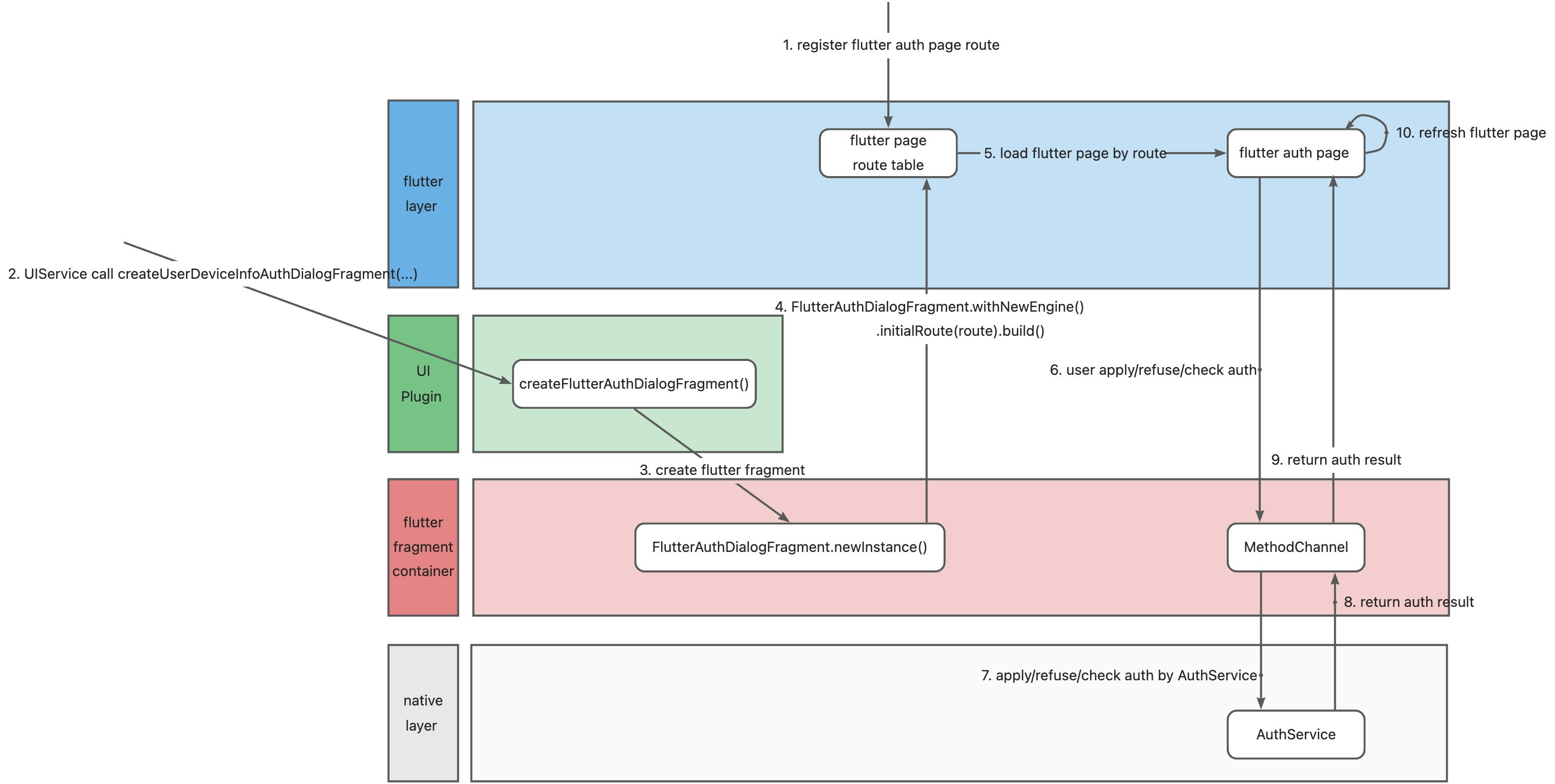
3.2.1 関連パッケージのインポート
    // build.gradle 内
    implementation "com.aliyun.emas.suite.foundation:mini-app-adapter:1.8.14"
    implementation "com.aliyun.emas.suite.foundation:windvane-mini-app:1.8.14"
    implementation "com.aliyun.emas.suite.foundation:mini-app-plugin-base:1.8.14"
// Podfile 内
pod 'EMASMiniAppAdapter', '1.1.4'
pod 'EMASWindVaneMiniApp', '1.2.5'
// Bluetooth 機能を利用する場合は、WindVaneBluetooth を追加します
pod 'WindVaneBluetooth', '1.0.2'
3.2.2 FlutterAuthDialogFragment の実装
Flutter ページをポップアップボックスの表示に利用するクライアントの場合、まず FlutterFragment コンテナを実装する必要があります。
public class FlutterAuthDialogFragment extends FlutterFragment {
    private static final String TAG = FlutterAuthDialogFragment.class.getName();


    // TODO: パラメーター引数の名前を変更し、フラグメント初期化時のパラメーターと整合する名前にしてください(例:ARG_ITEM_NUMBER)
    private static final String ARG_ROUTE = "route";
    private static final String ARG_PARAM2 = "param2";

    // TODO: 名前と型を適切に変更してください
    private String mRoute;
    private String mParam2;

    private MethodChannel mMethodChannel;


    public FlutterAuthDialogFragment(String route) {
        mRoute = route;
    }


    public static FlutterAuthDialogFragment newInstance(String route, String dartEntrypoint) {

        FlutterAuthDialogFragment flutterFragment = new FlutterAuthDialogFragment(route);
        Bundle args = new Bundle();
        args.putString(ARG_FLUTTERVIEW_TRANSPARENCY_MODE, TransparencyMode.transparent.name());
        flutterFragment.setArguments(args);
        return flutterFragment;
    }

    @Nullable
    @Override
    public FlutterEngine provideFlutterEngine(@NonNull Context context) {
        FlutterEngine flutterEngine = new FlutterEngine(context);
        flutterEngine.getNavigationChannel().setInitialRoute(mRoute);
        flutterEngine.getDartExecutor().executeDartEntrypoint(
                DartExecutor.DartEntrypoint.createDefault()
        );
        return flutterEngine;
    }


    @Override
    public void onAttach(@NonNull android.content.Context context) {
        super.onAttach(context);
        initializeMethodChannel();
    }

    @Override
    public void onCreate(Bundle savedInstanceState) {
        super.onCreate(savedInstanceState);
        if (getArguments() != null) {
            mRoute = getArguments().getString(ARG_ROUTE);
            mParam2 = getArguments().getString(ARG_PARAM2);
        }
    }

    private void initializeMethodChannel() {

        FlutterEngine flutterEngine = getFlutterEngine();
        if (flutterEngine == null) {
            Log.e("FlutterFragment", "FlutterEngine 未初期化");
            return;
        }

        mMethodChannel = new MethodChannel(flutterEngine.getDartExecutor().getBinaryMessenger(), "flutter_auth_dialog");
        mMethodChannel.setMethodCallHandler(new MethodChannel.MethodCallHandler() {
            @Override
            public void onMethodCall(@NonNull MethodCall call, @NonNull MethodChannel.Result result) {
                IAuthService authService = PluginEnv.getInstance().getContainerContext().getAuthService();


                if (FlutterUIPluginConstant.FLUTTER_APPROVAL_AUTH_ACTION.equals(call.method)) {

                    Log.i(TAG, "承認権限付与");

                    Map<String, Object> arguments = (Map<String, Object>)call.arguments;
                    String permission = (String)arguments.get("permission");
                    String userId = (String)arguments.get("userId");
                    String miniAppId = (String)arguments.get("miniAppId");


                    // 承認権限付与操作を処理
                    authService.saveAuth(FlutterAuthDialogFragment.this.getActivity(), permission, userId, miniAppId);

                    // 結果を Flutter コードに返却
                    result.success(true);
                } else if (FlutterUIPluginConstant.FLUTTER_CHECK_AUTH_ACTION.equals(call.method)) {
                    Log.i(TAG, "権限確認");

                    Map<String, Object> arguments = (Map<String, Object>)call.arguments;
                    String permission = (String)arguments.get("permission");
                    String userId = (String)arguments.get("userId");
                    String miniAppId = (String)arguments.get("miniAppId");

                    // 権限確認操作を処理
                    boolean isAuthorized = authService.isAuthorized(FlutterAuthDialogFragment.this.getActivity(), permission, userId, miniAppId);

                    // 結果を Flutter コードに返却
                    result.success(isAuthorized);
                } else {
                    result.notImplemented();
                }
            }
        });
    }

    @Override
    public void onDestroy() {
        super.onDestroy();
        if (mMethodChannel != null) {
            mMethodChannel.setMethodCallHandler(null);
        }
    }

}
iOS
import UIKit
import EMASMiniAppService

class EMASAliAuthUIViewController: FlutterViewController {
    var messageChannel: FlutterMethodChannel?
    var authBlock: (([AnyHashable : Any]) -> Void)?

    override func viewDidLoad() {
        super.viewDidLoad()
        self.view.backgroundColor = UIColor.init(white: 0.0, alpha: 0.5)
        //flutter_auth_dialog

    }

    func setAuthInfo(_ dic: [AnyHashable : Any]) {

        self.messageChannel = FlutterMethodChannel(name: "flutter_auth_dialog", binaryMessenger: self.binaryMessenger)

        self.messageChannel?.setMethodCallHandler({ [weak self] call, result in
            print("------\(call.method)")
            if call.method == "flutter_approval_auth_action" {
                self?.selectScope(call: call, result: result)

            }

        })

    }

    func selectScope(call: FlutterMethodCall, result: FlutterResult) {

        guard let arguments = call.arguments as? NSDictionary, let permission = arguments["permission"] as? String else {
            self.authBlock?(["code": EMAS_ERROR, "msg": "権限情報が取得できませんでした"])
            result(nil)
            return
        }
        print("------\(arguments)")
        self.authBlock?(["code": EMAS_CONFIRM, "msg": "", "data": [permission: true]])
        result(nil);

    }

}
3.2.3 Flutter 権限付与ページの実装
import 'package:flutter/material.dart';
import 'package:fluttertest/windvane.dart';

class AuthListPage extends StatefulWidget {

  const AuthListPage({super.key});

  @override
  State<StatefulWidget> createState() {
    return AuthListPageState();
  }

}

class AuthListPageState extends State<AuthListPage> {

  final List<String> permissionsItem = [
    "location",
    "album",
    "camera",
    "bluetooth",
    "contacts",
    "microphone",
    "file",
    "call",
    "vibrate",
    "screen",
  ];
  final List<bool> approvalItem = [
    false,
    false,
    false,
    false,
    false,
    false,
    false,
    false,
    false,
    false,
  ];


  @override
  Widget build(BuildContext context) {
    return SizedBox(
      height: 1000,
      child: ListView.builder(
        itemCount: permissionsItem.length,
        itemBuilder: (context, index) {
          return ListTile(
            title: Text(permissionsItem[index]),
            onTap: () {
              print("項目クリック:${permissionsItem[index]}");

              Map<String, String> args = {
                "permission": permissionsItem[index],
                "userId": "123",
                "miniAppId": "17856810363",
              };

              // ステップ 7:ユーザーによる権限付与/拒否
              WindVaneMiniAppManager.authChannel.invokeMethod(approvalItem[index] ? "flutter_revoke_auth_action" : "flutter_approval_auth_action", args).then((result) {

                // ステップ 9:権限付与結果の受信
                approvalItem[index] = result;

                // ステップ 10:画面のリフレッシュ
                setState(() {});
              });

            },
          );
        },
      ),
    );
  }
}
3.2.4 Flutter メソッドチャネルの実装
class WindVaneMiniAppManager {
  static const MethodChannel authChannel = const MethodChannel("flutter_auth_dialog");
}
3.2.5 Flutter ページルートの宣言
class MyApp extends StatelessWidget {
  @override
  Widget build(BuildContext context) {
    return MaterialApp(
      title: 'Flutter Demo',
      theme: ThemeData(
        primarySwatch: Colors.blue,
      ),

      onGenerateRoute: (RouteSettings settings) {
        final uri = Uri.parse(settings.name ?? '/');
        Map<String, String> params = uri.queryParameters;
        String path = uri.path;


        // ステップ 1:Flutter 権限付与ページのルート登録
        if (path == "/ui/auth") {

          return MaterialPageRoute(builder: (BuildContext context) {
            return AuthListPage();
          });

        } else if (path == "/ui/more") {

          return MaterialPageRoute(builder: (BuildContext context) {
            return const MoreDialogPage();
          });

        } else {
          ...
        }
      },
      initialRoute: 'home',
      builder: EasyLoading.init(),
    );
  }
}
3.2.6 プラグイン経由でのインタフェース実装
public class FlutterUIPlugin extends BasePlugin implements UIExtension {


    public FlutterUIPlugin(Context context) {
        super(context);
    }

    // ステップ 2:UIService が createUserDeviceInfoAuthDialogFragment(...) を呼び出して権限付与ダイアログフラグメントを作成
    @Override
    public Fragment createUserDeviceInfoAuthDialogFragment(HashMap<String, Object> params) {

        // "/ui/auth" は Flutter ページのルートです
        FlutterFragment fragment = FlutterAuthDialogFragment.newInstance("/ui/auth", params);
        return fragment;
    }

    ...
}
iOS
import UIKit
import EMASMiniAppService

class EMASAliCustomUIPlugin: EMASBasePlugin, EMASIUIExtension {

    func createUserDeviceInfoAuthDialogViewController(_ uiComponentParam: EMASUIComponentParam) -> UIViewController? {
        let vc = EMASAliAuthUIViewController()
        vc.setAuthInfo(uiComponentParam.params)
        vc.authBlock = uiComponentParam.completionBlock
        vc.setInitialRoute("/ui/auth")
        return vc
    }
}
3.2.7 プラグインの登録
    private void initWindVaneMiniApp() {

        // 1. MiniAppService のパラメーターを設定
        MiniAppInitConfig config = new MiniAppInitConfig.Builder()
                .setUseWindVane(true)
                .setUseUniApp(false)
                .setHost("poc.superapp-intl.com")
                .setAppCode("YourAppCode")
                .setAccessKey("YourAccessKey")
                .setSecretKey("YourSecretKey")
                .build();

        // 2. MiniAppService オブジェクトを作成し、初期化
        IMiniAppService miniAppService = new MiniAppService();
        miniAppService.initialize(application, config);

        ...

        // 3. プラグインを登録
        miniAppService.registerPlugin("FlutterUIPlugin", FlutterUIPlugin(this));
    }
iOS
    private func configMiniAppContainer() {
        // 1. MiniAppService のパラメーターを設定
        let miniAppInitConfig = EMASMiniAppInitConfig()
        miniAppInitConfig.accessKey = "YourAccessKey";
        miniAppInitConfig.secretKey = "YourSecretKey";
        miniAppInitConfig.host = "poc.superapp-intl.com";
        miniAppInitConfig.appCode = "YourAppCode";
        miniAppInitConfig.useUniApp = false
        miniAppInitConfig.useWindVane = true
        // 2. MiniAppService オブジェクトを作成し、初期化
        let miniAppService = EMASMiniAppServiceImpl();
        miniAppService.initialize(miniAppInitConfig)
        EMASServiceManager.sharedInstance().registerServiceProtocol("EMASMiniAppService", impClass: "EMASMiniAppServiceImpl", target: miniAppService)
        // 3. プラグインを登録
        let aliUIPlugin = EMASAliCustomUIPlugin()
        miniAppService.registerPlugin("EMASAliCustomUIPlugin", plugin: aliUIPlugin)
    }
3.3 Flutter 半透明ページ
3.3.1 半透明ページ
|
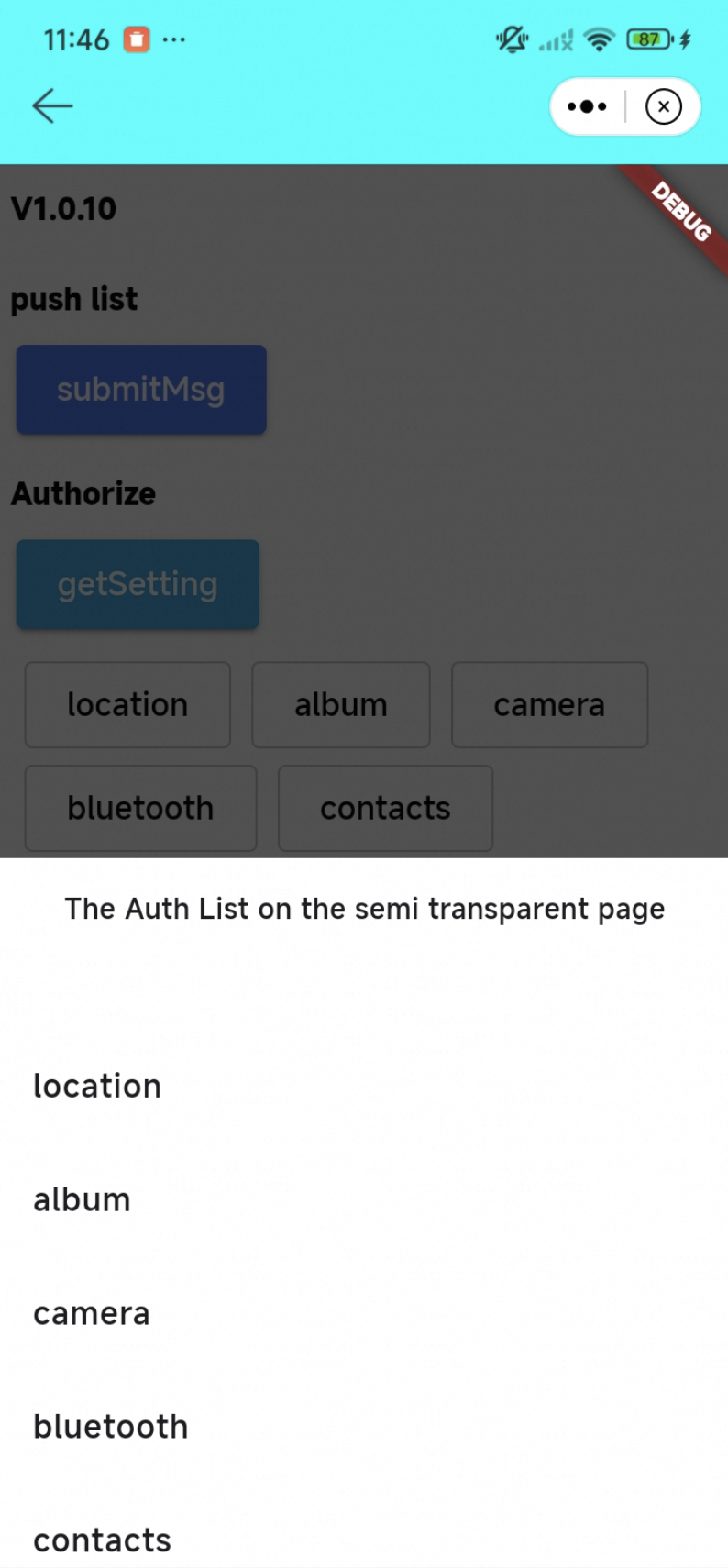
3.3.2 「main.dart」で、MaterialApp のバックグラウンドを透明に設定します:
void main() {
  runApp(
    MaterialApp(

      // 透明なバックグラウンドを設定
      theme: ThemeData(
        scaffoldBackgroundColor: Colors.transparent,
        canvasColor: Colors.transparent,
      ),


      onGenerateRoute: (RouteSettings settings) {
        final uri = Uri.parse(settings.name ?? '/');
        Map<String, String> params = uri.queryParameters;
        String path = uri.path;

        if (path == "/ui/auth") {
          return MaterialPageRoute(builder: (BuildContext context) {
            return AuthListPage();
          });
        } else {
          return MaterialPageRoute(builder: (BuildContext context) {
            return MyHomePage(title: settings.name.toString());
          });
        }
      },
    ),
  );
}
3.3.3 半透明 Flutter ページのデモ
class AuthListPage extends StatefulWidget {

  const AuthListPage({super.key});

  @override
  State<StatefulWidget> createState() {
    return AuthListPageState();
  }

}

class AuthListPageState extends State<AuthListPage> {

  final List<String> permissionsItem = [
    "location",
    "album",
    "camera",
    "bluetooth",
    "contacts",
    "microphone",
    "file",
    "call",
    "vibrate",
    "screen",
  ];
  final List<bool> approvalItem = [
    false,
    false,
    false,
    false,
    false,
    false,
    false,
    false,
    false,
    false,
  ];


  @override
  Widget build(BuildContext context) {
    return Column(
      children: [
        Expanded(
          child: Container(
            // 半透明値を設定
            color: Colors.black.withOpacity(0.65),
          ),
        ),
        Column(
          crossAxisAlignment: CrossAxisAlignment.start,
          children: [
            Container(
              height: 50,
              color: Colors.white,
              alignment: Alignment.center,
              child: const Text("半透明ページ上の権限一覧"),
            ),
            Container(
              height: 300,
              color: Colors.white,
              child: ListView.builder(
                itemCount: permissionsItem.length,
                itemBuilder: (context, index) {
                  return ListTile(
                    title: Text(permissionsItem[index]),
                    onTap: () {
                      print("項目をクリック:${permissionsItem[index]}");

                      Map<String, String> args = {
                        "permission": permissionsItem[index],
                        "userId": "123",
                        "miniAppId": "17856810363",
                      };

                      // ステップ 7:ユーザーによる権限付与/拒否
                      WindVaneMiniAppManager.authChannel.invokeMethod(approvalItem[index] ? "flutter_revoke_auth_action" : "flutter_approval_auth_action", args).then((result) {

                        // ステップ 9:権限処理結果の受信
                        approvalItem[index] = result;

                        // ステップ 10:ページのリフレッシュ
                        setState(() {});
                      });

                    },
                  );
                },
              ),
            ),
          ],
        ),
      ],
    );
  }
}
3.3.4 FlutterFragment の作成と透過性の設定
3.3.4.1 Android 向け
  public static FlutterAuthDialogFragment newInstance(String route, String dartEntrypoint) {

        FlutterAuthDialogFragment flutterFragment = new FlutterAuthDialogFragment(route);
        Bundle args = new Bundle();
        args.putString(ARG_FLUTTERVIEW_TRANSPARENCY_MODE, TransparencyMode.transparent.name());
        flutterFragment.setArguments(args);
        return flutterFragment;
    }
3.3.4.2 iOS 向け
   override func viewDidLoad() {
        super.viewDidLoad()
        self.view.backgroundColor = UIColor.init(white: 0.0, alpha: 0.5)
        //flutter_auth_dialog

    }
3.3.5 詳細な内容について
詳細については、「flutter_windvane_demo」プロジェクトのブランチ feature/flutter_page_in_native をご参照ください。
4 一般的なインターフェイス
認証インターフェイス
4.1.1 Android での場合
SDK 内の認証インターフェイス
public interface IAuthService {

    public boolean saveAuth(Context context, String scope, String userId, String miniAppId);

    public boolean saveAuthList(Context context, List<String> scopes, String userId, String miniAppId);

    public boolean revokeAuth(Context context, String scope, String userId, String miniAppId);

    public boolean revokeAuthList(Context context, List<String> scopes, String userId, String miniAppId);

    public String queryAuthInfo(Context context, String userId, String miniAppId);

    public boolean isAuthorized(Context context, String scope, String userId, String miniAppId);

}
AuthService の使用方法
    IAuthService authService = PluginEnv.getInstance().getContainerContext().getAuthService();
    authService.saveAuth(context, scope, userId, miniAppId);
4.1.2 iOS の場合
SDK 内の認証インターフェイス
@protocol EMASIAuthService <NSObject>

@optional

- (BOOL)saveAuth:(NSString *)scope userId:(NSString *)userId miniAppId:(NSString *)miniAppId;
- (BOOL)saveAuthList:(NSArray<NSString *> *)scopes userId:(NSString *)userId miniAppId:(NSString *)miniAppId;

- (BOOL)revokeAuth:(NSString *)scope userId:(NSString *)userId miniAppId:(NSString *)miniAppId;
- (BOOL)revokeAuthList:(NSArray<NSString *> *)scopes userId:(NSString *)userId miniAppId:(NSString *)miniAppId;

- (NSDictionary *)queryAuthInfo:(NSString *)userId miniAppId:(NSString *)miniAppId;
- (BOOL)isAuthorized:(NSString *)scope userId:(NSString *)userId miniAppId:(NSString *)miniAppId;

@end
AuthService の使用方法
EMASPluginEnv.shareInstance().getContainerContext().getAuthService().saveAuthList!(scopes, userId: userId, miniAppId: miniAppId)
UI インターフェイス
4.2.1 Android
SDK 内の UI インターフェイス
public interface UIExtension {

       // 「図 1」を参照して、[その他] ダイアログの作成に使用します(例:スタイルの参考)
    public default Fragment createMoreDialogFragment(UIComponentParam uiComponentParam) {
        return  NoExistFragment.newInstance();
    }

    // 「図 2」を参照して、[お気に入り] ダイアログの作成に使用します(例:スタイルの参考)
    public default Fragment createFavoriteDialogFragment(UIComponentParam uiComponentParam) {
        return NoExistFragment.newInstance();
    }

    // 「図 3」を参照して、[認証] ダイアログの作成に使用します(例:スタイルの参考)
    public default Fragment createUserDeviceInfoAuthDialogFragment(UIComponentParam uiComponentParam) {
        return NoExistFragment.newInstance();
    }

    // 「図 5」を参照して、[エラー] サブページの作成に使用します(例:スタイルの参考)
    public default Fragment createErrorPageFragment(UIComponentParam uiComponentParam) {
        return NoExistFragment.newInstance();
    }

    // 「図 6」を参照して、[スプラッシュ] サブページの作成に使用します(例:スタイルの参考)
    public default Fragment createSplashPageFragment(UIComponentParam uiComponentParam) {
        return NoExistFragment.newInstance();
    }

    // 「図 8」を参照して、[当社について] ダイアログの作成に使用します(例:スタイルの参考)
    public default Fragment createAboutUsDialogFragment(UIComponentParam uiComponentParam) {
        return NoExistFragment.newInstance();
    }
    // 「図 7」を参照して、[ユーザー情報認証] サブページの作成に使用します(例:スタイルの参考)
    public default Fragment createUserInfoAuthPageFragment(UIComponentParam uiComponentParam) {
        return NoExistFragment.newInstance();
    }
}
public class UIComponentParam {
private UIResultCallBack uiResultCallBack;
private Context context;
private HashMap<String, Object> params;
/**
* uiResultCallBack:返却されるデータ
* data:送信するデータ
* **/
public UIComponentParam(UIResultCallBack uiResultCallBack, HashMap<String, Object> data, Context context) {
this.uiResultCallBack = uiResultCallBack;
this.params = data;
this.context = context;
}
public UIResultCallBack getUiResultCallBack() {
return uiResultCallBack;
}
public HashMap<String, Object> getParams() {
return params;
}
public Context getContext() {
return context;
}
}4.2.2 iOS の場合
@protocol EMASIUIExtension <NSObject>

@optional

// 「図 1」を参照して、[その他] ダイアログの作成に使用します(例:スタイルの参考)
- (nullable UIViewController *)createMoreDialogViewController:(EMASUIComponentParam *)uiComponentParam;

// 「図 2」を参照して、[お気に入り] ダイアログの作成に使用します(例:スタイルの参考)
- (nullable UIViewController *)createFavoriteDialogViewController:(EMASUIComponentParam *)uiComponentParam;

// 「図 3」を参照して、[認証] ダイアログの作成に使用します(例:スタイルの参考)
- (nullable UIViewController *)createUserDeviceInfoAuthDialogViewController:(EMASUIComponentParam *)uiComponentParam;

// 「図 5」を参照して、[エラー] サブページの作成に使用します(例:スタイルの参考)
- (nullable UIViewController *)createErrorPageViewController:(EMASUIComponentParam *)uiComponentParam;

// 「図 6」を参照して、[スプラッシュ] サブページの作成に使用します(例:スタイルの参考)
- (nullable UIViewController *)createSplashPageViewController:(EMASUIComponentParam *)uiComponentParam;

// 「図 8」を参照して、[当社について] ダイアログの作成に使用します(例:スタイルの参考)
- (nullable UIViewController *)createAboutUsDialogViewController:(EMASUIComponentParam *)uiComponentParam;

- (nullable UIViewController *)createSettingsDialogViewController:(EMASUIComponentParam *)uiComponentParam;


@end
@interface EMASUIComponentParam : NSObject
@property (nonatomic, strong) NSDictionary * params;
@property (nonatomic, copy) void(^completionBlock)(NSDictionary *resultDict);
@endFOUNDATION_EXPORT NSString * _Nonnull const EMAS_CANCEL;
FOUNDATION_EXPORT NSString * _Nonnull const EMAS_CONFIRM;
FOUNDATION_EXPORT NSString * _Nonnull const EMAS_RESTART_MINIAPP;
FOUNDATION_EXPORT NSString * _Nonnull const EMAS_EXIT_MINIAPP;
FOUNDATION_EXPORT NSString * _Nonnull const EMAS_ERROR;
FOUNDATION_EXPORT NSString * _Nonnull const EMAS_OPEN_ABOUT;
FOUNDATION_EXPORT NSString * _Nonnull const EMAS_OPEN_SETTING;
5. SDK の新しいデフォルト UI
図 1 さらにダイアログ |
|
図 2 お気に入りダイアログ |
|
図 3 認証ダイアログ |
|
図 4 ローディングダイアログ |
|
図 5 エラーページ |
|
図 6 スプラッシュページ |
|
図 7 ユーザー情報認証ページ |
|
図 8 当社について ダイアログ |
|
|