このトピックでは、動的配信、クロスアカウント配信、動的なクロスアカウント配信、複雑な動的配信など、複数の Logstore にデータを配信するためのさまざまなシナリオと各手順を説明します。
背景情報
Log Service のデータ変換機能を使用すると、結果を複数の Logstore に配信できます。AccessKey ペアを使用して異なるアカウントの Logstore に結果を送信したり、e_output および e_coutput 関数を使用して結果を特定のプロジェクトおよび Logstore に動的にルーティングしたりできます。
-
結果は最大 20 のアカウントにまたがる Logstore に配信できます。
-
e_output関数は、指定された Logstore にログを送信し、後続の変換ルールの適用を停止します。ログを送信した後もルールの適用を続けるには、e_coutput関数を使用します。詳細については、「e_output および e_coutput 関数」をご参照ください。本トピックでは、e_output関数を例に説明します。
シナリオ 1:クロスアカウント配信
たとえば、あるウェブサイトのすべてのアクセスログは、単一の Logstore に保存されています。HTTP ステータスが異なるログを、異なるアカウントの Logstore に転送したいとします。
これは、Log Service のデータ変換機能を使用して実現できます。
-
生ログ
http_host: example.com http_status: 200 request_method: GET request_uri: /pic/icon.jpg scheme: https http_host: example.org http_status: 301 request_method: POST request_uri: /data/data.php scheme: http http_host: example.net http_status: 404 request_method: GET request_uri: /category/abc/product_id scheme: https http_host: aliyundoc.com http_status: 504 request_method: GET request_uri: /data/index.html scheme: https -
配信要件
-
http_status が 2XX のログを、ストレージターゲット target0 の Logstore0 に保存し、トピックを success_event に設定します。
-
http_status が 3XX のログを、ストレージターゲット target1 の Logstore1 に配信し、トピックを redirection_event に設定します。
-
http_status が 4XX のログを、ストレージターゲット target2 の Logstore2 に配信し、トピックを unauthorized_event に設定します。
-
http_status が 5XX のログを、ストレージターゲット target3 の Logstore3 に配信し、トピックを internal_server_error_event に設定します。
target0 はアカウント A に属し、target1、target2、target3 はアカウント B に属します。
-
-
変換ルール
e_switch(e_match("status", r"2\d+"), e_set("__topic__", "success_event"), e_match("status", r"3\d+"), e_compose(e_set("__topic__", "redirection_event"), e_output("target1")), e_match("status", r"4\d+"), e_compose(e_set("__topic__", "unauthorized_event"), e_output("target2")), e_match("status", r"5\d+"), e_compose(e_set("__topic__", "internal_server_error_event"), e_output("target3")) ) -
ストレージターゲット
[データ変換ジョブの作成] パネルで、ストレージターゲットを設定します。 詳細については、「データ変換ジョブを作成する」をご参照ください。 ターゲット 2 (target1) のターゲットリージョンは 中国 (北京) で、そのエンドポイントは
https://cn-beijing.log.aliyuncs.comです。 ターゲット 3 (target2) のターゲットリージョンは 中国 (杭州) - 現在のリージョン で、そのエンドポイントはcn-hangzhou-intranet.log.aliyuncs.comです。ラベル
ストレージターゲット
送信先プロジェクトと Logstore
AccessKey
1
target0
Project0、Logstore0
アカウント A の AccessKey ペア
2
target1
Project1、Logstore1
アカウント B の AccessKey ペア
3
target2
Project2、Logstore2
アカウント B の AccessKey ペア
4
target3
Project3、Logstore3
アカウント B の AccessKey ペア
-
変換結果
## http_status が 2xx のログは、アカウント A の Logstore0 に配信されます。
__topic__:  success_event
http_host:  example.com
http_status:  200
request_method:  GET
request_uri:  /pic/icon.jpg
scheme:  https
## http_status が 3xx のログは、アカウント B の Logstore1 に配信されます。
__topic__:  redirection_event
http_host:  example.org
http_status:  301
request_method:  POST
request_uri:  /data/data.php
scheme:  http
## http_status が 4xx のログは、アカウント B の Logstore2 に配信されます。
__topic__: unauthorized_event
http_host:  example.net
http_status:  404
request_method:  GET
request_uri:  /category/abc/product_id
scheme:  https
## http_status が 5xx のログは、アカウント B の Logstore3 に配信されます。
__topic__: internal_server_error_event
http_host:  aliyundoc.com
http_status:  504
request_method:  GET
request_uri:  /data/index.html
scheme:  https
シナリオ 2:シンプルな動的配信
たとえば、Web サイトのすべてのアクセスログが単一の Logstore に保存されているとします。このシナリオでは、これらのログを project および logstore フィールドに基づいて、異なる Logstore に配信します。
これは、Log Service のデータ変換機能を使用して実現できます。
-
生ログ
__tag__:type: dynamic_dispatch host: example.aliyundoc.com project: Project1 logstore: Logstore1 http_status: 200 request_method: GET request_uri: /pic/icon.jpg scheme: https __tag__:type: dynamic_dispatch host: demo.aliyundoc.com project: Project1 logstore: Logstore2 http_status: 301 request_method: POST request_uri: /data/data.php scheme: http __tag__:type: dynamic_dispatch host: learn.aliyundoc.com project: Project2 logstore: Logstore1 http_status: 404 request_method: GET request_uri: /category/abc/product_id scheme: https __tag__:type: dynamic_dispatch host: guide.aliyundoc.com project: Project2 logstore: Logstore2 http_status: 504 request_method: GET request_uri: /data/index.html scheme: https -
配信要件
-
ログを、project および logstore フィールドの値に基づいて動的に配信します。
-
値が dynamic_dispatch の tag:type フィールドをログに追加します。
-
-
変換ルール
e_output(project=v("project"), logstore=v("logstore"), tags={"type": "dynamic_dispatch"})e_output 関数は、project フィールドと logstore フィールドの値を動的に抽出し、ログを配信します。
-
ストレージターゲット
[データ変換ジョブの作成] ページで、デフォルトのストレージターゲットのみを設定する必要があります。このターゲットは、変換プロセス中に破棄されないログの保存に使用されます。
説明このシナリオでは、動的ディストリビューションの宛先の Project と Logstore は、
e_output関数の設定によって決定されます。この宛先は、[データ変換ジョブの作成] ページでデフォルトのストレージターゲット (ラベル 1) に設定されているものとは独立しています。デフォルトのストレージターゲット (ラベル 1) の設定例:[ターゲット名] を
target0に、[送信先リージョン] を China (Zhangjiakou) に、[送信先プロジェクト] をProject0に、[送信先 Logstore] をLogstore0に設定します。[権限付与方法] では、[デフォルトロール] を選択します。 -
変換結果
## Project1 の Logstore1 に配信。
__tag__:type: dynamic_dispatch
host:  example.aliyundoc.com
project: Project1
logstore: Logstore1
http_status:  200
request_method:  GET
request_uri:  /pic/icon.jpg
scheme:  https
## Project1 の Logstore2 に配信。
__tag__:type: dynamic_dispatch
host:  demo.aliyundoc.com
project: Project1
logstore: Logstore2
http_status:  301
request_method:  POST
request_uri:  /data/data.php
scheme:  http
## Project2 の Logstore1 に配信。
__tag__:type:  dynamic_dispatch
host:   learn.aliyundoc.com
project: Project2
logstore: Logstore1
http_status:  404
request_method:  GET
request_uri:  /category/abc/product_id
scheme:  https
## Project2 の Logstore2 に配信。
__tag__:type: dynamic_dispatch
host:   guide.aliyundoc.com
project: Project2
logstore: Logstore2
http_status:  504
request_method:  GET
request_uri:  /data/index.html
scheme:  https
シナリオ 3:動的なクロスアカウント配信
たとえば、Web サイトのすべてのアクセスログが単一の Logstore に保存されているとします。このシナリオでは、ログ内の project および logstore フィールドに基づいて、ログを異なるアカウントの Logstore に動的にルーティングします。
これは、Log Service のデータ変換機能を使用して実現できます。
-
生ログ
host: example.aliyundoc.com project: Project1 logstore: Logstore1 http_status: 200 request_method: GET request_uri: /pic/icon.jpg scheme: https host: demo.aliyundoc.com project: Project1 logstore: Logstore2 http_status: 301 request_method: POST request_uri: /data/data.php scheme: http host: learn.aliyundoc.com project: Project2 logstore: Logstore1 http_status: 404 request_method: GET request_uri: /category/abc/product_id scheme: https host: guide.aliyundoc.com project: Project2 logstore: Logstore2 http_status: 504 request_method: GET request_uri: /data/index.html scheme: https -
配信要件
データを、ログ内の project および logstore フィールドの値に基づいて、異なるアカウントのプロジェクトに動的に配信します。たとえば、Project1 (Logstore1 と Logstore2 を含む) はアカウント A に属し、Project2 (Logstore1 と Logstore2 を含む) はアカウント B に属します。
-
変換ルール
e_switch(e_match(v("project"), "Project1"), e_output(name="target1", project=v("project"), logstore=v("logstore")), e_match(v("project"), "Project2"), e_output(name="target2", project=v("project"), logstore=v("logstore"))) -
ストレージターゲット
[データ変換ジョブの作成] ページで、ストレージターゲットを設定します。詳細については、「データ変換ジョブを作成する」をご参照ください。
説明このシナリオでは、宛先の Project と Logstore は
e_output関数の設定によって決まります。この宛先は、[データ変換ジョブの作成] ページで設定するデフォルトのストレージターゲット (ラベル 1) の宛先とは独立しています。各ストレージターゲットの [権限付与方法] で [AccessKey ペア] を選択し、対応するアカウントの [AccessKey ID] と [AccessKey Secret] を入力します。
ラベル
ストレージターゲット
送信先プロジェクトと Logstore
AccessKey
1
target0
Project0、Logstore0
該当なし
2
target1
任意の値に設定できます。送信先は
e_output関数によって決定されます。アカウント A の AccessKey ペア
3
target2
任意の値に設定できます。送信先は
e_output関数によって決定されます。アカウント B の AccessKey ペア
-
変換結果
## アカウントAのProject1、Logstore1に配信。
host:  example.aliyundoc.com
project: Project1
logstore: Logstore1
http_status:  200
request_method:  GET
request_uri:  /pic/icon.jpg
scheme:  https
## アカウントAのProject1、Logstore2に配信。
host:  demo.aliyundoc.com
project: Project1
logstore: Logstore2
http_status:  301
request_method:  POST
request_uri:  /data/data.php
scheme:  http
## アカウントBのProject2、Logstore1に配信。
host:   learn.aliyundoc.com
project: Project2
logstore: Logstore1
http_status:  404
request_method:  GET
request_uri:  /category/abc/product_id
scheme:  https
## アカウントBのProject2、Logstore2に配信。
host:   guide.aliyundoc.com
project: Project2
logstore: Logstore2
http_status:  504
request_method:  GET
request_uri:  /data/index.html
scheme:  https
シナリオ 4:複雑な動的配信
たとえば、ある企業がゲームの広告を掲載し、そのゲームのすべての API リクエストログを単一の Logstore に保存しているとします。ここでは、user_agent リクエストヘッダーを解析して、異なるデバイス (iOS、Android、Windows) からのリクエストを別々の Logstore にルーティングし、request_method フィールドを分析して広告コンバージョン率を計算します。
これらの要件は、Log Service のデータ変換機能とクエリと分析機能を使用して実現できます。
-
生ログ
__source__:127.0.0.0 __tag__:__receive_time__: 1589541467 ip:10.0.0.0 request_method: GET user_agent: Mozilla/5.0 (Macintosh; Intel Mac OS X 10.9; rv:50.0) Gecko/20100101 Firefox/50.0 -
配信要件
-
Windows ユーザーからのリクエストログを、ストレージターゲット
target1の Logstore1 に配信します。 -
iOS ユーザーからのリクエストログを、ストレージターゲット
target2の Logstore2 に配信します。 -
Android ユーザーからのリクエストログを、ストレージターゲット
target3の Logstore3 に配信します。
-
-
変換ルール
この例では、ua_parse_os 関数を使用して user_agent フィールドを解析し、dct_get 関数を使用してリクエストヘッダーからオペレーティングシステム情報を取得し、e_set 関数を使用して os という名前の新しいフィールドを追加し、その値をオペレーティングシステム情報に設定できます。その後、e_output 関数と条件付き関数を使用して動的配信を実行できます。
e_set("os", dct_get(ua_parse_os(v("user_agent")),"family")) e_if(e_search("os==Windows"),e_output(name="target1")) e_if(e_search("os==iOS"),e_output(name="target2")) e_if(e_search("os==Android"),e_output(name="target3")) -
ストレージターゲット
[データ変換ジョブの作成] ページで、ストレージターゲットを設定します。 詳細については、「データ変換ジョブを作成する」をご参照ください。
各ストレージターゲットで、[ターゲット名]、[送信先プロジェクト]、および [送信先 Logstore] を設定します。また、[送信先リージョン] (例: China (Hangzhou)) と [権限付与方法] (デフォルトロール または カスタムロール) を選択する必要があります。[カスタムロール] を選択した場合は、[ロール ARN] を指定する必要があります。
ラベル
ストレージターゲット
送信先プロジェクトと Logstore
1
target0
Project0、Logstore0
2
target1
Project1、Logstore1
3
target2
Project2、Logstore2
4
target3
Project3、Logstore3
-
クエリと分析
送信先 Logstore でクエリを実行し、広告コンバージョン率を判定します。次の結果は、Android ユーザーのコンバージョン率が高いことを示しています。詳細については、「クエリと分析のクイックスタート」をご参照ください。
-
Logstore2 の [検索と分析] ページで、次のクエリを実行して、iOS ユーザーからの GET および POST リクエストをカウントします。
* | SELECT request_method, COUNT(*) as number GROUP BY request_method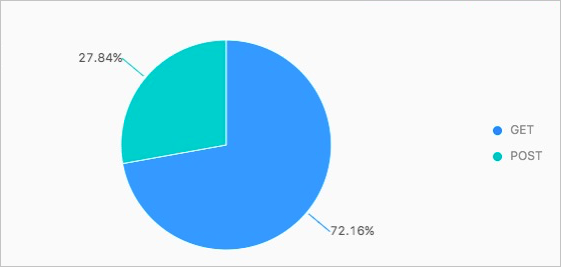
-
Logstore3 の [検索と分析] ページで、次のクエリを実行して、Android ユーザーからの GET および POST リクエストをカウントします。
* | SELECT request_method, COUNT(*) as number GROUP BY request_method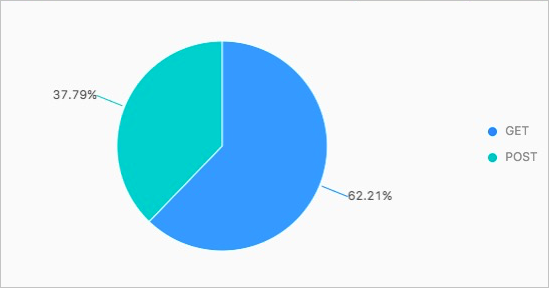
-