このドキュメントは、クイック トラッキングと技術統合の概要であり、販売基準として使用されるものではありません。企業が購入した特定の製品および技術サービスについては、商業購入契約が優先されます。
概要
タッチ チャネルを使用して、メールや Webhook など、監視アラートのプッシュ チャネルを設定できます。設定後、監視アラートの情報はこのチャネルを通じて到達できます。
有効範囲:組織の範囲内で有効です。
はじめに
メール設定
次の図は、送信メールアドレス、メール認証コード、および SMTP を構成する方法を示しています。
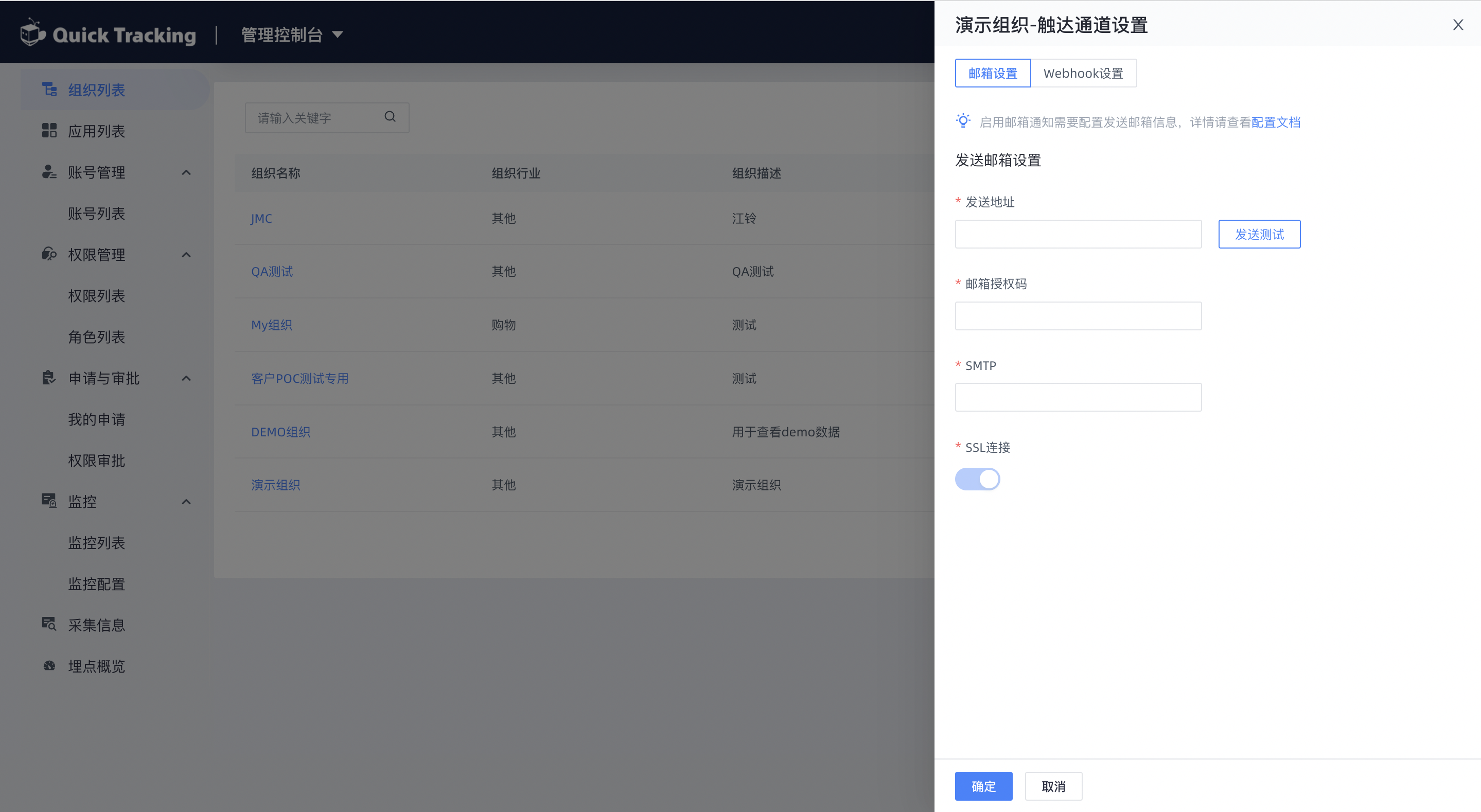
送信アドレス:メールの送信先メールアドレス(例:「c***@1*.com」)。
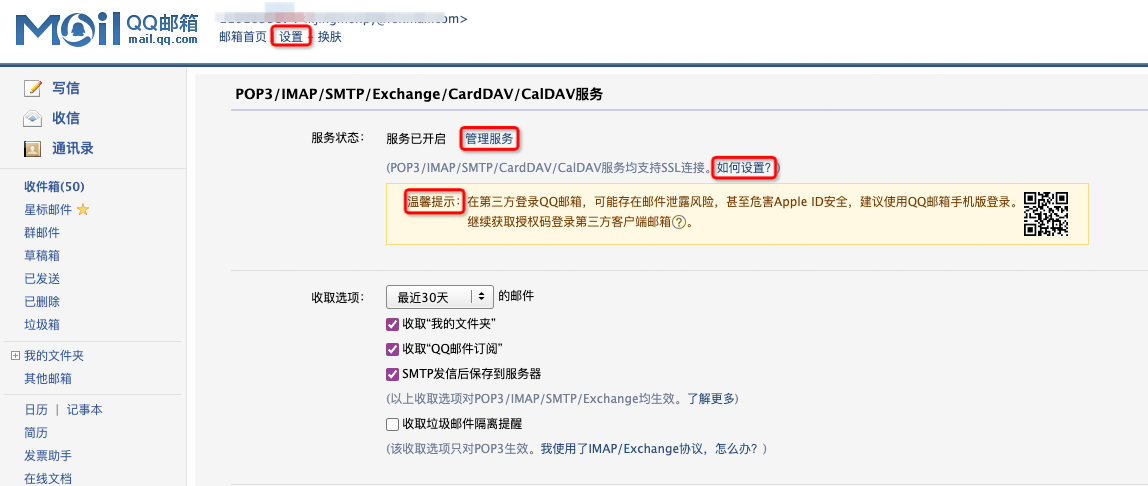
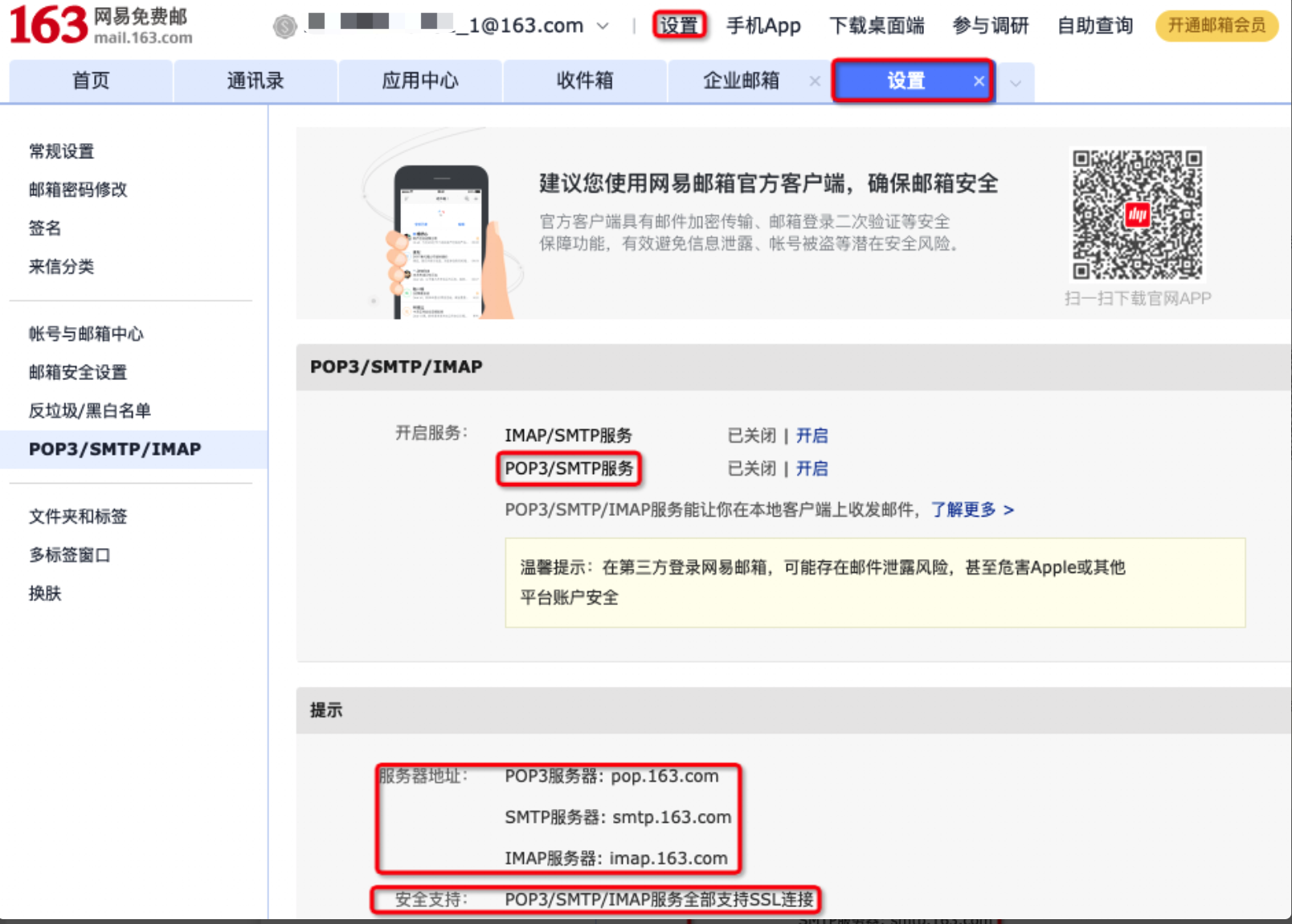
メール認証コードと SMTP(送信サーバーアドレス)を取得します。
QQ メールを例にとります。メールボックスの「設定 - アカウント - POP3/IMAP/SMTP/Exchange/CardDAV/CalDAV サービス」セクションで、POP3/SMTP サービスの「有効にする」をクリックし、携帯電話のメッセージを使用して認証コードを生成します。
163 NetEase メールを例にとります。「設定 - POP3/SMTP/IMAP」ページで、IMAP/SMTP の「開く」をクリックし、SMS で認証コードを生成します。
グループ Webhook チャネル
Webhook モードを選択し、設定を追加します。プラットフォーム名はカスタマイズできます(DingTalk グループ名に設定して、区別しやすくできます)。
Webhook は DingTalk グループにプッシュできます。

Webhook リンクを取得する
1. まず、受信グループにカスタム ロボット 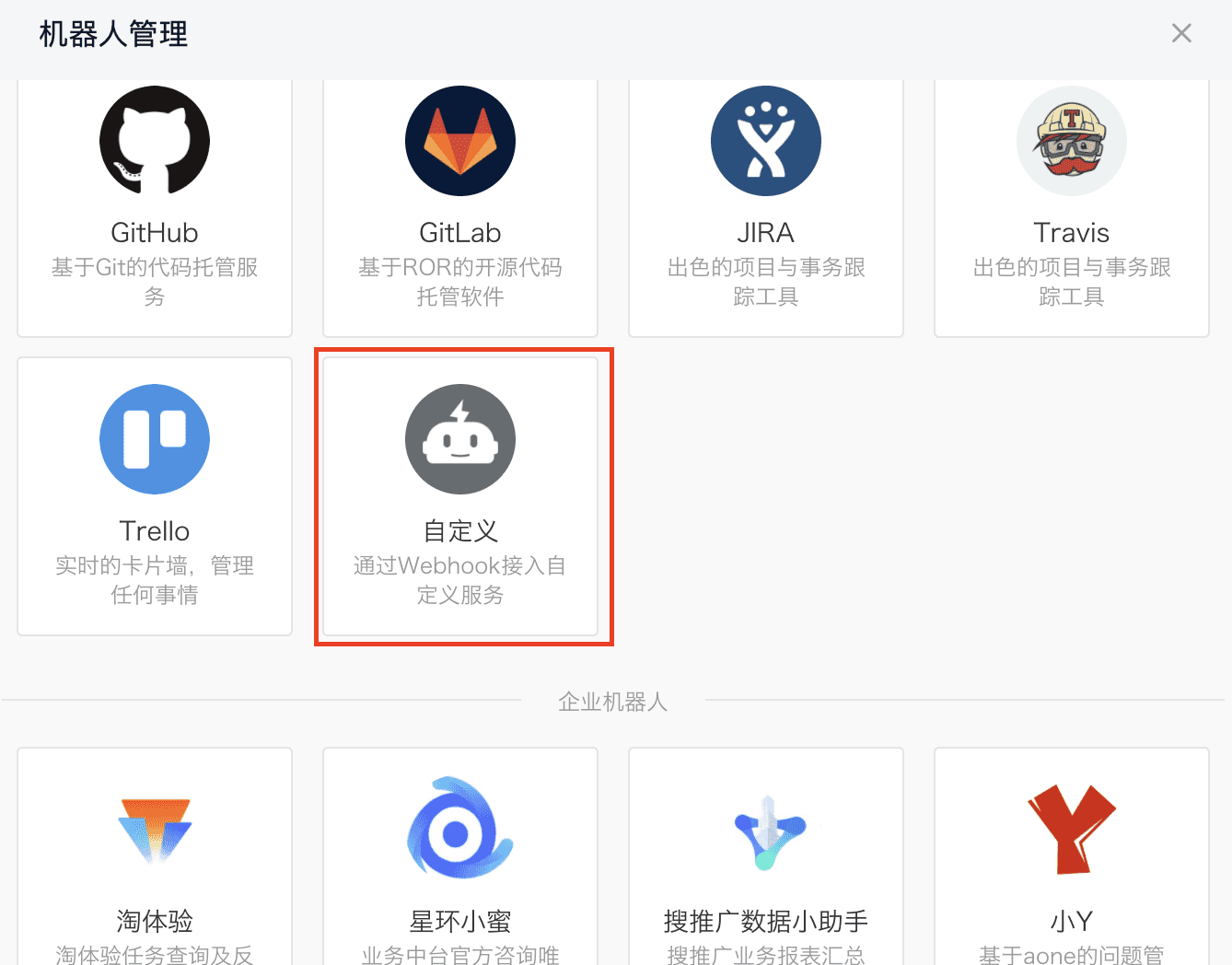 を追加する必要があります。
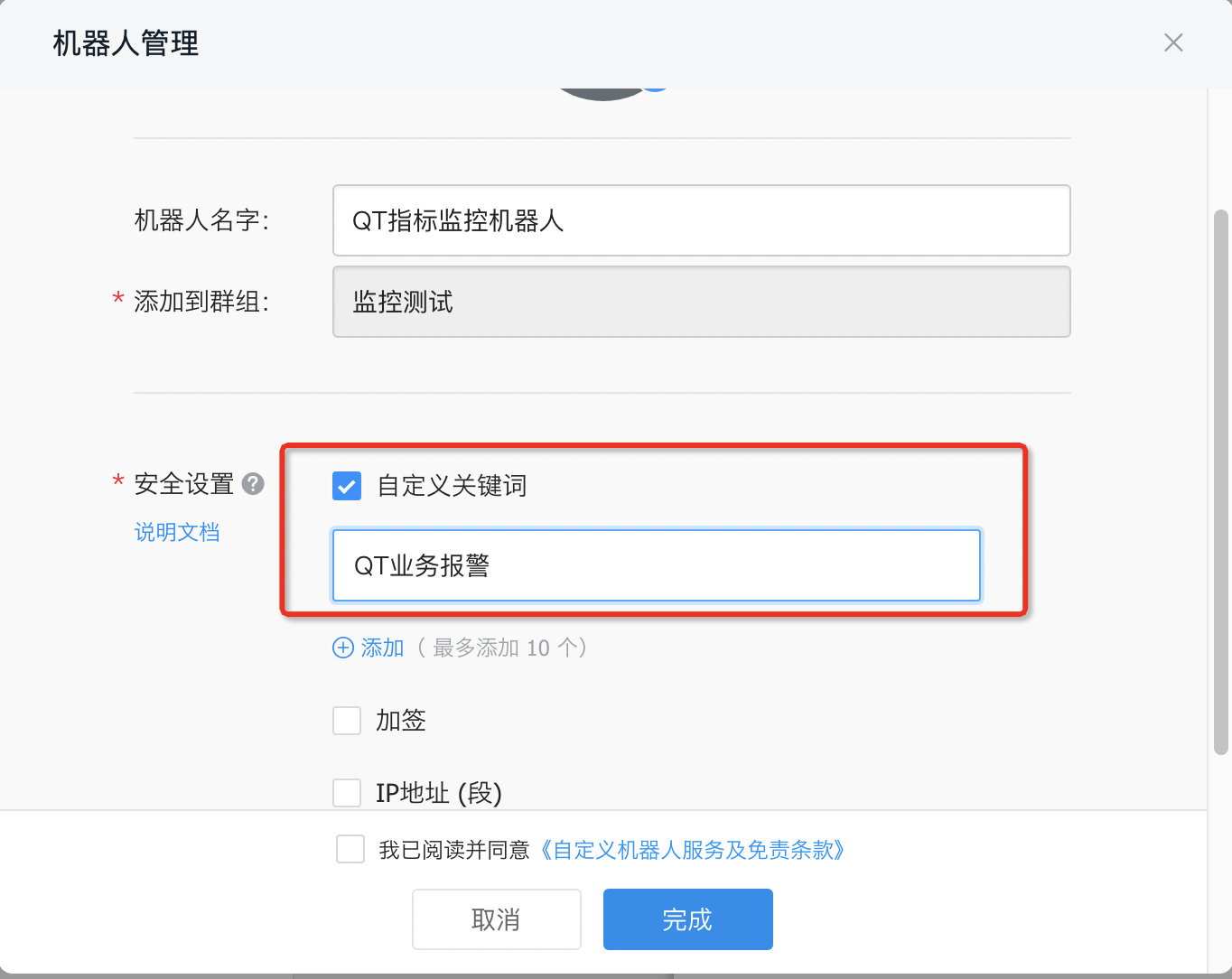
2. DingTalk ロボット セット キーワードで、以下のように設定します。
2. DingTalk ロボットでキーワードを設定します。
3. Webhook URL を取得する 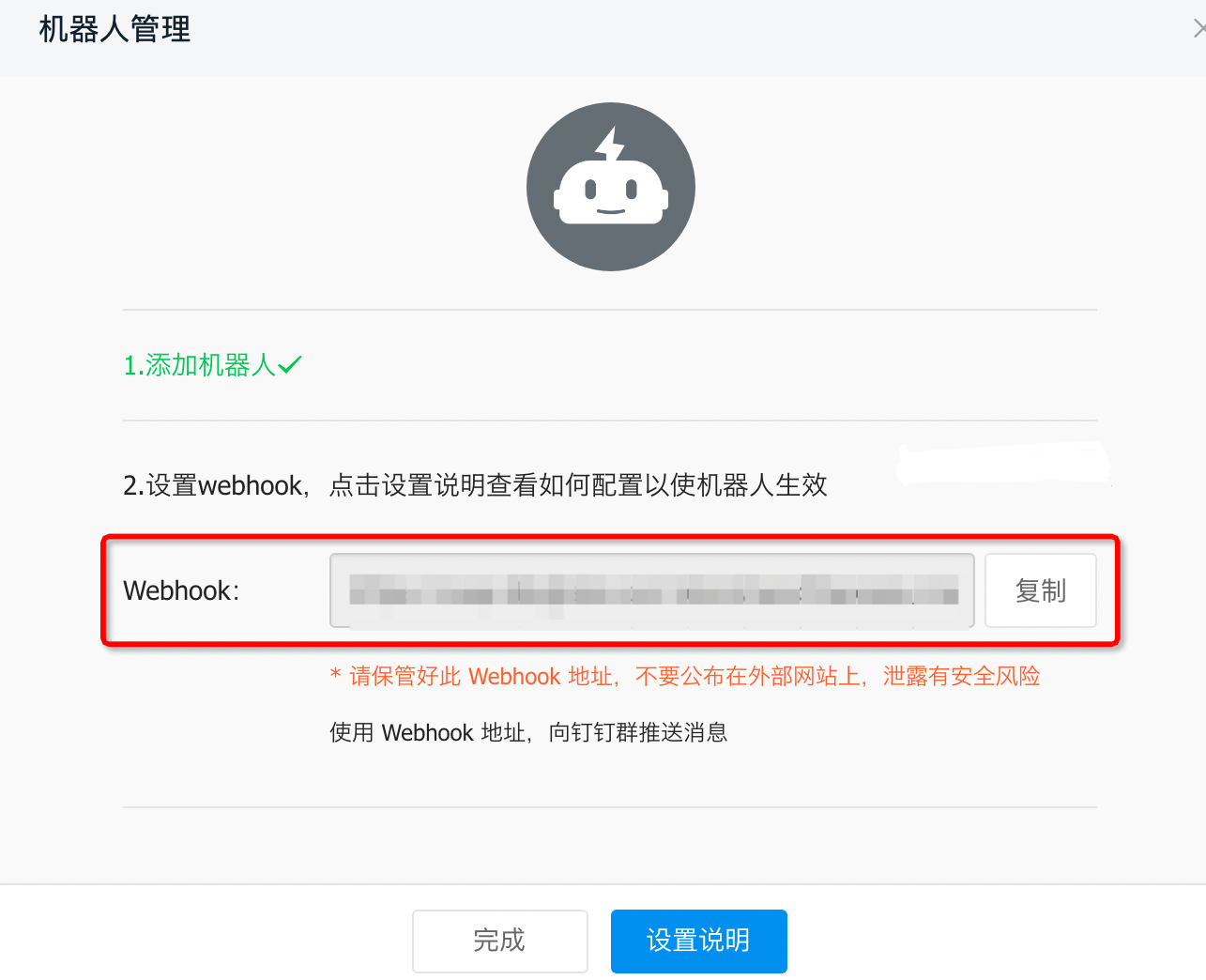
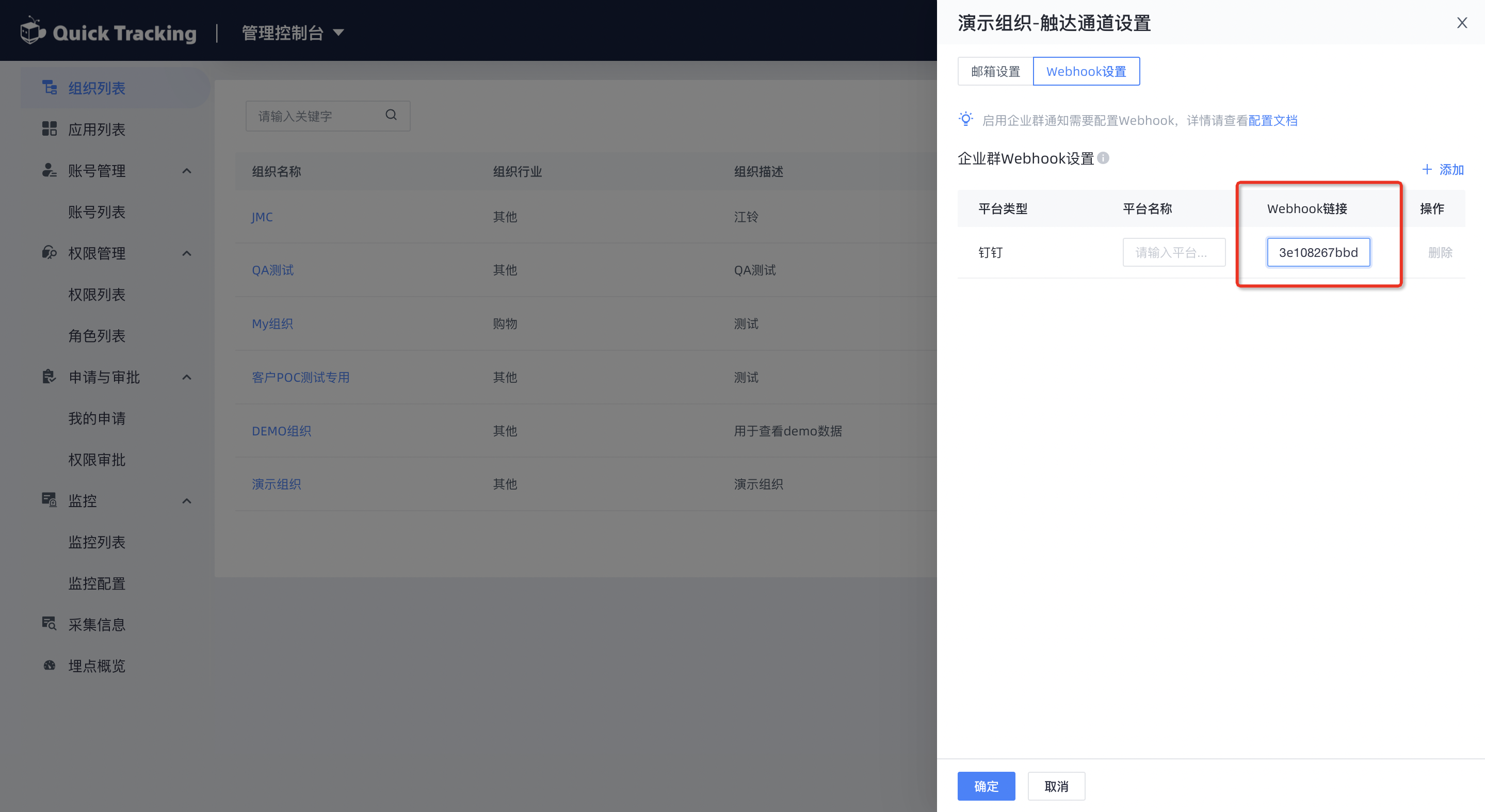
4. QT「タッチ チャネル」に追加します
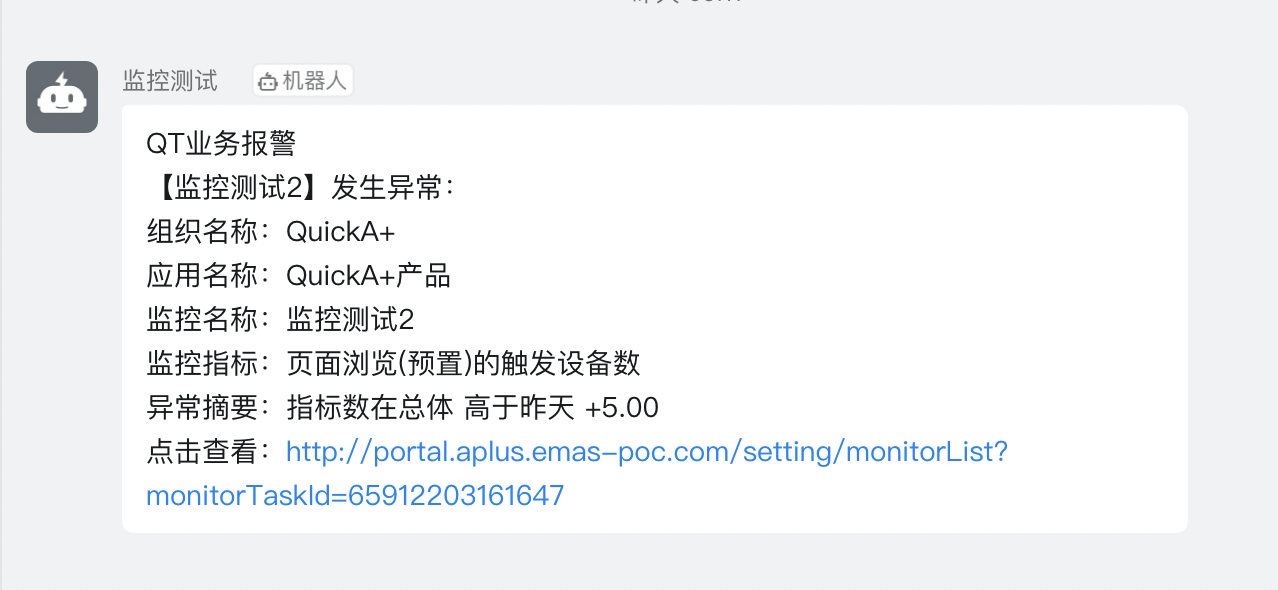
5. メッセージ スタイル
カスタム Webhook チャネル
カスタム Webhook フローチャート
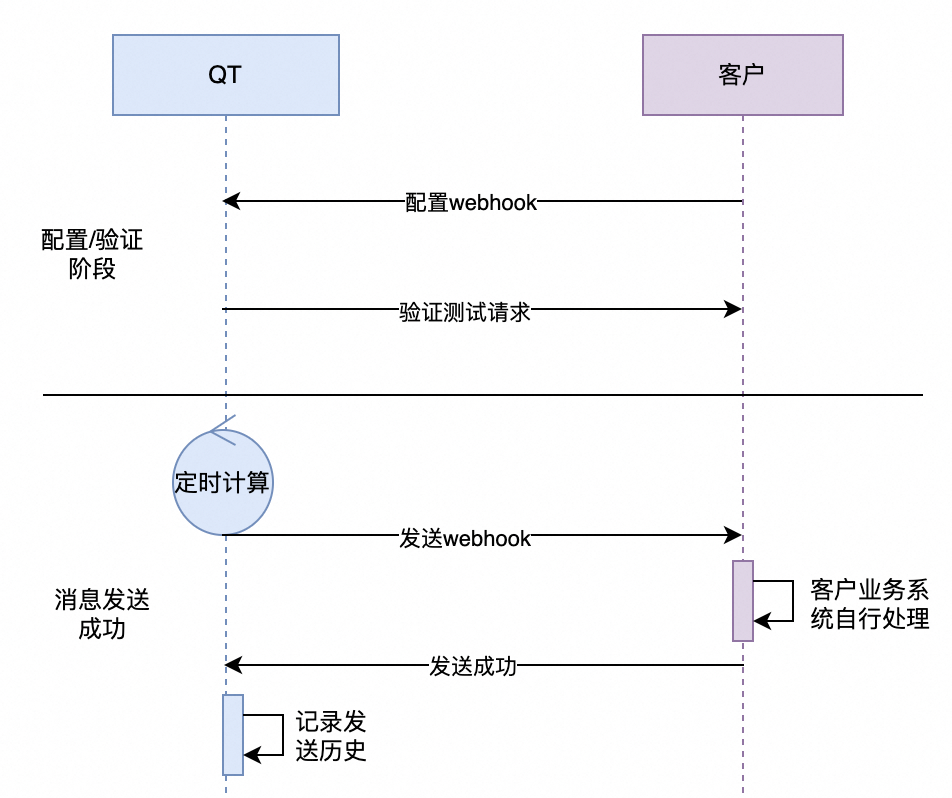
手順
Webhook を構成する場合、各顧客のプロトコルは異なります。複数の状況に対応するために、Webhook 構成では以下のように複数のメソッドがサポートされます。
パラメーター
パラメーター
必須
意味
Cron 式
request
method
はい
リクエスト メソッド(POST/GET)
https://xxx.yyy.com
headers
いいえ
リクエスト ヘッダー(キーと値を入力)
POST
body
いいえ
リクエスト本文(顧客が定義、形式は json、中括弧 {{xx}} はプレースホルダーで、事前定義された変数を示します)
{ "name": "Test custom webhook", "title": "An exception occurred in the" {{AppName}} "monitoring task" {{MonitorTaskName}} "of" {{OrgName}} ", "content": "Metric: {{IndicatorDescription}} exception occurred \nThe exception message is:{{IndicatorExceptionMsgContent}}" }
bodySuccessTag
-
いいえ
リクエスト成功の識別
事前定義フィールド
事前定義フィールド
説明
OrgName
組織名
AppName
アプリケーション名
WebhookPlatformName
カスタム Webhook 名
MonitorTaskId
監視タスク ID
MonitorTaskName
監視タスク名
IndicatorDescription
メトリックの説明。
IndicatorExceptionMsgContent
メトリック例外メッセージ本文
IndicatorExceptionMsgList
メトリック例外情報リスト
次の図に示すサンプル コードを使用して、コード内のパラメーターを構成します。
例 1:
構成:
{
  "request": {
    "method": "post",
    "headers": {
      "Content-Type": "application/json"
    },
    "body": {
      "name": "Test custom webhook", // テスト カスタム webhook
      "title": "An exception occurred in the" {{AppName}} "monitoring task" {{MonitorTaskName}} "of" {{OrgName}} ", // {{OrgName}} の {{AppName}} 監視タスク {{MonitorTaskName}} で例外が発生しました
      "content": "Metric: {{IndicatorDescription}} exception occurred \nThe exception message is:{{IndicatorExceptionMsgContent}}" // メトリック: {{IndicatorDescription}} 例外が発生しました \n例外メッセージは次のとおりです:{{IndicatorExceptionMsgContent}}
    }
  }
}
レスポンス:
{
    "name": "Test custom webhook", // テスト カスタム webhook
    "title": "An exception occurred in the test view monitoring task" test view monitoring "of the test organization", // テスト組織のテスト ビュー監視タスク「テスト ビュー監視」で例外が発生しました
    "content": "Indicator: The number of times that the device ID of any event (preset) is triggered is abnormal. \nThe exception information is: Alarm calculation time: 2024/05/09 01:00:00" SDK version ["5.3.2"] "The current indicator value is 232.0, and the range is 1 to 10000. \nThe current indicator value of" SDK version ["6.5.6"] "is 186.0. Interval 1 to 10000\n" SDK version [\"6.3.0\"] "The current indicator value is 326.0, interval 1 to 10000\n" SDK version [\"10.3.2\"] "The current indicator value is 288.0, interval 1 to 10000\n" SDK version [\"12.5.6\"] "The current indicator value is 48.0, range 1 to 10000\n" SDK version ["11.3.0"] "Current metric value is 48.0, range 1 to 10000" // 指標: 任意のイベント (プリセット) のデバイス ID がトリガーされた回数が異常です。 \n例外情報は次のとおりです: アラーム計算時間: 2024/05/09 01:00:00 SDK バージョン ["5.3.2"] "現在の指標値は 232.0 で、範囲は 1 ~ 10000 です。 \n" SDK バージョン ["6.5.6"] "の現在の指標値は 186.0 です。間隔 1 ~ 10000\n" SDK バージョン ["6.3.0"] "現在の指標値は 326.0、間隔 1 ~ 10000\n" SDK バージョン ["10.3.2"] "現在の指標値は 288.0、間隔 1 ~ 10000\n" SDK バージョン ["12.5.6"] "現在の指標値は 48.0、範囲 1 ~ 10000\n" SDK バージョン ["11.3.0"] "現在のメトリック値は 48.0、範囲 1 ~ 10000"
}
例 2:
構成:
{
  "request": {
    "method": "post", // 投稿
    "headers": {
      "Content-Type": "application/json" // コンテンツタイプ
    },
    "body": {
      "name": "Test custom webhook", // テスト カスタム webhook
      "title": "An exception occurred in the" {{AppName}} "monitoring task" {{MonitorTaskName}} "of" {{OrgName}} ", // {{OrgName}} の {{AppName}} 監視タスク {{MonitorTaskName}} で例外が発生しました
      "taskId": "{{MonitorTaskId}}", // 監視タスクID
      "msgList": {{IndicatorExceptionMsgList}} // 指標例外メッセージリスト
    }
  }
}
レスポンス:
{
    "name": "Test custom webhook", // テスト カスタム webhook
    "title": "An exception occurred in the test view monitoring task" test view monitoring "of the test organization", // テスト組織のテスト ビュー監視タスク「テスト ビュー監視」で例外が発生しました
    "taskId": "1837812901", // タスクID
    "msgList": [ // メッセージリスト
      "The current metric value of" SDK version [\"5.3.2\"] "is 232.0", // " SDK バージョン [\"5.3.2\"] "の現在のメトリック値は 232.0 です"
      "The current metric value of" SDK version [\"6.5.6\"] "is 186.0, and the range is 1 to 10000", // " SDK バージョン [\"6.5.6\"] "の現在のメトリック値は 186.0 で、範囲は 1 ~ 10000 です"
      "The current indicator value of" SDK version [\"10.3.2\"] "is 288.0, and the range is 1 to 10000", // " SDK バージョン [\"10.3.2\"] "の現在の指標値は 288.0 で、範囲は 1 ~ 10000 です"
      "The current metric value of" SDK version [\"12.5.6\"] "is 48.0 in the range of 1 to 10000" // " SDK バージョン [\"12.5.6\"] "の現在のメトリック値は、1 ~ 10000 の範囲で 48.0 です"
    ]
}