ラベル伝播アルゴリズム (LPA) は、半教師付き機械学習アルゴリズムである。 頂点のラベル (コミュニティ) は、隣接する頂点のラベルに依存します。 依存度は、頂点間の類似性によって決定される。 データは、反復伝搬更新を実行することによって安定する。 Label Propagation Clusteringコンポーネントは、グラフ内のすべての頂点の収束後に各頂点のグループを提供できます。
アルゴリズムの説明
グラフクラスタリングは、グラフのトポロジに基づいてグラフをサブグラフに分割するために使用されます。 したがって、サブグラフ内の頂点間のリンクは、サブグラフ間のリンクよりも多くなります。
このアルゴリズムは、一意のラベルを使用して各頂点を初期化し、頂点を反復し、コミュニティ内の隣接する頂点の中で最も頻繁に現れるラベルを頂点に割り当てます。 アルゴリズムは、各頂点がその隣接する頂点の中で最も頻繁に現れるラベルを有するまで、頂点へのラベルの割り当てを停止する。
コンポーネントの設定
方法1: パイプラインページでコンポーネントを設定する
Label Propagation Clusteringコンポーネントは、Platform for AI (PAI) コンソールのMachine Learning Designerのパイプラインページに追加できます。 下表に、各パラメーターを説明します。
タブ | パラメーター | 説明 |
フィールド設定 | Vertexテーブル: Vertex Column | 頂点テーブルの頂点列。 |
頂点のテーブル: 重量のコラム | 頂点テーブルの頂点の重み列。 | |
エッジテーブル: ソース頂点列 | エッジテーブルの開始頂点列。 | |
エッジテーブル: ターゲット頂点列 | エッジテーブルの末尾の頂点列。 | |
エッジテーブル: 重量コラム | エッジテーブルのエッジ重み列。 | |
パラメーター設定 | 最大イテレーション | 反復の最大数。 デフォルト値:30。 |
チューニング | 労働者 | 並列ジョブ実行の頂点の数。 並列性とフレームワーク通信コストの程度は、このパラメータの値とともに増加します。 |
Workerあたりのメモリサイズ (MB) | 1つのジョブで使用できるメモリの最大サイズ。 単位:MB。 デフォルト値: 4096 使用済みメモリのサイズがこのパラメーターの値を超えると、 |
方法2: PAIコマンドを使用してコンポーネントを構成する
ラベル伝播クラスタリングコンポーネントは、PAIコマンドを使用して設定できます。 SQLスクリプトコンポーネントを使用してPAIコマンドを実行できます。 詳細については、「SQLスクリプト」トピックの「シナリオ4: SQLスクリプトコンポーネント内でPAIコマンドを実行する」をご参照ください。
PAI -name LabelPropagationClustering
    -project algo_public
    -DinputEdgeTableName=LabelPropagationClustering_func_test_edge
    -DfromVertexCol=flow_out_id
    -DtoVertexCol=flow_in_id
    -DinputVertexTableName=LabelPropagationClustering_func_test_node
    -DvertexCol=node
    -DoutputTableName=LabelPropagationClustering_func_test_result
    -DhasEdgeWeight=true
    -DedgeWeightCol=edge_weight
    -DhasVertexWeight=true
    -DvertexWeightCol=node_weight
    -DrandSelect=true
    -DmaxIter=100;
パラメーター | 必須 | デフォルト値 | 説明 |
inputEdgeTableName | 可 | デフォルト値なし | 入力エッジテーブルの名前。 |
inputEdgeTablePartitions | 不可 | フルテーブル | 入力エッジテーブルのパーティション。 |
fromVertexCol | 可 | デフォルト値なし | 入力エッジテーブルの開始頂点列。 |
toVertexCol | 可 | デフォルト値なし | 入力エッジテーブルの末尾の頂点列。 |
inputVertexTableName | 可 | デフォルト値なし | 入力頂点テーブルの名前。 |
inputVertexTablePartitions | 不可 | フルテーブル | 入力頂点テーブルのパーティション。 |
vertexCol | 可 | デフォルト値なし | 入力頂点テーブルの頂点列。 |
outputTableName | 可 | デフォルト値なし | 出力テーブルの名前。 |
outputTablePartitions | 不可 | デフォルト値なし | 出力テーブルのパーティション。 |
ライフサイクルの設定 (Set lifecycle) | 不可 | デフォルト値なし | 出力テーブルのライフサイクル。 |
workerNum | 不可 | デフォルト値なし | 並列ジョブ実行の頂点の数。 並列性とフレームワーク通信コストの程度は、このパラメータの値とともに増加します。 |
workerMem | 不可 | 4096 | 1つのジョブで使用できるメモリの最大サイズ。 単位:MB。 デフォルト値: 4096 使用済みメモリのサイズがこのパラメーターの値を超えると、 |
splitSize | 不可 | 64 | データ分割サイズ。 単位:MB。 |
hasEdgeWeight | 不可 | false | 入力エッジテーブルのエッジに重みがあるかどうかを指定します。 |
edgeWeightCol | 不可 | デフォルト値なし | 入力エッジテーブルのエッジ重み列。 |
hasVertexWeight | 不可 | false | 入力頂点テーブルの頂点に重みがあるかどうかを指定します。 |
vertexWeightCol | 不可 | デフォルト値なし | 入力頂点テーブルの頂点の重み列。 |
randSelect | 不可 | false | 最大ラベル値をランダムに選択するかどうかを指定します。 |
maxIter | 不可 | 有効期限の 30 | 反復の最大数。 |
例:
SQLスクリプトコンポーネントを頂点としてキャンバスに追加し、次のSQL文を実行してトレーニングデータを生成します。
drop table if exists LabelPropagationClustering_func_test_edge;
create table LabelPropagationClustering_func_test_edge as
select * from
(
    select '1' as flow_out_id,'2' as flow_in_id,0.7 as edge_weight
    union all
    select '1' as flow_out_id,'3' as flow_in_id,0.7 as edge_weight
    union all
    select '1' as flow_out_id,'4' as flow_in_id,0.6 as edge_weight
    union all
    select '2' as flow_out_id,'3' as flow_in_id,0.7 as edge_weight
    union all
    select '2' as flow_out_id,'4' as flow_in_id,0.6 as edge_weight
    union all
    select '3' as flow_out_id,'4' as flow_in_id,0.6 as edge_weight
    union all
    select '4' as flow_out_id,'6' as flow_in_id,0.3 as edge_weight
    union all
    select '5' as flow_out_id,'6' as flow_in_id,0.6 as edge_weight
    union all
    select '5' as flow_out_id,'7' as flow_in_id,0.7 as edge_weight
    union all
    select '5' as flow_out_id,'8' as flow_in_id,0.7 as edge_weight
    union all
    select '6' as flow_out_id,'7' as flow_in_id,0.6 as edge_weight
    union all
    select '6' as flow_out_id,'8' as flow_in_id,0.6 as edge_weight
    union all
    select '7' as flow_out_id,'8' as flow_in_id,0.7 as edge_weight
)tmp
;
drop table if exists LabelPropagationClustering_func_test_node;
create table LabelPropagationClustering_func_test_node as
select * from
(
    select '1' as node,0.7 as node_weight
    union all
    select '2' as node,0.7 as node_weight
    union all
    select '3' as node,0.7 as node_weight
    union all
    select '4' as node,0.5 as node_weight
    union all
    select '5' as node,0.7 as node_weight
    union all
    select '6' as node,0.5 as node_weight
    union all
    select '7' as node,0.7 as node_weight
    union all
    select '8' as node,0.7 as node_weight
)tmp;
データ構造
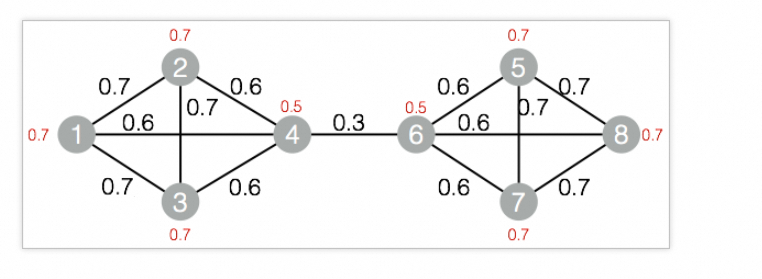
SQLスクリプトコンポーネントを頂点としてキャンバスに追加し、次のPAIコマンドを実行してモデルをトレーニングします。
drop table if exists ${o1}; PAI -name LabelPropagationClustering -project algo_public -DinputEdgeTableName=LabelPropagationClustering_func_test_edge -DfromVertexCol=flow_out_id -DtoVertexCol=flow_in_id -DinputVertexTableName=LabelPropagationClustering_func_test_node -DvertexCol=node -DoutputTableName=${o1} -DhasEdgeWeight=true -DedgeWeightCol=edge_weight -DhasVertexWeight=true -DvertexWeightCol=node_weight -DrandSelect=true -DmaxIter=100;SQLスクリプトコンポーネントを右クリックし、[データの表示]> [SQLスクリプトの出力] を選択してトレーニング結果を表示します。
| node | group_id |
| ---- | -------- |
| 1    | 3        |
| 3    | 3        |
| 5    | 7        |
| 7    | 7        |
| 2    | 3        |
| 4    | 3        |
| 6    | 7        |
| 8    | 7        |