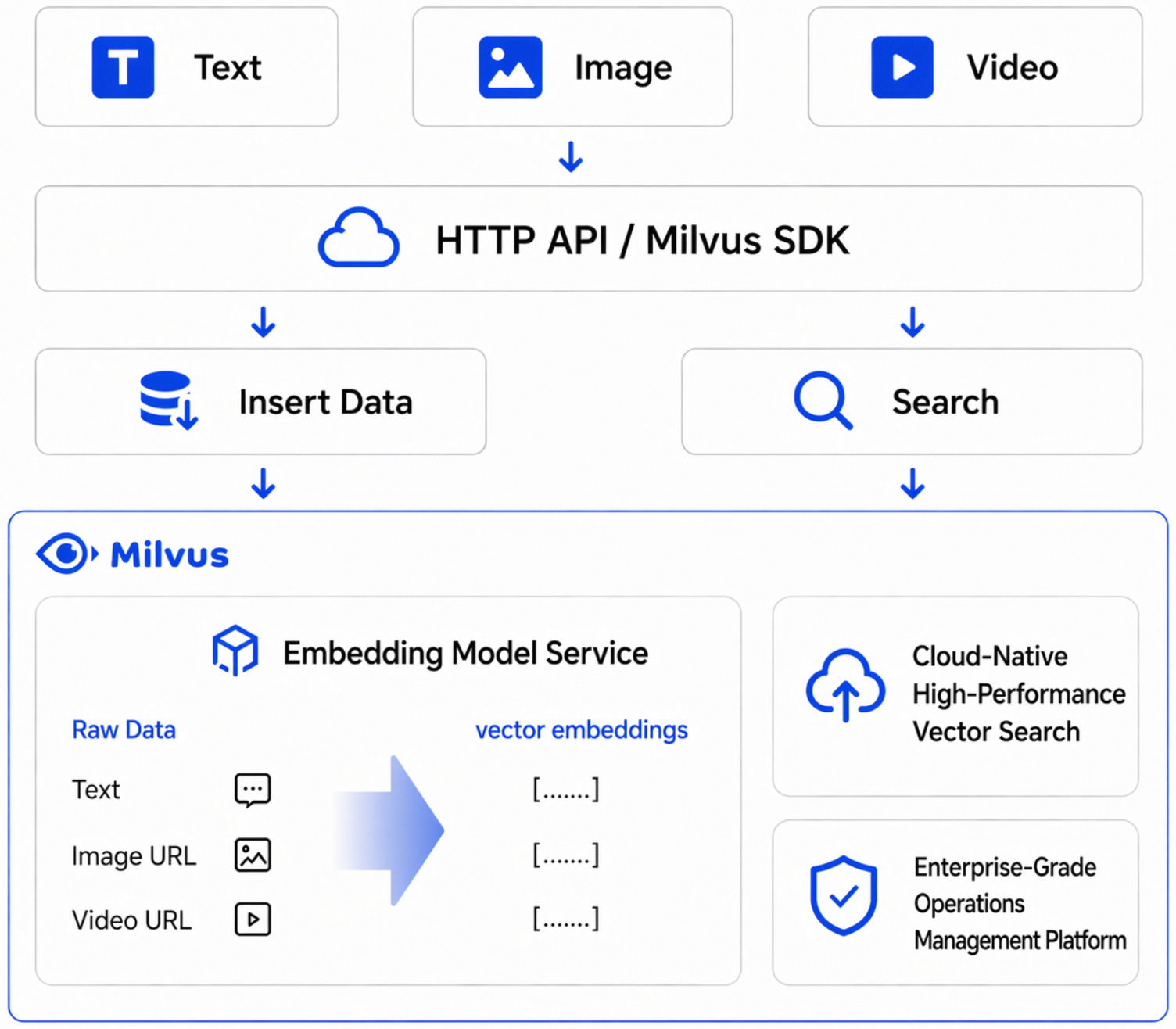
Alibaba Cloud Milvus AI Center は、Milvus に組み込まれたマネージドモデルサービス機能です。有効化後、データインジェスト時および検索時に生のテキストやマルチモーダルデータ(画像、動画)を直接渡すことができます。システムが自動的にベクトルを生成するため、別途埋め込み推論サービスをデプロイする必要はありません。
機能概要
|
機能 |
説明 |
|
ワンストップコンソール管理 |
複数のプラットフォーム間で切り替えることなく、コンソール上でモデルサービスの確認、設定、呼び出し例の取得が可能です。 |
|
マネージドモデル機能 |
プラットフォームがマネージドモデル推論サービスを提供するため、独自の推論サービスを構築したりインフラストラクチャを維持したりする必要はありません。 |
|
生データの直接インジェストと検索 |
挿入、更新、クエリ時に生のテキストまたはマルチモーダルコンテンツを直接渡すことができます。システムが自動的にベクトル化を完了します。 |
|
柔軟なマルチモデル切り替え |
複数のベクトル化モデルを利用できます。ビジネスシナリオに応じて、効果、遅延、コストのバランスを柔軟に選択できます。 |
|
呼び出しとトークン統計 |
クラスターおよびモデルの両方の次元で、トークン使用量および呼び出し回数の統計情報を取得できます。 |
|
呼び出しモニタリング |
成功率や平均 RT(平均応答時間)などの運用メトリックを確認できます。 |
ベクトル化に加えて、AI Center は再ランキング、テキスト生成、マルチモーダル理解、ビデオ編集などの統一されたモデル機能も提供しており、セマンティック検索、RAG ナレッジベース、エンタープライズ AI チャット、コンテンツレコメンデーション、マルチモーダル検索などのシナリオで直接利用できます。本トピックでは、ベクトル化を例として、テキスト検索およびマルチモーダル検索の完全な統合プロセスについて説明します。
手順
利用可能なベクトル化モデルの確認
Milvus コンソールにログインし、左側のナビゲーションウィンドウで AI Center を選択します。モデルサービス タブの ベクトル化 グループで、各モデルの入力タイプ、出力ディメンション、および API 例 を確認できます。
現在利用可能なベクトル化モデルは以下のとおりです。
|
モデル |
サポートされる入力 |
説明 |
|
|
テキスト |
推奨テキスト埋め込みモデル。デフォルトディメンション:1024。 |
|
|
テキスト |
多言語テキスト埋め込みモデル。カスタムベクトルディメンションをサポートします。 |
|
|
テキスト |
汎用テキスト埋め込みモデル。 |
|
|
テキスト |
汎用テキスト埋め込みモデル。廃止予定です。新規ワークロードには推奨されません。 |
|
|
テキスト、画像、動画 |
推奨マルチモーダル埋め込みモデル。デフォルトディメンション:2560。 |
|
|
テキスト、画像、動画 |
マルチモーダル埋め込みモデル。 |
AI Center はリージョンごとに独立してサービスを提供します。リージョンを切り替えた場合、新しいリージョンで再度サービスを確認および設定する必要があります。
Milvus インスタンスの準備
ベクトル化機能には Milvus 2.6 インスタンスが必要です。2.6 インスタンスを作成後、コレクション内で直接関数(Function)を宣言してモデルを呼び出すことができます。モデルとインスタンスを個別にバインドする操作は不要です。
インターネット経由でインスタンスにアクセスするには、インスタンスの製品ページで セキュリティ設定 タブを開き、パブリックネットワークアクセス を有効にして、パブリックアクセスホワイトリストを設定してください。
使用量とモニタリングの確認
AI Center に移動し、モニタリング タブをクリックします。Milvus クラスター別 または モデル別 の 2 つの観点から呼び出しの詳細を確認できます。
-
トークン使用量 / 呼び出し回数:クラスターおよびモデルごとのトークン使用量と呼び出し回数の詳細。
-
合計トークン数 / 合計テキスト入力トークン数:選択範囲内の集計されたトークン消費量。
-
成功率:リクエスト成功率。
-
平均 RT:平均応答時間。
クラスターまたはモデルを選択し、サンプリング間隔を設定して、1 時間、3 時間、6 時間、12 時間、1 日、7 日などのクイックタイムレンジでフィルターをかけるか、カスタムタイムウィンドウを指定できます。
例 1:テキスト対テキストのセマンティック検索
シナリオ
事前にベクトルを生成せずに、生のテキストのバッチを Milvus にインジェストします。クエリ時に自然言語の質問を直接渡すと、Milvus が自動的にクエリをベクトル化し、セマンティック的に最も関連性の高い結果を返します。ナレッジベースの Q&A、ドキュメント検索、よくある質問の取得などのシナリオに適用できます。
操作手順
-
コレクションを作成し、生テキストフィールド
documentとベクトルフィールドdenseを定義します。 -
qwen3.7-text-embeddingモデルをFunctionを使用してバインドします。 -
テスト用テキストデータを挿入し、
flushを呼び出してデータを検索可能にします。 -
自然言語の質問を使用して検索を実行し、最も関連性の高いテキストセグメントを取得します。
データ挿入後、必ず flush を呼び出してください。そうしないと、挿入直後に実行した検索が空の結果を返す可能性があります。
サンプルコード
from pymilvus import MilvusClient, DataType, Function, FunctionType

client = MilvusClient(
    uri="http://c-xxxx.milvus.aliyuncs.com:19530",
    token='root:xxx',
)

# ========== コレクションの作成 ==========
collection_name = 'demo1'
schema = client.create_schema()

schema.add_field("id", DataType.INT64, is_primary=True, auto_id=False)
schema.add_field("document", DataType.VARCHAR, max_length=9000)
schema.add_field("dense", DataType.FLOAT_VECTOR, dim=1024)
text_embedding_function = Function(
    name="dashscope_api_test123",
    function_type=FunctionType.TEXTEMBEDDING,
    input_field_names=["document"],
    output_field_names=["dense"],
    params={
        "provider": "aliyun_milvus",
        "model_name": "qwen3.7-text-embedding"
    }
)

schema.add_function(text_embedding_function)
index_params = client.prepare_index_params()

index_params.add_index(
    field_name="dense",
    index_type="AUTOINDEX",
    metric_type="COSINE"
)
client.drop_collection(collection_name)
client.create_collection(
    collection_name=collection_name,
    schema=schema,
    index_params=index_params
)

insert_data = []
record_id = 1

mock_texts = [
    "ベクトルデータベースはテキストを高次元ベクトルに変換してセマンティック検索を行い、クエリの真の意図を理解します。",
    "ディープラーニングモデルは大規模な画像データセットから特徴表現を学習し、画像分類やオブジェクト検出などのタスクを実行します。",
    "検索拡張生成(RAG)は関連ドキュメントを取得して大規模言語モデルに外部知識を提供し、ハルシネーションを減らして回答の信頼性を向上させます。",
    "カスタマーサービスのシナリオでは、セマンティック検索により過去のチケットを迅速に特定でき、初回対応効率と解決率が向上します。",
    "類似性検索では一般的にコサイン距離を使用してベクトルの方向近接度を測定し、テキストのセマンティックマッチングタスクに適しています。",
    "ベクトル化前のデータクリーニングは重要なステップです。ノイズ除去とフォーマット標準化により、再現率が大幅に向上します。",
    "埋め込みディメンションが高いほど良いとは限りません。効果、遅延、ストレージコストのバランスを取る必要があります。",
    "長文書を小さなセグメントに分割するチャンキング戦略により、検索ヒット率が向上し、コンテキストの冗長性が削減されます。",
    "各ナレッジにソースフィールドを追加すると、結果の説明性が向上し、フロントエンドで引用証拠を簡単に表示できます。",
    "多言語検索では統一されたベクトル空間を利用してクロスリンガルマッチングを行い、国際化システムのエクスペリエンスを強化します。",
    "HNSW の ef や M などのインデックスパラメーターは取得率とクエリパフォーマンスに影響するため、ビジネス要件に基づいて調整する必要があります。",
    "本番環境に適用する前にオフライン評価を実施することで、異なるモデルおよびパラメーター組み合わせによる検索品質の差異を定量的に把握できます。",
    "ベクトルデータベースのメタデータフィルタリングはセマンティックリコールと組み合わせて、より正確なスコープ付き検索を実現できます。",
    "高頻度クエリの場合、検索結果を短時間キャッシュすることでバックエンドの計算負荷と応答時間を削減できます。",
    "セマンティック検索パイプラインではクエリをログに記録し、ゼロ結果クエリの分析とナレッジベースの継続的最適化を容易にすべきです。",
    "ナレッジコンテンツが頻繁に更新される場合、増分インデックス戦略によりフルリビルドのリソース消費を削減できます。",
    "Q&A システムに再ランキングモデルを追加することで、上位結果の関連性と読みやすさを向上させられます。",
    "機密データに対するアクセスの制御ポリシーを確立することは、エンタープライズ向けベクトル検索システムの基本的なセキュリティ要件です。",
    "topK を適切に設定することでカバー率とノイズのバランスを取り、関連性の低い結果を多数返すことを回避できます。",
    "ユーザーフィードバックをトレーニングおよび評価パイプラインに反映させることで、全体的な検索および Q&A パフォーマンスを継続的に改善できます。",
]

for text in mock_texts:
    insert_data.append({
        "id": record_id,
        "document": text,
    })
    record_id += 1

BATCH_SIZE = 30
print(f"{len(insert_data)} 件のレコードを挿入する準備をしています。batch_size={BATCH_SIZE}...")
for batch_start in range(0, len(insert_data), BATCH_SIZE):
    batch = insert_data[batch_start:batch_start + BATCH_SIZE]
    client.insert(collection_name, batch)
    print(f"  {min(batch_start + BATCH_SIZE, len(insert_data))}/{len(insert_data)} 件のレコードを挿入しました")
client.flush(collection_name)
print("データ挿入が完了しました!\n")

# ========== テスト 1:テキスト対テキスト検索(dense フィールドによるセマンティック検索) ==========
print("=" * 60)
print("テスト 1:テキスト対テキスト検索 - ベクトルデータベースに関連するクエリ内容")
print("=" * 60)
results = client.search(
    collection_name=collection_name,
    data=['セマンティック検索とは何ですか?ベクトルデータベースはどのように動作しますか?'],
    anns_field='dense',
    limit=3,
    output_fields=['document'],
)
for hits in results:
    for hit in hits:
        print(f"  id={hit['id']}, distance={hit['distance']:.4f}, document={hit['entity']['document'][:50]}")
出力
20 件のレコードを挿入する準備をしています。batch_size=30...
  20/20 件のレコードを挿入しました
データ挿入が完了しました!

============================================================
テスト 1:テキスト対テキスト検索 - ベクトルデータベースに関連するクエリ内容
============================================================
  id=1, distance=0.8668, document=ベクトルデータベースはテキストを高次元ベクトルに変
  id=13, distance=0.5989, document=ベクトルデータベースのメタデータフィルタリングはセマ
  id=15, distance=0.5414, document=セマンティック検索パイプラインではクエリをログに記
検索結果はセマンティックな関連性に基づいてランキングされ、クエリの意図に最も近いテキストが上位に表示されます。実際の類似性スコアは、モデルバージョンおよびデータ内容によって異なります。
例 2:マルチモーダル検索
シナリオ
小売、E コマース、コンテンツプラットフォームなどのシナリオでは、検索対象にテキストに加えて画像や動画が含まれます。AI Center のマルチモーダル埋め込みモデルは、テキストと視覚コンテンツを単一のベクトル化および検索パイプラインで統合し、Text-to-Image/Video や Image-to-Image/Video などのクロスモーダル検索機能を実現します。
この例では、同一のコレクション内に 2 つのベクトルフィールドを定義します。dense はテキストモデルによって生成され、テキストセマンティック検索に使用されます。dense_mm はマルチモーダルモデルによって生成され、クロスモーダル検索に使用されます。
操作手順
-
画像または動画を OSS または他のオブジェクトストレージサービスにアップロードし、モデルサービスからアクセス可能な URL を生成します。
-
コレクションを作成し、テキストフィールド
document、マルチメディア URL フィールドurl、テキストベクトルフィールドdense、マルチモーダルベクトルフィールドdense_mmを定義します。 -
qwen3.7-text-embeddingとqwen3-vl-embeddingをそれぞれテキストフィールドとマルチメディアフィールドにバインドします。 -
テスト用アセットと対応するテキスト説明を挿入します。
-
テキスト対テキスト、テキスト対画像/動画、画像対画像/動画の検索検証を実行します。
マルチモーダルモデルをマルチメディアフィールドにバインドする際は、params に is_multimodal を true に設定する必要があります。設定しない場合、モデルが入力を解析できないため、コレクションの作成が失敗します。dim 値はベクトルフィールドで宣言されたディメンションと一致している必要があります。
マルチメディアフィールドにはプレーンテキストを直接渡すこともできます。マルチモーダルモデルは同じベクトル空間内でテキストベクトルを生成し、画像とテキストの混合検索を可能にします。
サンプルコード
from pymilvus import MilvusClient, DataType, Function, FunctionType

client = MilvusClient(
    uri="http://c-xxxx.milvus.aliyuncs.com:19530",
    token='root:xxx',
)

# モデルサービスからアクセス可能な独自の画像または動画 URL に置き換えてください
IMAGE_URL = "https://example.com/your-image.jpg"
VIDEO_URL = "https://example.com/your-video.mp4"

# ========== コレクションの作成 ==========
collection_name = 'demo11'
schema = client.create_schema()

schema.add_field("id", DataType.INT64, is_primary=True, auto_id=False)
schema.add_field("document", DataType.VARCHAR, max_length=9000)
schema.add_field("url", DataType.VARCHAR, max_length=9000)
schema.add_field("dense", DataType.FLOAT_VECTOR, dim=1024)
schema.add_field("dense_mm", DataType.FLOAT_VECTOR, dim=1024)

text_embedding_function = Function(
    name="dashscope_api_test123",
    function_type=FunctionType.TEXTEMBEDDING,
    input_field_names=["document"],
    output_field_names=["dense"],
    params={
        "provider": "aliyun_milvus",
        "model_name": "qwen3.7-text-embedding"
    }
)
mm_embedding_function = Function(
    name="dashscope_api_mm123",
    function_type=FunctionType.TEXTEMBEDDING,
    input_field_names=["url"],
    output_field_names=["dense_mm"],
    params={
        "provider": "aliyun_milvus",
        "model_name": "qwen3-vl-embedding",
        "dim": "1024",
        "is_multimodal": "true"
    }
)

schema.add_function(text_embedding_function)
schema.add_function(mm_embedding_function)
index_params = client.prepare_index_params()

index_params.add_index(
    field_name="dense",
    index_type="AUTOINDEX",
    metric_type="COSINE"
)
index_params.add_index(
    field_name="dense_mm",
    index_type="AUTOINDEX",
    metric_type="COSINE"
)
client.drop_collection(collection_name)
client.create_collection(
    collection_name=collection_name,
    schema=schema,
    index_params=index_params
)

# ========== データ挿入:マルチメディアアセットは URL を使用し、プレーンテキストは直接渡す ==========
insert_data = [
    {"id": 1, "document": "人物が着用している上着の外観詳細を示す衣料品製品画像。", "url": IMAGE_URL},
    {"id": 2, "document": "衣料品の動的な着用効果を示すショート衣料品紹介動画。", "url": VIDEO_URL},
    {"id": 3,
     "document": "ベクトルデータベースはテキストを高次元ベクトルに変換してセマンティック検索を行い、クエリの真の意図を理解します。",
     "url": "ベクトルデータベースはテキストを高次元ベクトルに変換してセマンティック検索を行い、クエリの真の意図を理解します。"},
    {"id": 4,
     "document": "ディープラーニングモデルは大規模な画像データセットから特徴表現を学習し、画像分類やオブジェクト検出などのタスクを実行します。",
     "url": "ディープラーニングモデルは大規模な画像データセットから特徴表現を学習し、画像分類やオブジェクト検出などのタスクを実行します。"},
    {"id": 5,
     "document": "衣料品 E コマースプラットフォームでは、通常、スタイル、色、素材で製品画像を検索する必要があります。",
     "url": "衣料品 E コマースプラットフォームでは、通常、スタイル、色、素材で製品画像を検索する必要があります。"},
]

print(f"{len(insert_data)} 件のレコードを挿入する準備をしています...")
client.insert(collection_name, insert_data)
client.flush(collection_name)
print("データ挿入が完了しました!\n")

# ========== テスト 1:テキスト対テキスト検索(dense フィールドによるセマンティック検索) ==========
print("=" * 60)
print("テスト 1:テキスト対テキスト検索 - 衣料品製品に関連するクエリ内容")
print("=" * 60)
results = client.search(
    collection_name=collection_name,
    data=['衣料品製品の外観紹介'],
    anns_field='dense',
    limit=3,
    output_fields=['document', 'url'],
)
for hits in results:
    for hit in hits:
        print(f"  id={hit['id']}, distance={hit['distance']:.4f}, document={hit['entity']['document'][:40]}")

# ========== テスト 2:テキスト対画像/動画検索(テキストでマルチメディアコンテンツをクエリし、URL レコードをフィルター) ==========
print("\n" + "=" * 60)
print("テスト 2:テキスト対画像/動画検索 - テキスト説明を使用して衣料品関連アセットを検索")
print("=" * 60)
results = client.search(
    collection_name=collection_name,
    data=['展示のために着用されている衣料品'],
    anns_field='dense_mm',
    limit=3,
    filter='url like "http%"',
    output_fields=['document', 'url'],
)
for hits in results:
    for hit in hits:
        is_media = "media" if str(hit['entity']['url']).startswith('http') else "text"
        print(f"  id={hit['id']}, distance={hit['distance']:.4f}, [{is_media}] document={hit['entity']['document'][:40]}")

# ========== テスト 3:画像対画像/動画検索(画像 URL を使用してマルチメディアコンテンツをクエリ) ==========
print("\n" + "=" * 60)
print("テスト 3:画像対画像/動画検索 - 画像 URL を使用して類似アセットを検索")
print("=" * 60)
results = client.search(
    collection_name=collection_name,
    data=[IMAGE_URL],
    anns_field='dense_mm',
    limit=3,
    output_fields=['document', 'url'],
)
for hits in results:
    for hit in hits:
        is_media = "media" if str(hit['entity']['url']).startswith('http') else "text"
        print(f"  id={hit['id']}, distance={hit['distance']:.4f}, [{is_media}] document={hit['entity']['document'][:40]}")
出力
5 件のレコードを挿入する準備をしています...
データ挿入が完了しました!

============================================================
テスト 1:テキスト対テキスト検索 - 衣料品製品に関連するクエリ内容
============================================================
  id=1, distance=0.6412, document=人物が着用している上着の外観詳細を示す衣料品製品画
  id=5, distance=0.5901, document=衣料品 E コマースプラットフォームでは、通常、スタイ
  id=2, distance=0.5689, document=衣料品の動的な着用効果を示すショート衣料品紹介動

============================================================
テスト 2:テキスト対画像/動画検索 - テキスト説明を使用して衣料品関連アセットを検索
============================================================
  id=2, distance=0.1861, [media] document=衣料品の動的な着用効果を示すショート衣料品紹介動
  id=1, distance=0.1153, [media] document=人物が着用している上着の外観詳細を示す衣料品製品画

============================================================
テスト 3:画像対画像/動画検索 - 画像 URL を使用して類似アセットを検索
============================================================
  id=1, distance=1.0000, [media] document=人物が着用している上着の外観詳細を示す衣料品製品画
  id=2, distance=0.0732, [media] document=衣料品の動的な着用効果を示すショート衣料品紹介動
  id=3, distance=0.0294, [text] document=ベクトルデータベースはテキストを高次元ベクトルに変
テスト 3 では、クエリ画像とデータベース内の同一画像の類似性が 1.0000 となっており、画像対画像検索パイプラインが正しく機能していることを確認できます。クロスモーダル検索(テキストによるマルチメディアのクエリ)では、通常、同モーダル検索よりも類似性スコアが低くなります。これは正常な動作です。絶対スコアをシナリオ間で比較するのではなく、同一検索シナリオ内での相対ランキングに基づいて効果を評価してください。