csi-secrets-store-provider-alibabacloud を使用すると、KMS 認証情報を Kubernetes Secret としてインポートしたり、CSI インラインボリュームを介してマウントしたりできます。このコンポーネントは、シークレットの自動ローテーションもサポートしています。

セキュリティリスク
ファイルシステムからシークレットを読み取るワークロードと Secrets Manager とが直接対話すると、互換性の問題が発生する可能性があります。csi-secrets-store-provider-alibabacloud はこれらの問題を解決し、シークレットを Kubernetes Secret オブジェクトに同期して環境変数として使用することをサポートします。続行する前に、以下のセキュリティリスクを評価してください。
キーがファイルシステムでアクセス可能な場合、アプリケーションの脆弱性によってディレクトリトラバーサルの脅威が生じ、機密情報が漏洩する可能性があります。
デバッグエンドポイントやログ権限の設定を誤ると、キーが漏洩する可能性があります。そのため、環境変数で参照としてキーをマウントする方法は安全ではなく、推奨されません。
シークレット同期機能を有効にする場合は、最小権限の原則に基づいてアクセス権限を厳密に制御する必要があります。
これらの理由から、アプリケーションが暗号文の永続的なストレージを必要としない場合は、RRSA を使用して Pod レベルのアクセス制御を行い、アプリケーションに最小限の Pod レベルの権限を設定し、アプリケーション内で直接 GetSecretValue API を使用してキー認証情報を取得することを推奨します。これにより、Pod のファイルシステムや Kubernetes Secret でのキーコンテンツの漏洩リスクを低減できます。
前提条件
次の要件を満たす ACK クラスターを作成してください (「ACK マネージドクラスターの作成」または「ACK One 登録済みクラスターの作成」をご参照ください)。
クラスターは Kubernetes 1.20 以降で実行されています。サポートされているクラスタータイプには、ACK マネージドクラスター、ACK 専用クラスター、ACK Edge クラスター、および ACK One 登録クラスターが含まれます。ACK Serverless クラスターはサポートされていません。
ステップ 1:アドオンの認証設定
csi-secrets-store-provider-alibabacloud が KMS から認証情報を取得するための認証を設定します。認証がない場合、csi-secrets-store-provider-alibabacloud はクラスターに認証情報をインポートまたは同期できません。クラスターのタイプに応じて、次のいずれかの認可方法を選択してください。
RRSA を使用した権限付与:この方法は、Kubernetes 1.22 以降を実行する ACK マネージドクラスターに適用できます。
クラスターのワーカー RAM ロールへの権限付与:この方法は、ACK マネージドクラスター、ACK 専用クラスター、および ACK One 登録済みクラスターに適用できます。
AccessKey ID と AccessKey シークレットを指定して特定の RAM ロールを引き受ける:この方法は、すべての ACK クラスターに適用できます。
RRSA を使用した権限付与
他の認可方法と比較して、RRSA 認可は Pod レベルの権限分離を提供し、AK/SK を直接使用することによる認証情報の漏洩リスクを回避します。
ACK コンソールでクラスターの RRSA 機能を有効化します。RRSA は、クラスター作成時に指定された ID プロバイダー情報を使用します。
csi-secrets-store-provider-alibabacloud を使用するには、OIDC ID プロバイダーを信頼されたエンティティとして RAM ロールを作成します。主要なパラメーターを次の表に示します。
パラメーター
説明
[IdP タイプ]
[OIDC] を選択します。
[アイデンティティプロバイダー者]
ack-rrsa-<cluster_id> を選択します。<cluster_id> を実際のクラスター ID に置き換えます。
[条件]
oidc:iss:デフォルト値を保持します。
oidc:aud:デフォルト値を保持します。
oidc:sub:この条件を追加します。
キー:[oidc:sub] を選択します。
演算子:[StringEquals] を選択します。
値:
system:serviceaccount:<namespace>:<serviceAccountName>を入力します。<namespace>をアプリケーションの名前空間に、<serviceAccountName>をサービスアカウント名に置き換えます。このトピックでは、system:serviceaccount:kube-system:csi-secrets-store-provider-alibabacloudを使用します。説明コンポーネントはデフォルトの
kube-system名前空間にインストールすることを推奨します。csi-secrets-store-provider-alibabacloud を別の名前空間にインストールする場合は、kube-systemをその名前空間の名前に置き換えてください。
カスタムポリシーを作成し、前の手順で作成した RAM ロールに権限を付与します。
csi-secrets-store-provider-alibabacloud が KMS 認証情報をインポートするための権限ポリシーを作成します (「カスタムポリシーの作成」をご参照ください)。ポリシーの内容は次のとおりです。
{
    "Action": [
       "kms:GetSecretValue",
       "kms:Decrypt"
    ],
    "Resource": [
        "*"
    ],
    "Effect": "Allow"
}
前の手順で作成した RAM ロールに権限を付与します。「RAM ロールの権限管理」をご参照ください。
クラスターに
alibaba-credentialsという名前の Kubernetes Secret を作成します。プレースホルダーの値を置き換えてください。次の内容で secretstore-rrsa.yaml という名前のファイルを作成します。プレースホルダーを実際の値に置き換えてください。
{rolearn}:手順 2 で作成した RAM ロールの Base64 でエンコードされた ARN。{oidcproviderarn}:RRSA を有効化した後に生成された OIDC プロバイダーの Base64 でエンコードされた ARN。
apiVersion: v1
data:
  rolearn: {rolearn}
  oidcproviderarn: {oidcproviderarn}
kind: Secret
metadata:
  name: alibaba-credentials
  namespace: kube-system
type: Opaque
Kubernetes Secret をデプロイします。
kubectl apply -f secretstore-rrsa.yaml
ワーカー RAM ロールによる権限付与
ACK マネージドクラスター、ACK 専用クラスター、および ACK One 登録済みクラスターに適用できます。
カスタムポリシーを作成します (「カスタムポリシーの作成」をご参照ください)。ポリシーの内容は次のとおりです。
{
  "Action": [
    "kms:GetSecretValue",
    "kms:Decrypt"
  ],
  "Resource": [
    "*"
  ],
  "Effect": "Allow"
}
カスタムポリシーをワーカー RAM ロールにアタッチします。「ワーカー RAM ロールへの権限付与」をご参照ください。
AccessKey による権限付与
すべての ACK クラスターに適用できます。
信頼できる Alibaba Cloud アカウント用に RAM ロールを作成します。「Alibaba Cloud アカウント用の RAM ロールの作成」をご参照ください。
説明信頼できるエンティティとして、現在のアカウント を選択します。
カスタムポリシーを作成し、前の手順で作成した RAM ロールに権限を付与します。
KMS 認証情報へのアクセスのための権限ポリシーを作成します (「カスタムポリシーの作成」をご参照ください)。ポリシーの内容は次のとおりです。
{
  "Action": [
    "kms:GetSecretValue",
    "kms:Decrypt"
  ],
  "Resource": [
    "*"
  ],
  "Effect": "Allow"
}
前の手順で作成した RAM ロールに権限を付与します。「RAM ロールの権限管理」をご参照ください。
前の手順で作成したロールを引き受けるためのカスタムポリシーを作成し、RAM ユーザーにアタッチします。
ロールを引き受けるためのカスタムポリシーを作成します (「カスタムポリシーの作成」をご参照ください)。ポリシーの内容は次のとおりです。
{
    "Statement": [
        {
            "Action": "sts:AssumeRole",
            "Effect": "Allow",
            "Resource": "acs:ram:*:<account-id>:role/<role-name>"
        }
    ],
    "Version": "1"
}
このカスタムポリシーでは、
Resource要素はロール ARN を指定します。ここで、<ACCOUNT_ID>は Alibaba Cloud アカウント ID、<ROLE_NAME>は RAM ロール名です。カスタムポリシーを RAM ユーザーに付与すると、そのユーザーが引き受け可能な RAM ロールを指定できます。詳細については、「RAM ユーザーの権限管理」をご参照ください。
クラスターに alibaba-credentials という名前の Kubernetes Secret を作成します。プレースホルダーの値を置き換えてください。
次の内容で alibaba-credentials.yaml という名前のファイルを作成します。プレースホルダーを実際の値に置き換えてください。
{rolearn}:手順 1 で作成した RAM ロールの Base64 でエンコードされた ARN。{ak}:RAM ユーザーの Base64 でエンコードされた AccessKey ID。{sk}:RAM ユーザーの Base64 でエンコードされた AccessKey シークレット。apiVersion: v1 data: id: {ak} secret: {sk} rolearn: {rolearn} kind: Secret metadata: name: alibaba-credentials namespace: kube-system type: Opaque
Kubernetes Secret をデプロイします。
kubectl apply -f alibaba-credentials.yaml
ステップ 2: csi-secrets-store-provider-alibabacloud アドオンをインストールする
ACKコンソールにログインします。 左側のナビゲーションウィンドウで、[クラスター] をクリックします。
[クラスター] ページで、管理するクラスターの名前をクリックします。 左側のナビゲーションウィンドウで、 を選択します。
[Helm] ページで、デプロイ をクリックします。csi-secrets-store-provider-alibabacloud を検索して選択します。デフォルト設定のまま、次 をクリックします。
設定を確認します。アドオンは、アドオンと同じ名前の Helm リリースで、デフォルトの kube-system 名前空間にインストールされます。アプリケーション名や名前空間をカスタマイズするには、プロンプトに従ってパラメーターを設定します。
最新の Chart バージョン を選択します。[Parameters] セクションで、ステップ 1 の認証方法に基づいてパラメーターを設定します。その後、OK をクリックします。
RRSA を使用した権限付与を選択した場合、
rrsa.enableを true に設定します。
その他のパラメーター:
envVarsFromSecret:
#  ACCESS_KEY_ID:
#    secretKeyRef: alibaba-credentials
#    key: id
#  SECRET_ACCESS_KEY:
#    secretKeyRef: alibaba-credentials
#    key: secret
  ALICLOUD_ROLE_ARN:
    secretKeyRef: alibaba-credentials
    key: rolearn
#  ALICLOUD_ROLE_SESSION_NAME:
#    secretKeyRef: alibaba-credentials
#    key: rolesessionname
#  ALICLOUD_ROLE_SESSION_EXPIRATION:
#    secretKeyRef: alibaba-credentials
#   key: rolesessionexpiration
  ALICLOUD_OIDC_PROVIDER_ARN:
    secretKeyRef: alibaba-credentials
    key: oidcproviderarn
クラスターのワーカー RAM ロールへの権限付与を選択した場合、デフォルト設定を使用します。
AccessKey ID と AccessKey シークレットを指定して特定の RAM ロールを引き受けるを選択した場合、次のパラメーターを設定します。
envVarsFromSecret:
  ACCESS_KEY_ID:
    secretKeyRef: alibaba-credentials
    key: id
  SECRET_ACCESS_KEY:
    secretKeyRef: alibaba-credentials
    key: secret
  ALICLOUD_ROLE_ARN:
    secretKeyRef: alibaba-credentials
    key: rolearn
#  ALICLOUD_ROLE_SESSION_NAME:
#    secretKeyRef: alibaba-credentials
#    key: rolesessionname
#  ALICLOUD_ROLE_SESSION_EXPIRATION:
#    secretKeyRef: alibaba-credentials
#    key: rolesessionexpiration
#  ALICLOUD_OIDC_PROVIDER_ARN:
#    secretKeyRef: alibaba-credentials
#    key: oidcproviderarn
シークレットを Kubernetes Secret オブジェクトに同期するには、次のパラメーターを設定します。
syncSecret: enabled: truesecrets-store-csi-driver.syncSecret.enabled:シークレットを Kubernetes Secret として同期します。trueの場合、必要な RBAC Role と RoleBinding をデプロイします。シークレットの自動ローテーションを有効にするには、次のパラメーターを設定します。

secrets-store-csi-driver.enableSecretRotation:シークレットの自動ローテーションを有効にします。true に設定します。secrets-store-csi-driver.rotationPollInterval:シークレットの同期間隔。例:120s は 2 分ごとに同期します。要件に応じて調整してください。
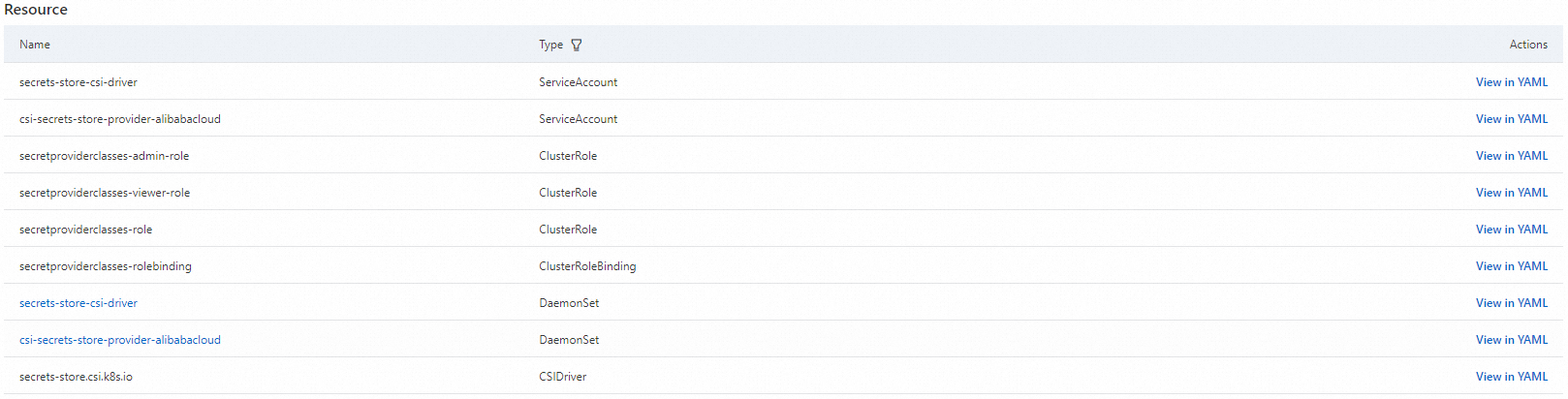
デプロイ後、csi-secrets-store-provider-alibabacloud ページにリダイレクトされます。すべてのリソースが作成されたことを確認してください。コンソールの [Resources] ページで、アドオンによって作成された Kubernetes リソース (secrets-store-csi-driver と csi-secrets-store-provider-alibabacloud (ServiceAccount)、secretproviderclasses-admin-role、secretproviderclasses-viewer-role、secretproviderclasses-role (ClusterRole)、secretproviderclasses-rolebinding (ClusterRoleBinding)、secrets-store-csi-driver と csi-secrets-store-provider-alibabacloud (DaemonSet)、および secrets-store.csi.k8s.io (CSIDriver)) を確認できます。
ステップ 3:データ同期の設定
認証を設定した後、SecretProviderClass を使用してインポートする KMS 認証情報を指定します。
テンプレート
SecretProviderClass は次の形式を使用します。
apiVersion: secrets-store.csi.x-k8s.io/v1
kind: SecretProviderClass
metadata:
  name: <NAME>
spec:
  provider: alibabacloud   # この値は 'alibabacloud' に固定されています。
  parameters:
    objects: |
      - objectName: <KMS Encryption Parameter Name> # KMS 認証情報の名前。
        objectType: kms # KMS 認証情報を同期する場合は kms に固定されます。
parameters フィールドは、次のマウント設定をサポートしています。
パラメーター | 必須 | 説明 |
objects | はい | マウントするシークレットを YAML 配列として指定します。例:
|
region | 任意 | Secrets Manager のリージョン。デフォルトではノードのリージョンが使用されますが、大規模なデプロイではパフォーマンスのオーバーヘッドが追加される可能性があります。リージョンを明示的に指定してください。 |
pathTranslation | 任意 |
|
使用例
SecretProviderClass を使用して、ACK マネージドクラスターと同じリージョンから test という名前の KMS 認証情報をワークロードにインポートします。
次の内容で secretstore.yaml という名前のファイルを作成します。
apiVersion: secrets-store.csi.x-k8s.io/v1
kind: SecretProviderClass
metadata:
  name: test-secrets
spec:
  provider: alibabacloud   # この値は alibabacloud に固定されています。
  parameters:
    objects: | # objectType は oos と kms をサポートします。デフォルトは kms です。
      - objectName: "test-hangzhou"
        objectType: "kms"
        objectAlias: "hangzhou-public"
        kmsEndpoint:  "kms.{region}.aliyuncs.com"
SecretProviderClass をデプロイします。
kubectl apply -f secretstore.yaml次の内容で deploy.yaml という名前のファイルを作成します。
この NGINX Deployment は、前の手順の SecretProviderClass からの認証情報を、CSI インラインボリュームを介して
/mnt/secrets-storeにマウントします (Deployment の例)。apiVersion: apps/v1 # バージョン 1.8.0 より前では、apps/v1beta1 を使用します。 kind: Deployment metadata: name: nginx-deployment-basic labels: app: nginx spec: replicas: 2 selector: matchLabels: app: nginx template: metadata: labels: app: nginx spec: volumes: - name: secrets-store-inline csi: driver: secrets-store.csi.k8s.io readOnly: true volumeAttributes: secretProviderClass: "test-secrets" containers: - name: nginx image: anolis-registry.cn-zhangjiakou.cr.aliyuncs.com/openanolis/nginx:1.14.1-8.6 # 実際のイメージに置き換えてください。 ports: - containerPort: 80 resources: limits: cpu: "500m" volumeMounts: - name: secrets-store-inline mountPath: "/mnt/secrets-store" readOnly: trueアプリケーションをデプロイします。
kubectl apply -f deploy.yamlシークレットが正しくマウントされていることを確認します。
Pod にログインし、
/mnt/secrets-storeにシークレット名と一致するファイルが存在し、その内容が KMS 認証情報と一致することを確認します。
KMS 認証情報の Kubernetes Secret への同期
Secrets Store CSI Driver は、外部サービス (KMS または OOS) のシークレットをネイティブの Kubernetes Secret オブジェクトとして自動的に同期するため、アプリケーションはコードを変更することなく外部シークレットを利用できます。
設定方法:SecretProviderClass
この機能を有効にするには、SecretProviderClass リソースの spec に、任意の secretObjects フィールドを追加します。
apiVersion: secrets-store.csi.x-k8s.io/v1
kind: SecretProviderClass
metadata:
  name: <NAME>
spec:
  provider: alibabacloud   # この値は alibabacloud に固定されています。変更しないでください。
  parameters:
    objects: |
      - objectName: <KMS Encryption Parameter Name>  # KMS 認証情報の名前。
        objectType: kms     # KMS 認証情報を同期する場合は kms に固定されます。
  secretObjects:
  - secretName: <Kubernetes Secret Name>            # Kubernetes Secret の名前。
    type: <Kubernetes Secret Type>                  # Kubernetes Secret のタイプ。
    data:
    - objectName: <parameters.objects.objectName>   # parameters.objects.objectName からの名前。エイリアスが指定されている場合は、そのエイリアスを使用します。
      key: <Kubernetes Secret Data Key>             # Kubernetes Secret データ内のキー名。
secretObjects には通常、次の 3 つのパラメーターが含まれます:
パラメーター | タイプ | 説明 |
secretName | 必須 | 作成する Kubernetes Secret の名前です。 |
type | 必須 | Secret のタイプです。有効な値: |
data | 必須 | 外部シークレットを
|
同期ライフサイクル
Secret オブジェクトの同期とクリーンアップは、対応する SecretProviderClass をマウントする Pod によって動的にトリガーされます:
作成:最初に
SecretProviderClassを使用するPodが起動してボリュームをマウントしたときにのみ、Kubernetes Secret が作成されます。更新:
secrets-store-csi-driver.enableSecretRotationがtrueの場合、Kubernetes Secret はsecrets-store-csi-driver.rotationPollInterval間隔で定期的に更新されます。それ以外の場合は更新されません。削除:
SecretProviderClassを使用する最後のPodが削除されると、対応する Kubernetes Secret も削除されます。
例:認証情報の同期とインジェクション
KMS 認証情報を Kubernetes Secret に同期し、環境変数として NGINX Pod にインジェクトします。
SecretProviderClass を作成します。
次の内容で syncSecret.yaml という名前のファイルを作成します。
apiVersion: secrets-store.csi.x-k8s.io/v1
kind: SecretProviderClass
metadata:
  name: alibabacloud-sync-secret
spec:
  provider: alibabacloud
  parameters:
    objects: |
      - objectName: test-kms
        objectAlias: secretalias
        objectType: kms
  secretObjects:
  - secretName: test-sync-secret  # 生成される Kubernetes Secret の名前。
    type: Opaque
    data:
    - objectName: secretalias     # objectName または objectAlias に対応します。
      key: test                   # 生成される Kubernetes Secret のデータキーを設定します。
SecretProviderClass をデプロイします。
kubectl apply -f syncSecret.yaml同期をトリガーするためにアプリケーション Pod を作成します。
次の内容で
pod-sync-secret.yamlファイルを作成します。この Pod は、前のSecretProviderClassをマウントし、secretKeyRefを使用して生成されるSecret(名前:test-sync-secret) を参照しようとします。kind: Pod apiVersion: v1 metadata: name: pod-sync-secret spec: containers: - name: nginx image: nginx:latest volumeMounts: - name: secrets-store-inline mountPath: "/mnt/secrets-store" readOnly: true env: - name: SECRET_TEST valueFrom: secretKeyRef: name: test-sync-secret key: test volumes: - name: secrets-store-inline csi: driver: secrets-store.csi.k8s.io readOnly: true volumeAttributes: secretProviderClass: "alibabacloud-sync-secret"Pod をデプロイして同期をトリガーします。
kubectl apply -f pod-sync-secret.yaml結果を確認します。
Kubernetes Secret が作成されたことを確認します。
kubectl get secret test-sync-secretコマンドの出力には、
test-sync-secretKubernetes Secret が表示されます。環境変数が Pod にインジェクトされたことを確認します。
kubectl exec -it $(kubectl get pods | awk '/pod-sync-secret/{print $1}' | head -1) -- env出力には、KMS シークレットと一致する値を持つ
SECRET_TESTが含まれます。
kmsEndpoint の設定
専用ゲートウェイまたは共有ゲートウェイの KMS エンドポイントを設定します (「共有ゲートウェイと専用ゲートウェイの違い」をご参照ください)。
KMS エンドポイントアドレス
ゲートウェイタイプ | ドメインタイプ | エンドポイントアドレス | 説明 |
専用ゲートウェイ | KMS プライベート | {kms-instance-id}.cryptoservice.kms.aliyuncs.com |
|
共有ゲートウェイ | VPC | kms-vpc.{region}.aliyuncs.com |
|
共有ゲートウェイ | パブリック | kms.{region}.aliyuncs.com |
|
KMS エンドポイントの設定例
apiVersion: secrets-store.csi.x-k8s.io/v1
kind: SecretProviderClass
metadata:
  name: test
spec:
  provider: alibabacloud # 'alibabacloud' に固定
  parameters:
    # ゲートウェイの使用例:
    # hangzhou-public は共有ゲートウェイのパブリックエンドポイントを使用します。{region} を KMS 認証情報が配置されているリージョンに置き換えます。この方法により、クラスターとは異なるリージョンから KMS 認証情報にアクセスできます。
    # hangzhou-vpc は kmsEndpoint フィールドを指定せず、共有ゲートウェイのデフォルトの VPC エンドポイントを使用します。
    # hangzhou-cryptoservice は専用ゲートウェイを使用します。{kms-instance-id} を KMS 認証情報のインスタンス ID に置き換えます。
    # london-public は共有ゲートウェイのパブリックエンドポイントを使用します。{region} を KMS 認証情報が配置されているリージョンに置き換えます。この方法により、クラスターとは異なるリージョンから KMS 認証情報にアクセスできます。
    objects: |
      - objectName: "test-hangzhou"
        objectType: "kms"
        objectAlias: "hangzhou-public"
        kmsEndpoint:  "kms.{region}.aliyuncs.com"
      - objectName: "test-hangzhou"
        objectType: "kms"
        objectAlias: "hangzhou-vpc"
      - objectName: "test-hangzhou"
        objectType: "kms"
        objectAlias: "hangzhou-cryptoservice"
        kmsEndpoint:  "{kms-instance-id}.cryptoservice.kms.aliyuncs.com"
      - objectName: "test-london"
        objectAlias: "london-public"
        kmsEndpoint:  "kms.{region}.aliyuncs.com"
関連ドキュメント
ACK サーバーレスクラスターのワークロードについては、「ack-secret-manager を使用した Alibaba Cloud KMS サービス認証情報のインポート」をご参照ください。
キャッシュされた KMS シークレットを保護するには、Alibaba Cloud KMS を使用して保管時に暗号化します。