Java 関数を Function Compute にデプロイするには、コードとその依存関係を ZIP または JAR ファイルにパッケージ化し、Function Compute コンソールまたは Serverless Devs を通じてパッケージをアップロードします。
このトピックでは、2 つのデプロイパスについて説明します。
Maven を使用したデプロイ — コンソール経由での手動コンパイルとアップロード
Serverless Devs を使用したデプロイ — 1 つの CLI コマンドでのコンパイルとデプロイ
依存ライブラリ
Function Compute は、2 つの Java ライブラリを提供しています。
| ライブラリ | アーティファクト ID | バージョン | 説明 |
|---|---|---|---|
com.aliyun:fc-java-core | fc-java-core | 1.4.1 | ハンドラインターフェイスとコンテキストオブジェクトを定義します |
com.aliyun:fc-java-events | fc-java-event | 1.2.0 | 一般的なイベントソースのイベントタイプを提供します |
両方のライブラリを Maven セントラルリポジトリから取得し、pom.xml に追加します。
<!-- fc-java-core: 必須 -->
<dependency>
    <groupId>com.aliyun.fc.runtime</groupId>
    <artifactId>fc-java-core</artifactId>
    <version>1.4.1</version>
</dependency>

<!-- fc-java-events: オプション。関数が Alibaba Cloud サービスからのイベントを処理する場合に追加 -->
<dependency>
    <groupId>com.aliyun.fc.runtime</groupId>
    <artifactId>fc-java-event</artifactId>
    <version>1.2.0</version>
</dependency>依存関係パッケージが大きすぎる場合は、依存関係をレイヤーにパッケージ化して、コードパッケージを小さく保ちます。詳細については、「カスタムレイヤーの作成」をご参照ください。
Maven を使用したデプロイ
前提条件
開始する前に、以下が準備できていることを確認してください。
Java がインストールされていること (Java 公式サイト)
Maven がインストールされていること (Apache Maven のインストール)
手順
Java プロジェクトを作成します。ハンドラを
src/main/java/example/App.javaに配置します。package example; import com.aliyun.fc.runtime.Context; import com.aliyun.fc.runtime.StreamRequestHandler; import java.io.IOException; import java.io.InputStream; import java.io.OutputStream; public class App implements StreamRequestHandler { @Override public void handleRequest(InputStream inputStream, OutputStream outputStream, Context context) throws IOException { outputStream.write(new String("hello world").getBytes()); } }pom.xmlの<build>セクションにmaven-shade-pluginを追加します。このプラグインは、依存関係をデプロイに適した単一の JAR ファイルにバンドルします。Apache Maven Shade の代わりに Apache Maven Assembly を使用することもできます。
<build>
    <plugins>
        <plugin>
            <groupId>org.apache.maven.plugins</groupId>
            <artifactId>maven-shade-plugin</artifactId>
            <version>3.2.1</version>
            <executions>
                <execution>
                    <phase>package</phase>
                    <goals>
                        <goal>shade</goal>
                    </goals>
                    <configuration>
                        <filters>
                            <filter>
                                <artifact>*:*</artifact>
                                <excludes>
                                    <exclude>META-INF/*.SF</exclude>
                                    <exclude>META-INF/*.DSA</exclude>
                                    <exclude>META-INF/*.RSA</exclude>
                                </excludes>
                            </filter>
                        </filters>
                    </configuration>
                </execution>
            </executions>
        </plugin>
    </plugins>
</build>
<details> <summary>pom.xml の完全な例</summary>
<project xmlns="http://maven.apache.org/POM/4.0.0"
  xmlns:xsi="http://www.w3.org/2001/XMLSchema-instance" xsi:schemaLocation="http://maven.apache.org/POM/4.0.0 http://maven.apache.org/maven-v4_0_0.xsd">
  <modelVersion>4.0.0</modelVersion>
  <groupId>example</groupId>
  <artifactId>HelloFCJava</artifactId>
  <packaging>jar</packaging>
  <version>1.0-SNAPSHOT</version>
  <name>HelloFCJava</name>

  <dependencies>
    <dependency>
      <groupId>junit</groupId>
      <artifactId>junit</artifactId>
      <version>3.8.1</version>
      <scope>test</scope>
    </dependency>
    <dependency>
      <groupId>com.aliyun.fc.runtime</groupId>
      <artifactId>fc-java-core</artifactId>
      <version>1.4.1</version>
    </dependency>
  </dependencies>

  <build>
    <plugins>
        <plugin>
          <groupId>org.apache.maven.plugins</groupId>
          <artifactId>maven-shade-plugin</artifactId>
          <version>3.2.1</version>
          <executions>
            <execution>
              <phase>package</phase>
              <goals>
                <goal>shade</goal>
              </goals>
              <configuration>
                <filters>
                  <filter>
                    <artifact>*:*</artifact>
                    <excludes>
                      <exclude>META-INF/*.SF</exclude>
                      <exclude>META-INF/*.DSA</exclude>
                      <exclude>META-INF/*.RSA</exclude>
                    </excludes>
                  </filter>
                </filters>
              </configuration>
            </execution>
          </executions>
        </plugin>
    </plugins>
  </build>

  <properties>
    <maven.compiler.target>1.8</maven.compiler.target>
    <maven.compiler.source>1.8</maven.compiler.source>
    <maven.test.skip>true</maven.test.skip>
  </properties>
</project>
</details>
プロジェクトのルートディレクトリから、次のコマンドを実行します。
重要macOS および Linux では、コードファイルを圧縮する前に、読み取り可能かつ実行可能であることを確認してください。
mvn clean packageビルドが成功すると、次のように終了します。
[INFO] BUILD SUCCESS
[INFO] ------------------------------------------------------------------------
[INFO] Total time:  11.681 s
[INFO] Finished at: 2020-03-26T15:55:05+08:00
[INFO] ------------------------------------------------------------------------
出力される JAR ファイルの名前は、
pom.xml内のartifactIdフィールドとversionフィールドに基づきます。上記の例では、ファイルはtarget/HelloFCJava-1.0-SNAPSHOT.jarです。ビルドが失敗した場合は、エラーメッセージを確認し、コードを修正してから再試行してください。Function Compute コンソールにログインし、JAR ファイルをアップロードします。
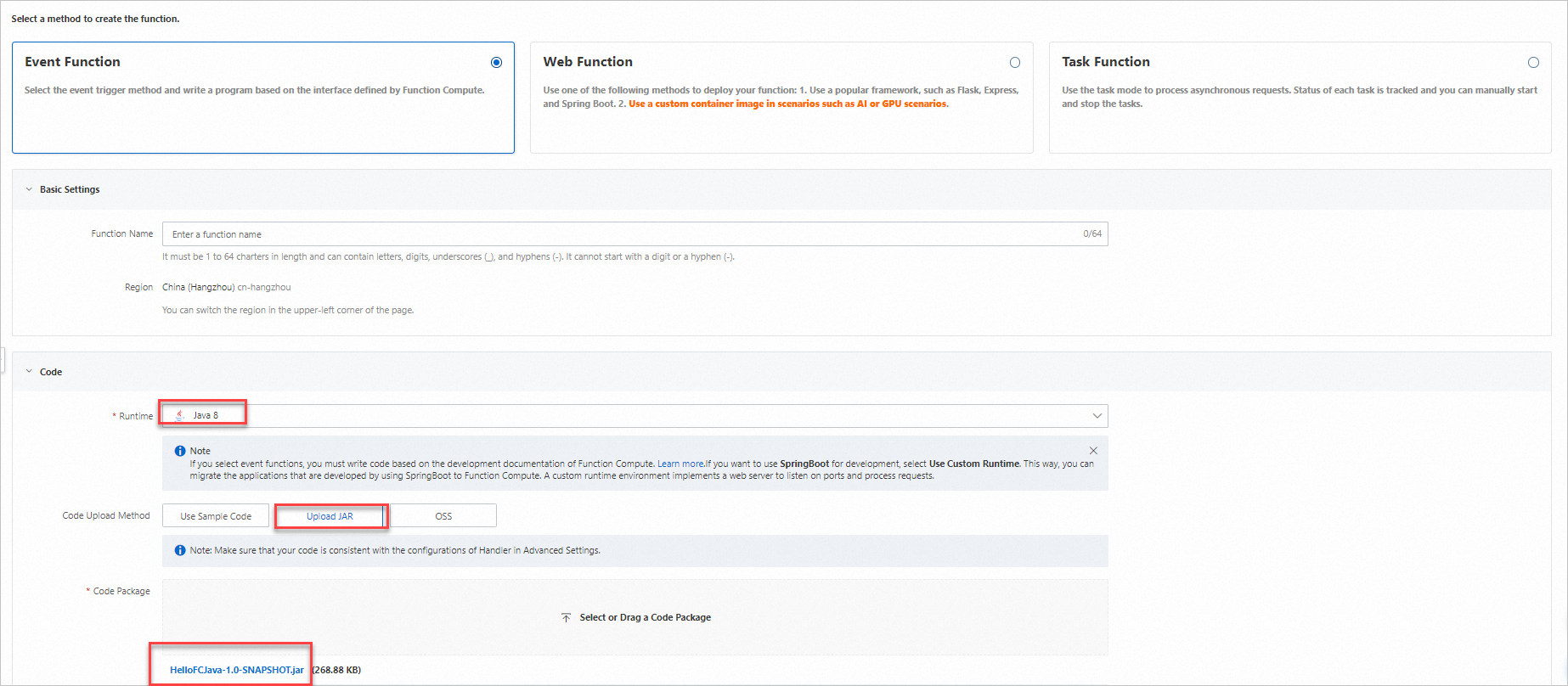
[関数詳細] ページで [設定] タブに移動し、[ハンドラ] の値を確認します。ハンドラは、
[パッケージ名].[クラス名]::[メソッド名]というフォーマットに従う必要があります。上記の例では、ハンドラはexample.App::handleRequestです。必要に応じて [変更] をクリックして更新します。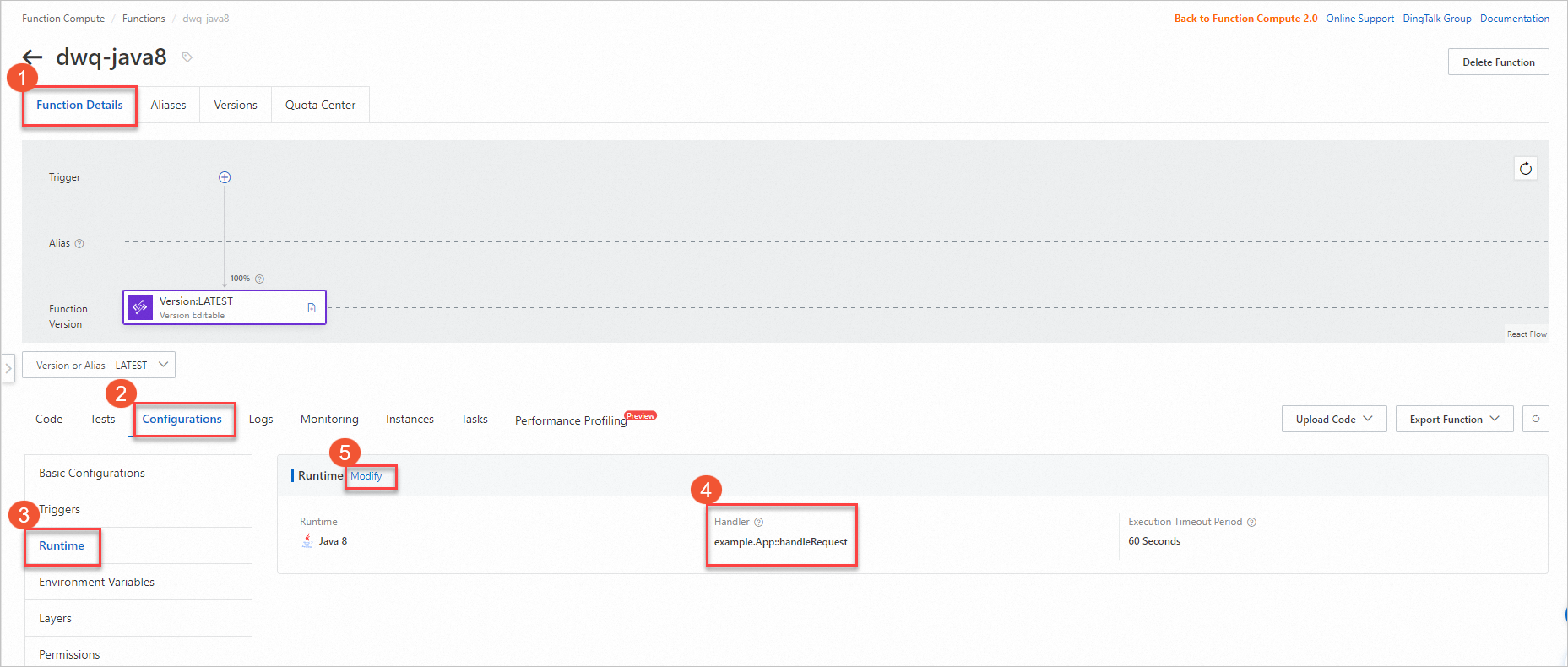
[コード] タブで [関数をテスト] をクリックして、デプロイを検証します。

Serverless Devs を使用したデプロイ
Serverless Devs は、コンパイルとデプロイを 1 つのコマンドで処理します。s deploy は、コードをアップロードする前に自動的に mvn package を実行します。
前提条件
開始する前に、以下が準備できていることを確認してください。
Serverless Devs およびその依存関係がインストールされています。詳しくは、「Serverless Devs およびその依存関係のインストール」をご参照ください。
Serverless Devs が設定されていること。詳細については、「Serverless Devs の設定」をご参照ください。
Java 開発キット (JDK) がインストールされていること。Java Downloads からダウンロードしてください。
Maven がインストールされていること。Apache Maven Downloads からダウンロードしてください。
手順
プロジェクトを初期化します。
s initプロンプトが表示されたら、ベンダーとして Alibaba Cloud を選択し、Java テンプレート、ランタイム、リージョン、および関数名を選択します。
プロジェクトディレクトリに移動します。
cd start-fc-event-java8プロジェクトの構造は次のようになります。
start-fc-event-java8
├── src
│   └── main
│       └── java
│           └── example
│               └── App.java
├── pom.xml
├── readme
└── s.yaml
プロジェクトをデプロイします。
s deployServerless Devs は、まず
mvn package(pre-deployフック) を実行し、次に JAR をアップロードしてデプロイします。デプロイが成功すると、次のような出力で終了します。[2022-04-07 12:00:09] [INFO] [S-CORE] - Start the pre-action [2022-04-07 12:00:09] [INFO] [S-CORE] - Action: mvn package [INFO] Scanning for projects... [INFO] ------------------------< example:HelloFCJava >------------------------- [INFO] Building HelloFCJava 1.0-SNAPSHOT [INFO] --------------------------------[ jar ]--------------------------------- ...... [INFO] BUILD SUCCESS [INFO] ------------------------------------------------------------------------ [INFO] Total time: 3.617 s [INFO] Finished at: 2022-04-07T20:00:14+08:00 [INFO] ------------------------------------------------------------------------ [2022-04-07 12:00:14] [INFO] [S-CORE] - End the pre-action Checking Service, Function (0.64s) Creating Service, Function (0.71s) Tips for next step ====================== * Display information of the deployed resource: s info * Display metrics: s metrics * Display logs: s logs * Invoke remote function: s invoke * Remove Service: s remove service * Remove Function: s remove function * Remove Trigger: s remove trigger * Remove CustomDomain: s remove domain helloworld: region: cn-hangzhou service: name: hello-world-service function: name: start-fc-event-java8 runtime: java8 handler: example.App::handleRequest memorySize: 128 timeout: 60関数を呼び出して、正しく実行されることを確認します。
s invoke期待される出力は次のとおりです。
========= FC invoke Logs begin =========
FC Initialize Start RequestId: b246c3bf-06bc-49e5-92b8-xxxxxxxx
FC Initialize End RequestId: b246c3bf-06bc-49e5-92b8-xxxxxxxx
FC Invoke Start RequestId: b246c3bf-06bc-49e5-92b8-xxxxxxxx
FC Invoke End RequestId: b246c3bf-06bc-49e5-92b8-xxxxxxxx

Duration: 7.27 ms, Billed Duration: 8 ms, Memory Size: 128 MB, Max Memory Used: 65.75 MB
========= FC invoke Logs end =========

FC Invoke Result:
hello world