Java 関数を Function Compute にデプロイするには、コードと依存関係を ZIP または JAR ファイルにパッケージ化してから、Function Compute コンソールまたは Serverless Devs を使用してパッケージをアップロードします。
このトピックでは、2 つのデプロイ方法について説明します。
-
Maven を使用したデプロイ — コンソールを使用して手動でコンパイルおよびアップロードする
-
Serverless Devs を使用したデプロイ — 単一の CLI コマンドでコンパイルとデプロイを実行する
依存関係ライブラリ
Function Compute は、2 つの Java ライブラリを提供しています。
| ライブラリ | アーティファクト ID | バージョン | 説明 |
|---|---|---|---|
com.aliyun.fc.runtime:fc-java-core |
fc-java-core |
1.4.1 | ハンドラーインターフェイスとコンテキストオブジェクトを定義します |
com.aliyun.fc.runtime:fc-java-event |
fc-java-event |
1.2.0 | 一般的なイベントソースのイベントタイプを提供します |
両方のライブラリは Maven セントラルリポジトリ から取得して、pom.xml に追加します。
<!-- fc-java-core: 必須 -->
<dependency>
    <groupId>com.aliyun.fc.runtime</groupId>
    <artifactId>fc-java-core</artifactId>
    <version>1.4.1</version>
</dependency>

<!-- fc-java-events: オプション。関数が Alibaba Cloud サービスからのイベントを処理する場合に追加します -->
<dependency>
    <groupId>com.aliyun.fc.runtime</groupId>
    <artifactId>fc-java-event</artifactId>
    <version>1.2.0</version>
</dependency>依存関係パッケージのサイズが大きすぎる場合は、依存関係をレイヤーにパッケージ化してコードパッケージのサイズを小さく抑えることができます。詳細については、「カスタムレイヤーの作成」をご参照ください。
Maven を使用したデプロイ
前提条件
作業を開始する前に、次の前提条件が満たされていることを確認してください。
-
Java がインストールされていること (Java 公式サイト)
-
Maven がインストールされていること (Installing Apache Maven)
操作手順
-
Java プロジェクトを作成します。ハンドラーを
src/main/java/example/App.javaに配置します。package example; import com.aliyun.fc.runtime.Context; import com.aliyun.fc.runtime.StreamRequestHandler; import java.io.IOException; import java.io.InputStream; import java.io.OutputStream; public class App implements StreamRequestHandler { @Override public void handleRequest(InputStream inputStream, OutputStream outputStream, Context context) throws IOException { outputStream.write(new String("hello world").getBytes()); } } -
pom.xmlの<build>セクションにmaven-shade-pluginを追加します。このプラグインは、依存関係を単一の JAR ファイルにバンドルして、デプロイに適した形式にまとめます。Apache Maven Shade の代わりに Apache Maven Assembly を使用することもできます。
<build>
    <plugins>
        <plugin>
            <groupId>org.apache.maven.plugins</groupId>
            <artifactId>maven-shade-plugin</artifactId>
            <version>3.2.1</version>
            <executions>
                <execution>
                    <phase>package</phase>
                    <goals>
                        <goal>shade</goal>
                    </goals>
                    <configuration>
                        <filters>
                            <filter>
                                <artifact>*:*</artifact>
                                <excludes>
                                    <exclude>META-INF/*.SF</exclude>
                                    <exclude>META-INF/*.DSA</exclude>
                                    <exclude>META-INF/*.RSA</exclude>
                                </excludes>
                            </filter>
                        </filters>
                    </configuration>
                </execution>
            </executions>
        </plugin>
    </plugins>
</build>
<details> <summary>pom.xml の完全な例</summary>
<project xmlns="http://maven.apache.org/POM/4.0.0"
  xmlns:xsi="http://www.w3.org/2001/XMLSchema-instance" xsi:schemaLocation="http://maven.apache.org/POM/4.0.0 http://maven.apache.org/maven-v4_0_0.xsd">
  <modelVersion>4.0.0</modelVersion>
  <groupId>example</groupId>
  <artifactId>HelloFCJava</artifactId>
  <packaging>jar</packaging>
  <version>1.0-SNAPSHOT</version>
  <name>HelloFCJava</name>

  <dependencies>
    <dependency>
      <groupId>junit</groupId>
      <artifactId>junit</artifactId>
      <version>3.8.1</version>
      <scope>test</scope>
    </dependency>
    <dependency>
      <groupId>com.aliyun.fc.runtime</groupId>
      <artifactId>fc-java-core</artifactId>
      <version>1.4.1</version>
    </dependency>
  </dependencies>

  <build>
    <plugins>
        <plugin>
          <groupId>org.apache.maven.plugins</groupId>
          <artifactId>maven-shade-plugin</artifactId>
          <version>3.2.1</version>
          <executions>
            <execution>
              <phase>package</phase>
              <goals>
                <goal>shade</goal>
              </goals>
              <configuration>
                <filters>
                  <filter>
                    <artifact>*:*</artifact>
                    <excludes>
                      <exclude>META-INF/*.SF</exclude>
                      <exclude>META-INF/*.DSA</exclude>
                      <exclude>META-INF/*.RSA</exclude>
                    </excludes>
                  </filter>
                </filters>
              </configuration>
            </execution>
          </executions>
        </plugin>
    </plugins>
  </build>

  <properties>
    <maven.compiler.target>1.8</maven.compiler.target>
    <maven.compiler.source>1.8</maven.compiler.source>
    <maven.test.skip>true</maven.test.skip>
  </properties>
</project>
</details>
-
プロジェクトのルートディレクトリから、次のコマンドを実行します。
重要macOS および Linux では、圧縮する前に、コードファイルが読み取り可能かつ実行可能であることを確認してください。
mvn clean packageビルドが成功すると、次のように表示されます。
[INFO] BUILD SUCCESS
[INFO] ------------------------------------------------------------------------
[INFO] Total time:  11.681 s
[INFO] Finished at: 2020-03-26T15:55:05+08:00
[INFO] ------------------------------------------------------------------------
出力される JAR ファイルの名前は、
pom.xmlのartifactIdフィールドとversionフィールドに基づいて決まります。上記の例では、ファイルはtarget/HelloFCJava-1.0-SNAPSHOT.jarです。ビルドが失敗した場合は、エラーメッセージを確認してコードを修正してから、再試行してください。 -
Function Compute コンソール にログインし、JAR ファイルをアップロードします。
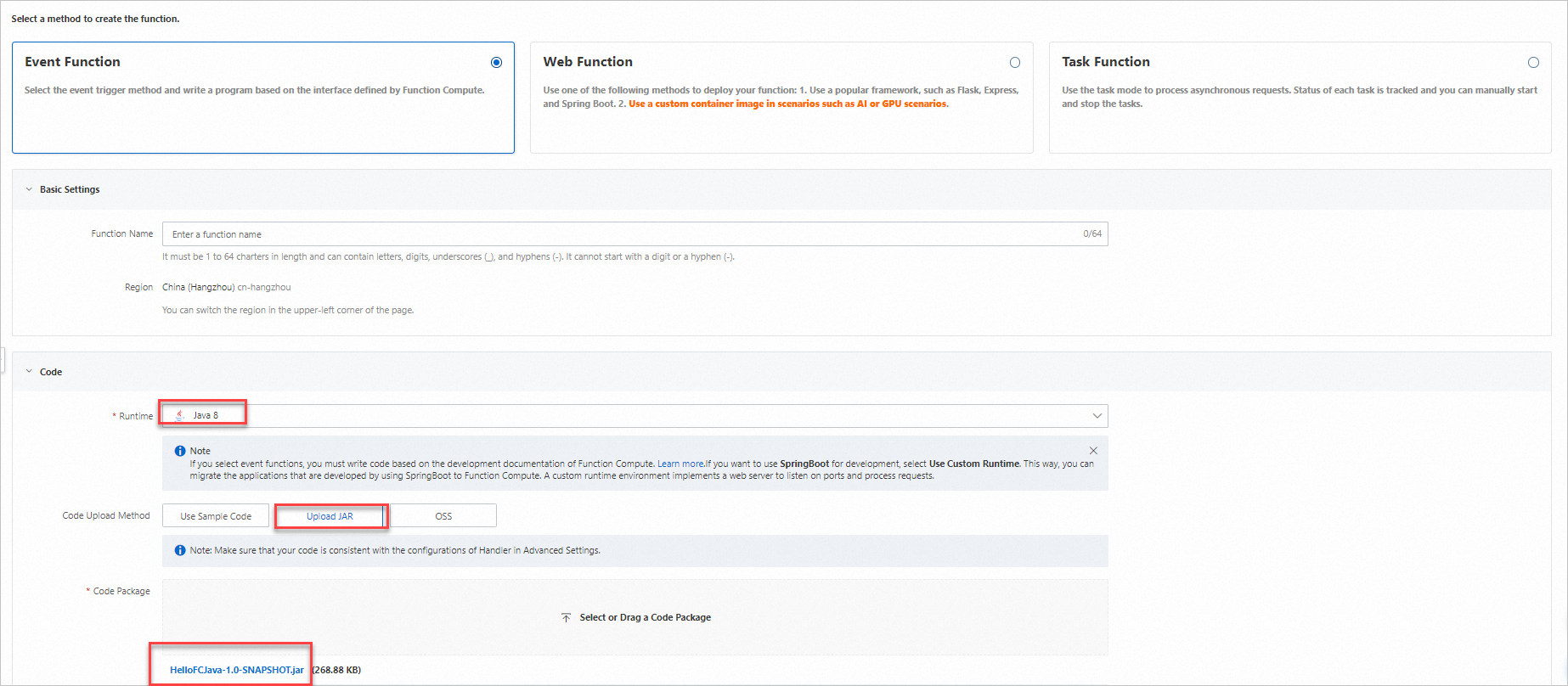
-
関数の詳細 ページの 設定 タブで、ハンドラー の値を確認します。ハンドラーは
[Package name].[Class name]::[Method name]形式に従う必要があります。上記の例では、ハンドラーはexample.App::handleRequestです。必要に応じて、基本設定 セクションの 変更 をクリックして更新します。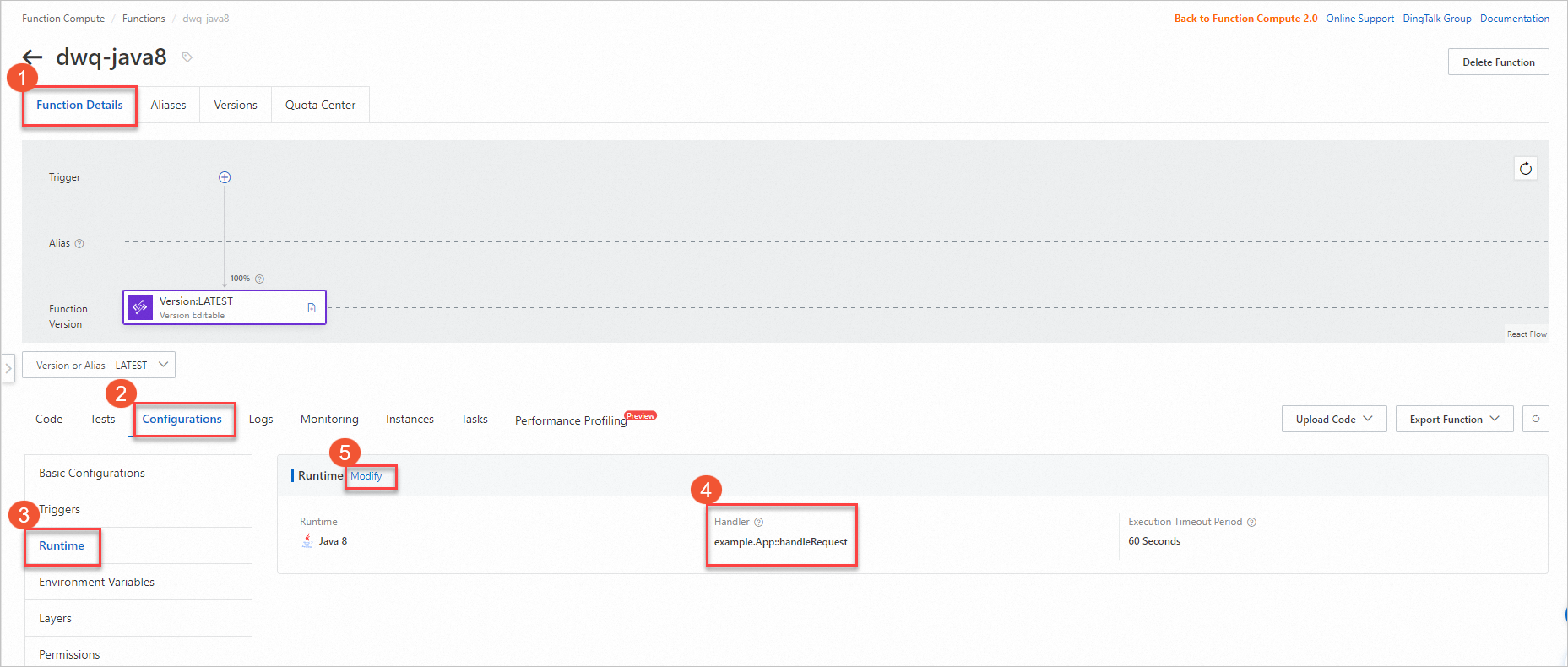
-
コード タブで、関数のテスト をクリックしてデプロイを検証します。

Serverless Devs を使用したデプロイ
Serverless Devs を使用すると、単一のコマンドでコンパイルとデプロイを行えます。s deploy を実行すると、コードをアップロードする前に自動的に mvn package が実行されます。
前提条件
作業を開始する前に、次の前提条件が満たされていることを確認してください。
-
Serverless Devs とその依存関係がインストールされていること。「Serverless Devs と依存関係のインストール」をご参照ください。
-
Serverless Devs が設定されていること。「Serverless Devs の設定」をご参照ください。
-
Java Development Kit (JDK) がインストールされていること。Java Downloads からダウンロードしてください。
-
Maven がインストールされていること。Apache Maven Downloads からダウンロードしてください。
操作手順
-
プロジェクトを初期化します。
s initプロンプトが表示されたら、ベンダーで Alibaba Cloud を選択して、Java テンプレート、ランタイム、リージョン、関数名を選択します。
-
プロジェクトディレクトリに移動します。
cd start-fc-event-java8プロジェクト構造は次のようになります。
start-fc-event-java8 ├── src │ └── main │ └── java │ └── example │ └── App.java ├── pom.xml ├── readme └── s.yaml -
プロジェクトをデプロイします。
s deployServerless Devs は、まず
mvn packageを実行して (pre-deployフック)、その後 JAR をアップロードしてデプロイします。デプロイが成功すると、次のような出力が表示されます。[2022-04-07 12:00:09] [INFO] [S-CORE] - Start the pre-action [2022-04-07 12:00:09] [INFO] [S-CORE] - Action: mvn package [INFO] Scanning for projects... [INFO] ------------------------< example:HelloFCJava >------------------------- [INFO] Building HelloFCJava 1.0-SNAPSHOT [INFO] --------------------------------[ jar ]--------------------------------- ...... [INFO] BUILD SUCCESS [INFO] ------------------------------------------------------------------------ [INFO] Total time: 3.617 s [INFO] Finished at: 2022-04-07T20:00:14+08:00 [INFO] ------------------------------------------------------------------------ [2022-04-07 12:00:14] [INFO] [S-CORE] - End the pre-action Checking Service, Function (0.64s) Creating Service, Function (0.71s) Tips for next step ====================== * Display information of the deployed resource: s info * Display metrics: s metrics * Display logs: s logs * Invoke remote function: s invoke * Remove Service: s remove service * Remove Function: s remove function * Remove Trigger: s remove trigger * Remove CustomDomain: s remove domain helloworld: region: cn-hangzhou service: name: hello-world-service function: name: start-fc-event-java8 runtime: java8 handler: example.App::handleRequest memorySize: 128 timeout: 60 -
関数を呼び出して、正しく実行されることを確認します。
s invoke出力例:
========= FC invoke Logs begin =========
FC Initialize Start RequestId: b246c3bf-06bc-49e5-92b8-xxxxxxxx
FC Initialize End RequestId: b246c3bf-06bc-49e5-92b8-xxxxxxxx
FC Invoke Start RequestId: b246c3bf-06bc-49e5-92b8-xxxxxxxx
FC Invoke End RequestId: b246c3bf-06bc-49e5-92b8-xxxxxxxx

Duration: 7.27 ms, Billed Duration: 8 ms, Memory Size: 128 MB, Max Memory Used: 65.75 MB
========= FC invoke Logs end =========

FC Invoke Result:
hello world