オペレーティングシステム間でデータを共有するには、Windows インスタンスにネットワーク ファイル システム (NFS) ファイルシステムをマウントします。これにより、データをアップロードおよびダウンロードできます。このトピックでは、Windows オペレーティングシステムに NFS ファイルシステムをマウントする方法について説明します。
前提条件
NAS ファイルシステムを作成したのと同じエッジゾーンに Windows ENS インスタンスが存在すること。
NAS NFS ファイルシステムを作成し、そのマウントポイントアドレスを取得済みであること。ファイルシステムと ENS インスタンスは同じ VPC にある必要があります。
手順
ENS インスタンスにリモート接続します。
NFS クライアントをインストールします。
サーバーマネージャーを開きます。
[管理] > [役割と機能の追加] に移動します。
役割と機能の追加ウィザードの指示に従って、NFS クライアントをインストールします。
[サーバーの役割] タブで、[ファイル サービスと記憶域サービス] > [ファイル サービスと iSCSI サービス] に移動し、[NFS 用サーバー] を選択します。
[機能] タブで、[NFS 用クライアント] を選択します。
ENS インスタンスを再起動します。
コマンドプロンプトを開き、mount コマンドを実行します。出力が次の図のようであれば、NFS クライアントはインストールされています。

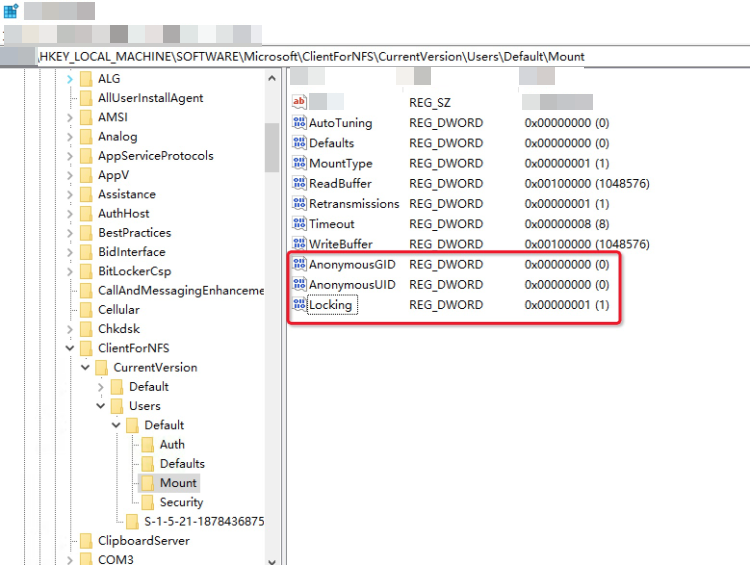
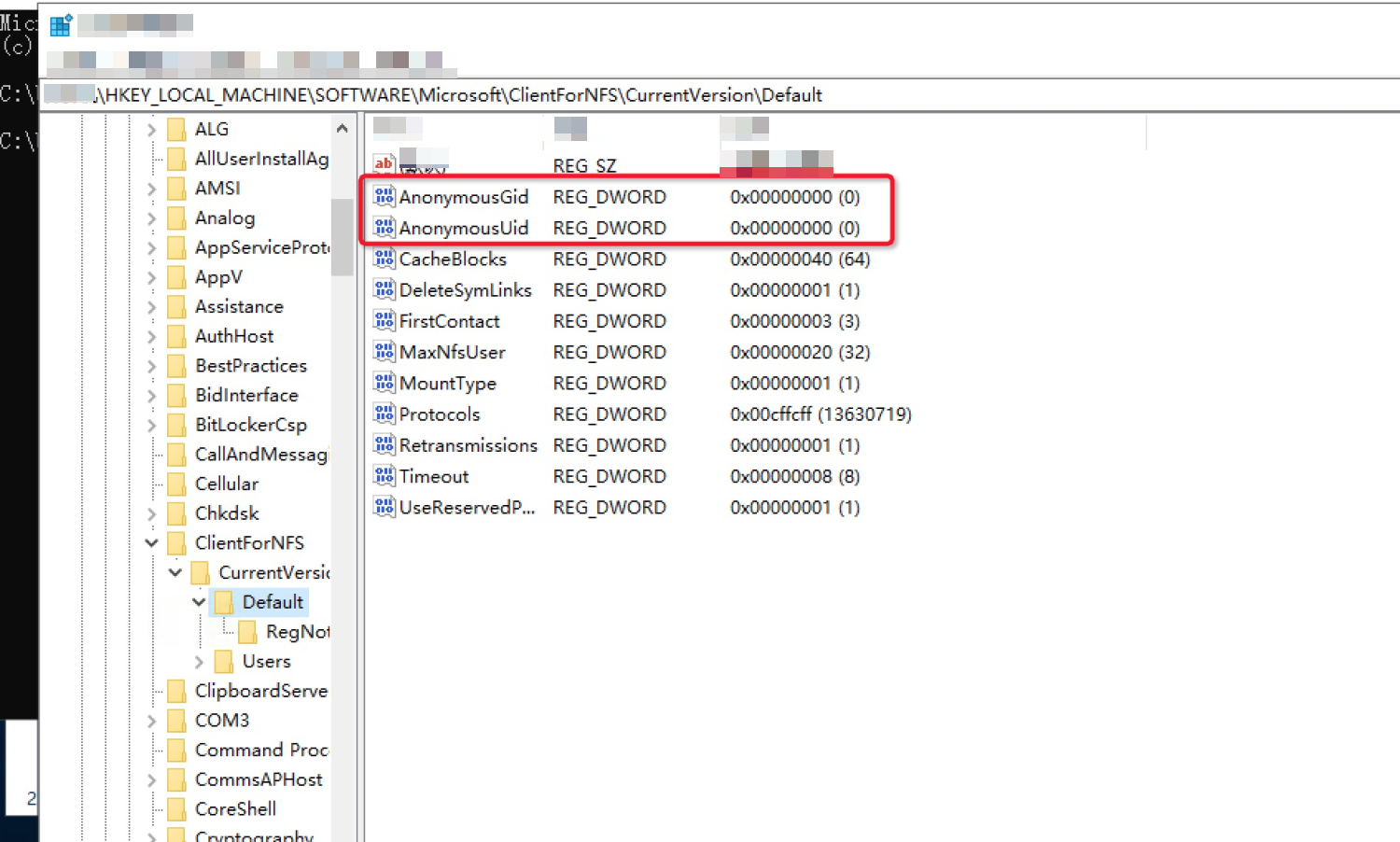
レジストリを変更して、匿名ユーザーのデフォルトのユーザー ID (UID) とグループ ID (GID) を追加します。これにより、NAS ファイルシステムのマウント後にファイルにアクセスする際の権限エラーを防ぎます。
パス HKEY_LOCAL_MACHINE > SOFTWARE > Microsoft > ClientForNFS > CurrentVersion > Users > Default > Mount に移動します。Locking、AnonymousGID、および AnonymousUID レジストリエントリを作成します。Locking の値を 1 に設定します。
パス HKEY_LOCAL_MACHINE > SOFTWARE > Microsoft > ClientForNFS > CurrentVersion > Default に移動します。AnonymousGID と AnonymousUID レジストリエントリを作成して GID と UID を設定します。
システムを再起動します。
システムを再起動する必要があります。再起動しない場合、読み取り専用の権限しか持ちません。
ルートを追加します。
NAS マウントポイントにアクセスする前に、Windows インスタンスで次のコマンドを実行してルートを追加します: `route add 100.64.XXX.XXX <インスタンスのプライベート_IP_アドレス>`。
NFS ファイルシステムをマウントします。
Windows クライアントで、次のコマンドを実行して NFS ファイルシステムをマウントします: `mount <マウントポイント_アドレス> <ドライブ文字>`。
説明Windows クライアントは NFSv3 プロトコルのみをサポートします。
ファイルシステムの詳細ページから NFSv3 マウントポイントアドレスを取得できます。たとえば、詳細ページの NFSv3 マウントポイントアドレスが `100.64.XXX.XXX:/source_path` の場合、Windows クライアントのマウントポイントアドレスは
\\100.64.XXX.XXX\source_pathです。マウント結果を確認します。
マウントが成功したら、[この PC] アイコンをダブルクリックして、新しい共有ファイルシステムを表示します。
スクリプトを使用したマウント
スクリプトの機能
NFS クライアントのインストール。
レジストリの変更。
NFS の読み取り/書き込みマウント。
起動時の自動マウント。
スクリプトには再起動コマンドは含まれていません。スクリプトを使用して NFS クライアントをインストールしたり、レジストリを変更したりした場合は、手動でインスタンスを再起動する必要があります。そうしないと、マウントされたフォルダは読み取り専用になります。
使用方法
スクリプトをフォルダ (たとえば C: ドライブ) に保存し、ファイル名を nfs_mount.ps1 とします。
PowerShell でスクリプトを実行します。
方法 1:
powershell -file C:\nfs_mount.ps1方法 2:
powershell -file C:\nfs_mount.ps1 -url <mount_target> -drive z
# 注: このメソッドは、スクリプト内のデフォルトの url (マウントポイント) と drive (ドライブ文字) を上書きします。
NFS の読み取り/書き込みマウント
[CmdletBinding()]
Param(
# マウントポイント
[string]$url="100.125.255.100\nas_test",
# Windows ドライブ文字
[string]$drive="z"
)
# 現在の実行時間を取得
$now = Get-Date
# ログファイルの場所を指定: 現在の実行フォルダ
$logPath="C:\"
# ログファイル名を設定
$logName = "executLog"
$logFileName= $logName + "_" + $now.ToString("yyyy-MM-dd")+".log"
$logInfo = $now.ToString("yyyy-MM-dd HH:mm:ss.fff") + " "
# ログファイルの完全なパスを設定
$logPathFile = Join-Path $logPath $logFileName
Write-Output ($logInfo+"マウントパス:"+$url+" ドライブ文字:"+$drive)
Write-Output ($logInfo+"マウントパス:"+$url+" ドライブ文字:"+$drive) | Out-File -FilePath $logPathFile -Encoding default -Append
$nfs=get-WindowsFeature -Name "NFS-Client"
if($nfs.installed){
$nas_start = (Get-Item HKCU:\Software\Microsoft\Windows\CurrentVersion\Run).GetValueNames().Contains("nas_run")
Write-Output ($logInfo+":起動時の自動マウント>>"+$nas_start)
Write-Output ($logInfo+":起動時の自動マウント>>"+$nas_start) | Out-File -FilePath $logPathFile -Encoding default -Append
if(!$nas_start){
Write-Output ($logInfo+":起動時の自動マウントを設定")
Write-Output ($logInfo+":起動時の自動マウントを設定") | Out-File -FilePath $logPathFile -Encoding default -Append
$nas_script_path = $myinvocation.mycommand.definition
$run_script = "powershell -file "+ $nas_script_path +" -url "+ $url +" -drive "+ $drive
$nas_run = "nas_run"
$nas_run_result = New-ItemProperty -Path "HKCU:\Software\Microsoft\Windows\CurrentVersion\Run" -Name $nas_run  -PropertyType String -Value $run_script -ErrorAction Continue -ErrorVariable run_err_msg
if($err_msg){
Write-Output ($logInfo +"起動時の自動マウントの設定に失敗しました。結果:" +$run_err_msg)
Write-Output ($logInfo +"起動時の自動マウントの設定に失敗しました。結果:" +$run_err_msg) | Out-File -FilePath $logPathFile -Encoding default -Append
}else{
Write-Output ($logInfo +"起動時の自動マウントを設定しました。結果:" +$nas_run_result)
Write-Output ($logInfo +"起動時の自動マウントを設定しました。結果:" +$nas_run_result) | Out-File -FilePath $logPathFile -Encoding default -Append
}
}
Write-Output ($logInfo+"NFS クライアントが存在します。NFS マウントポイントをマウントしています。")
Write-Output ($logInfo+"NFS クライアントが存在します。NFS マウントポイントをマウントしています。") | Out-File -FilePath $logPathFile -Encoding default -Append
$nfs_url = "mount -o  nolock -o  mtype=hard -o  timeout=60 \\$url ${drive}:"
Write-Output ($logInfo + ":NAS のマウントを開始 "+$nfs_url)
Write-Output ($logInfo + ":NAS のマウントを開始 "+$nfs_url) | Out-File -FilePath $logPathFile -Encoding default -Append
$reslut = cmd /c $nfs_url
Write-Output ($logInfo+$reslut)
Write-Output ($logInfo+$reslut) | Out-File -FilePath $logPathFile -Encoding default -Append
}else{
Write-Output ($logInfo +":NFS クライアントがインストールされていません。レジストリをインストールして設定しています。完了後に再起動してください。")
Write-Output ($logInfo +":NFS クライアントがインストールされていません。レジストリをインストールして設定しています。完了後に再起動してください。") | Out-File -FilePath $logPathFile -Encoding default -Append
Add-WindowsFeature -Name "NFS-Client"
$lock_path = Test-Path HKLM:\SOFTWARE\Microsoft\ClientForNFS\CurrentVersion\Users\Default\Mount
if($lock_path){
$lock = (Get-Item HKLM:\SOFTWARE\Microsoft\ClientForNFS\CurrentVersion\Users\Default\Mount).GetValueNames().Contains("Locking")
if(!$lock){
$lock_result = New-ItemProperty  -Path "HKLM:\SOFTWARE\Microsoft\ClientForNFS\CurrentVersion\Users\Default\Mount" -Name "Locking" -PropertyType DWord -Value 1 -ErrorAction Continue -ErrorVariable err_msg
if($err_msg){
Write-Output ($logInfo +"レジストリの設定に失敗しました。結果:" +$err_msg)
Write-Output ($logInfo +"レジストリの設定に失敗しました。結果:" +$err_msg) | Out-File -FilePath $logPathFile -Encoding default -Append
}else{
Write-Output ($logInfo +"レジストリを設定しました。結果:" +$lock_result)
Write-Output ($logInfo +"レジストリを設定しました。結果:" +$lock_result) | Out-File -FilePath $logPathFile -Encoding default -Append
}
}
}else{
Write-Output "レジストリキー HKEY_LOCAL_MACHINE\SOFTWARE\Microsoft\ClientForNFS\CurrentVersion\Users\Default\Mount が存在しません。手動で作成してください。"
Write-Output "レジストリキー HKEY_LOCAL_MACHINE\SOFTWARE\Microsoft\ClientForNFS\CurrentVersion\Users\Default\Mount が存在しません。手動で作成してください。" | Out-File -FilePath $logPathFile -Encoding default -Append
}


$id_path = Test-Path HKLM:\SOFTWARE\Microsoft\ClientForNFS\CurrentVersion\Default
if ($id_path){
$gid = (Get-Item HKLM:\SOFTWARE\Microsoft\ClientForNFS\CurrentVersion\Default).GetValueNames().Contains("AnonymousGID")
$uid = (Get-Item HKLM:\SOFTWARE\Microsoft\ClientForNFS\CurrentVersion\Default).GetValueNames().Contains("AnonymousUID")
if (!$gid){
$gid_result = New-ItemProperty -Path "HKLM:\SOFTWARE\Microsoft\ClientForNFS\CurrentVersion\Default" -Name "AnonymousGID" -PropertyType DWord -Value 0   -ErrorAction Continue -ErrorVariable gid_err_msg
if($gid_err_msg){
Write-Output ($logInfo +"レジストリの設定に失敗しました。結果:" +$gid_err_msg)
Write-Output ($logInfo +"レジストリの設定に失敗しました。結果:" +$gid_err_msg) | Out-File -FilePath $logPathFile -Encoding default -Append
}else{
Write-Output ($logInfo +"レジストリを設定しました。結果:" +$gid_result)
Write-Output ($logInfo +"レジストリを設定しました。結果:" +$gid_result) | Out-File -FilePath $logPathFile -Encoding default -Append
}
}
if (!$uid){
$uid_result = New-ItemProperty -Path "HKLM:\SOFTWARE\Microsoft\ClientForNFS\CurrentVersion\Default" -Name "AnonymousUID" -PropertyType DWord -Value 0  -ErrorAction Continue -ErrorVariable uid_err_msg
if($uid_err_msg){
Write-Output ($logInfo +"レジストリの設定に失敗しました。結果:" +$uid_err_msg)
Write-Output ($logInfo +"レジストリの設定に失敗しました。結果:" +$uid_err_msg) | Out-File -FilePath $logPathFile -Encoding default -Append
}else{
Write-Output ($logInfo +"レジストリを設定しました。結果:" +$uid_result)
Write-Output ($logInfo +"レジストリを設定しました。結果:" +$uid_result) | Out-File -FilePath $logPathFile -Encoding default -Append
}
}
}else{
Write-Output ($logInfo +"レジストリキー HKEY_LOCAL_MACHINE\SOFTWARE\Microsoft\ClientForNFS\CurrentVersion\Default が存在しません。手動で作成してください。")
Write-Output ($logInfo +"レジストリキー HKEY_LOCAL_MACHINE\SOFTWARE\Microsoft\ClientForNFS\CurrentVersion\Default が存在しません。手動で作成してください。") | Out-File -FilePath $logPathFile -Encoding default -Append
}
$nas_start = (Get-Item HKCU:\Software\Microsoft\Windows\CurrentVersion\Run).GetValueNames().Contains("nas_run")
Write-Output ($logInfo+":起動時の自動マウント>>"+$nas_start)
Write-Output ($logInfo+":起動時の自動マウント>>"+$nas_start) | Out-File -FilePath $logPathFile -Encoding default -Append
if(!$nas_start){
Write-Output ($logInfo+":起動時の自動マウントを設定")
Write-Output ($logInfo+":起動時の自動マウントを設定") | Out-File -FilePath $logPathFile -Encoding default -Append
$nas_script_path = $myinvocation.mycommand.definition
$run_script = "powershell -file "+ $nas_script_path +" -url "+ $url +" -drive "+ $drive
$nas_run = "nas_run"
$nas_run_result = New-ItemProperty -Path "HKCU:\Software\Microsoft\Windows\CurrentVersion\Run" -Name $nas_run  -PropertyType String -Value $run_script -ErrorAction Continue -ErrorVariable run_err_msg
if($err_msg){
Write-Output ($logInfo +"起動時の自動マウントの設定に失敗しました。結果:" +$run_err_msg)
Write-Output ($logInfo +"起動時の自動マウントの設定に失敗しました。結果:" +$run_err_msg) | Out-File -FilePath $logPathFile -Encoding default -Append
}else{
Write-Output ($logInfo +"起動時の自動マウントを設定しました。結果:" +$nas_run_result)
Write-Output ($logInfo +"起動時の自動マウントを設定しました。結果:" +$nas_run_result) | Out-File -FilePath $logPathFile -Encoding default -Append
}
}
$nfs_url = "mount -o  nolock -o  mtype=hard -o  timeout=60 \\$url ${drive}:"
Write-Output ($logInfo + ":NAS のマウントを開始 "+$nfs_url)
Write-Output ($logInfo + ":NAS のマウントを開始 "+$nfs_url) | Out-File -FilePath $logPathFile -Encoding default -Append
$result = cmd /c $nfs_url
Write-Output ($logInfo  +":NAS マウントが完了しました"  +$result)
Write-Output ($logInfo  +":NAS マウントが完了しました"  +$result) | Out-File -FilePath $logPathFile -Encoding default -Append
Write-Output ($logInfo  +":設定が完了しました")
Write-Output ($logInfo  +":設定が完了しました") | Out-File -FilePath $logPathFile -Encoding default -Append
}
読み取り専用マウントと起動時の自動マウント
[CmdletBinding()]
Param(
# マウントポイント
[string]$url="100.125.255.100\nas_test",
# Windows ドライブ文字
[string]$drive="z"
)
# 現在の実行時間を取得
$now = Get-Date
# ログファイルの場所を指定: 現在の実行フォルダ
$logPath="C:\"
# ログファイル名を設定
$logName = "executLog"
$logFileName= $logName + "_" + $now.ToString("yyyy-MM-dd")+".log"
$logInfo = $now.ToString("yyyy-MM-dd HH:mm:ss.fff") + " "
# ログファイルの完全なパスを設定
$logPathFile = Join-Path $logPath $logFileName
Write-Output ($logInfo+"マウントパス:"+$url+" ドライブ文字:"+$drive)
Write-Output ($logInfo+"マウントパス:"+$url+" ドライブ文字:"+$drive) | Out-File -FilePath $logPathFile -Encoding default -Append
$nfs=get-WindowsFeature -Name "NFS-Client"
if($nfs.installed){
$nas_start = (Get-Item HKCU:\Software\Microsoft\Windows\CurrentVersion\Run).GetValueNames().Contains("nas_run")
Write-Output ($logInfo+":起動時の自動マウント>>"+$nas_start)
Write-Output ($logInfo+":起動時の自動マウント>>"+$nas_start) | Out-File -FilePath $logPathFile -Encoding default -Append
if(!$nas_start){
Write-Output ($logInfo+":起動時の自動マウントを設定")
Write-Output ($logInfo+":起動時の自動マウントを設定") | Out-File -FilePath $logPathFile -Encoding default -Append
$nas_script_path = $myinvocation.mycommand.definition
$run_script = "powershell -file "+ $nas_script_path +" -url "+ $url +" -drive "+ $drive
$nas_run = "nas_run"
$nas_run_result = New-ItemProperty -Path "HKCU:\Software\Microsoft\Windows\CurrentVersion\Run" -Name $nas_run  -PropertyType String -Value $run_script -ErrorAction Continue -ErrorVariable run_err_msg
if($err_msg){
Write-Output ($logInfo +"起動時の自動マウントの設定に失敗しました。結果:" +$run_err_msg)
Write-Output ($logInfo +"起動時の自動マウントの設定に失敗しました。結果:" +$run_err_msg) | Out-File -FilePath $logPathFile -Encoding default -Append
}else{
Write-Output ($logInfo +"起動時の自動マウントを設定しました。結果:" +$nas_run_result)
Write-Output ($logInfo +"起動時の自動マウントを設定しました。結果:" +$nas_run_result) | Out-File -FilePath $logPathFile -Encoding default -Append
}
}
Write-Output ($logInfo+"NFS クライアントが存在します。NFS マウントポイントをマウントしています。")
Write-Output ($logInfo+"NFS クライアントが存在します。NFS マウントポイントをマウントしています。") | Out-File -FilePath $logPathFile -Encoding default -Append
$nfs_url = "mount -o  nolock -o  mtype=hard -o  timeout=60 \\$url ${drive}:"
Write-Output ($logInfo + ":NAS のマウントを開始 "+$nfs_url)
Write-Output ($logInfo + ":NAS のマウントを開始 "+$nfs_url) | Out-File -FilePath $logPathFile -Encoding default -Append
$reslut = cmd /c $nfs_url
Write-Output ($logInfo+$reslut)
Write-Output ($logInfo+$reslut) | Out-File -FilePath $logPathFile -Encoding default -Append
}else{
Write-Output ($logInfo +":NFS クライアントがインストールされていません。レジストリをインストールして設定しています。完了後に再起動してください。")
Write-Output ($logInfo +":NFS クライアントがインストールされていません。レジストリをインストールして設定しています。完了後に再起動してください。") | Out-File -FilePath $logPathFile -Encoding default -Append
Add-WindowsFeature -Name "NFS-Client"
$lock_path = Test-Path HKLM:\SOFTWARE\Microsoft\ClientForNFS\CurrentVersion\Users\Default\Mount
if($lock_path){
$lock = (Get-Item HKLM:\SOFTWARE\Microsoft\ClientForNFS\CurrentVersion\Users\Default\Mount).GetValueNames().Contains("Locking")
if(!$lock){
$lock_result = New-ItemProperty  -Path "HKLM:\SOFTWARE\Microsoft\ClientForNFS\CurrentVersion\Users\Default\Mount" -Name "Locking" -PropertyType DWord -Value 1 -ErrorAction Continue -ErrorVariable err_msg
if($err_msg){
Write-Output ($logInfo +"レジストリの設定に失敗しました。結果:" +$err_msg)
Write-Output ($logInfo +"レジストリの設定に失敗しました。結果:" +$err_msg) | Out-File -FilePath $logPathFile -Encoding default -Append
}else{
Write-Output ($logInfo +"レジストリを設定しました。結果:" +$lock_result)
Write-Output ($logInfo +"レジストリを設定しました。結果:" +$lock_result) | Out-File -FilePath $logPathFile -Encoding default -Append
}
}
}else{
Write-Output "レジストリキー HKEY_LOCAL_MACHINE\SOFTWARE\Microsoft\ClientForNFS\CurrentVersion\Users\Default\Mount が存在しません。手動で作成してください。"
Write-Output "レジストリキー HKEY_LOCAL_MACHINE\SOFTWARE\Microsoft\ClientForNFS\CurrentVersion\Users\Default\Mount が存在しません。手動で作成してください。" | Out-File -FilePath $logPathFile -Encoding default -Append
}
$nas_start = (Get-Item HKCU:\Software\Microsoft\Windows\CurrentVersion\Run).GetValueNames().Contains("nas_run")
Write-Output ($logInfo+":起動時の自動マウント>>"+$nas_start)
Write-Output ($logInfo+":起動時の自動マウント>>"+$nas_start) | Out-File -FilePath $logPathFile -Encoding default -Append
if(!$nas_start){
Write-Output ($logInfo+":起動時の自動マウントを設定")
Write-Output ($logInfo+":起動時の自動マウントを設定") | Out-File -FilePath $logPathFile -Encoding default -Append
$nas_script_path = $myinvocation.mycommand.definition
$run_script = "powershell -file "+ $nas_script_path +" -url "+ $url +" -drive "+ $drive
$nas_run = "nas_run"
$nas_run_result = New-ItemProperty -Path "HKCU:\Software\Microsoft\Windows\CurrentVersion\Run" -Name $nas_run  -PropertyType String -Value $run_script -ErrorAction Continue -ErrorVariable run_err_msg
if($err_msg){
Write-Output ($logInfo +"起動時の自動マウントの設定に失敗しました。結果:" +$run_err_msg)
Write-Output ($logInfo +"起動時の自動マウントの設定に失敗しました。結果:" +$run_err_msg) | Out-File -FilePath $logPathFile -Encoding default -Append
}else{
Write-Output ($logInfo +"起動時の自動マウントを設定しました。結果:" +$nas_run_result)
Write-Output ($logInfo +"起動時の自動マウントを設定しました。結果:" +$nas_run_result) | Out-File -FilePath $logPathFile -Encoding default -Append
}
}
$nfs_url = "mount -o  nolock -o  mtype=hard -o  timeout=60 \\$url ${drive}:"
Write-Output ($logInfo+":NAS のマウントを開始 "+$nfs_url)
Write-Output ($logInfo+":NAS のマウントを開始 "+$nfs_url) | Out-File -FilePath $logPathFile -Encoding default -Append
$result = cmd /c $nfs_url
Write-Output ($logInfo  +":NAS マウントが完了しました"  +$result)
Write-Output ($logInfo  +":NAS マウントが完了しました"  +$result) | Out-File -FilePath $logPathFile -Encoding default -Append
Write-Output ($logInfo  +":設定が完了しました")
Write-Output ($logInfo  +":設定が完了しました") | Out-File -FilePath $logPathFile -Encoding default -Append
}