API セキュリティ設定では、Edge Security Accelerator (ESA) の API セキュリティに関するセッション ID、スキーマ検証設定、トークン設定を一元管理できます。セッション識別子は、主に API 管理機能によって使用されます。トークン設定は、API ルールを設定する際に使用されます。
セッション識別子の追加
セッション識別子は、API の個々のセッションを識別します。ESA は、タグ付けされた API のトラフィックを収集・分析し、それらの API に対するレート制限の提案を生成します。
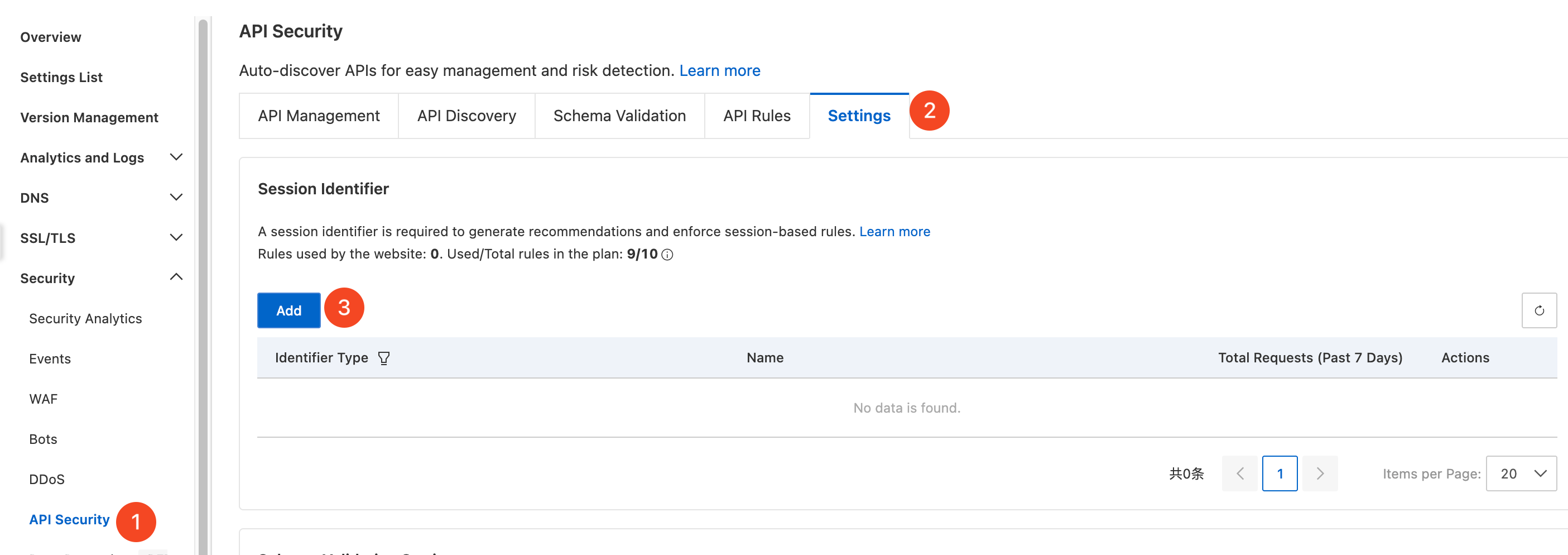
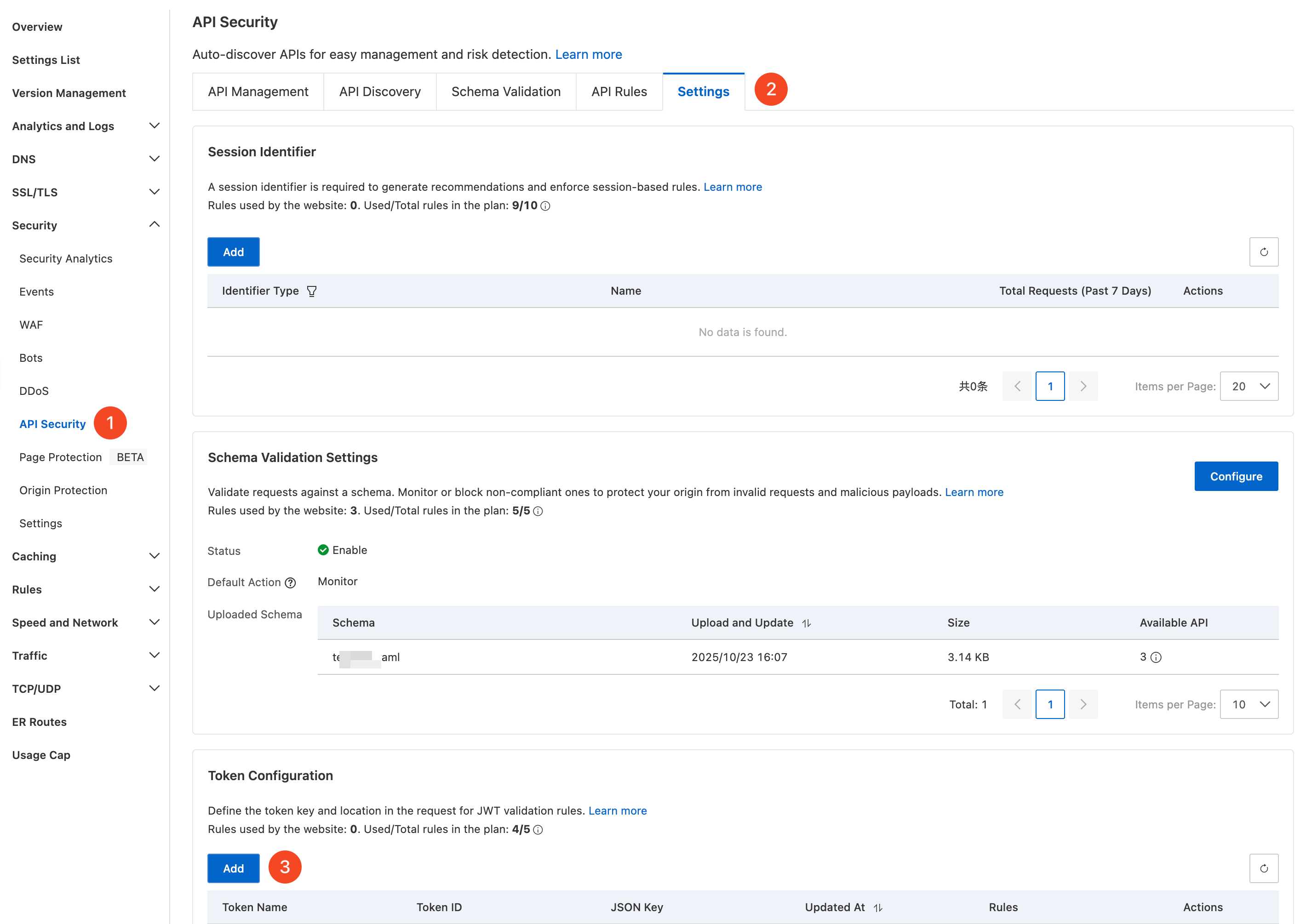
ESA コンソールで サイト管理 を選択し、サイト 列で対象のサイトをクリックします。
左側のナビゲーションペインで、セキュリティ保護 > API セキュリティ の順に選択します。
API セキュリティ ページで 設定 タブをクリックし、セッション識別子 セクションの 追加 をクリックして設定を開始します。
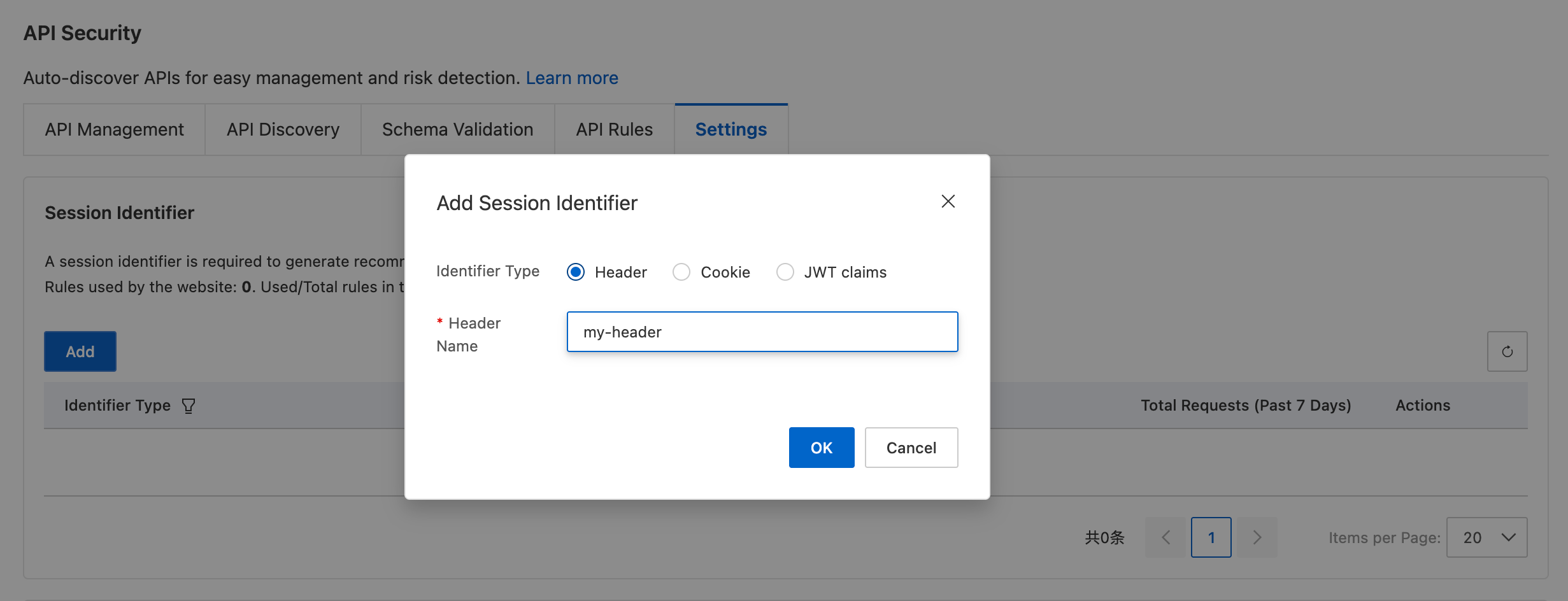
ビジネス要件に合わせて識別子のタイプを選択し、対応するカスタムヘッダー名を入力します。次の識別子タイプが利用可能です。
[ヘッダー]
[Cookie]
[JWT クレーム]。既存のものを使用するか、新規に作成する必要があります。
スキーマ検証の設定
OpenAPI 仕様などの API スキーマをアップロードします。ESA は、管理対象の API に自動的にマッチングし、受信リクエストをスキーマと照合して検証し、設定されたアクションを非準拠のリクエストに適用します。スキーマ検証設定では、機能のオン/オフの切り替え、デフォルトのアクションの設定、カスタムスキーマファイルのアップロードができます。
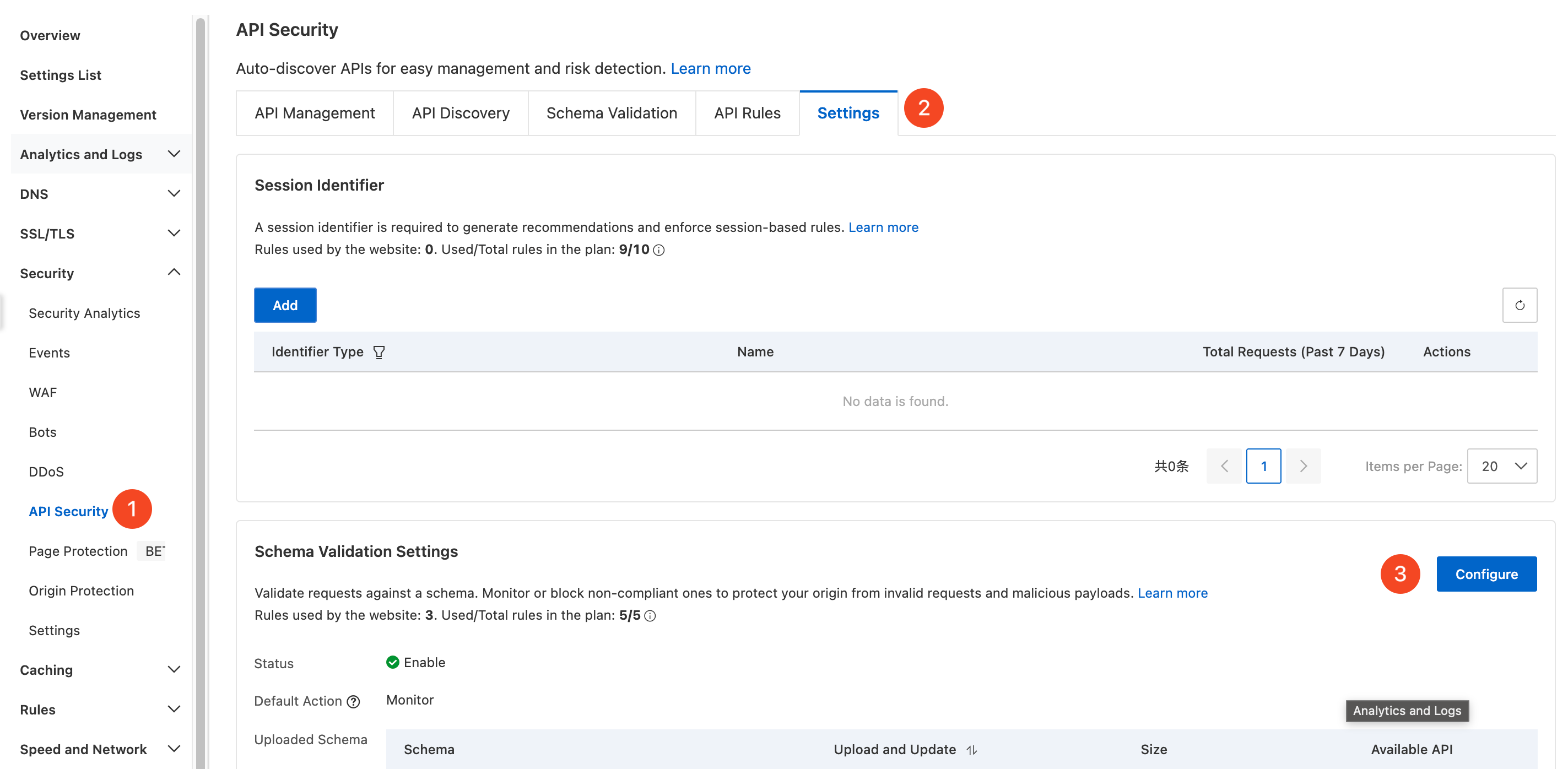
ESA コンソールで サイト管理 を選択し、サイト 列で対象のサイトをクリックします。
左側のナビゲーションペインで、セキュリティ保護 > API セキュリティ の順に選択します。
API セキュリティ ページで 設定 タブをクリックし、スキーマ検証設定 セクションの 設定 をクリックして設定を開始します。
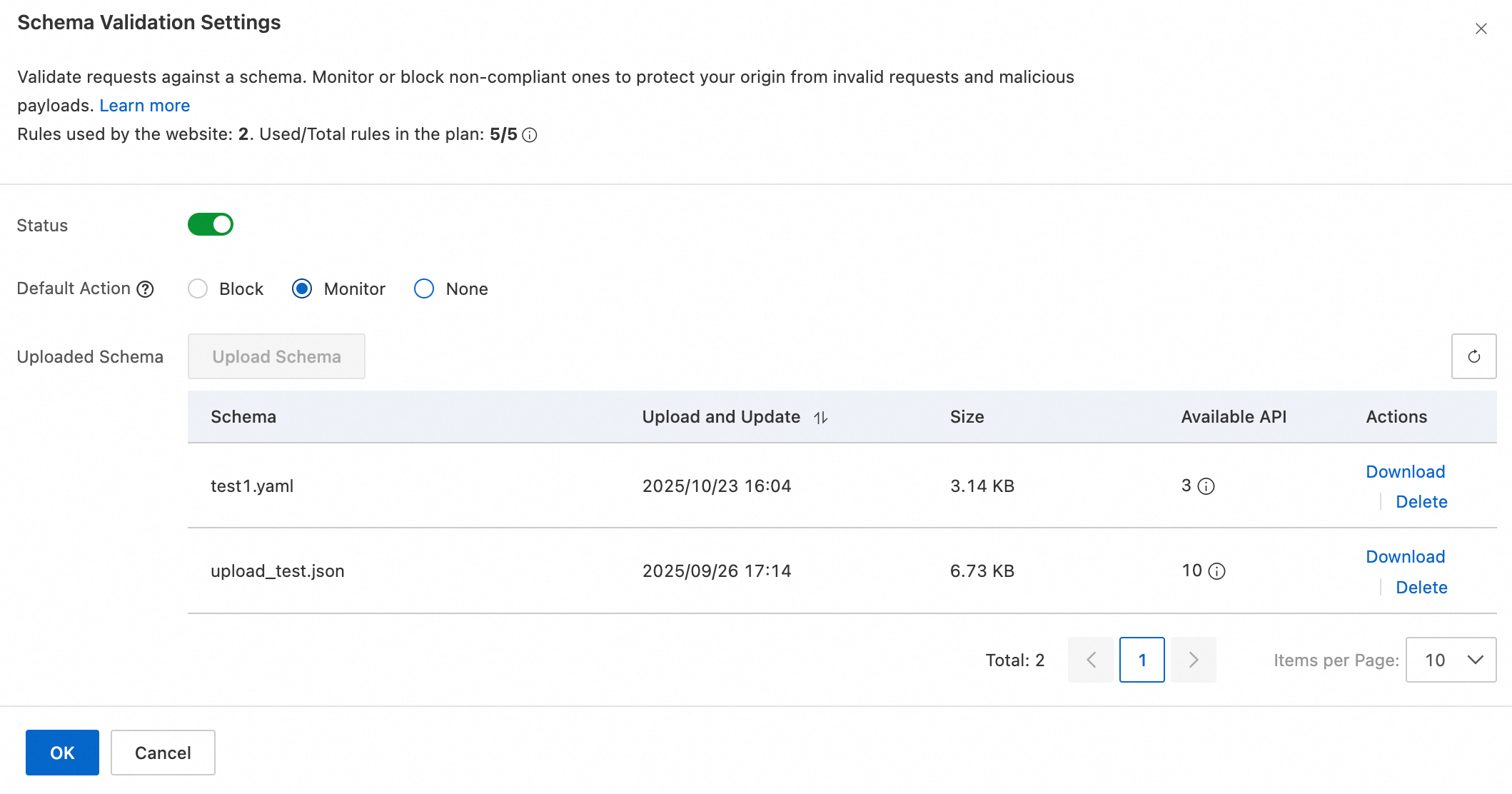
ビジネス要件に基づいて次の設定を行い、確認 をクリックします。
[ステータス]:スキーマ検証を有効または無効にします。
[デフォルトアクション]:スキーマに準拠しないリクエストに適用するデフォルトのアクションを選択します。次のアクションが利用可能です。
[アップロード済みスキーマ]:カスタムスキーマファイルをアップロードします。ESA はファイルを自動的に解析し、API コンプライアンス検証ルールとして使用します。
トークンの追加
トークン設定 に JSON Web Token (JWT) 情報を追加し、「APIトークンコンプライアンス検証」で参照することで、訪問者を認証します。
ESA コンソールで サイト管理 を選択し、サイト 列で対象のサイトをクリックします。
左側のナビゲーションペインで、セキュリティ保護 > API セキュリティ の順に選択します。
API セキュリティ ページで 設定 タブをクリックし、トークン設定 セクションの 追加 をクリックして設定を開始します。
ビジネス要件に基づいて、次のトークンパラメーターを指定します。
[名前]:
JWT-Demoのように、カスタムトークン名を入力します。[トークンの位置]:リクエスト内のトークンの場所を選択します。ヘッダー または Cookie を選択し、対応するキーを入力します。
ビジネス全体で異なる場所に存在するJWTに対応するには、Or をクリックして
OR条件を作成します。最大で 4 つのトークンの場所を同時に評価できます。[シークレットキー]:手動で入力するか、JSONファイルをアップロードしてトークンキーを追加します。キーの要件については、「JWKフィールド」をご参照ください。
複数のキーを設定した場合、ESA は
kidフィールドに基づいて検証用のキーを選択します。いずれかのキーでトークンの検証に成功すると、検証は成功となります。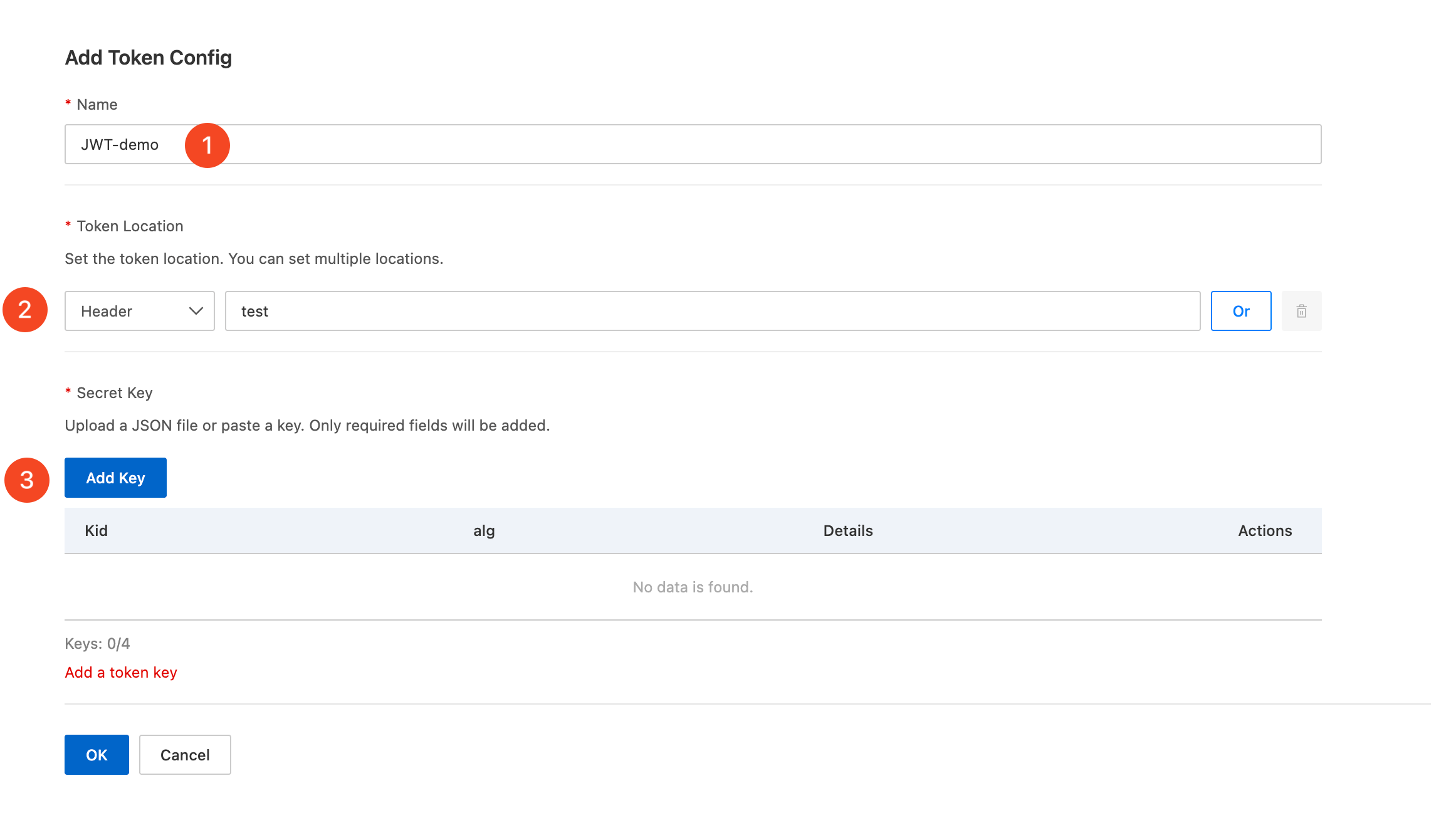
スキーマファイルの仕様
タイプとサイズ
スキーマ検証ファイルは、.yml、.yaml、または .json 形式である必要があります。最大ファイルサイズは 58 KB です。スキーマファイルがこの制限を超える場合は、.json 形式を使用し、アップロードする前にローカルでファイルを圧縮してください。
スキーマの内容
バージョン
ESA のスキーマ検証は、OpenAPI Specification (OAS) v3.0.x にのみ対応しています。
フィールド
必須フィールド
openapi:API バージョン。例:3.0.0。info:API に関するメタデータ。例:"version": "1.0.0"。paths:少なくとも 1 つの API パスを含む必要があります。例:/api。servers:ホストに関する情報。次のサブフィールドをサポートします。url:絶対 URL のみをサポートします。例:https://api.example.com。変数: ESA はサーバー変数をサポートしていません。変数プレースホルダーは解析中に無視されます。
任意フィールド
schema:データ構造の定義。次のタイプをサポートします。int32
uint32
int64
uint64
float
double
boolean
email
reference:$refを使用して定義済みのオブジェクトを参照します。外部参照または相対参照はサポートされていません。requestBody:リクエストボディを定義します。content-typeがapplication/jsonのデータのみをサポートします。
例
以下は、.json 形式のスキーマファイルの例です。{
"openapi": "3.0.0",
"info": {
"title": "example",
"description": "example",
"version": "1.0"
},
"servers": [
{
"url": "https://example1.aliyun.com",
"description": "example1 url"
},
{
"url": "https://example2.aliyun.com",
"description": "example2 url"
}
],
"components": {
"schemas": {
"ParamsObject": {
"type": "object",
"properties": {
"id": {
"type": "integer"
},
"value": {
"type": "string"
}
},
"required": [
"id",
"value"
]
}
}
},
"paths": {
"/example/{param1}": {
"get": {
"operationId": "getexampleById",
"parameters": [
{
"name": "param1",
"in": "path",
"required": true,
"description": "id",
"schema": {
"type": "integer",
"format": "int32"
}
}
]
}
},
"/api1": {
"post": {
"operationId": "post_api1",
"summary": "post api1 request",
"parameters": [],
"requestBody": {
"required": true,
"content": {
"application/json": {
"schema": {
"$ref": "#/components/schemas/ParamsObject"
}
}
}
}
},
"get" :{
"operationId": "get_api1",
"summary": "get api1 request",
"parameters": [
{
"name": "id",
"in": "query",
"required": true,
"schema": {
"type": "integer",
"format": "int32"
}
},
{
"name": "name",
"in": "query",
"required": false,
"schema": {
"type": "string"
}
}
]
}
}
}
}Schema file specifications
Type and size
Schema validation files must be in .yml, .yaml, or .json format. The maximum file size is 58 KB. If your schema file exceeds this limit, use the .json format and compress the file locally before uploading.
Schema content
Version
ESA schema validation supports only OpenAPI Specification (OAS) v3.0.x.
Fields
Required fields
openapi: The API version, such as3.0.0.info: Metadata about the API, such as"version": "1.0.0".paths: Must contain at least one API path, such as/api.servers: Information about the host. The following sub-fields are supported:url: Only absolute URLs are supported, such ashttps://api.example.com.variables: ESA does not support server variables. Variable placeholders are ignored during parsing.
Optional fields
schema: The data structure definition. The following types are supported:int32
uint32
int64
uint64
float
double
boolean
email
reference: Uses$refto reference a predefined object. External or relative references are not supported.requestBody: Defines the request body. Only data with acontent-typeofapplication/jsonis supported.
Example
The following is an example of a .json schema file.{
"openapi": "3.0.0",
"info": {
"title": "example",
"description": "example",
"version": "1.0"
},
"servers": [
{
"url": "https://example1.aliyun.com",
"description": "example1 url"
},
{
"url": "https://example2.aliyun.com",
"description": "example2 url"
}
],
"components": {
"schemas": {
"ParamsObject": {
"type": "object",
"properties": {
"id": {
"type": "integer"
},
"value": {
"type": "string"
}
},
"required": [
"id",
"value"
]
}
}
},
"paths": {
"/example/{param1}": {
"get": {
"operationId": "getexampleById",
"parameters": [
{
"name": "param1",
"in": "path",
"required": true,
"description": "id",
"schema": {
"type": "integer",
"format": "int32"
}
}
]
}
},
"/api1": {
"post": {
"operationId": "post_api1",
"summary": "post api1 request",
"parameters": [],
"requestBody": {
"required": true,
"content": {
"application/json": {
"schema": {
"$ref": "#/components/schemas/ParamsObject"
}
}
}
}
},
"get" :{
"operationId": "get_api1",
"summary": "get api1 request",
"parameters": [
{
"name": "id",
"in": "query",
"required": true,
"schema": {
"type": "integer",
"format": "int32"
}
},
{
"name": "name",
"in": "query",
"required": false,
"schema": {
"type": "string"
}
}
]
}
}
}
}