このトピックでは、OpenTelemetry SDK for iOSを使用してiOSアプリからSimple Log Serviceにトレースデータをインポートする方法について説明します。
前提条件
トレースインスタンスが作成されます。 詳細については、「トレースインスタンスの作成」をご参照ください。
ステップ1: SDKの統合
Swiftプロジェクト
opentelemetry-swiftパッケージをインポートします。
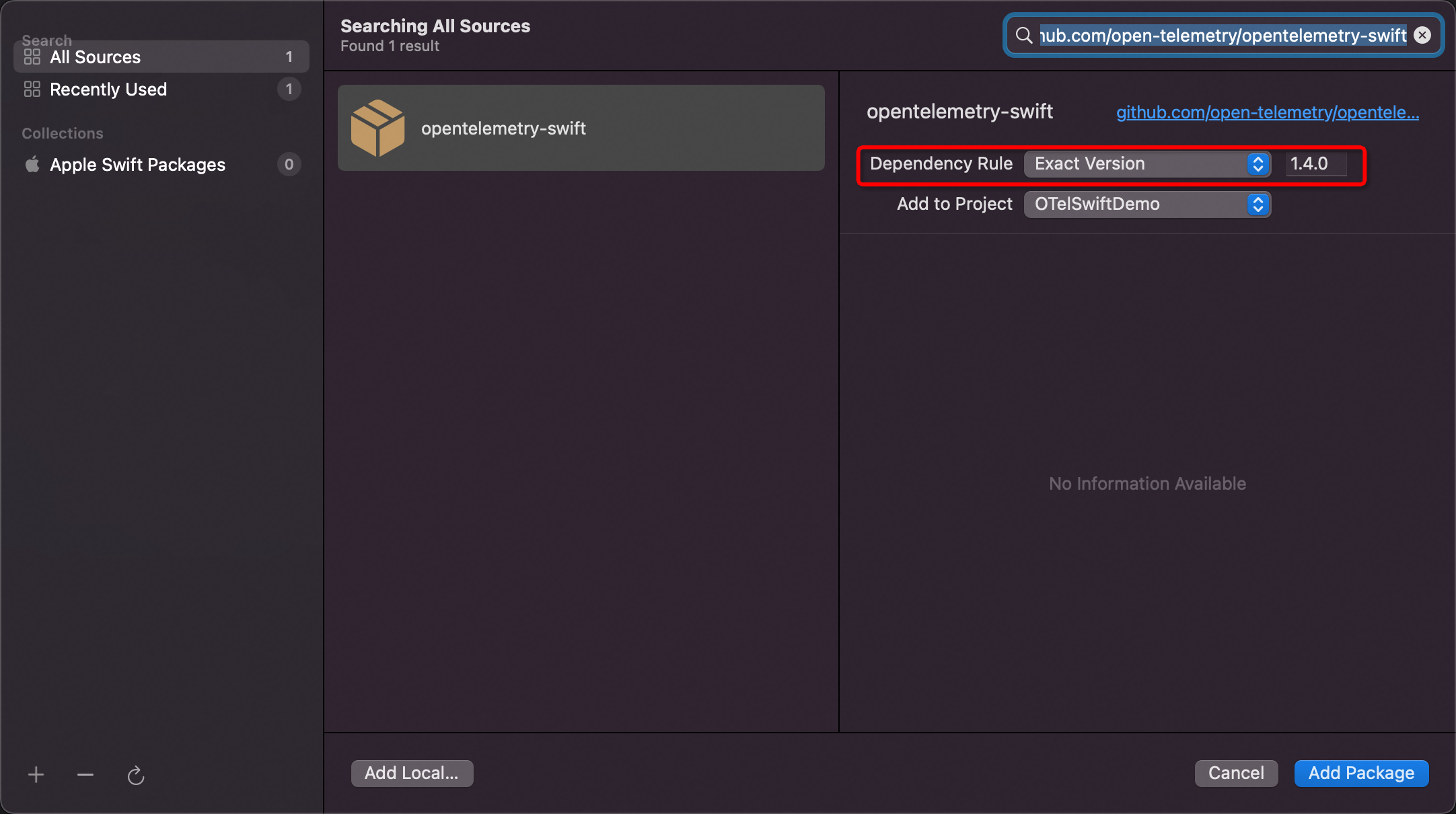
Xcodeで、ファイル > パッケージの追加を選択します。
右上隅の検索ボックスに次のリンクを入力します。
https://github.com/open-telemetry/opentelemetry-swift[依存関係ルール] に [完全バージョン] を選択し、バージョン番号として1.4.0を入力します。
詳細については、「OpenTelemetry iOS SDKリリース」をご参照ください。
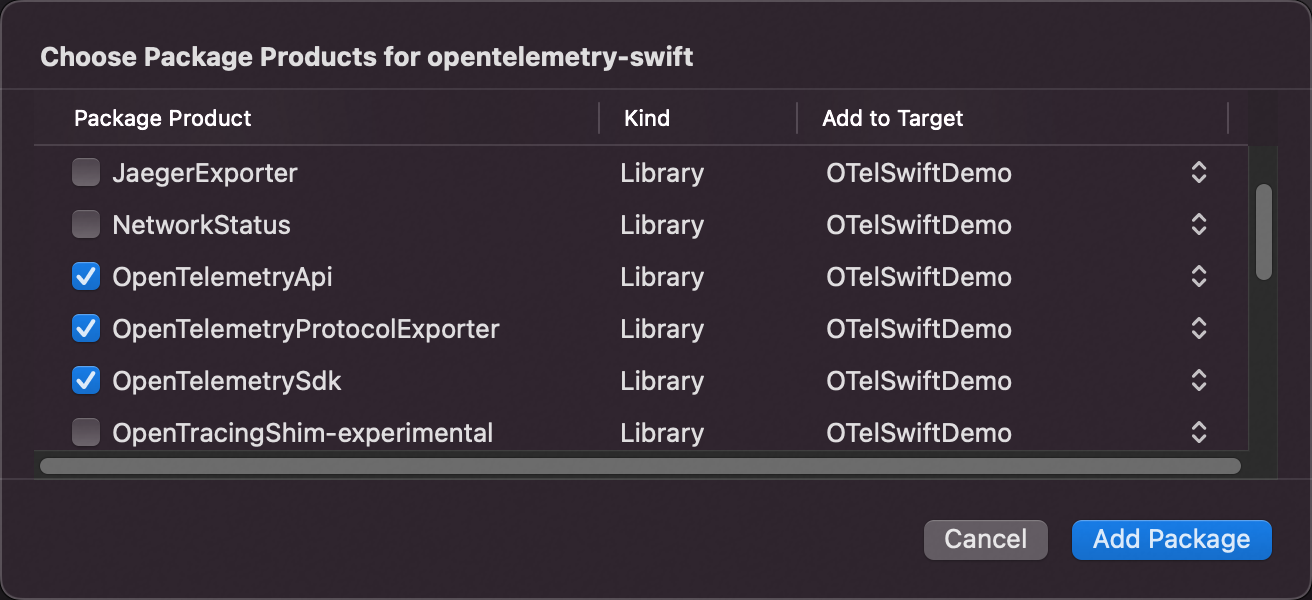
opentelemetry-swiftパッケージの製品を選択します。
次の製品を選択することをお勧めします。
OpenTelemetryApi
OpenTelemetryProtocolExporter
OpenTelemetrySdk
URLSessionInstrumentation
StdoutExporter
ResourceExtension
opentelemetry-swiftパッケージで使用できる製品の詳細については、「付録: OpenTelemetry製品の説明」をご参照ください。
Objective-Cプロジェクト
opentelemetry-swiftパッケージは、Objective-Cプログラミング言語との互換性が低いです。 そのため、Simple Log Serviceはopentelemetry-swiftパッケージに基づいてObjective-Cクラスを拡張します。 Objective-CプロジェクトでSwiftプロジェクトに必要な設定を構成する必要があります。 また、opentelemetry-objc-extensionパッケージをObjective-Cプロジェクトに追加する必要があります。
Swiftプロジェクトに必要な設定を構成します。
opentelemetry-objc-extensionパッケージをインポートします。
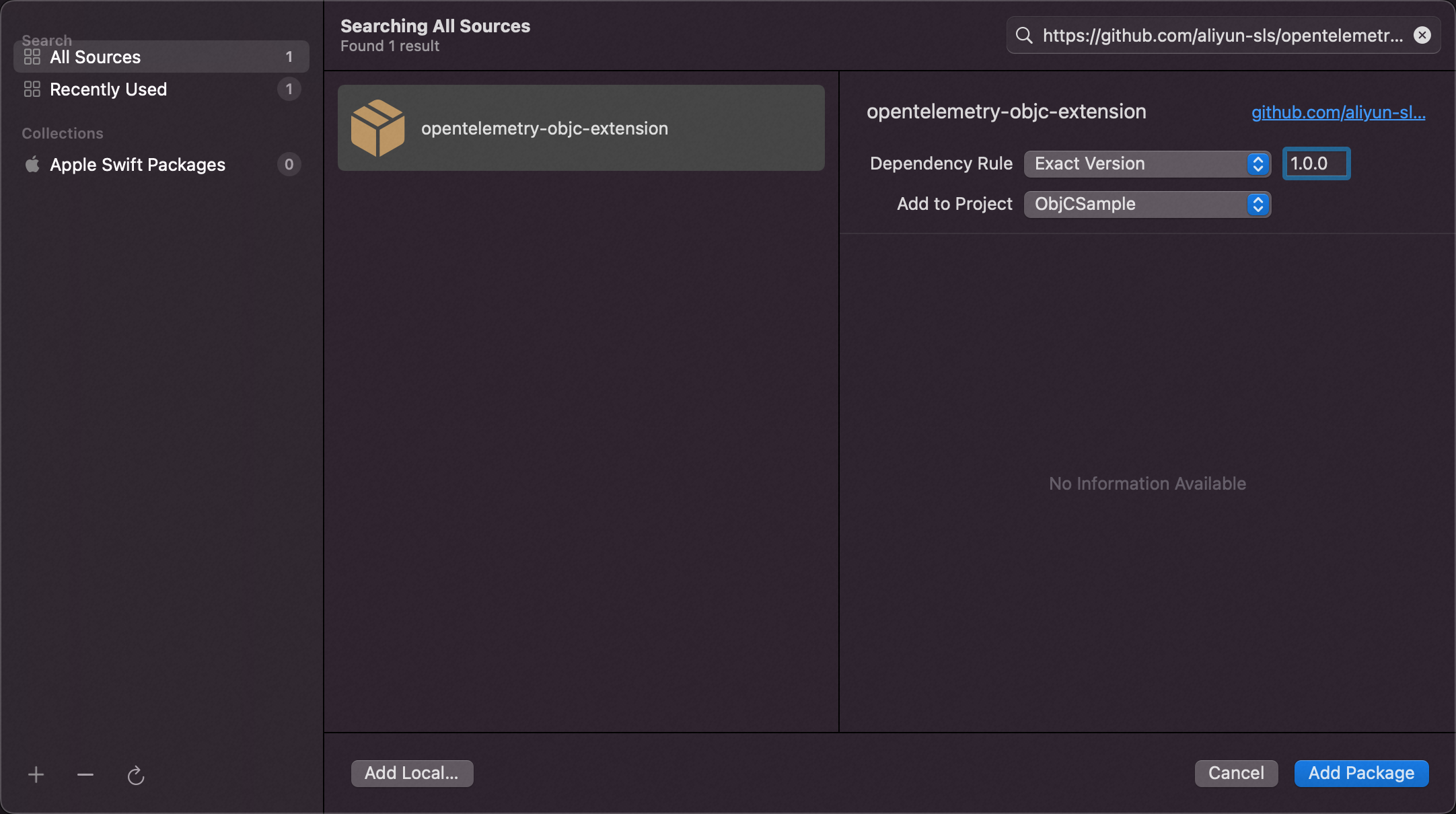
Xcodeで、ファイル > パッケージの追加を選択します。
右上隅の検索ボックスに次のリンクを入力します。
https://github.com/aliyun-sls/opentelemetry-objc-extension[依存関係ルール] に [完全バージョン] を選択し、バージョン番号として1.0.0を入力します。
詳細については、「OpenTelemetry iOS Objc拡張SDKリリース」をご参照ください。
opentelemetry-objc-extensionパッケージの製品を選択します。
次の製品を選択することをお勧めします。
OpenTelemetryApiObjc
OpenTelemetryProtocolExporterObjc
OpenTelemetrySdkObjc
ResourceExtensionObjc
URLSessionInstrumentationObjc
StdoutExporterObjc
opentelemetry-objc-extensionパッケージで使用できる製品の詳細については、「付録: OpenTelemetry製品の説明」をご参照ください。
ステップ2: SDKの初期化
AppDelegateクラスの- (BOOL)application :( UIApplication *)application didFinishLaunchingWithOptions :( NSDictionary *)launchOptionsメソッドを使用してSDKを初期化することを推奨します。
Swiftプロジェクト
// Import the following modules:
import GRPC
import NIO
import OpenTelemetryApi
import OpenTelemetrySdk
import OpenTelemetryProtocolExporter
import StdoutExporter
import URLSessionInstrumentation

// Initialize the exporter. The exporter is used to export trace data to a Log Service Logstore.
let client = ClientConnection.usingPlatformAppropriateTLS(for: MultiThreadedEventLoopGroup(numberOfThreads: 1))
.connect(host: "${endpoint}", port: ${port})
let otlpTraceExporter = OtlpTraceExporter(
 channel: client,
 config: OtlpConfiguration(
 timeout: OtlpConfiguration.DefaultTimeoutInterval,
 headers:
 [
 ("x-sls-otel-project", "${project}"),
 ("x-sls-otel-instance-id", "${instanceId}"),
 ("x-sls-otel-ak-id", "${access-key-id}"),
 ("x-sls-otel-ak-secret", "${access-key-secret}")
 ]
 )
)

// Initialize the tracer provider. The tracer provider is used to expose major API operations, preprocess spans, and configure custom clocks.
// Configure the custom rules that are used to generate trace IDs and span IDs and configure custom samplers. You can configure the settings based on your business requirements.
let spanExporters = MultiSpanExporter(spanExporters: [StdoutExporter(isDebug: true), otlpTraceExporter])
let spanProcessor = SimpleSpanProcessor(spanExporter: spanExporters)
OpenTelemetry.registerTracerProvider(
 tracerProvider: TracerProviderBuilder()
 .add(spanProcessor: spanProcessor)
 .with(resource:
 Resource(attributes:
 [
 ResourceAttributes.serviceName.rawValue: AttributeValue.string("${service}"),
 ResourceAttributes.serviceNamespace.rawValue: AttributeValue.string("${service.namespace}"),
 ResourceAttributes.serviceVersion.rawValue: AttributeValue.string("${version}"),
 ResourceAttributes.hostName.rawValue: AttributeValue.string("${host}"),
 ResourceAttributes.deploymentEnvironment.rawValue: AttributeValue.string("${environment}"),
 ]
 )
 )
 .build()
)

// Configure other instrumentation collectors based on your business requirements. The following configuration is used to collect data from the NSUrlSession network library.
URLSessionInstrumentation(configuration: URLSessionInstrumentationConfiguration(
 shouldInstrument: { request in
 return true
 })
)
let tracer = OpenTelemetry.instance.tracerProvider.get(instrumentationName: "OTel Application", instrumentationVersion: "1.0.0")
Objective-Cプロジェクト
// Import the following modules:
@import OpenTelemetryApiObjc;
@import OpenTelemetrySdkObjc;
@import OpenTelemetryProtocolExporterObjc;
@import URLSessionInstrumentationObjc;
@import StdoutExporterObjc;

// Initialize the exporter. The exporter is used to export trace data to a Log Service Logstore.
NSDictionary *headers = @{
 @"x-sls-otel-project": @"${project}",
 @"x-sls-otel-instance-id": @"${instanceId}",
 @"x-sls-otel-ak-id": @"${access-key-id}",
 @"x-sls-otel-ak-secret": @"${access-key-secret}"
};
OtlpConfigurationObjc *configuration = [OtlpConfigurationObjc configuration:OtlpConfigurationObjc.DefaultTimeoutInterval headers:headers];
OtlpTraceExporterObjc *exporter = [OtlpTraceExporterObjc exporter:@"https://${endpoint}"
 port:@"${port}"
 configuration:configuration
];

// Initialize the tracer provider. The tracer provider is used to expose major API operations, preprocess spans, and configure custom clocks.
// Configure the custom rules that are used to generate trace IDs and span IDs, and configure custom samplers. You can configure the settings based on your business requirements.
NSArray *exporters = @[
 [StdoutExporterObjc stdoutExporter:true], // During development and debugging, we recommend that you enable stdoutExporter to display span content in the console.
 exporter
];
SpanProcessorObjc *spanProcessor = [BatchSpanProcessorObjc processor: [MultiSpanExporterObjc multiSpanExporter:exporters]];

TracerProviderBuilderObjc *providerBuilder = [TracerProviderBuilderObjc builder];
NSDictionary *resources = @{
 ResourceAttributesObjc.serviceName: [AttributeValueObjc string:@"${service}"], // The name of the service that you want to trace. We recommend that you use the name of a module, such as homepage and member center.
 ResourceAttributesObjc.serviceNamespace: [AttributeValueObjc string:@"${service.namespace}"], // We recommend that you set the namespace of the service to iOS, iPadOS, macOS, tvOS, or watchOS.
 ResourceAttributesObjc.serviceVersion: [AttributeValueObjc string:@"${version}"], // We recommend that you set the version of the service to the version of the app.
 ResourceAttributesObjc.hostName: [AttributeValueObjc string:@"${host}"], // We recommend that you set the hostname to iOS.
 ResourceAttributesObjc.deploymentEnvironment: [AttributeValueObjc string:@"${environment}"] // The deployment environment. We recommend that you use dev for a development environment and prod for a production environment.
};
providerBuilder = [providerBuilder withResource: [ResourceObjc resource:resources]];
providerBuilder = [providerBuilder addSpanProcessor: spanProcessor];

// Initialize OpenTelemetry SDK.
[OpenTelemetryObjc registerTracerProvider:[providerBuilder build]];

// Configure other instrumentation collectors based on your business requirements. The following configuration is used to collect data from the NSUrlSession network library.
[URLSessionInstrumentationObjc urlSessionInstrumentation:
 [URLSessionInstrumentationConfigurationObjc urlSessionInstrumentationConfiguration:[TestURLSessionInstrumentation instrumentation]]
];
次の表に変数を示します。
変数 | 説明 | 例 |
| プロジェクトが存在するリージョンのSimple Log Serviceエンドポイント。 Simple Log Serviceには、内部エンドポイントまたはパブリックエンドポイントを使用してアクセスできます。 内部エンドポイントは、クラシックネットワークまたは仮想プライベートクラウド (VPC) 経由でアクセスできます。 インターネット経由でパブリックエンドポイントにアクセスできます。 詳細については、「エンドポイント」をご参照ください。 | cn-hangzhou.log.aliyuncs.com |
| ネットワークポート。 値を10010に設定します。 | 10010 |
| Simple Log Serviceプロジェクトの名前。 | test-project |
| トレースインスタンスのID。 詳細については、「トレースインスタンスの作成」をご参照ください。 | テストトレース |
| Alibaba CloudアカウントのAccessKey ID。 Simple Log Serviceプロジェクトに対する書き込み権限のみを持つRAMユーザーのAccessKeyペアを使用することを推奨します。 AccessKey ペアは、AccessKey ID と AccessKey Secret で構成されます。 指定したプロジェクトの書き込み権限をRAMユーザーに付与する方法の詳細については、「カスタムポリシーを使用してRAMユーザーに権限を付与する」をご参照ください。 AccessKeyペアを取得する方法の詳細については、「AccessKey ペア」をご参照ください。 | なし |
| Alibaba CloudアカウントのAccessKeyシークレット。 Simple Log Serviceプロジェクトに対する書き込み権限のみを持つRAMユーザーのAccessKeyペアを使用することを推奨します。 | なし |
| サービスが属する名前空間。 | order |
| サービスの名前です。 ビジネス要件に基づいて値を指定します。 | payment |
| サービスのバージョンです。 | v0.1.2 |
| ホスト名。 | localhost |
| デプロイ環境。 例: テスト環境または本番環境。 ビジネス要件に基づいて値を指定します。 | 前 |
ステップ4: SDKの使用
トレーサーの作成
ビジネスシナリオに基づいてトレーサーを作成することを推奨します。 トレーサーを作成するときは、インストルメンテーションスコープ名を指定する必要があります。 これにより、トレースデータをスコープで区別できます。
Swiftプロジェクトのサンプルコード
let tracer: Tracer = OpenTelemetry.instance.tracerProvider.get(instrumentationName: "OTel Application", instrumentationVersion: "1.0.0")Objective-Cプロジェクトのサンプルコード
TracerObjc *tracer = [OpenTelemetryObjc.instance.tracerProvider getWithInstrumentationName:@"app" instrumentationVersion:@"1.0"];基本スパンの作成
スパンは、トランザクションにおける動作を示す。 各スパンは、操作名、開始タイムスタンプおよび終了タイムスタンプ、属性、イベント、およびコンテキストをカプセル化します。
Swiftプロジェクトのサンプルコード
let spanBuilder = tracer.spanBuilder(spanName: "operation name")
let span = spanBuilder .setSpanKind(spanKind: .client).startSpan()
// do stuff
// ...
span.end()
Objective-Cプロジェクトのサンプルコード
SpanBuilderObjc *spanBuilder = [_tracer spanBuilder:@"operation name"];
SpanObjc *span = [[spanBuilder setSpanKind:SpanKindObjc.CLIENT] startSpan];
// do stuff
// ...
[span end];
ネストされたスパンの作成
ネストされた操作で作業をトレースするためのネストされたスパンを作成する場合は、OpenTelemetryを使用して、オンプレミスプロセスおよびリモートプロセス間の操作スレッドをトレースできます。 以下の例では、メソッドAはメソッドBを呼び出す。次の例に基づいて、ネストされたスパンを作成できます。
Swiftプロジェクトのサンプルコード
func methodA() {
 let span = tracer.spanBuilder(spanName: "operation methodA").setSpanKind(spanKind: .client).startSpan()
	method(span)
 span.end()
}

func methodB(_ parent: Span) {
 let spanBuilder = tracer.spanBuilder(spanName: "operation methodB")
 spanBuilder.setParent(parent)
 let child = spanBuilder .setSpanKind(spanKind: .client).startSpan()
 // do stuff
 // ...
 child.end()
}
Objective-Cプロジェクトのサンプルコード
- (void) methodA {
 SpanObjc *span = [[[_tracer spanBuilder:@"operation methodA"] setSpanKind:SpanKindObjc.CLIENT] startSpan];
 [self methodB: span];
 [span end];
}

- (void) methodB: (SpanObjc *)parent {
 SpanBuilderObjc *spanBuilder = [_tracer spanBuilder:@"operation name"];
 [spanBuilder setParent: parent];
 SpanObjc *span = [[spanBuilder setSpanKind:SpanKindObjc.CLIENT] startSpan];
 // do stuff
 // ...
 [span end];
}
OpenTelemetry APIは、親スパンを伝播するために使用される自動化メソッドを提供します。
Swiftプロジェクトのサンプルコード
func methodA() {
 let span = tracer.spanBuilder(spanName: "operation methodA").setSpanKind(spanKind: .client).startSpan()
 OpenTelemetry.instance.contextProvider.setActiveSpan(span)

 methodB(span)

 span.end()
}

func methodB(_ parent: Span) {
 let child = tracer.spanBuilder(spanName: "operation methodB").setSpanKind(spanKind: .client).startSpan()
 // do stuff
 // ...
 child.end()
}
Objective-Cプロジェクトのサンプルコード
- (void) methodA {
 SpanObjc *span = [[[_tracer spanBuilder:@"operation methodA"] setSpanKind:SpanKindObjc.CLIENT] startSpan];
 [OpenTelemetryObjc.instance.contextProvider setActiveSpan:span];
 [self methodB];
 // do stuff
 // ...
 [span end];
}

- (void) methodB {
 SpanBuilderObjc *spanBuilder = [_tracer spanBuilder:@"operation name"];
 SpanObjc *span = [[spanBuilder setSpanKind:SpanKindObjc.CLIENT] startSpan];
 // do stuff
 // ...
 [span end];
}
属性で注釈を付けたスパンの作成
属性を指定することで、スパン内の特定の操作のコンテキストを指定できます。 たとえば、実行結果と関連するビジネス情報を提供できます。 例:
Swiftプロジェクトのサンプルコード
let spanBuilder = tracer.spanBuilder(spanName: "GET /resource/catalog")
let span = spanBuilder .setSpanKind(spanKind: .client).startSpan()
span.setAttribute(key: "http.method", value: "GET")
span.setAttribute(key: "http.url", value: "http url")
Objective-Cプロジェクトのサンプルコード
SpanBuilderObjc *spanBuilder = [_tracer spanBuilder:@"GET /resource/catalog"];
SpanObjc *span = [[spanBuilder setSpanKind:SpanKindObjc.CLIENT] startSpan];
[span setAttribute:@"http.method" stringValue:@"GET"];
[span setAttribute:@"http.url" stringValue:request.URL.baseURL];
イベントで注釈を付けたスパンの作成
複数のイベントを使用してスパンに注釈を付けることができます。
Swiftプロジェクトのサンプルコード
span.addEvent(name: "start")
// do stuff
// ...
span.addEvent(name: "start")

// Use attributes to annotate an event.
span.addEvent(name: "event with attributes",
 attributes: [ "key1": AttributeValue.string("value1"),
 "key2": AttributeValue.double(2.2)
 ]
)
Objective-Cプロジェクトのサンプルコード
[chilsSpan addEvent:@"start"];
// do stuff
// ...
[chilsSpan addEvent:@"end"];

// Use attributes to annotate an event.
[chilsSpan addEvent:@"event with attributes" attributes:@{
 @"key1": [AttributeValueObjc string:@"value1"],
 @"key2": [AttributeValueObjc double:1.1],
}];
リンクで注釈を付けたスパンの作成
スパンは、因果関係にある1つまたは複数の他のスパンにリンクすることができる。
Swiftプロジェクトのサンプルコード
spanBuilder.addLink(spanContext: parent.context)
let span = spanBuilder .setSpanKind(spanKind: .client).startSpan()
Objective-Cプロジェクトのサンプルコード
SpanBuilderObjc *spanBuilder = [_tracer spanBuilder:@"Another"];
[spanBuilder addLink:parent.context];

SpanObjc *span = [[spanBuilder setSpanKind:SpanKindObjc.CLIENT] startSpan];リモートプロセスからコンテキスト情報を読み取る方法の詳細については、「コンテキスト伝播」をご参照ください。
スパンの状態の指定
スパンには、StatusCode.UNSET、StatusCode.OK、およびStatusCode.ERRORのいずれかの状態を指定できます。 StatusCode.UNSETはデフォルトの状態を示します。 StatusCode.OKは、操作が成功したことを示します。 StatusCode.ERRORは、操作が呼び出された後にエラーが発生することを示します。 次の例では、StatusCode.ERRORがスパンに指定されています。
Swiftプロジェクトのサンプルコード
let span = tracer.spanBuilder(spanName: "operation name").startSpan()
do {
 try expression
 // do stuff
 // ...
} catch {
 span.status = .error(description: "\(error)")
}
Objective-Cプロジェクトのサンプルコード
SpanObjc *span = [[_tracer spanBuilder:@"operation name"] startSpan];
@try {
 // do stuff
 // ...
} @catch (NSException *exception) {
 [span setStatus:[StatusObjc error: exception.description]];
} @finally {
 [span end];
}
コンテキストの伝播
OpenTelemetryは、コンテキストを伝播するテキストベースのメソッドを提供します。 次の例では、HTTPリクエストはNSURLSessionを使用して開始されます。
Swiftプロジェクトのサンプルコード
// Initialize URLSessionInstrumentation during SDK initialization.
// Pass parameters based on your business requirements.
URLSessionInstrumentation(
 configuration: URLSessionInstrumentationConfiguration(
 shouldInstrument: { request in
 // Specify whether to collect data from the request.
 return true
 }
 )
)
Objective-Cプロジェクトのサンプルコード
// Initialize URLSessionInstrumentationObjc during SDK initialization.
// When you initialize URLSessionInstrumentationObjc, you must pass a class that implements URLSessionInstrumentationConfigurationImpl. The following code provides an example of a class.
[URLSessionInstrumentationObjc urlSessionInstrumentation:
 [URLSessionInstrumentationConfigurationObjc urlSessionInstrumentationConfiguration:[TestURLSessionInstrumentation instrumentation]]
];

// An example of a class that implements TestURLSessionInstrumentation.
#pragma mark - URLSessionInstrumentation
@interface TestURLSessionInstrumentation: NSObject<URLSessionInstrumentationConfigurationImpl>
+ (instancetype) instrumentation;
@end

@implementation TestURLSessionInstrumentation
+ (instancetype) instrumentation {
 return [[TestURLSessionInstrumentation alloc] init];
}
- (void)createdRequest:(NSURLRequest * _Nonnull)request span:(SpanObjc * _Nonnull)span {
 // Initiate a callback if the request is created.
 [span setAttribute:@"createdRequest" stringValue:@"request created"];
}
- (void)injectCustomHeaders:(NSURLRequest * _Nonnull)request span:(SpanObjc * _Nullable)span {
 // Inject custom headers of the request.
 [(NSMutableURLRequest *)request addValue:@"custom header" forHTTPHeaderField:@"injectCustomHeaders"];
}
- (NSString * _Nullable)nameSpan:(NSURLRequest * _Nonnull)request {
 // Rename the span.
 if ([request.URL.host containsString:@"dns.alidns.com"]) {
 return @"Initiate a request for DNS resolution";
 }
 return nil;
}
- (void)receivedError:(NSError * _Nonnull)error dataOrFile:(NSObject * _Nullable)dataOrFile span:(SpanObjc * _Nonnull)span {
 // Initiate a callback if the operation fails.
}
- (void)receivedResponse:(NSURLResponse * _Nonnull)response dataOrFile:(NSObject * _Nullable)dataOrFile span:(SpanObjc * _Nonnull)span {
 // Initiate a callback if the operation is successful.
 NSLog(@"receivedResponse: %@", dataOrFile);
}
- (BOOL)shouldInjectTracingHeaders:(NSURLRequest * _Nonnull)request {
 // Inject tracing headers.
 return YES;
}
- (BOOL)shouldInstrument:(NSURLRequest * _Nonnull)request {
 // Specify whether to collect data from the request.
 return YES;
}
- (BOOL)shouldRecordPayload:(NSURLSession * _Nonnull)session {
 // Specify whether to collect information about the request body.
 return YES;
}
- (void)spanCustomization:(NSURLRequest * _Nonnull)request spanBuilder:(SpanBuilderObjc * _Nonnull)spanBuilder {
 // Specify additional information for the span.
 [spanBuilder setAttribute:@"spanCustomization" stringValue:@"customize span"];
}
@end
OpenTelemetry SDKは、W3Cトレースコンテキスト仕様に準拠したコンテキスト伝播をサポートします。 詳細については、「W3CTraceContextPropagatorクラス」をご参照ください。
OpenTelemetry SDKの詳細については、「公式ドキュメント」をご参照ください。
付録: OpenTelemetry製品の説明
スウィフト | Objective-C | 目的 |
OpenTelemetryApi | OpenTelemetryApiObjc | OpenTelemetry APIの規則と最小限の実装。 |
OpenTelemetrySdk | OpenTelemetrySdkObjc | OpenTelemetry APIの最小限の実装。 |
OpenTelemetryProtocolExporter | OpenTelemetryProtocolExporterObjc | OpenTelemetryプロトコルの実装。 |
StdoutExporter | StdoutExporterObjc | コンソールにトレースデータを表示するために使用される標準出力エクスポータ。 |
ResourceExtension | ResourceExtensionObjc | リソースからの拡張コレクション。 |
URLSessionInstrumentation | URLSessionInstrumentationObjc | URLSessionネットワークライブラリからの自動収集。 |
よくある質問
Q: SDK for Swiftを使用しても、Simple Log Serviceにデータはアップロードされません。 どうすればよいですか。
A: SDK for Swiftは、OtlpTraceExporterを使用してのみデータをアップロードできます。 OtlpTraceExporterの設定が有効かどうかを確認する必要があります。 次のコードは、有効な構成の例を示しています。
重要http://またはhttps://をhostに追加することはできません。portを10010に設定する必要があります。
let client = ClientConnection
.usingPlatformAppropriateTLS(for: MultiThreadedEventLoopGroup(numberOfThreads: 1))
.connect(host: "cn-beijing.log.aliyuncs.com", port: 10010)

let otlpTraceExporter = OtlpTraceExporter(channel: client, config: OtlpConfiguration(timeout: OtlpConfiguration.DefaultTimeoutInterval, headers: [
 ("x-sls-otel-project", "your trace project"),
 ("x-sls-otel-instance-id", "your trace instance id"),
 ("x-sls-otel-ak-id", "your access key id"),
 ("x-sls-otel-ak-secret", "your access key secret")
]))