このトピックでは、Edge Function テンプレートを使用して Edge Security Acceleration (ESA) の 3 つの認証方式を実装する方法について説明します。各方式の署名アルゴリズム、URL フォーマット、パラメーター、およびサーバー側の検証ロジックについて解説します。これらの方式は、保護されたファイルアクセスや認証済み API リクエストなどのユースケースでリソースを保護します。提供されているコード例とパラメーターの説明は、実装の設定とデバッグに役立ちます。
仕組み
URL 署名は、認証に失敗したリクエストをブロックすることで、オリジンリソースを保護します。
認証方式
ESA は、方式 A、B、C の 3 つの認証方式を提供します。各方式は、URL からの MD5 ハッシュと POP (Point of Presence) で計算されたハッシュを比較してリクエストを検証します。ハッシュが一致する場合、POP はリクエストを処理してリソースを提供します。一致しない場合、リクエストは拒否されます。
方式 A
署名付き URL フォーマット:
http://DomainName/Filename?auth_key={timestamp}-{rand}-{uid}-{md5hash}。これらのパラメーターの説明については、「パラメーター」をご参照ください。コード例
import { createHash } from "node:crypto";

async function handleRequest(request) {
  const url = new URL(request.url);
  const path = url.pathname;
  const delta = 3600;

  const authKeyTypeA = url.searchParams.get('auth_key');

  const privateKey = 'your_secret_key'
  const currentTimestamp = Math.floor(Date.now() / 1000);

  if (!authKeyTypeA) {
    return new Response('Unauthorized', { status: 401 });
  }

  const [timestamp, rand, uid, signature] = authKeyTypeA.split('-');

  if (currentTimestamp > parseInt(timestamp)+ delta) {
    return new Response('Link expired', { status: 403 });
  }

  const signString = [path, timestamp, rand, uid, privateKey].join('-');

  const md5 = createHash('md5').update(signString).digest('hex');

  if (md5 !== signature) {
    return new Response('Unauthorized', { status: 401 });
  }

  // リソースが別のドメインにある場合は、それをフェッチして応答を返します
  // const yourUrl = `https://your-dcdn-domain.com${path}${url.search}`
  // const cdnResponse = await fetch(yourUrl, request)
  // return new Response(cdnResponse.body, cdnResponse)

  // ほとんどの場合、オリジンフェッチは 1 回で十分です
  return fetch(request.url)
}

export default {
  async fetch(request) {
    return handleRequest(request)
  }
}
テストと検証
コマンドラインインターフェイス (CLI) を使用して、認証に成功する URL をテストします:
curl -I http://esa.aliyun.top/video/test.mp4?auth_key=1743388566-61b20a42d14f403ba3790d1b82502027-1-ee1c2c463a41ef4d72fcff5987f1e08c。 HTTP 応答コード200は、認証が成功したことを示します。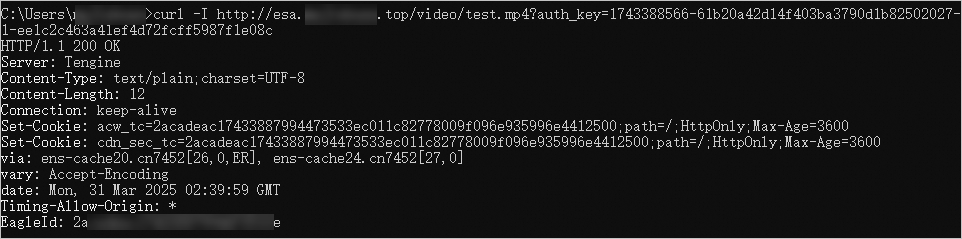
CLI を使用して、認証に失敗する URL をテストします:
curl -I http://esa.aliyun.top/test.mp4。401HTTP 応答コードは、認証が失敗したことを示します。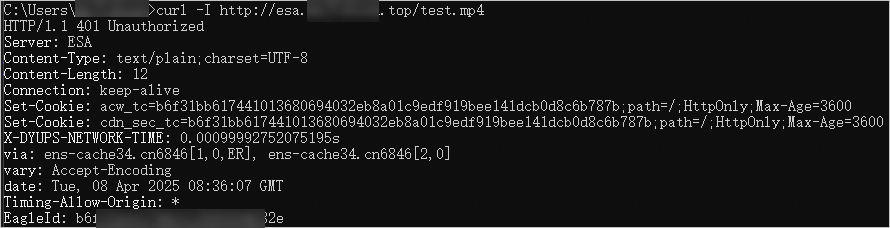
方式 B
署名付き URL フォーマット:
http://DomainName/{timestamp}/{md5hash}/FileName。これらのパラメーターの説明については、「パラメーター」をご参照ください。コード例
import { createHash } from "node:crypto";

function handleRequest(request) {
  const url = new URL(request.url);
  const path = url.pathname;
  const parts = path.split('/');
  const delta = 3600;
  const privateKey = 'your_secret_key'
  const currentTimestamp = Math.floor(Date.now() / 1000);
  const timestamp = parts[1];
  const signature = parts[2];

  if (!timestamp || !signature) {
    return new Response('Unauthorized', { status: 401 });
  }

  const filePath = '/' + parts.slice(3).join('/');
  const signString = [privateKey, timestamp, filePath].join('');
  const md5 = createHash('md5').update(signString).digest('hex');

  if (md5 !== signature) {
    return new Response('Unauthorized', { status: 401 });
  }

  if (currentTimestamp > parseInt(timestamp)+ delta) {
    return new Response('Link expired', { status: 403 });
  }

  // リソースが別のドメインにある場合は、それをフェッチして応答を返します
  // const yourUrl = `https://your-dcdn-domain.com${path}${url.search}`
  // const cdnResponse = await fetch(yourUrl, request)
  // return new Response(cdnResponse.body, cdnResponse)

  // 認証方式 B の場合、オリジンフェッチのために元のファイルパスを再構築します。
  return fetch(url.origin + filePath)
}

export default {
  async fetch(request) {
    return handleRequest(request)
  }
}
テストと検証
CLI を使用して、認証に成功するはずの URL をテストします:
curl -I http://esa.aliyun.top/1743391454/f1415e282ae5ae650455e7b525231eff/test.mp4。`200` の HTTP 応答コードは、認証が成功したことを示します。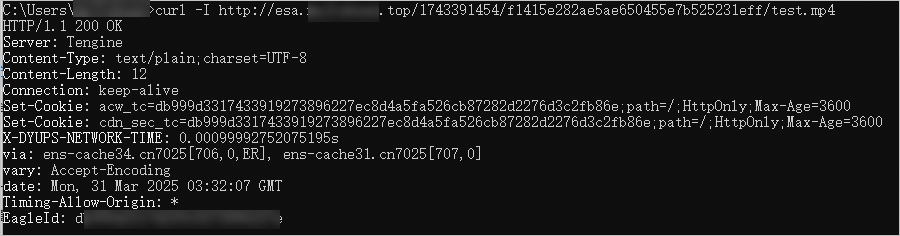
CLI を使用して、認証に失敗するはずの URL をテストします:
http://esa.aliyun.top/test.mp4。`401` の HTTP 応答コードは、認証が失敗したことを示します。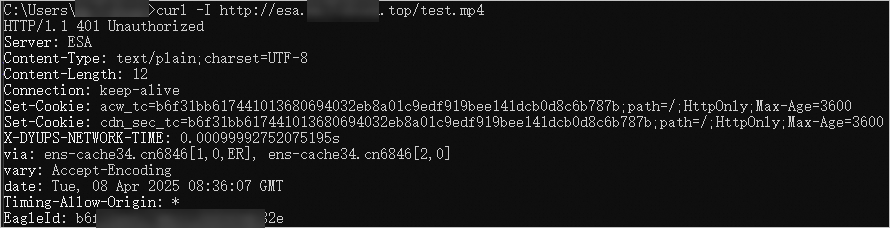
方式 C
署名付き URL フォーマット:
http://DomainName/{md5hash}/{timestamp}/FileName。これらのパラメーターの説明については、「パラメーター」をご参照ください。コード例
import { createHash } from "node:crypto";

function handleRequest(request) {
  const url = new URL(request.url);
  const path = url.pathname;
  const parts = path.split('/');
  const delta = 3600;
  const privateKey = 'your_secret_key'
  const currentTimestamp = Math.floor(Date.now() / 1000);
  const signature = parts[1];
  const hexTime = parts[2];
  const timestamp = parseInt(hexTime, 16);

  if (!hexTime || !signature) {
    return new Response('Unauthorized', { status: 401 });
  }

  const filePath = '/' + parts.slice(3).join('/');
  const signString = [privateKey, filePath, hexTime].join('-');
  const md5 = createHash('md5').update(signString).digest('hex');

  if (md5 !== signature) {
    return new Response('Unauthorized', { status: 401 });
  }

  if (currentTimestamp > parseInt(timestamp)+ delta) {
    return new Response('Link expired', { status: 403 });
  }

  // リソースが別のドメインにある場合は、それをフェッチして応答を返します
  // const yourUrl = `https://your-dcdn-domain.com${path}${url.search}`
  // const cdnResponse = await fetch(yourUrl, request)
  // return new Response(cdnResponse.body, cdnResponse)

  // 認証方式 C の場合、オリジンフェッチのために元のファイルパスを再構築します。
  return fetch(url.origin + filePath)
}

export default {
  async fetch(request) {
    return handleRequest(request)
  }
}
テストと検証
CLI を使用して、認証に成功するはずの URL をテストします:
curl -I http://esa.aliyun.top/e59c904c85f19a48413b6283fc9d2f5a/1743400480/test.mp4。`200` の HTTP 応答コードは、認証が成功したことを示します。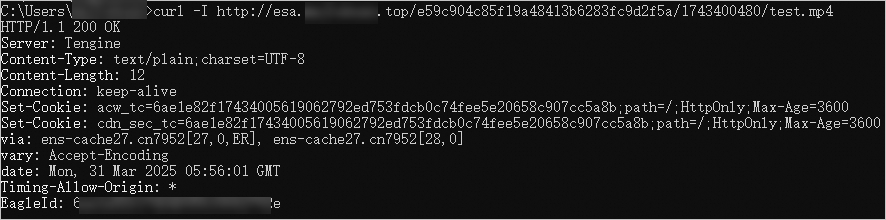
CLI を使用して、認証に失敗するはずの URL をテストします:
http://esa.aliyun.top/test.mp4。`401` の HTTP 応答コードは、認証が失敗したことを示します。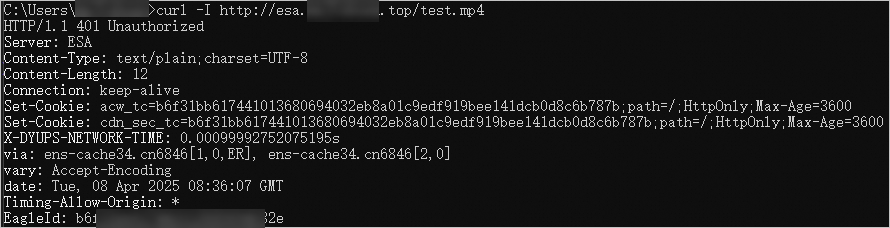
パラメーター
DomainName: ご利用の ESA サイトの DNS レコードです。timestamp: 署名付き URL が生成された時刻で、UNIX タイムスタンプ (UNIX エポックからの秒数) で表されます。この値は、設定された TTL とともに、URL の有効期限を決定します。認証方式 C の場合、タイムスタンプは 16 進数の文字列で表されます。説明署名付き URL は、
timestampに設定された有効期間を加えた時点で有効期限が切れます。有効期間は、通常 ESA で設定されます。サンプルコードでは、この期間に対して `delta` 変数で設定された固定値を使用します。FileName: オリジンサーバー上のリクエストされたファイルへのパスです。パスはスラッシュ (/) で始まる必要があります。md5hash: MD5 アルゴリズムを使用して生成された 32 文字の検証文字列です。この文字列は、0 から 9 までの数字と a から z までの小文字で構成されます。md5hashの値は、次のように計算されます。認証方式 A:
getMd5(FileName + "-" + timestamp + "-" + rand + "-" + uid + "-" + your_secret_key)。認証方式 B:
getMd5(your_secret_key + timestamp + FileName)。認証方式 C:
getMd5(your_secret_key + "-" + FileName + "-" + timestamp)。
説明getMd5関数を手動で実装する必要があります。rand: 各署名付き URL を一意にするために使用されるランダムな文字列です。この値には、ハイフンなしの汎用一意識別子 (UUID) を使用します。例:477b3bbc253f467b8def6711128c7bec。uid: ユーザー ID (UID) です。ビジネス要件に基づいて設定できます。auth_key: リクエストの認証情報であり、timestamp、rand、uid、およびmd5hashで構成されます。