CheckOutLicense API を使用してサービスインスタンスの有効性を確認する方法について説明します。
制限事項
お使いのサービスは、次の要件のいずれかを満たす必要があります。
サービスがカスタム販売用に設定されている。
サービスが Alibaba Cloud Marketplace に掲載されている。
仕組み
Compute Nest がサービスインスタンスをプロビジョニングすると、基盤となるリソースに、サービスインスタンス ID (ServiceInstanceId) とサービス ID (ServiceId) を含むタグが自動的に付けられます。CheckOutLicense API は、これらのタグを使用して、呼び出しを開始したリソースに関連付けられているサービスインスタンスを識別します。
Compute Nest コンソールからサービスの
ServiceIdを取得します。CheckOutLicenseを呼び出すときに、パラメーターとしてServiceIdを渡すことができます。Compute Nest は、このパラメーターをリソースのタグからのサービス ID と比較します。一致する場合、API はライセンス詳細を返します。
API 呼び出しの例
この例では、「制限事項」の要件を満たすサービスに属する ECS インスタンスから CheckOutLicense API を呼び出す方法を示します。
ECS インスタンスのリージョン ID の取得
CheckOutLicense API を呼び出す前に、アプリケーションがデプロイされている ECS インスタンスのリージョン ID を取得します。次のステップのために、この ID を保存しておきます。
次のコマンドを実行してリージョン ID を取得します。
curl http://100.100.100.200/latest/meta-data/region-id出力例:
cn-hangzhou
Compute Nest コンソールから
ServiceIdを取得します。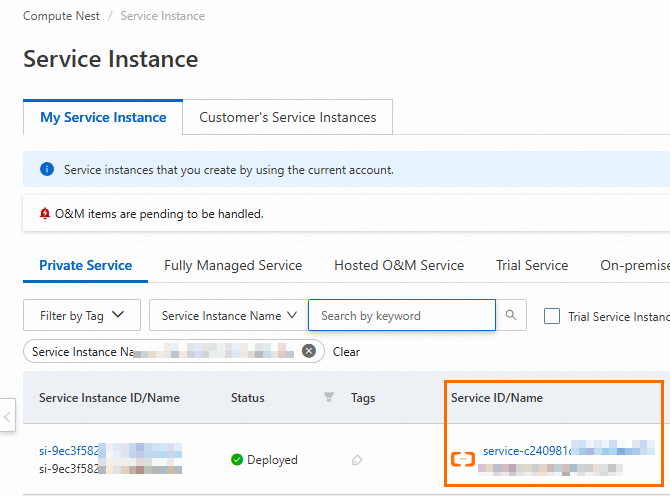
リクエストの例
この例は、中国 (杭州) リージョンから開始された呼び出しを示しています。URL 内のリージョンと ServiceId を実際の値に置き換えてください。
# ServiceId の値を実際のサービス ID に置き換えます。
curl -H "Content-Type: application/json" -X POST https://cn-hangzhou.axt.aliyun.com/computeNest/license/check_out_license -d '{"ServiceId":"service-8fff945fe6844906****"}'
応答例
{
    "code":200,
    "requestId":"6af1efb7-c59c-4cee-9094-e1e3bbefb639",
    "instanceId":"i-0jl957dfri612gxxxxxx",
    "result":{
        "RequestId":"B22723B7-FC31-18F5-A33E-1AF4C82736AA",
        "ServiceInstanceId":"si-0f14037f30c14292****",
        "LicenseMetadata":"{\"TemplateName\":\"Custom_Image_Ecs\",\"SpecificationName\":\"\",\"CustomData\":\"xxxx\"}",
        "TrialType":"NotTrial",
        "Token":"58d4574bd0d967bb431cd8936b5e80c4",
        "ExpireTime":"2024-08-28T06:27:08Z",
        "ServiceId":"service-8fff945fe6844906****",
        "Components":"{\"package_version\":\"yuncode55xxxxxxxx\",\"SystemDiskSize\":\"40\",\"DataDiskSize\":\"100\"}"
    }
 }
次の表に、応答の主要なパラメーターを示します。
パラメーター
説明
例
ServiceInstanceId
サービスインスタンス ID。
si-0f14037f30c14292****
ServiceId
サービス ID。
service-8fff945fe6844906****
ExpireTime
サービスインスタンスの有効期限。
2024-08-28T06:27:08Z
LicenseMetadata
カスタムメタデータ。
このデータは、カスタム販売設定で定義されます。
{\"TemplateName\":\"Custom_Image_Ecs\",\"SpecificationName\":\"\",\"CustomData\":\"xxxx\"}
Components
Alibaba Cloud Marketplace のアドオン課金コンポーネントの詳細。
{\"package_version\":\"yuncode55xxxxxxxx\",\"SystemDiskSize\":\"40\",\"DataDiskSize\":\"100\"}
コードサンプル
Python
import requests
import json
import hashlib
import time
import sys
from urllib.request import urlopen

def get_region_id():
    """Alibaba Cloud メタデータサービスからリージョン ID (例:cn-hangzhou) を取得します。"""
    try:
        with urlopen(
            "http://100.100.100.200/latest/meta-data/region-id",
            timeout=2
        ) as response:
            return response.read().decode().strip()
    except Exception as e:
        print(f"リージョン ID の取得に失敗しました:{str(e)}", file=sys.stderr)
        sys.exit(1)

def checkout_license():
    # リージョン ID を動的に取得し、URL を構築します。
    region_id = get_region_id()
    url = f"https://{region_id}.axt.aliyun.com/computeNest/license/check_out_license"

    # POST リクエストを送信します。
    try:
        response = requests.post(
            url,
            json={
              # オプション:ServiceId を含めて、チェックを特定のサービスに限定します。
              # 省略した場合、Compute Nest はリソースのタグからサービスを識別します。
              # "ServiceId": "service-ec9cbf77f9be443db938"
            },
            headers={"Content-Type": "application/json"}
        )
        print(f"リクエスト URL:{url}")
        print(f"ステータスコード:{response.status_code}")
        print(f"応答:{response.text}")
    except Exception as e:
        print(f"リクエストが失敗しました:{str(e)}", file=sys.stderr)

if __name__ == "__main__":
    # 関数を呼び出します。
    checkout_license()
出力例:

Java
import java.io.BufferedReader;
import java.io.InputStreamReader;
import java.io.OutputStream;
import java.net.HttpURLConnection;
import java.net.URL;
import java.security.MessageDigest;

public class CheckoutLicense {
    public static void main(String[] args) {
        try {
            // === リージョン ID を動的に取得 ===
            String regionId = getRegionId();
            System.out.println("検出されたリージョン ID:" + regionId);

            String checkoutLicenseString = "{}";
            // オプション:ServiceId を含めて、チェックを特定のサービスに限定します。
            // 省略した場合、Compute Nest はリソースのタグからサービスを識別します。
            // String checkoutLicenseString = "{\"ServiceId\": \"service-ec9cbf77f9be443db938\"}";

            // === POST リクエストを送信 ===
            String urlStr = "https://" + regionId + ".axt.aliyun.com/computeNest/license/check_out_license";
            URL url = new URL(urlStr);
            HttpURLConnection conn = (HttpURLConnection) url.openConnection();
            conn.setRequestMethod("POST");
            conn.setRequestProperty("Content-Type", "application/json");
            conn.setDoOutput(true);

            try (OutputStream os = conn.getOutputStream()) {
                byte[] input = checkoutLicenseString.getBytes("UTF-8");
                os.write(input, 0, input.length);
            }

            // === 応答を読み取り ===
            try (BufferedReader br = new BufferedReader(new InputStreamReader(conn.getInputStream()))) {
                StringBuilder response = new StringBuilder();
                String responseLine;
                while ((responseLine = br.readLine()) != null) {
                    response.append(responseLine);
                }
                System.out.println("応答:" + response.toString());
            }
            conn.disconnect();
            System.out.println("リクエスト URL:" + urlStr);

        } catch (Exception e) {
            e.printStackTrace();
        }
    }

    // === Alibaba Cloud メタデータサービスからリージョン ID を取得 ===
    private static String getRegionId() throws Exception {
        String regionIdUrl = "http://100.100.100.200/latest/meta-data/region-id";
        HttpURLConnection conn = (HttpURLConnection) new URL(regionIdUrl).openConnection();
        conn.setRequestMethod("GET");
        conn.setConnectTimeout(2000); // 2 秒のタイムアウト
        conn.setReadTimeout(2000);

        try (BufferedReader in = new BufferedReader(
            new InputStreamReader(conn.getInputStream()))) {
            return in.readLine().trim();
        }
    }
}
出力例:
