すべてのプロダクト
Search
ドキュメントセンター

Cloud Monitor:loongsuite-util-genai および OpenTelemetry SDK を使用したトレースのカスタマイズ

最終更新日:Apr 03, 2026

ARMS Application Monitoring を統合すると、エージェントが一般的な AI フレームワークを自動的にイベントトラッキングし、コード変更なしにトレースデータを収集します。トレース内に特定のビジネスメソッドをキャプチャするには、loongsuite-util-genai パッケージと OpenTelemetry SDK を使用してカスタムイベントトラッキングを追加します。本トピックでは、loongsuite-util-genai および OpenTelemetry Python SDK を使用してカスタムスパンを作成し、カスタム属性を追加する方法について説明します。

ARMS エージェントがサポートする AI コンポーネントおよびフレームワークの一覧については、以下のトピックをご参照ください。

前提条件

依存関係のインストール

pip install loongsuite-util-genai

このインストールにより、opentelemetry.util.genai パッケージおよび ExtendedTelemetryHandler などの拡張インターフェイスが提供されます。詳細については、「loongsuite-util-genai 詳細ドキュメント」をご参照ください。

loongsuite-util-genai および OpenTelemetry SDK の使用

loongsuite-util-genai および OpenTelemetry SDK を使用すると、以下の操作が可能です。

  • GenAI セマンティクス(Entry、Agent、Tool、ReAct Step など)を持つスパンを作成する。

  • OpenTelemetry SDK を使用してカスタムスパンを作成する。

  • スパンにカスタム属性を追加する。

  • 現在のトレースコンテキストを取得し、traceId を出力する。

基本概念

  • スパン:リクエスト内の単一の操作。たとえば、大規模言語モデル (LLM) 呼び出しやツール実行など。

  • SpanContext:リクエストトレースのコンテキストで、traceId や spanId などの情報を含む。

  • 属性:スパンに追加されるフィールドで、モデル名やトークン使用量などの重要な情報を記録するために使用される。

  • ハンドラ:loongsuite-util-genai が提供する ExtendedTelemetryHandler。GenAI セマンティクス規則に準拠したスパンを作成するために使用される。

以下の表は、loongsuite-util-genai がサポートするすべてのスパンタイプを示しています。本トピックでは、Entry、Agent、Tool、および ReAct Step スパンの使用方法に焦点を当てます。Embedding、Retrieval、Rerank、Memory などの他のタイプの詳細については、「loongsuite-util-genai 完全ドキュメント」をご参照ください。

スパンタイプ

操作名

説明

Entry

enter

アプリケーションのエントリポイントで、セッション ID、ユーザー ID、およびアプリケーションとのやり取りの完全な詳細を含む。

Agent

invoke_agent {name}

エージェントの呼び出しで、トークン使用量を集約する。

Tool

execute_tool {name}

ツールまたは関数の実行。

Step

react

単一の ReAct 反復のマーカー。

LLM

chat {model}

LLM チャット。通常はエージェントによって自動的にキャプチャされる。

Embedding

embeddings {model}

ベクトル埋め込み操作。

Retriever

retrieval {data_source}

取得操作(RAG 向け)。

Reranker

rerank {model}

再ランキング操作。

Memory

memory {operation}

メモリの読み取り/書き込み操作。

以下のセクションでは、各タイプのスパンをイベントトラッキングするためのステップバイステップの手順とコードスニペットを提供します。実行可能な完全なコード例は、本文末尾の付録にあります。

重要

TelemetryHandler を直接インスタンス化するのではなく、必ず get_extended_telemetry_handler() を使用してハンドラインスタンスを取得してください。ARMS エージェントは get_extended_telemetry_handler() のみと互換性があります。TelemetryHandler を直接インスタンス化すると、環境変数の互換性に関する問題が発生する可能性があります。

重要

カスタムイベントトラッキングを追加する際は、必ず「LLM トレースフィールド定義」で定義されたセマンティクス規則に従ってください。トークン統計やセッション分析などの AI アプリケーション可観測性機能は、これらの規則に基づいてデータをレンダリングします。スパン属性がこれらの規則に従っていない場合、関連データがコンソールに正しく表示されない可能性があります。

1. ハンドラおよびトレーサーの取得

loongsuite-util-genai からシングルトンハンドラを取得するには get_extended_telemetry_handler() を、OpenTelemetry SDK からトレーサーを取得するには get_tracer(__name__) を使用します。これらはそれぞれ、GenAI セマンティクススパンおよびカスタムビジネススパンを作成するために使用されます。

from opentelemetry.util.genai.extended_handler import get_extended_telemetry_handler
from opentelemetry.util.genai.extended_types import (
    ExecuteToolInvocation,
    InvokeAgentInvocation,
)
from opentelemetry.util.genai._extended_common import EntryInvocation, ReactStepInvocation
from opentelemetry.util.genai.types import Error, InputMessage, OutputMessage, Text
from opentelemetry.trace import get_tracer

handler = get_extended_telemetry_handler()
tracer = get_tracer(__name__)

ハンドラは以下の 2 つの使用パターンをサポートします。

  • コンテキストマネージャーwith handler.entry(inv) など):推奨される方法です。スパンのライフサイクルを自動的に管理します。

  • start/stop/fail APIhandler.start_entry(inv) / handler.stop_entry(inv) / handler.fail_entry(inv, error)):with 文を使用できない非同期、コールバック、ストリーミングなどのシナリオに適しています。

2. Entry スパンの作成

リクエストのエントリポイントで Entry スパンを作成します。session_id および user_id を含め、input_messages を使用してユーザー入力を記録します。ストリーミング応答が完了したら、出力を連結して output_messages に設定し、stop_entry を呼び出してスパンを終了します。これにより、コンソール上でリクエストの完全な入力と最終的な出力を直接確認できます。

entry_inv = EntryInvocation(
    session_id=req.session_id or str(uuid.uuid4()),
    user_id=req.user_id or "anonymous",
    input_messages=[
        InputMessage(role="user", parts=[Text(content=req.topic)]),
    ],
)

def event_generator():
    handler.start_entry(entry_inv)
    output_chunks: list[str] = [ ]

    try:
        for chunk in run_agent_stream(topic=req.topic):
            output_chunks.append(chunk)
            yield f"data: {json.dumps({'content': chunk}, ensure_ascii=False)}\n\n"
        yield "data: [DONE]\n\n"
    except Exception as exc:
        handler.fail_entry(entry_inv, Error(message=str(exc), type=type(exc)))
        yield f"data: {json.dumps({'error': str(exc)}, ensure_ascii=False)}\n\n"
        return
    entry_inv.output_messages = [
        OutputMessage(
            role="assistant",
            parts=[Text(content="".join(output_chunks))],
            finish_reason="stop",
        ),
    ]
    handler.stop_entry(entry_inv)

3. Agent スパンの作成

start_invoke_agent を使用して、エージェント名、モデル、説明を記録する Agent スパンを作成します。Agent スパンはトレース全体のルート GenAI スパンであり、後続のすべての ReAct Step、LLM 呼び出し、およびツール呼び出しスパンはその子スパンとなります。

invocation = InvokeAgentInvocation(
    provider="dashscope",
    agent_name="TechContentAgent",
    agent_description="Technical content generation assistant",
    request_model="qwen-plus",
)
total_input_tokens = 0
total_output_tokens = 0

handler.start_invoke_agent(invocation)
try:
    # ... Core agent logic (ReAct loop) ...

    invocation.input_tokens = total_input_tokens
    invocation.output_tokens = total_output_tokens
    handler.stop_invoke_agent(invocation)
except Exception:
    handler.fail_invoke_agent(invocation, Error(message="agent failed", type=RuntimeError))
    raise

エージェントの実行が完了すると、累積された total_input_tokens および total_output_tokens が Agent スパンに書き込まれ、トークンメトリックが集約されます。

4. ReAct Step スパンの作成

各 ReAct 推論反復に対して Step スパンを作成し、現在の round を渡します。反復が終了すると、継続が必要な場合は finish_reasoncontinue に、最終回答の場合は stop に設定します。この例では、各反復における LLM 呼び出しは ARMS エージェントによって自動的にイベントトラッキングされるため、手動で作成する必要はありません。

step_inv = ReactStepInvocation(round=iteration + 1)
handler.start_react_step(step_inv)

try:
    response = client.chat.completions.create(
        model="qwen-plus",
        messages=messages,
        tools=TOOL_DEFINITIONS,
    )
    # ... Process the response ...

    step_inv.finish_reason = "stop"  # or "continue"
    handler.stop_react_step(step_inv)
except Exception:
    handler.fail_react_step(step_inv, Error(message="step failed", type=RuntimeError))
    raise

5. Tool スパンの作成

モデルがツール呼び出しを返した場合、各 tool_call に対して Tool スパンを作成し、ツール名、呼び出し ID、入力パラメーター、および結果を記録します。

tool_inv = ExecuteToolInvocation(
    tool_name=tool_call.function.name,
    tool_call_id=tool_call.id,
    tool_call_arguments=tool_call.function.arguments,
    tool_type="function",
)
handler.start_execute_tool(tool_inv)
try:
    result = dispatch_tool(tool_name, tool_call.function.arguments)
    tool_inv.tool_call_result = result
except Exception as exc:
    handler.fail_execute_tool(tool_inv, error=Error(message=str(exc), type=type(exc)))
    raise
else:
    handler.stop_execute_tool(tool_inv)

6. OpenTelemetry SDK を使用したカスタムスパンの作成

loongsuite-util-genai が提供する GenAI セマンティクススパンに加えて、OpenTelemetry SDK の tracer.start_as_current_span() メソッドを使用してカスタムビジネススパンを作成し、GenAI スパンと組み合わせて使用できます。

以下の例は、カスタムスパンの代表的なユースケースを 2 つ示しています。

duplicate_tool_detection

このプロセスは各 ReAct 反復の前に実行されます。Counter を使用して各ツールの呼び出し回数をカウントし、検出結果を gen_ai.loop_detection.* 属性に書き込みます。ループが検出された場合、メッセージリストにシステムプロンプトを追加して、モデルが繰り返しを回避するように誘導します。

def _check_duplicate_tools(
    tool_usage_counter: Counter,
    messages: list[dict[str, Any]],
) -> None:
    duplicates = [name for name, count in tool_usage_counter.items() if count > 1]
    has_duplicates = len(duplicates) > 0

    with tracer.start_as_current_span("duplicate_tool_detection") as span:
        span.set_attributes({
            "gen_ai.loop_detection.detected": has_duplicates,
            "gen_ai.loop_detection.duplicate_tools": str(duplicates) if has_duplicates else "[ ]",
            "gen_ai.loop_detection.total_calls": sum(tool_usage_counter.values()),
            "gen_ai.loop_detection.unique_tools": len(tool_usage_counter),
        })

    if has_duplicates:
        details = ", ".join(f"{n}({tool_usage_counter[n]} calls)" for n in duplicates)
        messages.append({
            "role": "system",
            "content": f"[System Hint] Duplicate tool calls detected: {details}. Please avoid repeating the call.",
        })

response_loop_detection

このプロセスは各 LLM 応答後に実行されます。現在の応答と前の応答のテキスト類似度を比較し、is_loopoverlap_ratio などのメトリックをスパン属性に書き込みます。ループが検出された場合(テキストが同一であるか、重複率が 80 % を超える場合)、finish_reasonloop_detected に設定され、エージェントが早期に終了します。

def _check_response_loop(
    current_content: str | None,
    previous_content: str | None,
) -> bool:
    cur = (current_content or "").strip()
    prev = (previous_content or "").strip()

    with tracer.start_as_current_span("response_loop_detection") as span:
        if not prev or not cur:
            span.set_attributes({
                "gen_ai.loop_detection.is_loop": False,
                "gen_ai.loop_detection.reason": "no_text_content",
            })
            return False

        is_identical = cur == prev
        longer = max(len(cur), len(prev))
        common_prefix_len = sum(1 for a, b in zip(cur, prev) if a == b)
        overlap_ratio = common_prefix_len / longer if longer > 0 else 0.0
        is_loop = is_identical or overlap_ratio > 0.8

        span.set_attributes({
            "gen_ai.loop_detection.is_loop": is_loop,
            "gen_ai.loop_detection.is_identical": is_identical,
            "gen_ai.loop_detection.overlap_ratio": round(overlap_ratio, 2),
            "gen_ai.loop_detection.current_length": len(cur),
            "gen_ai.loop_detection.previous_length": len(prev),
        })
        return is_loop
説明

カスタムスパンは GenAI セマンティクス規則に従っていないため、コンソールのトレースビューでそれらを確認するには、すべてのビュー に切り替える必要があります。

モニタリング詳細の確認

  1. Cloud Monitor 2.0 コンソールにログインし、対象のワークスペースを選択して、左側のナビゲーションウィンドウで すべての機能 > AI アプリケーション可観測性 を選択します。

  2. AI アプリケーションページで、統合済みのアプリケーションを確認できます。アプリケーション名をクリックして、詳細なモニタリングデータを表示します。

インストルメンテーションの結果

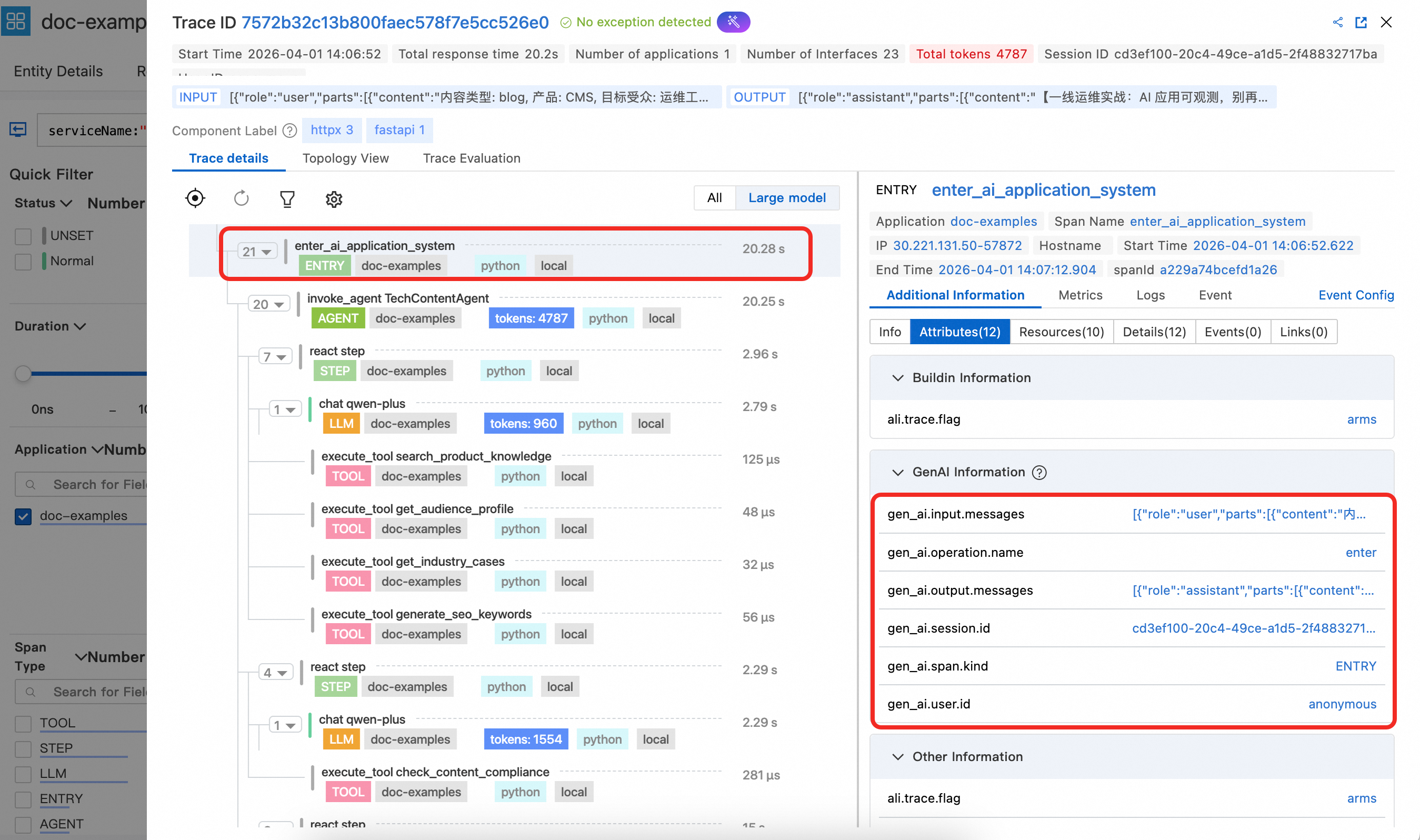
1. Entry スパンの詳細

Entry スパンには、gen_ai.session.idgen_ai.user.id などの重要な属性が表示されます。関数エントリポイントで設定すると、これらの属性は自動的に LLM、Tool、および他のスパンに伝搬し、セッションおよびユーザー情報に基づいた分析が可能になります。また、Entry スパンには gen_ai.input.messages(ユーザー入力)および gen_ai.output.messages(最終出力)も含まれるため、コンソールでリクエストのやり取り内容全体を簡単に確認できます。
image

2. Agent スパンの詳細

Agent スパンには、エージェントの定義済み名および説明が表示されます。また、例示コードで計算されたエージェントレベルでの集約トークン使用量統計も表示されます。
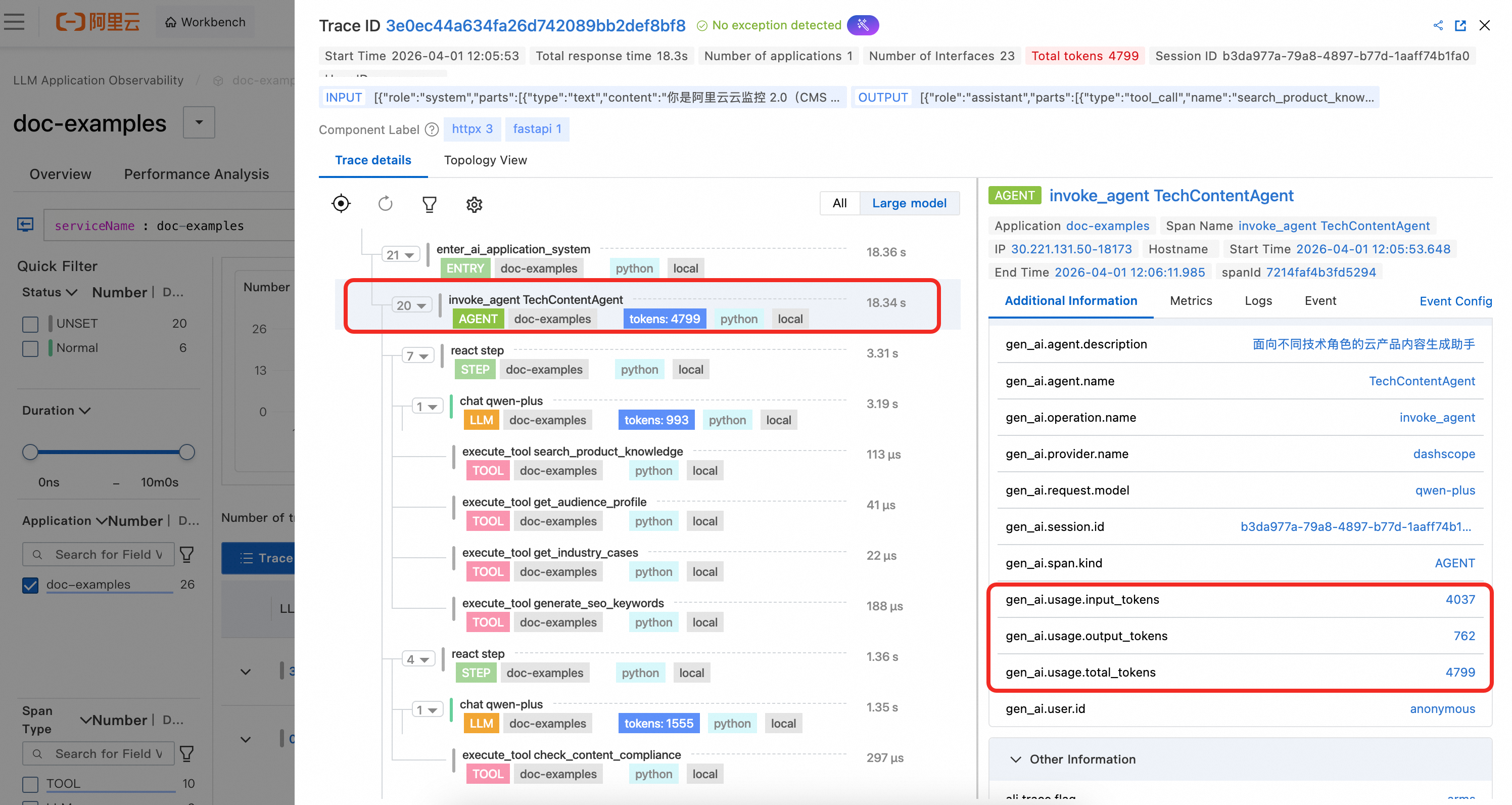
image.png

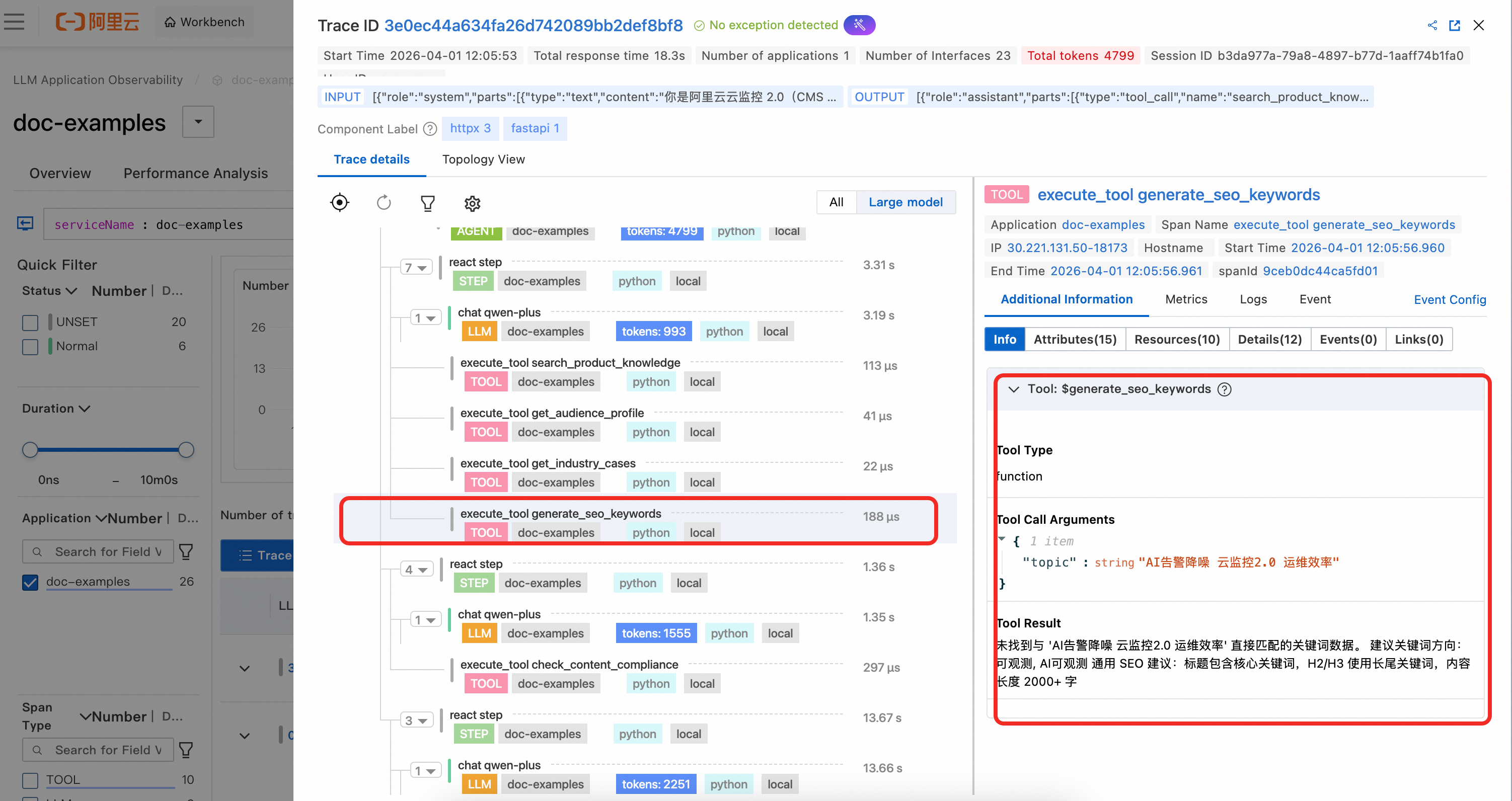
3. Tool スパンの詳細

Tool スパンには、ツール名、入力パラメーター、およびツール呼び出しの結果が表示されます。image.png
4. LLM スパンの詳細

例示コードでは、LLM スパンは手動でイベントトラッキングされていません。OpenAI 呼び出しであるため、エージェントによって自動的にキャプチャされます。LLM 呼び出しの完全なコンテキスト情報およびトークン消費量を明確に確認できます。
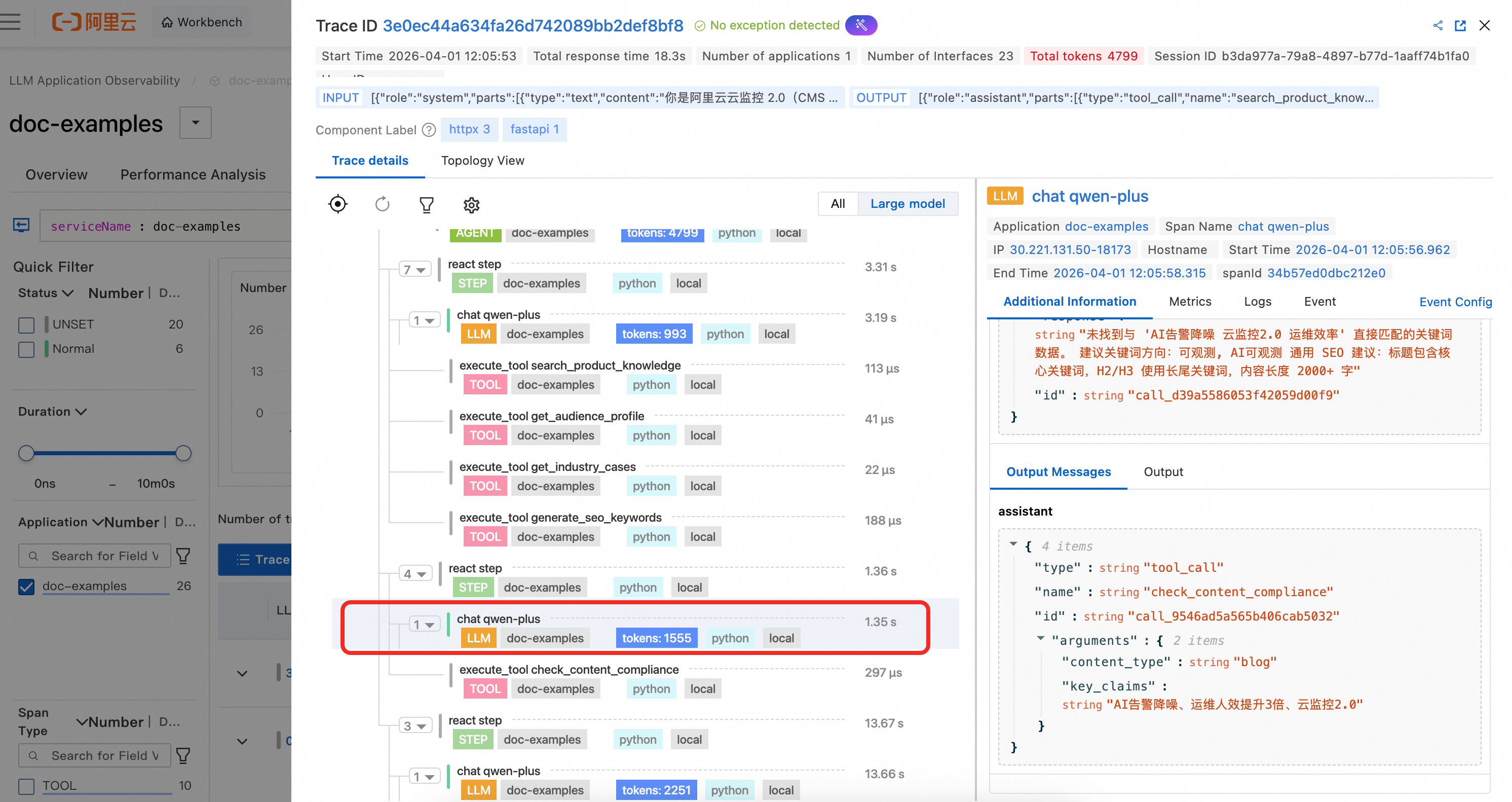
image.png

5. カスタムスパンの詳細

例示コードでは、OpenTelemetry SDK を使用して GenAI セマンティクススパンと組み合わせる方法を示すために、2 つのカスタムビジネススパンが作成されています。これらのカスタムスパンは GenAI セマンティクスの一部ではないため、確認するには「すべてのビュー」に切り替える必要があります。

  • duplicate_tool_detection:このスパンは各 ReAct 反復の前に作成され、エージェントが繰り返しツール呼び出しのループに陥っているかどうかを検出します。スパン属性には、重複が検出されたかどうか、重複ツールのリスト、呼び出し総数、および一意のツール数が記録されます。これにより、ARMS でツール呼び出しループの問題を迅速に診断できます。
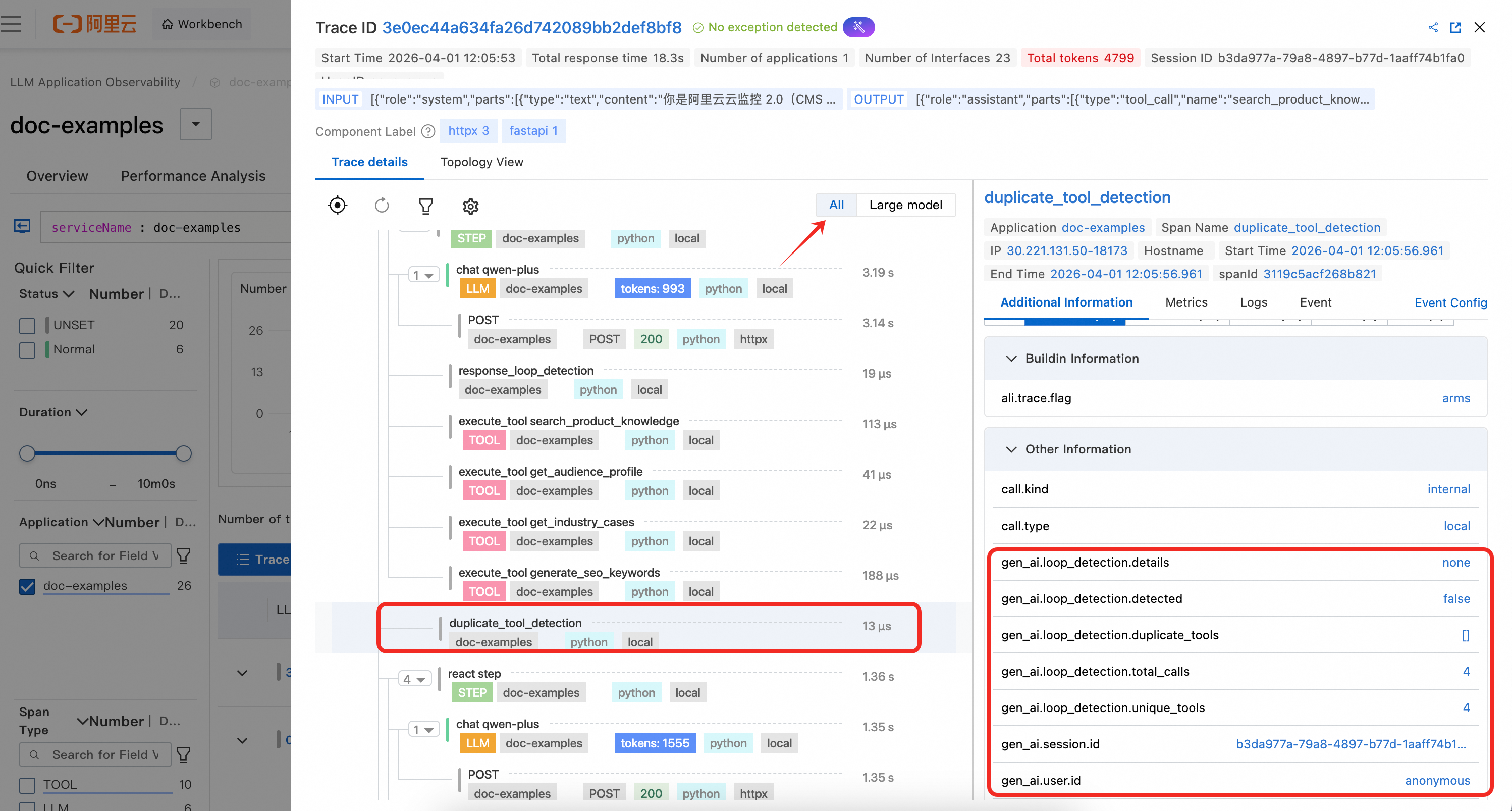
    image.png

  • response_loop_detection:このスパンは各 LLM 応答後に作成され、モデルが非常に類似したコンテンツを繰り返し返していないかどうかを検出します。スパン属性には、ループが識別されたかどうか、テキストが同一かどうか、重複率、および現在と前の応答の長さが記録されます。これにより、モデルが繰り返し出力ループに陥る異常なシナリオのトラブルシューティングが可能になります。
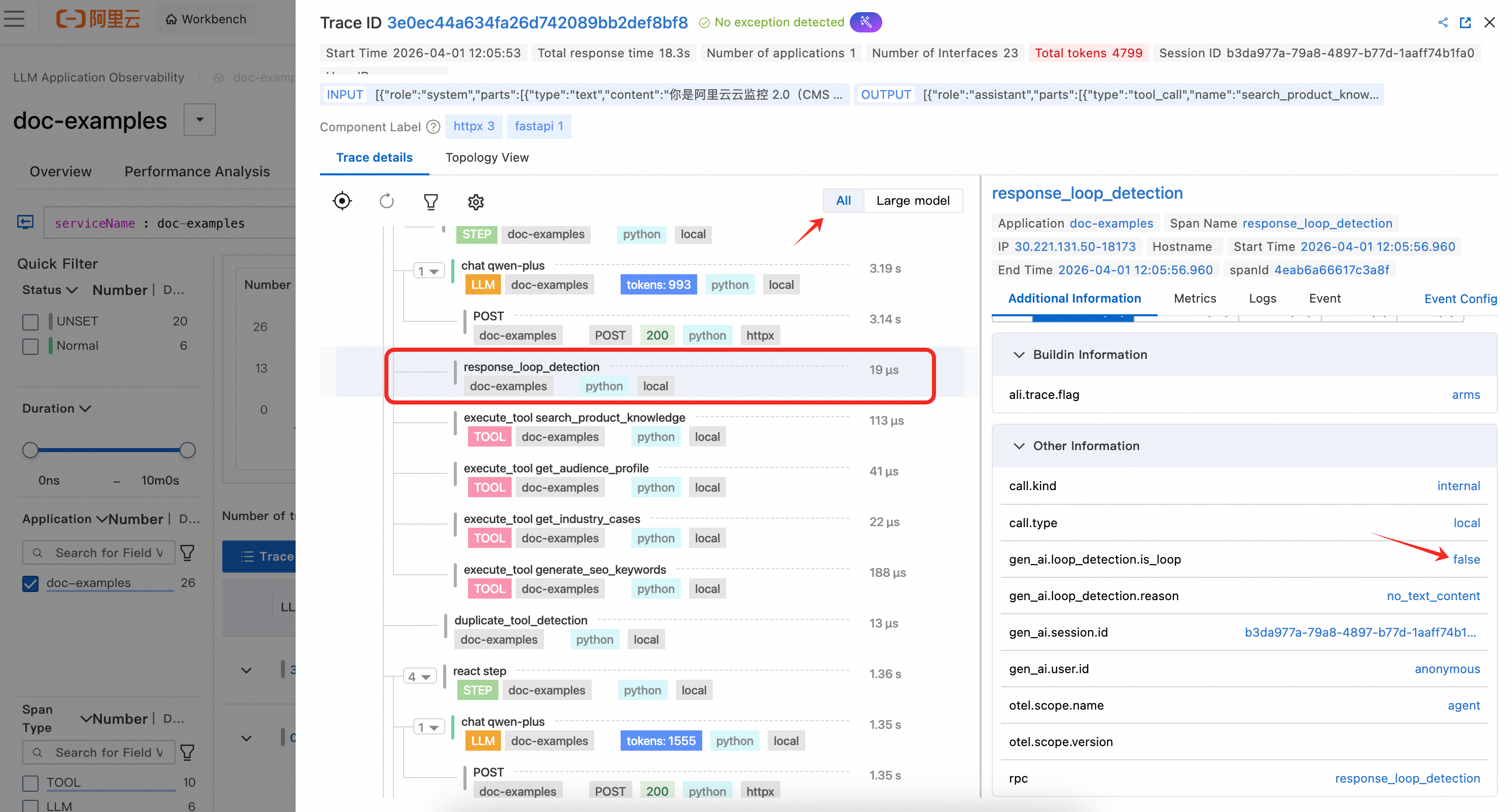
    image.png

参考文献

他の言語向けのカスタムイベントトラッキング

付録

完全なコード例

app.py

import json
import uuid

from fastapi import FastAPI
from fastapi.responses import StreamingResponse
from pydantic import BaseModel
from opentelemetry.util.genai.extended_handler import get_extended_telemetry_handler
from opentelemetry.util.genai._extended_common import EntryInvocation
from opentelemetry.util.genai.types import Error, InputMessage, OutputMessage, Text

from agent import run_marketing_agent_stream

app = FastAPI(title="Cloud Product Technical Content Generation Assistant")


class GenerateRequest(BaseModel):
    content_type: str = "blog"
    product: str = "CMS"
    target_audience: str = "Operations Engineer"
    topic: str = ""
    session_id: str = ""
    user_id: str = ""


@app.post("/api/v1/generate/stream")
async def generate_stream(req: GenerateRequest) -> StreamingResponse:
    handler = get_extended_telemetry_handler()

    user_prompt = (
        f"Content type: {req.content_type}, Product: {req.product}, "
        f"Target audience: {req.target_audience}, Topic: {req.topic}"
    )

    entry_inv = EntryInvocation(
        session_id=req.session_id or str(uuid.uuid4()),
        user_id=req.user_id or "anonymous",
        input_messages=[
            InputMessage(role="user", parts=[Text(content=user_prompt)]),
        ],
    )

    def event_generator():
        handler.start_entry(entry_inv)
        output_chunks: list[str] = []
        try:
            for chunk in run_marketing_agent_stream(
                content_type=req.content_type,
                product=req.product,
                target_audience=req.target_audience,
                topic=req.topic,
            ):
                output_chunks.append(chunk)
                yield f"data: {json.dumps({'content': chunk}, ensure_ascii=False)}\n\n"
            yield "data: [DONE]\n\n"
        except Exception as exc:
            handler.fail_entry(
                entry_inv,
                Error(message=str(exc), type=type(exc)),
            )
            yield f"data: {json.dumps({'error': str(exc)}, ensure_ascii=False)}\n\n"
            return
        entry_inv.output_messages = [
            OutputMessage(
                role="assistant",
                parts=[Text(content="".join(output_chunks))],
                finish_reason="stop",
            ),
        ]
        handler.stop_entry(entry_inv)

    return StreamingResponse(event_generator(), media_type="text/event-stream")


@app.get("/health")
async def health():
    return {"status": "ok"}


if __name__ == "__main__":
    import uvicorn
    uvicorn.run(app, host="0.0.0.0", port=8000)

agent.py

import os
from collections import Counter
from collections.abc import Generator
from typing import Any

from openai import OpenAI
from opentelemetry.trace import get_tracer
from opentelemetry.util.genai.extended_handler import get_extended_telemetry_handler
from opentelemetry.util.genai.extended_types import (
    ExecuteToolInvocation,
    InvokeAgentInvocation,
)
from opentelemetry.util.genai._extended_common import ReactStepInvocation
from opentelemetry.util.genai.types import Error

from tools import TOOL_DEFINITIONS, dispatch_tool

tracer = get_tracer(__name__)

MODEL_NAME = os.environ.get("MODEL_NAME", "qwen-plus")
BASE_URL = os.environ.get(
    "OPENAI_BASE_URL",
    "https://dashscope.aliyuncs.com/compatible-mode/v1",
)
API_KEY = os.environ.get("DASHSCOPE_API_KEY", "")

MAX_ITERATIONS = 10

SYSTEM_PROMPT = """\
You are a technical content generation assistant for Alibaba Cloud Monitor 2.0 (CMS 2.0).
You generate high-value technical content for operations engineers and architects, using professional language they are familiar with.

Key principles: Adjust the perspective and language style based on the target audience.
- Operations Engineers: Focus on hands-on steps, troubleshooting efficiency, and tool integration. Use common terms from daily operations.
- Architects: Focus on architectural design, standardization, and scalability. Use in-depth, professional language.

You must strictly follow these steps, calling the corresponding tool for each step:

Step 1: Use the `search_product_knowledge` tool to search for CMS product information (features or comparison).
Step 2: Use the `get_audience_profile` tool to get the profile and pain points of the target audience.
Step 3: Use the `get_industry_cases` tool to find relevant industry case studies.
Step 4: If the content is a blog post, use the `generate_seo_keywords` tool to get SEO keywords.
Step 5: Generate the content based on the collected information.
Step 6: Use the `check_content_compliance` tool to check for compliance.

Content requirements: Focus on product advantages and audience pain points, cite case study data, write in Chinese, and keep it under 800 characters."""


def _build_client() -> OpenAI:
    return OpenAI(base_url=BASE_URL, api_key=API_KEY)


def _build_user_message(
    content_type: str,
    product: str,
    target_audience: str,
    topic: str,
) -> str:
    type_labels = {
        "blog": "a hands-on technical blog for front-line technical staff",
        "email": "a technical recommendation email for a specific target audience",
        "case_study": "a practical customer case study for reference",
        "comparison": "a product comparison analysis to assist with technology selection",
    }
    label = type_labels.get(content_type, content_type)
    return (
        f"Please generate {label} for the {product} product.\n"
        f"Target audience: {target_audience}\n"
        f"Topic/Direction: {topic}\n\n"
        f"Please write from the perspective and in the language familiar to the target audience in their daily work. "
        f"Strictly follow the steps to call tools and collect information before generating the content."
    )


def _check_duplicate_tools(
    tool_usage_counter: Counter,
    messages: list[dict[str, Any]],
) -> list[str]:
    duplicates = [name for name, count in tool_usage_counter.items() if count > 1]
    total_calls = sum(tool_usage_counter.values())
    has_duplicates = len(duplicates) > 0

    duplicate_details = (
        ", ".join(f"{name}({tool_usage_counter[name]} calls)" for name in duplicates)
        if has_duplicates
        else "none"
    )

    with tracer.start_as_current_span("duplicate_tool_detection") as detect_span:
        detect_span.set_attributes({
            "gen_ai.loop_detection.detected": has_duplicates,
            "gen_ai.loop_detection.duplicate_tools": str(duplicates) if has_duplicates else "[]",
            "gen_ai.loop_detection.details": duplicate_details,
            "gen_ai.loop_detection.total_calls": total_calls,
            "gen_ai.loop_detection.unique_tools": len(tool_usage_counter),
        })

    if not has_duplicates:
        return []

    hint_message = (
        f"[System Hint] The following tools were called multiple times: {duplicate_details}. "
        f"Avoid calling the same tools again. Use the information you already have to proceed to the next steps."
    )
    messages.append({"role": "system", "content": hint_message})

    return duplicates


def _check_response_loop(
    current_content: str | None,
    previous_content: str | None,
) -> bool:
    """Compare consecutive LLM text responses to detect stuck loops."""
    cur = (current_content or "").strip()
    prev = (previous_content or "").strip()

    with tracer.start_as_current_span("response_loop_detection") as span:
        if not prev or not cur:
            span.set_attributes({
                "gen_ai.loop_detection.is_loop": False,
                "gen_ai.loop_detection.reason": "no_text_content",
            })
            return False

        is_identical = cur == prev

        common_prefix_len = 0
        for a, b in zip(cur, prev):
            if a == b:
                common_prefix_len += 1
            else:
                break
        longer = max(len(cur), len(prev))
        overlap_ratio = common_prefix_len / longer if longer > 0 else 0.0
        is_loop = is_identical or overlap_ratio > 0.8

        span.set_attributes({
            "gen_ai.loop_detection.is_loop": is_loop,
            "gen_ai.loop_detection.is_identical": is_identical,
            "gen_ai.loop_detection.overlap_ratio": round(overlap_ratio, 2),
            "gen_ai.loop_detection.current_length": len(cur),
            "gen_ai.loop_detection.previous_length": len(prev),
        })
        return is_loop


def run_marketing_agent_stream(
    content_type: str,
    product: str,
    target_audience: str,
    topic: str,
) -> Generator[str, None, None]:
    client = _build_client()
    handler = get_extended_telemetry_handler()

    user_message = _build_user_message(content_type, product, target_audience, topic)

    invocation = InvokeAgentInvocation(
        provider="dashscope",
        agent_name="TechContentAgent",
        agent_description="A cloud product content generation assistant for different technical roles",
        request_model=MODEL_NAME,
    )

    total_input_tokens = 0
    total_output_tokens = 0
    tool_usage_counter: Counter = Counter()
    previous_content: str | None = None

    handler.start_invoke_agent(invocation)
    try:
        messages: list[dict[str, Any]] = [
            {"role": "system", "content": SYSTEM_PROMPT},
            {"role": "user", "content": user_message},
        ]

        for iteration in range(MAX_ITERATIONS):
            _check_duplicate_tools(tool_usage_counter, messages)

            step_inv = ReactStepInvocation(round=iteration + 1)
            handler.start_react_step(step_inv)
            try:
                response = client.chat.completions.create(
                    model=MODEL_NAME,
                    messages=messages,
                    tools=TOOL_DEFINITIONS,
                    temperature=0.7,
                )

                choice = response.choices[0]
                message = choice.message

                if response.usage:
                    total_input_tokens += response.usage.prompt_tokens
                    total_output_tokens += response.usage.completion_tokens

                current_content = message.content
                if _check_response_loop(current_content, previous_content):
                    step_inv.finish_reason = "loop_detected"
                    handler.stop_react_step(step_inv)
                    if current_content:
                        yield current_content
                    break
                if (current_content or "").strip():
                    previous_content = current_content

                if message.tool_calls:
                    messages.append(message.model_dump())

                    for tool_call in message.tool_calls:
                        tool_name = tool_call.function.name
                        tool_args = tool_call.function.arguments
                        tool_usage_counter[tool_name] += 1

                        tool_inv = ExecuteToolInvocation(
                            tool_name=tool_name,
                            tool_call_id=tool_call.id,
                            tool_call_arguments=tool_args,
                            tool_type="function",
                        )

                        handler.start_execute_tool(tool_inv)
                        try:
                            result = dispatch_tool(tool_name, tool_args)
                            tool_inv.tool_call_result = result
                        except Exception as exc:
                            handler.fail_execute_tool(
                                tool_inv,
                                error=Error(message=str(exc), type=type(exc)),
                            )
                            raise
                        else:
                            handler.stop_execute_tool(tool_inv)

                        messages.append({
                            "role": "tool",
                            "tool_call_id": tool_call.id,
                            "content": result,
                        })

                    step_inv.finish_reason = "continue"
                    handler.stop_react_step(step_inv)
                    continue

                if choice.finish_reason == "stop" or message.content:
                    if message.content:
                        yield message.content

                    step_inv.finish_reason = "stop"
                    handler.stop_react_step(step_inv)
                    break
            except Exception:
                handler.fail_react_step(
                    step_inv, Error(message="step failed", type=RuntimeError)
                )
                raise

        invocation.input_tokens = total_input_tokens
        invocation.output_tokens = total_output_tokens
        handler.stop_invoke_agent(invocation)
    except Exception:
        handler.fail_invoke_agent(
            invocation, Error(message="agent failed", type=RuntimeError)
        )
        raise

tools.py

import json
from typing import Any

PRODUCT_KNOWLEDGE: dict[str, dict[str, str]] = {
    "CMS": {
        "features": (
            "Cloud Monitor 2.0 (CMS 2.0) is a one-stop observability platform from Alibaba Cloud, "
            "integrating the capabilities of SLS, CMS, and ARMS:\n"
            "1. Full-stack unified monitoring: Unified view of metrics, traces, logs, and events.\n"
            "2. UModel unified modeling: Automatic resource correlation and observability graph construction.\n"
            "3. AI-powered analytics: Anomaly detection, alert noise reduction, and a conversational Ops Copilot.\n"
            "4. Open and compatible: Supports Prometheus, Grafana, and OpenTelemetry ecosystems.\n"
            "5. AI Application Observability: LLM trace tracking, token statistics, and model performance analysis."
        ),
        "comparison": (
            "Cloud Monitor 2.0 vs. traditional monitoring solutions:\n"
            "1. Data integration: Traditional solutions require switching between 3-5 consoles; CMS 2.0 provides a one-stop integrated experience.\n"
            "2. AI capabilities: Traditional static threshold alerts have a false positive rate of over 30%; CMS 2.0 reduces noise by 80% with AI.\n"
            "3. Observability graph: CMS 2.0 automatically builds a dependency graph through UModel.\n"
            "4. AI Application Observability: Not supported by traditional solutions; CMS 2.0 provides native support for the full LLM/Agent trace."
        ),
    },
}
AUDIENCE_PROFILES: dict[str, dict[str, str]] = {
    "Operations Engineer": {
        "role": "Operations Engineer / SRE",
        "pain_points": (
            "1. Long troubleshooting times: Locating issues in microservices architectures takes an average of 30-60 minutes.\n"
            "2. Alert storms: A surge in alerts during promotional events makes it difficult to prioritize.\n"
            "3. Tool fragmentation: Need to switch between 5-6 different monitoring tools.\n"
            "4. AI operations blind spots: Lack of transparency in large language model traces."
        ),
        "interests": "End-to-end tracing, root cause analysis, alert noise reduction, Prometheus/Grafana integration",
        "decision_factors": "Technical maturity, community activity, learning curve, integration difficulty",
    },
    "Architect": {
        "role": "Architect / Technical Expert",
        "pain_points": (
            "1. Observability challenges in hybrid architectures with microservices and AI Agents.\n"
            "2. Lack of objective comparison for selecting between open-source self-built and commercial solutions.\n"
            "3. Fragmented monitoring solutions and data formats across different teams.\n"
            "4. Uncertainty if the current solution can support 10x business growth."
        ),
        "interests": "Architectural design, OpenTelemetry standardization, unified data models, scalability",
        "decision_factors": "Architectural advancement, standardization level, scalability, openness, community ecosystem",
    },
}

INDUSTRY_CASES: dict[str, list[dict[str, str]]] = {
    "Finance": [
        {
            "company": "A leading joint-stock bank",
            "scenario": (
                "Observability upgrade for a core trading system: Covering over 200 microservices "
                "with end-to-end tracing for 50 million daily transactions."
            ),
            "results": (
                "Reduced fault MTTR from 45 minutes to 8 minutes, an 82% improvement; "
                "Increased alert accuracy from 60% to 95%; "
                "Improved operational efficiency by 3x and passed Level 3 classified protection compliance checks on the first attempt."
            ),
        },
    ],
    "Internet": [
        {
            "company": "A social media platform",
            "scenario": (
                "Full-stack observability for an application with tens of millions of DAUs: Covering app-side experience monitoring -> "
                "CDN -> API Gateway -> 2000+ microservices -> Databases/Caches."
            ),
            "results": (
                "Reduced user-side crash rate from 0.5% to 0.08%; "
                "Optimized API P99 latency by 40%; "
                "Saved over 100,000 RMB per month in monitoring costs (compared to a self-built solution)."
            ),
        },
    ],
}

COMPLIANCE_RULES: dict[str, dict[str, Any]] = {
    "product_names": {
        "incorrect": {
            "Aliyun": "Alibaba Cloud",
            "CMS2.0": "CMS 2.0",
            "Cloud Monitor2.0": "Cloud Monitor 2.0",
        },
    },
    "claim_rules": [
        "Data citations must include the source",
        "Avoid absolute terms (e.g., 'the best', 'the only', 'the first')",
        "Use objective data when comparing with competitors",
    ],
}

SEO_KEYWORDS_DB: dict[str, dict[str, Any]] = {
    "Observability": {
        "primary": "Observability",
        "long_tail": ["cloud-native observability solution", "microservices observability platform selection"],
        "search_volume": "High",
    },
    "AI Observability": {
        "primary": "AI Application Observability",
        "long_tail": ["LLM trace tracking", "AI Agent observability"],
        "search_volume": "Medium (rapidly growing)",
    },
}


def search_product_knowledge(product: str, aspect: str) -> str:
    product_key = "CMS"
    product_data = PRODUCT_KNOWLEDGE.get(product_key)
    if not product_data:
        available = ", ".join(PRODUCT_KNOWLEDGE.keys())
        return f"Knowledge base for product '{product}' not found. Available products: {available}"

    aspect_lower = aspect.lower()
    aspect_data = product_data.get(aspect_lower)
    if not aspect_data:
        available = ", ".join(product_data.keys())
        return f"Information about '{aspect}' for '{product}' not found. Available aspects: {available}"

    return f"[{product} - {aspect}]\n{aspect_data}"


def get_audience_profile(audience_type: str) -> str:
    profile = AUDIENCE_PROFILES.get(audience_type)
    if not profile:
        available = ", ".join(AUDIENCE_PROFILES.keys())
        return f"Audience type '{audience_type}' not found. Available types: {available}"

    return (
        f"Audience Profile — {profile['role']}\n\n"
        f"Core Pain Points:\n{profile['pain_points']}\n\n"
        f"Areas of Interest: {profile['interests']}\n\n"
        f"Decision Factors: {profile['decision_factors']}"
    )


def get_industry_cases(industry: str) -> str:
    cases = INDUSTRY_CASES.get(industry)
    if not cases:
        available = ", ".join(INDUSTRY_CASES.keys())
        return f"Case studies for industry '{industry}' not found. Available industries: {available}"

    parts: list[str] = [f"[{industry} Industry Case Studies]\n"]
    for i, case in enumerate(cases, 1):
        parts.append(
            f"Case {i}: {case['company']}\n"
            f"  Scenario: {case['scenario']}\n"
            f"  Results: {case['results']}"
        )
    return "\n\n".join(parts)


def check_content_compliance(content_type: str, key_claims: str) -> str:
    issues: list[str] = []

    for wrong, correct in COMPLIANCE_RULES["product_names"]["incorrect"].items():
        if wrong in key_claims and correct not in key_claims:
            issues.append(f"Product name '{wrong}' should be corrected to '{correct}'")

    for word in ("best", "only", "first", "strongest"):
        if word in key_claims:
            issues.append(f"Contains absolute term '{word}'. Suggest replacing with an objective description.")

    rules_text = "\n".join(
        f"  {i+1}. {rule}"
        for i, rule in enumerate(COMPLIANCE_RULES["claim_rules"])
    )

    result = "Compliance Check Results:\n\n"
    if issues:
        result += "Issues Found:\n" + "\n".join(f"  - {i}" for i in issues) + "\n\n"
    else:
        result += "No apparent compliance issues found.\n\n"
    result += f"Compliance Rules:\n{rules_text}"
    return result


def generate_seo_keywords(topic: str) -> str:
    topic_lower = topic.lower()
    matched: list[dict[str, Any]] = []

    for key, data in SEO_KEYWORDS_DB.items():
        if key.lower() in topic_lower or topic_lower in key.lower() or any(
            w in topic_lower for w in key.lower().split() if len(w) > 1
        ):
            matched.append({"keyword": key, **data})

    if not matched:
        all_keywords = list(SEO_KEYWORDS_DB.keys())
        return (
            f"No directly matching keyword data found for '{topic}'.\n"
            f"Suggested keyword directions: {', '.join(all_keywords)}\n"
            f"General SEO advice: Include core keywords in the title, "
            f"use long-tail keywords in H2/H3 headings, and aim for content length of 2000+ words."
        )

    parts: list[str] = [f"SEO Keyword Analysis — '{topic}':\n"]
    for item in matched:
        long_tail = "\n".join(f"    - {kw}" for kw in item["long_tail"])
        parts.append(
            f"Primary Keyword: {item['primary']}\n"
            f"  Search Volume: {item['search_volume']}\n"
            f"  Long-tail Keywords:\n{long_tail}"
        )
    return "\n\n".join(parts)


TOOL_REGISTRY: dict[str, Any] = {
    "search_product_knowledge": search_product_knowledge,
    "get_audience_profile": get_audience_profile,
    "get_industry_cases": get_industry_cases,
    "check_content_compliance": check_content_compliance,
    "generate_seo_keywords": generate_seo_keywords,
}


def dispatch_tool(name: str, arguments: str) -> str:
    func = TOOL_REGISTRY.get(name)
    if not func:
        return f"Unknown tool: {name}"
    try:
        kwargs = json.loads(arguments)
    except json.JSONDecodeError:
        return f"Failed to parse tool arguments: {arguments}"
    return func(**kwargs)


TOOL_DEFINITIONS: list[dict[str, Any]] = [
    {
        "type": "function",
        "function": {
            "name": "search_product_knowledge",
            "description": "Searches the CMS product knowledge base for information on features or competitor comparisons.",
            "parameters": {
                "type": "object",
                "properties": {
                    "product": {
                        "type": "string",
                        "description": "The product name",
                        "enum": ["CMS"],
                    },
                    "aspect": {
                        "type": "string",
                        "description": "The aspect to query",
                        "enum": ["features", "comparison"],
                    },
                },
                "required": ["product", "aspect"],
            },
        },
    },
    {
        "type": "function",
        "function": {
            "name": "get_audience_profile",
            "description": "Gets the profile of the target audience, including pain points, areas of interest, and decision factors.",
            "parameters": {
                "type": "object",
                "properties": {
                    "audience_type": {
                        "type": "string",
                        "description": "The type of target audience",
                        "enum": ["Operations Engineer", "Architect"],
                    },
                },
                "required": ["audience_type"],
            },
        },
    },
    {
        "type": "function",
        "function": {
            "name": "get_industry_cases",
            "description": "Gets industry customer success stories, including scenarios and performance data.",
            "parameters": {
                "type": "object",
                "properties": {
                    "industry": {
                        "type": "string",
                        "description": "The target industry",
                        "enum": ["Finance", "Internet"],
                    },
                },
                "required": ["industry"],
            },
        },
    },
    {
        "type": "function",
        "function": {
            "name": "check_content_compliance",
            "description": "Checks content for compliance, including product name standards and promotional language.",
            "parameters": {
                "type": "object",
                "properties": {
                    "content_type": {
                        "type": "string",
                        "description": "The type of content",
                        "enum": ["blog", "case_study", "comparison"],
                    },
                    "key_claims": {
                        "type": "string",
                        "description": "Key promotional points and data citations",
                    },
                },
                "required": ["content_type", "key_claims"],
            },
        },
    },
    {
        "type": "function",
        "function": {
            "name": "generate_seo_keywords",
            "description": "Generates SEO keywords based on a topic. Call this when generating a blog post.",
            "parameters": {
                "type": "object",
                "properties": {
                    "topic": {
                        "type": "string",
                        "description": "The main topic or core keywords of the article",
                    },
                },
                "required": ["topic"],
            },
        },
    },
]

requirements.txt

openai
fastapi
uvicorn[standard]
loongsuite-util-genai