すべてのプロダクト
Search
ドキュメントセンター

Application Real-Time Monitoring Service:アラートイベントの EventBridge への送信

最終更新日:Aug 19, 2026

複雑な本番環境でアラートがトリガーされると、自動修復やチケットシステムの統合など、自動化されたアクションをトリガーする必要がしばしばあります。Application Real-Time Monitoring Service (ARMS) のアラート管理は EventBridge と統合されており、アラートのライフサイクルイベント (トリガー、要求、コメント、クリア) をカスタムイベントバスに転送します。そこから、EventBridge は定義したルールに基づいて、イベントをダウンストリームコンシューマーにルーティングします。

仕組み

  1. ARMS は通知統合を通じて、アラートイベントを EventBridge のカスタムイベントバスに公開します。

  2. 各イベントは CloudEvents 1.0 仕様に準拠しており、オープンソースの Alertmanager Webhook フォーマットと互換性があります。

  3. EventBridge イベントを利用してサードパーティプラットフォームに接続し、自動修復やチケットシステムの統合を実装できます。

ステップ 1:EventBridge リソースの作成

ARMS 統合を設定する前に、EventBridge でイベントバスとイベントソースを設定します。

  1. カスタムイベントバスを作成します。詳細については、「カスタムイベントバスの管理」をご参照ください。イベントバスを作成した後、[イベントバスの概要] ページからパブリックエンドポイントをコピーします。この値はステップ 2 で必要になります。
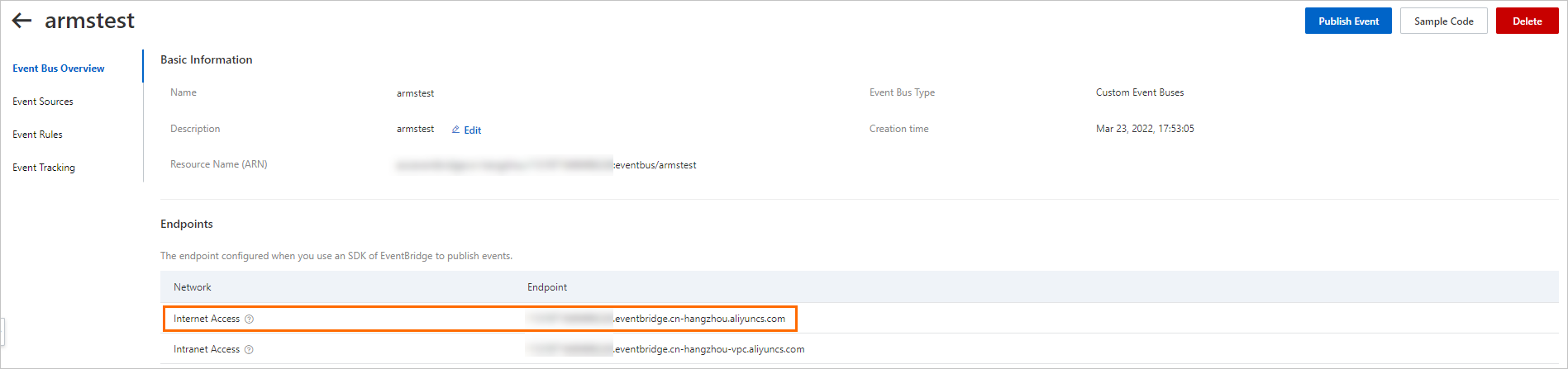
    Event Bus public endpoint

  2. イベントバスにカスタムイベントソースを追加します。詳細については、「カスタムイベントソースの管理」をご参照ください。イベントソース名をメモしておきます。この値もステップ 2 で必要になります。
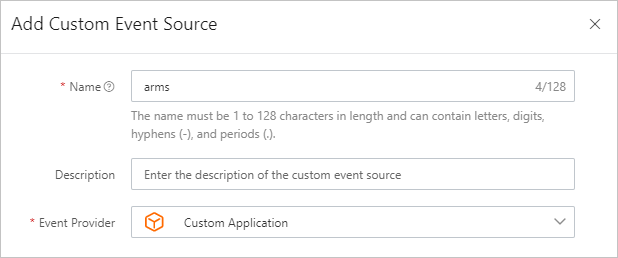
    Custom event sources

ステップ 2:ARMS での EventBridge 統合の設定

  1. ARMS コンソールにログインします。

  2. 左側のナビゲーションウィンドウで、[アラート管理] > [統合] を選択します。

  3. [通知統合] タブをクリックし、次に [EventBridge] をクリックします。

  4. [統合の追加] ダイアログボックスで、次のパラメーターを設定し、[保存] をクリックします。

    パラメーター説明
    名前この統合の表示名。EventBridge integration
    説明オプション。統合の簡単な説明。--
    エンドポイントステップ 1 で作成したイベントバスのパブリックエンドポイント。https://xxxx.eventbridge.cn-hangzhou.aliyuncs.com
    AccessKeyご利用の Alibaba Cloud アカウントの AccessKey ID。詳細については、「AccessKey ペアの取得」をご参照ください。LTAI5tXxx
    AccessKey Secretご利用の Alibaba Cloud アカウントの AccessKey Secret。詳細については、「AccessKey ペアの取得」をご参照ください。xXxXxXx
    メッセージバス名ステップ 1 で作成したイベントバスの名前。armstest
    regionIdイベントバスが存在するリージョン ID。cn-hangzhou
    イベントソース名ステップ 1 で作成したイベントソースの名前。arms

ステップ 3:通知ポリシーの設定

EventBridge 統合を通知ポリシーに接続して、一致するアラートが EventBridge に転送されるようにします。

  1. ARMS コンソールで、通知ポリシーの設定に移動します。

  2. 通知ポリシーを作成または編集します。[チケットシステム] フィールドで、ステップ 2 で作成した EventBridge 統合を選択します。

詳細については、「通知ポリシーの作成と管理」をご参照ください。

統合の検証

設定が完了したら、イベントが EventBridge に到達することを確認します:

  1. EventBridge コンソールにログインします。

  2. カスタムイベントバスを開き、受信イベントを確認します。詳細については、「イベントのクエリ」をご参照ください。

  3. イベントペイロードを確認するには、[操作] 列の [イベント詳細] をクリックします。

イベントタイプ

ARMS は、アラートのライフサイクルアクションごとに 1 つのイベントを送信します。各イベントは、それぞれ異なる type 値を使用します。

イベントコードアラートアクション
aliyun:arms:alarm:createアラートのトリガー
aliyun:arms:alarm:claimクレーム済みアラート
aliyun:arms:alarm:commentアラートへのコメント追加
aliyun:arms:alarm:closeアラートのクリア

通知ポリシーで設定された繰り返し通知は、DingTalk グループや Webhook などの通知受信者にのみ送信されます。繰り返し通知は、EventBridge への新しいイベント配信をトリガーしません。EventBridge は、アラートのステータスが変更された場合にのみイベントを配信しますが、繰り返し通知はステータスの変更ではなく、同じアラートの継続的な状態を反映するものです。

イベントペイロードのリファレンス

すべてのイベントは CloudEvents 1.0 仕様に準拠しています。data.data オブジェクトは、オープンソースの Alertmanager Webhook フォーマットと互換性があります。

トップレベルフィールド

フィールドタイプ説明
idstring一意のイベント ID。
sourcestringイベントソース。常に arms です。
typestring上記の表のイベントコード。
specversionstringCloudEvents のバージョン。常に 1.0 です。
datacontenttypestringコンテンツタイプ。常に application/json です。
subjectstringARMS コンソールにおけるアラートの一意の URL。
aliyuneventbusnamestringターゲットイベントバスの名前。
aliyunregionidstringイベントバスのリージョン ID。
aliyunaccountidstringAlibaba Cloud アカウント ID。
aliyunpublishtimestringイベントが公開されたときのタイムスタンプ (ISO 8601)。
aliyunoriginalaccountidstring元の Alibaba Cloud アカウント ID。
aliyunpublishaddrstringイベントパブリッシャーの IP アドレス。
dataobjectイベント固有のペイロード。以下をご参照ください。

data オブジェクトフィールド

フィールドタイプ含まれるイベント説明
ownerstringすべてのイベントアラートのオーナー (通知ポリシーで指定された連絡先)。
handlerstringclaim、comment、closeアラートのハンドラ。
operatorstringclaim、comment、closeアクションを実行したユーザー。
commentstringcomment のみコメントの内容。
solutionstringclose のみアラートをクリアする際に記録されたソリューション。
timestampnumberすべてのイベントUNIX タイムスタンプ (ミリ秒)。
dataobjectすべてのイベントAlertmanager 互換のアラートペイロード。以下をご参照ください。

data.data オブジェクトフィールド (Alertmanager 互換)

フィールドタイプ説明
statusstringfiring または resolved
levelstringアラートの深刻度レベル (例:P2)。
dispatchRuleNamestringディスパッチルールの名前 (例:O&M チーム)。
startTimestringアラートの開始時刻。
endTimestringアラートの終了時刻。アラートが解決された場合にのみ存在します。
externalURLstringARMS コンソールのアラート詳細ページへの URL。
receiverstring受信者の識別子。
alertsarray個々のアラートオブジェクトの配列。
commonLabelsobjectグループ内のすべてのアラートで共有されるラベル。
commonAnnotationsobjectグループ内のすべてのアラートで共有されるアノテーション。
groupLabelsobjectアラートのグルーピングに使用されるラベル。

alerts[] オブジェクトフィールド

フィールドタイプ説明
fingerprintstringアラートを識別する一意のハッシュ。
statusstringfiring または resolved
startsAtstringアラートの開始時刻 (ISO 8601)。
endsAtstringアラートの終了時刻 (ISO 8601)。
labelsobjectキーと値のペアのラベル。severityregionIdalertname、および ARMS 固有のメタデータを含みます。
annotationsobjectキーと値のペアのアノテーション。message を含みます。

各イベントタイプに固有のフィールド

Alertmanager 互換の data.data 構造は、すべてのイベントタイプで同じです。data オブジェクト内の以下のフィールドは、イベントタイプによって異なります:

イベントタイプdata
アラートのトリガー (create)owner
アラートの要求 (claim)ownerhandleroperator
コメントの追加 (comment)ownerhandleroperatorcomment
アラートのクリア (close)ownerhandleroperatorsolution

例:アラートトリガーイベント

{
    "datacontenttype": "application/json",
    "aliyunaccountid": "11xxxxxxxxxxx",
    "data": {
        "owner": "xx",  // アラートのオーナー。通知ポリシーで指定された連絡先に値を設定します。
        "data": {        // アラートのコンテンツ。アラートのコンテンツは、オープンソースの Alertmanager のイベント形式と互換性があります。詳細については、Prometheus の公式ドキュメント (https://prometheus.io/docs/alerting/latest/configuration/#webhook_config) をご参照ください。
            "alerts": [
                {
                    "fingerprint": "9b115ab3762a47b51a8efcb516d4aa50",
                    "annotations": {
                        "message": "Manually triggered test alert"
                    },
                    "startsAt": "2022-06-07T09:22:01.645000000Z",
                    "endsAt": "2022-06-07T09:27:39.099000000Z",
                    "labels": {
                        "severity": "error",
                        "regionId": "cn-hangzhou",
                        "_aliyun_arms_denoise_code": "0",
                        "_aliyun_arms_integration_name": "Custom integration",
                        "alertname": "Manually triggered alert",
                        "_aliyun_arms_product_type": "CUSTOM",
                        "_aliyun_arms_userid": "11xxxxxxxxxxx",
                        "_aliyun_arms_integration_id": "616",
                        "_aliyun_arms_is_denoise_filtered": "false"
                    },
                    "status": "firing"
                }
            ],
            "commonLabels": {
                "severity": "error",
                "regionId": "cn-hangzhou",
                "_aliyun_arms_denoise_code": "0",
                "_aliyun_arms_integration_name": "Custom integration",
                "alertname": "Manually triggered alert",
                "_aliyun_arms_product_type": "CUSTOM",
                "_aliyun_arms_userid": "11xxxxxxxxxxx",
                "_aliyun_arms_integration_id": "616",
                "_aliyun_arms_is_denoise_filtered": "false"
            },
            "externalURL": "https://arms.console.alibabacloud.com/#/alarm/alert/detail/12345",
            "groupLabels": {
                "alertname": "Manually triggered alert",
            },
            "receiver": "",
            "level": "P2",
            "dispatchRuleName": "O & M team",
            "startTime": "2022-06-07 17:22:01",
            "commonAnnotations": {
                "message": "Manually triggered test alert"
            },
            "status": "firing"
        },
        "timestamp": 1654593783951
    },
    "subject": "https://arms.console.alibabacloud.com/#/alarm/alert/detail/12345", // アラートのグローバルに一意な URL。
    "aliyunoriginalaccountid": "11xxxxxxxxxxx",
    "source": "arms",
    "type": "aliyun:arms:alarm:create",
    "aliyunpublishtime": "2022-06-07T09:23:04.003Z",
    "specversion": "1.0",
    "aliyuneventbusname": "armstest",
    "id": "d997f8c775d4d15b05f3346d5863fdc6******_create",
    "aliyunregionid": "cn-hangzhou",
    "aliyunpublishaddr": "xx.xx.xx.xx"
}

例:アラート要求イベント

{
    "datacontenttype": "application/json",
    "aliyunaccountid": "11xxxxxxxxxxx",
    "data": {
        "owner": "xx", // アラートのオーナー。
        "handler": "xx", // アラートのハンドラ。
        "data": { // アラートのコンテンツ。アラートのコンテンツは、オープンソースの Alertmanager のイベント形式と互換性があります。詳細については、Prometheus の公式ドキュメント (https://prometheus.io/docs/alerting/latest/configuration/#webhook_config) をご参照ください。
            "alerts": [
                {
                    "fingerprint": "9b115ab3762a47b51a8efcb516d4aa50",
                    "annotations": {
                        "message": "Manually triggered test alert"
                    },
                    "startsAt": "2022-06-07T09:20:43.780000000Z",
                    "endsAt": "2022-06-07T09:25:43.780000000Z",
                    "labels": {
                        "severity": "error",
                        "regionId": "cn-hangzhou",
                        "_aliyun_arms_denoise_code": "0",
                        "_aliyun_arms_integration_name": "Custom integration",
                        "alertname": "Manually triggered alert",
                        "_aliyun_arms_product_type": "CUSTOM",
                        "_aliyun_arms_userid": "11xxxxxxxxxxx",
                        "_aliyun_arms_integration_id": "616",
                        "_aliyun_arms_is_denoise_filtered": "false"
                    },
                    "status": "firing"
                }
            ],
            "commonLabels": {
                "severity": "error",
                "regionId": "cn-hangzhou",
                "_aliyun_arms_denoise_code": "0",
                "_aliyun_arms_integration_name": "Custom integration",
                "alertname": "Manually triggered alert",
                "_aliyun_arms_product_type": "CUSTOM",
                "_aliyun_arms_userid": "11xxxxxxxxxxx",
                "_aliyun_arms_integration_id": "616",
                "_aliyun_arms_is_denoise_filtered": "false"
            },
            "externalURL": "https://arms.console.alibabacloud.com/#/alarm/alert/detail/12345",
            "groupLabels": {
                "alertname": "Manually triggered alert",
            },
            "receiver": "",
            "level": "P2",
            "dispatchRuleName": "O & M team",
            "startTime": "2022-06-07 17:20:43",
            "commonAnnotations": {
                "message": "Manually triggered test alert"
            },
            "status": "firing"
        },
        "operator": "xx", // アラートのオペレーター。
        "timestamp": 1654593717195
    },
    "subject": "https://arms.console.alibabacloud.com/#/alarm/alert/detail/12345",
    "aliyunoriginalaccountid": "11xxxxxxxxxxx",
    "source": "arms",
    "type": "aliyun:arms:alarm:claim",
    "aliyunpublishtime": "2022-06-07T09:21:57.362Z",
    "specversion": "1.0",
    "aliyuneventbusname": "armstest",
    "id": "59e174db-f843-473a-9d3e-df3421******",
    "aliyunregionid": "cn-hangzhou",
    "aliyunpublishaddr": "118.31.XX.XX"
}

例:アラートへのコメント追加イベント

{
    "datacontenttype": "application/json",
    "aliyunaccountid": "11xxxxxxxxxxx",
    "data": {
        "owner": "xx", // アラートのオーナー。
        "handler": "xx", // アラートのハンドラ。
        "data": {  // アラートのコンテンツ。アラートのコンテンツは、オープンソースの Alertmanager のイベント形式と互換性があります。詳細については、Prometheus の公式ドキュメント (https://prometheus.io/docs/alerting/latest/configuration/#webhook_config) をご参照ください。
            "alerts": [
                {
                    "fingerprint": "9b115ab3762a47b51a8efcb516d4aa50",
                    "annotations": {
                        "message": "Manually triggered test alert"
                    },
                    "startsAt": "2022-06-07T09:20:44.000000000Z",
                    "endsAt": "2022-06-07T09:22:00.000000000Z",
                    "labels": {
                        "severity": "error",
                        "regionId": "cn-hangzhou",
                        "_aliyun_arms_denoise_code": "0",
                        "_aliyun_arms_integration_name": "Custom integration",
                        "alertname": "Manually triggered alert",
                        "_aliyun_arms_product_type": "CUSTOM",
                        "_aliyun_arms_userid": "11xxxxxxxxxxx",
                        "_aliyun_arms_integration_id": "616",
                        "_aliyun_arms_is_denoise_filtered": "false"
                    },
                    "status": "resolved"
                }
            ],
            "commonLabels": {
                "severity": "error",
                "regionId": "cn-hangzhou",
                "_aliyun_arms_denoise_code": "0",
                "_aliyun_arms_integration_name": "Custom integration",
                "alertname": "Manually triggered alert",
                "_aliyun_arms_product_type": "CUSTOM",
                "_aliyun_arms_userid": "11xxxxxxxxxxx",
                "_aliyun_arms_integration_id": "616",
                "_aliyun_arms_is_denoise_filtered": "false"
            },
            "externalURL": "https://arms.console.alibabacloud.com/#/alarm/alert/detail/12345",
            "groupLabels": {
                "alertname": "Manually triggered alert",
            },
            "receiver": "",
            "level": "P2",
            "dispatchRuleName": "O & M team",
            "startTime": "2022-06-07 17:20:44",
            "endTime": "2022-06-07 17:22:00",
            "commonAnnotations": {
                "message": "Manually triggered test alert"
            },
            "status": "resolved"
        },
        "comment": "Solution: False positive", // コメントの内容。
        "operator": "xx", // アラートのオペレーター。
        "timestamp": 1654593720385
    },
    "subject": "https://arms.console.alibabacloud.com/#/alarm/alert/detail/12345",
    "aliyunoriginalaccountid": "11xxxxxxxxxxx",
    "source": "arms",
    "type": "aliyun:arms:alarm:comment",
    "aliyunpublishtime": "2022-06-07T09:22:00.435Z",
    "specversion": "1.0",
    "aliyuneventbusname": "armstest",
    "id": "ef38ca1b-89cb-4c7c-9052-b73e15******",
    "aliyunregionid": "cn-hangzhou",
    "aliyunpublishaddr": "118.31.XX.XX"
}

例:アラートクリアイベント

{
    "datacontenttype": "application/json",
    "aliyunaccountid": "11xxxxxxxxxxx",
    "data": {
        "owner": "xx", // アラートのオーナー。
        "handler": "xx", // アラートのハンドラ。
        "data": { // アラートのコンテンツ。アラートのコンテンツは、オープンソースの Alertmanager のイベント形式と互換性があります。詳細については、Prometheus の公式ドキュメント (https://prometheus.io/docs/alerting/latest/configuration/#webhook_config) をご参照ください。
            "alerts": [
                {
                    "fingerprint": "9b115ab3762a47b51a8efcb516d4aa50",
                    "annotations": {
                        "message": "Manually triggered test alert"
                    },
                    "startsAt": "2022-06-07T09:20:44.000000000Z",
                    "endsAt": "2022-06-07T09:22:00.000000000Z",
                    "labels": {
                        "severity": "error",
                        "regionId": "cn-hangzhou",
                        "_aliyun_arms_denoise_code": "0",
                        "_aliyun_arms_integration_name": "Custom integration",
                        "alertname": "Manually triggered alert",
                        "_aliyun_arms_product_type": "CUSTOM",
                        "_aliyun_arms_userid": "11xxxxxxxxxxx",
                        "_aliyun_arms_integration_id": "616",
                        "_aliyun_arms_is_denoise_filtered": "false"
                    },
                    "status": "resolved"
                }
            ],
            "commonLabels": {
                "severity": "error",
                "regionId": "cn-hangzhou",
                "_aliyun_arms_denoise_code": "0",
                "_aliyun_arms_integration_name": "Custom integration",
                "alertname": "Manually triggered alert",
                "_aliyun_arms_product_type": "CUSTOM",
                "_aliyun_arms_userid": "11xxxxxxxxxxx",
                "_aliyun_arms_integration_id": "616",
                "_aliyun_arms_is_denoise_filtered": "false"
            },
            "externalURL": "https://arms.console.alibabacloud.com/#/alarm/alert/detail/12345",
            "groupLabels": {
                "alertname": "Manually triggered alert",
            },
            "receiver": "",
            "level": "P2",
            "dispatchRuleName": "O&M team",
            "startTime": "2022-06-07 17:20:44",
            "endTime": "2022-06-07 17:22:00",
            "commonAnnotations": {
                "message": "Manually triggered test alert"
            },
            "status": "resolved"
        },
        "solution": "", // アラートのソリューション。
        "operator": "xx", // アラートのオペレーター。
        "timestamp": 1654593720279
    },
    "subject": "https://arms.console.alibabacloud.com/#/alarm/alert/detail/12345",
    "aliyunoriginalaccountid": "11xxxxxxxxxxx",
    "source": "arms",
    "type": "aliyun:arms:alarm:close",
    "aliyunpublishtime": "2022-06-07T09:22:00.352Z",
    "specversion": "1.0",
    "aliyuneventbusname": "armstest",
    "id": "d997f8c775d4d15b05f3346d5863fdc6******_close",
    "aliyunregionid": "cn-hangzhou",
    "aliyunpublishaddr": "xx.xx.xx.xx"
}

次のステップ

  • EventBridge とは -- EventBridge の概念とアーキテクチャについて学びます。