ApsaraMQ for RocketMQでは、通常のメッセージを同期、非同期、および一方向の送信モードで送信できます。 このトピックでは、3つの送信モードの原理とシナリオについて説明し、サンプルコードを提供します。 このトピックでは、3つの送信モードも比較します。
前提条件
開始する前に、次の操作が実行されていることを確認してください。
SDK for Java 4.5.2以降のCommunity Editionがダウンロードされます。 詳細については、RocketMQのダウンロードページをご覧ください。
環境を整えます。 詳細については、「環境の準備」をご参照ください。
Alibaba CloudアカウントにAccessKeyペアが作成されます。 詳細については、「AccessKey の作成」をご参照ください。
同期伝送
同期伝送の仕組み
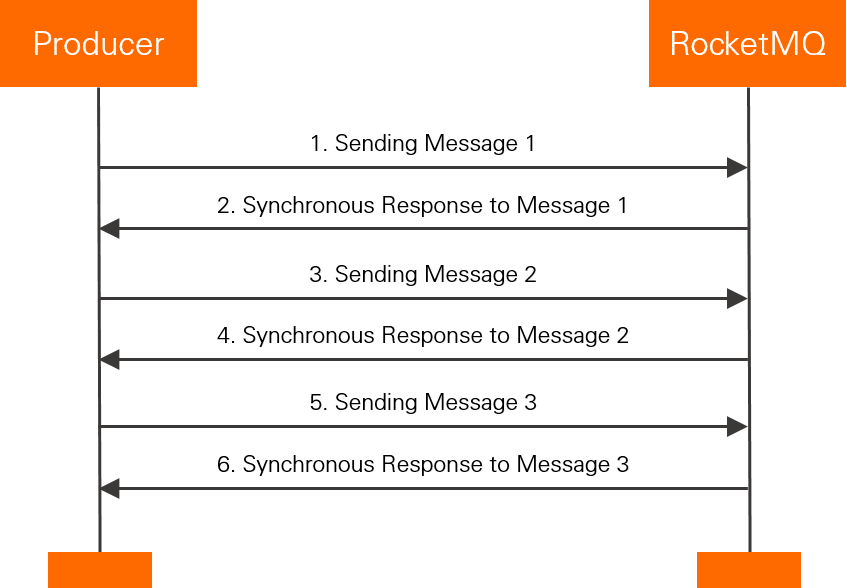
同期送信モードでは、送信者はApsaraMQ for RocketMQブローカーから前のメッセージに対する応答を受信した後にのみメッセージを送信します。
利用シナリオ
同期送信モードは、重要な通知をメール、登録のための通知メッセージ、およびプロモーションメッセージに送信するシナリオで使用できます。
サンプルコード
import java.util.Date;
import org.apache.rocketmq.acl.common.AclClientRPCHook;
import org.apache.rocketmq.acl.common.SessionCredentials;
import org.apache.rocketmq.client.AccessChannel;
import org.apache.rocketmq.client.exception.MQClientException;
import org.apache.rocketmq.client.producer.DefaultMQProducer;
import org.apache.rocketmq.client.producer.SendResult;
import org.apache.rocketmq.common.message.Message;
import org.apache.rocketmq.remoting.RPCHook;
import org.apache.rocketmq.remoting.common.RemotingHelper;
public class RocketMQProducer {
    /**
    * The AccessKey ID and AccessKey secret of your Alibaba Cloud account.
    * Make sure that the environment variables ALIBABA_CLOUD_ACCESS_KEY_ID and ALIBABA_CLOUD_ACCESS_KEY_SECRET are configured.
    */
    private static RPCHook getAclRPCHook() {
	  return new AclClientRPCHook(new SessionCredentials(System.getenv("ALIBABA_CLOUD_ACCESS_KEY_ID"), System.getenv("ALIBABA_CLOUD_ACCESS_KEY_SECRET")));
    }

    public static void main(String[] args) throws MQClientException {
        /**
         * Create a producer and enable the message trace feature. Set this parameter to the ID of the group that you created in the ApsaraMQ for RocketMQ console.
         * If you do not want to enable the message trace feature, you can use the following method to create a producer:
         *DefaultMQProducer producer = new DefaultMQProducer("YOUR GROUP ID", getAclRPCHook());
         */
        DefaultMQProducer producer = new DefaultMQProducer("YOUR GROUP ID", getAclRPCHook(), true, null);
        /**
         * Specify Alibaba Cloud as the access channel. If you want to use the message trace feature on the cloud, configure this parameter. If you do not want to enable the message trace feature, leave this parameter empty.
         */
        producer.setAccessChannel(AccessChannel.CLOUD);
        /**
         * The endpoint that you obtained in the ApsaraMQ for RocketMQ console. The value is in the format of http://MQ_INST_XXXX.aliyuncs.com:80.
         */
        producer.setNamesrvAddr("YOUR ACCESS POINT");
        producer.start();

        for (int i = 0; i < 128; i++) {
            try {
                Message msg = new Message("YOUR TOPIC",
                    "YOUR MESSAGE TAG",
                    "Hello world".getBytes(RemotingHelper.DEFAULT_CHARSET));
                SendResult sendResult = producer.send(msg);
                System.out.printf("%s%n", sendResult);
            } catch (Exception e) {
                // Specify the logic to resend or persist the message if the message fails to be sent and needs to be sent again.
                System.out.println(new Date() + " Send mq message failed.");
                e.printStackTrace();
            }
        }

        // Before you exit the application, shut down the producer object.
        // Note: This operation is optional.
        producer.shutdown();
    }
}
非同期伝送
非同期伝送の仕組み
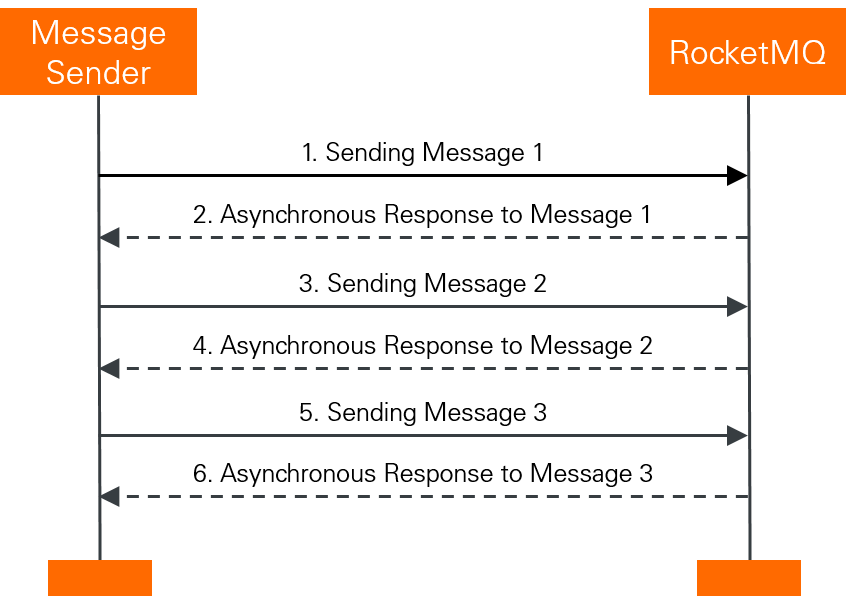
非同期伝送モードでは、送信者はApsaraMQ for RocketMQブローカーから前のメッセージに対する応答を受信せずにメッセージを送信します。 ApsaraMQ for RocketMQで非同期伝送モードを使用してメッセージを送信する場合は、SendCallback操作の実装ロジックを記述する必要があります。 送信者は、ApsaraMQ for RocketMQブローカーからの応答を待たずに、メッセージを送信した直後に別のメッセージを送信します。 送信者はSendCallback操作を呼び出してApsaraMQ for RocketMQブローカーから応答を受信し、応答を処理します。
利用シナリオ
このモードは、応答時間に敏感なビジネスシナリオで時間のかかるプロセスに使用されます。 たとえば、ビデオをアップロードした後、コード変換を有効にするためにコールバックが使用されます。 ビデオがトランスコードされた後、コールバックを使用してトランスコード結果をプッシュします。
サンプルコード
import java.util.Date;
import org.apache.rocketmq.acl.common.AclClientRPCHook;
import org.apache.rocketmq.acl.common.SessionCredentials;
import org.apache.rocketmq.client.AccessChannel;
import org.apache.rocketmq.client.exception.MQClientException;
import org.apache.rocketmq.client.producer.DefaultMQProducer;
import org.apache.rocketmq.client.producer.SendCallback;
import org.apache.rocketmq.client.producer.SendResult;
import org.apache.rocketmq.common.message.Message;
import org.apache.rocketmq.remoting.RPCHook;
import org.apache.rocketmq.remoting.common.RemotingHelper;
public class RocketMQAsyncProducer {
    /**
    * The AccessKey ID and AccessKey secret of your Alibaba Cloud account.
    * Make sure that the environment variables ALIBABA_CLOUD_ACCESS_KEY_ID and ALIBABA_CLOUD_ACCESS_KEY_SECRET are configured.
    */
    private static RPCHook getAclRPCHook() {
        return new AclClientRPCHook(new SessionCredentials(System.getenv("ALIBABA_CLOUD_ACCESS_KEY_ID"), System.getenv("ALIBABA_CLOUD_ACCESS_KEY_SECRET")));
    }

    public static void main(String[] args) throws MQClientException {
        /**
         * Create a producer and enable the message trace feature. Set this parameter to the ID of the group that you created in the ApsaraMQ for RocketMQ console.
         * If you do not want to enable the message trace feature, you can use the following method to create a producer:
         * DefaultMQProducer producer = new DefaultMQProducer("YOUR GROUP ID", getAclRPCHook());
         */
        DefaultMQProducer producer = new DefaultMQProducer("YOUR GROUP ID", getAclRPCHook(), true, null);
        /**
         * Specify Alibaba Cloud as the access channel. Before you use the message trace feature on the cloud, configure this parameter. If you do not want to enable the message trace feature, leave this parameter empty.
         */
        producer.setAccessChannel(AccessChannel.CLOUD);
        /**
         * The endpoint that you obtained in the ApsaraMQ for RocketMQ console. The value is in the format of http://MQ_INST_XXXX.aliyuncs.com:80.
         */
        producer.setNamesrvAddr("YOUR ACCESS POINT");
        producer.start();

        for (int i = 0; i < 128; i++) {
            try {
                Message msg = new Message("YOUR TOPIC",
                    "YOUR MESSAGE TAG",
                    "Hello world".getBytes(RemotingHelper.DEFAULT_CHARSET));
                producer.send(msg, new SendCallback() {
                    @Override public void onSuccess(SendResult result) {
                        // The message is sent to the consumer.
                        System.out.println("send message success. msgId= " + result.getMsgId());
                    }

                    @Override public void onException(Throwable throwable) {
                        // Specify the logic to resend or persist the message if the message fails to be sent and needs to be sent again.
                        System.out.println("send message failed.");
                        throwable.printStackTrace();
                    }
                });
            } catch (Exception e) {
                // Specify the logic to resend or persist the message if the message fails to be sent and needs to be sent again.
                System.out.println(new Date() + " Send mq message failed.");
                e.printStackTrace();
            }
        }

        // Before you exit the application, shut down the producer object.
        // Note: This operation is optional.
        producer.shutdown();
    }
}
一方向伝送
一方向伝送の仕組み
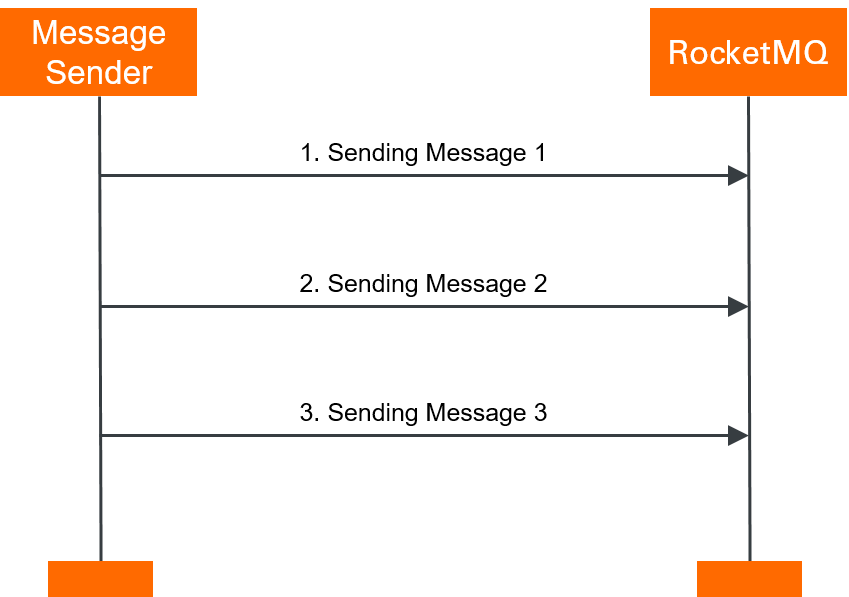
一方向送信モードでは、プロデューサはメッセージのみを送信する。 プロデューサーは、ApsaraMQ for RocketMQブローカーからの応答を待つ必要も、コールバック関数をトリガーする必要もありません。 このモードでは、メッセージはマイクロ秒以内に送信できます。
利用シナリオ
一方向送信モードは、メッセージが短時間で送信されるが信頼性に対する要求が低いシナリオに適している。 たとえば、このモードはログ収集に使用できます。
サンプルコード
import java.util.Date;
import org.apache.rocketmq.acl.common.AclClientRPCHook;
import org.apache.rocketmq.acl.common.SessionCredentials;
import org.apache.rocketmq.client.AccessChannel;
import org.apache.rocketmq.client.exception.MQClientException;
import org.apache.rocketmq.client.producer.DefaultMQProducer;
import org.apache.rocketmq.common.message.Message;
import org.apache.rocketmq.remoting.RPCHook;
import org.apache.rocketmq.remoting.common.RemotingHelper;
public class RocketMQOnewayProducer {
    /**
    * The AccessKey ID and AccessKey secret of your Alibaba Cloud account.
    * Make sure that the environment variables ALIBABA_CLOUD_ACCESS_KEY_ID and ALIBABA_CLOUD_ACCESS_KEY_SECRET are configured.
    */
    private static RPCHook getAclRPCHook() {
        return new AclClientRPCHook(new SessionCredentials(System.getenv("ALIBABA_CLOUD_ACCESS_KEY_ID"), System.getenv("ALIBABA_CLOUD_ACCESS_KEY_SECRET")));
    }

    public static void main(String[] args) throws MQClientException {
        /**
         * Create a producer and enable the message trace feature. Set this parameter to the ID of the group that you created in the ApsaraMQ for RocketMQ console.
         * If you do not want to enable the message trace feature, you can use the following method to create a producer:
         * DefaultMQProducer producer = new DefaultMQProducer("YOUR GROUP ID", getAclRPCHook());
         */
        DefaultMQProducer producer = new DefaultMQProducer("YOUR GROUP ID", getAclRPCHook(), true, null);
        /**
         * Specify Alibaba Cloud as the access channel. Before you use the message trace feature on the cloud, configure this parameter. If you do not want to enable the message trace feature, leave this parameter empty.
         */
        producer.setAccessChannel(AccessChannel.CLOUD);
        /**
         * The endpoint that you obtained in the ApsaraMQ for RocketMQ console. The value is in the format of http://MQ_INST_XXXX.aliyuncs.com:80.
         */
        producer.setNamesrvAddr("YOUR ACCESS POINT");
        producer.start();

        for (int i = 0; i < 128; i++) {
            try {
                Message msg = new Message("YOUR TOPIC",
                    "YOUR MESSAGE TAG",
                    "Hello world".getBytes(RemotingHelper.DEFAULT_CHARSET));
                producer.sendOneway(msg);
            } catch (Exception e) {
                // Specify the logic to resend or persist the message if the message fails to be sent and needs to be sent again.
                System.out.println(new Date() + " Send mq message failed.");
                e.printStackTrace();
            }
        }

        // Before you exit the application, shut down the producer object.
        // Note: This operation is optional.
        producer.shutdown();
    }
}
3つの伝送モードの比較
送信モード | TPS | レスポンス | 信頼性 |
同期 | 高い | 可 | メッセージ損失なし |
非同期 | 高い | 可 | メッセージ損失なし |
片道 | 最高 | 任意 | メッセージ損失の可能性 |
通常のメッセージを購読する
通常のメッセージをサブスクライブするには、次の方法のみを使用できます。 サンプルコード:
import java.util.List;
import org.apache.rocketmq.acl.common.AclClientRPCHook;
import org.apache.rocketmq.acl.common.SessionCredentials;
import org.apache.rocketmq.client.AccessChannel;
import org.apache.rocketmq.client.consumer.DefaultMQPushConsumer;
import org.apache.rocketmq.client.consumer.listener.ConsumeConcurrentlyContext;
import org.apache.rocketmq.client.consumer.listener.ConsumeConcurrentlyStatus;
import org.apache.rocketmq.client.consumer.listener.MessageListenerConcurrently;
import org.apache.rocketmq.client.consumer.rebalance.AllocateMessageQueueAveragely;
import org.apache.rocketmq.client.exception.MQClientException;
import org.apache.rocketmq.common.message.MessageExt;
import org.apache.rocketmq.remoting.RPCHook;

public class RocketMQPushConsumer {
    /**
    * The AccessKey ID and AccessKey secret of your Alibaba Cloud account.
    * Make sure that the environment variables ALIBABA_CLOUD_ACCESS_KEY_ID and ALIBABA_CLOUD_ACCESS_KEY_SECRET are configured.
    */
    private static RPCHook getAclRPCHook() {
        return new AclClientRPCHook(new SessionCredentials(System.getenv("ALIBABA_CLOUD_ACCESS_KEY_ID"), System.getenv("ALIBABA_CLOUD_ACCESS_KEY_SECRET")));
    }
  public static void main(String[] args) throws MQClientException {
        /**
         * Create a consumer and enable the message trace feature. Set this parameter to the ID of the group that you created in the ApsaraMQ for RocketMQ console.
         * If you do not want to enable the message trace feature, you can use the following method to create a producer:
         * DefaultMQPushConsumer consumer = new DefaultMQPushConsumer("YOUR GROUP ID", getAclRPCHook(), new AllocateMessageQueueAveragely());
         */
         DefaultMQPushConsumer consumer = new DefaultMQPushConsumer("YOUR GROUP ID", getAclRPCHook(), new AllocateMessageQueueAveragely(), true, null);
        // The endpoint of the ApsaraMQ for RocketMQ instance.
    consumer.setNamesrvAddr("http://xxxx.mq-internet.aliyuncs.com:80");
        // Set the AccessChannel parameter to CLOUD. If you want to use the message trace feature on the cloud, configure this parameter. If you do not want to enable the message trace feature, leave this parameter empty.
    consumer.setAccessChannel(AccessChannel.CLOUD);
        // The topic that you created in the ApsaraMQ for RocketMQ console.
    consumer.subscribe("YOUR TOPIC", "*");
    consumer.registerMessageListener(new MessageListenerConcurrently() {
      @Override
      public ConsumeConcurrentlyStatus consumeMessage(List<MessageExt> msgs,
        ConsumeConcurrentlyContext context) {
        System.out.printf("Receive New Messages: %s %n", msgs);
        return ConsumeConcurrentlyStatus.CONSUME_SUCCESS;
      }
    });
    consumer.start();
  }
}