このトピックでは、SpringJPA 接続の例を示し、MySQL に対するいくつかの一般的な SpringJPA 機能のパフォーマンスをテストします。
依存関係の構成
<dependency>
   <groupId>com.oceanbase</groupId>
   <artifactId>oceanbase-client</artifactId>
   <version>2.4.0</version>
</dependency>
<dependency>
   <groupId>org.springframework.data</groupId>
   <artifactId>spring-data-jpa</artifactId>
   <version>1.10.1.RELEASE</version>
</dependency>

<! --その他の Spring 依存関係はここでは省略します。 -->
構成ファイル
applicationContext.xml
ファイルの内容:
<?xml version="1.0" encoding="UTF-8"?>
<beans xmlns="http://www.springframework.org/schema/beans"
       xmlns:xsi="http://www.w3.org/2001/XMLSchema-instance"
       xmlns:context="http://www.springframework.org/schema/context"
       xmlns:tx="http://www.springframework.org/schema/tx" xmlns:mvc="http://www.springframework.org/schema/mvc"
       xmlns:jpa="http://www.springframework.org/schema/data/jpa"
       xsi:schemaLocation="http://www.springframework.org/schema/beans
         http://www.springframework.org/schema/beans/spring-beans-4.2.xsd
         http://www.springframework.org/schema/context
         http://www.springframework.org/schema/context/spring-context-4.2.xsd
         http://www.springframework.org/schema/tx
         http://www.springframework.org/schema/tx/spring-tx-4.2.xsd
         http://www.springframework.org/schema/aop
         http://www.springframework.org/schema/aop/spring-aop-4.2.xsd
         http://www.springframework.org/schema/mvc
         http://www.springframework.org/schema/mvc/spring-mvc-4.2.xsd
         http://www.springframework.org/schema/data/jpa
         http://www.springframework.org/schema/data/jpa/spring-jpa.xsd"
        >

    <!-- IOC アノテーションスキャンを有効にする -->
    <context:component-scan base-package="com.bjyada.demo" />
    <!-- MVC アノテーションスキャンを有効にする -->
    <mvc:annotation-driven />

    <bean id="dataSource" class="org.apache.commons.dbcp.BasicDataSource"
          destroy-method="close">
        <!-- 接続情報 -->
        <property name="driverClassName" value="${jdbc.driver}"/>
        <property name="url" value="${jdbc.url}"/>
        <property name="username" value="${jdbc.username}"/>
        <property name="password" value="${jdbc.password}"/>

        <!-- 接続プーリング情報 -->
        <property name="maxActive" value="${dbcp.maxActive}"/>
        <property name="maxIdle" value="${dbcp.maxIdle}"/>
        <property name="defaultAutoCommit" value="true"/>
        <!-- 1 時間アイドル状態だったセッションを削除する -->
        <property name="timeBetweenEvictionRunsMillis" value="3600000"/>
        <property name="minEvictableIdleTimeMillis" value="3600000"/>
    </bean>

    <bean class="org.springframework.beans.factory.config.PropertyPlaceholderConfigurer">
        <property name="systemPropertiesModeName" value="SYSTEM_PROPERTIES_MODE_OVERRIDE"/>
        <property name="ignoreResourceNotFound" value="true"/>
        <property name="locations">
            <list>
                <!-- 外部 -->
                <!--<value>file:${user.dir}/dbcp.properties</value>-->
                <!-- 内部 -->
                <value>classpath*:dbcp.properties</value>
            </list>
        </property>
    </bean>

    <!-- JPA エンティティマネージャーを構成する -->
    <bean id="entityManagerFactory" class="org.springframework.orm.jpa.LocalContainerEntityManagerFactoryBean">
        <property name="dataSource" ref="dataSource"/>
        <property name="jpaVendorAdapter" ref="hibernateJpaVendorAdapter"/>
        <property name="packagesToScan" value="com.bjyada.demo.entity"/>
        <property name="persistenceUnitName" value="primary"/>
        <property name="jpaProperties">
            <props>
                <prop key="hibernate.ejb.naming_strategy">org.hibernate.cfg.ImprovedNamingStrategy</prop>
                <!-- Hibernate がロードされるたびにデータベーステーブル構造を自動的に作成したり、更新したり、検証したりしないように、update を none に変更します。
                validate: Hibernate がロードされるたびにデータベーステーブル構造を検証します。
                create: Hibernate がロードされるたびにデータベーステーブル構造を再作成します。
                create-drop: Hibernate がロードされるたびにデータベーステーブル構造を作成し、Hibernate が終了するたびにデータベーステーブル構造を削除します。
                update: Hibernate がロードされるたびにデータベーステーブル構造を更新します。-->
                <prop key="hibernate.hbm2ddl.auto">update</prop>
                <prop key="hibernate.show_sql">false</prop>
                <prop key="hibernate.format_sql">false</prop>
                <prop key="hibernate.temp.use_jdbc_metadata_defaults">false</prop>
            </props>
        </property>
    </bean>

    <bean id="hibernateJpaVendorAdapter" class="org.springframework.orm.jpa.vendor.HibernateJpaVendorAdapter">
        <property name="database" value="${database.dialect}"/>
    </bean>

    <!-- トランザクションマネージャーを構成する -->
    <bean id="transactionManager" class="org.springframework.orm.jpa.JpaTransactionManager">
        <property name="entityManagerFactory" ref="entityManagerFactory" />
    </bean>

    <!-- アノテーショントランザクションを有効にする -->
    <tx:annotation-driven transaction-manager="transactionManager" />

    <!-- Spring Data JPA スキャンディレクトリを構成する -->
    <jpa:repositories base-package="com.bjyada.demo" />
    <bean class="com.bjyada.demo.ExceptionHandler"></bean>
</beans>
dbcp.properties
ファイルの内容:
#OceanBase データベース
jdbc.driver=com.oceanbase.jdbc.Driver
jdbc.url=jdbc:oceanbase://xxx.xxx.xxx.xxx:3306/test
jdbc.username=a****
jdbc.password=******
database.dialect=MYSQL
dbcp.maxIdle=5
dbcp.maxActive=40
useUnicode=true&characterEncoding=utf-8
pom.xml
ファイルの内容:
<dependency>
   <groupId>org.springframework.boot</groupId>
   <artifactId>spring-boot-starter-data-jpa</artifactId>
   <version>****</version>
</dependency>
<dependency>
   <groupId>com.oceanbase</groupId>
   <artifactId>oceanbase-client</artifactId>
   <version>2.4.0</version>
</dependency>

<!-- 残りは省略します。 -->
application.properties
ファイルの内容 (データソースと JPA の部分):
spring.datasource.url=jdbc:oceanbase://xxx.xxx.xxx.xxx:3306/test
spring.datasource.username=a****
spring.datasource.password=******
spring.datasource.driver-class-name=com.oceanbase.jdbc.Driver

spring.jpa.hibernate.ddl-auto=update
spring.jpa.show-sql=true
spring.jpa.properties.hibernate.dialect= org.hibernate.dialect.MySQL5Dialect
テストの準備
エンティティクラス
サンプルコード:
public class User implements Serializable {
    private Integer id;
    private String username;
    // フレームワークに基づいてテーブルが作成された後、エンティティクラスの新しいプロパティに従ってテーブルが自動的に変更されることを確認するために、いくつかのフィールドを最初にコメントアウトします。
    //private Date birthday;
    //private String sex;
    //private String address;
    //...      コンストラクタと get および set メソッドはここでは省略します。
}
データベースアクセスインターフェース
public interface UserDao extends JpaRepository<User,Serializable>{
    User findById(Integer id);
}
サンプルコード
テーブルの自動作成
テストメソッド:
@Test
public void testInsert(){
  User user = new User();
  user.setId(1);
  user.setUsername("テストデータ");
  userDao.save(user);
}
実行結果:
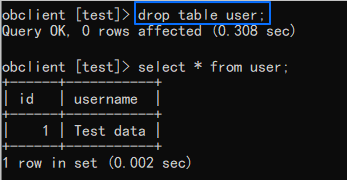
テーブルの変更 (フィールドの追加)
User クラスのコメントアウトされた属性を有効にし、次のメソッドを実行します。
@Test
public void testAlert(){
    User user = new User();
    user.setId(1);
    user.setUsername("テストデータ");
    user.setAddress("北京");
    user.setSex("男性");
    user.setBirthday(new Date());
    userDao.save(user);
}
実行結果:
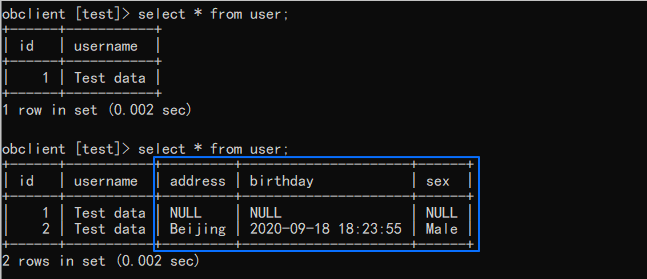
テスト結果は、OceanBase データベースが SpringJPA の Alert Table 機能をサポートしていることを示しています。
データの永続化
テストメソッド:
@Test
public void testInsert(){
    List<User> list = new ArrayList<User>();
    list.add(new User(3,"asd", new Date(), "男性", "漳州"));
    list.add(new User(4,"qwe", new Date(), "女性", "杭州"));
    list.add(new User(5,"zxc", new Date(), "男性", "上海"));
    list.add(new User(6,"xcv", new Date(), "女性", "杭州"));
    list.add(new User(7,"sdf", new Date(), "男性", "杭州"));
    list.add(new User(8,"wer", new Date(), "女性", "杭州"));
    list.add(new User(9,"ert", new Date(), "男性", "漳州"));
    list.add(new User(10,"rty", new Date(), "女性", "上海"));
    list.add(new User(11,"tyu", new Date(), "男性", "杭州"));

    list.forEach(s -> userDao.save(s));
}
実行結果:
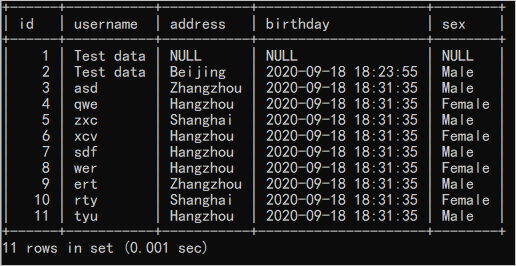
テスト結果は、OceanBase データベースが SpringJPA の Insert 機能をサポートしていることを示しています。
プライマリキーによるクエリ
テストメソッド:
@Test
public void testFindOne(){
    Table_Test one = table_testDao.findOne("aaa");
    System.out.println(one);
}
実行結果:
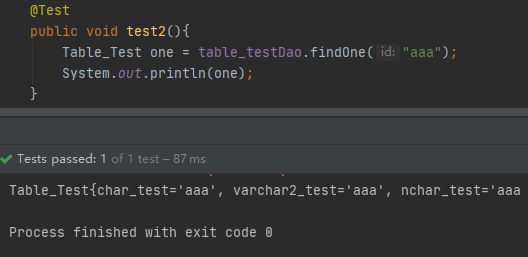
テスト結果は、OceanBase データベースが SpringJPA の findOne 機能をサポートしていることを示しています。
プライマリキーまたはオブジェクトによるレコードの削除
テストメソッド:
@Test
public void testDelete(){
    table_testDao.delete("9998");
}

@Test
public void test6(){
    Table_Test a = new Table_Test();
    a.setChar_test("9997");
    table_testDao.delete(a);
}
実行結果:

テスト結果は、OceanBase データベースが SpringJPA の Delete 機能をサポートしていることを示しています。
レコードの変更
テストメソッド:
@Test
public void testChange(){
    Table_Test one = table_testDao.findOne("9996");
    System.out.println("変更前: "+one);
    one.setVarchar2_test("変更済み");
    one.setNchar_test("変更済み");
    table_testDao.save(one);
    one = table_testDao.findOne("9996");
    System.out.println("変更後: "+one);
}
実行結果:
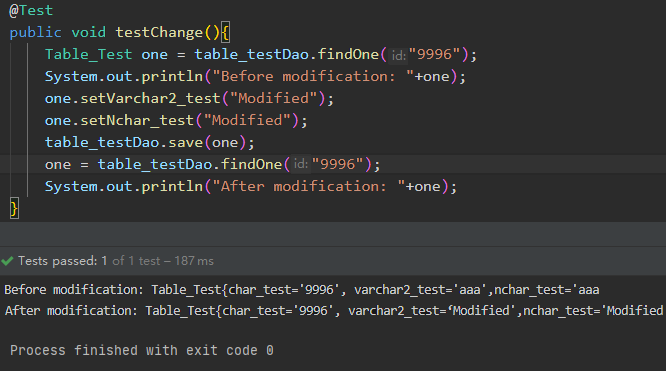
テスト結果は、OceanBase データベースが SpringJPA のデータ変更機能をサポートしていることを示しています。
テーブル全体のクエリ
テストメソッド:
@Test
public void testFindAll(){
    List<User> all = userDao.findAll();
    all.forEach(System.out::println);
}
実行結果:
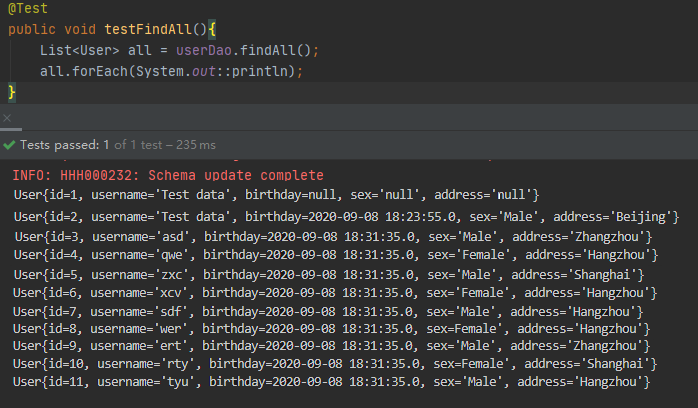
テスト結果は、OceanBase データベースが SpringJPA の FindAll 機能をサポートしていることを示しています。