4 つの一般的な Container Service for Kubernetes (ACK) クラスターロールに対して RAM 権限と RBAC 権限を設定します。
認可システム

[RAM 認可]は、システムポリシーとカスタムポリシーを使用して、ACK API 操作および Alibaba Cloud サービスへのアクセスを制御します。対象範囲は次のとおりです:
-
クラスターの作成、表示、アップグレード、削除
-
ノードプールの作成、変更、スケーリング
-
認可の管理
-
クラスターのモニタリング、およびログとイベントの収集
[RBAC 認可]は、Kubernetes RBAC を使用してクラスター内の Kubernetes リソースへのアクセスを制御します。対象範囲は、次のリソースに対する追加、削除、変更、および照会操作です:
-
ワークロード: Deployment、StatefulSet、DaemonSet、Job、CronJob、Pod、ReplicaSet
-
ネットワークリソース: Service、Ingress、NetworkPolicy
-
ストレージリソース: PersistentVolume (PV)、PersistentVolumeClaim (PVC)、StorageClass
-
Namespace、ConfigMap、Secret
前提条件
以下を確認します:
-
RAM ユーザーまたは RAM ロールが権限管理者として指定されていること (Alibaba Cloud アカウントの所有者には不要です)。
ユースケース 1:読み取り専用管理者の認可
すべての Namespace にわたる Kubernetes リソースへの読み取り専用アクセスには、読み取り専用管理者の事前定義された RBAC ロールを割り当てます。RAM 認可は不要です。
読み取り専用管理者ロールの割り当て
ACK コンソール
「RAM ユーザーまたは RAM ロールへの RBAC 権限の付与」をご参照ください。
Alibaba Cloud CLI
GrantPermissions API を呼び出し、role_name を admin-view に設定します。DescribeUserPermission API で確認します。
aliyun cs POST /permissions/users/234xxxxxxxx --header "Content-Type=application/json;" --body "[{\"cluster\":\"c24xxxxxxxxxxxxxxxxxxxxxxxxxxxxxxx\",\"is_custom\":false,\"role_name\":\"admin-view\",\"role_type\":\"cluster\"}]"Terraform
resource "alicloud_cs_kubernetes_permissions" "default" {
  uid = alicloud_ram_user.user.id
  permissions {
    cluster     = alicloud_cs_managed_kubernetes.default.id
    role_type   = "cluster"
    role_name   = "admin-view"
    namespace   = ""
    is_custom   = false
    is_ram_role = false
  }
}
ユースケース 2:O&M エンジニアの認可
O&M エンジニアがクラスターとアプリケーションを管理するには、RAM 認可と RBAC 認可の両方が必要です。
ステップ 1:RAM 認可
ACK は、2 つのシステム管理 RAM ポリシーを提供します:
| ポリシー | アクセスレベル |
|---|---|
AliyunCSFullAccess |
すべての ACK API 操作への完全な読み書きアクセス |
AliyunCSReadOnlyAccess |
すべての ACK API 操作への読み取り専用アクセス |
RAM コンソールで、RAM ユーザーまたは RAM ロールにポリシーをアタッチします。詳細については、「RAM ユーザーへの権限付与」および「RAM ロールへの権限付与」をご参照ください。RAM コンソールRAM コンソール
きめ細かい制御を行うには、カスタムポリシーを作成します。詳細については、「RAM を使用したクラスターとクラウドリソースへのアクセス権限の付与」をご参照ください。次の例は、すべての O&M 操作をカバーしています。各アクションについては、「アクションの説明」をご参照ください。
{
  "Version": "1",
  "Statement": [
    {
      "Effect": "Allow",
      "Action": [
        "cs:GetClusters",
        "cs:ModifyCluster",
        "cs:UpgradeCluster",
        "cs:DescribeClusterDetail",
        "cs:DescribeClusterVuls",
        "cs:DescribeClusterSecuritySummary",
        "cs:DescribeClusterUserKubeconfig",
        "cs:RevokeK8sClusterKubeConfig",
        "cs:CheckControlPlaneLogEnable",
        "cs:DescribeClusterResources",
        "cs:DescribeClusterEvents",
        "cs:DescribeClusterLogs",
        "cs:GetClusterAuditProject",
        "cs:ListClusterChecks",
        "cs:GetClusterCheck",
        "cs:RunClusterCheck",
        "cs:ModifyClusterAudit",
        "cs:DescribeResourcesDeleteProtection",
        "cs:UpdateResourcesDeleteProtection",
        "cs:DescribeClusterNodePools",
        "cs:DescribeClusterNodePoolDetail",
        "cs:CreateClusterNodePool",
        "cs:ModifyClusterNodePool",
        "cs:UpgradeClusterNodepool",
        "cs:DeleteClusterNodepool",
        "cs:CreateAutoscalingConfig",
        "cs:SyncClusterNodePool",
        "cs:RepairClusterNodePool",
        "cs:AttachInstancesToNodePool",
        "cs:ModifyNodePoolNodeConfig",
        "cs:DescribeClusterNodes",
        "cs:RemoveClusterNodes",
        "cs:RemoveNodePoolNodes",
        "cs:DiagnoseClustersNode",
        "cs:DescribeNodePoolVuls",
        "cs:FixNodePoolVuls",
        "cs:DrainNodes",
        "cs:DescribeClusterAddonMetadata",
        "cs:DescribeClusterAddonsVersion",
        "cs:InstallClusterAddons",
        "cs:UpgradeClusterAddons",
        "cs:ModifyClusterAddon",
        "cs:UnInstallClusterAddons",
        "cs:DescribeClusterAddonInstance",
        "cs:DescribeClusterAddonsUpgradeStatus",
        "cs:DescribeClusterAddonUpgradeStatus",
        "cs:ListClusterComponent",
        "cs:GetClusterComponent",
        "cs:DescribePolicyInstances",
        "cs:DeployPolicyInstance",
        "cs:ModifyPolicyInstance",
        "cs:DeletePolicyInstance",
        "cs:DescribePolicyGovernanceInCluster",
        "cs:DescribePolicyInstancesStatus",
        "cs:UpdateContactGroupForAlert",
        "cs:StartAlert",
        "cs:StopAlert",
        "cs:ListAlertRules",
        "cs:GetAlertHistory",
        "cs:DescribeClusterTasks",
        "cs:GetClusterBasicInfo",
        "cs:ListClusterReportSummary",
        "cs:GetClusterReportSummary",
        "cs:ListReportTaskRule",
        "cs:CreateTrigger",
        "cs:DescribeKubernetesClusterHookTrigger",
        "cs:CreateDiagnose",
        "cs:CreateClusterOverviewReport",
        "cs:GetAIDiagnosisResult",
        "cs:CreateReportTaskRule",
        "cs:CreateClusterReport",
        "cs:GetClusterCheckResult",
        "cs:GetClusterServices",
        "cs:UpdateControlPlaneLog",
        "cs:UpdateClusterName"
      ],
      "Resource": "acs:cs:*:*:cluster/xxxxx"
    },
    {
      "Effect": "Allow",
      "Action": [
        "cs:DescribeSubAccountHelmPermission",
        "cs:CheckServiceRole",
        "cs:DeleteTriggerHook",
        "cs:QueryAlertContact",
        "cs:QueryAlertContactGroup",
        "cs:AddOrUpdateAlertContact",
        "cs:AddOrUpdateAlertContactGroup",
        "cs:DeleteAlertContact",
        "cs:DeleteAlertContactGroup",
        "cs:DescribeKubernetesVersionMetadata",
        "cs:ListOperationPlans",
        "cs:DescribeClusterEndpoints",
        "cs:DescribeTaskInfo",
        "cs:DescribeEvents",
        "cs:DescribeUserQuota",
        "cs:DescribeTasks",
        "cs:PauseTask",
        "cs:CancelTask",
        "cs:DescribeAddons",
        "cs:DeleteReportTaskRule",
        "cs:CreateSessionMessage",
        "cs:DescribePolicies",
        "cs:DescribePolicyDetails"
      ],
      "Resource": "*"
    },
    {
      "Effect": "Allow",
      "Action": [
        "vpc:DescribeVSwitches",
        "vpc:DescribeVpcs",
        "vpc:DescribeEipAddresses"
      ],
      "Resource": "*"
    },
    {
      "Effect": "Allow",
      "Action": "kms:ListKeys",
      "Resource": "*"
    },
    {
      "Effect": "Allow",
      "Action": [
        "arms:ListDashboards",
        "arms:InstallAddon"
      ],
      "Resource": "*"
    },
    {
      "Effect": "Allow",
      "Action": [
        "cloudshell:CreateEnvironment",
        "cloudshell:AttachStorage",
        "cloudshell:DetachStorage",
        "cloudshell:CreateSession"
      ],
      "Resource": "*"
    },
    {
      "Effect": "Allow",
      "Action": [
        "ess:DescribeScalingActivities",
        "ess:DescribeScalingActivityDetail",
        "ess:DescribeLifecycleActions"
      ],
      "Resource": "*"
    },
    {
      "Effect": "Allow",
      "Action": "oos:ListExecutions",
      "Resource": "*"
    },
    {
      "Effect": "Allow",
      "Action": [
        "ecs:DescribeKeyPairs",
        "ecs:DescribeInstances",
        "ecs:DescribeSecurityGroups",
        "ecs:DescribeImages",
        "ecs:DescribePrice"
      ],
      "Resource": "*"
    },
    {
      "Effect": "Allow",
      "Action": [
        "cr:ListInstance",
        "cr:ListInstanceDomain",
        "cr:ListRepository",
        "cr:ListArtifactTag"
      ],
      "Resource": "*"
    },
    {
      "Effect": "Allow",
      "Action": "ram:GetRole",
      "Resource": "acs:ram:*:*:role/aliyuncisdefaultrole"
    },
    {
      "Effect": "Allow",
      "Action": [
        "log:GetDashboard",
        "log:GetSavedSearch",
        "log:GetLogStore",
        "log:GetIndex",
        "log:UpdateIndex",
        "log:GetLogStoreLogs",
        "log:CreateDashboardSharing",
        "log:ListProject",
        "log:GetProjectLogs",
        "log:GetResourceRecord",
        "log:CreateResourceRecord",
        "log:UpdateResourceRecord"
      ],
      "Resource": "*"
    }
  ]
}acs:cs:*:*:cluster/xxxxxのxxxxxをお使いのクラスター ID に置き換えてください。
ACK API のアクションについては、「[製品変更] ACK API がユーザー認証を強化」および「機能別の操作一覧」をご参照ください。
ステップ 2:RBAC 認可
RAM 認可の後、事前定義された RBAC ロールを割り当てます。次の表で、すべての事前定義ロールとそのスコープを説明します。
| 事前定義ロール | クラスターリソースに対する RBAC 権限 | ユースケース |
|---|---|---|
| 管理者 | すべての Namespace 内のすべての Kubernetes リソース、およびクラスターレベルのリソース (ノード、PV、Namespace、リソースクォータ) への完全な読み書きアクセス。 | クラスターへの無制限のアクセスが必要な場合。権限管理には、[カスタム]cluster-admin > を使用します。 |
| 読み取り専用管理者 | すべての Namespace 内のすべての Kubernetes リソース、およびクラスターレベルのリソース (ノード、PV、Namespace、リソースクォータ) に対する読み取り専用アクセス。 | 書き込みアクセス権なしで、クラスター全体を可視化する必要がある場合。 |
| [O&M エンジニア] | すべての Namespace において、コンソールで表示可能なすべてのリソースへの読み書きアクセス。ノード、PV、Namespace への読み取りおよび更新アクセス。その他すべてのリソースへの読み取り専用アクセス。 | 日常的なクラスター操作を行う場合。権限管理はできません。 |
| [開発者] | コンソールで表示可能なリソースへの読み書きアクセス。スコープはすべての Namespace、または指定した Namespace に限定されます。 | アプリケーションのデプロイと管理を行う場合。スコープを特定の Namespace に限定できます。 |
| 制限付きユーザー | コンソールで表示可能なリソースへの読み取り専用アクセス。スコープはすべての Namespace、または指定した Namespace に限定されます。 | 開発者またはオペレーターに表示専用アクセスを提供する場合。 |
| [カスタム] | 選択した ClusterRole によって決定されます。割り当てる前に権限を確認してください。詳細については、「カスタム RBAC ロールを使用したクラスター内のリソース操作の制限」をご参照ください。 | 事前定義ロールでは不十分な、きめ細かいアクセス制御が必要な場合。 |
cluster-admin ClusterRole を割り当てると、Alibaba Cloud アカウントと同じ権限、つまりクラスター内のすべてのリソースに対する完全な制御権が付与されます。取り扱いにはご注意ください。
コンソールでロールを割り当てるには:
-
[認可] ページで、[RAM ユーザー] タブまたは [RAM ロール] タブをクリックします。対象を見つけ、[権限の変更] をクリックします。
-
[+権限の追加] をクリックし、対象のクラスターと Namespace に対して [O&M エンジニア] を選択し、[送信] をクリックします。
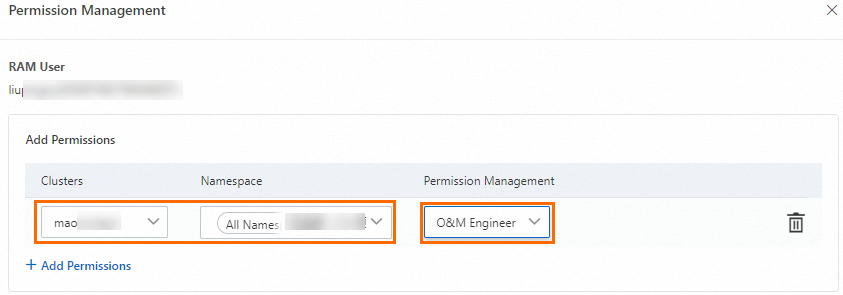
ACK は自動的に ClusterRoleBinding を作成します。以下は、O&M エンジニアロール (cs:ops) の ClusterRole 定義です:
apiVersion: rbac.authorization.k8s.io/v1
kind: ClusterRole
metadata:
  name: cs:ops
rules:
- apiGroups: [""]
  resources:  ["pods", "pods/attach", "pods/exec", "pods/portforward", "pods/proxy"]
  verbs: ["create", "delete", "deletecollection", "get", "list", "patch", "update", "watch"]
- apiGroups: [""]
  resources:  ["configmaps", "endpoints", "persistentvolumeclaims", "replicationcontrollers", "replicationcontrollers/scale", "secrets", "serviceaccounts", "services", "services/proxy"]
  verbs: ["create", "delete", "deletecollection", "get", "list", "patch", "update", "watch"]
- apiGroups: [""]
  resources:  ["bindings", "events", "limitranges", "namespaces/status", "replicationcontrollers/status", "pods/log", "pods/status", "resourcequotas", "resourcequotas/status", "componentstatuses"]
  verbs: ["get", "list", "watch"]
- apiGroups: [""]
  resources:  ["namespaces", "nodes", "persistentvolumes"]
  verbs: ["get", "list", "watch", "patch"]
- apiGroups: ["coordination.k8s.io"]
  resources:  ["leases"]
  verbs: ["get"]
- apiGroups: ["apps"]
  resources:  ["daemonsets", "deployments", "deployments/rollback", "deployments/scale", "replicasets", "replicasets/scale", "statefulsets"]
  verbs: ["create", "delete", "deletecollection", "get", "list", "patch", "update", "watch"]
- apiGroups: ["autoscaling"]
  resources:  ["horizontalpodautoscalers"]
  verbs: ["create", "delete", "deletecollection", "get", "list", "patch", "update", "watch"]
- apiGroups: ["batch"]
  resources:  ["cronjobs", "jobs"]
  verbs: ["create", "delete", "deletecollection", "get", "list", "patch", "update", "watch"]
- apiGroups: ["extensions"]
  resources:  ["daemonsets", "deployments", "deployments/rollback", "deployments/scale","ingresses","replicasets", "replicasets/scale", "replicationcontrollers/scale"]
  verbs: ["create", "delete", "deletecollection", "get", "list", "patch", "update", "watch"]
- apiGroups: ["networking.k8s.io"]
  resources:  ["*"]
  verbs: ["create", "delete", "deletecollection", "get", "list", "patch", "update", "watch"]
- apiGroups: ["servicecatalog.k8s.io"]
  resources:  ["clusterserviceclasses", "clusterserviceplans", "clusterservicebrokers", "serviceinstances", "servicebindings"]
  verbs: ["create", "delete", "get", "list", "patch", "update", "watch"]
- apiGroups: ["servicecatalog.k8s.io"]
  resources:  ["clusterservicebrokers/status", "clusterserviceclasses/status", "clusterserviceplans/status", "serviceinstances/status", "serviceinstances/reference", "servicebindings/status",]
  verbs: ["update"]
- apiGroups: ["storage.k8s.io"]
  resources:  ["storageclasses"]
  verbs: ["get", "list", "watch"]
- apiGroups: ["alicloud.com"]
  resources:  ["*"]
  verbs: ["create", "delete", "get", "list", "patch", "update", "watch"]
- apiGroups: ["policy"]
  resources:  ["poddisruptionbudgets"]
  verbs: ["create", "delete", "deletecollection", "get", "list", "patch", "update", "watch"]
- apiGroups: ["metrics.k8s.io"]
  resources: ["pods", "nodes"]
  verbs: ["get", "watch", "list"]
- apiGroups: ["networking.istio.io"]
  resources:  ["*"]
  verbs: ["create", "delete", "deletecollection", "get", "list", "patch", "update", "watch"]
- apiGroups: ["config.istio.io"]
  resources:  ["*"]
  verbs: ["create", "delete", "deletecollection", "get", "list", "patch", "update", "watch"]
- apiGroups: ["rbac.istio.io"]
  resources:  ["*"]
  verbs: ["create", "delete", "deletecollection", "get", "list", "patch", "update", "watch"]
- apiGroups: ["istio.alibabacloud.com"]
  resources:  ["*"]
  verbs: ["create", "delete", "deletecollection", "get", "list", "patch", "update", "watch"]
- apiGroups: ["authentication.istio.io"]
  resources:  ["*"]
  verbs: ["create", "delete", "deletecollection", "get", "list", "patch", "update", "watch"]
- apiGroups: ["log.alibabacloud.com"]
  resources:  ["*"]
  verbs: ["create", "delete", "deletecollection", "get", "list", "patch", "update", "watch"]
- apiGroups: ["monitoring.kiali.io"]
  resources:  ["*"]
  verbs: ["create", "delete", "deletecollection", "get", "list", "patch", "update", "watch"]
- apiGroups: ["kiali.io"]
  resources:  ["*"]
  verbs: ["create", "delete", "deletecollection", "get", "list", "patch", "update", "watch"]
- apiGroups: ["apiextensions.k8s.io"]
  resources: ["customresourcedefinitions"]
  verbs: ["get", "list", "create", "watch", "patch", "update", "delete", "deletecollection"]
- apiGroups: ["serving.knative.dev"]
  resources: ["*"]
  verbs: ["get", "list", "create", "watch", "patch", "update", "delete", "deletecollection"]
- apiGroups: ["eventing.knative.dev"]
  resources: ["*"]
  verbs: ["get", "list", "create", "watch", "patch", "update", "delete", "deletecollection"]
- apiGroups: ["messaging.knative.dev"]
  resources: ["*"]
  verbs: ["get", "list", "create", "watch", "patch", "update", "delete", "deletecollection"]
- apiGroups: ["sources.eventing.knative.dev"]
  resources: ["*"]
  verbs: ["get", "list", "create", "watch", "patch", "update", "delete", "deletecollection"]
- apiGroups: ["tekton.dev"]
  resources: ["*"]
  verbs: ["get", "list", "create", "watch", "patch", "update", "delete", "deletecollection"]
- apiGroups: ["alert.alibabacloud.com"]
  resources: ["*"]
verbs: ["get", "list", "create", "watch", "patch", "update", "delete", "deletecollection"]きめ細かい制御を行うには、Kubernetes RBAC でカスタム ClusterRole を作成し、ACK コンソールACK コンソールの [認可] ページでそれを選択します。詳細については、「カスタム RBAC ロールを使用したクラスター内のリソース操作の制限」をご参照ください。
ユースケース 3:開発者の認可
開発者には、Kubernetes リソースに対する RBAC 認可と、クラスターに対する読み取り専用の RAM アクセス権が必要です。
RBAC 認可の前に RAM 認可を完了してください。RBAC 認可を有効にするには、開発者がクラスターに対して少なくとも読み取り専用の RAM 権限を持っている必要があります。
ステップ 1:RAM 認可
RAM コンソールでカスタムポリシーを作成し、RAM ユーザーまたは RAM ロールにアタッチします。詳細については、「RAM を使用したクラスターとクラウドリソースへのアクセス権限の付与」をご参照ください。最小限の読み取り専用権限は次のとおりです:
{
  "Statement": [
    {
      "Action": [
        "cs:GetClusters",
        "cs:DescribeClusterDetail",
        "cs:GetClusterAuditProject",
        "cs:DescribeResourcesDeleteProtection"
      ],
      "Resource": "acs:cs:*:*:cluster/xxxxx",
      "Effect": "Allow"
    }
  ],
  "Version": "1"
}xxxxxをお使いのクラスター ID に置き換えてください。すべての ACK クラスターへの読み取り専用アクセスには、AliyunCSReadOnlyAccessシステムポリシーを使用します。
ステップ 2:RBAC 認可
-
[認可] ページで、[RAM ユーザー] タブまたは [RAM ロール] タブをクリックします。対象を見つけ、[権限の変更] をクリックします。
-
[+権限の追加] をクリックし、対象のクラスターと Namespace に対して [開発者] を選択し、[送信] をクリックします。
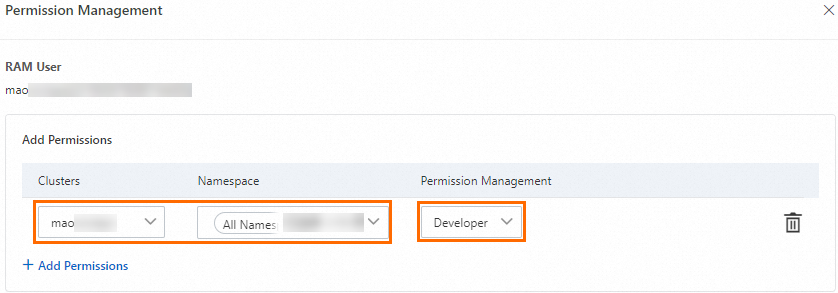
ACK は自動的に ClusterRoleBinding を作成します。以下は、開発者ロール (cs:ns:dev) の ClusterRole 定義です:
apiVersion: rbac.authorization.k8s.io/v1
kind: ClusterRole
metadata:
  name: cs:ns:dev
rules:
- apiGroups: [""]
  resources:  ["pods", "pods/attach", "pods/exec", "pods/portforward", "pods/proxy"]
  verbs: ["create", "delete", "deletecollection", "get", "list", "patch", "update", "watch"]
- apiGroups: [""]
  resources:  ["configmaps", "endpoints", "persistentvolumeclaims", "replicationcontrollers", "replicationcontrollers/scale", "secrets", "serviceaccounts", "services", "services/proxy"]
  verbs: ["create", "delete", "deletecollection", "get", "list", "patch", "update", "watch"]
- apiGroups: [""]
  resources:  ["events", "replicationcontrollers/status", "pods/log", "pods/status"]
  verbs: ["get", "list", "watch"]
- apiGroups: ["apps"]
  resources:  ["daemonsets", "deployments", "deployments/rollback", "deployments/scale", "replicasets", "replicasets/scale", "statefulsets"]
  verbs: ["create", "delete", "deletecollection", "get", "list", "patch", "update", "watch"]
- apiGroups: ["autoscaling"]
  resources:  ["horizontalpodautoscalers"]
  verbs: ["create", "delete", "deletecollection", "get", "list", "patch", "update", "watch"]
- apiGroups: ["batch"]
  resources:  ["cronjobs", "jobs"]
  verbs: ["create", "delete", "deletecollection", "get", "list", "patch", "update", "watch"]
- apiGroups: ["extensions"]
  resources:  ["daemonsets", "deployments", "deployments/rollback", "deployments/scale","ingresses","replicasets", "replicasets/scale", "replicationcontrollers/scale"]
  verbs: ["create", "delete", "deletecollection", "get", "list", "patch", "update", "watch"]
- apiGroups: ["networking.k8s.io"]
  resources:  ["*"]
  verbs: ["create", "delete", "deletecollection", "get", "list", "patch", "update", "watch"]
- apiGroups: ["servicecatalog.k8s.io"]
  resources:  ["clusterserviceclasses", "clusterserviceplans", "clusterservicebrokers", "serviceinstances", "servicebindings"]
  verbs: ["create", "delete", "get", "list", "patch", "update", "watch"]
- apiGroups: ["servicecatalog.k8s.io"]
  resources:  ["clusterservicebrokers/status", "clusterserviceclasses/status", "clusterserviceplans/status", "serviceinstances/status", "serviceinstances/reference", "servicebindings/status",]
  verbs: ["update"]
- apiGroups: ["alicloud.com"]
  resources:  ["*"]
  verbs: ["create", "delete", "get", "list", "patch", "update", "watch"]
- apiGroups: ["policy"]
  resources:  ["poddisruptionbudgets"]
  verbs: ["create", "delete", "deletecollection", "get", "list", "patch", "update", "watch"]
- apiGroups: ["networking.istio.io"]
  resources:  ["*"]
  verbs: ["create", "delete", "deletecollection", "get", "list", "patch", "update", "watch"]
- apiGroups: ["config.istio.io"]
  resources:  ["*"]
  verbs: ["create", "delete", "deletecollection", "get", "list", "patch", "update", "watch"]
- apiGroups: ["rbac.istio.io"]
  resources:  ["*"]
  verbs: ["create", "delete", "deletecollection", "get", "list", "patch", "update", "watch"]
- apiGroups: ["istio.alibabacloud.com"]
  resources:  ["*"]
  verbs: ["create", "delete", "deletecollection", "get", "list", "patch", "update", "watch"]
- apiGroups: ["authentication.istio.io"]
  resources:  ["*"]
  verbs: ["create", "delete", "deletecollection", "get", "list", "patch", "update", "watch"]
- apiGroups: ["log.alibabacloud.com"]
  resources:  ["*"]
  verbs: ["create", "delete", "deletecollection", "get", "list", "patch", "update", "watch"]
- apiGroups: ["monitoring.kiali.io"]
  resources:  ["*"]
  verbs: ["create", "delete", "deletecollection", "get", "list", "patch", "update", "watch"]
- apiGroups: ["kiali.io"]
  resources:  ["*"]
  verbs: ["create", "delete", "deletecollection", "get", "list", "patch", "update", "watch"]
- apiGroups: ["apiextensions.k8s.io"]
  resources: ["customresourcedefinitions"]
  verbs: ["get", "list", "create", "watch", "patch", "update", "delete", "deletecollection"]
- apiGroups: ["serving.knative.dev"]
  resources: ["*"]
  verbs: ["get", "list", "create", "watch", "patch", "update", "delete", "deletecollection"]
- apiGroups: ["eventing.knative.dev"]
  resources: ["*"]
  verbs: ["get", "list", "create", "watch", "patch", "update", "delete", "deletecollection"]
- apiGroups: ["messaging.knative.dev"]
  resources: ["*"]
  verbs: ["get", "list", "create", "watch", "patch", "update", "delete", "deletecollection"]
- apiGroups: ["sources.eventing.knative.dev"]
  resources: ["*"]
  verbs: ["get", "list", "create", "watch", "patch", "update", "delete", "deletecollection"]
- apiGroups: ["tekton.dev"]
  resources: ["*"]
  verbs: ["get", "list", "create", "watch", "patch", "update", "delete", "deletecollection"]
- apiGroups: ["alert.alibabacloud.com"]
  resources: ["*"]
verbs: ["get", "list", "create", "watch", "patch", "update", "delete", "deletecollection"]きめ細かい制御を行うには、Kubernetes RBAC でカスタム ClusterRole を作成し、ACK コンソールACK コンソールの [認可] ページでそれを選択します。詳細については、「カスタム RBAC ロールを使用したクラスター内のリソース操作の制限」をご参照ください。
ユースケース 4:権限管理者の認可
権限管理者は、他の RAM ユーザーおよび RAM ロールの RBAC 権限を管理します。デフォルトでは、RAM ユーザーまたは RAM ロールは RBAC 権限を付与できません。[認可] ページに次のメッセージが表示されます:[The current RAM user account has no permission to manage authorizations. Contact the Alibaba Cloud account owner or authorized RAM user to request permission.]
これには、RAM 認可と RBAC 認可の両方が必要です。
ステップ 1:RAM 認可
RAM ポリシーには、以下の権限を含める必要があります:
-
Alibaba Cloud アカウント内の RAM ユーザーと RAM ロールを照会する
-
RAM ユーザーまたは RAM ロールの RBAC 権限を照会する
-
他の RAM ユーザーまたは RAM ロールに RBAC 権限を付与する
RAM コンソールで、RAM ユーザーまたは RAM ロールに次のポリシーをアタッチします:RAM コンソール
{
  "Statement": [
    {
      "Action": [
        "ram:ListRoles",
        "ram:ListUserBasicInfos",
        "cs:GetClusters",
        "cs:DescribeUserPermission",
        "cs:DescribeClusterDetail",
        "cs:GrantPermissions",
        "cs:UpdateUserPermissions",
        "cs:GetClusterAuditProject",
        "cs:DescribeResourcesDeleteProtection",
        "cs:UpdateResourcesDeleteProtection",
        "cs:DescribeClusterAddonUpgradeStatus"
      ],
      "Resource": "*",
      "Effect": "Allow"
    }
  ],
  "Version": "1"
}
ステップ 2:RBAC 認可
-
[認可] ページで、[RAM ユーザー] タブまたは [RAM ロール] タブをクリックします。対象を見つけ、[権限の変更] をクリックします。
-
[権限の追加] をクリックし、[カスタム] の下にある [管理者] または
cluster-adminを選択して、[送信] をクリックします。
デフォルトでは、Alibaba Cloud アカウントとクラスター所有者にはcluster-admin ロールが割り当てられ、クラスター内のすべての Kubernetes リソースへの完全なアクセス権を持ちます。
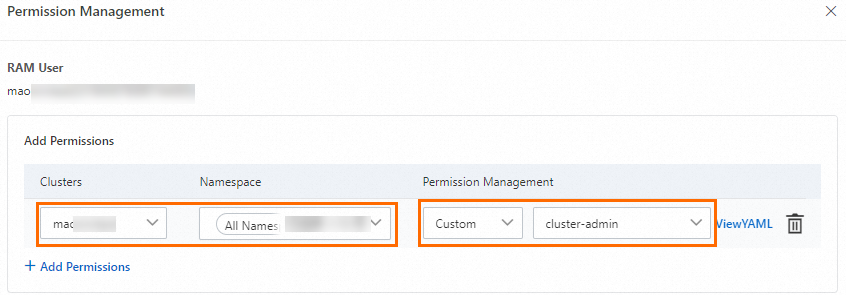
両方のステップが完了すると、RAM ユーザーまたは RAM ロールは、設定されたスコープ内で他の RAM ユーザーまたは RAM ロールに RBAC 権限を付与できるようになります。