ワークロードの需要に基づいて Spark エグゼキューターを自動スケールし、リソースの浪費とジョブのレイテンシを削減します。
動的リソース割り当ての仕組み
動的リソース割り当て (DRA) は、ワークロードに基づいてコンピューティングリソースを動的に調整する Spark の仕組みです。ドライバーは、アイドル状態のエグゼキューターを自動的に解放し、タスクのバックログがある場合には追加のエグゼキューターをリクエストします。これにより、リソース使用率とジョブパフォーマンスのバランスが保たれます。
リクエストポリシー
保留中のタスクが spark.dynamicAllocation.schedulerBacklogTimeout のしきい値 (デフォルト: 1 秒) を超えると、ドライバーはエグゼキューターをリクエストします。バックログが継続する場合、ドライバーは spark.dynamicAllocation.sustainedSchedulerBacklogTimeout 秒 (デフォルト: 1 秒) ごとに追加のバッチをリクエストします。各バッチは指数関数的に増加します (1、2、4、8 のようになります)。
削除ポリシー
エグゼキューターが spark.dynamicAllocation.executorIdleTimeout (デフォルト: 60 秒) よりも長くアイドル状態が続くと、ドライバーはそれを解放してクラスターリソースを回収します。
動的リソース割り当ての有効化
DRA は Standalone、YARN、Mesos、Kubernetes モードで動作しますが、デフォルトでは無効になっています。有効にするには、spark.dynamicAllocation.enabled を true に設定し、シャッフルデータの保持方法を設定します。
-
外部シャッフルサービス (ESS):
spark.shuffle.service.enabledをtrueに設定し、各ワーカーノードで ESS を設定します。 -
シャッフルトラッキング:
spark.dynamicAllocation.shuffleTracking.enabledをtrueに設定します。Spark はシャッフルデータを追跡し、エグゼキューターが解放される際にデータを保持します。 -
ノードのデコミッショニング:
spark.decommission.enabledとspark.storage.decommission.shuffleBlocks.enabledをtrueに設定します。Spark は、デコミッションされたノードから利用可能なノードへシャッフルブロックをコピーします。 -
ShuffleDataIO プラグイン:
spark.shuffle.sort.io.plugin.classを外部シャッフルデータ I/O 用のプラグインクラスに設定します。
モード別の設定
-
Standalone モード: ESS のみを有効にします。
-
Celeborn を使用しない Spark on Kubernetes: シャッフルトラッキング (
spark.dynamicAllocation.shuffleTracking.enabled=true) を有効にします。 -
Celeborn を使用する Spark on Kubernetes:
-
Spark 3.5.0 以降:
spark.shuffle.sort.io.plugin.classをorg.apache.spark.shuffle.celeborn.CelebornShuffleDataIOに設定します。 -
Spark 3.5.0 より前: Spark バージョンにパッチを適用します。追加の設定は不要です。詳細については、「Support Spark Dynamic Allocation」をご参照ください。
-
Spark 3.4.0 以降:
spark.dynamicAllocation.shuffleTracking.enabledをfalseに設定します。Celeborn を使用する場合、シャッフルトラッキングによりアイドル状態のエグゼキューターが解放されなくなります。
-
DRA パラメータリファレンス
主要な DRA パラメータとデフォルト値です。
| パラメータ | デフォルト値 | 説明 |
|---|---|---|
spark.dynamicAllocation.enabled |
false |
DRA を有効または無効にします。 |
spark.dynamicAllocation.shuffleTracking.enabled |
true |
シャッフルトラッキングを有効にします。Celeborn を使用する場合は無効にします。 |
spark.dynamicAllocation.initialExecutors |
spark.dynamicAllocation.minExecutors |
起動時に割り当てるエグゼキューター数です。 |
spark.dynamicAllocation.minExecutors |
0 |
保持する最小エグゼキューター数です。 |
spark.dynamicAllocation.maxExecutors |
infinity |
割り当てる最大エグゼキューター数です。無制限の Pod 作成を防ぐため、有限の値を設定します。 |
spark.dynamicAllocation.executorIdleTimeout |
60s |
ドライバーがエグゼキューターを解放するまでのアイドル時間です。 |
spark.dynamicAllocation.cachedExecutorIdleTimeout |
infinity |
キャッシュデータを保持しているエグゼキューターのアイドルタイムアウトです。 |
spark.dynamicAllocation.schedulerBacklogTimeout |
1s |
最初のエグゼキューターリクエストをトリガーするバックログ期間です。 |
spark.dynamicAllocation.sustainedSchedulerBacklogTimeout |
1s |
後続のエグゼキューターリクエストバッチ間の間隔です。 |
spark.shuffle.sort.io.plugin.class |
(none) | ShuffleDataIO プラグインクラスです。Spark 3.5.0 以降で Celeborn を使用する場合は、org.apache.spark.shuffle.celeborn.CelebornShuffleDataIO に設定します。 |
前提条件
-
ack-spark-operator アドオン がインストールされていること
説明この例では
spark.jobNamespaces=["spark"]を設定しています。他の名前空間を使用する場合は、このフィールドを変更してください。 -
ack-spark-history-server アドオン がデプロイされていること
説明この例では、
nas-pvという名前の PersistentVolume とnas-pvcという名前の PersistentVolumeClaim を作成します。Spark History Server は、NAS ファイルシステム上の/spark/event-logsからイベントログを読み取ります。 -
(オプション) ack-celeborn アドオン がデプロイされていること
操作手順
リモートシャッフルサービス (RSS) として Celeborn を使用するかどうかに基づいて、シナリオを選択します。
-
Celeborn を使用しない場合: シャッフルトラッキングがシャッフルデータを保持します。セットアップは簡単ですが、シャッフルデータを持つエグゼキューターは不要になるまで割り当てられたままになります。
-
Celeborn を使用する場合: Celeborn がシャッフルデータを外部で管理するため、エグゼキューターはアイドル状態になるとすぐに解放されます。
シナリオ 1: RSS として Celeborn を使用しない場合
この例では Spark 3.5.4 を使用します。Celeborn を使用せずに DRA を有効にするには、次のパラメータを設定します。
-
spark.dynamicAllocation.enabled:"true"-- 動的リソース割り当てを有効にします。 -
spark.dynamicAllocation.shuffleTracking.enabled:"true"-- ESS なしでシャッフルデータを保持するため、シャッフルトラッキングを有効にします。
-
spark-pagerank-dra.yamlを作成するには、次の SparkApplication マニフェストを使用します。説明Spark イメージには Hadoop OSS SDK の依存関係が含まれている必要があります。次の Dockerfile でビルドし、イメージリポジトリにプッシュしてください。
apiVersion: sparkoperator.k8s.io/v1beta2
kind: SparkApplication
metadata:
  name: spark-pagerank-dra
  namespace: spark
spec:
  type: Scala
  mode: cluster
  # <SPARK_IMAGE> を Spark イメージに置き換えます。
  image: <SPARK_IMAGE>
  mainApplicationFile: local:///opt/spark/examples/jars/spark-examples_2.12-3.5.4.jar
  mainClass: org.apache.spark.examples.SparkPageRank
  arguments:
  # <OSS_BUCKET> を OSS バケットの名前に置き換えます。
  - oss://<OSS_BUCKET>/data/pagerank_dataset.txt
  - "10"
  sparkVersion: 3.5.4
  hadoopConf:
    # oss:// 形式を使用して OSS データにアクセスします。
    fs.AbstractFileSystem.oss.impl: org.apache.hadoop.fs.aliyun.oss.OSS
    fs.oss.impl: org.apache.hadoop.fs.aliyun.oss.AliyunOSSFileSystem
    # OSS にアクセスするためのエンドポイント。<OSS_ENDPOINT> を OSS アクセスエンドポイントに置き換える必要があります。
    # 例えば、中国 (北京) リージョンで OSS にアクセスするための内部エンドポイントは oss-cn-beijing-internal.aliyuncs.com です。
    fs.oss.endpoint: <OSS_ENDPOINT>
    # 環境変数から OSS アクセス認証情報を取得します。
    fs.oss.credentials.provider: com.aliyun.oss.common.auth.EnvironmentVariableCredentialsProvider
  sparkConf:
    # ====================
    # イベントログ
    # ====================
    spark.eventLog.enabled: "true"
    spark.eventLog.dir: file:///mnt/nas/spark/event-logs

    # ====================
    # 動的リソース割り当て
    # ====================
    # 動的リソース割り当てを有効にします。
    spark.dynamicAllocation.enabled: "true"
    # ESS に依存せずに動的リソース割り当てを実装するため、シャッフルトラッキングを有効にします。
    spark.dynamicAllocation.shuffleTracking.enabled: "true"
    # エグゼキューター数の初期値です。
    spark.dynamicAllocation.initialExecutors: "1"
    # エグゼキューターの最小数です。
    spark.dynamicAllocation.minExecutors: "0"
    # エグゼキューターの最大数です。
    spark.dynamicAllocation.maxExecutors: "5"
    # エグゼキューターのアイドルタイムアウト期間です。タイムアウト期間を超えると、エグゼキューターは解放されます。
    spark.dynamicAllocation.executorIdleTimeout: 60s
    # キャッシュデータを保持しているエグゼキューターのアイドルタイムアウト期間です。タイムアウト期間を超えると、エグゼキューターは解放されます。デフォルト値は infinity で、データブロックは解放されません。
    # spark.dynamicAllocation.cachedExecutorIdleTimeout:
    # ジョブが指定されたスケジュール時間を超えると、追加のエグゼキューターがリクエストされます。
    spark.dynamicAllocation.schedulerBacklogTimeout: 1s
    # 各時間間隔後、後続のバッチのエグゼキューターがリクエストされます。
    spark.dynamicAllocation.sustainedSchedulerBacklogTimeout: 1s
  driver:
    cores: 1
    coreLimit: 1200m
    memory: 512m
    envFrom:
    - secretRef:
        name: spark-oss-secret
    volumeMounts:
    - name: nas
      mountPath: /mnt/nas
    serviceAccount: spark-operator-spark
  executor:
    cores: 1
    coreLimit: "2"
    memory: 8g
    envFrom:
    - secretRef:
        name: spark-oss-secret
    volumeMounts:
    - name: nas
      mountPath: /mnt/nas
  volumes:
  - name: nas
    persistentVolumeClaim:
      claimName: nas-pvc
  restartPolicy:
    type: Never
ARG SPARK_IMAGE=spark:3.5.4 FROM ${SPARK_IMAGE} # Hadoop Aliyun OSS サポート用の依存関係を追加します。 ADD --chown=spark:spark --chmod=644 https://repo1.maven.org/maven2/org/apache/hadoop/hadoop-aliyun/3.3.4/hadoop-aliyun-3.3.4.jar ${SPARK_HOME}/jars ADD --chown=spark:spark --chmod=644 https://repo1.maven.org/maven2/com/aliyun/oss/aliyun-sdk-oss/3.17.4/aliyun-sdk-oss-3.17.4.jar ${SPARK_HOME}/jars ADD --chown=spark:spark --chmod=644 https://repo1.maven.org/maven2/org/jdom/jdom2/2.0.6.1/jdom2-2.0.6.1.jar ${SPARK_HOME}/jars -
Spark ジョブを送信します。想定される出力:
kubectl apply -f spark-pagerank-dra.yamlsparkapplication.sparkoperator.k8s.io/spark-pagerank-dra created -
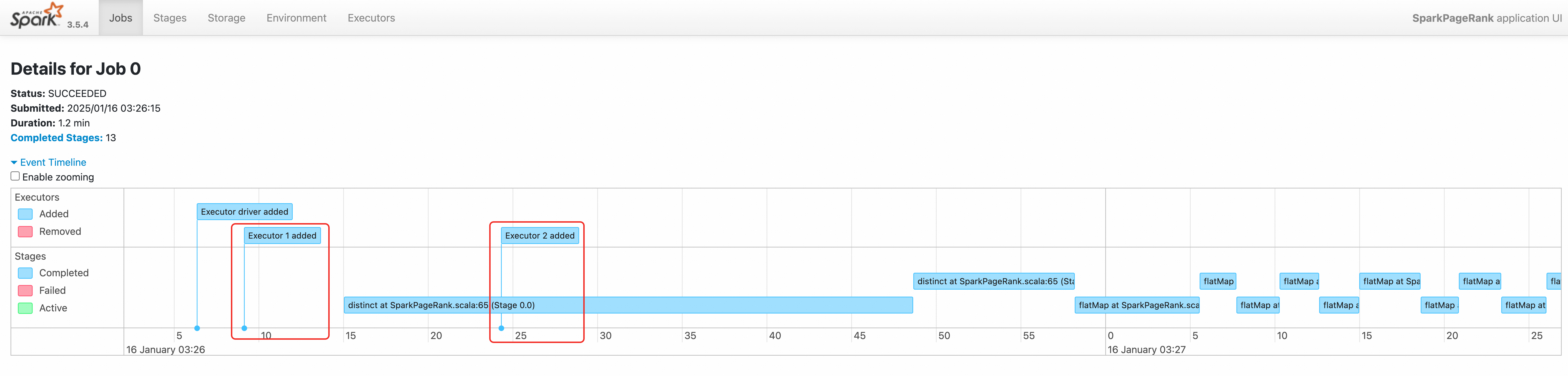
ドライバーログを表示します。出力には、03:26:06 と 03:26:16 のエグゼキューターリクエストが表示されます。
kubectl logs -n spark spark-pagerank-dra-driver | grep -a2 -b2 "Going to request"3544-25/01/16 03:26:04 INFO SparkKubernetesClientFactory: Auto-configuring K8s client using current context from users K8s config file 3674-25/01/16 03:26:06 INFO Utils: Using initial executors = 1, max of spark.dynamicAllocation.initialExecutors, spark.dynamicAllocation.minExecutors and spark.executor.instances 3848:25/01/16 03:26:06 INFO ExecutorPodsAllocator: Going to request 1 executors from Kubernetes for ResourceProfile Id: 0, target: 1, known: 0, sharedSlotFromPendingPods: 2147483647. 4026-25/01/16 03:26:06 INFO ExecutorPodsAllocator: Found 0 reusable PVCs from 0 PVCs 4106-25/01/16 03:26:06 INFO BasicExecutorFeatureStep: Decommissioning not enabled, skipping shutdown script -- 10410-25/01/16 03:26:15 INFO TaskSetManager: Starting task 0.0 in stage 0.0 (TID 0) (192.168.95.190, executor 1, partition 0, PROCESS_LOCAL, 9807 bytes) 10558-25/01/16 03:26:15 INFO BlockManagerInfo: Added broadcast_1_piece0 in memory on 192.168.95.190:34327 (size: 12.5 KiB, free: 4.6 GiB) 10690:25/01/16 03:26:16 INFO ExecutorPodsAllocator: Going to request 1 executors from Kubernetes for ResourceProfile Id: 0, target: 2, known: 1, sharedSlotFromPendingPods: 2147483647. 10868-25/01/16 03:26:16 INFO ExecutorAllocationManager: Requesting 1 new executor because tasks are backlogged (new desired total will be 2 for resource profile id: 0) 11030-25/01/16 03:26:16 INFO ExecutorPodsAllocator: Found 0 reusable PVCs from 0 PVCs -
Spark History Server でログを表示します。イベントタイムラインには、順次作成された 2 つのエグゼキューターが表示されます。
シナリオ 2: RSS として Celeborn を使用する場合
この例では Spark 3.5.4 を使用します。Celeborn で DRA を有効にするには、次のパラメータを設定します。
-
spark.dynamicAllocation.enabled:"true"-- 動的リソース割り当てを有効にします。 -
spark.shuffle.sort.io.plugin.class:org.apache.spark.shuffle.celeborn.CelebornShuffleDataIO-- Spark 3.5.0 以降で必須です。 -
spark.dynamicAllocation.shuffleTracking.enabled:"false"-- シャッフルトラッキングを無効にします。Celeborn を使用する場合、シャッフルトラッキングによりアイドル状態のエグゼキューターが解放されなくなります。
-
spark-pagerank-celeborn-dra.yamlを作成するには、次の SparkApplication マニフェストを使用します。説明Spark イメージには Hadoop OSS SDK と JindoSDK の依存関係が含まれている必要があります。次の Dockerfile でビルドし、イメージリポジトリにプッシュしてください。
apiVersion: sparkoperator.k8s.io/v1beta2
kind: SparkApplication
metadata:
  name: spark-pagerank-celeborn-dra
  namespace: spark
spec:
  type: Scala
  mode: cluster
  # <SPARK_IMAGE> を Spark イメージに置き換えます。イメージには JindoSDK が含まれている必要があります。
  image: <SPARK_IMAGE>
  mainApplicationFile: local:///opt/spark/examples/jars/spark-examples_2.12-3.5.4.jar
  mainClass: org.apache.spark.examples.SparkPageRank
  arguments:
  # <OSS_BUCKET> を OSS バケットの名前に置き換えます。
  - oss://<OSS_BUCKET>/data/pagerank_dataset.txt
  - "10"
  sparkVersion: 3.5.4
  hadoopConf:
    # oss:// 形式を使用して OSS データにアクセスします。
    fs.AbstractFileSystem.oss.impl: org.apache.hadoop.fs.aliyun.oss.OSS
    fs.oss.impl: org.apache.hadoop.fs.aliyun.oss.AliyunOSSFileSystem
    # OSS にアクセスするためのエンドポイント。<OSS_ENDPOINT> を OSS アクセスエンドポイントに置き換える必要があります。
    # 例えば、中国 (北京) リージョンで OSS にアクセスするための内部エンドポイントは oss-cn-beijing-internal.aliyuncs.com です。
    fs.oss.endpoint: <OSS_ENDPOINT>
    # 環境変数から OSS アクセス認証情報を取得します。
    fs.oss.credentials.provider: com.aliyun.oss.common.auth.EnvironmentVariableCredentialsProvider
  sparkConf:
    # ====================
    # イベントログ
    # ====================
    spark.eventLog.enabled: "true"
    spark.eventLog.dir: file:///mnt/nas/spark/event-logs

    # ====================
    # Celeborn
    # 参照: https://github.com/apache/celeborn/blob/main/README.md#spark-configuration
    # ====================
    # シャッフルマネージャークラス名は 0.3.0 で変更されました:
    #    0.3.0 より前: `org.apache.spark.shuffle.celeborn.RssShuffleManager`
    #    0.3.0 以降: `org.apache.spark.shuffle.celeborn.SparkShuffleManager`
    spark.shuffle.manager: org.apache.spark.shuffle.celeborn.SparkShuffleManager
    # java シリアライザーは再配置をサポートしていないため、kryo シリアライザーを使用する必要があります。
    spark.serializer: org.apache.spark.serializer.KryoSerializer
    # Celeborn マスターノードのレプリカ数に基づいて、このパラメータを設定します。
    spark.celeborn.master.endpoints: celeborn-master-0.celeborn-master-svc.celeborn.svc.cluster.local,celeborn-master-1.celeborn-master-svc.celeborn.svc.cluster.local,celeborn-master-2.celeborn-master-svc.celeborn.svc.cluster.local
    # オプション: hash、sort
    # Hash シャッフルライターは (パーティション数) * (celeborn.push.buffer.max.size) * (spark.executor.cores) のメモリを使用します。
    # Sort シャッフルライターは hash シャッフルライターよりも少ないメモリを使用します。シャッフルパーティション数が多い場合は、sort ライターの使用を推奨します。
    spark.celeborn.client.spark.shuffle.writer: hash
    # サーバー側データレプリケーションを有効にするため、`spark.celeborn.client.push.replicate.enabled` を true に設定することを推奨します。
    # ワーカーが 1 つしかない場合、この設定は false にする必要があります。
    # Celeborn が HDFS を使用している場合は、この設定を false にすることを推奨します。
    spark.celeborn.client.push.replicate.enabled: "false"
    # Spark AQE のサポートは Spark 3 でのみテストされています。
    spark.sql.adaptive.localShuffleReader.enabled: "false"
    # パフォーマンス向上のため、aqe サポートを有効にすることを推奨します。
    spark.sql.adaptive.enabled: "true"
    spark.sql.adaptive.skewJoin.enabled: "true"
    # Spark バージョンが 3.5.0 以降の場合、動的リソース割り当てをサポートするためにこのパラメータを設定します。
    spark.shuffle.sort.io.plugin.class: org.apache.spark.shuffle.celeborn.CelebornShuffleDataIO
    spark.executor.userClassPathFirst: "false"

    # ====================
    # 動的リソース割り当て
    # 参照: https://spark.apache.org/docs/latest/job-scheduling.html#dynamic-resource-allocation
    # ====================
    # 動的リソース割り当てを有効にします。
    spark.dynamicAllocation.enabled: "true"
    # シャッフルトラッキングを無効にします。Spark 3.4.0 以降で Celeborn を RSS として使用する場合、この設定は false にする必要があります。
    spark.dynamicAllocation.shuffleTracking.enabled: "false"
    # エグゼキューター数の初期値です。
    spark.dynamicAllocation.initialExecutors: "1"
    # エグゼキューターの最小数です。
    spark.dynamicAllocation.minExecutors: "0"
    # エグゼキューターの最大数です。
    spark.dynamicAllocation.maxExecutors: "5"
    # エグゼキューターのアイドルタイムアウト期間です。タイムアウト期間を超えると、エグゼキューターは解放されます。
    spark.dynamicAllocation.executorIdleTimeout: 60s
    # キャッシュデータを保持しているエグゼキューターのアイドルタイムアウト期間です。タイムアウト期間を超えると、エグゼキューターは解放されます。デフォルト値は infinity で、データブロックは解放されません。
    # spark.dynamicAllocation.cachedExecutorIdleTimeout:
    # ジョブが指定されたスケジュール時間を超えると、追加のエグゼキューターがリクエストされます。
    spark.dynamicAllocation.schedulerBacklogTimeout: 1s
    # 各時間間隔後、後続のバッチのエグゼキューターがリクエストされます。
    spark.dynamicAllocation.sustainedSchedulerBacklogTimeout: 1s
  driver:
    cores: 1
    coreLimit: 1200m
    memory: 512m
    envFrom:
    - secretRef:
        name: spark-oss-secret
    volumeMounts:
    - name: nas
      mountPath: /mnt/nas
    serviceAccount: spark-operator-spark
  executor:
    cores: 1
    coreLimit: "1"
    memory: 4g
    envFrom:
    - secretRef:
        name: spark-oss-secret
    volumeMounts:
    - name: nas
      mountPath: /mnt/nas
  volumes:
  - name: nas
    persistentVolumeClaim:
      claimName: nas-pvc
  restartPolicy:
    type: Never
ARG SPARK_IMAGE=spark:3.5.4 FROM ${SPARK_IMAGE} # Hadoop Aliyun OSS サポート用の依存関係を追加します。 ADD --chown=spark:spark --chmod=644 https://repo1.maven.org/maven2/org/apache/hadoop/hadoop-aliyun/3.3.4/hadoop-aliyun-3.3.4.jar ${SPARK_HOME}/jars ADD --chown=spark:spark --chmod=644 https://repo1.maven.org/maven2/com/aliyun/oss/aliyun-sdk-oss/3.17.4/aliyun-sdk-oss-3.17.4.jar ${SPARK_HOME}/jars ADD --chown=spark:spark --chmod=644 https://repo1.maven.org/maven2/org/jdom/jdom2/2.0.6.1/jdom2-2.0.6.1.jar ${SPARK_HOME}/jars # JindoSDK の依存関係を追加します。 ADD --chown=spark:spark --chmod=644 https://jindodata-binary.oss-cn-shanghai.aliyuncs.com/jindosdk/4.6.10/jindosdk-4.6.10.jar ${SPARK_HOME}/jars # Celeborn の依存関係を追加します。 ADD --chown=spark:spark --chmod=644 https://repo1.maven.org/maven2/org/apache/celeborn/celeborn-client-spark-3-shaded_2.12/0.5.3/celeborn-client-spark-3-shaded_2.12-0.5.3.jar ${SPARK_HOME}/jars -
SparkApplication を送信します。想定される出力:
kubectl apply -f spark-pagerank-celeborn-dra.yamlsparkapplication.sparkoperator.k8s.io/spark-pagerank-celeborn-dra created -
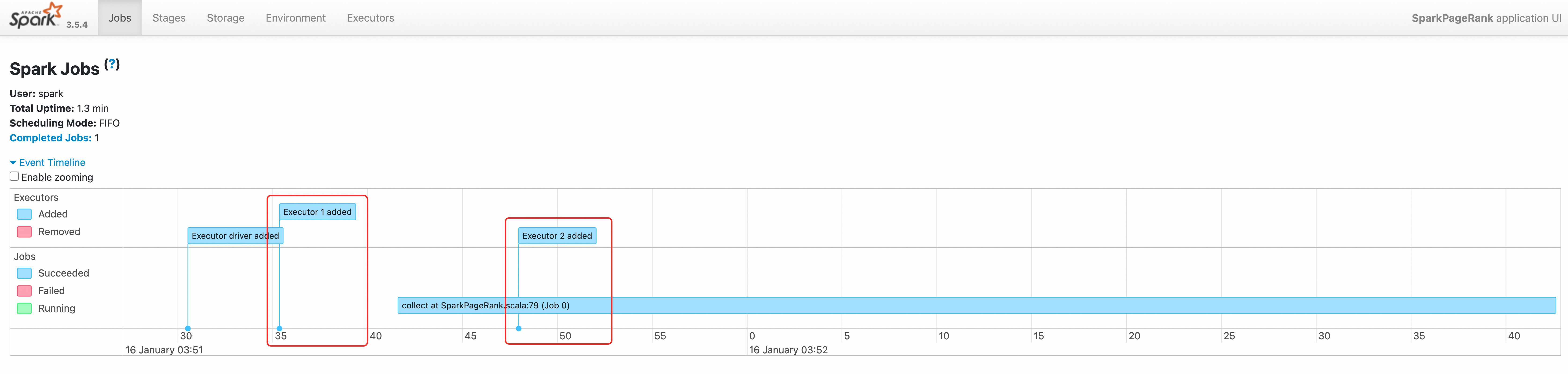
ドライバーログを表示します。出力には、
03:51:30と03:51:42のエグゼキューターリクエストが表示されます。kubectl logs -n spark spark-pagerank-celeborn-dra-driver | grep -a2 -b2 "Going to request"3544-25/01/16 03:51:28 INFO SparkKubernetesClientFactory: Auto-configuring K8s client using current context from users K8s config file 3674-25/01/16 03:51:30 INFO Utils: Using initial executors = 1, max of spark.dynamicAllocation.initialExecutors, spark.dynamicAllocation.minExecutors and spark.executor.instances 3848:25/01/16 03:51:30 INFO ExecutorPodsAllocator: Going to request 1 executors from Kubernetes for ResourceProfile Id: 0, target: 1, known: 0, sharedSlotFromPendingPods: 2147483647. 4026-25/01/16 03:51:30 INFO ExecutorPodsAllocator: Found 0 reusable PVCs from 0 PVCs 4106-25/01/16 03:51:30 INFO CelebornShuffleDataIO: Loading CelebornShuffleDataIO -- 11796-25/01/16 03:51:41 INFO TaskSetManager: Starting task 0.0 in stage 0.0 (TID 0) (192.168.95.163, executor 1, partition 0, PROCESS_LOCAL, 9807 bytes) 11944-25/01/16 03:51:42 INFO BlockManagerInfo: Added broadcast_1_piece0 in memory on 192.168.95.163:37665 (size: 13.3 KiB, free: 2.1 GiB) 12076:25/01/16 03:51:42 INFO ExecutorPodsAllocator: Going to request 1 executors from Kubernetes for ResourceProfile Id: 0, target: 2, known: 1, sharedSlotFromPendingPods: 2147483647. 12254-25/01/16 03:51:42 INFO ExecutorAllocationManager: Requesting 1 new executor because tasks are backlogged (new desired total will be 2 for resource profile id: 0) 12416-25/01/16 03:51:42 INFO ExecutorPodsAllocator: Found 0 reusable PVCs from 0 PVCs -
Spark History Server にアクセスしてジョブを表示します。手順については、「Spark History Server Web UI へのアクセス」をご参照ください。