MediaPackage Live-to-VOD saves live stream content to OSS for on-demand replay after the stream ends.
Overview
The Live-to-VOD feature stores the content of a live stream in Object Storage Service (OSS). After the live stream ends, viewers can replay it by accessing the content stored in OSS.
Prerequisites
-
OSS is activated, and at least one bucket is created to store the files of live streams. For more information, see Activate OSS and Create a bucket. Make sure that the bucket resides in the same region where you use the Live-to-VOD feature.
ImportantYou are charged fees for files that are stored in OSS. For more information about OSS storage fees, see Storage fees.
-
The time shifting feature is enabled for channel endpoints, with the startover window set to a value greater than 0.
Use the feature
-
Log on to the Intelligent Media Services (IMS) console. In the top left corner, select a region based on your business requirements.
-
In the left-side navigation pane, choose . On the page that appears, click Create Collection Task.
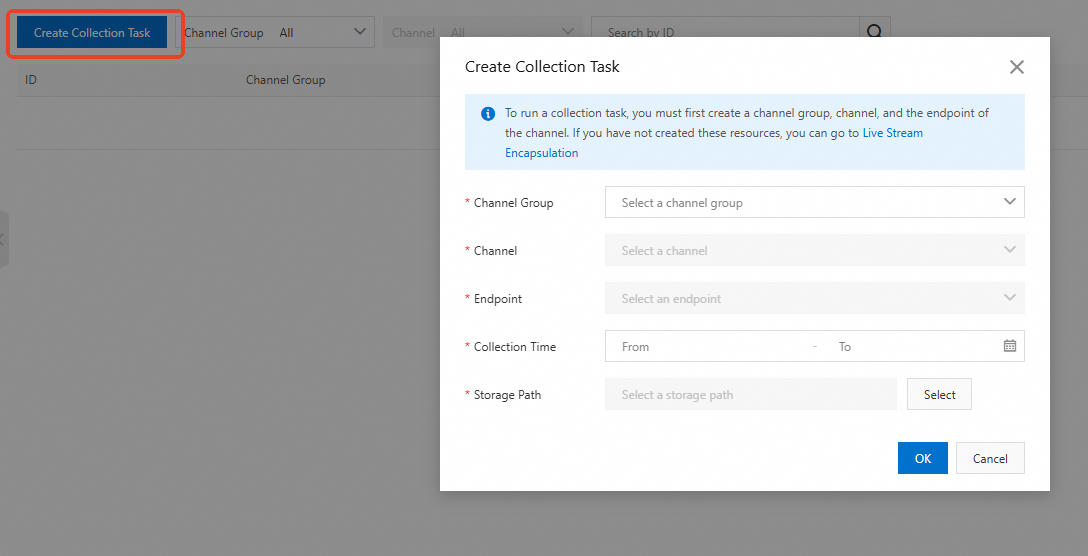
The following table describes the parameters:
Parameter
Description
Channel Group
Select a channel group, channel, and endpoint.
-
You must create the channel group, channel, and endpoint in advance by using the live packaging feature. For more information, see Live packaging.
-
You must enable the time shifting feature for the endpoint by setting the startover window to a value greater than 0.
Channel
Endpoint
Collection Time
Specifies the time range of live content to collect and store in OSS. The time shifting feature must be enabled.
Storage Path
Select the OSS bucket in which to store the collected M3U8 files.
Note-
A collection task automatically starts after it is created. To view the collected files, go to the OSS console.
-
If you create multiple collection tasks for an endpoint, each task collects files independently.
-
FAQ
Why are no files collected for a collection task that I created?
Ensure that the time shifting feature is enabled for the endpoint, with the startover window set to a value greater than 0.
What are the differences between creating a collection task from the Live Package and Live to VOD modules in the IMS console?
They are basically the same. You can use either method to implement the Live-to-VOD feature. However, the Live to VOD module lets you manage all collection tasks on one page, whereas the Live Package module lets you manage collection tasks of separate channels .