MediaWeaver ad insertion lets you dynamically insert ads into live and VOD streams. This topic describes how to get started.
Procedure
Complete these steps to set up and use MediaWeaver ad insertion:
-
Prepare live or video-on-demand (VOD) sources.
-
Prepare an ad decision server (ADS) template URL.
-
Create an ad insertion configuration.
-
Send the playback request to MediaWeaver.
Preparations
-
Prepare live or VOD sources.
The source stream must have both master and media playlists, and the media playlist must contain ad markers.
Sample master playlist:
#EXTM3U
#EXT-X-STREAM-INF:PROGRAM-ID=1,BANDWIDTH=100000,CODECS="mp4a.40.2,avc1.64001e",RESOLUTION=640x302
video/player-ld.m3u8
#EXT-X-STREAM-INF:PROGRAM-ID=1,BANDWIDTH=200000,CODECS="mp4a.40.2,avc1.64001f",RESOLUTION=848x402
video/player-sd.m3u8
#EXT-X-STREAM-INF:PROGRAM-ID=1,BANDWIDTH=300000,CODECS="mp4a.40.2,avc1.640020",RESOLUTION=1280x606
video/player-hd.m3u8
Sample media playlist with ad markers:
#EXTM3U
#EXT-X-VERSION:6
#EXT-X-PLAYLIST-TYPE:EVENT
#EXT-X-TARGETDURATION:14
#EXT-X-MEDIA-SEQUENCE:0
#EXT-X-DISCONTINUITY
#EXT-X-CUE-OUT:60.00
...
#EXT-X-CUE-IN
#EXTINF:16.666,
1723518884_121.ts
#EXTINF:2.533,
1723518886_122.ts
#EXT-X-ENDLIST
For more information about playlists and ad markers, see Supported protocol.
-
Prepare an ADS template URL.
Configure the ADS request URL and query parameters.
Sample URL:
http://ads.aliyundoc.com/getAd?adId=[player_params.ad_id]The ADS must comply with VAST and VMAP specifications and other Interactive Advertising Bureau (IAB) standards. For details, see ADS requirements.
Feature configuration
-
Log on to the IMS console and select a region in the upper-left corner based on your business requirements.
-
In the left-side navigation pane, select . Click Create Configuration and set up the following parameters:

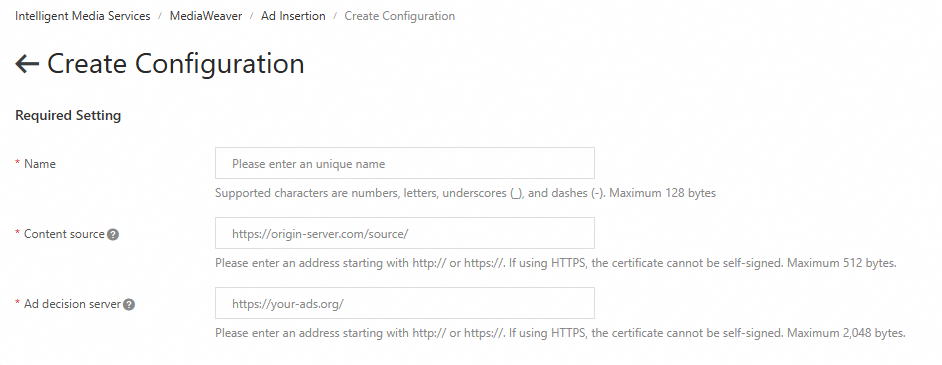
Parameter
Description
Name
Enter a unique name for the configuration.
Content Source
The URL prefix for the master playlist of the source stream.
For example, if the master playlist URL is
https://player.aliyundoc.com/source/example1.m3u8, enterhttps://player.aliyundoc.com/source/.Ad Decision Server (ADS)
The ADS request URL, as described in Prepare an ADS template URL.
-
Click OK to create the configuration.
Feature usage
After you create the configuration, copy the Playback Endpoint Prefix from the Ad Insertion page.

To play back the ad-inserted stream, append the master playlist name to the playback endpoint prefix.
For example, if the URL of the source master playlist is https://player.aliyundoc.com/source/example1.m3u8, and the Content Source you entered is https://player.aliyundoc.com/source/, the playback request URL is playback endpoint prefix + example1.m3u8. Use a player that supports HTTP Live Streaming (HLS) to request the playlist with inserted ads.