全部产品
Search
文档中心

Object Storage Service:Tutorial: Membangun sistem pencarian semantik cerdas untuk perangkat IPC

更新时间:Mar 21, 2026

Kamera IP menghasilkan aliran video terus-menerus, sehingga tinjauan manual terhadap rekaman menjadi tidak praktis dalam skala besar. Tutorial ini menjelaskan cara menggunakan fitur pengindeksan data OSS untuk membangun sistem pencarian semantik yang memungkinkan Anda mengkueri pustaka video menggunakan deskripsi bahasa alami—misalnya, "halaman dengan mobil yang diparkir."

Ikhtisar solusi

image

Solusi ini mencakup dua langkah:

  1. Create a bucket and upload videos: Simpan file video mentah dari kamera IP Anda di bucket OSS.

  2. Enable the AISearch feature: Aktifkan AISearch untuk bucket agar OSS mengindeks konten video dan menjadikannya dapat dicari menggunakan bahasa alami.

Kemampuan utama

CapabilityDescription
Semantic searchKueri video menggunakan deskripsi bahasa alami dan kondisi gabungan. Temukan frame spesifik dengan cepat tanpa tinjauan manual.
Multimodal searchCari di seluruh video, gambar, dan teks melalui satu antarmuka. Mengurangi hambatan teknis serta biaya operasi dan maintenance (O&M).
Horizontal scalingOSS menyediakan kapasitas tak terbatas dengan skalabilitas elastis untuk menangani set data video yang besar dan terus bertambah.

Prasyarat

Sebelum memulai, pastikan Anda memiliki:

  • Akun Alibaba Cloud dengan akses OSS

  • Akses ke OSS console

  • File video yang siap diunggah (file sampel disediakan pada Langkah 1)

Langkah 1: Buat bucket dan unggah video

  1. Login ke OSS console.

  2. Buka halaman Buckets dan klik Create Bucket.

  3. Pada halaman Create Bucket, masukkan nama bucket yang relevan dengan bisnis Anda, misalnya ipc-videos-oss-metaquery-demo. Pertahankan konfigurasi default untuk semua parameter lainnya.

  4. Klik Create. Setelah bucket dibuat, klik View Bucket.

  5. Pada halaman File List, klik Upload File > Scan File. Pilih file video yang akan diunggah, seperti Video A.mp4, Video B.mp4, dan Video C.mp4. Pertahankan konfigurasi default dan klik Upload File.

  6. (Opsional) Tambahkan tag ke file video yang telah diunggah. Tag memungkinkan Anda memfilter video berdasarkan atribut seperti ID kamera atau lokasi selama proses pengindeksan maupun pencarian. Pada kolom Actions untuk file target, pilih more > More > Tagging. Di kotak dialog, tambahkan pasangan kunci-nilai tag. Contohnya: Klik OK.

    • Tetapkan kunci ke need-seek dan nilai ke true untuk digunakan sebagai kondisi filter saat membuat indeks.

    • Tetapkan kunci ke camera dan nilai ke camera-a untuk memfilter hasil berdasarkan kamera selama pencarian.

Langkah 2: Aktifkan fitur AISearch

  1. Pada panel navigasi kiri, pilih File Management > Data Indexing.

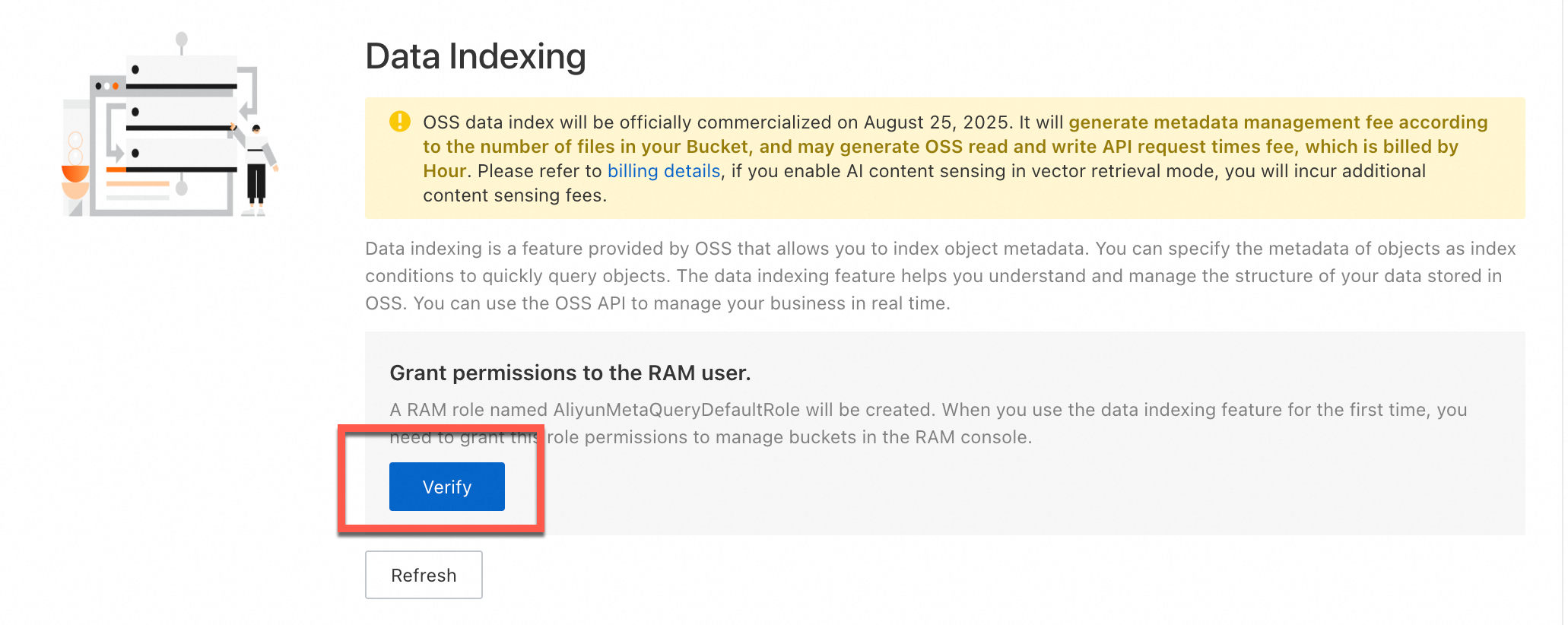
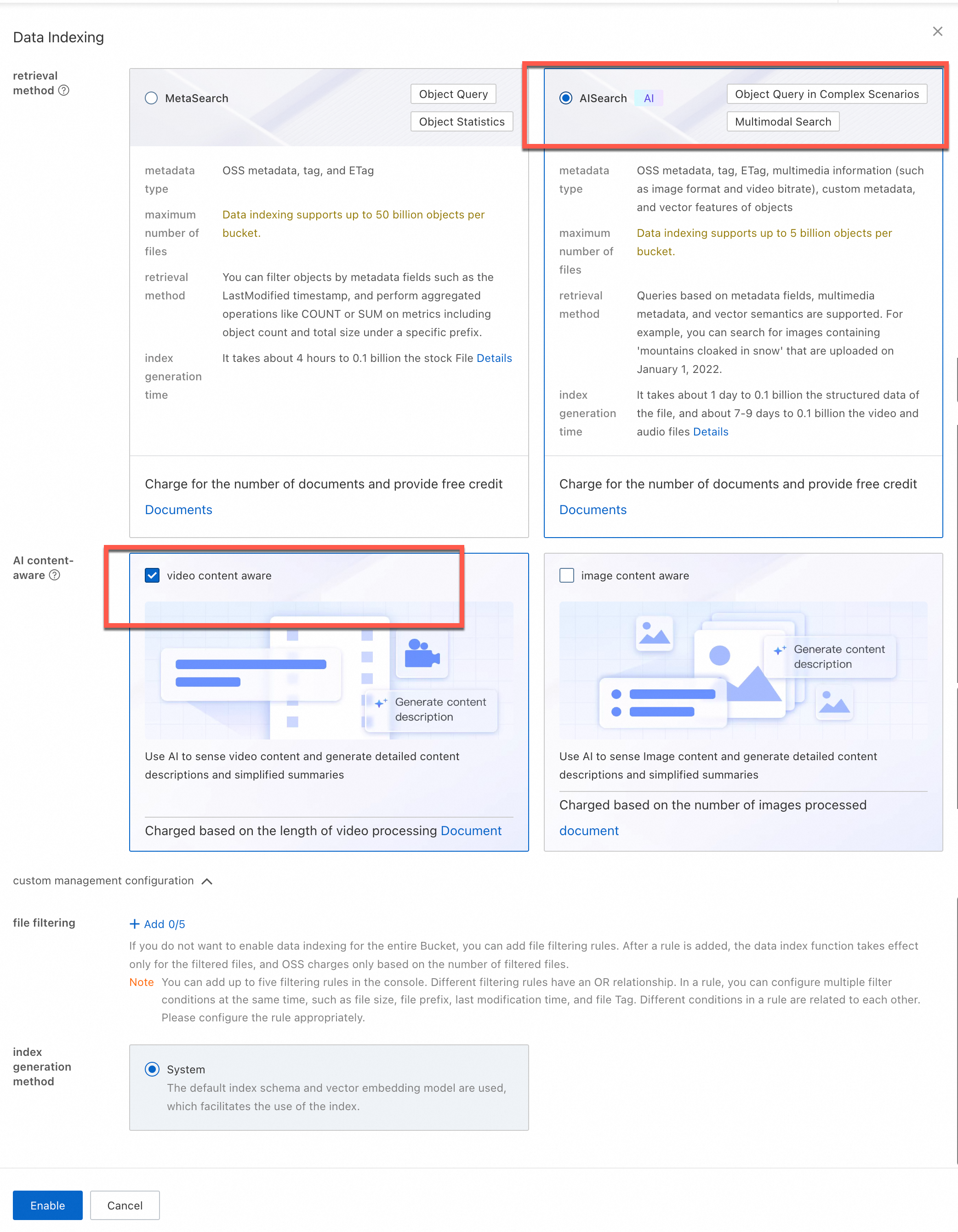
  2. Pada halaman Data Indexing, jika ini pertama kali Anda menggunakan pengindeksan data, ikuti instruksi di layar untuk memberikan izin kepada peran AliyunMetaQueryDefaultRole. Hal ini memungkinkan OSS mengelola data di bucket Anda. Setelah memberikan izin, klik Enable Data Indexing dan pilih Search.

  3. (Opsional) AI Content Awareness: Pilih Image Content Awareness atau Video Content Awareness sesuai kebutuhan Anda.

  4. (Opsional) File filtering rules: Konfigurasikan opsi ini untuk menjalankan analisis AI hanya pada file yang memenuhi kondisi tertentu. Maksimal lima aturan didukung. Kriteria filter mencakup awalan (prefix), ukuran file, tag, dan LastModifiedTime. Misalnya, tambahkan aturan filter tag dengan kunci need-seek dan nilai true — sistem kemudian hanya mengindeks file yang memiliki tag tersebut.

    Jika filter file diaktifkan, Anda dikenai biaya pengindeksan data, AISearch, dan content awareness hanya berdasarkan jumlah file yang difilter.
  5. Klik Enable.

Pembuatan indeks metadata memerlukan waktu. Durasi tepatnya bergantung pada jumlah objek di bucket. Muat ulang halaman untuk memeriksa status.
imageimage

Verifikasi hasil

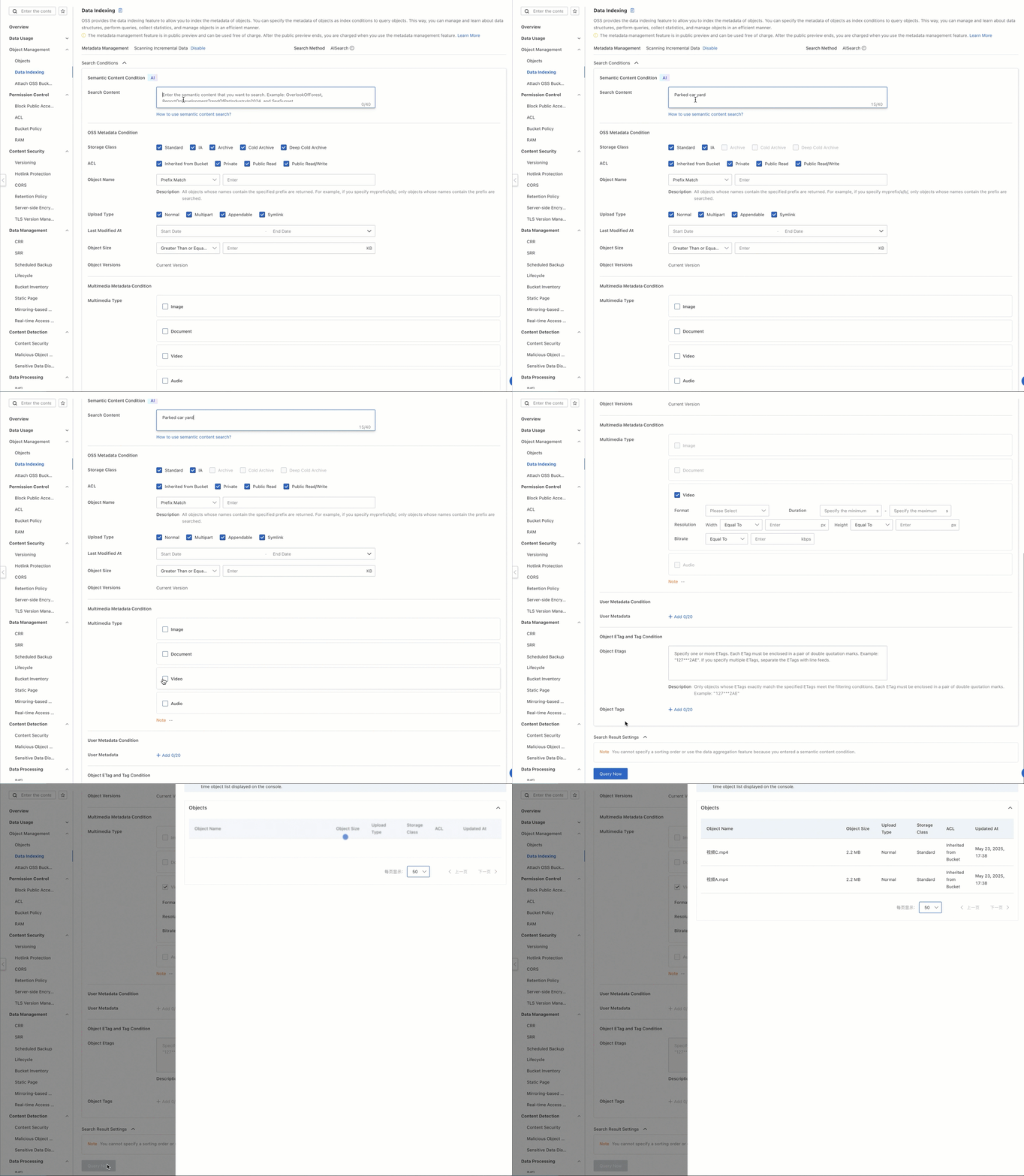
Cukup masukkan teks deskriptif, seperti a yard with a parked car, dan sistem akan mengembalikan video relevan yang sesuai dengan deskripsi tersebut.

  1. Pada halaman Buckets, klik nama bucket Anda.

  2. Pada halaman Files, pastikan video telah diunggah.

  3. Pada panel navigasi kiri, pilih File Management > Data Indexing.

  4. Pada halaman Data Indexing, masukkan a yard with a parked car di kotak pencarian. Untuk Media Type, pilih Video.

  5. (Opsional) Untuk Object Tagging, tetapkan kunci ke camera dan nilai ke camera-a. Sistem hanya akan mengembalikan video yang ditandai dengan camera=camera-a.

  6. Klik Search.

  7. Salin path file dari hasil pencarian. Kembali ke halaman Objects, tempel path tersebut ke kotak pencarian, lalu cari untuk melihat video yang sesuai.

2025-05-23_16-41-02 (1)

Mulai Beroperasi

Langkah-langkah konsol di atas bertujuan untuk validasi fitur. Untuk lingkungan produksi, gunakan kit pengembangan perangkat lunak (SDK) OSS untuk mengotomatiskan unggah video, manajemen tag, dan kueri pencarian.

Unggah video ke OSS

Kamera IP menghasilkan aliran video terus-menerus. Gunakan SDK Python OSS untuk mengunggah segmen video ke bucket Anda secara otomatis.

Contoh berikut menggunakan file upload manager untuk mengunggah video:

import argparse
import alibabacloud_oss_v2 as oss
from alibabacloud_oss_v2.models import ListObjectsRequest, PutObjectTaggingRequest, Tagging, TagSet, Tag, PutObjectRequest
import os

def upload_video(client, bucket, video_config):
    """Upload a video"""
    try:
        # Check if the file exists
        if not os.path.exists(video_config['path']):
            print(f'File does not exist: {video_config["path"]}')
            return False

        # Create an object to upload the file
        uploader = client.uploader()

        # Execute the upload request - pass the filepath parameter correctly
        result = uploader.upload_file(
            filepath=video_config['path'],  # Add the filepath parameter
            request=PutObjectRequest(
                bucket=bucket,
                key=video_config['key']
            )
        )

        print(f'Upload {video_config["key"]} successful:')
        print(f'status code: {result.status_code},'
              f' request id: {result.request_id}')
        return True
    except Exception as e:
        print(f'Upload {video_config["key"]} failed: {str(e)}')
        return False

def main():
    # OSS configuration
    args = argparse.Namespace(
        region='cn-beijing',
        bucket='ipc-videos-oss-metaquery-demo',
        endpoint='https://oss-cn-beijing.aliyuncs.com'
    )

    # Configure the OSS client
    credentials_provider = oss.credentials.EnvironmentVariableCredentialsProvider()
    cfg = oss.config.load_default()
    cfg.credentials_provider = credentials_provider
    cfg.region = args.region
    cfg.endpoint = args.endpoint
    client = oss.Client(cfg)

    # Video file configuration, including different tags
    videos = [
        {
            'path': '<Your-Path>/VideoA.mp4',
            'key': 'VideoA.mp4'
        },
        {
            'path': '<Your-Path>/VideoB.mp4',
            'key': 'VideoB.mp4'
        },
        {
            'path': '<Your-Path>/VideoC.mp4',
            'key': 'VideoC.mp4'
        }
    ]

    # Upload all videos
    for video in videos:
        print(f"\nStart uploading video: {video['key']}")
        upload_video(
            client=client,
            bucket=args.bucket,
            video_config=video
        )

if __name__ == "__main__":
    main()

Ganti nilai placeholder sebelum menjalankan:

PlaceholderDescriptionExample
<Your-Path>Direktori lokal yang berisi file video/home/user/videos

Jalankan pencarian semantik

Integrasikan OSS MetaQuery ke layanan backend Anda untuk mengkueri indeks video secara terprogram. Semua permintaan pencarian menggunakan API DoMetaQuery dengan mode=semantic.

Contoh berikut membangun permintaan XML yang sesuai dengan spesifikasi OSS MetaQuery dan mengembalikan hasil yang cocok beserta URL yang ditandatangani:

# -*- coding: utf-8 -*-
import argparse
import alibabacloud_oss_v2 as oss
# Parse the XML response
import xml.etree.ElementTree as ET
import json
from datetime import datetime

def get_search_conditions():
    """Get multi-conditional input from the user"""
    print("Enter a semantic description (example: a yard with a parked car)")
    query = input("> Semantic keywords: ").strip()
    while not query:
        print("Semantic keywords cannot be empty!")
        query = input("> Semantic keywords: ").strip()
    return query

def build_metaquery_xml(query):
    """Build a MetaQuery XML that complies with OSS specifications"""
    xml_parts = [f'<Query>{query}</Query>']
    # Add the MediaTypes tag, hard-coded to video here
    xml_parts.append('<MediaTypes><MediaType>video</MediaType></MediaTypes>')

    meta_query_xml = f'''<MetaQuery>
    {"".join(xml_parts)}
</MetaQuery>'''
    return meta_query_xml  # Encode as a UTF-8 byte stream


def format_result(key, pre_url):
    """Format a single search result"""
    return f""" File path: {key}
 File address: {pre_url}
-----------------------"""

def semantic_search():
    # Assign values directly to command line arguments
    args = argparse.Namespace(
        region = 'cn-beijing',  # Replace with your region
        bucket = 'ipc-videos-oss-metaquery-demo',  # Replace with your bucket name
        endpoint = 'https://oss-cn-beijing.aliyuncs.com',  # Replace with your endpoint. You can leave this empty or delete it if not needed.
    )

    # Initialize the OSS client
    credentials = oss.credentials.EnvironmentVariableCredentialsProvider()
    cfg = oss.config.load_default()
    cfg.credentials_provider = credentials
    cfg.region = args.region
    if args.endpoint:
        cfg.endpoint = args.endpoint
    client = oss.Client(cfg)

    # Get user input
    query = get_search_conditions()  # Get only the query
    # Build the request
    try:
        # Construct the request body (XML data)
        data_str = build_metaquery_xml(query)

        # Define the operation input
        req = oss.OperationInput(
            op_name='DoMetaQuery',  # Custom action name
            method='POST',            # HTTP method
            parameters={              # Query parameters
                'metaQuery': '',
                'mode': 'semantic',
                'comp': 'query',
            },
            headers=None,             # Custom request headers (optional)
            body=data_str.encode("utf-8"),  # Request body (encoded as a UTF-8 byte stream)
            bucket=args.bucket,       # Target bucket name
        )

        # Call the generic interface to execute the operation
        resp = client.invoke_operation(req)

    except oss.exceptions.ServiceError as e:
        print(f" Server error: {e.message}")
        return

    root = ET.fromstring(resp.http_response.content.decode('utf-8'))
     # Find all File elements
    files = root.findall('.//File')

    print(f"\n Found {len(files)} matching results:")


    for i, file in enumerate(files, 1):
        print(f"\nFile {i}:")

        # Fetch and print various properties
        uri_element = file.find('URI')
        uri = uri_element.text if uri_element is not None else 'N/A'
        print(f"  URI: {uri}")

        key_element = file.find('Filename')
        key = key_element.text if key_element is not None else 'N/A'
        print(f"  File name: {key}")

        size_element = file.find('Size')
        size = size_element.text if size_element is not None else 'N/A'
        print(f"  Size: {size}")

        modified_time_element = file.find('FileModifiedTime')
        modified_time = modified_time_element.text if modified_time_element is not None else 'N/A'
        print(f"  Modified time: {modified_time}")

        content_type_element = file.find('ContentType')
        content_type = content_type_element.text if content_type_element is not None else 'N/A'
        print(f"  ContentType: {content_type}")

        media_type_element = file.find('MediaType')
        media_type = media_type_element.text if media_type_element is not None else 'N/A'
        print(f"  MediaType: {media_type}")

        # You can add fetching and printing for more properties as needed, such as ImageHeight, ImageWidth, OSSStorageClass, etc.
        # image_height_element = file.find('ImageHeight')
        # image_height = image_height_element.text if image_height_element is not None else 'N/A'
        # print(f"  ImageHeight: {image_height}")

        # Generate a signed URL (if needed)
        if key != 'N/A': # Generate a URL only if the file name exists
             try:
                pre_url = client.presign(
                    oss.GetObjectRequest(
                        bucket=args.bucket,  # Specify the bucket name
                        key=key,        # Specify the object key
                    )
                )
                print(f"  File address (signed URL): {pre_url.url}")
             except Exception as e:
                 print(f"  Failed to generate signed URL: {e}")


        print("-" * 20) # Separator

if __name__ == "__main__":
    semantic_search()

Setelah menjalankan program, masukkan deskripsi seperti a yard with a parked car. Sistem akan mengkueri indeks data dan mengembalikan hasil yang cocok. Gunakan URL yang ditandatangani pada setiap hasil untuk mengakses video secara langsung.

Contoh output:

Found 1 matching result:

File 1:
  URI: oss://ipc-videos-oss-metaquery-demo/VideoA.mp4
  File name: VideoA.mp4
  Size: 2311252
  Modified time: 2025-05-23T17:38:10+08:00
  ContentType: video/mp4
  MediaType: video
  File address (signed URL): https://ipc-videos-oss-metaquery-demo.oss-cn-beijing.aliyuncs.com/VideoA.mp4?x-oss-signature-version=OSS4-HMAC-SHA256&x-oss-date=20250523T094511Z&x-oss-expires=900&x-oss-credential=LTAI********************%2F20250523%2Fcn-beijing%2Foss%2Faliyun_v4_request&x-oss-signature=0bf38092c42a179ff0e8334c8bea3fd92f5a78599038e816e2ed3e02755542af
--------------------

Atur tag video

Saat bekerja dengan set data video yang besar, path file saja sering kali tidak cukup untuk pemfilteran dan kategorisasi. Penandaan objek OSS memungkinkan Anda menyambungkan metadata pasangan kunci-nilai ke file—misalnya, untuk mencatat kamera mana yang merekam video atau zona geografis mana yang dimilikinya. Tag memungkinkan Anda:

  • Mengkategorikan video secara dinamis menggunakan pasangan kunci-nilai

  • Memfilter hasil pencarian dengan cepat ke subset tertentu (misalnya, berdasarkan ID kamera atau lokasi)

  • Menetapkan aturan pengindeksan yang hanya berlaku untuk file yang ditandai

Tiga video contoh yang digunakan dalam tutorial ini ditandai sebagai berikut:

FileContentTag
VideoA.mp4Rekaman halaman belakangcamera=camera-a
VideoB.mp4Rekaman area penjualcamera=camera-b
VideoC.mp4Rekaman halaman belakang (mirip VideoA)camera=camera-c
VideoA.mp4VideoB.mp4VideoC.mp4
exampleexample (1)example
Video halaman belakang, ditandai direkam oleh camera-aVideo vending, ditandai sebagai rekaman oleh camera-bVideo halaman belakang, mirip kontennya dengan Video A, ditandai direkam oleh camera-c

Tag dapat ditetapkan saat unggah atau ditambahkan dan diperbarui setelah unggah.

Tetapkan tag saat unggah

Contoh berikut mengunggah file video dan menetapkan tag dalam satu operasi:

import argparse
import alibabacloud_oss_v2 as oss
from alibabacloud_oss_v2.models import PutObjectRequest
import os

def upload_video_with_tags(client, bucket, video_config):
    """Upload a video with tags"""
    try:
        # Check if the file exists
        if not os.path.exists(video_config['path']):
            print(f'File does not exist: {video_config["path"]}')
            return False

        # Create an object to upload the file
        uploader = client.uploader()

        # Use the tagging string directly (encoding is not needed if keys and values are simple strings)
        tagging_str = f"camera={video_config['camera_tag']}"

        # Execute the upload request - carry tags directly
        result = uploader.upload_file(
            filepath=video_config['path'],
            request=PutObjectRequest(
                bucket=bucket,
                key=video_config['key'],
                tagging=tagging_str
            )
        )

        print(f'Upload {video_config["key"]} successful:')
        print(f'status code: {result.status_code},'
              f' request id: {result.request_id}')
        print(f'Tag added: {tagging_str}')
        return True
    except Exception as e:
        print(f'Upload {video_config["key"]} failed: {str(e)}')
        return False


def main():
    # OSS configuration
    args = argparse.Namespace(
        region='cn-beijing',
        bucket='ipc-videos-oss-metaquery-demo',
        endpoint='https://oss-cn-beijing.aliyuncs.com'
    )

    # Configure the OSS client
    credentials_provider = oss.credentials.EnvironmentVariableCredentialsProvider()
    cfg = oss.config.load_default()
    cfg.credentials_provider = credentials_provider
    cfg.region = args.region
    cfg.endpoint = args.endpoint
    client = oss.Client(cfg)

    # Video file configuration, including different tags
    videos = [
        {
            'path': '<Your-Path>/VideoA.mp4',
            'key': 'VideoA.mp4',
            'camera_tag': 'camera-a'
        },
        {
            'path': '<Your-Path>/VideoB.mp4',
            'key': 'VideoB.mp4',
            'camera_tag': 'camera-b'
        },
        {
            'path': '<Your-Path>/VideoC.mp4',
            'key': 'VideoC.mp4',
            'camera_tag': 'camera-c'
        }
    ]

    # Upload all videos and add tags
    for video in videos:
        print(f"\nStart uploading video: {video['key']}")
        upload_video_with_tags(
            client=client,
            bucket=args.bucket,
            video_config=video
        )


if __name__ == "__main__":
    main()

Perbarui tag setelah unggah

Untuk menambah atau memodifikasi tag pada file yang sudah diunggah, gunakan PutObjectTaggingRequest:

import argparse
import alibabacloud_oss_v2 as oss
from alibabacloud_oss_v2.models import GetObjectTaggingRequest, PutObjectTaggingRequest, Tagging, TagSet, Tag


def apply_tags_to_frame(client, bucket, frame_key, tags):
    """Add tags to a video"""
    try:
        # Build the tagging object
        tagging = Tagging(
            version=1,
            tag_set=TagSet(tags=tags)
        )

        # Create the request to update tags
        put_tag_request = PutObjectTaggingRequest(
            bucket=bucket,
            key=frame_key,
            tagging=tagging
        )

        # Update the object tags
        result = client.put_object_tagging(put_tag_request)

        # Convert tags to a string for printing
        tags_str = '&'.join([f"{tag.key}={tag.value}" for tag in tags])
        print(f"Successfully added tags to {frame_key}: {tags_str}")
        return True
    except Exception as e:
        print(f"Failed to add tags: {str(e)}")
        return False

def frame_tags():
    # OSS configuration
    args = argparse.Namespace(
        region='cn-beijing',
        frame_bucket='ipc-videos-oss-metaquery-demo',
        endpoint='https://oss-cn-beijing.aliyuncs.com'
    )

    # Configure the OSS client
    credentials_provider = oss.credentials.EnvironmentVariableCredentialsProvider()
    cfg = oss.config.load_default()
    cfg.credentials_provider = credentials_provider
    cfg.region = args.region
    cfg.endpoint = args.endpoint
    client = oss.Client(cfg)

    # Configure your video names
    videos = [
        'VideoA.mp4',
        'VideoB.mp4',
        'VideoC.mp4'
    ]

    # Process each video
    for video_filename in videos:
        print(f"\nStart processing tags for video {video_filename}") # Print the original extracted file name

        # Remove the file name extension, for example, 'VideoA.mp4' -> 'VideoA'
        # The sample code extracts the last character of the video file name as the camera identifier. This is for reference only. You can add tags based on your actual business requirements.
        video_name_base = video_filename.split('.')[0] if '.' in video_filename else video_filename
        tags = [
            Tag(key='camera', value=f'camera-{video_name_base[-1].lower()}' if video_name_base else 'camera-unknown'),
            # Tag(key='category', value='video_monitoring')       # Add actual business category information
        ]

        # Add tags to the video
        apply_tags_to_frame(client, args.frame_bucket, video_filename, tags)

        print(f"Finished processing tags for video {video_filename}\n") # Print the original extracted file name

if __name__ == "__main__":
    frame_tags()

Pencarian dengan filter tag

Pencarian semantik mengembalikan semua video yang sesuai dengan deskripsi. Untuk mempersempit hasil lebih lanjut—misalnya, hanya mengambil rekaman halaman belakang dari kamera tertentu—terapkan filter tag setelah hasil pencarian awal dikembalikan.

Contoh berikut menggabungkan pencarian semantik dengan pemfilteran tag di sisi klien:

# -*- coding: utf-8 -*-
import argparse
import alibabacloud_oss_v2 as oss
# Parse the XML response
import xml.etree.ElementTree as ET
import json
from datetime import datetime
# --- New import ---
from alibabacloud_oss_v2.models import GetObjectTaggingRequest
# --- End of new import ---

def get_inputs():
    """Get the user's semantic query (required) and filter conditions (optional)"""
    # 1. Get the required semantic query
    print(" Enter a semantic description (example: a yard with a parked car)")
    query = input("> Semantic keywords: ").strip()
    while not query:
        print(" Semantic keywords cannot be empty!")
        query = input("> Semantic keywords: ").strip()

    conditions = [] # Initialize the list of filter conditions
    target_tag = None # --- Used to store the target tag ---

    # 2. Get the optional tag filter
    print("\n (Optional) Enter tag filter conditions (used for client-side filtering, example: camera=camera-a, press Enter to skip)")
    tag_input = input("> Tag (format key=value): ").strip()
    if tag_input:
        if '=' in tag_input:
            # conditions.append({
            #     'field': 'Tags',
            #     'value': tag_input,
            #     'op': 'eq'
            # })
            target_tag = tag_input
            print(f" Info: The tag '{target_tag}' will be used for client-side filtering after getting the results.")
        else:
             print(" Incorrect tag format, ignored. Use the 'key=value' format.")

    # --- Return target_tag ---
    return query, conditions, target_tag

def build_metaquery_xml(query, conditions):
    """Build a MetaQuery XML that complies with OSS specifications (includes semantic query and optional filters)"""
    # Always include the semantic query part
    xml_parts = [f'<Query>{query}</Query>']

    # Add the media type restriction
    xml_parts.append('<MediaTypes><MediaType>video</MediaType></MediaTypes>')

    # Add optional filter conditions - in semantic mode, only some fields are supported (such as Filename here)
    for cond in conditions:
        # In semantic mode, skip building SimpleQuery for the Tags field (although we no longer add Tags to conditions, this is kept just in case)
        if cond['field'] == 'Tags':
            continue

        json_query = json.dumps({
            "Field": cond['field'],
            "Value": cond['value'],
            "Operation": cond['op']
        }, ensure_ascii=False)
        xml_parts.append(f'<SimpleQuery>{json_query}</SimpleQuery>')

    # Combine into the complete MetaQuery XML
    meta_query_xml = f'''<MetaQuery>
    {"".join(xml_parts)}
</MetaQuery>'''
    return meta_query_xml

def format_result(key, pre_url):
    """Format a single search result"""
    return f""" File address: {pre_url}
 File path: {key}
-----------------------"""

def perform_search():
    # Assign values directly to command line arguments
    args = argparse.Namespace(
        region='cn-beijing',  # Replace with your region
        bucket='ipc-videos-oss-metaquery-demo',  # Replace with your bucket name
        endpoint='https://oss-cn-beijing.aliyuncs.com',  # Replace with your endpoint
    )

    # Initialize the OSS client
    credentials = oss.credentials.EnvironmentVariableCredentialsProvider()
    cfg = oss.config.load_default()
    cfg.credentials_provider = credentials
    cfg.region = args.region
    if args.endpoint:
        cfg.endpoint = args.endpoint
    client = oss.Client(cfg)

    # Get user input (semantic query + optional conditions + target tag)
    query, conditions, target_tag = get_inputs()

    # Build the request
    try:
        # Construct the request body (XML data)
        # --- Pass only conditions (without Tags) ---
        data_str = build_metaquery_xml(query, conditions)

        # Define the operation input
        req = oss.OperationInput(
            op_name='DoMetaQuery',
            method='POST',
            parameters={
                'metaQuery': '',
                'mode': 'semantic', # <-- Re-add semantic mode
                'comp': 'query',
            },
            headers=None,
            body=data_str.encode("utf-8"),
            bucket=args.bucket,
        )

        # Call the generic interface to execute the operation
        print("\n Sending DoMetaQuery request...")
        resp = client.invoke_operation(req)
        print(f"\n Request successful, HTTP status code: {resp.http_response.status_code}")
    except oss.exceptions.ServiceError as e:
        print(f" Server error (ServiceError): {e.message}")
        print(f"   - HTTP Status Code: {e.status_code}")
        print(f"   - Error Code: {e.error_code}")
        print(f"   - Request ID: {e.request_id}")
        return
    except oss.exceptions.ClientError as e: # Add catch for client errors
        print(f" Client or network error (ClientError): {e.message}")
        return
    except Exception as e: # Catch other possible exceptions
        print(f" Unknown error: {e}")
        import traceback
        traceback.print_exc() # Print the full traceback
        return


    # Parse and process the results...
    final_results_count = 0 # --- New: counter to tally the final matching results ---
    try:
        root = ET.fromstring(resp.http_response.content.decode('utf-8'))
        # Find all File elements
        files = root.findall('.//File')

        print(f"\n Got {len(files)} initial matching results from OSS, starting client-side tag filtering...")

        if not files:
            # Check for NextContinuationToken, paging may be needed
            next_token_elem = root.find('.//NextContinuationToken')
            if next_token_elem is not None and next_token_elem.text:
                print(" Note: There may be more results. The current implementation does not handle paging.")
            print("\n No initial matching results.")
            return # Return early if there are no files


        for i, file in enumerate(files, 1):
            # Get the file name
            key_element = file.find('Filename')
            if key_element is None:
                print(f" Warning: The {i}-th initial result is missing the Filename field, skipped.")
                continue
            key = key_element.text

            # --- Client-side tag filtering ---
            if target_tag:
                try:
                    tagging_req = GetObjectTaggingRequest(bucket=args.bucket, key=key)
                    tagging_resp = client.get_object_tagging(tagging_req)
                    # Check if the returned tag set contains the target tag
                    tag_found = False
                    target_k, target_v = target_tag.split('=', 1)

                    if tagging_resp.tag_set and tagging_resp.tag_set.tags: # Use .tags
                        for tag in tagging_resp.tag_set.tags: # Use .tags

                            if tag.key == target_k and tag.value == target_v:
                                tag_found = True
                                break
                    if not tag_found:
                        continue # Tag does not match, skip this file
                except oss.exceptions.ServiceError as tag_err:
                     if tag_err.status_code == 404 and tag_err.error_code == 'NoSuchTagSet':
                         continue
                     else:
                        print(f" Warning: Error getting tags for file '{key}': {tag_err.error_code} - {tag_err.message}, skipped.")
                        continue
                except Exception as tag_e:
                    print(f" Warning: Unknown error while getting or processing tags for file '{key}': {tag_e}, skipped.")
                    # --- Add traceback for debugging ---
                    import traceback
                    traceback.print_exc()
                    # --- End of addition ---
                    continue
            # --- End of client-side tag filtering ---

            # --- If it passed the tag filter (or no tag filter was set), process and print the result ---
            final_results_count += 1 # Increment the final result counter
            print(f"\n[{final_results_count}] File '{key}' matches all conditions:") # Print the final result number

            # Generate a signed URL
            try:
                pre_url = client.presign(
                    oss.GetObjectRequest(
                        bucket=args.bucket,
                        key=key,
                    )
                )
                print(format_result(key, pre_url.url))
            except Exception as presign_e:
                print(f" Warning: Error generating signed URL for file '{key}': {presign_e}")
                print(format_result(key, "[Could not generate URL]"))
        # --- Print final statistics after the loop ---
        print(f"\n Client-side filtering complete, found {final_results_count} final matching results.")

    except ET.ParseError as xml_e:
        print(f" Error: Error parsing OSS response XML - {xml_e}")
    except Exception as parse_e:
        print(f" Error: Unexpected error while processing results - {parse_e}")


if __name__ == "__main__":
    perform_search()

Untuk memfilter video halaman belakang dari kamera tertentu, jalankan program dan masukkan hal berikut:

  1. Deskripsi semantik: a yard with a parked car

  2. Filter tag: camera=camera-a

Dalam contoh ini, baik VideoA maupun VideoC berisi adegan yang sesuai dengan deskripsi tersebut. Filter tag hanya menyimpan VideoA (ditandai camera-a), sehingga hasil akhir hanya berisi satu file.

Contoh output:

Sending DoMetaQuery request...

Request successful, HTTP status code: 200

Got 2 initial matching results from OSS, starting client-side tag filtering...

[1] File 'VideoA.mp4' matches all conditions:
 File address: https://ipc-videos-oss-metaquery-demo.oss-cn-beijing.aliyuncs.com/VideoA.mp4?x-oss-signature-version=OSS4-HMAC-SHA256&x-oss-date=20250526T054908Z&x-oss-expires=900&x-oss-credential=LTAI********************%2Fcn-beijing%2Foss%2Faliyun_v4_request&x-oss-signature=01bbf29790763d8e0f177d4cb0469cb00ae1c69d565219edb3866f75110b37ab
 File path: VideoA.mp4
-----------------------

 Client-side filtering complete, found 1 final matching result.