Aksi ini memungkinkan Anda memilih resource secara batch saat mengatur parameter.
Tujuan
Jika Anda membuat eksekusi berdasarkan templat yang menggunakan aksi ACS::SelectTargets dengan parameter AssociationProperty diatur ke Targets, Anda dapat beralih antar metode pemilihan resource tanpa mengubah templat tersebut. Saat membuat eksekusi, Anda dapat memilih beberapa resource sekaligus menggunakan salah satu metode berikut: memilih resource tertentu, menentukan tag resource, memilih semua resource, mengunggah file CSV berisi ID resource, atau menentukan inventaris.
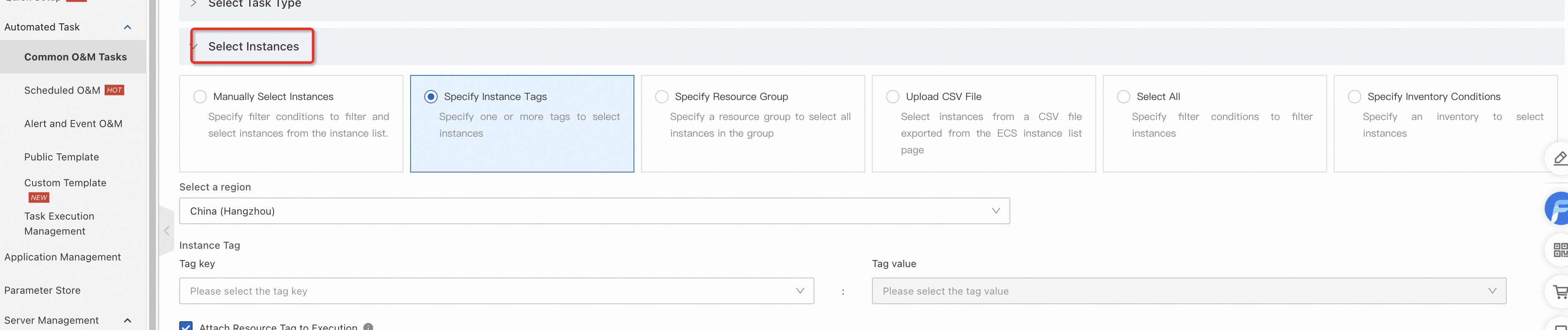
Sintaksis
FormatVersion: OOS-2019-06-01
Description: 'Penggunaan ACS::SelectTargets'
Parameters:
  targets:  # Nama parameter yang digunakan untuk memilih cakupan resource.
    Type: Json  # Jenis parameter. Harus berupa Json.
    AssociationProperty: Targets    # Aksi yang terkait dengan parameter. Untuk ACS::SelectTargets, harus berupa Targets.
    AssociationPropertyMetadata:  # Definisi resource yang akan dipilih.
      ResourceType: ALIYUN::ECS::Instance # Jenis resource yang akan dipilih.
                    # ALIYUN::ECS::Instance: Resource berupa instance ECS.
                    # ALIYUN::ECD::Desktop: Resource berupa instance Cloud Desktop.
                    # ALIYUN::RDS::Instance: Resource berupa instance ApsaraDB RDS.
                    # ALIYUN::Redis::Instance: Resource berupa instance Redis.
                    # ALIYUN::MongoDB::Instance: Resource berupa instance MongoDB.
                    # ALIYUN::ECS::ManagedInstance: Resource berupa managed instance.
                    # ALIYUN::ComputeNestSupplier::Instance: Resource berupa instance layanan Compute Nest.
                    # ALIYUN::SWAS::Instance: Resource berupa instance Simple Application Server.
Tasks:
  - Name: getInstance # Nama tugas.
    Action: 'ACS::SelectTargets'  # Aksi untuk memilih resource tertentu.
    Properties:
      ResourceType: 'ALIYUN::ECS::Instance'  # Jenis resource yang akan dipilih.
      Filters: # Cakupan untuk filter.
        - '{{ targets }}'  # Nama parameter untuk cakupan resource.
    Outputs:  # Output tugas.
      instanceIds: # Nama parameter output.
        Type: List  # Jenis parameter output.
ValueSelector: 'Instances.Instance[].InstanceId' # Selector jq. Memfilter hasil yang dikembalikan oleh operasi Describe OpenAPI untuk jenis resource tersebut. Misalnya, untuk instance ECS, objek filter adalah hasil operasi DescribeInstances OpenAPI.{
"FormatVersion": "OOS-2019-06-01",
"Description": "Penggunaan ACS::SelectTargets",
"Parameters": {
"targets": {
"Type": "Json",
"AssociationProperty": "Targets",
"AssociationPropertyMetadata": {
"ResourceType": "ALIYUN::ECS::Instance"
}
}
},
"Tasks": [
{
"Name": "getInstance",
"Action": "ACS::SelectTargets",
"Properties": {
"ResourceType": "ALIYUN::ECS::Instance",
"Filters": [
"{{ targets }}"
]
},
"Outputs": {
"instanceIds": {
"Type": "List",
"ValueSelector": "Instances.Instance[].InstanceId"
}
}
}
]
}Contoh template
Menjalankan instance ECS secara batch
FormatVersion: OOS-2019-06-01 Description: en: Starts ECS instances in bulk. name-en: ACS-ECS-BulkyStartInstances categories: - instance_manage Parameters: targets: Type: Json AssociationProperty: Targets AssociationPropertyMetadata: ResourceType: 'ALIYUN::ECS::Instance' rateControl: Description: en: Concurrency ratio of task execution. Type: Json AssociationProperty: RateControl Default: Mode: Concurrency MaxErrors: 0 Concurrency: 10 OOSAssumeRole: Description: en: The RAM role to be assumed by OOS. Type: String Default: OOSServiceRole RamRole: '{{ OOSAssumeRole }}' Tasks: - Name: getInstance Description: en: Views the ECS instances. Action: 'ACS::SelectTargets' Properties: ResourceType: 'ALIYUN::ECS::Instance' Filters: - '{{ targets }}' Outputs: instanceIds: Type: List ValueSelector: 'Instances.Instance[].InstanceId' - Name: startInstance Action: 'ACS::ECS::StartInstance' Description: en: Starts the ECS instances. Properties: instanceId: '{{ ACS::TaskLoopItem }}' Loop: RateControl: '{{ rateControl }}' Items: '{{ getInstance.instanceIds }}' Outputs: instanceIds: Type: List Value: '{{ getInstance.instanceIds }}'{ "FormatVersion": "OOS-2019-06-01", "Description": { "en": "Starts ECS instances in bulk.", "name-en": "ACS-ECS-BulkyStartInstances", "categories": [ "instance_manage" ] }, "Parameters": { "targets": { "Type": "Json", "AssociationProperty": "Targets", "AssociationPropertyMetadata": { "ResourceType": "ALIYUN::ECS::Instance" } }, "rateControl": { "Description": { "en": "Concurrency ratio of task execution." }, "Type": "Json", "AssociationProperty": "RateControl", "Default": { "Mode": "Concurrency", "MaxErrors": 0, "Concurrency": 10 } }, "OOSAssumeRole": { "Description": { "en": "The RAM role to be assumed by OOS." }, "Type": "String", "Default": "OOSServiceRole" } }, "RamRole": "{{ OOSAssumeRole }}", "Tasks": [ { "Name": "getInstance", "Description": { "en": "Gets the ECS instances." }, "Action": "ACS::SelectTargets", "Properties": { "ResourceType": "ALIYUN::ECS::Instance", "Filters": [ "{{ targets }}" ] }, "Outputs": { "instanceIds": { "Type": "List", "ValueSelector": "Instances.Instance[].InstanceId" } } }, { "Name": "startInstance", "Action": "ACS::ECS::StartInstance", "Description": { "en": "Starts the instance." }, "Properties": { "instanceId": "{{ ACS::TaskLoopItem }}" }, "Loop": { "RateControl": "{{ rateControl }}", "Items": "{{ getInstance.instanceIds }}" } } ], "Outputs": { "instanceIds": { "Type": "List", "Value": "{{ getInstance.instanceIds }}" } } }
Pengaturan contoh parameter targets untuk memilih instance ECS menggunakan berbagai metode
Pilih berdasarkan ID instance.
targets: Type: ResourceIds RegionId: cn-hangzhou ResourceIds: - i-******************1 - i-******************2 - i-******************3{ "targets": { "Type": "ResourceIds", "RegionId": "cn-hangzhou", "ResourceIds": [ "i-******************1", "i-******************2", "i-******************3" ] } }Pilih instance berdasarkan tag. Anda dapat memilih hingga 1.000 instance. Untuk memilih lebih banyak instance, lihat ACS::SelectTargets.
targets: Type: Tags RegionId: cn-hangzhou Tags: - Key: key1 Value: value1 - Key: key2 Value: value2{ "targets": { "Type": "Tags", "RegionId": "cn-hangzhou", "Tags": [ { "Key": "key1", "Value": "value1" }, { "Key": "key2", "Value": "value2" } ] } }Pilih berdasarkan kelompok sumber daya.
targets: Type: ResourceGroup RegionId: cn-hangzhou ResourceGroupId: rg-acf*********re3y{ "targets": { "Type": "ResourceGroup", "RegionId": "cn-hangzhou", "ResourceGroupId": "rg-acf*********re3y" } }Pilih semua instance ECS
targets: Type: All RegionId: cn-hangzhou Parameters: RegionId: cn-hangzhou Status: Running Tags: - Key: key1 Value: value1{ "targets": { "Type": "All", "RegionId": "cn-hangzhou", "Parameters": { "RegionId": "cn-hangzhou", "Status": "Running", "Tags": [ { "Key": "key1", "Value": "value1" } ] } } }Pilih berdasarkan kriteria manifes konfigurasi yang ditentukan.
targets: Type: Inventory RegionId: cn-hangzhou InventoryFilters: - Name: TypeName Operator: Equal Value: - ACS:InstanceInformation - Name: ACS:InstanceInformation.Status Value: - Running Operator: Equal{ "targets": { "Type": "Inventory", "RegionId": "cn-hangzhou", "InventoryFilters": [ { "Name": "TypeName", "Operator": "Equal", "Value": [ "ACS:InstanceInformation" ] }, { "Name": "ACS:InstanceInformation.Status", "Value": [ "Running" ], "Operator": "Equal" } ] } }Pilih instance berdasarkan ID instance dalam kelompok aplikasi tertentu.
targets: ResourceIds: - i-001 - i-002 ApplicationName: 'test' ApplicationGroupName: 'test' RegionId: cn-hangzhou Type: ApplicationGroup{ "targets": { "ResourceIds": [ "i-001", "i-002" ], "ApplicationName": "test", "ApplicationGroupName": "test", "RegionId": "cn-hangzhou", "Type": "ApplicationGroup" } }Pilih semua instance dalam kelompok aplikasi tertentu.
targets: ApplicationName: 'test' ApplicationGroupName: 'test' RegionId: cn-hangzhou Type: ApplicationGroup{ "targets": { "ApplicationName": "test", "ApplicationGroupName": "test", "RegionId": "cn-hangzhou", "Type": "ApplicationGroup" } }
Contoh pengaturan parameter target untuk memilih instance layanan Compute Nest
Dapatkan templat contoh untuk instance Compute Nest.
FormatVersion: OOS-2019-06-01 Parameters: RegionId: Type: String Label: en: RegionId zh-cn: Region ID AssociationProperty: RegionId Default: '{{ ACS::RegionId }}' Targets: Type: Json Label: en: TargetInstance zh-cn: Target Instance AssociationProperty: Targets AssociationPropertyMetadata: ResourceType: ALIYUN::ComputeNestSupplier::Instance RegionId: RegionId RateControl: Label: en: RateControl zh-cn: Concurrency rate for task execution Type: Json AssociationProperty: RateControl Default: Mode: Concurrency MaxErrors: 0 Concurrency: 1 OOSAssumeRole: Label: en: OOSAssumeRole zh-cn: RAM role to be assumed by OOS Type: String RamRole: '{{ OOSAssumeRole }}' Tasks: - Name: GetServiceInstance Description: en: Views the compute nest supplier instances zh-cn: Retrieves service instances from the supplier side of Compute Nest Action: ACS::SelectTargets Properties: ResourceType: ALIYUN::ComputeNestSupplier::Instance RegionId: '{{ RegionId }}' Filters: - '{{ Targets }}' Outputs: InstanceIds: Type: List ValueSelector: ServiceInstances[].ServiceInstanceId Metadata: ALIYUN::OOS::Interface: ParameterGroups: - Parameters: - RegionId - Targets Label: default: zh-cn: Configuration Parameters en: Configure Parameters - Parameters: - RateControl - OOSAssumeRole Label: default: zh-cn: Advanced Options en: Control Options{ "FormatVersion": "OOS-2019-06-01", "Parameters": { "RegionId": { "Type": "String", "Label": { "en": "RegionId", "zh-cn": "Region ID" }, "AssociationProperty": "RegionId", "Default": "{{ ACS::RegionId }}" }, "Targets": { "Type": "Json", "Label": { "en": "TargetInstance", "zh-cn": "Target Instance" }, "AssociationProperty": "Targets", "AssociationPropertyMetadata": { "ResourceType": "ALIYUN::ComputeNestSupplier::Instance", "RegionId": "RegionId" } }, "RateControl": { "Label": { "en": "RateControl", "zh-cn": "Concurrency rate for task execution" }, "Type": "Json", "AssociationProperty": "RateControl", "Default": { "Mode": "Concurrency", "MaxErrors": 0, "Concurrency": 1 } }, "OOSAssumeRole": { "Label": { "en": "OOSAssumeRole", "zh-cn": "The RAM role that OOS assumes" }, "Type": "String" } }, "RamRole": "{{ OOSAssumeRole }}", "Tasks": [ { "Name": "GetServiceInstance", "Description": { "en": "Views the compute nest supplier instances", "zh-cn": "Retrieve service instances on the supplier side of Compute Nest" }, "Action": "ACS::SelectTargets", "Properties": { "ResourceType": "ALIYUN::ComputeNestSupplier::Instance", "RegionId": "{{ RegionId }}", "Filters": [ "{{ Targets }}" ] }, "Outputs": { "InstanceIds": { "Type": "List", "ValueSelector": "ServiceInstances[].ServiceInstanceId" } } } ], "Metadata": { "ALIYUN::OOS::Interface": { "ParameterGroups": [ { "Parameters": [ "RegionId", "Targets" ], "Label": { "default": { "zh-cn": "Configuration Parameters", "en": "Configure Parameters" } } }, { "Parameters": [ "RateControl", "OOSAssumeRole" ], "Label": { "default": { "zh-cn": "Advanced Options", "en": "Control Options" } } } ] } } }Contoh: Memilih parameter berdasarkan ID instance.
targets: ResourceIds: - si-9b136xxxxxxxxxxxxxxx - si-f63edxxxxxxxxxxxxxxx RegionId: cn-hangzhou Type: ResourceIds{ "targets": { "ResourceIds": [ "si-9b1363ae63664f19a156", "si-f63ed519cc3445eebdcd" ], "RegionId": "cn-hangzhou", "Type": "ResourceIds" } }Pilih semua instance layanan yang diterapkan di wilayah China (Hangzhou) dengan ID layanan dalam format service-xxxx dan versi layanan 4.
targets: Type: All RegionId: cn-hangzhou Parameters: Filter: - Name: Status Value: - Deployed - Name: 'Version ' Value: - '4' - Name: ServiceId Value: - ervice-ea89c844c3e9430a9b9c RegionId: cn-hangzhou{ "targets": { "Type": "All", "RegionId": "cn-hangzhou", "Parameters": { "Filter": [{ "Name": "Status", "Value": [ "Deployed" ] }, { "Name": "Version ", "Value": ["4"] }, { "Name": "ServiceId", "Value": ["ervice-ea89c844c3e9430a9b9c"] } ], "RegionId": "cn-hangzhou" } } }Pilih instance ECS berdasarkan tag dan jalankan template perintah.
FormatVersion: OOS-2019-06-01 Description: en: Queries instances using tags and executes commands. zh-cn: Queries instances using tags and executes commands. name-en: Run Command name-zh-cn: Run Command categories: - run_command - application_manage - computenest - tag_operate_resource Parameters: regionId: Type: String Label: en: Region ID zh-cn: Region ID AssociationProperty: RegionId Default: '{{ ACS::RegionId }}' tags: Description: name-en: Tags name-zh-cn: Tags en: 'Format: [{"Key":"k1","Value":"v1"},{"Key":"k2","Value":"v2"}....].' zh-cn: 'Format: [{"Key":"k1","Value":"v1"},{"Key":"k2","Value":"v2"}....].' Type: Json AssociationProperty: Tags commandType: Label: en: Command Type zh-cn: Command Type AssociationPropertyMetadata: LocaleKey: ECSCommandType Type: String AllowedValues: - RunShellScript - RunPythonScript - RunPerlScript - RunBatScript - RunPowerShellScript Default: RunShellScript commandContent: Label: en: Command Content zh-cn: Command Content Type: String MaxLength: 16384 AssociationProperty: ALIYUN::OOS::Command::CommandContent AssociationPropertyMetadata: CommandType: ${commandType} workingDir: Description: en: 'For Linux instances, the default working directory is the home directory of the administrator (root user), which is /root. For Windows instances, the default working directory is the directory where the Cloud Assistant client process is located, such as C:\Windows\System32. Make sure that you enter a valid directory.' zh-cn: 'For Linux instances, the default working directory is the home directory of the administrator (root user), which is /root. For Windows instances, the default working directory is the directory where the Cloud Assistant client process is located, such as C:\Windows\System32. Make sure that you enter a valid directory.' Label: en: Working Directory zh-cn: Working Directory Type: String Default: '' AssociationPropertyMetadata: Value: - Condition: Fn::Or: - Fn::Equals: - ${commandType} - RunShellScript - Fn::Equals: - ${commandType} - RunPythonScript - Fn::Equals: - ${commandType} - RunPerlScript Value: /root - Condition: Fn::Or: - Fn::Equals: - ${commandType} - RunBatScript - Fn::Equals: - ${commandType} - RunPowerShellScript Value: C:\\Windows\\System32 timeout: Label: en: Timeout zh-cn: Timeout Type: Number Default: 600 enableParameter: Label: en: Enable Custom or Encrypted Parameters zh-cn: Enable Custom or Encrypted Parameters Type: Boolean Default: false username: Description: en: The username used to run the command on the ECS instance. The username can be up to 255 characters in length. By default, commands are run as the root user on Linux instances and as the System user on Windows instances. Make sure that the username you enter is correct. <a href="https://www.alibabacloud.com/help/doc-detail/203771.html" target="_blank">Learn more</a> zh-cn: The username used to run the command on the ECS instance. The username can be up to 255 characters in length. By default, commands are run as the root user on Linux instances and as the System user on Windows instances. Make sure that the username you enter is correct. <a href="https://www.alibabacloud.com/help/doc-detail/203771.html" target="_blank">Learn more</a> Label: en: Username zh-cn: Username Type: String Default: '' windowsPasswordName: Label: en: Password Name for Windows User zh-cn: Password Name for Windows User Type: String Default: '' AssociationProperty: ALIYUN::OOS::SecretParameter::Value AssociationPropertyMetadata: Visible: Condition: Fn::Or: - Fn::Equals: - ${commandType} - RunBatScript - Fn::Equals: - ${commandType} - RunPowerShellScript rateControl: Label: en: Task Execution Concurrency zh-cn: Task Execution Concurrency Type: Json AssociationProperty: RateControl Default: Mode: Concurrency MaxErrors: 0 Concurrency: 10 OOSAssumeRole: Label: en: RAM Role for OOS zh-cn: RAM Role for OOS Type: String Default: '' RamRole: '{{ OOSAssumeRole }}' Tasks: - Name: ListInstance Action: ACS::ExecuteAPI Description: en: Queries instances using tags. zh-cn: Queries instances using tags. Properties: Service: ECS API: ListTagResources Parameters: RegionId: '{{ regionId }}' ResourceType: instance Tag: '{{ tags }}' Outputs: instanceIds: Type: List ValueSelector: .TagResources.TagResource[].ResourceId - Name: runCommand Action: ACS::ECS::RunCommand Description: en: Runs a Cloud Assistant command. zh-cn: Runs a Cloud Assistant command. Properties: regionId: '{{ regionId }}' commandContent: '{{ commandContent }}' instanceId: '{{ ACS::TaskLoopItem }}' commandType: '{{ commandType }}' workingDir: '{{ workingDir }}' timeout: '{{ timeout }}' enableParameter: '{{ enableParameter }}' username: '{{ username }}' windowsPasswordName: '{{ windowsPasswordName }}' contentEncoding: PlainText parameters: {} maxRetryInterval: 300 Outputs: commandOutput: Type: String ValueSelector: invocationOutput Loop: Items: '{{ ListInstance.instanceIds }}' RateControl: '{{ rateControl }}' Outputs: commandOutputs: AggregateType: Fn::ListJoin AggregateField: commandOutput Outputs: commandOutputs: Type: List Value: '{{ runCommand.commandOutputs }}' Metadata: ALIYUN::OOS::Interface: ParameterGroups: - Parameters: - commandType - commandContent - workingDir - timeout - enableParameter - username - windowsPasswordName Label: default: zh-cn: Run Command Options en: Run Command Options - Parameters: - regionId - tags Label: default: zh-cn: Select ECS Instances en: Select ECS Instances - Parameters: - rateControl - OOSAssumeRole Label: default: zh-cn: Advanced Options en: Advanced Options{ "FormatVersion": "OOS-2019-06-01", "Description": { "en": "Query instances through tags and execute commands..", "zh-cn": "Query instances using tags and execute commands.", "name-en": "Run Command", "name-zh-cn": "Run Command", "categories": [ "run_command", "application_manage", "computenest", "tag_operate_resource" ] }, "Parameters": { "regionId": { "Type": "String", "Label": { "en": "RegionId", "zh-cn": "Region ID" }, "AssociationProperty": "RegionId", "Default": "{{ ACS::RegionId }}" }, "tags": { "Description": { "name-en": "Tags", "name-zh-cn": "Tags", "en": "format:[{\"Key\":\"k1\",\"Value\":\"v1\"},{\"Key\":\"k2\",\"Value\":\"v2\"}....].", "zh-cn": "Input format: [{\"Key\":\"k1\",\"Value\":\"v1\"},{\"Key\":\"k2\",\"Value\":\"v2\"}....]" }, "Type": "Json", "AssociationProperty": "Tags" }, "commandType": { "Label": { "en": "CommandType", "zh-cn": "Command Type" }, "AssociationPropertyMetadata": { "LocaleKey": "ECSCommandType" }, "Type": "String", "AllowedValues": [ "RunShellScript", "RunPythonScript", "RunPerlScript", "RunBatScript", "RunPowerShellScript" ], "Default": "RunShellScript" }, "commandContent": { "Label": { "en": "CommandContent", "zh-cn": "Command Content" }, "Type": "String", "MaxLength": 16384, "AssociationProperty": "ALIYUN::OOS::Command::CommandContent", "AssociationPropertyMetadata": { "CommandType": "${commandType}" } }, "workingDir": { "Description": { "en": "Linux instances: under the home directory of the administrator (root user): /root.Windows instances: under the directory where the process of the Cloud Assistant client is located, such asC:\\Windows\\System32. Please ensure you input the correct directory.", "zh-cn": "For Linux instances, the default working directory is the home directory of the administrator (root user), which is /root. For Windows instances, the default working directory is the directory where the Cloud Assistant client process is located, such as C:\\Windows\\System32. Make sure that the directory you enter is correct." }, "Label": { "en": "WorkingDir", "zh-cn": "Working Directory" }, "Type": "String", "Default": "", "AssociationPropertyMetadata": { "Value": [ { "Condition": { "Fn::Or": [ { "Fn::Equals": [ "${commandType}", "RunShellScript" ] }, { "Fn::Equals": [ "${commandType}", "RunPythonScript" ] }, { "Fn::Equals": [ "${commandType}", "RunPerlScript" ] } ] }, "Value": "/root" }, { "Condition": { "Fn::Or": [ { "Fn::Equals": [ "${commandType}", "RunBatScript" ] }, { "Fn::Equals": [ "${commandType}", "RunPowerShellScript" ] } ] }, "Value": "C:\\\\Windows\\\\System32" } ] } }, "timeout": { "Label": { "en": "Timeout", "zh-cn": "Timeout" }, "Type": "Number", "Default": 600 }, "enableParameter": { "Label": { "en": "EnableParameter", "zh-cn": "Enable encrypted or custom parameters" }, "Type": "Boolean", "Default": false }, "username": { "Description": { "en": "The username that is used to run the command on the ECS instance, length must not exceed 255 characters. Linux system ECS instance, the default is root. Windows system ECS instance, the default is System. Please ensure you input the correct username. <a href=\"https://www.alibabacloud.com/help/doc-detail/203771.html\" target=\"_blank\">See more</a>", "zh-cn": "The name of the user that runs the command on the ECS instance. The name can be up to 255 characters in length. For Linux instances, the command is run by the root user by default. For Windows instances, the command is run by the System user by default. Make sure that the username you enter is correct. <a href=\"https://www.alibabacloud.com/help/doc-detail/203771.html\" target=\"_blank\">Learn more</a>" }, "Label": { "en": "Username", "zh-cn": "Username" }, "Type": "String", "Default": "" }, "windowsPasswordName": { "Label": { "en": "WindowsPasswordName", "zh-cn": "Password name for Windows user" }, "Type": "String", "Default": "", "AssociationProperty": "ALIYUN::OOS::SecretParameter::Value", "AssociationPropertyMetadata": { "Visible": { "Condition": { "Fn::Or": [ { "Fn::Equals": [ "${commandType}", "RunBatScript" ] }, { "Fn::Equals": [ "${commandType}", "RunPowerShellScript" ] } ] } } } }, "rateControl": { "Label": { "en": "RateControl", "zh-cn": "Rate control for task execution" }, "Type": "Json", "AssociationProperty": "RateControl", "Default": { "Mode": "Concurrency", "MaxErrors": 0, "Concurrency": 10 } }, "OOSAssumeRole": { "Label": { "en": "OOSAssumeRole", "zh-cn": "RAM role for OOS to assume" }, "Type": "String", "Default": "" } }, "RamRole": "{{ OOSAssumeRole }}", "Tasks": [ { "Name": "ListInstance", "Action": "ACS::ExecuteAPI", "Description": { "en": "List the eips.", "zh-cn": "Queries instances using tags." }, "Properties": { "Service": "ECS", "API": "ListTagResources", "Parameters": { "RegionId": "{{ regionId }}", "ResourceType": "instance", "Tag": "{{ tags }}" } }, "Outputs": { "instanceIds": { "Type": "List", "ValueSelector": ".TagResources.TagResource[].ResourceId" } } }, { "Name": "runCommand", "Action": "ACS::ECS::RunCommand", "Description": { "en": "Execute cloud assistant command", "zh-cn": "Executes a Cloud Assistant command." }, "Properties": { "regionId": "{{ regionId }}", "commandContent": "{{ commandContent }}", "instanceId": "{{ ACS::TaskLoopItem }}", "commandType": "{{ commandType }}", "workingDir": "{{ workingDir }}", "timeout": "{{ timeout }}", "enableParameter": "{{ enableParameter }}", "username": "{{ username }}", "windowsPasswordName": "{{ windowsPasswordName }}", "contentEncoding": "PlainText", "parameters": {}, "maxRetryInterval": 300 }, "Outputs": { "commandOutput": { "Type": "String", "ValueSelector": "invocationOutput" } }, "Loop": { "Items": "{{ ListInstance.instanceIds }}", "RateControl": "{{ rateControl }}", "Outputs": { "commandOutputs": { "AggregateType": "Fn::ListJoin", "AggregateField": "commandOutput" } } } } ], "Outputs": { "commandOutputs": { "Type": "List", "Value": "{{ runCommand.commandOutputs }}" } }, "Metadata": { "ALIYUN::OOS::Interface": { "ParameterGroups": [ { "Parameters": [ "commandType", "commandContent", "workingDir", "timeout", "enableParameter", "username", "windowsPasswordName" ], "Label": { "default": { "zh-cn": "Command Execution Options", "en": "run command options" } } }, { "Parameters": [ "regionId", "tags" ], "Label": { "default": { "zh-cn": "Select Instances", "en": "Select Ecs Instances" } } }, { "Parameters": [ "rateControl", "OOSAssumeRole" ], "Label": { "default": { "zh-cn": "Advanced Options", "en": "Control Options" } } } ] } } }