Jika beberapa templat tugas berbagi konfigurasi yang sama, Anda dapat menyimpan nilainya di Parameter Store sebagai variabel global. Nilai tersebut dapat digunakan kembali di berbagai templat untuk meningkatkan efisiensi dan konsistensi operasional. Topik ini menjelaskan cara menggunakan parameter umum dalam templat tugas.
Prasyarat
Parameter umum harus dibuat terlebih dahulu di Parameter Store. Untuk informasi selengkapnya, lihat Buat parameter umum.
Prosedur
Penggunaan di Konsol OOS
Contoh ini menggunakan templat tugas umum Send Remote Command. Timeout templat diatur ke 600 menggunakan parameter umum time_out yang memiliki nilai 600.
Masuk ke konsol CloudOps Orchestration Service.
Pada panel navigasi di sebelah kiri, pilih . Temukan templat umum yang dituju, lalu klik Create Execution.
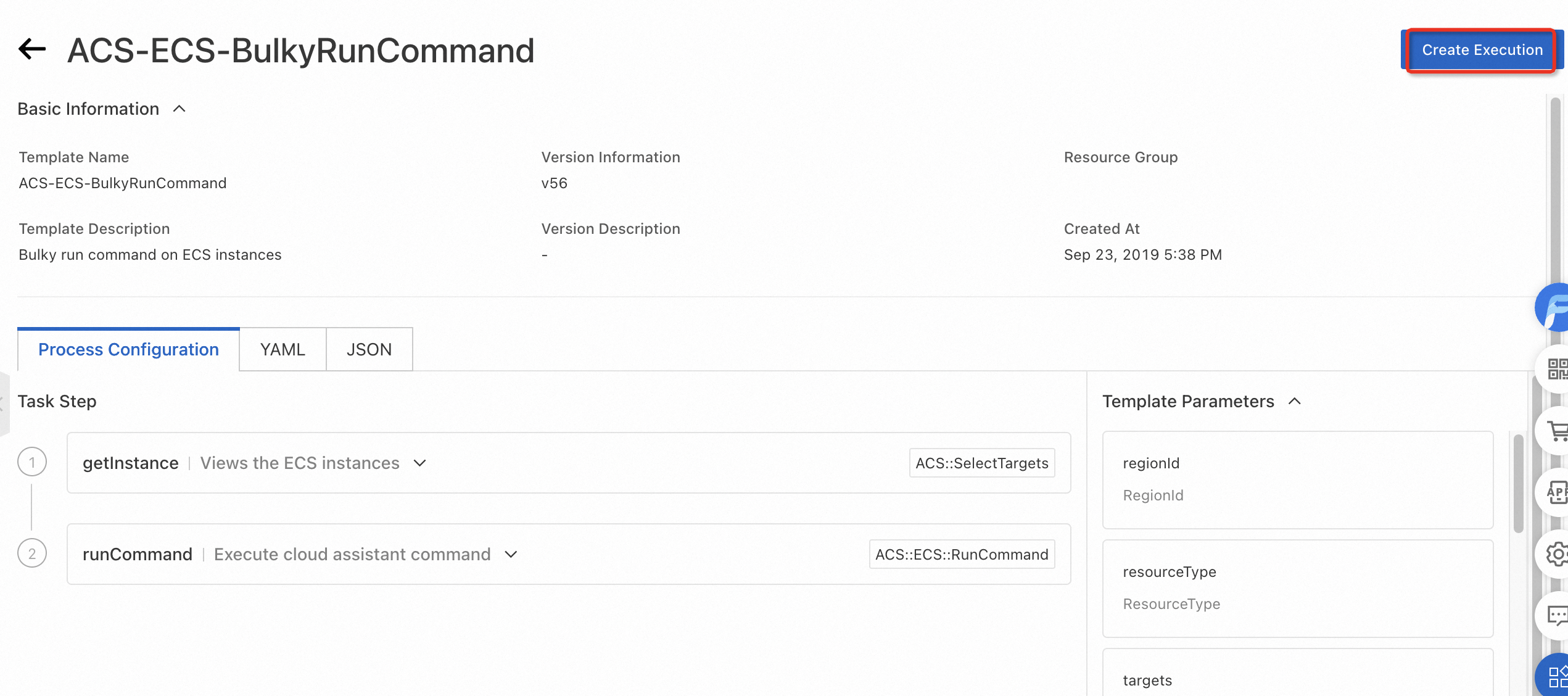
Masukkan informasi dasar, lalu klik Next: Set Parameters.
Klik ikon
 di sebelah kiri Timeout. Pilih parameter umum, misalnya time_out, untuk mengatur timeout menjadi 500. Kemudian, pilih instans target dan klik Next.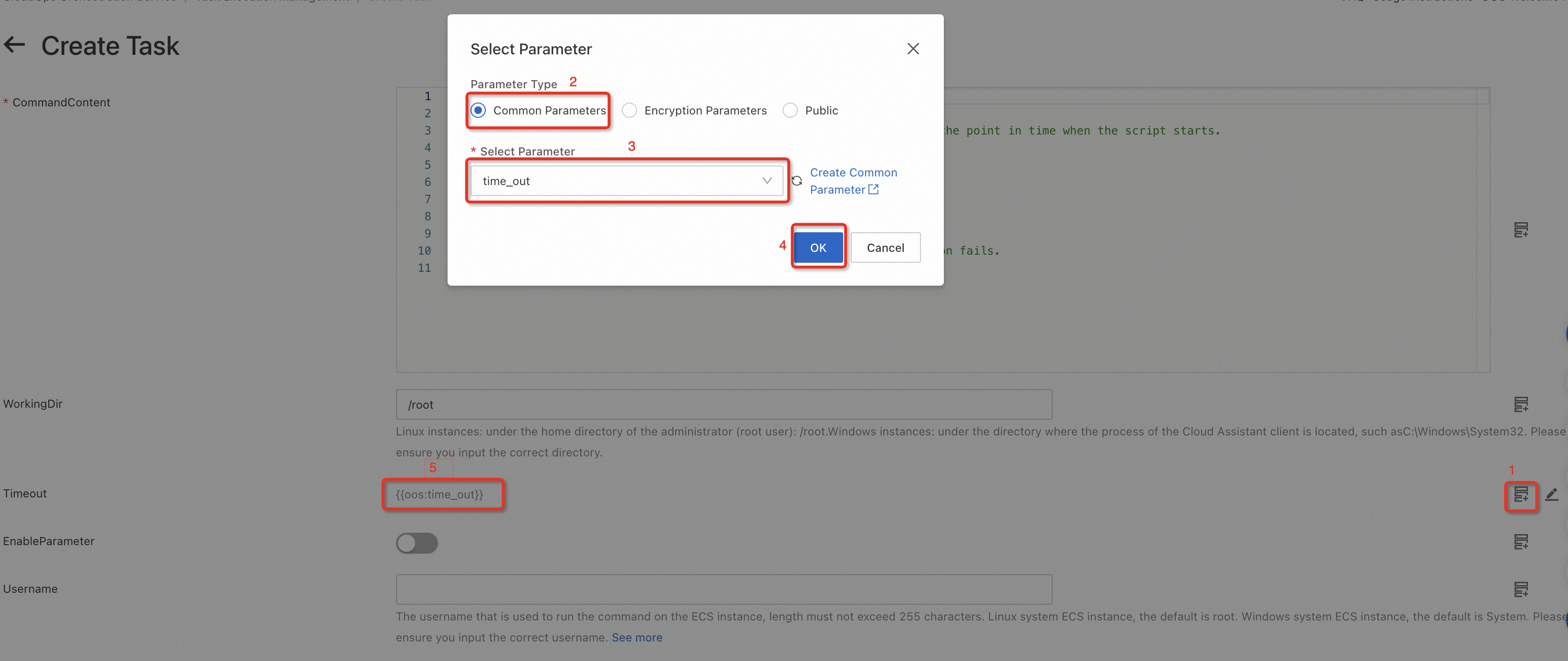
Verifikasi bahwa informasi tugas sudah benar, lalu klik Create.
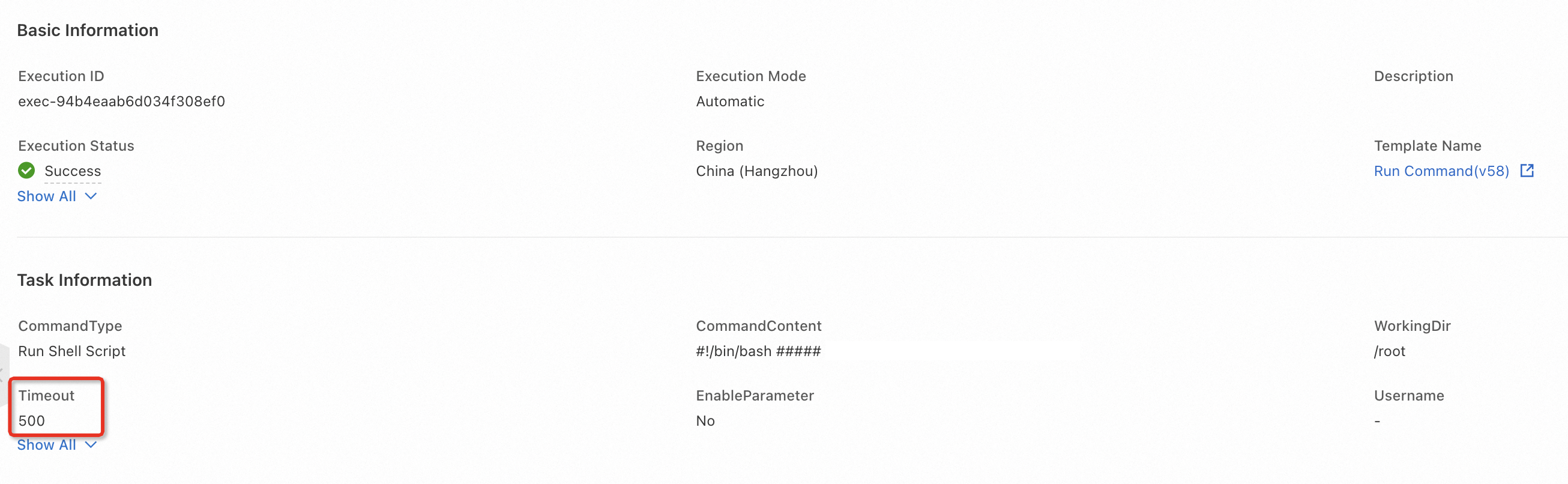
Setelah Anda mengklik Create, halaman detail eksekusi akan ditampilkan. Verifikasi bahwa bidang target telah diatur ke nilai yang diharapkan.
Gunakan dalam templat
Untuk menggunakan parameter umum dalam templat, referensikan parameter tersebut dengan format {{ oos:parameter_name }}.
Contoh ini menunjukkan cara membuat templat yang menjalankan perintah Cloud Assistant pada instance ECS. Dalam contoh ini, parameter umum time_out digunakan untuk mengatur timeout menjadi 600.
Masuk ke konsol CloudOps Orchestration Service.
Pada panel navigasi di sebelah kiri, pilih lalu klik Create Template. Dalam templat tersebut, parameter `timeout` pada baris 98 menggunakan format `{{ oos:time_out }}` untuk mereferensikan parameter umum `time_out`.
FormatVersion: OOS-2019-06-01
Description: Runs Cloud Assistant commands on multiple ECS instances in batches. This is useful for managing multiple ECS instances at once for tasks such as application management and resource tagging. During configuration, provide the following required parameters. Region ID (regionId) to specify the region of the target ECS instances. Resource Type (resourceType) to determine the target instance type, such as an ECS instance or a managed instance. Targets (targets) to select the specific instances. Other parameters include Command Type (commandType) to specify the command type, such as Shell or Python, and Command Content (commandContent) for the script content. After execution, the template returns the batch operation output so you can verify the execution status.
Parameters:
  regionId:
    Type: String
    Label: Region ID
    AssociationProperty: RegionId
    Default: '{{ ACS::RegionId }}'
  resourceType:
    Type: String
    Label: Resource Type
    AssociationPropertyMetadata:
      LocaleKey: TargetResourceType
    AllowedValues:
      - ALIYUN::ECS::Instance
      - ALIYUN::ECS::ManagedInstance
    Default: ALIYUN::ECS::Instance
  targets:
    Type: Json
    Label: Target Instances
    AssociationProperty: Targets
    AssociationPropertyMetadata:
      ResourceType: resourceType
      RegionId: regionId
      Status: Running
  commandType:
    Label: Command Type
    AssociationPropertyMetadata:
      LocaleKey: ECSCommandType
    Type: String
    AllowedValues:
      - RunShellScript
      - RunPythonScript
      - RunPerlScript
      - RunBatScript
      - RunPowerShellScript
    Default: RunShellScript
  commandContent:
    Label: Command Content
    Type: String
    MaxLength: 16384
    AssociationProperty: ALIYUN::OOS::Command::CommandContent
    AssociationPropertyMetadata:
      CommandType: ${commandType}
  workingDir:
    Description: 'For Linux instances, the default directory is the home directory of the administrator (root user), which is /root. For Windows instances, the default directory is where the Cloud Assistant client process is located, such as C:\Windows\System32. Make sure that the directory you enter is correct.'
    Label: Working Directory
    Type: String
    Default: ''
  enableParameter:
    Label: Does the command contain encrypted or custom parameters
    Type: Boolean
    Default: false
  username:
    Description: The username to use when running the command on the ECS instance. The username cannot exceed 255 characters. On Linux instances, the command is run as the root user by default. On Windows instances, the command is run as the System user by default. Make sure that the username you enter is correct. <a href="https://www.alibabacloud.com/help/doc-detail/203771.html" target="_blank">Learn more</a>
    Label: Username for command execution
    Type: String
    Default: ''
  windowsPasswordName:
    Label: Password name for the user on Windows instances
    Type: String
    Default: ''
  rateControl:
    Label: Task execution concurrency ratio
    Type: Json
    AssociationProperty: RateControl
    Default:
      Mode: Concurrency
      MaxErrors: 0
      Concurrency: 10
  OOSAssumeRole:
    Label: RAM role assumed by OOS
    Type: String
    Default: ''
RamRole: '{{ OOSAssumeRole }}'
Tasks:
  - Name: getInstance
    Description: Get ECS instances
    Action: ACS::SelectTargets
    Properties:
      ResourceType: '{{ resourceType }}'
      RegionId: '{{ regionId }}'
      Filters:
        - '{{ targets }}'
    Outputs:
      instanceIds:
        Type: List
        ValueSelector: Instances.Instance[].InstanceId
  - Name: runCommand
    Action: ACS::ECS::RunCommand
    Description: Run Cloud Assistant command
    Properties:
      regionId: '{{ regionId }}'
      commandContent: '{{ commandContent }}'
      instanceId: '{{ ACS::TaskLoopItem }}'
      commandType: '{{ commandType }}'
      workingDir: '{{ workingDir }}'
      timeout: '{{ oos:time_out }}'
      enableParameter: '{{ enableParameter }}'
      username: '{{ username }}'
      windowsPasswordName: '{{ windowsPasswordName }}'
    Loop:
      RateControl: '{{ rateControl }}'
      Items: '{{ getInstance.instanceIds }}'
      Outputs:
        commandOutputs:
          AggregateType: Fn::ListJoin
          AggregateField: commandOutput
    Outputs:
      commandOutput:
        Type: String
        ValueSelector: invocationOutput
Outputs:
  commandOutputs:
    Type: List
    Value: '{{ runCommand.commandOutputs }}'
Setelah membuat templat, klik Execute. Masukkan parameter yang diperlukan, lalu mulai eksekusi.
Klik tugas Run Cloud Assistant Command, lalu klik Child Executions. Klik ID eksekusi untuk melihat detail eksekusi anak.
Pada bagian Execution Steps and Results, klik Input. Parameter timeout diganti dengan 600, yaitu nilai dari parameter umum time_out.