Model Wan Image-to-Video menerima input multimodal (teks, gambar, atau audio) dan menghasilkan video dengan durasi hingga 15 detik pada resolusi 1080P.
- Pengaturan Dasar: Mendukung durasi video dalam bilangan bulat dari 2 hingga 15 detik, resolusi video yang dapat dikonfigurasi (480P, 720P, atau 1080P), penulisan ulang prompt cerdas, dan watermark opsional.
- Kemampuan Audio: Mendukung dubbing otomatis atau mengunggah file audio untuk mencapai sinkronisasi audio-visual.(Didukung oleh Wan 2.5 dan Wan 2.6)
- Narasi Multi-shot: Menghasilkan video multi-shot sekaligus menjaga konsistensi subjek di seluruh transisi shot. (Hanya didukung oleh Wan 2.6)
Akses Cepat: Pengalaman Online (Singapura|Virginia|Beijing)|Referensi API
Mulai Menggunakan
| Prompt Masukan | Gambar Frame Pertama Input | Video Output (Multi-shot, Audio Video) |
Kamera perlahan bergerak naik dari bawah kura-kura, yang berenang dengan anggun, detail perutnya terlihat jelas. | 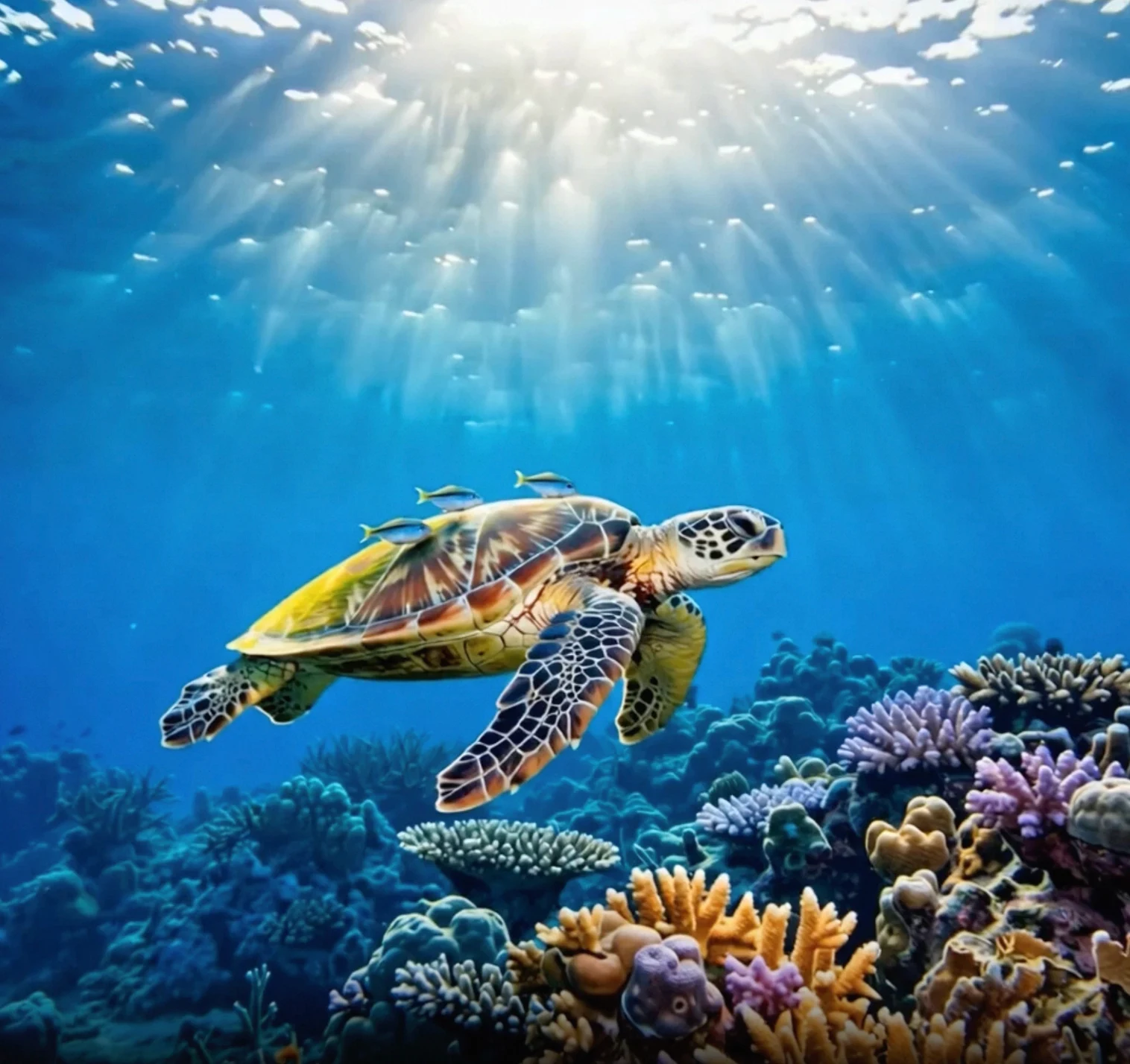 |
Sebelum memanggil API, pertama-tama dapatkan Kunci API dan host API Anda, lalu konfigurasikan Kunci API sebagai Variabel lingkungan (metode ini sudah tidak digunakan lagi dan telah diintegrasikan ke dalam konfigurasi Kunci API). Untuk memanggil API menggunakan SDK, Anda dapat menginstal SDK DashScope.
Ganti {WorkspaceId} dengan ID Ruang Kerja aktual Anda.
Python SDK
PentingPastikan versi SDK Python DashScope minimal 2.0.1 sebelum menjalankan kode berikut.
Jika versinya terlalu lama, mungkin akan memicu error seperti “url error, please check url!”. Lihat Instal SDK untuk memperbarui.
import os
import dashscope
from dashscope.v2 import DashScopeError

# Berikut adalah konfigurasi untuk wilayah Singapura. Ganti {WorkspaceId} dengan ID ruang kerja aktual Anda. Nilai region berbeda-beda untuk setiap wilayah. Untuk titik akhir setiap wilayah, lihat https://www.alibabacloud.com/help/model-studio/image-to-video-api-reference
# Kunci API berbeda tiap wilayah. Dapatkan Kunci API: https://www.alibabacloud.com/help/model-studio/get-api-key
client = dashscope.Client(
    api_key=os.getenv("DASHSCOPE_API_KEY", "YOUR_API_KEY"),
    workspace="{WorkspaceId}",
    region="ap-southeast-1",
)

print('please wait...')
# generate adalah panggilan satu langkah (kirim tugas dan tunggu hingga selesai) serta mengembalikan Job yang telah selesai
# shot_type bukan bagian dari signature bernama, diteruskan melalui parameters
try:
    job = client.videos.generate(model='wan2.6-i2v-flash',
                                 prompt='The camera slowly moves up from below the turtle, which swims gracefully, its belly details clearly visible.',
                                 image_url="https://help-static-aliyun-doc.aliyuncs.com/file-manage-files/zh-CN/20260121/zlpocv/wan-i2v-haigui.webp",
                                 resolution="720P",
                                 duration=10,
                                 prompt_extend=True,
                                 watermark=True,
                                 parameters={'shot_type': "multi"})
    print(job)
    print("video_url:", job.video_url)
except DashScopeError as e:
    print(f"HTTP status code: {e.status_code}")
    print(f"Error code: {e.code}")
    print(f"Error message: {e.message}")
    print("See the documentation: https://www.alibabacloud.com/help/model-studio/developer-reference/error-code")
Java SDK
PentingPastikan versi SDK Java DashScope minimal2.22.6 sebelum menjalankan kode berikut.
Jika versinya terlalu lama, mungkin akan memicu error seperti “url error, please check url!”. Lihat Instal SDK untuk memperbarui.
import com.alibaba.dashscope.aigc.videosynthesis.VideoSynthesis;
import com.alibaba.dashscope.aigc.videosynthesis.VideoSynthesisParam;
import com.alibaba.dashscope.aigc.videosynthesis.VideoSynthesisResult;
import com.alibaba.dashscope.exception.ApiException;
import com.alibaba.dashscope.exception.InputRequiredException;
import com.alibaba.dashscope.exception.NoApiKeyException;
import com.alibaba.dashscope.utils.JsonUtils;
import com.alibaba.dashscope.utils.Constants;

public class Image2Video {

    static {
        // URL berikut untuk wilayah Singapura. Ganti {WorkspaceId} dengan ID ruang kerja aktual Anda. URL berbeda tiap wilayah.
        Constants.baseHttpApiUrl = "https://{WorkspaceId}.ap-southeast-1.maas.aliyuncs.com/api/v1";
    }

    // Jika Anda belum mengonfigurasi variabel lingkungan, ganti baris berikut dengan Kunci API Studio Model Anda: apiKey="sk-xxx"
    // Kunci API berbeda tiap wilayah. Dapatkan Kunci API: https://www.alibabacloud.com/help/en/model-studio/get-api-key
    static String apiKey = System.getenv("DASHSCOPE_API_KEY");

    public static void image2video() throws ApiException, NoApiKeyException, InputRequiredException {
        VideoSynthesis vs = new VideoSynthesis();
        VideoSynthesisParam param =
                VideoSynthesisParam.builder()
                        .apiKey(apiKey)
                        .model("wan2.6-i2v-flash")
                        .prompt("The camera slowly moves up from below the turtle, which swims gracefully, its belly details clearly visible.")
                        .imgUrl("https://help-static-aliyun-doc.aliyuncs.com/file-manage-files/zh-CN/20260121/zlpocv/wan-i2v-haigui.webp")
                        .duration(10)
                        .resolution("720P")
                        .shotType("multi")
                        .promptExtend(true)
                        .watermark(true)
                        .build();
        System.out.println("please wait...");
        VideoSynthesisResult result = vs.call(param);
        System.out.println(JsonUtils.toJson(result));
    }

    public static void main(String[] args) {
        try {
            image2video();
        } catch (ApiException | NoApiKeyException | InputRequiredException e) {
            System.out.println(e.getMessage());
        }
        System.exit(0);
    }
}
curl
Langkah 1: Buat tugas untuk mendapatkan ID tugascurl --location 'https://{WorkspaceId}.ap-southeast-1.maas.aliyuncs.com/api/v1/services/aigc/video-generation/video-synthesis' \
-H 'X-DashScope-Async: enable' \
-H "Authorization: Bearer $DASHSCOPE_API_KEY" \
-H 'Content-Type: application/json' \
-d '{
"model": "wan2.6-i2v-flash",
"input": {
"prompt": "The camera slowly moves up from below the turtle, which swims gracefully, its belly details clearly visible.",
"img_url": "https://help-static-aliyun-doc.aliyuncs.com/file-manage-files/zh-CN/20260121/zlpocv/wan-i2v-haigui.webp"
},
"parameters": {
"resolution": "720P",
"prompt_extend": true,
"watermark": true,
"duration": 10,
"shot_type":"multi"
}
}'
Ganti {task_id} dengan nilai task_id yang dikembalikan oleh pemanggilan API sebelumnya. task_id berlaku untuk kueri selama 24 jam.
curl -X GET https://{WorkspaceId}.ap-southeast-1.maas.aliyuncs.com/api/v1/tasks/{task_id} \
--header "Authorization: Bearer $DASHSCOPE_API_KEY"
video_urlberlaku selama 24 jam. Unduh video segera.
{
    "request_id": "c1209113-8437-424f-a386-xxxxxx",
    "output": {
        "task_id": "966cebcd-dedc-4962-af88-xxxxxx",
        "task_status": "SUCCEEDED",
        "video_url": "https://dashscope-result-sh.oss-accelerate.aliyuncs.com/xxx.mp4?Expires=xxx",
         ...
    },
    ...
}
Cakupan
- Model yang didukung berbeda tiap wilayah. Sumber daya terisolasi antar wilayah. Untuk model yang didukung di setiap wilayah, lihat Konsol Studio Model.
- Saat melakukan pemanggilan, pastikan model, URL titik akhir, dan Kunci API Anda semuanya berasal dari wilayah yang sama. Pemanggilan lintas wilayah akan gagal.
CatatanKode contoh dalam topik ini berlaku untuk wilayah Singapura.
Kemampuan Inti
Buat Video Multi-shot
Model yang Didukung: Model seri Wan 2.6.
Perkenalan Fungsi: Model secara otomatis beralih antar shot—seperti dari wide ke close-up—sehingga ideal untuk produksi video musik.
Pengaturan Parameter:
shot_type: Harus diatur ke"multi".prompt_extend: Harus diatur ketrue(mengaktifkan penulisan ulang cerdas untuk mengoptimalkan deskripsi shot).
| Prompt Masukan | Gambar Frame Pertama Input | Video Output (Wan 2.6, Video Multi-shot) |
An urban fantasy art scene. A dynamic graffiti art character. A boy made of spray paint comes to life from a concrete wall. He raps an English song at a very fast pace, striking a classic, energetic rapper pose. The scene is set at night under an urban railway bridge. The lighting comes from a single street lamp, creating a cinematic atmosphere, full of high energy and amazing detail. The audio part of the video consists entirely of rap, with no other dialogue or background noise. | 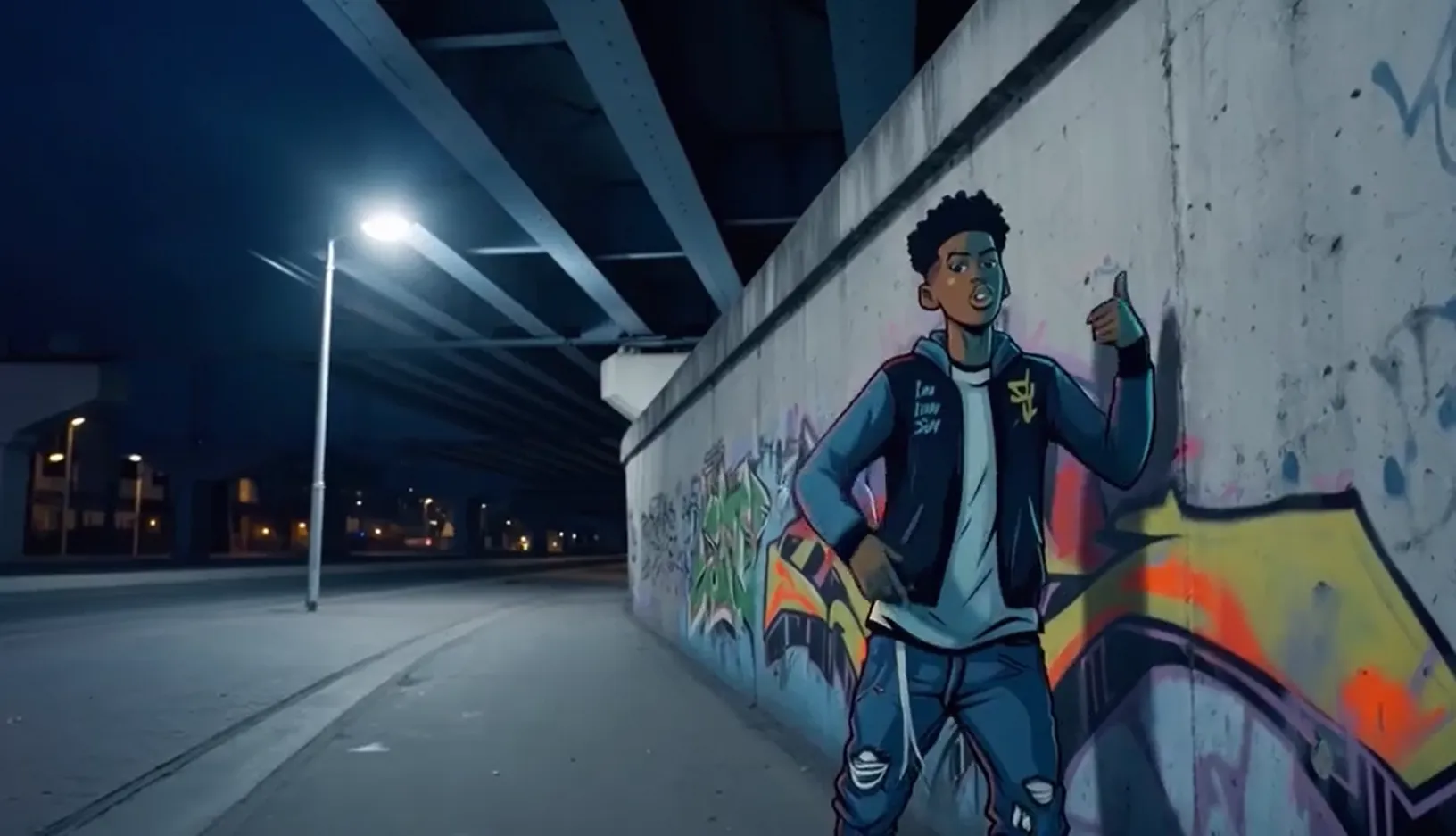 Input Audio: |
Ganti {WorkspaceId} dengan ID Ruang Kerja aktual Anda.
Python SDK
Pastikan versi SDK DashScope untuk Python minimal
2.0.1. Untuk petunjuk cara memperbarui, lihat Menginstal SDK.
import os
import dashscope
from dashscope.v2 import DashScopeError

# Berikut adalah konfigurasi untuk wilayah Singapura. Ganti {WorkspaceId} dengan ID ruang kerja aktual Anda. Nilai region berbeda-beda untuk setiap wilayah. Untuk titik akhir setiap wilayah, lihat https://www.alibabacloud.com/help/model-studio/image-to-video-api-reference
client = dashscope.Client(
    # Jika variabel lingkungan tidak dikonfigurasi, atur Kunci API Studio Model Anda secara langsung: api_key="sk-xxx"
    # Kunci API berbeda tiap wilayah. Dapatkan Kunci API: https://www.alibabacloud.com/help/en/model-studio/get-api-key
    api_key=os.getenv("DASHSCOPE_API_KEY"),
    workspace="{WorkspaceId}",
    region="ap-southeast-1",
)

def sample_async_call_i2v():
    # Pemanggilan asinkron mengembalikan task_id
    try:
        # audio_url / negative_prompt adalah bidang bagian input yang tidak termasuk dalam signature bernama, diteruskan melalui extra_input
        # shot_type (multi-shot) adalah bidang bagian parameters, diteruskan melalui parameters
        job = client.videos.jobs.create(model='wan2.6-i2v-flash',
                                        prompt='An urban fantasy art scene. A dynamic graffiti art character. A boy made of spray paint comes to life from a concrete wall. He raps an English song at a very fast pace, striking a classic, energetic rapper pose. The scene is set at night under an urban railway bridge. The lighting comes from a single street lamp, creating a cinematic atmosphere, full of high energy and amazing detail. The audio part of the video consists entirely of rap, with no other dialogue or background noise.',
                                        image_url="https://help-static-aliyun-doc.aliyuncs.com/file-manage-files/zh-CN/20250925/wpimhv/rap.png",
                                        extra_input={'audio_url': "https://help-static-aliyun-doc.aliyuncs.com/file-manage-files/zh-CN/20250925/ozwpvi/rap.mp3",
                                                     'negative_prompt': ""},
                                        resolution="720P",
                                        duration=10,
                                        prompt_extend=True,
                                        watermark=True,
                                        seed=12345,
                                        parameters={'shot_type': "multi"})  # Multi-shot
        print(job)
        print("task_id: %s" % job.task_id)
    except DashScopeError as e:
        print(f"HTTP status code: {e.status_code}")
        print(f"Error code: {e.code}")
        print(f"Error message: {e.message}")
        print("See the documentation: https://www.alibabacloud.com/help/model-studio/developer-reference/error-code")
        return

    # Tunggu hingga tugas asinkron selesai (polling dengan exponential backoff, total anggaran default 24 jam)
    try:
        done = client.videos.jobs.wait(job)
        print(done)
        print(done.video_url)
    except DashScopeError as e:
        print(f"HTTP status code: {e.status_code}")
        print(f"Error code: {e.code}")
        print(f"Error message: {e.message}")
        print("See the documentation: https://www.alibabacloud.com/help/model-studio/developer-reference/error-code")

if __name__ == '__main__':
    sample_async_call_i2v()
Java SDK
Pastikan versi SDK Java DashScope minimal
2.22.6. Untuk memperbarui SDK, lihat Instal SDK.
import com.alibaba.dashscope.aigc.videosynthesis.VideoSynthesis;
import com.alibaba.dashscope.aigc.videosynthesis.VideoSynthesisParam;
import com.alibaba.dashscope.aigc.videosynthesis.VideoSynthesisResult;
import com.alibaba.dashscope.exception.ApiException;
import com.alibaba.dashscope.exception.InputRequiredException;
import com.alibaba.dashscope.exception.NoApiKeyException;
import com.alibaba.dashscope.utils.JsonUtils;
import com.alibaba.dashscope.utils.Constants;

public class Image2Video {
    static {
        // URL berikut untuk wilayah Singapura. Ganti {WorkspaceId} dengan ID ruang kerja aktual Anda. URL berbeda tiap wilayah.
        Constants.baseHttpApiUrl = "https://{WorkspaceId}.ap-southeast-1.maas.aliyuncs.com/api/v1";
    }

    // Jika Anda belum mengonfigurasi variabel lingkungan, ganti baris berikut dengan Kunci API Studio Model Anda: apiKey="sk-xxx"
    // Kunci API berbeda tiap wilayah. Dapatkan Kunci API: https://www.alibabacloud.com/help/en/model-studio/get-api-key
    static String apiKey = System.getenv("DASHSCOPE_API_KEY");

    // Atur URL gambar input
    static String imgUrl = "https://help-static-aliyun-doc.aliyuncs.com/file-manage-files/zh-CN/20250925/wpimhv/rap.png";
    // Atur URL audio
    static String audioUrl = "https://help-static-aliyun-doc.aliyuncs.com/file-manage-files/zh-CN/20250925/ozwpvi/rap.mp3";

    public static void image2video() throws ApiException, NoApiKeyException, InputRequiredException {
        VideoSynthesis vs = new VideoSynthesis();
        VideoSynthesisParam param =
                VideoSynthesisParam.builder()
                        .apiKey(apiKey)
                        .model("wan2.6-i2v-flash")
                        .prompt("An urban fantasy art scene. A dynamic graffiti art character. A boy made of spray paint comes to life from a concrete wall. He raps an English song at a very fast pace, striking a classic, energetic rapper pose. The scene is set at night under an urban railway bridge. The lighting comes from a single street lamp, creating a cinematic atmosphere, full of high energy and amazing detail. The audio part of the video consists entirely of rap, with no other dialogue or background noise.")
                        .imgUrl(imgUrl)
                        .audioUrl(audioUrl)
                        .shotType("multi")
                        .duration(10)
                        .resolution("720P")
                        .negativePrompt("")
                        .promptExtend(true)
                        .watermark(true)
                        .seed(12345)
                        .build();
        // Pemanggilan asinkron
        VideoSynthesisResult task = vs.asyncCall(param);
        System.out.println(JsonUtils.toJson(task));
        System.out.println("please wait...");

        // Dapatkan hasil
        VideoSynthesisResult result = vs.wait(task, apiKey);
        System.out.println(JsonUtils.toJson(result));
    }

    public static void main(String[] args) {
        try {
            image2video();
        } catch (ApiException | NoApiKeyException | InputRequiredException e) {
            System.out.println(e.getMessage());
        }
        System.exit(0);
    }
}
curl
Langkah 1: Buat tugas untuk mendapatkan ID tugasGanti {task_id} dengan nilai task_id yang dikembalikan oleh pemanggilan API sebelumnya. task_id berlaku untuk kueri selama 24 jam.
curl -X GET https://{WorkspaceId}.ap-southeast-1.maas.aliyuncs.com/api/v1/tasks/{task_id} \
--header "Authorization: Bearer $DASHSCOPE_API_KEY"
Mencapai Sinkronisasi Audio-Visual
Model yang Didukung: model seri wan2.5 dan wan2.6.
Perkenalan Fungsi: Membuat karakter dalam foto berbicara atau bernyanyi dengan gerakan bibir yang disinkronkan dengan audio. Untuk lebih banyak contoh, lihat Generasi Suara Video.
Pengaturan Parameter:- File Audio Input: Berikan
audio_url. Model menyinkronkan gerakan bibir berdasarkan file audio tersebut. - Dubbing Otomatis: Jangan berikan
audio_url. Secara default, output adalah video dengan suara. Model secara otomatis menghasilkan efek suara, musik, atau vokal berdasarkan visual.
| Prompt Masukan | Gambar Frame Pertama Input | Video Output (Video dengan Suara) |
A scene of urban fantasy art. A dynamic graffiti character. A teenager painted with spray paint comes to life from a concrete wall. He raps in English at a very fast pace, striking a classic, energetic rapper pose. The scene is set at night under an urban railway bridge. Light from a solitary streetlamp creates a cinematic atmosphere, full of high energy and stunning detail. The audio portion of the video consists entirely of rap, with no other dialogue or noise. | Input Audio: |
Ganti {WorkspaceId} dengan ID Ruang Kerja aktual Anda.
Python SDK
Pastikan versi SDK DashScope untuk Python minimal
2.0.1. Untuk petunjuk cara memperbarui, lihat Menginstal SDK.
import os
import dashscope
from dashscope.v2 import DashScopeError

# Berikut adalah konfigurasi untuk wilayah Singapura. Ganti {WorkspaceId} dengan ID ruang kerja aktual Anda. Nilai region berbeda-beda untuk setiap wilayah. Untuk titik akhir setiap wilayah, lihat https://www.alibabacloud.com/help/model-studio/image-to-video-api-reference
client = dashscope.Client(
    # Jika variabel lingkungan tidak dikonfigurasi, ganti baris berikut dengan: api_key="sk-xxx" menggunakan Kunci API Studio Model Anda.
    # Kunci API berbeda tiap wilayah. Dapatkan Kunci API Anda: https://www.alibabacloud.com/help/en/model-studio/get-api-key
    api_key=os.getenv("DASHSCOPE_API_KEY"),
    workspace="{WorkspaceId}",
    region="ap-southeast-1",
)

def sample_async_call_i2v():
    # Pemanggilan asinkron, mengembalikan task_id
    try:
        # audio_url / negative_prompt adalah bidang bagian input yang tidak termasuk dalam signature bernama, diteruskan melalui extra_input
        job = client.videos.jobs.create(model='wan2.6-i2v-flash',
                                        prompt='A scene of urban fantasy art. A dynamic graffiti character. A teenager painted with spray paint comes to life from a concrete wall. He raps in English at a very fast pace, striking a classic, energetic rapper pose. The scene is set at night under an urban railway bridge. Light from a solitary streetlamp creates a cinematic atmosphere, full of high energy and stunning detail. The audio portion of the video consists entirely of rap, with no other dialogue or noise.',
                                        image_url="https://help-static-aliyun-doc.aliyuncs.com/file-manage-files/zh-CN/20250925/wpimhv/rap.png",
                                        extra_input={'audio_url': "https://help-static-aliyun-doc.aliyuncs.com/file-manage-files/zh-CN/20250925/ozwpvi/rap.mp3",
                                                     'negative_prompt': ""},
                                        resolution="720P",
                                        duration=10,
                                        prompt_extend=True,
                                        watermark=True,
                                        seed=12345)
        print(job)
        print("task_id: %s" % job.task_id)
    except DashScopeError as e:
        print(f"HTTP status code: {e.status_code}")
        print(f"Error code: {e.code}")
        print(f"Error message: {e.message}")
        print("See the documentation: https://www.alibabacloud.com/help/model-studio/developer-reference/error-code")
        return

    # Tunggu hingga tugas asinkron selesai (polling dengan exponential backoff, total anggaran default 24 jam)
    try:
        done = client.videos.jobs.wait(job)
        print(done)
        print(done.video_url)
    except DashScopeError as e:
        print(f"HTTP status code: {e.status_code}")
        print(f"Error code: {e.code}")
        print(f"Error message: {e.message}")
        print("See the documentation: https://www.alibabacloud.com/help/model-studio/developer-reference/error-code")

if __name__ == '__main__':
    sample_async_call_i2v()
Java SDK
Pastikan versi SDK Java DashScope minimal
2.22.6. Untuk memperbarui SDK, lihat Instal SDK.
import com.alibaba.dashscope.aigc.videosynthesis.VideoSynthesis;
import com.alibaba.dashscope.aigc.videosynthesis.VideoSynthesisParam;
import com.alibaba.dashscope.aigc.videosynthesis.VideoSynthesisResult;
import com.alibaba.dashscope.exception.ApiException;
import com.alibaba.dashscope.exception.InputRequiredException;
import com.alibaba.dashscope.exception.NoApiKeyException;
import com.alibaba.dashscope.utils.JsonUtils;
import com.alibaba.dashscope.utils.Constants;

public class Image2Video {
    static {
        // URL berikut untuk wilayah Singapura. Ganti {WorkspaceId} dengan ID ruang kerja aktual Anda. URL berbeda tiap wilayah.
        Constants.baseHttpApiUrl = "https://{WorkspaceId}.ap-southeast-1.maas.aliyuncs.com/api/v1";
    }

    // Jika Anda belum mengonfigurasi variabel lingkungan, ganti baris berikut dengan: apiKey="sk-xxx" menggunakan Kunci API Studio Model Anda.
    // Kunci API berbeda tiap wilayah. Dapatkan Kunci API Anda: https://www.alibabacloud.com/help/en/model-studio/get-api-key
    static String apiKey = System.getenv("DASHSCOPE_API_KEY");

    // Atur URL gambar input
    static String imgUrl = "https://help-static-aliyun-doc.aliyuncs.com/file-manage-files/zh-CN/20250925/wpimhv/rap.png";
    // Atur URL audio
    static String audioUrl = "https://help-static-aliyun-doc.aliyuncs.com/file-manage-files/zh-CN/20250925/ozwpvi/rap.mp3";

    public static void image2video() throws ApiException, NoApiKeyException, InputRequiredException {
        VideoSynthesis vs = new VideoSynthesis();
        VideoSynthesisParam param =
                VideoSynthesisParam.builder()
                        .apiKey(apiKey)
                        .model("wan2.6-i2v-flash")
                        .prompt("A scene of urban fantasy art. A dynamic graffiti character. A teenager painted with spray paint comes to life from a concrete wall. He raps in English at a very fast pace, striking a classic, energetic rapper pose. The scene is set at night under an urban railway bridge. Light from a solitary streetlamp creates a cinematic atmosphere, full of high energy and stunning detail. The audio portion of the video consists entirely of rap, with no other dialogue or noise.")
                        .imgUrl(imgUrl)
                        .audioUrl(audioUrl)
                        .duration(10)
                        .resolution("720P")
                        .negativePrompt("")
                        .promptExtend(true)
                        .watermark(true)
                        .seed(12345)
                        .build();
        // Pemanggilan asinkron
        VideoSynthesisResult task = vs.asyncCall(param);
        System.out.println(JsonUtils.toJson(task));
        System.out.println("please wait...");

        // Dapatkan hasil
        VideoSynthesisResult result = vs.wait(task, apiKey);
        System.out.println(JsonUtils.toJson(result));
    }

    public static void main(String[] args) {
        try {
            image2video();
        } catch (ApiException | NoApiKeyException | InputRequiredException e) {
            System.out.println(e.getMessage());
        }
        System.exit(0);
    }
}
curl
Langkah 1: Buat tugas untuk mendapatkan ID tugasGanti {task_id} dengan nilai task_id yang dikembalikan oleh pemanggilan API sebelumnya. task_id berlaku untuk kueri selama 24 jam.
curl -X GET https://{WorkspaceId}.ap-southeast-1.maas.aliyuncs.com/api/v1/tasks/{task_id} \
--header "Authorization: Bearer $DASHSCOPE_API_KEY"
Langkah 1: Buat tugas untuk mendapatkan ID tugas
Dubbing Otomatis
File Audio Input
Tab 2 Body
Langkah 2: Dapatkan hasil berdasarkan ID tugas
Hasilkan video tanpa suara
Model yang didukung: wan2.6-i2v-flash, model seri wan2.2, model seri wan2.1.
Perkenalan fungsi: Gunakan video tanpa suara untuk skenario visual saja yang tidak memerlukan audio, seperti poster animasi atau video pendek tanpa suara.
Pengaturan parameter:
wan2.6-i2v-flash: Secara default menghasilkan video yang mendukung audio. Untuk menghasilkan video tanpa suara, atur eksplisitaudio=false. Bahkan jika Anda memberikanaudio_url, output tetap tanpa suara ketikaaudio=false. Anda dikenai biaya untuk video tanpa suara.model wan2.2 dan sebelumnya: Secara default menghasilkan video tanpa suara. Tidak perlu konfigurasi tambahan.
| Prompt | Masukkan gambar frame pertama | Video output (video tanpa suara) |
A cat runs on grass | 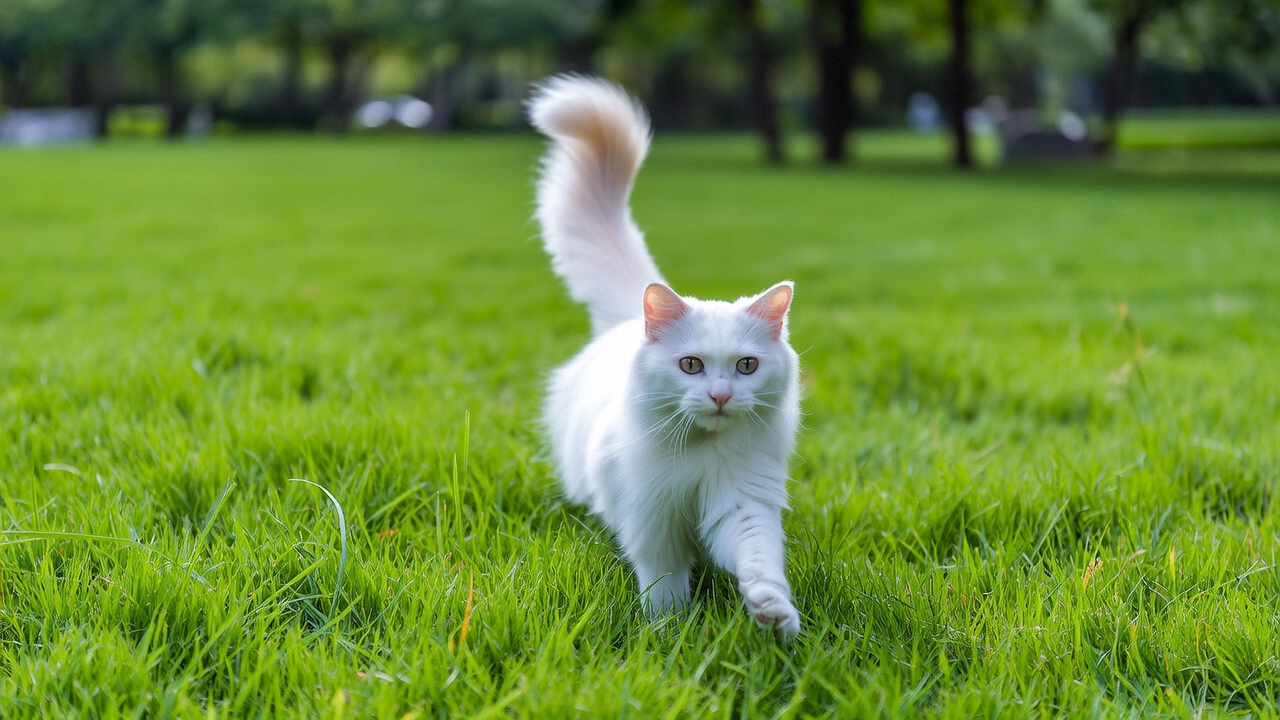 |
Ganti {WorkspaceId} dengan ID Ruang Kerja aktual Anda.
Python SDK
Pastikan versi SDK DashScope untuk Python minimal
2.0.1. Untuk petunjuk cara memperbarui, lihat Menginstal SDK.
import os
import dashscope
from dashscope.v2 import DashScopeError

# Berikut adalah konfigurasi untuk wilayah Singapura. Ganti {WorkspaceId} dengan ID ruang kerja aktual Anda. Nilai region berbeda-beda untuk setiap wilayah. Untuk titik akhir setiap wilayah, lihat https://www.alibabacloud.com/help/model-studio/image-to-video-api-reference
client = dashscope.Client(
    # Jika variabel lingkungan tidak dikonfigurasi, atur Kunci API Studio Model Anda secara langsung: api_key="sk-xxx"
    # Kunci API berbeda tiap wilayah. Dapatkan Kunci API Anda: https://www.alibabacloud.com/help/en/model-studio/get-api-key
    api_key=os.getenv("DASHSCOPE_API_KEY"),
    workspace="{WorkspaceId}",
    region="ap-southeast-1",
)

def sample_async_call_i2v():
    # Panggil secara asinkron. Mengembalikan task_id.
    try:
        # negative_prompt adalah bidang bagian input, diteruskan melalui extra_input
        # audio (harus diatur secara eksplisit ke False untuk menghasilkan video tanpa suara) adalah bidang bagian parameters, diteruskan melalui parameters
        job = client.videos.jobs.create(model='wan2.6-i2v-flash',
                                        prompt='A cat runs on grass',
                                        image_url="https://cdn.translate.alibaba.com/r/wanx-demo-1.png",
                                        extra_input={'negative_prompt': ""},
                                        resolution="720P",
                                        duration=5,
                                        prompt_extend=True,
                                        watermark=True,
                                        seed=12345,
                                        parameters={'audio': False})   # Harus diatur secara eksplisit ke False, artinya menghasilkan video tanpa suara
        print(job)
        print("task_id: %s" % job.task_id)
    except DashScopeError as e:
        print(f"HTTP status code: {e.status_code}")
        print(f"Error code: {e.code}")
        print(f"Error message: {e.message}")
        print("See the documentation: https://www.alibabacloud.com/help/model-studio/developer-reference/error-code")
        return

    # Tunggu hingga tugas asinkron selesai.
    try:
        done = client.videos.jobs.wait(job)
        print(done)
        print(done.video_url)
    except DashScopeError as e:
        print(f"HTTP status code: {e.status_code}")
        print(f"Error code: {e.code}")
        print(f"Error message: {e.message}")
        print("See the documentation: https://www.alibabacloud.com/help/model-studio/developer-reference/error-code")

if __name__ == '__main__':
    sample_async_call_i2v()
Java SDK
Pastikan versi SDK Java DashScope minimal
2.22.6. Untuk memperbarui SDK, lihat Instal SDK.
import com.alibaba.dashscope.aigc.videosynthesis.VideoSynthesis;
import com.alibaba.dashscope.aigc.videosynthesis.VideoSynthesisParam;
import com.alibaba.dashscope.aigc.videosynthesis.VideoSynthesisResult;
import com.alibaba.dashscope.exception.ApiException;
import com.alibaba.dashscope.exception.InputRequiredException;
import com.alibaba.dashscope.exception.NoApiKeyException;
import com.alibaba.dashscope.utils.JsonUtils;
import com.alibaba.dashscope.utils.Constants;

public class Image2Video {
    static {
        // URL berikut untuk wilayah Singapura. Ganti {WorkspaceId} dengan ID ruang kerja aktual Anda. URL berbeda tiap wilayah.
        Constants.baseHttpApiUrl = "https://{WorkspaceId}.ap-southeast-1.maas.aliyuncs.com/api/v1";
    }

    // Jika Anda belum mengatur variabel lingkungan, ganti baris berikut dengan: apiKey="sk-xxx"
    // Kunci API berbeda tiap wilayah. Dapatkan Kunci API Anda: https://www.alibabacloud.com/help/en/model-studio/get-api-key
    static String apiKey = System.getenv("DASHSCOPE_API_KEY");

    public static void image2video() throws ApiException, NoApiKeyException, InputRequiredException {
        VideoSynthesis vs = new VideoSynthesis();
        VideoSynthesisParam param =
                VideoSynthesisParam.builder()
                        .apiKey(apiKey)
                        .model("wan2.6-i2v-flash")
                        .prompt("A cat runs on grass")
                        .imgUrl("https://cdn.translate.alibaba.com/r/wanx-demo-1.png")
                        .audio(false)   /*Atur ke false untuk menghasilkan video tanpa suara.*/
                        .duration(10)
                        .resolution("720P")
                        .negativePrompt("")
                        .promptExtend(true)
                        .watermark(true)
                        .seed(12345)
                        .build();
        // Panggil secara asinkron.
        VideoSynthesisResult task = vs.asyncCall(param);
        System.out.println(JsonUtils.toJson(task));
        System.out.println("please wait...");

        // Dapatkan hasil.
        VideoSynthesisResult result = vs.wait(task, apiKey);
        System.out.println(JsonUtils.toJson(result));
    }

    public static void main(String[] args) {
        try {
            image2video();
        } catch (ApiException | NoApiKeyException | InputRequiredException e) {
            System.out.println(e.getMessage());
        }
        System.exit(0);
    }
}
curl
Langkah 1: Buat tugas untuk mendapatkan ID tugascurl --location 'https://{WorkspaceId}.ap-southeast-1.maas.aliyuncs.com/api/v1/services/aigc/video-generation/video-synthesis' \
-H 'X-DashScope-Async: enable' \
-H "Authorization: Bearer $DASHSCOPE_API_KEY" \
-H 'Content-Type: application/json' \
-d '{
"model": "wan2.6-i2v-flash",
"input": {
"prompt": "A cat runs on grass",
"img_url": "https://cdn.translate.alibaba.com/r/wanx-demo-1.png"
},
"parameters": {
"audio": false,
"resolution": "720P",
"prompt_extend": true,
"watermark": true,
"duration": 5
}
}'
Ganti {task_id} dengan nilai task_id yang dikembalikan oleh pemanggilan API sebelumnya. task_id berlaku untuk kueri selama 24 jam.
curl -X GET https://{WorkspaceId}.ap-southeast-1.maas.aliyuncs.com/api/v1/tasks/{task_id} \
--header "Authorization: Bearer $DASHSCOPE_API_KEY"
Cara mengirimkan gambar dan audio
Gambar Input
- Jumlah gambar: Satu.
- Metode input: URL gambar, jalur file lokal, atau string Base64.

Metode 2: Jalur file lokal (SDK saja)
Persyaratan jalur file sedikit berbeda antara Python dan Java. Ikuti aturan di bawah ini secara ketat untuk memformat jalur.
SDK Python: Mendukung jalur absolut dan relatif. Aturan jalur file sebagai berikut:
Sistem operasi | Jalur file input | Contoh (jalur absolut) | Contoh (jalur relatif) |
|---|---|---|---|
Linux / macOS | file://{absolute_or_relative_path_of_the_file} | file:///home/images/test.png | file://./images/test.png |
Windows | file://D:/images/test.png | file://./images/test.png |
SDK Java: Hanya mendukung jalur absolut. Aturan jalur file sebagai berikut:
Sistem operasi | Input File Path | Contoh (jalur absolut) |
|---|---|---|
Linux / macOS | file://{absolute_path_of_the_file} | file:///home/images/test.png |
Windows | file:///{absolute_path_of_the_file} | file:///D:/images/test.png |
Metode 3: String Base64 (antarmuka HTTP dan SDK)
-
Nilai contoh:
data:image/png;base64,iVBORw0KGgoAAAANSUhEUgAABDg......(Contoh dipotong hanya untuk demonstrasi). -
Persyaratan format: Ikuti format
data:{MIME_type};base64,{base64_data}, di mana:-
{base64_data}: String Base64 dari file gambar.
-
{MIME_type}: Jenis Multipurpose Internet Mail Extensions (MIME) dari gambar. Harus sesuai dengan format file.
Format gambar
Jenis MIME
JPEG
image/jpeg
JPG
image/jpeg
PNG
image/png
BMP
image/bmp
WEBP
image/webp
-
Kode contoh: Tiga metode input
Audio Input
-
Jumlah file audio: Satu.
-
Metode input:
- URL publik: Mendukung protokol HTTP atau HTTPS.
Video output
-
Jumlah video: 1.
-
Spesifikasi video output: Spesifikasi output berbeda tiap model. Untuk informasi lebih lanjut, lihat Cakupan.
-
Periode validitas URL video output: 24 jam.
-
Dimensi video output: Dimensi bergantung pada gambar input dan
resolusiyang dikonfigurasi.- Model berusaha mempertahankan rasio aspek gambar input sambil menskalanya ke jumlah piksel total mendekati nilai target. Untuk memenuhi standar pengkodean, lebar dan tinggi harus kelipatan 16. Model secara otomatis menyesuaikan dimensi tersebut.
- Contohnya: Untuk gambar input berukuran 750 × 1000 piksel (rasio aspek 3:4 = 0,75) dengan resolusi diatur ke “720P” (jumlah piksel target sekitar 920.000), output akhir mungkin berukuran 816 × 1104 piksel (rasio aspek ≈ 0,739, total piksel ≈ 900.000). Baik lebar maupun tinggi merupakan kelipatan 16.
Penagihan dan Pembatasan kecepatan
-
Untuk kuota gratis dan harga model, lihat Harga model.
-
Untuk pembatasan kecepatan model, lihat Seri Wan.
-
Rincian penagihan:
- Input tidak dikenai biaya. Output ditagih berdasarkan durasi dalam detik dari video yang berhasil dihasilkan.
- Pemanggilan model yang gagal atau kesalahan pemrosesan tidak dikenai biaya apa pun dan tidak mengurangi kuota gratis untuk pengguna baru.
- Image-to-video juga mendukung rencana penghematan.
Referensi API
Referensi API Image-to-video (frame pertama)
FAQ
T: Mengapa saya tidak bisa mengatur rasio aspek video secara langsung (misalnya 16:9)?
J: API saat ini tidak mendukung pengaturan rasio aspek video secara langsung. Anda hanya dapat mengonfigurasi resolusi video menggunakan parameter resolution.
Parameter resolution mengontrol jumlah total piksel—bukan rasio aspek tetap. Model mempertahankan rasio aspek asli dari frame input pertama (secara perkiraan) lalu menyesuaikannya agar memenuhi persyaratan pengkodean video. Secara spesifik, baik lebar maupun tinggi harus kelipatan 16.
T: Mengapa kode SDK mengembalikan “url error, please check url!”?
J: Pastikan bahwa:
- Versi SDK Python DashScope Anda minimal
2.0.1. - Versi SDK Java DashScope Anda minimal
2.22.6.
Jika versi SDK Anda terlalu lama, Anda mungkin melihat error “url error, please check url!”. Untuk petunjuknya, lihat Memperbarui SDK.