Secara default, probe merekam riwayat percakapan selama pemanggilan LLM dan agent, lalu memformat kontennya sesuai spesifikasi OpenTelemetry. Dokumen ini menjelaskan cara mengonfigurasi pengumpulan data tersebut untuk aplikasi LLM Anda.
ARMS agent mendukung tiga mode pengumpulan dan perekaman riwayat percakapan:
-
Merekam riwayat percakapan dalam atribut span (default).
-
Menonaktifkan perekaman riwayat percakapan.
-
Merekam riwayat percakapan dalam log.
Anda dapat mengonfigurasi perilaku pengumpulan riwayat percakapan sesuai kebutuhan aplikasi LLM Anda.
Prasyarat
-
Anda telah menginstal Python probe atau Java probe.
-
Python
Component/Framework
Supported versions
Scenarios
Probe version
OpenAI Python SDK
1.X
-
ChatCompletion
-
Completion
-
Embedding
2.0.0 atau yang lebih baru
Java
Component/Framework
Supported versions
Scenarios
Probe version
OpenAI Java SDK
1.1.0 atau yang lebih baru
-
ChatCompletion
-
Completion
-
Embedding
4.6.0 atau yang lebih baru
Spring AI
1.0.0 atau yang lebih baru
-
OpenAI ChatModel
-
ChatClient (Default)
-
ToolManager (Default)
4.6.0 atau yang lebih baru
Spring AI Alibaba
1.0.0.3 atau yang lebih baru
-
DashScope ChatModel
4.6.0 atau yang lebih baru
-
Contoh
Contoh ini menunjukkan bagaimana React agent melakukan pemanggilan tool menggunakan function. Pertama, LLM application memanggil large model dengan tool definition. Model merespons dengan permintaan tool_call. Aplikasi mengeksekusi permintaan tersebut dan mengembalikan tool call result ke large model, yang kemudian menghasilkan respons akhir. Sequence diagram berikut menggambarkan proses ini.
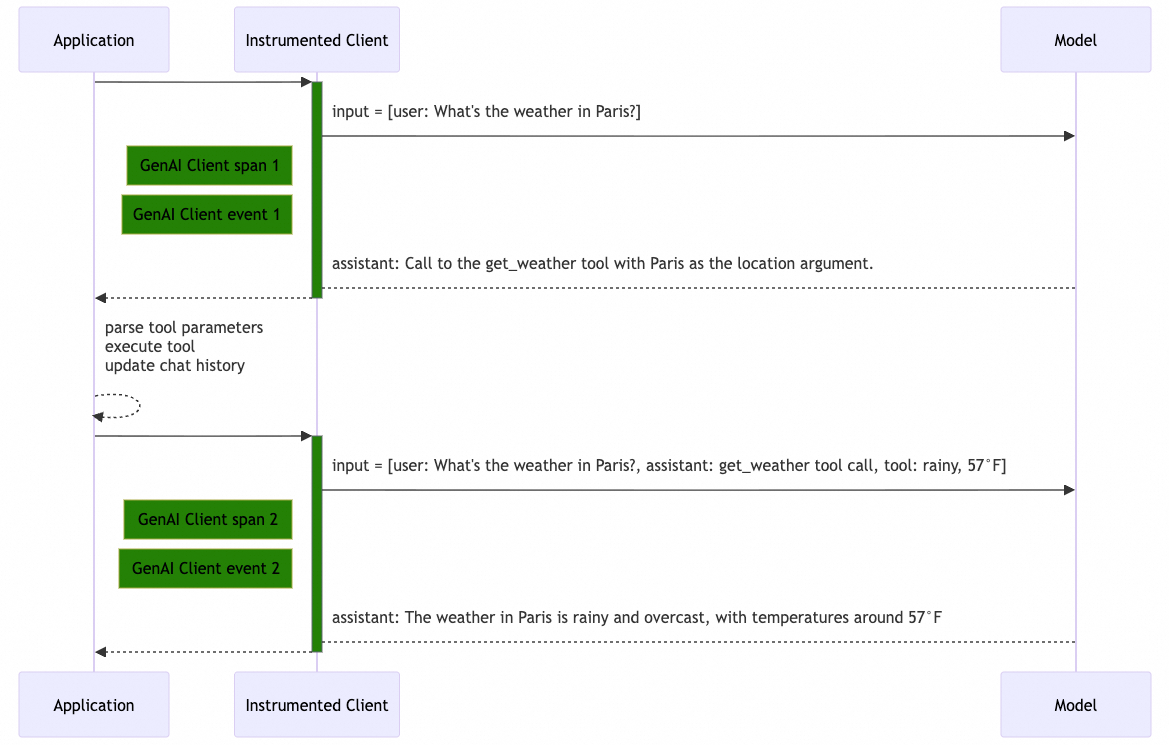
Merekam riwayat dialog dalam atribut span
Perilaku pengumpulan dan format data
Secara default, probe merekam pesan input, pesan output, instruksi sistem, dan definisi tool sebagai JSON dalam atribut span.
|
Nama atribut |
Deskripsi |
Skema |
Kelengkapan konten |
|
|
input messages |
Lengkap |
|
|
|
output messages |
Lengkap |
|
|
|
system instructions |
Lengkap |
|
|
|
tool definitions |
- |
|
Konfigurasi
-
Konfigurasikan menggunakan variabel lingkungan berikut:
Nama variabel lingkungan
Nilai
OTEL_INSTRUMENTATION_GENAI_CAPTURE_MESSAGE_CONTENT
TrueOTEL_INSTRUMENTATION_GENAI_MESSAGE_CONTENT_CAPTURE_STRATEGY
"span-attributes" -
Untuk aplikasi Java, Anda juga dapat mengonfigurasi ini melalui properti sistem dalam perintah startup, misalnya:
-Dotel.instrumentation.genai.capture-message-content=true \
-Dotel.instrumentation.genai.message-content.capture-strategy=span-attributes
Contoh
GenAI client span 1
|
Atribut |
Nilai |
|
span name |
|
|
|
|
|
|
|
|
|
|
|
|
|
|
|
|
|
|
|
|
|
|
|
|
|
|
|
|
|
|
|
|
|
|
|
|
|
|
|
|
GenAI client span 2
|
Atribut |
Nilai |
|
span name |
|
|
|
|
|
|
|
|
|
|
|
|
|
|
|
|
|
|
|
|
|
|
|
|
|
|
|
|
|
|
|
|
|
|
Nonaktifkan pengumpulan riwayat percakapan
Perilaku pengumpulan dan format data
Dalam mode ini, probe tidak merekam konten detail dari pesan input, pesan output, atau instruksi sistem. Untuk definisi tool, probe hanya merekam informasi dasar dalam format JSON.
|
Atribut |
Deskripsi |
Skema |
Kelengkapan konten |
|
|
input messages |
Tidak direkam |
|
|
|
output messages |
Tidak direkam |
|
|
|
system instructions |
Tidak direkam |
|
|
|
tool definitions |
- |
|
Konfigurasi
-
Tetapkan variabel lingkungan berikut:
Nama variabel lingkungan
Nilai
OTEL_INSTRUMENTATION_GENAI_CAPTURE_MESSAGE_CONTENT
False -
Untuk aplikasi Java, Anda juga dapat menambahkan properti sistem berikut ke perintah startup:
-Dotel.instrumentation.genai.capture-message-content=false
Contoh
GenAI Client Span 1
|
Atribut |
Nilai |
|
span name |
|
|
|
|
|
|
|
|
|
|
|
|
|
|
|
|
|
|
|
|
|
|
|
|
|
|
|
|
|
|
|
|
|
|
GenAI Client Span 2
|
Atribut |
Nilai |
|
span name |
|
|
|
|
|
|
|
|
|
|
|
|
|
|
|
|
|
|
|
|
|
|
|
|
|
|
|
|
Rekam riwayat percakapan ke log
Perilaku pengumpulan dan format data
Dalam mode ini, atribut span hanya menyimpan informasi dasar. Agent menulis informasi detail—seperti pesan input, pesan output, instruksi sistem, dan definisi tool—ke file log lokal dalam bentuk entri JSON satu baris.
|
Atribut |
Deskripsi |
Skema |
Kelengkapan konten |
|
|
input messages |
Lengkap |
|
|
|
output messages |
Lengkap |
|
|
|
system instructions |
Lengkap |
|
|
|
tool definitions |
- |
|
Secara default, saat agent dimulai, agent mencari direktori log yang tersedia dengan memeriksa lokasi berikut secara berurutan:
-
Jika direktori ditentukan melalui variabel lingkungan APSARA_APM_AGENT_WORKSPACE_DIR, agent menulis log ke subdirektori
.apsara-apm/{language}/logsdi dalam direktori tersebut. -
Direktori log agent:
/home/admin/.opt/.apsara-apm/{language}/logs -
Direktori home:
~/.apsara-apm/{language}/{agent_version}_{agent_commit_id}/logs
Saat aplikasi dimulai, agent mencetak pesan ke stdout yang menunjukkan direktori penyimpanan log. Untuk mempermudah manajemen direktori, disarankan menentukan direktori menggunakan variabel lingkungan APSARA_APM_AGENT_WORKSPACE_DIR.
Picked up [/Uxxxs/tools/log/.apsara-apm/python] as Agent Workspace.File log riwayat percakapan diberi nama dengan format genai_messages_{ip}_{pid}.log. Ukuran maksimum file adalah 256 MB. Jika ukuran melebihi batas ini, file akan diputar (rotated). Sistem hanya menyimpan dua file log terbaru dan menghapus file yang lebih lama.
Konfigurasi
-
Tetapkan variabel lingkungan berikut:
Variabel lingkungan
Nilai
OTEL_INSTRUMENTATION_GENAI_CAPTURE_MESSAGE_CONTENT
TrueOTEL_INSTRUMENTATION_GENAI_MESSAGE_CONTENT_CAPTURE_STRATEGY
event -
Untuk aplikasi Java, Anda juga dapat mengonfigurasi ini dengan menambahkan System Properties ke perintah startup, misalnya:
-Dotel.instrumentation.genai.capture-message-content=true \
-Dotel.instrumentation.genai.message-content.capture-strategy=event
Contoh
GenAI Client Span 1
|
Atribut |
Nilai |
|
span name |
|
|
|
|
|
|
|
|
|
|
|
|
|
|
|
|
|
|
|
|
|
|
|
|
|
|
|
|
|
|
|
GenAI Client Event 1
spanId bersesuaian dengan GenAI Client Span 1.
{
  "scope": {
    "name": "aliyun.instrumentation.openai",
    "version": "1.0.1"
  },
  "timeUnixNano": 1760080084146812928,
  "severity": "UNSPECIFIED",
  "attributes": {
    "event.name": "gen_ai.client.inference.operation.details",
    "gen_ai.provider.name": "openai",
    "gen_ai.operation.name": "chat",
    "gen_ai.request.model": "gpt-4",
    "gen_ai.request.max_tokens": 200,
    "gen_ai.request.top_p": 1.0,
    "gen_ai.response.id": "chatcmpl-9J3uIL87gldCFtiIbyaOvTeYBRA3l",
    "gen_ai.response.model": "gpt-4-0613",
    "gen_ai.usage.output_tokens": 17,
    "gen_ai.usage.input_tokens": 47,
    "gen_ai.response.finish_reasons": ["tool_calls"],
    "gen_ai.input.messages": "[{\"role\":\"user\",\"parts\":[{\"type\":\"text\",\"content\":\"Weather in Paris?\"}]}]",
    "gen_ai.output.messages": "[{\"role\":\"assistant\",\"parts\":[{\"type\":\"tool_call\",\"id\":\"call_VSPygqKTWdrhaFErNvMV18Yl\",\"name\":\"get_weather\",\"arguments\":{\"location\":\"Paris\"}}],\"finish_reason\":\"tool_call\"}]",
    "gen_ai.tool.definitions": "[{\"type\":\"function\",\"name\":\"get_weather\",\"description\":\"Get the current temperature for a specific location.\"}]"
  },
  "traceId": "0b46a347592ac487ed092ebe802c6818",
  "spanId": "b3c40af8cd1a522c"
}
GenAI Client Span 2
|
Atribut |
Nilai |
|
span name |
|
|
|
|
|
|
|
|
|
|
|
|
|
|
|
|
|
|
|
|
|
|
|
|
|
|
|
|
GenAI Client Event 2
spanId bersesuaian dengan GenAI Client Span 2.
{
  "scope": {
    "name": "aliyun.instrumentation.openai",
    "version": "1.0.1"
  },
  "timeUnixNano": 1760080084176812928,
  "severity": "UNSPECIFIED",
  "attributes": {
    "event.name": "gen_ai.client.inference.operation.details",
    "gen_ai.provider.name": "openai",
    "gen_ai.operation.name": "chat",
    "gen_ai.request.model": "gpt-4",
    "gen_ai.request.max_tokens": 200,
    "gen_ai.request.top_p": 1.0,
    "gen_ai.response.id": "chatcmpl-VSPygqKTWdrhaFErNvMV18Yl",
    "gen_ai.response.model": "gpt-4-0613",
    "gen_ai.usage.output_tokens": 52,
    "gen_ai.usage.input_tokens": 97,
    "gen_ai.response.finish_reasons": ["stop"],
    "gen_ai.input.messages": "[{\"role\":\"user\",\"parts\":[{\"type\":\"text\",\"content\":\"Weather in Paris?\"}]},{\"role\":\"assistant\",\"parts\":[{\"type\":\"tool_call\",\"id\":\"call_VSPygqKTWdrhaFErNvMV18Yl\",\"name\":\"get_weather\",\"arguments\":{\"location\": \"Paris\"}}]},{\"role\":\"tool\",\"parts\":[{\"type\":\"tool_call_response\",\"id\":\"call_VSPygqKTWdrhaFErNvMV18Yl\",\"response\":\"rainy, 57°F\"}]}]",
    "gen_ai.output.messages": "[{\"role\":\"assistant\",\"parts\":[{\"type\":\"text\",\"content\":\"The weather in Paris is currently rainy with a temperature of 57°F.\"}],\"finish_reason\":\"stop\"}]"
  },
  "traceId": "0b46a347592ac487ed092ebe802c6818",
  "spanId": "0a706a178bd746c5"
}
Kirim riwayat percakapan ke SLS
Dalam mode Rekam riwayat percakapan ke log lokal, Anda dapat menggunakan LoongCollector untuk mengumpulkan log lokal dan mengirimkannya ke Log Service (SLS) guna diproses.
Langkah 1: Instal LoongCollector
Jika LoongCollector sudah terinstal di lingkungan Anda, langkah ini dapat dilewati.
|
Jenis lingkungan |
Referensi |
|
Linux |
|
|
Windows |
|
|
Kubernetes |
Langkah 2: Buat konfigurasi pengumpulan
-
Login ke Konsol Log Service. Klik project target, perluas Logstore tempat Anda ingin menyimpan log, lalu klik ikon
 di samping Data Import. Di bagian JSON - Text Log, klik Connect Now.
 -
Pilih machine group yang sudah ada atau buat yang baru untuk host tempat log disimpan.
Untuk Scenario, pilih Host Scenario. Untuk Installation Environment, pilih ECS. Di daftar Applied Machine Group, pastikan machine group target (misalnya,
genai) telah ditambahkan. -
Buat konfigurasi pengumpulan. Di bawah Input Configuration, ganti File Path dengan direktori log aktual Anda. Untuk menemukan path direktori, periksa output standar aplikasi saat startup. Untuk Processing Configuration, pilih parsing JSON standar.
Sebagai contoh, atur Configuration Name menjadi
playground-test-config, pilih Text Log Collection untuk Input Type, gunakan format path file seperti/home/admin/logs/.apsara-apm/java/**/logs/genai_messages_*.log, dan atur Maximum Directory Monitoring Depth menjadi1.xxx Picked up /home/admin/logs/.apsara-apm/java/4.6.0_4e280e61/ as Agent Workspace. Unable to locate the -XX:ErrorFile parameter in the JVM options. If you are using Kubernetes, we recommend updating ack-onepilot to version 3.2.3 or later. For other environments, please consider adding the following parameters manually: -XX:ErrorFile=/{JavaAgentDirectory}/hs_err_pid%p.log -XX:OnError=/{JavaAgentDirectory}/crash_log_collector.sh These settings will enable automatic crash log collection to ARMS, helping us monitor incidents and provide timely feedback. Please note that this reminder does not affect the functionality of ARMS. If you prefer not to make these changes, feel free to disregard this message. Apsara Java Agent start cost: 5071 ms -
Untuk mengaktifkan pengambilan dan analisis data, konfigurasikan indeks sebagai berikut:
Aktifkan Full-Text Index, tetapi nonaktifkan Case Sensitive dan Include Chinese Characters. Di bawah Query on Specified Fields, tambahkan indeks untuk bidang-bidang berikut: attributes (tipe: json; aktifkan Case Sensitive dan Include Chinese Characters), resource (tipe: json; aktifkan Case Sensitive dan Include Chinese Characters), spanId (tipe: text; nonaktifkan Case Sensitive dan Include Chinese Characters), dan traceId (tipe: text; nonaktifkan Case Sensitive dan Include Chinese Characters).
Untuk detail tentang pengumpulan log, lihat Continuously collect text logs from hosts.
Langkah 3: Lihat log yang dikumpulkan di SLS
Setelah konfigurasi awal selesai, log akan muncul di Log Service (SLS) dalam beberapa menit:
▼ attributes: {}
    event.name: "gen_ai.client.inference.operation.details"
    gen_ai.input.messages: "[{"role":"system","parts":[{"type":"text","content":"
xxx
xxx
xxx
:
xxx
                              xxx"}]},{"role":"user","parts":[{"type":"text","content":"xxx"}]}]"
    gen_ai.operation.name: "invoke_agent"
    gen_ai.output.messages: "[{"role":"assistant","parts":[{"type":"text","content":"
xxx
                                    "}],"finishReason":"stop"}]"
    gen_ai.provider.name: "spring-ai"
    gen_ai.request.model: "qwen-max"
    gen_ai.request.temperature: 0.8
  ► gen_ai.response.finish_reasons: []
    gen_ai.response.id: "0d98f.xxx"
    gen_ai.tool.definitions: "[{"type":"function","name":"getBookingDetails"},{"type":"function","name":"cancelBooking"},{"type":"function","name":"changeBooking"}]"
    gen_ai.usage.input_tokens: 1300
    gen_ai.usage.output_tokens: 59
body:
▼ resource: {}
  ► attributes: {}
Menyesuaikan batas panjang pesan
Untuk mencegah penggunaan berlebihan, probe memotong konten pesan yang melebihi batas default 8.192 karakter per pesan. Pesan yang dipotong ditandai dengan identifier ...[truncated], seperti yang ditunjukkan di bawah ini:
[
  {
    "role": "assistant",
    "parts": [
      {
        "type": "text",
        "content": "The weather in Paris...[truncated]"
      }
    ],
    "finish_reason": "stop"
  }
]
Konfigurasi
-
Konfigurasikan batas menggunakan variabel lingkungan berikut:
Variabel lingkungan
Nilai
OTEL_INSTRUMENTATION_GENAI_MESSAGE_CONTENT_MAX_LENGTH
8192
-
Untuk aplikasi Java, Anda juga dapat mengonfigurasi batas ini dengan menambahkan System Property ke perintah startup, misalnya:
-Dotel.instrumentation.genai.message-content.max-length=8192
Isi pesan yang dikenai pemotongan
|
Jenis riwayat percakapan |
Pesan |
|
|
TextPart.content |
|
|
TextPart.content |
|
|
TextPart.content |