SDK Java ApsaraMQ for RocketMQ mendukung pengiriman dan konsumsi pesan dalam mode push atau pull. Topik ini menjelaskan metode dan parameter konfigurasi yang tersedia.
Mode push dan pull
ApsaraMQ for RocketMQ mengirimkan pesan ke konsumen dalam salah satu dari dua mode berikut:
Push mode: Broker mendorong pesan ke konsumen segera setelah pesan tersedia. Push mode mendukung batch consumption, yang mengirimkan beberapa pesan dalam satu batch.
Pull mode: Konsumen melakukan polling ke broker untuk mengambil pesan baru sesuai permintaan. Pull mode memberikan kendali langsung atas partisi yang akan dibaca, waktu pengambilan pesan, serta pengelolaan offset.
Pull mode memerlukan instans Enterprise Platinum Edition.
Parameter koneksi
Konfigurasikan parameter berikut untuk produsen maupun konsumen.
| Parameter | Deskripsi | Bawaan |
|---|---|---|
NAMESRV_ADDR | Titik akhir TCP dari instans ApsaraMQ for RocketMQ. Temukan nilai ini di halaman Instance Details pada Konsol. | -- |
AccessKey | ID AccessKey yang digunakan sebagai pengenal unik untuk autentikasi. Lihat Create an AccessKey pair. | -- |
SecretKey | Rahasia AccessKey yang digunakan sebagai kata sandi untuk autentikasi. Lihat Create an AccessKey pair. | -- |
OnsChannel | Saluran pengguna. Atur ke CLOUD untuk pengguna CloudTmall. | ALIYUN |
Metode produsen
Antarmuka produsen menyediakan metode berikut:
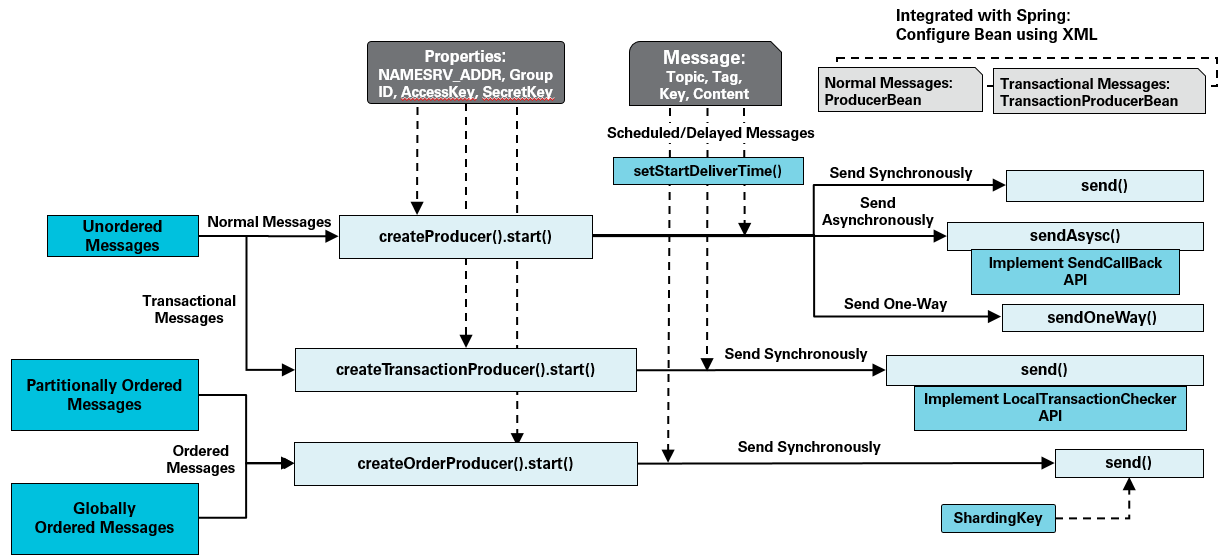
Parameter produsen
| Parameter | Deskripsi | Bawaan | Unit |
|---|---|---|---|
SendMsgTimeoutMillis | Timeout untuk mengirim pesan. | -- | Milidetik |
CheckImmunityTimeInSeconds | Waktu tunggu minimum sebelum broker pertama kali memeriksa status pesan transaksional. | -- | Detik |
shardingKey | Kunci partisi yang menentukan partisi mana yang menerima pesan terurut. | -- | -- |
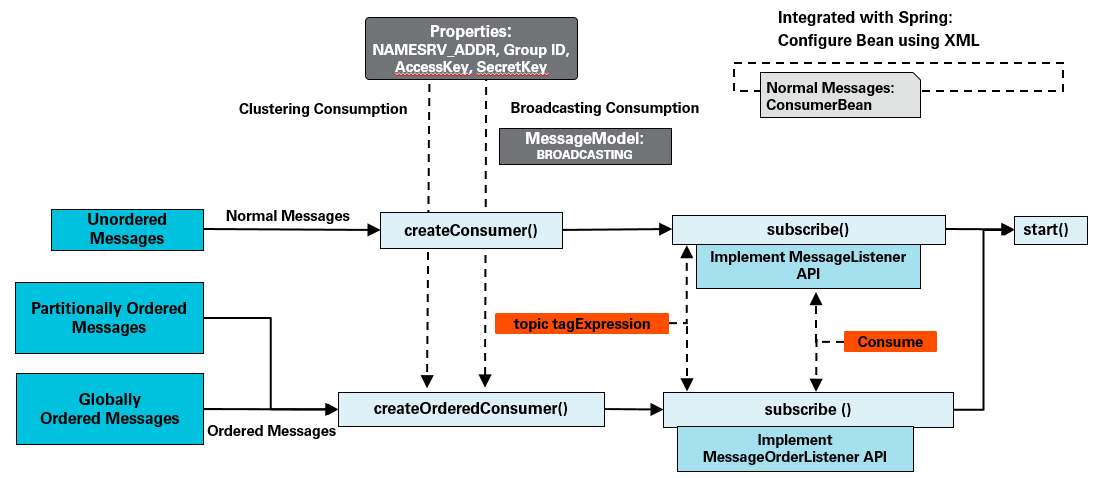
Metode konsumen
Push mode
Antarmuka konsumen push menyediakan metode berikut:
Pull mode
Antarmuka konsumen pull menyediakan metode berikut:
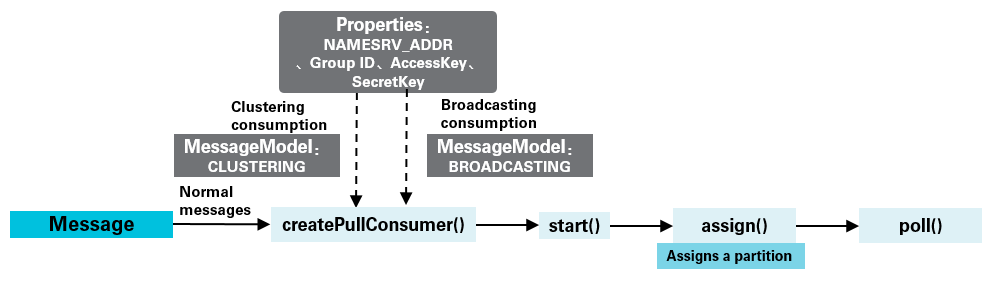
Antarmuka PullConsumer
public interface PullConsumer extends Admin {

    /**
     * Mengembalikan semua partisi untuk topik yang ditentukan.
     * Panggil metode ini hanya setelah konsumen pull telah dimulai.
     */
    Set<TopicPartition> topicPartitions(String topic);

    /**
     * Menetapkan partisi secara manual ke konsumen ini. Penyeimbangan ulang otomatis
     * tidak dilakukan -- pastikan semua partisi tercakup oleh
     * seluruh konsumen Anda. Memanggil metode ini lagi akan menggantikan
     * penetapan sebelumnya sepenuhnya.
     */
    void assign(Collection<TopicPartition> topicPartitions);

    /**
     * Melakukan polling untuk pesan. Mengembalikan hingga maxBatchMessageCount pesan,
     * dengan pemblokiran maksimal selama timeout yang ditentukan (dalam milidetik).
     */
    List<Message> poll(long timeout);

    /**
     * Mengatur ulang offset konsumen suatu partisi ke posisi tertentu.
     * Offset harus berada di antara offset minimum dan maksimum partisi tersebut.
     * Panggil metode ini hanya setelah konsumen telah dimulai dan
     * telah ditetapkan ke partisi target.
     */
    void seek(TopicPartition topicPartition, long offset);

    /**
     * Mengatur ulang offset konsumen suatu partisi ke pesan paling awal
     * yang tersedia. Memerlukan konsumen yang telah dimulai dan ditetapkan ke
     * partisi target.
     */
    void seekToBeginning(TopicPartition topicPartition);

    /**
     * Mengatur ulang offset konsumen suatu partisi ke pesan terbaru.
     * Memerlukan konsumen yang telah dimulai dan ditetapkan ke
     * partisi target.
     */
    void seekToEnd(TopicPartition topicPartition);

    /**
     * Menangguhkan konsumsi pesan pada partisi yang ditentukan.
     */
    void pause(Collection<TopicPartition> topicPartitions);

    /**
     * Melanjutkan konsumsi pesan pada partisi yang sebelumnya ditangguhkan.
     */
    void resume(Collection<TopicPartition> topicPartitions);

    /**
     * Mengembalikan offset pesan pertama yang disimpan pada atau setelah
     * timestamp yang diberikan dalam partisi tertentu. Timestamp mengacu pada
     * saat broker menyimpan pesan, bukan saat pesan dikirim.
     */
    Long offsetForTimestamp(TopicPartition topicPartition, Long timestamp);

    /**
     * Mengembalikan offset konsumen terbaru untuk partisi yang ditentukan.
     */
    Long committed(TopicPartition topicPartition);

    /**
     * Melakukan commit offset konsumen saat ini secara sinkron. Offset terlebih dahulu
     * disinkronkan ke client lokal, lalu ditulis ke broker secara asinkron.
     */
    void commitSync();

    /**
     * Antarmuka pendengar untuk event perubahan partisi.
     */
    interface TopicPartitionChangeListener {
        /**
         * Dipanggil ketika partisi suatu topik berubah -- misalnya,
         * setelah penskalaan broker menyesuaikan jumlah partisi.
         */
        void onChanged(Set<TopicPartition> topicPartitions);
    }

    /**
     * Mendaftarkan pendengar yang dipicu ketika jumlah partisi suatu
     * topik berubah (misalnya, karena penskalaan broker). Secara bawaan,
     * penundaan maksimum callback adalah 5 detik.
     */
    void registerTopicPartitionChangedListener(String topic,
            TopicPartitionChangeListener callback);
}
Parameter konsumen
Parameter umum
Parameter berikut berlaku untuk konsumen push maupun pull.
| Parameter | Deskripsi | Bawaan | Nilai valid | Unit |
|---|---|---|---|---|
GROUP_ID | ID kelompok konsumen yang dibuat di Konsol ApsaraMQ for RocketMQ. Lihat Terms. | -- | -- | -- |
MessageModel | Model konsumsi. Nilai valid: CLUSTERING (Konsumsi klustering) dan BROADCASTING (Konsumsi siaran). | CLUSTERING | CLUSTERING, BROADCASTING | -- |
ConsumeThreadNums | Jumlah thread yang digunakan konsumen untuk memproses pesan. | 20 | -- | -- |
MaxReconsumeTimes | Jumlah maksimum upaya pengulangan ketika konsumsi pesan gagal. | 16 | -- | -- |
ConsumeTimeout | Waktu maksimum yang diizinkan untuk mengonsumsi satu pesan. Jika melebihi batas ini, pesan akan dikirim ulang setelah interval pengulangan. Atur nilai ini berdasarkan logika bisnis Anda. | 15 | -- | Menit |
suspendTimeMillis | Interval pengulangan untuk pesan terurut yang gagal dikonsumsi. | -- | -- | -- |
maxCachedMessageAmount | Jumlah maksimum pesan yang di-cache pada client konsumen lokal. Kuota ini dibagi rata di antara semua topik yang berlangganan. Misalnya, jika konsumen berlangganan ke 2 topik dan nilai ini adalah 1.000, setiap topik dapat menyimpan cache hingga 500 pesan. Jika client konsumen menarik beberapa pesan sekaligus, jumlah aktual pesan yang di-cache dapat melebihi nilai ini. Atur nilai ini kira-kira dua kali lipat dari jumlah pesan yang diproses konsumen per detik. | 5.000 | 100–50.000 | -- |
maxCachedMessageSizeInMiB | Ukuran total maksimum pesan yang di-cache pada client konsumen lokal. | 512 | 16–2.048 | MiB |
Mengatur nilai maxCachedMessageAmount atau maxCachedMessageSizeInMiB terlalu tinggi dapat menyebabkan error kehabisan memori (OOM) pada client.
Parameter push batch
Parameter berikut mengontrol cara broker membuat batch pesan dalam push mode sebelum mengirimkannya.
| Parameter | Deskripsi | Bawaan | Nilai valid | Unit |
|---|---|---|---|---|
ConsumeMessageBatchMaxSize | Jumlah maksimum pesan yang di-cache dan dikirim ke konsumen dalam satu batch. Saat cache mencapai ambang batas ini, semua pesan yang di-cache akan didorong sekaligus. | 32 | 1–1.024 | -- |
BatchConsumeMaxAwaitDurationInSeconds | Waktu tunggu maksimum sebelum pesan yang di-cache didorong ke konsumen sekaligus. | 0 | 0–450 | Detik |
Parameter pull mode
Parameter berikut hanya berlaku untuk konsumen pull.
| Parameter | Deskripsi | Bawaan | Nilai valid | Unit |
|---|---|---|---|---|
maxCachedMessageSizeInMiB | Ukuran maksimum pesan yang di-cache per partisi pada client lokal. | 100 | 16–2.048 | MiB |
autoCommit | Apakah offset konsumen akan di-commit secara otomatis. | true | true, false | -- |
autoCommitIntervalMillis | Interval antara commit offset otomatis. | 5 | -- | Detik |
pollTimeoutMillis | Timeout untuk setiap panggilan poll(). | 5 | -- | Detik |
Mengatur nilai maxCachedMessageSizeInMiB terlalu tinggi dapat menyebabkan error OOM pada client.
Untuk informasi lebih lanjut tentang partisi dan offset, lihat Terms.
Referensi
Kode contoh untuk mengirim dan mengonsumsi pesan: